InsightfulPipe publishes this guide and makes the skills and the MCP server it describes.
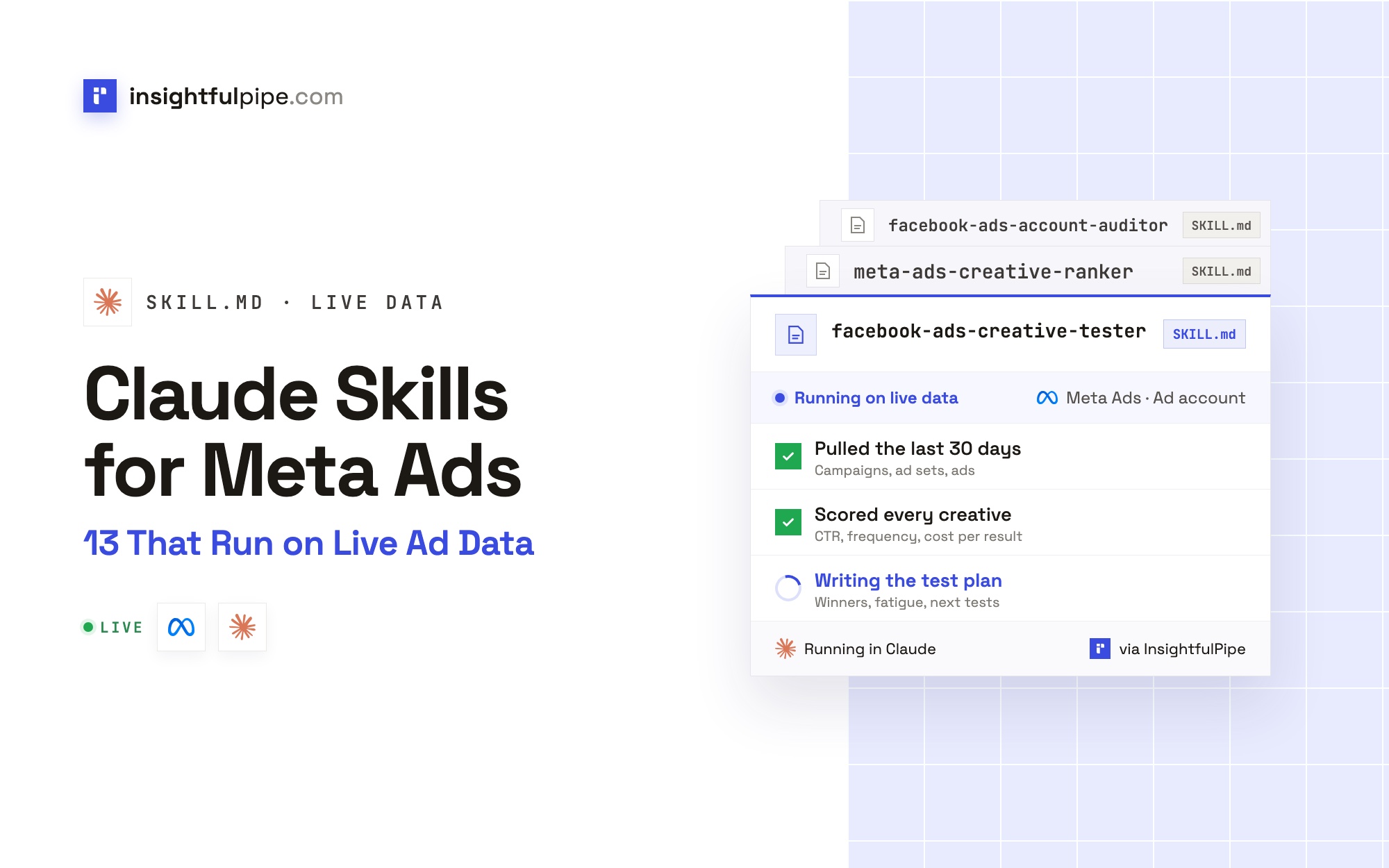
Claude skills for Meta Ads are SKILL.md folders that teach Claude one Meta Ads job, such as auditing an ad account, catching creative fatigue or moving budget to the ad sets that earn it. InsightfulPipe's Claude skills library has 13 built for Meta Ads, plus cross-channel skills that also read Meta, such as cross-platform-budget-allocator, attribution-model-auditor, retargeting-sequence-designer and ad-creative-brief-generator. Each one pulls the ad account itself through the InsightfulPipe Meta Ads MCP server, so there is no export to pull first. Each one changes the account only after you say yes to the exact change.
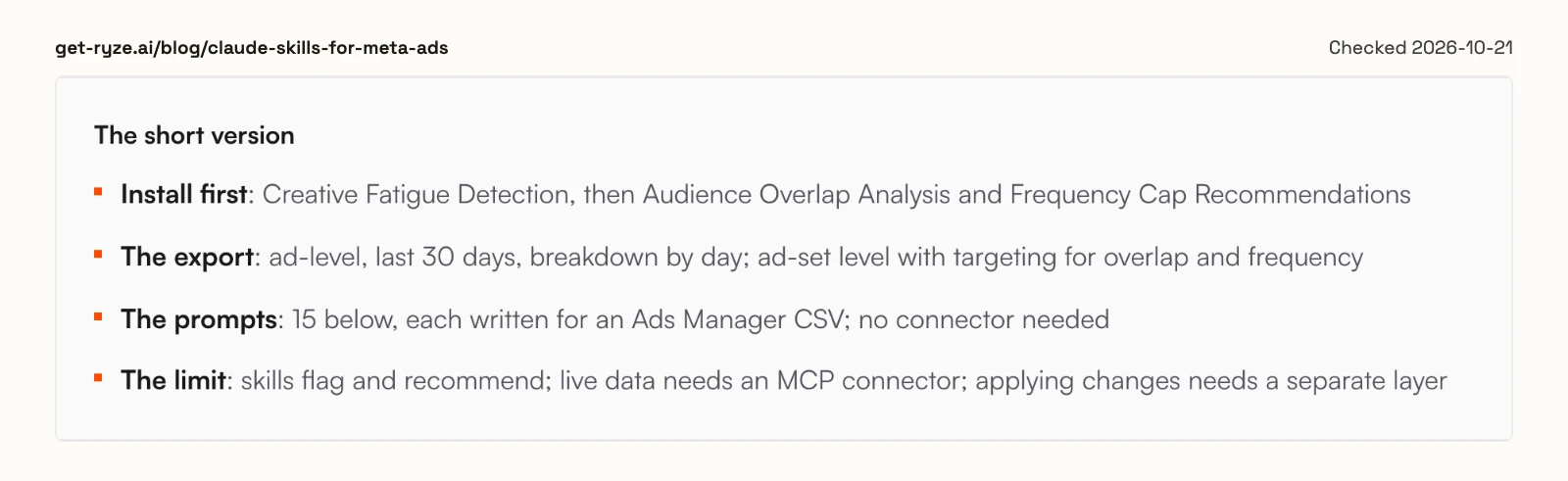
The library is free to download, and the skills read live data through an InsightfulPipe connection from $29.99 a month. Most packs that rank for this query work from an Ads Manager CSV instead; Ryze's own summary says "live data needs an MCP connector".
The 13 skills at a glance
All 13 read the account first and show their numbers. The last column lists the only changes each one can make, and each change waits for your yes.
Skill | The job | What it can change, after your yes |
|---|---|---|
Grades eight areas, ranks five fixes by money at stake | Renames, pauses after a merge | |
Health dashboard, campaign tiers, spikes, breakdowns | Pauses losing ads or ad sets | |
Fatigue score and runway per ad | Pauses a fatigued ad | |
Six tiers, a leaderboard and a kill list | Pauses the kill list | |
New copy from the angles that already win | A new creative and ad, paused | |
One-variable tests sized on your own baseline | The test campaign, paused | |
Overlapping and saturated audiences | Exclusions, pausing a duplicate | |
An audience plan sized with Meta's estimates | A test ad set, paused | |
Where the next dollar buys most | Budgets in steps, pauses | |
A week-by-week path to a target spend | A +20% step, a paused duplicate | |
Consolidation plan, or a build from a brief | Campaigns, ad sets and ads, paused | |
Critical, important and optimisation checks before launch | Dates, budget floors, names, UTMs | |
Goals, drivers and next month's plan | One pause, next month's budget |
How a Claude skill for Meta Ads works
A Claude skill is a folder with a SKILL.md file inside. It opens with a name and a description that tells Claude when to use it, followed by the steps, the inputs and the output format. Claude reads only the description until a request matches, then loads the whole file. Anthropic's skills guide covers the format.
What sets a Meta Ads skill apart is its input. Fatigue only shows in a daily breakdown per ad, and overlap only in each ad set's targeting. Most packs tell you which Ads Manager export to pull. InsightfulPipe's skills make the calls themselves. The account auditor reads the campaigns, ad sets, ads, pixels, audiences and 30 days of insights before it grades anything, and every finding names the call behind it.
Three parts work together:
- The skill is the procedure: what to read, how to judge it, and what to return.
- The MCP server is the access: 55 Meta Ads actions, 39 that read and 16 that make changes.
- The connection settings are the permissions: which ad accounts, which access level, and which actions are on.
A skill can only use what the connection allows. For how MCP differs from calling Meta's API yourself, see MCP vs API. For how the servers compare, see the best Meta Ads MCP servers.
Export or live data: the question that splits every Meta skill pack
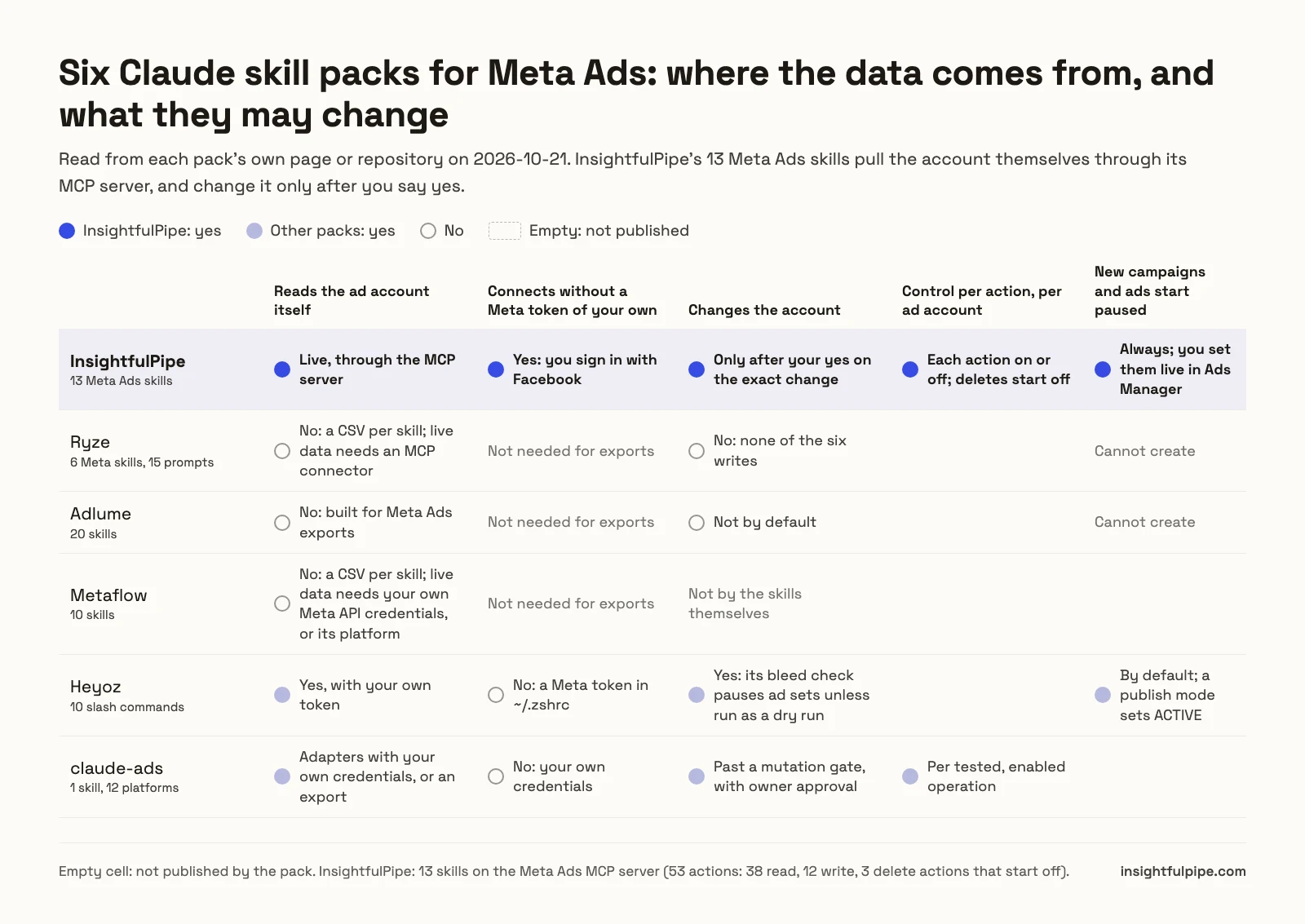
Before you compare skill names, ask where each pack gets its numbers: a CSV you export from Ads Manager, or the account itself. Then ask what it may change, and who decides. Those two answers sort every pack that ranks for this query.
We read every capability, default and price from each vendor's own documentation, pricing page or public repository, and ran InsightfulPipe on live accounts.
Pack | Meta skills | Where the numbers come from | What it can change |
|---|---|---|---|
InsightfulPipe | 13 | The live account, through the MCP server | Only after your yes on the exact change; everything created paused |
Ryze | 6, plus 15 prompts | An Ads Manager CSV per skill; live data needs an MCP connector | Nothing: its FAQ says none of the six writes to Ads Manager |
Adlume | 20 | Meta Ads exports | Nothing by default |
Metaflow | 10 | An Ads Manager CSV per skill; live data needs your own Meta API credentials, or its platform | Not by the skills themselves |
Heyoz | 10 slash commands | The Marketing API, with your own token | Its bleed check pauses ad sets unless run as a dry run |
claude-ads | 1 skill, 12 platforms | An export, screenshots, or adapters with your own credentials | Changes past its mutation gate |
Adlume's page says its skills "are designed to work with Meta Ads exports today". An export is a snapshot: stale by your first follow-up question, and limited to the columns you remembered to add.
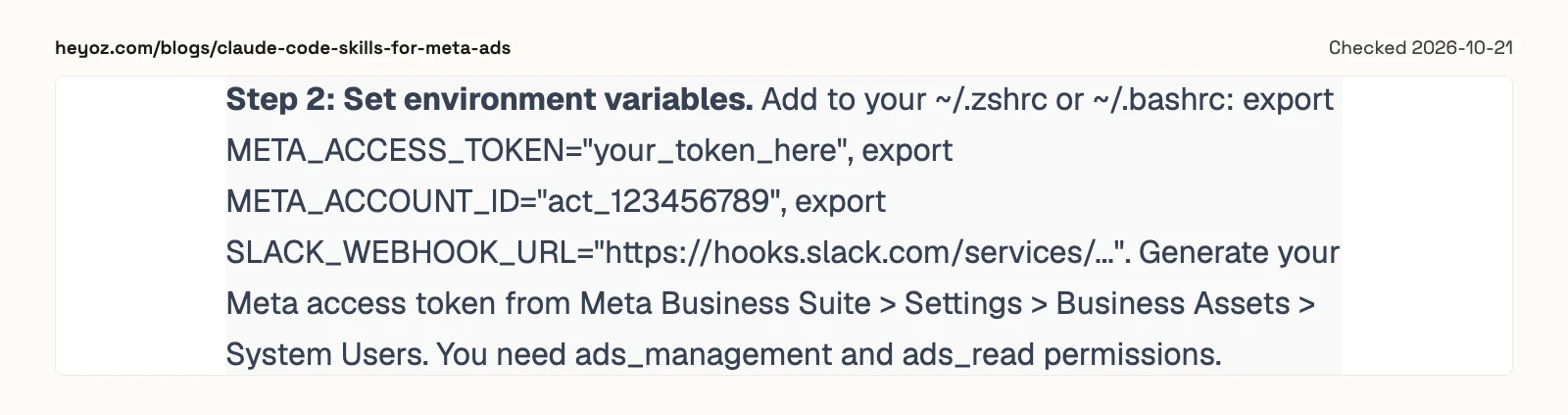
The packs that read live data ask more of you. Heyoz tells readers to keep a Meta token with ads_management permission in their shell profile. Its MCP step names @modelcontextprotocol/server-meta, a package npm returned as not found on 2026-10-21, and its deploy command has a publish mode that sets ads ACTIVE.
InsightfulPipe's skills combine five things:
- They read the live account.
- You connect by signing in with Facebook, with no token of your own.
- A change waits for your yes.
- Each action is a switch per ad account, and deletes start off.
- New campaigns, ad sets and ads are created paused.
No other pack in this table publishes all five.
The 13 InsightfulPipe Claude skills for Meta Ads
Each card below gives the job, a request to start with, and what the skill can change. The requests come from each skill's HOW_TO_USE file, and Claude picks the skill up from the opening phrase.
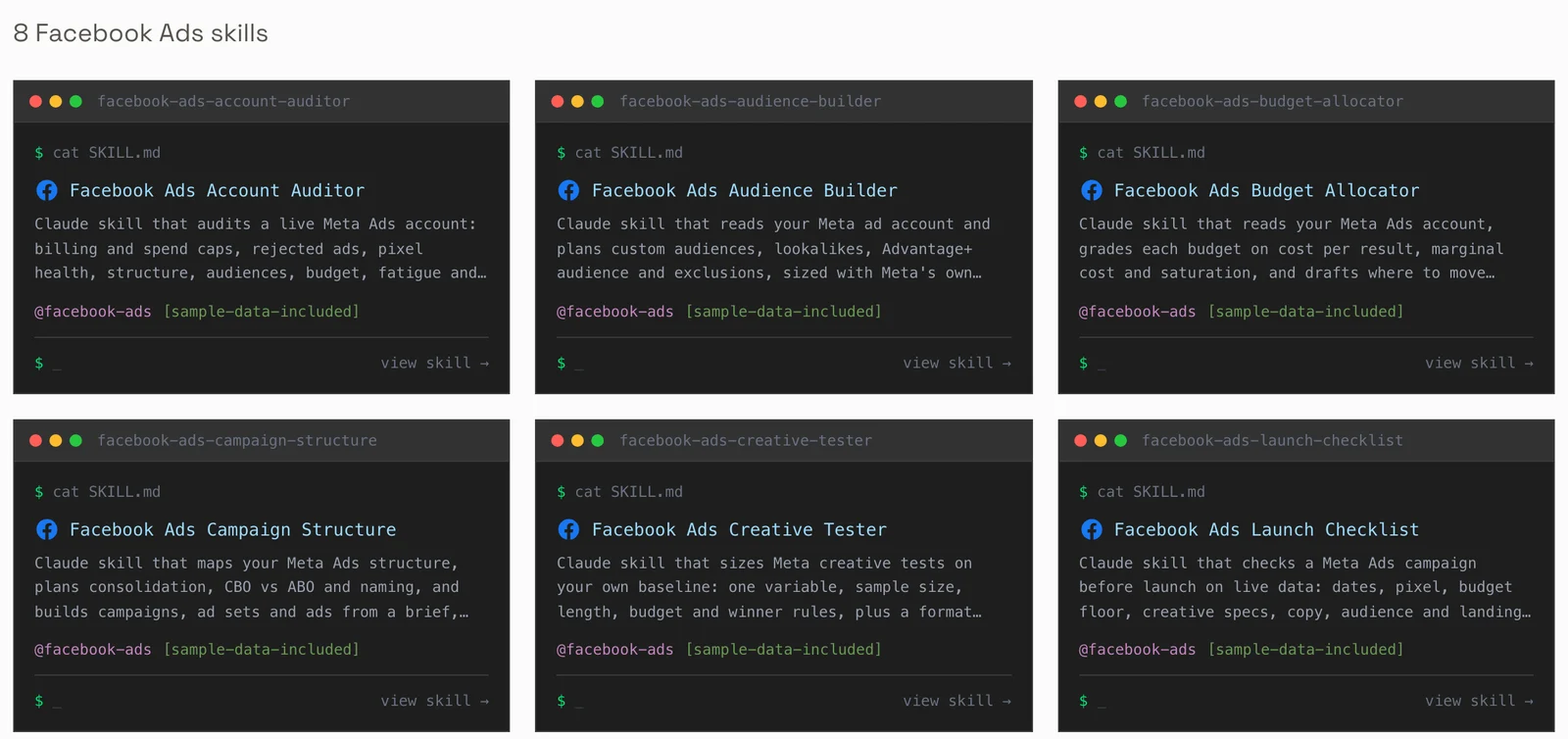
1. Facebook Ads Account Auditor
The account auditor grades billing, policy, tracking, structure, audiences, budget, creative and naming. It returns a grade out of 100, up to five fixes ranked by the money at stake in the last 30 days, a consolidation plan and a naming table.
Start with: "Hey Claude, I just added the facebook-ads-account-auditor skill. Run a full audit on my Meta Ads account for the last 30 days. Our target is $40 per lead."
It can rename to your convention and pause ad sets a merge empties. It never touches budgets, bids or targeting.
2. Meta Ads Performance Analyzer
The performance analyzer is the weekly read. It builds a six-light health dashboard and campaign tiers from Winners to Losers. It splits any cost spike into CPM, CTR and conversion rate, and breaks results down by placement, age, gender, country, device and hour.
Start with: "Hey Claude, I just added the meta-ads-performance-analyzer skill. My cost per lead went from $25 to $45 in two weeks. Find the spike and tell me what drove it."
It can pause a losing ad or ad set, and it warns you when an ad is the last one running in its ad set.
3. Ad Creative Fatigue Detector
The fatigue detector compares each ad's best period with its latest one, checks the drop against noise, and adds frequency, CPM and age. Every ad gets a fatigue score, a runway estimate and a refresh-or-replace call. It also works on TikTok, Google Ads, LinkedIn, Snapchat and X.
Start with: "Hey Claude, I just added the ad-creative-fatigue-detector skill. Run a creative fatigue check on my Meta ads for the last 8 weeks."
It can pause a fatigued ad, asking ad by ad. The method is in our creative performance analysis guide.
4. Meta Ads Creative Ranker
The creative ranker sorts every ad into six tiers against your target cost or ROAS, builds a leaderboard and a kill list, and compares angles, formats, video lengths and calls to action.
Start with: "Hey Claude, I just added the meta-ads-creative-ranker skill. Rank last week's Meta ads by cost per lead. Our target is $40 a lead."
It can pause the kill list you approve. Switching an ad back on happens in Ads Manager.
5. Meta Ad Copy Writer
The copy writer reads the exact text of the ads that win, names the angle behind each, and writes variants that keep the angle and test one change. Without facts from you, it makes no claim your ads don't already make.
Start with: "Hey Claude, I just added the meta-ad-copy-writer skill. Tell me which angles win on cost per lead over 90 days, and write five primary text variations."
It can save the copy as a new creative in a new ad, created paused.
6. Facebook Ads Creative Tester
The creative tester turns "let's try a few ads" into a test: one variable, a sample sized on your own rates, and a winner rule set in advance. It also compares video, image, carousel and collection formats.
Start with: "Hey Claude, I just added the facebook-ads-creative-tester skill. How many impressions, days and dollars does a question hook against a bold-claim hook take on my account?"
It can upload your media and build the test, all paused. It never changes a running test.
7. Audience Overlap Analyzer
The overlap analyzer uses Meta's reach estimates to find where your targeting reaches the same people twice. It checks saturation, scores each overlapping pair, and plans exclusions. With Google Ads connected, it also finds search terms two campaigns fight over.
Start with: "Hey Claude, I just added the audience-overlap-analyzer skill. Frequency and CPM have climbed on three prospecting ad sets for a month. Is it overlap, saturation, or both?"
It can add exclusions and pause a duplicate after a merge. It never creates audiences.
8. Facebook Ads Audience Builder
The audience builder reads every custom, lookalike and saved audience plus 90 days of ad set results. It ranks Advantage+ audience against manual targeting, and every size in the plan comes from Meta's own estimate.
Start with: "Hey Claude, I just added the facebook-ads-audience-builder skill. Has Advantage+ audience beaten our interest and lookalike ad sets over the last 90 days?"
It can create a test ad set, always paused, and add exclusions. You build custom audiences in Ads Manager from its specs.
9. Facebook Ads Budget Allocator
The budget allocator works on the next dollar, not the average one. It compares two 30-day windows and grades every budget on cost per result, saturation and marginal cost, then drafts the moves.
Start with: "Hey Claude, I just added the facebook-ads-budget-allocator skill. Which ad sets can take more budget without the cost per lead blowing up? Show me before you change anything."
It can change budgets and pause a failing ad set. It never raises a budget by more than 20% in one step.
10. Facebook Ads Scaling Roadmap
The scaling roadmap checks whether the account is ready to grow, lists the winners worth more money, and sets a week-by-week budget path with rollback triggers.
Start with: "Hey Claude, I just added the facebook-ads-scaling-roadmap skill. I spend about $100 a day on Meta and want $200 a day without cost per purchase going above $40."
It can raise a winner by up to 20%, duplicate a winning ad set paused, and pull back when a rollback trigger hits.
11. Facebook Ads Campaign Structure
The campaign structure skill gives the account as few ad sets as the business allows, so each one exits learning. It maps a messy account and plans the migration, or turns a brief into exact create_campaign, create_adset and create_ad payloads.
Start with: "Hey Claude, I just added the facebook-ads-campaign-structure skill. I have 15 campaigns and it's a mess. Show me what to merge."
It can build the new structure, all paused, then pause or rename the old one. It can't switch anything on.
12. Facebook Ads Launch Checklist
The launch checklist checks one paused campaign before it goes live: dates, pixel, Meta's minimum budgets, the audience estimate, creative specs and the landing page itself.
Start with: "Hey Claude, I just added the facebook-ads-launch-checklist skill. I built a leads campaign and it's paused. Check it before I turn it on tomorrow."
It can move dates, raise a budget to Meta's minimum, rename, and add UTMs through a tagged copy of the creative.
13. Facebook Ads Monthly Report
The monthly report answers three questions in order: did we hit the goals, why did the numbers move, and what happens next month. Agencies can pair it with automated client reporting in Claude.
Start with: "Hey Claude, I just added the facebook-ads-monthly-report skill. Write September's Meta Ads report for my client. The target ROAS is 3.0."
It can pause an ad it flagged as fatiguing and set an ad set's budget for next month.
Which Meta Ads skill fits which problem
Start from what you see in the account, not from the skill list. The chart maps 13 common symptoms to the skill that answers each one, and to how often to run it.
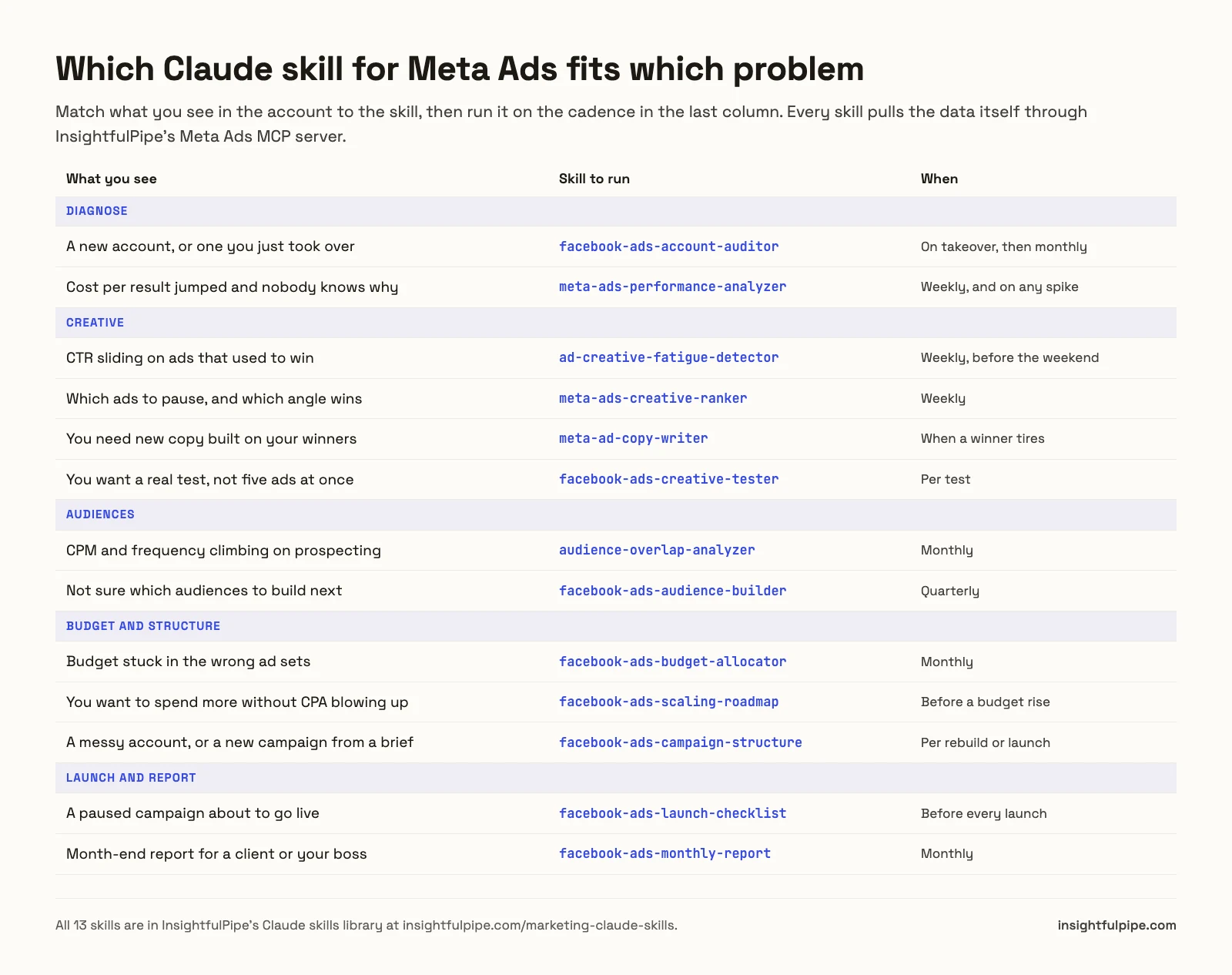
Not sure where to begin? Run the account auditor, whose "Go deeper" table names the next skill for each weak area. Across Google Ads, Meta and GA4, the orchestrator skill reads what you have connected and puts the skills in order.
How to install Claude skills for Meta Ads
Installing takes about a minute per skill in Claude, and two commands for the whole library in Claude Code. Each skill page has a Download Skill button for a ZIP holding SKILL.md, HOW_TO_USE.md and a sample input and output.
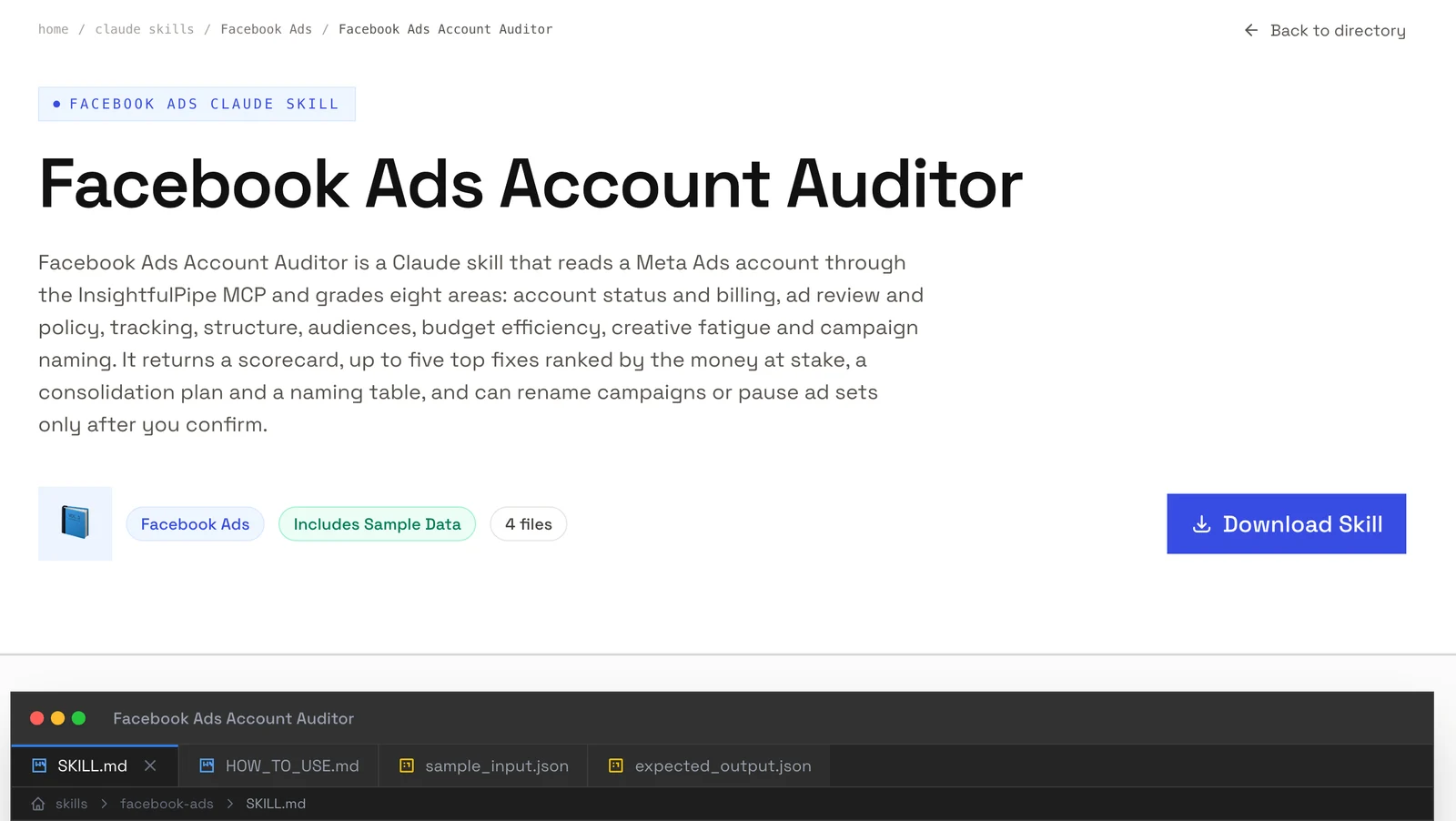
Claude on the web or desktop.
- Turn on code execution under Settings > Capabilities. Skills work on every Claude plan, Free included; on Enterprise, an owner enables them for the organization.
- Download the skill's ZIP from its page.
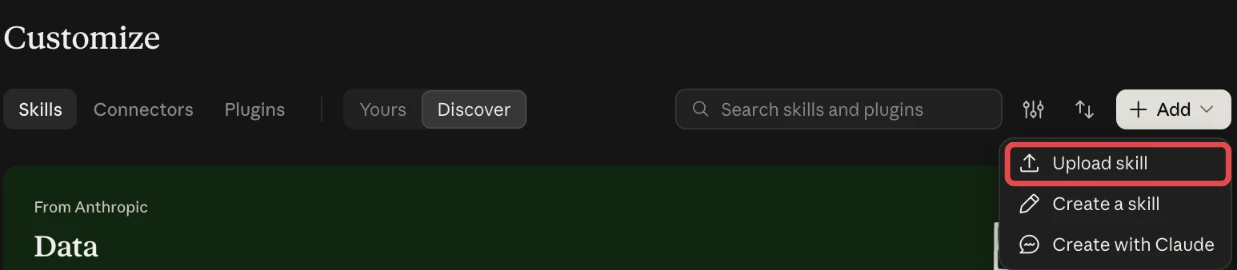
- In Claude, open Customize > Skills, click Add and choose Upload skill.
- Pick the ZIP, then switch the skill on.
Claude Code, the whole library. The library is mirrored on GitHub as Insightful-Pipe/marketing-skills under the MIT license. In Claude Code, run /plugin marketplace add Insightful-Pipe/marketing-skills, then /plugin install marketing-skills@insightfulpipe.
Claude Code, one skill. Unzip the folder into ~/.claude/skills/ for every project, or .claude/skills/ in one repository to share it with your team. For the wider set-up, see Claude Code for marketing data. Any agent that reads Agent Skills folders can load the same files.
Connect the Meta Ads MCP server so the skills read live data
Without a connection, a skill works on whatever you paste and marks the rest unknown. With the InsightfulPipe connection on, it reads the account itself. Setup takes about five minutes, with no Meta developer app and no token to keep. Our Meta Ads to Claude tutorial shows every screen.
Watch: Meta Ads MCP server: fix your Facebook Ads with Claude AI
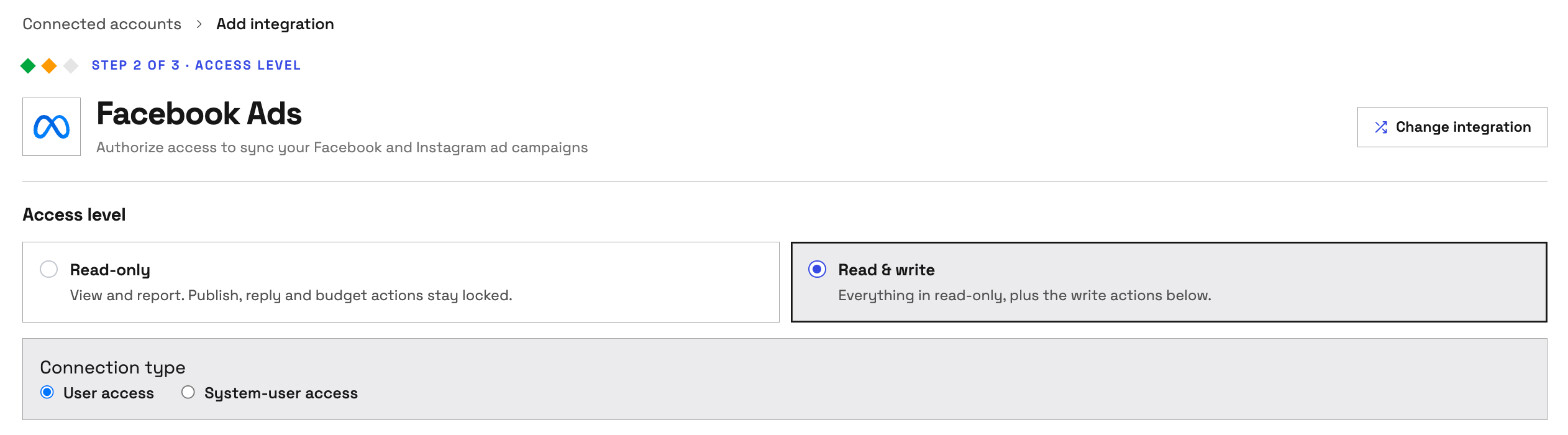
- Connect Meta in InsightfulPipe. Open Connected accounts, click Connect account and pick Facebook Ads. Choose Read-only or Read & write, sign in with Facebook, and pick your ad accounts.
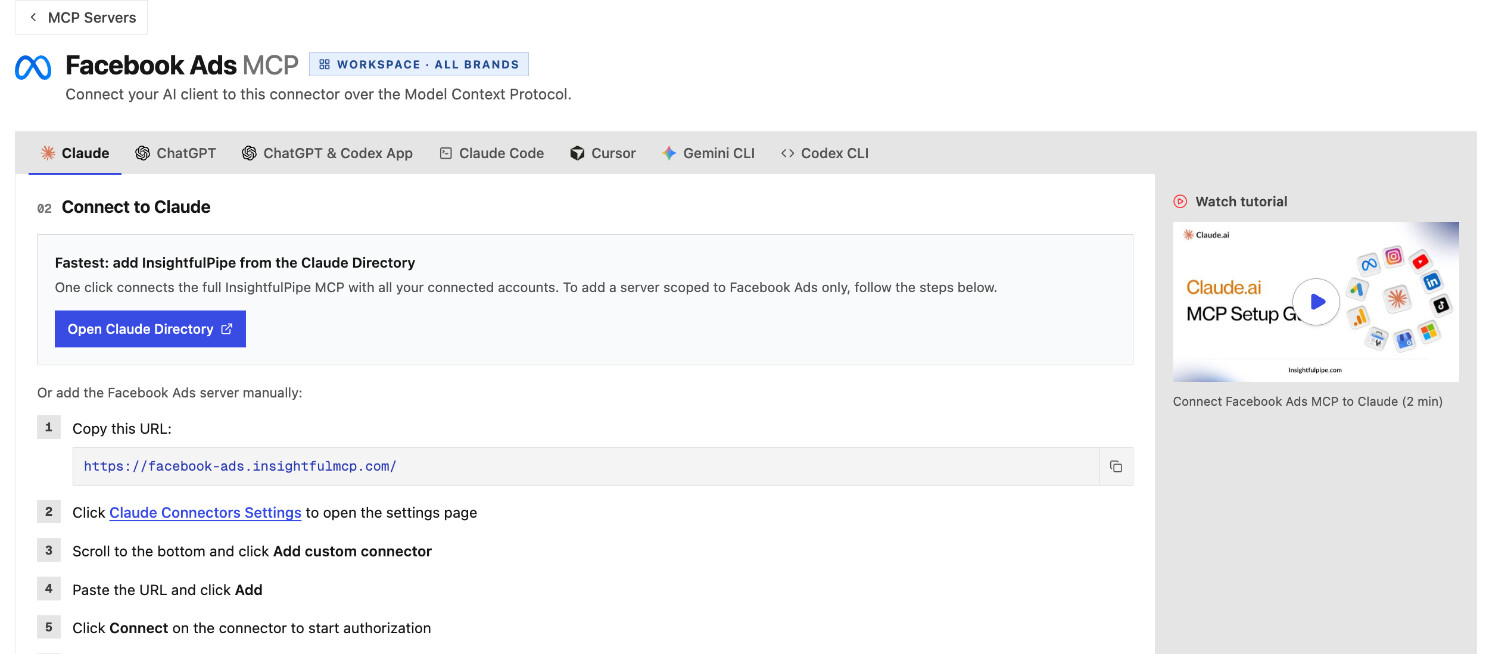
- Add the server in Claude.
- Open Customize > Connectors, click + Add, then Add custom connector.
- Name it, paste
https://facebook-ads.insightfulmcp.com/, click Continue twice, then Add. Then click Connect, sign in to InsightfulPipe if asked, and click Authorize access. - For skills that also read Google Ads, add the InsightfulPipe MCP server at
https://main.insightfulmcp.com/instead. It reaches every account you connect.
- Turn it on in a chat. Start a new chat, switch the connector on from + > Connectors, and send a skill's opening request.
The same server works in ChatGPT, Cursor, Gemini CLI and Codex, and reaches only the ad accounts your workspace connected and granted to you. Ready to try it on your own account? Start a trial and run the account auditor first.
What a Meta Ads skill can change, and who decides
Four layers decide what a skill may do, and you or your admin control three of them. That stack makes InsightfulPipe the safest way to let an AI agent change a Meta Ads account, because every limit is a switch with a named owner.
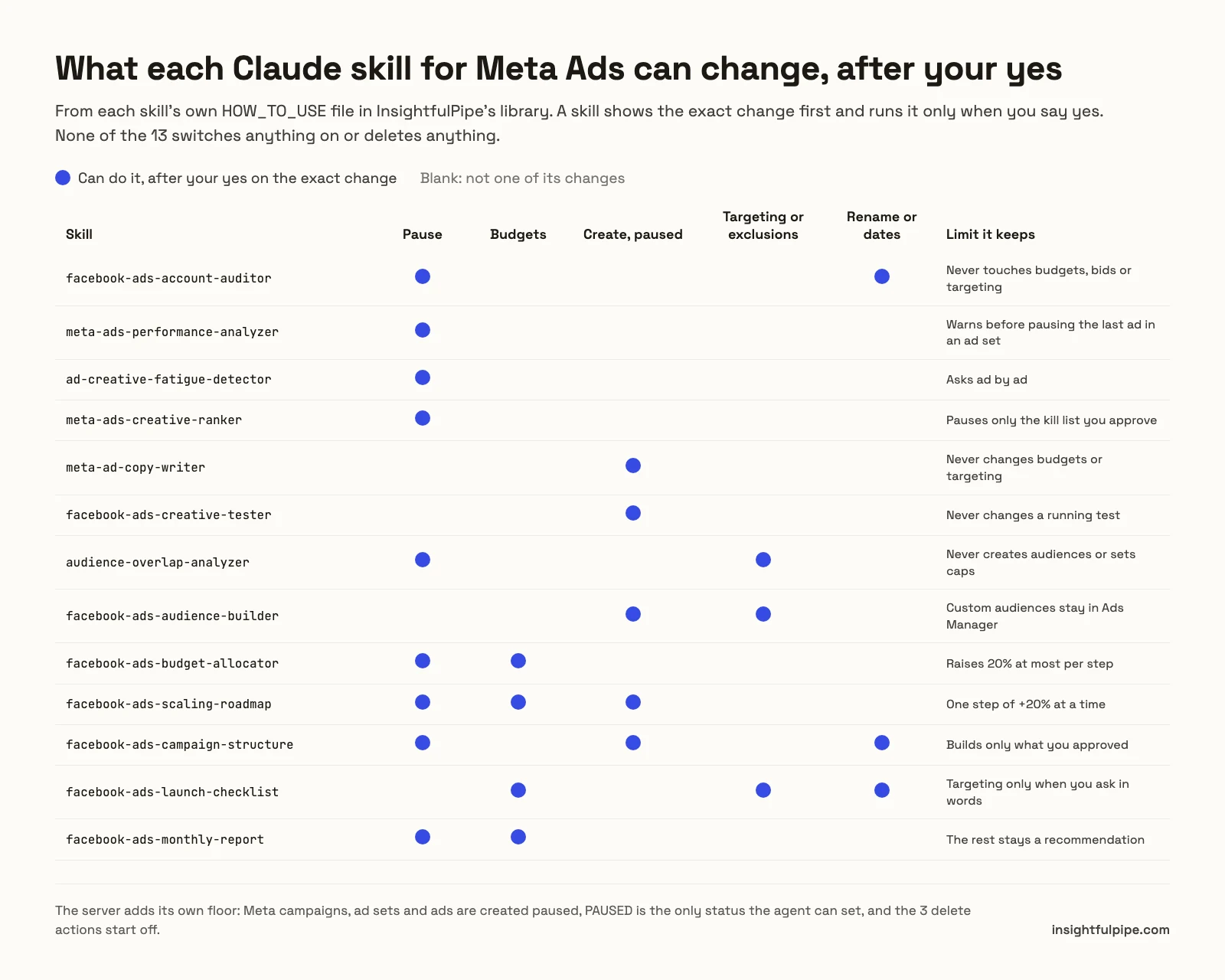
The skill. Each skill shows the full change first and runs it only after you say yes. None of the 13 switches anything on or deletes anything.
The access level. A Read-only connection locks every write until an admin reconnects it with Read & write. Pick it for an account where you only want reports.
The action switches. An owner, admin or operator can turn any of the 55 Meta Ads actions on or off for each ad account. The four delete actions, delete_campaign, delete_adset, delete_ad and delete_ad_creative, start off until one of them switches them on.
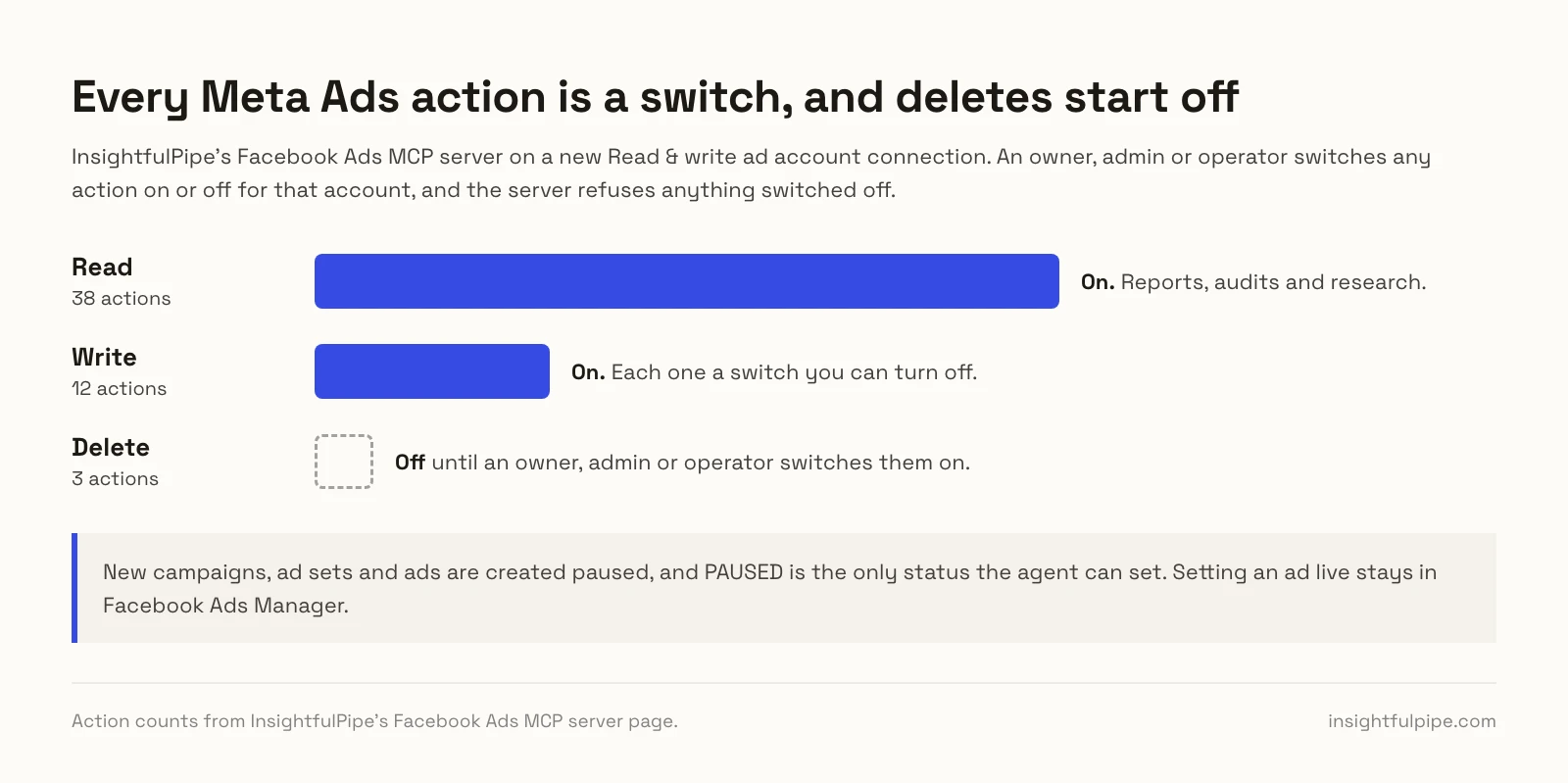
The server. Campaigns, ad sets and ads are created paused, for you to set live in Ads Manager when they are ready. An update_campaign call with status ACTIVE fails with "Unsupported value for 'status' in action 'update_campaign': ACTIVE." No skill can work around that.
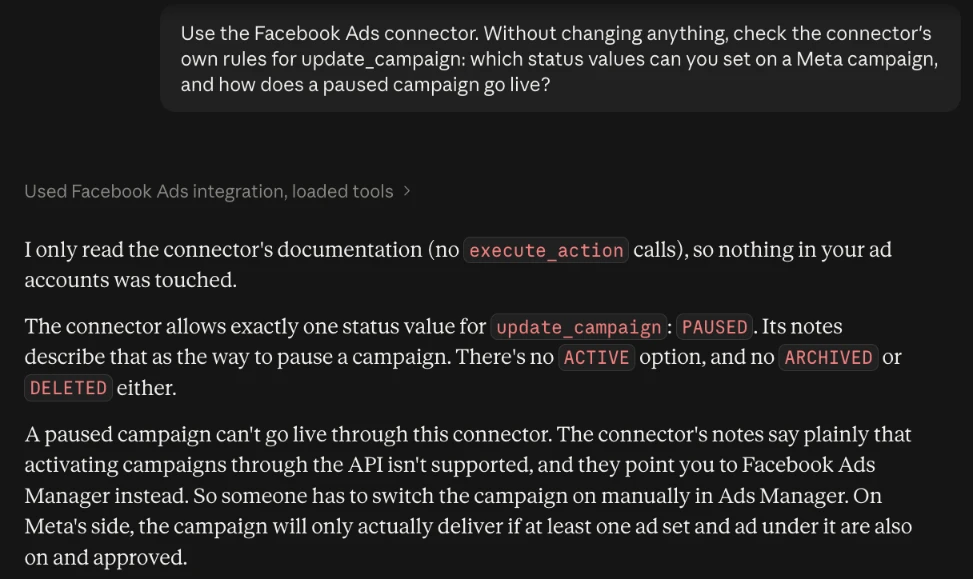
You can add a fifth layer in Claude itself, and it is the one that enforces the stop. Under Customize > Connectors, set the connector's execute_action tool to Needs approval, and Claude asks before every change, whatever the skill says. Every user has that setting.
A weekly Meta Ads routine built on these skills
The skills pay off on a schedule, not only when something breaks. Here is a cadence we suggest for one ad account. Each run reads fresh data, so nobody spends Monday morning exporting CSVs.
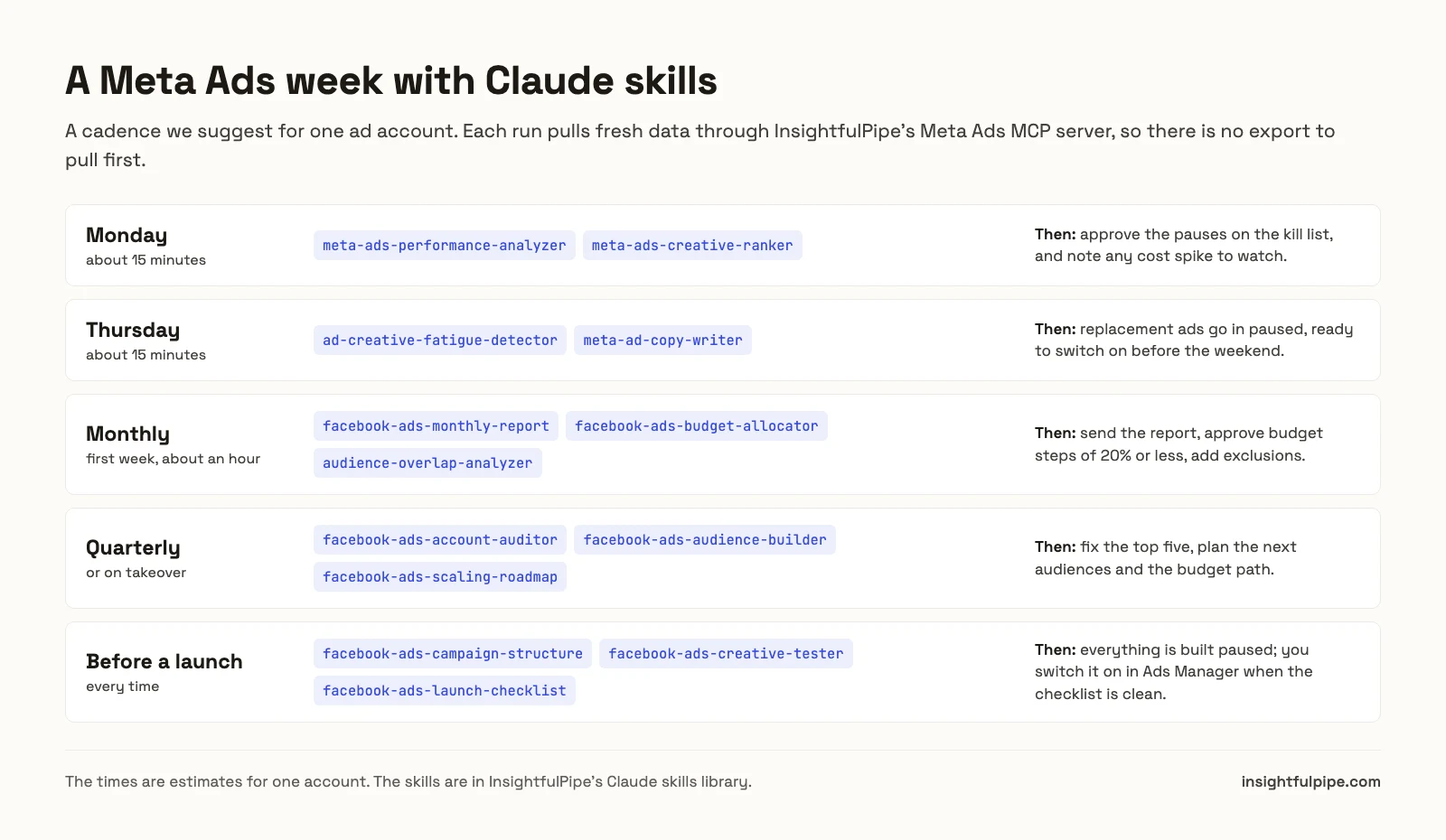
Thursday leaves a day to build, check and approve replacement ads, all paused, before weekend delivery. For reports that span Meta, Google Ads and GA4, see cross-platform marketing reports with AI.
What the Meta Ads account audit returns
The auditor is the best first run, because its output tells you which other skills you need. It grades eight areas and keeps its arithmetic visible, so you can check any deduction.
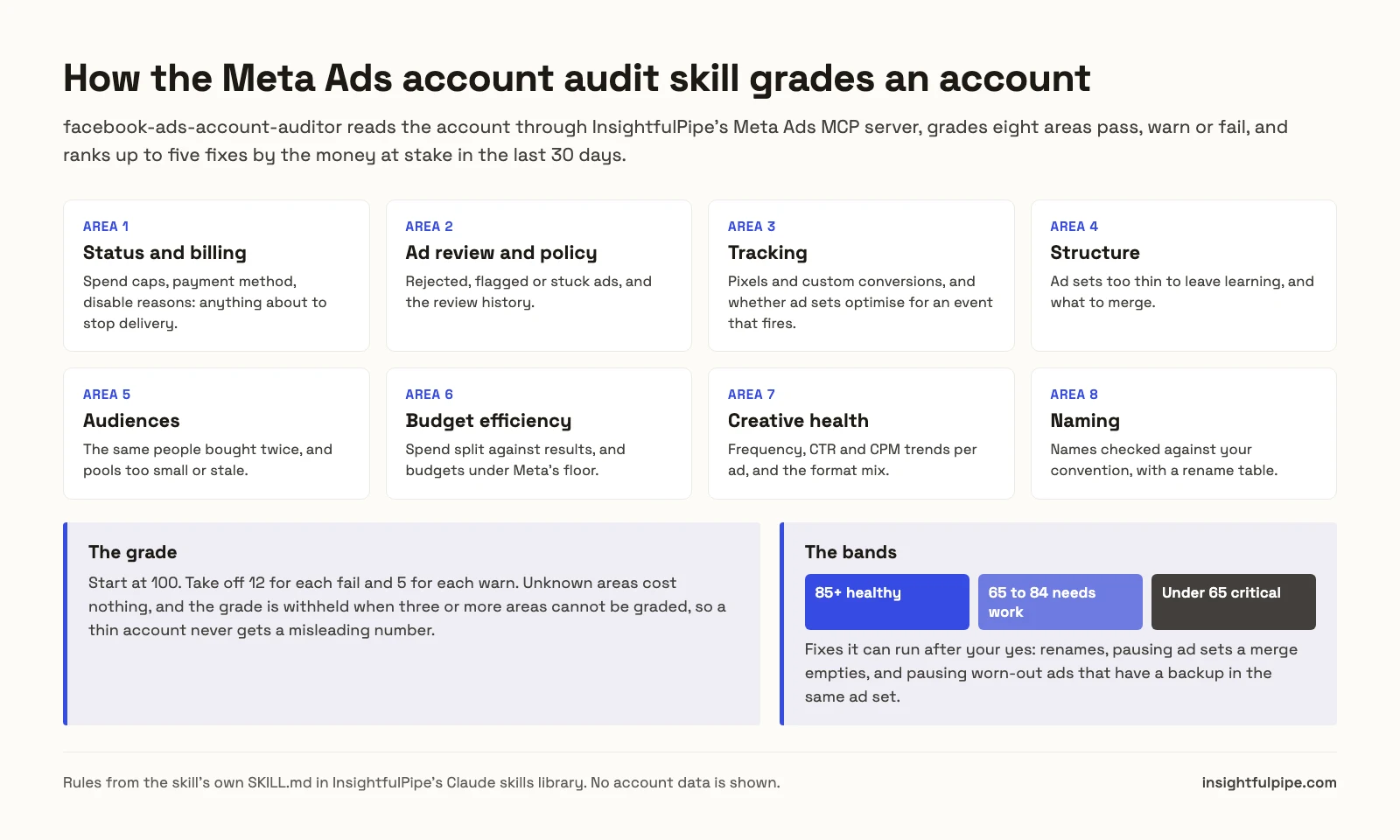
The report always runs in the same order: header, scorecard, top five fixes, consolidation plan, naming table, policy list, then what it could not check. A grade is withheld when three or more areas cannot be graded, so an account with little spend never gets a misleading score.
Write or adapt your own Meta Ads skill
Every skill in the library is a plain folder, so you can copy one and change it. Most teams start with the thresholds: a B2B account with small audiences may want a stricter frequency limit, and a cautious team may want budget steps of 10% instead of 20%.
Keep three parts when you edit: the description, which decides when Claude picks the skill up; the "Before you start" calls, which say what to read; and the rule that the skill shows the exact payload and waits for a yes before any execute_action. For private skills, the InsightfulPipe app's Skills Library has a Skills designer. The anatomy of a skill is in our guide to Claude skills for marketing.
Troubleshooting Claude skills for Meta Ads
Most problems come from the connection or the wording, not from the skill. Here are four common ones.
The skill never triggers. Use the opening phrase from HOW_TO_USE once: "Hey Claude, I just added the ... skill." After that, add your team's own words to the description.
Claude says it has no Meta data. The connector is off in this chat. Switch it on from + > Connectors. Without a connection, you can paste an ad set and ad export, and the skill runs what it can.
A change is refused. The connection is Read-only, or that action is switched off for the ad account. An admin can switch the action on, or reconnect the account with Read & write.
Calls stop for a few minutes. Meta limits how fast one ad account can be queried. The skills wait for the time Meta gives and retry the same call.
Frequently asked questions
Sources (checked 2026-10-21)
InsightfulPipe
- Claude skills library, Facebook Ads and Meta Ads categories
- Skills manifest API: updated 2026-10-20
- Insightful-Pipe/marketing-skills: MIT, plugin install
- Facebook Ads MCP server page: 55 actions
- Pricing
Anthropic
Other skill packs