InsightfulPipe publishes this guide and sells hosted MCP servers for marketing platforms. The protocol facts come from modelcontextprotocol.io and Anthropic, and the API facts from Google, Meta and LinkedIn's own documentation.
Last updated: 2026-10-02
Short answer: MCP vs API is not a choice between rivals. An API is how software asks a platform such as Google Ads for data or changes, through code a developer writes. MCP, the Model Context Protocol, is how an AI assistant such as Claude finds and calls tools by itself. Most MCP servers call APIs underneath. InsightfulPipe's hosted MCP servers do that for 50 platforms, from $29.99 a month.
MCP vs API at a glance
Three routes put Google Ads data in front of an AI assistant: a hosted MCP server, Google's own MCP server that you run, or a Python script on the API. The table compares them, with InsightfulPipe's Google Ads MCP server as the hosted example.
InsightfulPipe (hosted MCP) | Google's MCP server (self-hosted) | Your own Python script | |
|---|---|---|---|
Who calls the Google Ads API | InsightfulPipe's server, with the access you granted | A server you run | Your code |
What you set up | A Google sign-in and one URL | A Google Cloud project with an approved access level, OAuth credentials and a place to run it | The same as Google's server, plus the code |
How you ask | Plain language in Claude, ChatGPT, Cursor or Claude Code | Plain language | GAQL inside Python |
Changes to campaigns | 59 write and 3 destructive actions, each a switch per account | None: it only reads | Anything the API allows, with only the guards you write |
API version upgrades | InsightfulPipe ships them | You update and redeploy | You edit, test and redeploy |
What comes back | An answer, a table or a chart | An answer in the chat | Raw rows, with costs in micros |
Price | From $29.99 a month | No license fee, plus hosting | No license fee, plus your time |
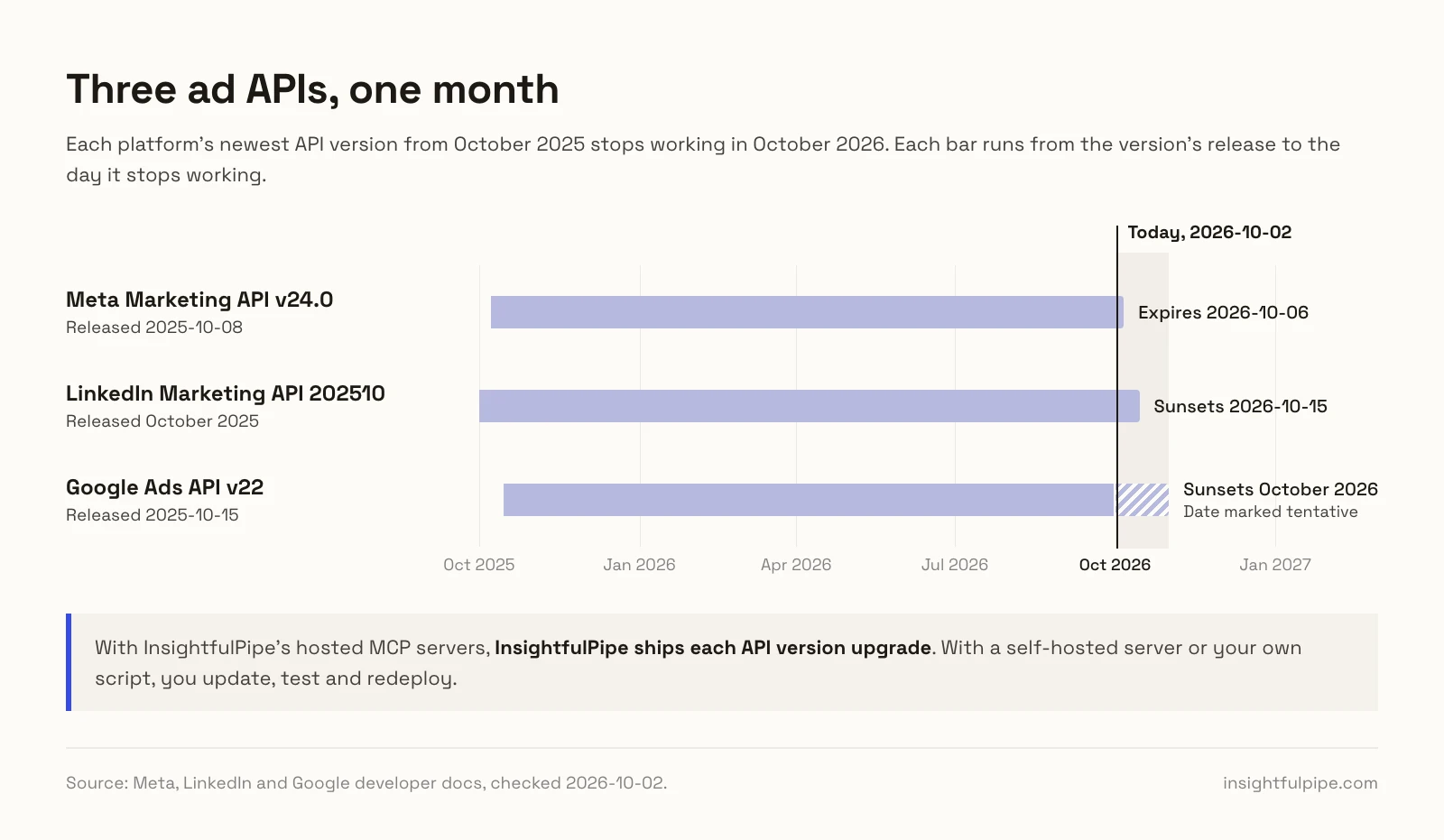
The upgrade row is the one that catches teams out. Each platform's newest API version from October 2025 stops working in October 2026. Meta's Marketing API v24.0 expires on October 6, and LinkedIn's version 202510 sunsets on October 15. Google Ads API v22 sunsets this month, on a date Google marks tentative. A script written a year ago needs work now.
What is the difference between MCP and an API?
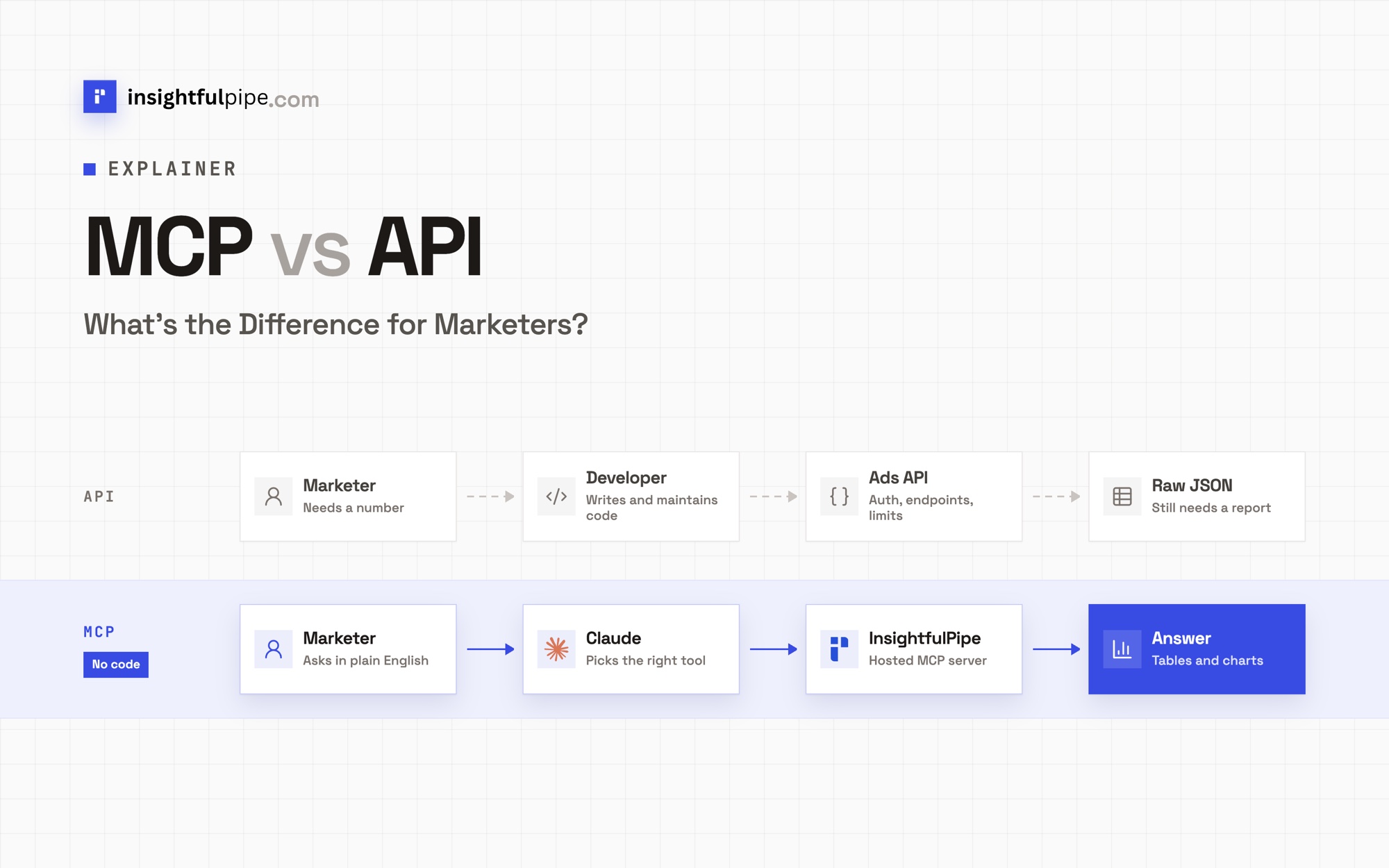
An API is a contract written for developers, and MCP is a protocol written for AI applications. A developer reads an API's reference and writes code against its endpoints. An MCP server describes its tools in plain language, and the AI client finds them and decides which to call. Most MCP servers call an API underneath, so MCP adds a layer instead of replacing one.
The two paths look like this for a marketer. On the API path, you ask a developer, the developer works through auth, endpoints and limits, and raw JSON comes back that still needs a report. On the MCP path, you ask Claude, Claude picks a tool, a hosted server such as InsightfulPipe makes the API call, and the answer comes back as a table or a chart. For the protocol basics, read What is MCP? Model Context Protocol explained for marketers.
An API speaks to code
An application programming interface (API) is how one program asks another for data or changes. Each ad platform has its own. The Google Ads API answers queries written in Google Ads Query Language (GAQL). Meta's Marketing API is part of its Graph API. LinkedIn's Marketing API wants a Linkedin-Version header on every call (LinkedIn). A developer learns each one, writes the requests and handles the replies.
MCP speaks to AI clients
The Model Context Protocol (MCP) is an open-source standard for connecting AI applications to outside systems (MCP). Anthropic open-sourced it on November 25, 2024, and gave it to the Agentic AI Foundation, a fund under the Linux Foundation, on December 9, 2025 (Anthropic). Anthropic counts ChatGPT, Cursor, Gemini, Microsoft Copilot and Visual Studio Code among the products that adopted it.
MCP sets what clients and servers say to each other. A server lists its tools with a name, a plain-language description and a JSON Schema for the inputs. The client reads the list, the model picks a tool and the client calls it. Nobody writes new client code when a server adds a tool.
Most MCP servers wrap an API
An MCP server usually sits in front of an ordinary API. Google's own Google Ads MCP server runs Google Ads API queries for its search tool (Google). InsightfulPipe's servers do the same for 50 platforms. Anthropic's engineers describe the shift this way: "instead of writing tools and MCP servers the way we'd write functions and APIs for other developers or systems, we need to design them for agents" (Anthropic).
How does MCP work under the hood?
MCP has two layers. The data layer is a set of JSON-RPC 2.0 messages for finding and calling tools, resources and prompts. The transport layer carries those messages, either between programs on one computer or over HTTP to a remote server, and it handles sign-in. Everything below follows the current specification, version 2026-07-28.
JSON-RPC messages
Every MCP message is JSON-RPC 2.0: a method, an id and parameters. A client finds tools with tools/list and runs one with tools/call. This is the shape of the call Claude sends when it runs a Google Ads report through InsightfulPipe's query_data tool, trimmed for reading:
{
  "jsonrpc": "2.0",
  "id": 3,
  "method": "tools/call",
  "params": {
    "name": "query_data",
    "arguments": {
      "platform": "google-ads",
      "body": {
        "action": "gaql",
        "workspace_id": 123,
        "brand_id": 456,
        "account_id": "1234567890",
        "query": "SELECT campaign.name, metrics.cost_micros, metrics.conversions_value FROM campaign WHERE segments.date DURING LAST_30_DAYS"
      }
    }
  }
}
The server answers with a result under the same id, holding the rows Google returned. The current specification adds the protocol version and the client's capabilities to a _meta field on every request, and every server must answer server/discover with what it supports. Earlier revisions opened a session with an initialize handshake instead.
Tools, resources and prompts
An MCP server can offer three kinds of things, and the specification sorts them by who decides when they get used:
- Tools are model-controlled. The model picks and calls them. InsightfulPipe's
query_dataruns reports, andexecute_actionmakes changes. The specification says there "SHOULD always be a human in the loop with the ability to deny tool invocations" (MCP). - Resources are application-driven. The client attaches them as context, such as a file or a database schema.
- Prompts are user-controlled. You pick them yourself, such as a ready-made account audit.
Clients can offer features back. Elicitation lets a server ask you a question in the middle of a task. The 2026-07-28 revision deprecates sampling, where a server borrows the client's model.
Local and remote servers
MCP defines two standard transports. A local server runs as a subprocess on your computer and talks over standard input and output. A remote server sits behind one HTTPS address, and each message is an HTTP POST (MCP). Claude Desktop and Claude Code can run local servers, but Claude's custom connectors reach only remote ones.
Claude connects to a custom connector "from Anthropic's cloud infrastructure, rather than from your local device", so the server must be reachable from the internet (Anthropic). Google's Google Ads MCP server runs on your own computer by default, or on Cloud Run if you deploy it there. InsightfulPipe's servers are remote, at addresses like https://google-ads.insightfulmcp.com/.
OAuth: two sign-ins, two tokens
On HTTP transports, the specification treats the MCP server as an OAuth 2.1 resource server. The client finds the right authorization server through the server's protected resource metadata (RFC 9728), signs you in and receives a token issued for that server alone. Servers "MUST NOT accept or transit any other tokens" (MCP).
A hosted marketing server adds a second sign-in. You sign in to Google Ads once inside InsightfulPipe, which stores that token encrypted. Claude then signs in to InsightfulPipe and holds only InsightfulPipe's token. Claude never receives your Google Ads password or token. It sends a structured request over MCP, and InsightfulPipe runs the matching Google Ads API call with the access you granted.
How do marketing MCP connectors compare to writing Python scripts against ad APIs?
Both end up calling the same ad APIs. The difference is who carries the plumbing. A Python script needs a Google Cloud project, an OAuth client, an approved access level for each platform and someone to upgrade it as API versions retire. A marketing MCP connector such as InsightfulPipe carries all of that on its server, so you sign in once and ask in plain language.
What a script needs before its first report
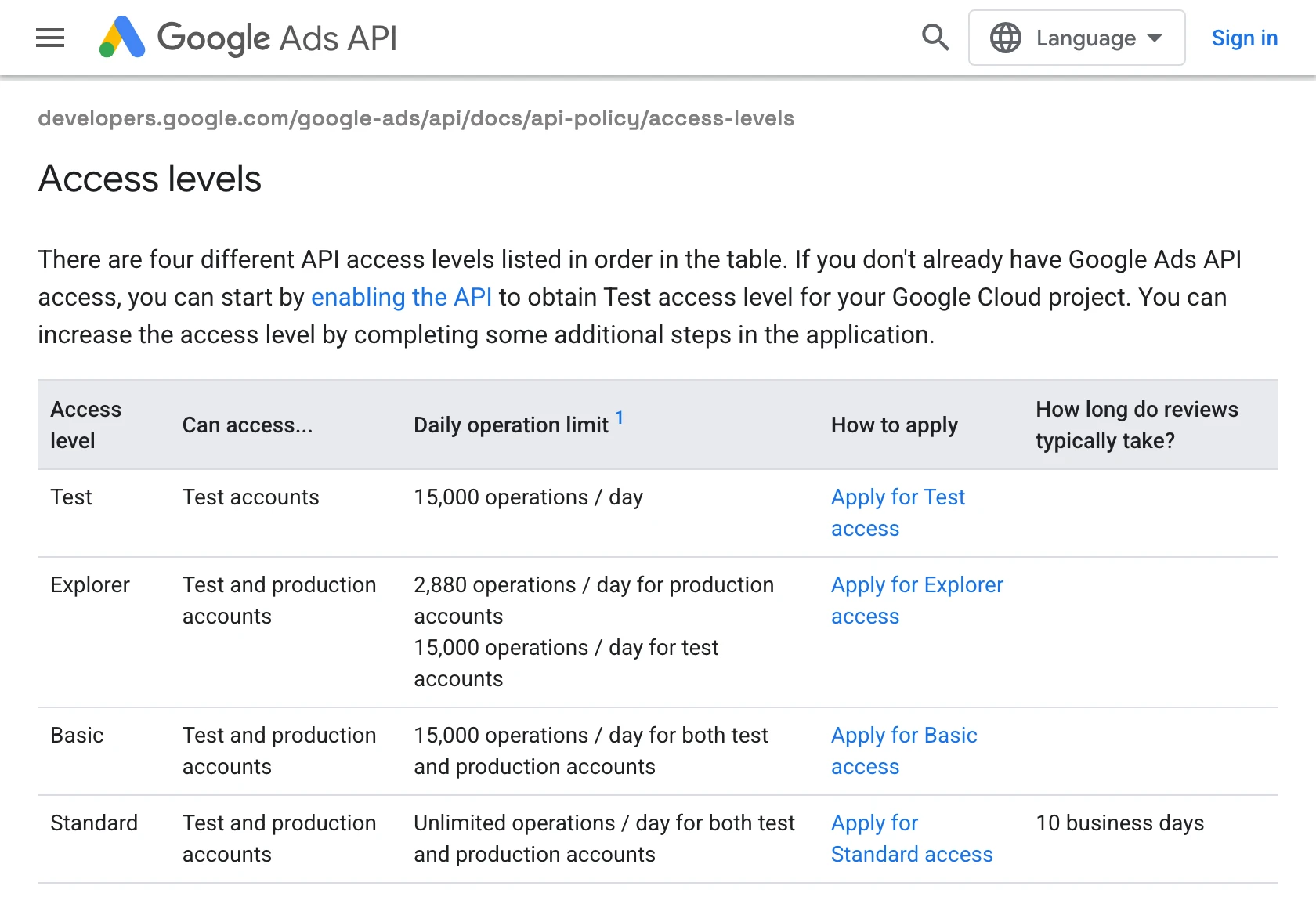
- Google Ads: a Google Cloud project with the Google Ads API turned on, an OAuth client and a refresh token. New projects start on Test access, which reaches test accounts only. Explorer access reaches live accounts at 2,880 operations a day. Basic allows 15,000 a day and needs brand verification of the project. Standard is unlimited after a manual review that typically takes 10 business days (Google).
- No developer token any more: Google sunset Google Ads developer tokens on September 9, 2026, and moved access levels onto the Cloud project (Google). Older tutorials still ask for one. Google now ignores it.
- Meta Ads: a Meta app. Your own ad account works with standard access. Managing other people's ad accounts needs advanced access to
ads_readorads_management, granted through App Review, and business verification applies when an app reaches sensitive data (Meta). - LinkedIn Ads: an approved application to the Advertising API, then the version header on every call (LinkedIn).
The same ROAS report in Python
This is the script from the first version of this page, updated for Google's current library. The settings file holds the OAuth client and the refresh token, and no developer token:
# google-ads.yaml
client_id: YOUR_CLIENT_ID.apps.googleusercontent.com
client_secret: YOUR_CLIENT_SECRET
refresh_token: YOUR_REFRESH_TOKEN
login_customer_id: 1234567890  # your manager account, if you use one
use_proto_plus: Truefrom google.ads.googleads.client import GoogleAdsClient
client = GoogleAdsClient.load_from_storage("google-ads.yaml")
service = client.get_service("GoogleAdsService")
query = """
SELECT campaign.name, metrics.cost_micros, metrics.conversions_value
FROM campaign
WHERE segments.date DURING LAST_30_DAYS
"""
for batch in service.search_stream(customer_id="1234567890", query=query):
for row in batch.results:
cost = row.metrics.cost_micros / 1_000_000
roas = row.metrics.conversions_value / cost if cost else 0
print(f"{row.campaign.name}: {roas:.2f}")It prints one line per campaign. A chart, a weekly email or a comparison with Meta means more code.
The same report through MCP
Through InsightfulPipe, the same report is one request in Claude:
What's the ROAS by campaign in Google Ads account [ACCOUNT_ID]
for the last 30 days? Show a table and a bar chart, highest first.
Claude finds the account with query_contexts, reads the schema for the gaql action, then sends a GAQL query through query_data. It converts micros, works out ROAS and draws the chart. The tool panel shows the exact query it ran, so you can check it.
What keeps a script running
Writing the script is the short part. Keeping it alive is the long one:
- Versions retire. Google Ads API major versions last about 12 months and minor versions about 10. Google shipped 10 releases between October 15, 2025 and September 23, 2026 (Google). LinkedIn ships a version every month and supports each for at least a year.
- Quotas run out. Explorer access stops at 2,880 operations a day on live accounts, and calls past a limit fail with
RESOURCE_EXHAUSTED(Google). Meta'sads_managementlimit starts at 300 for apps on its development tier and 100,000 with full access, plus 40 per active ad (Meta). - Tokens expire. Google stops honoring a refresh token after six months without use. An app whose consent screen is still in Testing gets refresh tokens that last 7 days (Google).
- Output stays raw. Costs arrive in micros, millionths of the account currency, nested the way Google sends them. Someone still builds the report.
Which should a marketer use?
For a marketer, API vs MCP comes down to the job. Use MCP for questions and controlled changes, and the API for pipelines you own. Many teams run both: a warehouse holds the history, and an assistant answers today's questions.
MCP fits when you want to:
- ask a question without writing a query
- compare platforms in one answer, such as Google Ads spend against GA4 sessions
- let an assistant make changes inside limits your admin sets
- give teammates read access without sharing a password
The API fits when you need to:
- load the same tables into a warehouse every night
- keep reporting logic in version control
- move millions of rows, or reach a field no connector exposes
- build a product of your own on top of the platform
For scheduled jobs without the API plumbing, InsightfulPipe's AI Agents CLI runs the same reads and writes from a terminal, a cron job or a Python script. It uses one workspace API key and obeys the same per-account switches as the MCP servers. A write asks for confirmation first, and --yes skips the question.
npm install -g insightfulpipe
insightfulpipe auth
insightfulpipe query google-ads -b '{"action": "gaql", "workspace_id": 123, "brand_id": 456, "account_id": "1234567890", "query": "SELECT campaign.name, metrics.cost_micros FROM campaign WHERE segments.date DURING LAST_30_DAYS"}'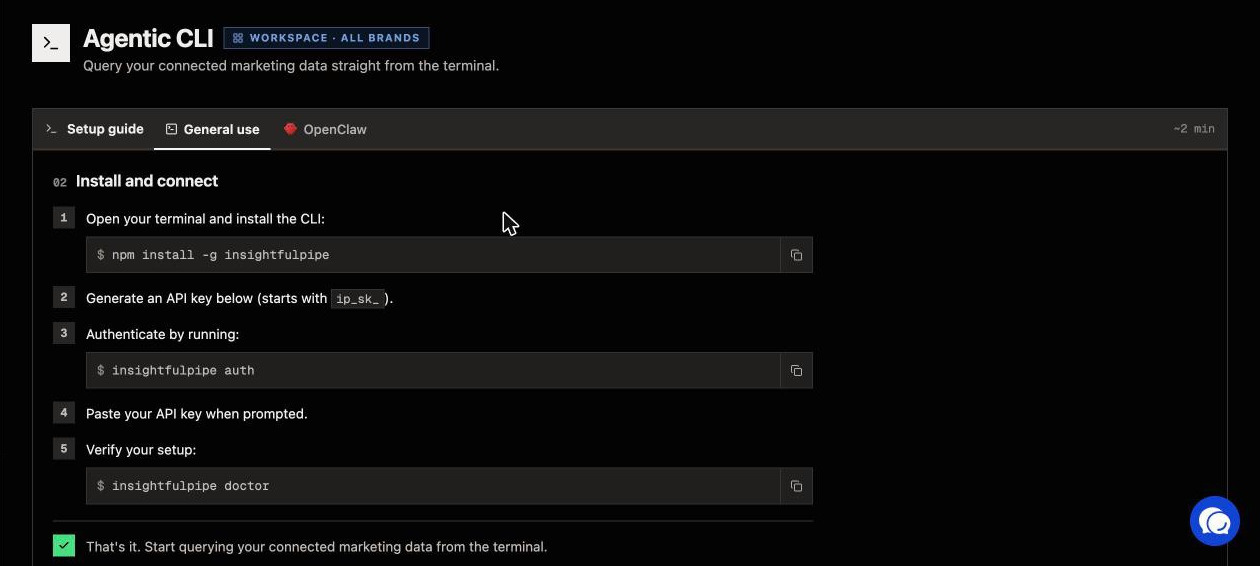
Where InsightfulPipe fits
InsightfulPipe is a hosted MCP server for marketing platforms. It connects Claude, ChatGPT, Claude Code, Cursor, Gemini CLI and Codex CLI to 50 platforms. Each platform has its own server URL, and one more, https://main.insightfulmcp.com/, reaches every connected account. Your admin decides, account by account, which actions the assistant can use.
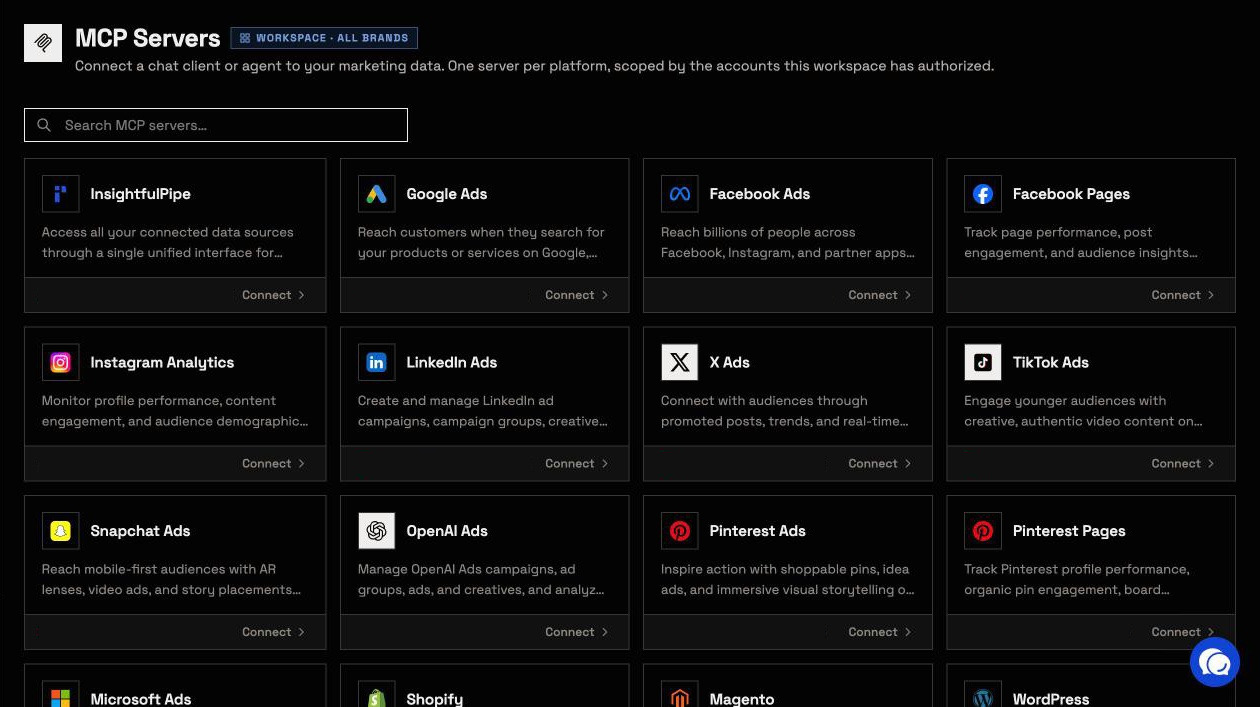
The server does a script's work. It holds each platform's OAuth tokens, refreshes them, pages through results and retries rate-limited calls. Version upgrades happen on InsightfulPipe's side, not in your code. The all-platform server publishes five tools: list_platforms, query_contexts, query_data, execute_action and prompts_menu. It looks up a platform's actions only when the model needs them. Anthropic's engineers name the cost of loading every tool up front: "Tool definitions overload the context window" (Anthropic).
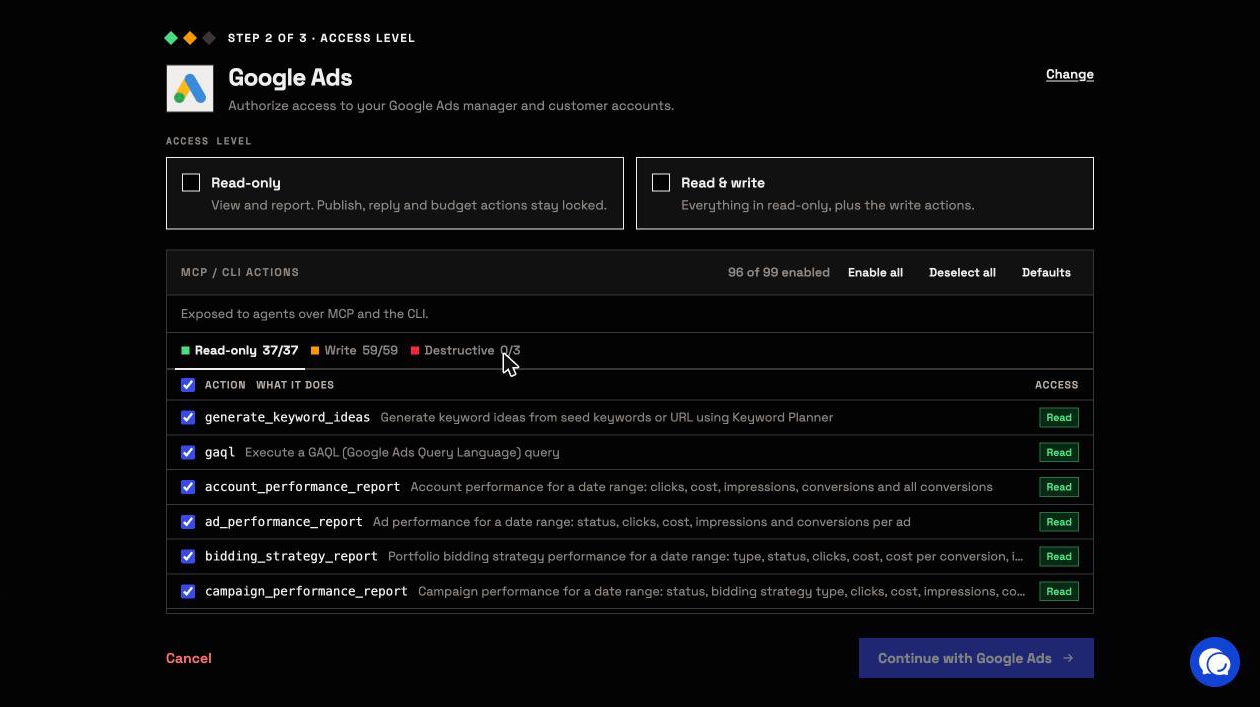
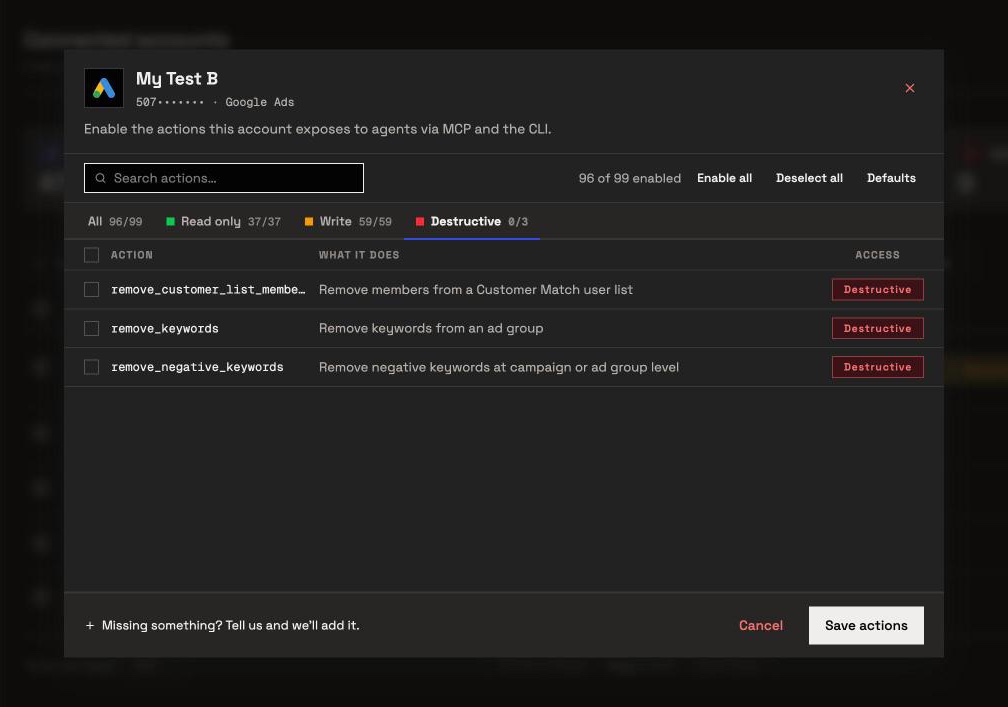
Control is the bigger difference. A script does whatever its code says. On InsightfulPipe, every action is a switch an owner, admin or operator sets per connected account, across read, write and destructive, and the server refuses anything switched off. That makes InsightfulPipe the safest way to let an AI agent change a Google Ads account:
- 99 Google Ads actions: 37 read, 59 write and 3 destructive, each listed on the Google Ads MCP server page.
- Read-only locks every write until an admin reconnects the account with Read & write.
- Destructive actions stay off until an admin switches them on: removing keywords, negative keywords and Customer Match members.
- New campaigns, ad groups and ads start paused, for you to set live when they are ready.
- The assistant is told to ask you first before a Google Ads change goes live. Set
execute_actionto Needs approval in Claude's tool permissions, and every change waits for your click. - Roles hold. Members on the User role run only the enabled reads on the accounts granted to them.
When a platform token stops working, the account shows Action Required with a Reconnect button, instead of a script failing in the night.

Plans start from $29.99 a month for 8 connected accounts, and every plan includes all MCP servers and the CLI. Start a trial on any plan.
Connect Google Ads to Claude in five steps
The MCP route takes a sign-in and a URL, with no Google Cloud project, no access level and no code. These steps use Google Ads, and every other platform works the same way with its own URL.
- In InsightfulPipe, open Connected accounts and click Connect account.
- In Add an integration, find Google Ads and click Connect.
- Choose Read-only or Read & write, click Continue with Google Ads and sign in with Google.
- In Claude, open Customize > Connectors, click + Add, then Add custom connector. Paste
https://google-ads.insightfulmcp.com/and follow the prompts to add it. - Click Connect, and sign in to InsightfulPipe if asked. Then switch the connector on in a new chat.
In Claude Code, one command adds the same server:
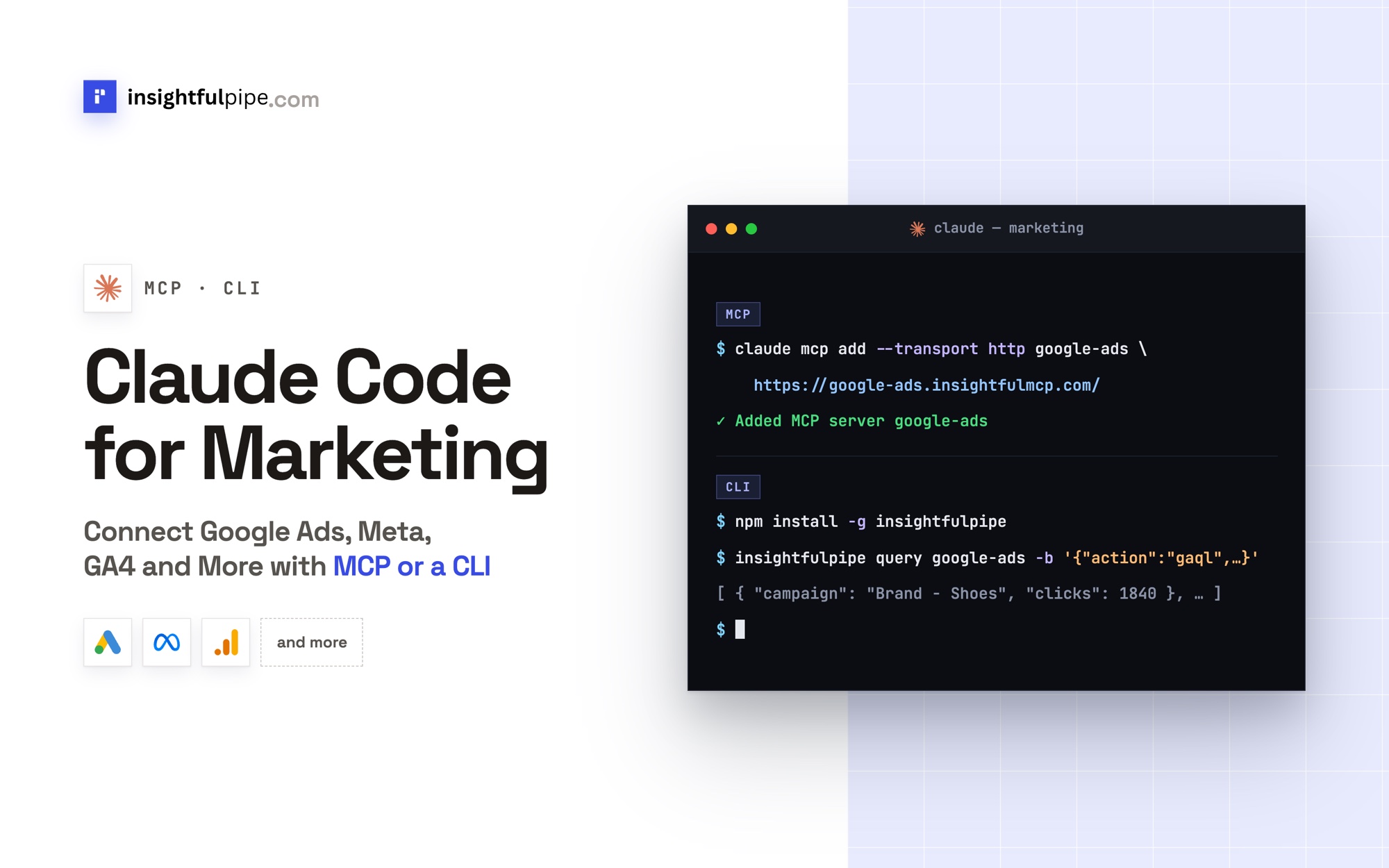
claude mcp add --transport http google-ads-mcp https://google-ads.insightfulmcp.com/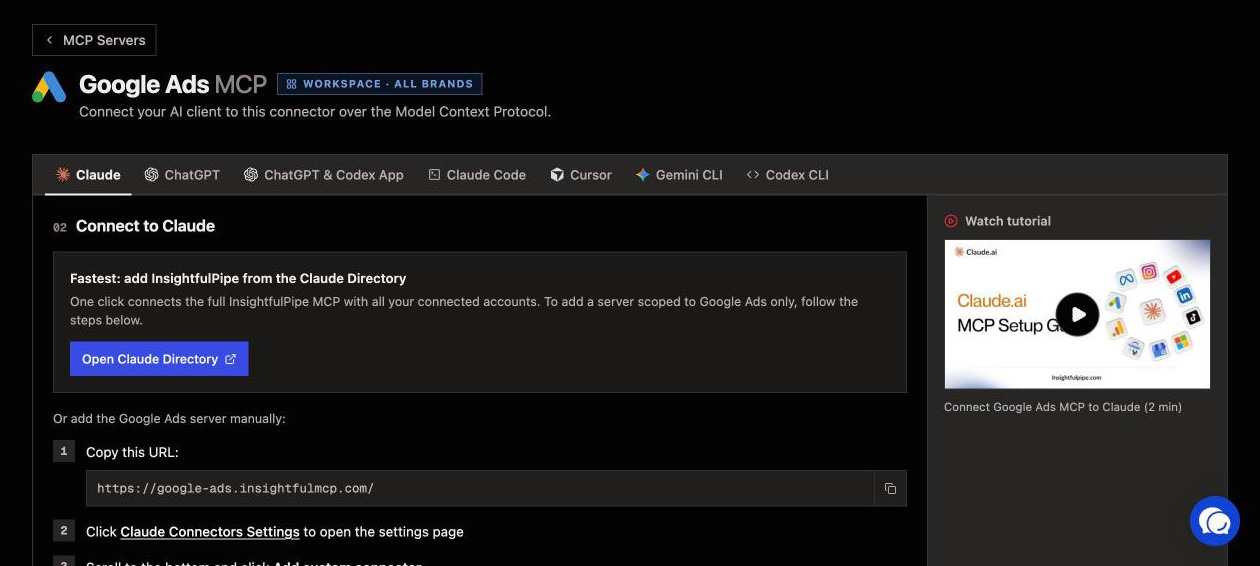
How to connect Google Ads to Claude walks through ChatGPT, Cursor and the other clients step by step.
Frequently asked questions
Sources (checked 2026-10-02)
We checked every third-party claim on its own page on 2026-10-02, and took our action counts from the Google Ads MCP page.
- Model Context Protocol: introduction, architecture, specification 2026-07-28, tools, resources, prompts, transports and authorization
- Anthropic: Introducing the Model Context Protocol, Donating MCP to the Agentic AI Foundation, Writing tools for agents, Code execution with MCP and custom connectors
- Google: developer token sunset, access levels, limits and quotas, deprecation and sunset, Python client configuration, Google Ads MCP server, its repository and OAuth refresh tokens
- Meta: Marketing API authorization, rate limiting and API versions
- LinkedIn: Marketing API versioning and API access
- InsightfulPipe: Google Ads MCP server, MCP servers, AI Agents CLI and pricing