Disclosure: InsightfulPipe publishes this and is one of the 8 options ranked.
The verdict
The best Google Tag Manager MCP server in 2026 is InsightfulPipe. Of the 8 best Google Tag Manager MCP servers compared here, it is the only hosted one that holds every change in a GTM workspace for a person to publish, lets an admin switch each of its 61 actions on or off per account, and starts every new connection with deletes off until an admin switches them on. That makes it the safest of the servers that can write to a live container.
That matters on Tag Manager, because one publish changes every page at once. Stape's own guide calls publishing "instant and global". All eight servers can change a container, and seven of them can also publish a version from the chat.
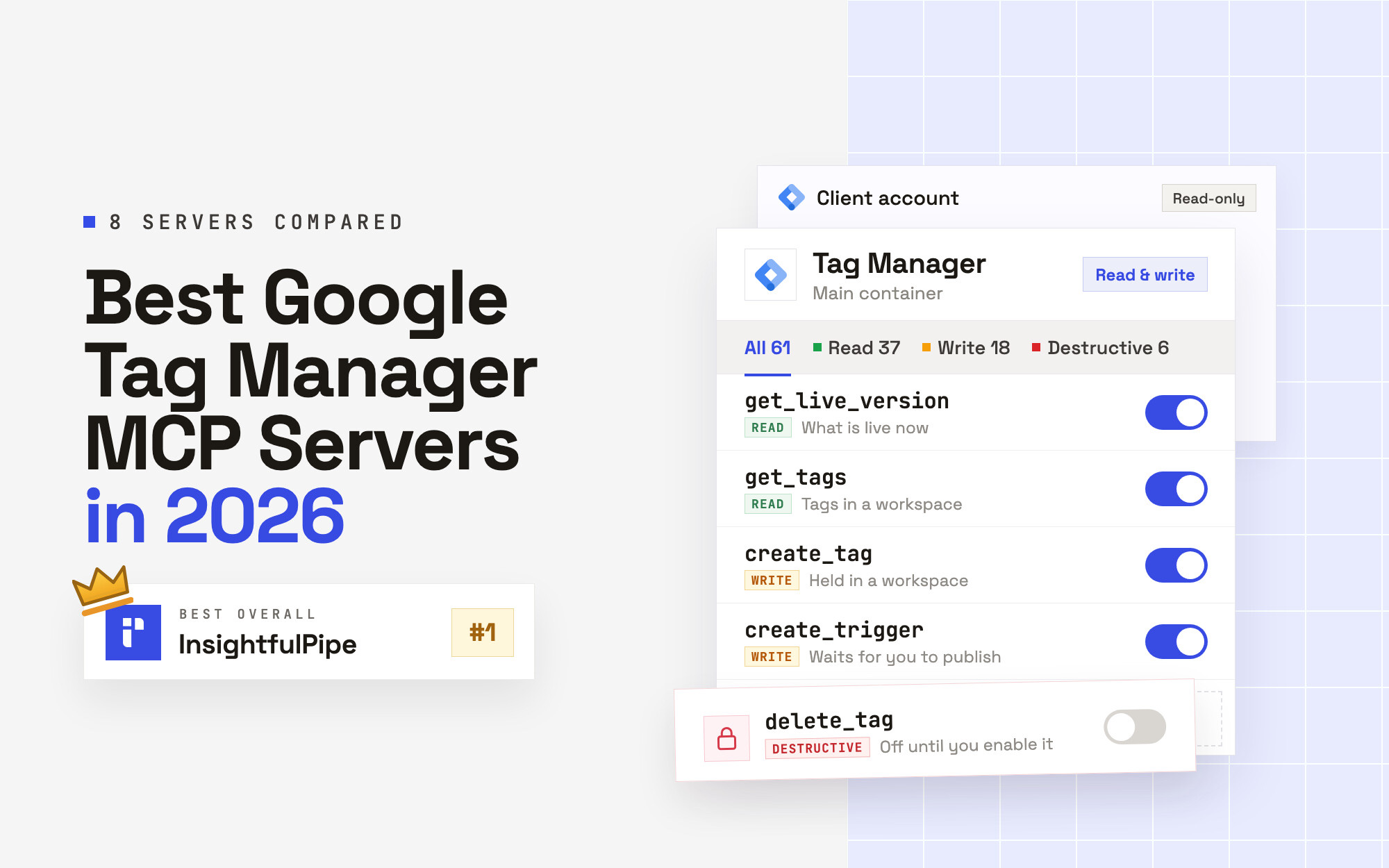
- Best overall: InsightfulPipe. 61 GTM actions, 37 read, 18 write and 6 destructive, each switched on or off per account by your admin, next to GA4 and Google Ads on the same login. From $29.99 a month, with every action listed on the Google Tag Manager MCP server page.
- Safest write access: InsightfulPipe. Every change waits in a workspace until someone on your team publishes it in Google Tag Manager, and the six destructive actions stay off until an admin switches them on.
- Best value: InsightfulPipe. $29.99 a month covers 8 connections across 50 platforms. Markifact starts at $79, and PaidSync's Pro plan costs $99 for 600 tasks.
Google publishes no Tag Manager MCP server. Its own list of Google MCP servers includes Google Analytics, not Tag Manager.
The best Google Tag Manager MCP servers at a glance
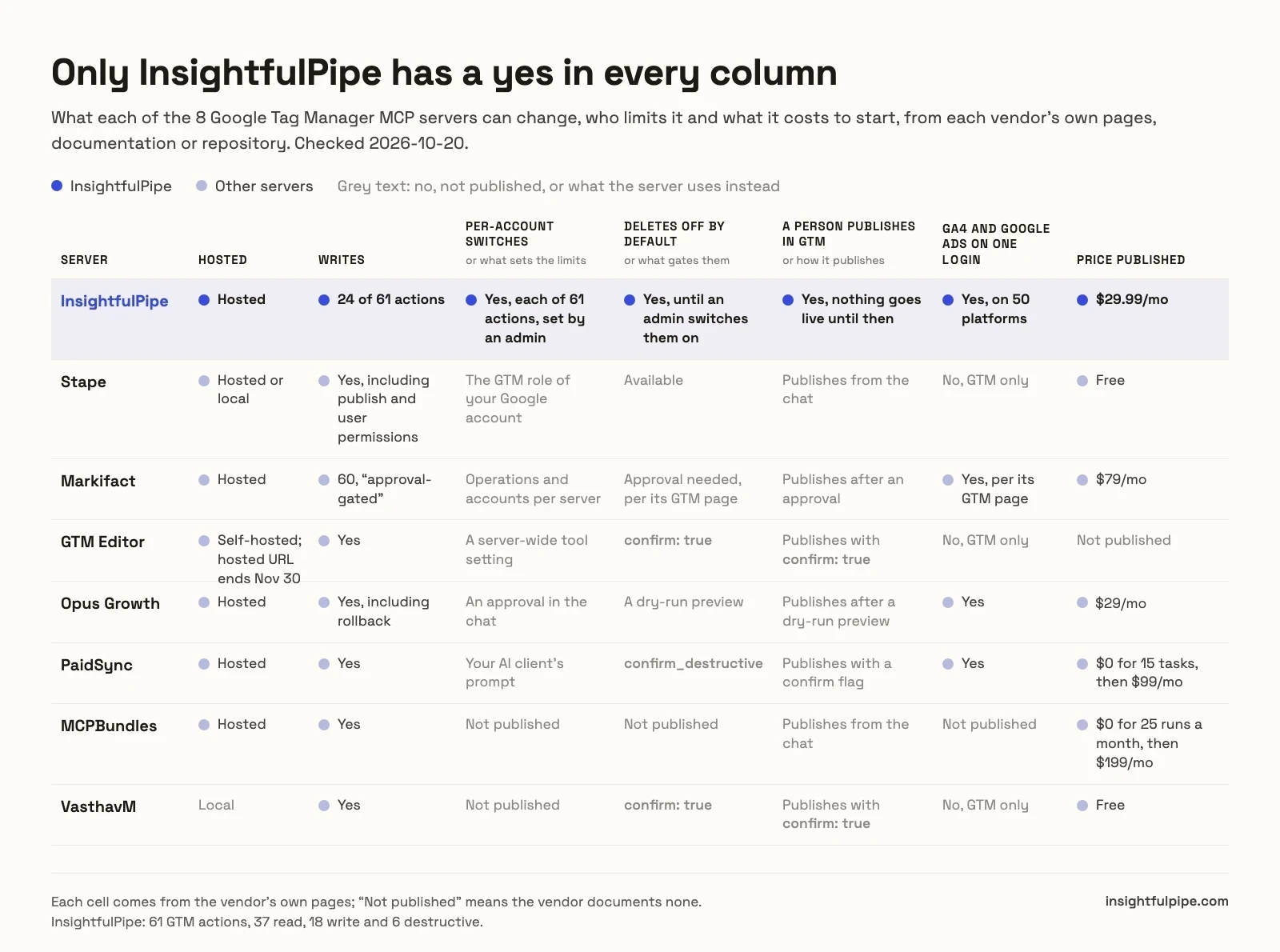
Eight servers, compared on what they can change, what reaches the live container, who sets the limits and what they cost to start. InsightfulPipe is the only hosted row that pairs workspace-only writes with per-account action switches.
Server | GTM tools | Writes | What reaches the live container | Who sets the limits | Hosting | Starting price |
|---|---|---|---|---|---|---|
InsightfulPipe | 61 actions | 18, plus 6 destructive off by default | Nothing until a person publishes in GTM | An admin, per account, enforced on the server | Hosted | $29.99/mo |
Stape | 20 tools | Yes, including publish and user permissions | Publishes from the chat | The GTM role of the Google account you sign in with | Hosted or local | Free |
Markifact | 97 operations | 60, "approval-gated" | Publishes after an approval | Your AI client's settings, per its docs | Hosted | $79/mo |
GTM Editor | 64 tools, 94 with all groups | Yes | Publishes with | A server-wide tool setting | Hosted until 2026-11-30, or self-hosted | No price published |
Opus Growth | Not published | Yes, including rollback | Publishes after a dry-run preview | An approval in the chat | Hosted | $29/mo |
PaidSync | 39 | Yes | Publishes with a confirm flag | Your AI client's prompt, per its page | Hosted | $0 for 15 tasks, then $99/mo |
MCPBundles | 25 tools | Yes | Publishes from the chat | Not published | Hosted | $0 for 25 runs a month, then $199/mo |
VasthavM | 50 tools | Yes | Publishes with | Not published | Local | Free |
How we tested
We read every capability, default and price from each vendor's own documentation, pricing page or public repository, and ran InsightfulPipe on live accounts. We checked every page on 2026-10-20, and took GitHub stars and commit dates the same day.
Criterion | What we checked |
|---|---|
GTM coverage | Which parts of a container can the agent read and change? |
Live container | Can the agent publish a version, or does a person publish in GTM? |
Control | Can an admin choose actions per account, and does the server enforce it? |
Day-one default | What can the agent do before anyone narrows it, and do deletes start off? |
Setup | A sign-in and a URL, or a Google Cloud project and an OAuth client you create? |
Other platforms | Does the same login reach GA4 and Google Ads? |
Price | What does write access cost to start? |
Where a vendor's own pages contradict each other, we quote both and attribute them to the vendor. Where a capability is not published, we say "not published" rather than guess. Roadmap features do not count.
Windsor.ai, Composio, Ryze, Pipeboard, AdKit and Zapier publish no Google Tag Manager MCP page, so they are not ranked. Six community servers sit in "What we would not recommend".
The single question that splits this list
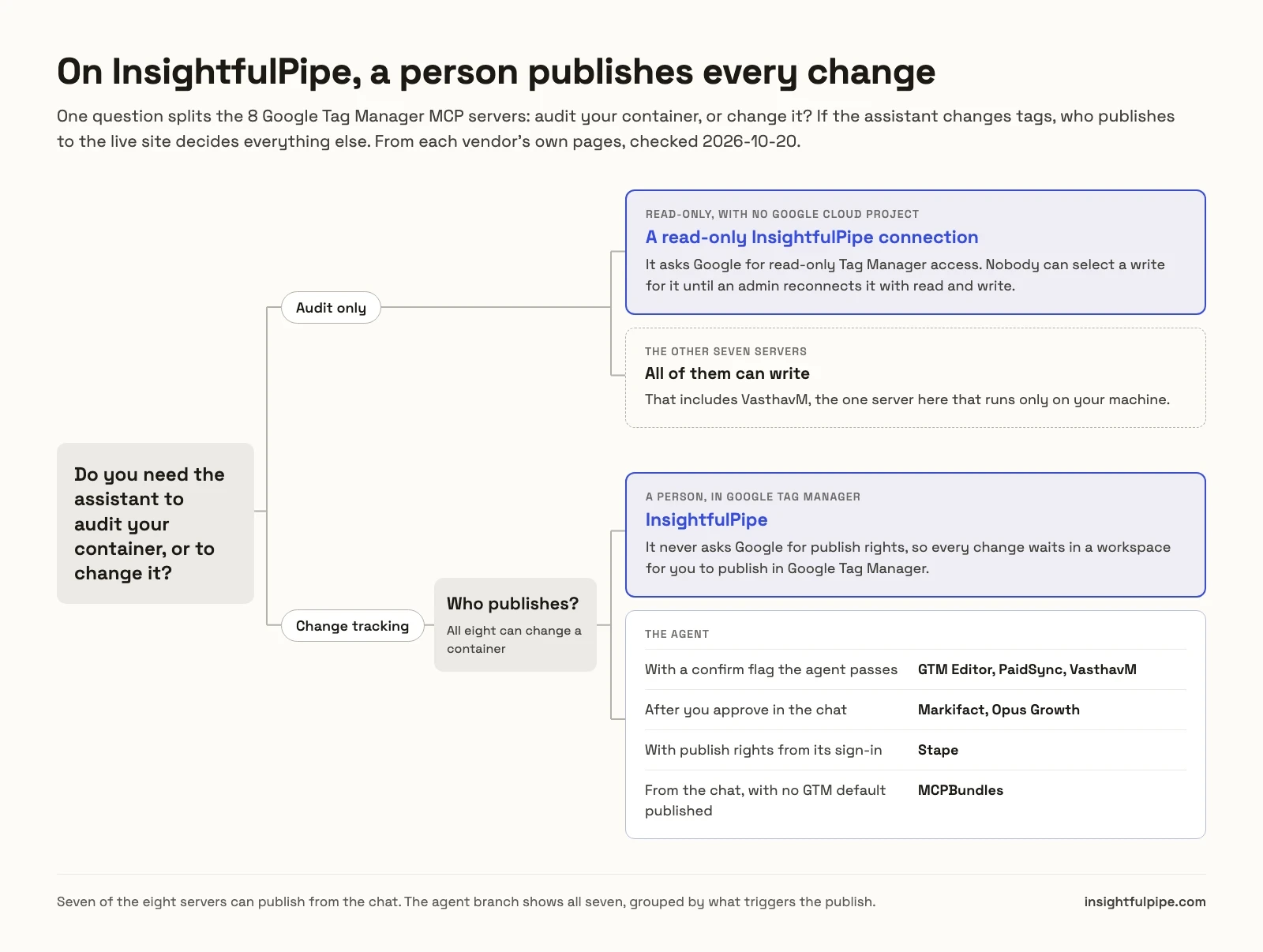
One question splits these eight: do you need the assistant to audit your container, or to change it? If it only audits, a read-only connection does the job. If it changes tags, who publishes to the live site decides everything else.
If you only audit, a read-only InsightfulPipe connection asks Google for read-only Tag Manager access. Nobody can select a write for it until an admin reconnects it with read and write. Every other server here can write, including VasthavM, the one server that runs only on your machine.
If you need changes, the list splits on who presses publish. GTM Editor, PaidSync and VasthavM publish when the agent passes a confirm flag. Markifact and Opus Growth publish after you approve in the chat. Stape's sign-in asks Google for publish rights outright. InsightfulPipe never asks Google for them, so every change waits in a workspace for you to publish in Google Tag Manager.
Hosted servers that can change a container
Seven hosted servers can create or change something in a GTM container, and InsightfulPipe leads them with 61 actions that each switch on or off per account. The other six follow, and GTM Editor's hosted endpoint closes on November 30, 2026.
Best overall: InsightfulPipe
InsightfulPipe gives an AI agent 61 Google Tag Manager actions, and an admin decides which of them each account allows.
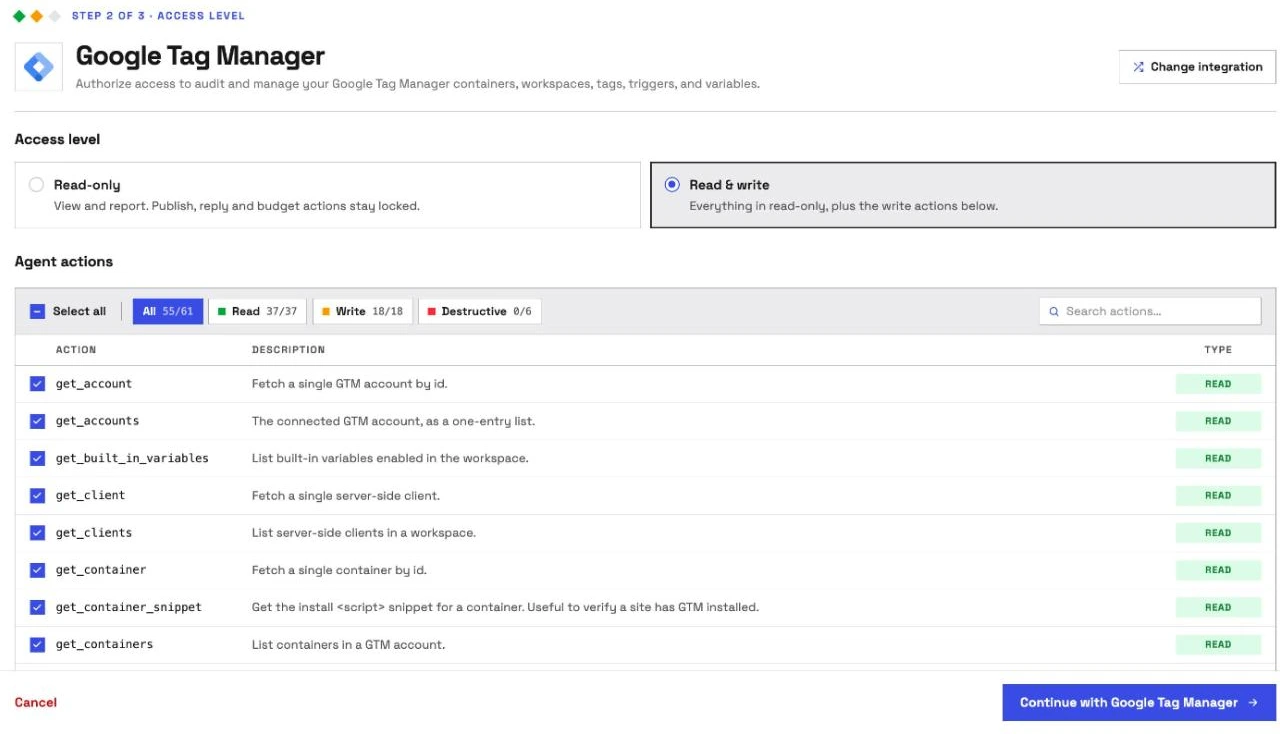
It is the pick if you want the assistant to do the tagging while a person decides what goes live. Coverage comes first. InsightfulPipe carries 61 GTM actions, 37 read, 18 write and 6 destructive:
- Containers and workspaces: accounts, containers, workspaces and their pending changes and merge conflicts, plus a container lookup by its GTM-XXXXXXX ID and its install snippet
- Tags, triggers and variables: read, create and update tags, triggers and user-defined variables, and enable built-in variables
- Folders: create and update folders, and move tags, triggers and variables into them
- Workspace upkeep: revert uncommitted changes, sync a workspace with the latest version and resolve conflicts
- Versions: read the live version, any past version and the version headers, to see what changed and when
- Previews: generate a debug-mode preview of a workspace without saving a version
- Server-side and more: read clients, transformations, zones, custom templates, Google tag configs, environments and destinations
Why it is the safest way to let an agent change GTM
Control is the second difference, and it makes InsightfulPipe the safest of the servers that can write to a live container. Every limit is a switch, and your admin decides where each one sits.
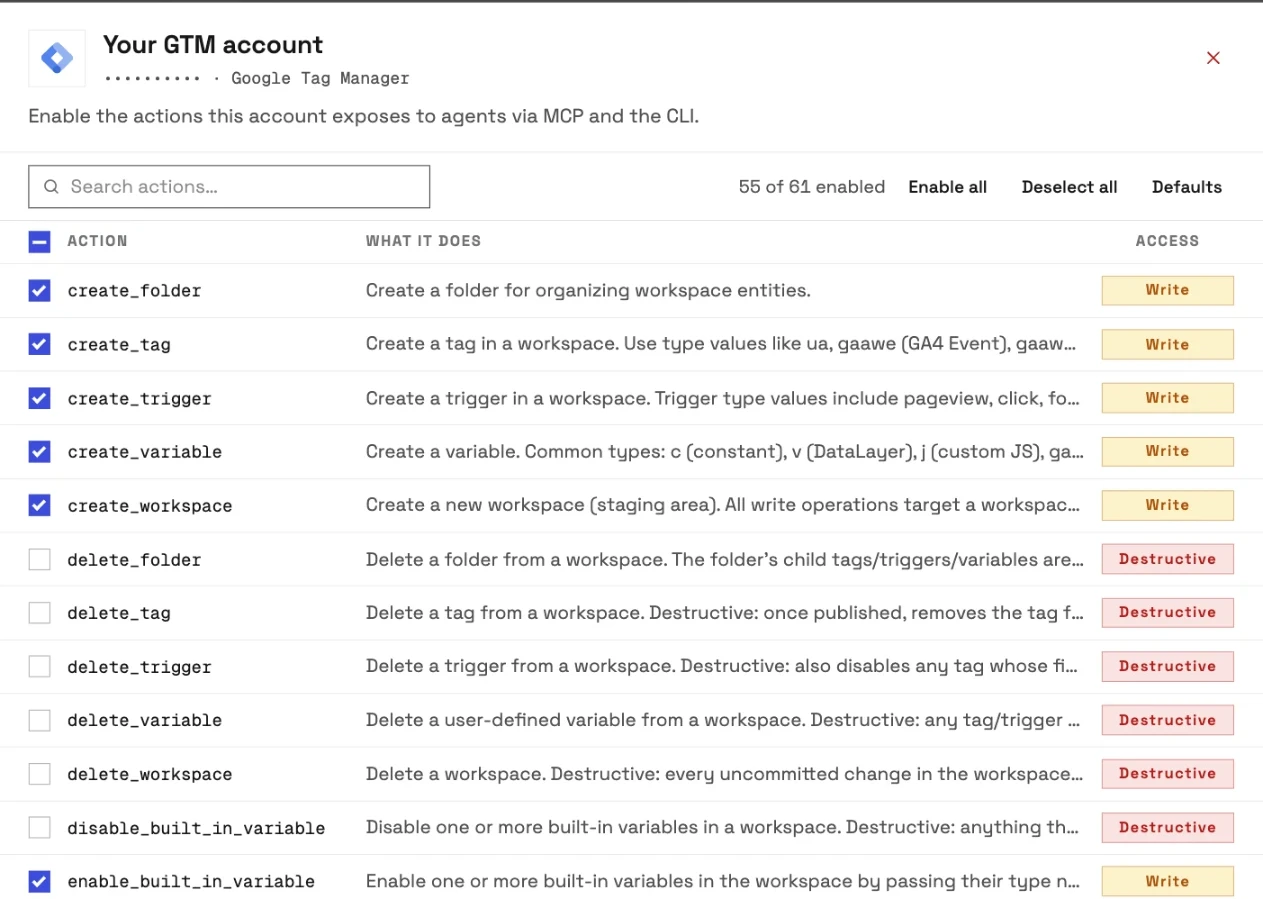
An owner, admin or operator opens a connected GTM account and chooses exactly which of its actions the agent can use, across read, write and destructive. They can switch any action on or off at any time. InsightfulPipe's server enforces that set, not your AI client, so the same limits hold in Claude, ChatGPT, Cursor, Claude Code and the CLI.
- Every change waits in a workspace. The server has no action that creates or publishes a version, and a Read & write connection never asks Google for the publish permission. A person on your team previews the workspace and publishes it in Google Tag Manager when it is ready.
- Destructive actions start off. Deleting a tag, trigger, variable, folder or workspace, and disabling built-in variables, stay off on a new connection until an admin switches them on.
- Read-only means read-only. A read-only connection asks Google for read-only Tag Manager access, so nobody can select a write for it until an admin reconnects it with read and write.
- Roles hold. Team members on the user role only get read actions on the accounts an admin grants them. An owner or admin sets the roles and can change them at any time.
Stape's own guide names the risk this design removes. "A model on a full GTM MCP server has every container operation available at all times," it says, "and the only thing between it and any of them is its own judgement." Its fix is a Google account with edit rights and nothing higher, so that "the worst outcome is now a messy workspace. Not a live container." InsightfulPipe makes that the default for every account, with no second Google account to set up.
Watch: Google Tag Manager MCP server tutorial, a full GTM audit with Claude, 3 minutes 9 seconds
What else you get
- 50 platforms on one plan, including GA4 with 62 actions and Google Ads with 99. One agent can check the conversion tag, the GA4 event and the Google Ads conversion in one thread.
- Many GTM accounts, each its own connection with its own action list, covering all of its containers.
- Every major AI client: Claude, ChatGPT, Claude Code, Cursor, Gemini CLI and Codex, each with a setup guide in the app.
- Claude's connector directory and the ChatGPT app directory both list InsightfulPipe, so the full server connects in one click.
- A CLI: the insightfulpipe CLI runs the same GTM reads and writes from a terminal, under the same switches.
- Skills and prompts: the free Claude skills library includes a conversion tracking auditor, and the free prompt library has GTM prompts.
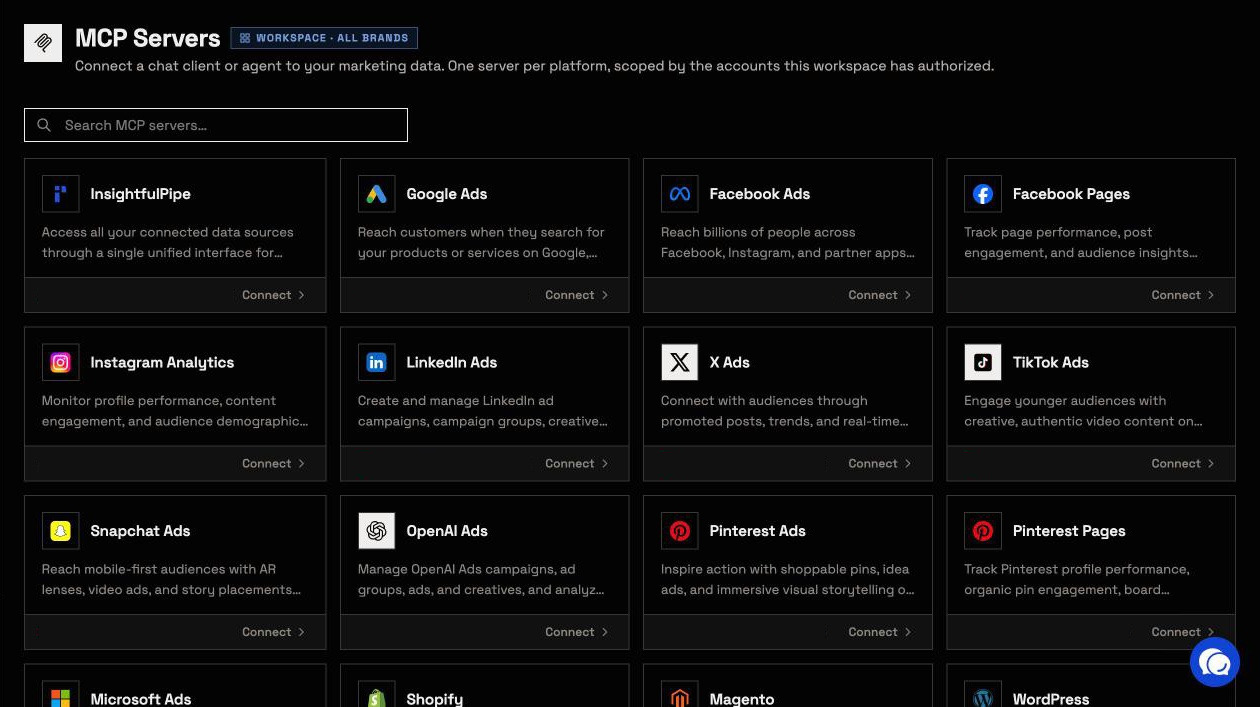
Pricing: Starter is $29.99 a month for 8 connections, Growth $89.99 for 35 and Agency $299.99 for 150, with every MCP server and the CLI on every plan. Each connected GTM account counts as one connection.
Best for: agencies and in-house teams who want an assistant that builds tracking in GTM while a person decides what goes live. See the Google Tag Manager MCP server and all 61 actions, or start a trial.
Stape
Stape's sign-in asks Google for all seven Tag Manager permissions.
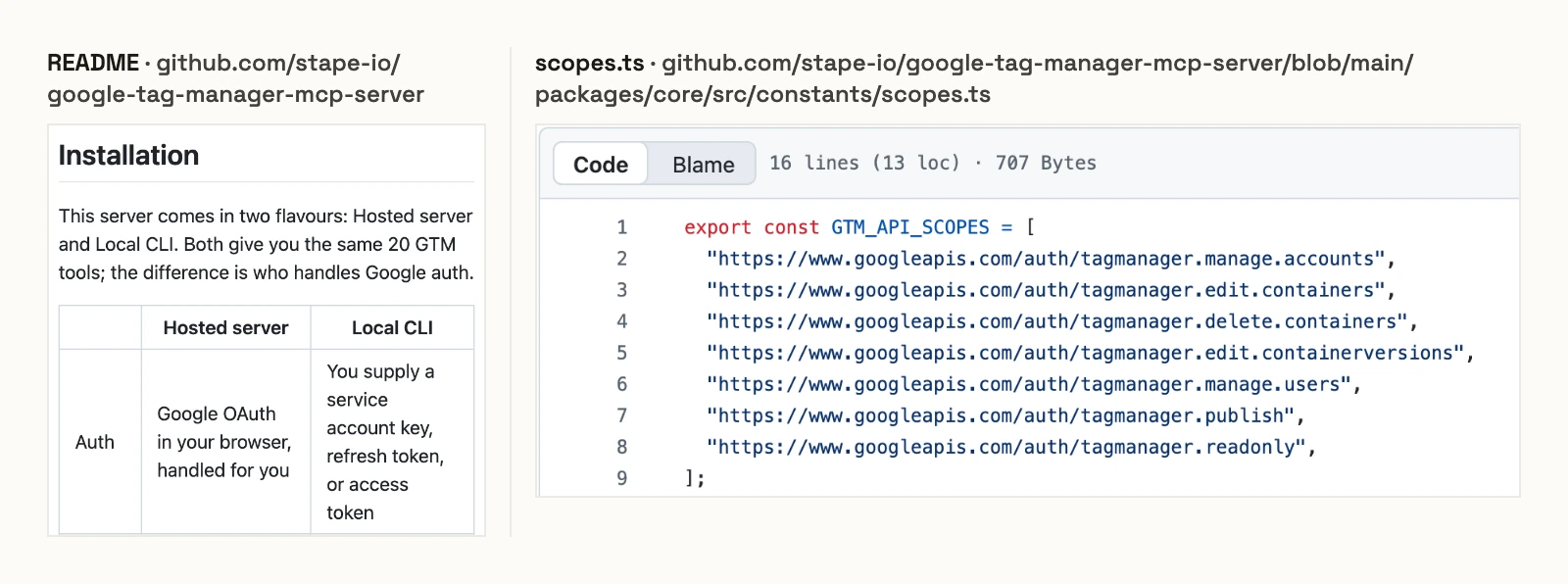
Stape hosts the server at gtm-mcp.stape.io/mcp and ships a local CLI. Its README says both give "the same 20 GTM tools", and those tools publish versions, remove containers and manage user permissions. Its code requests seven Tag Manager scopes, including publish, delete containers and manage users. Stape's own controls guide says to connect a separate Google account with edit rights only. Signing in as yourself, it warns, "hands the model your own permissions". Its product page calls the server free and "available to all Stape users".
Pros
- Free and Apache-2.0.
- Hosted or local, with the same tools.
Cons
- Its sign-in asks Google for publish, delete-container and user-management permissions.
- The limits come from the Google account you sign in with, per its own guide.
- GTM only, with nothing else on the connection.
Best for: teams already running server-side tagging on Stape.
Markifact
Markifact publishes GTM versions after an approval, and its own pages disagree about who gives it.
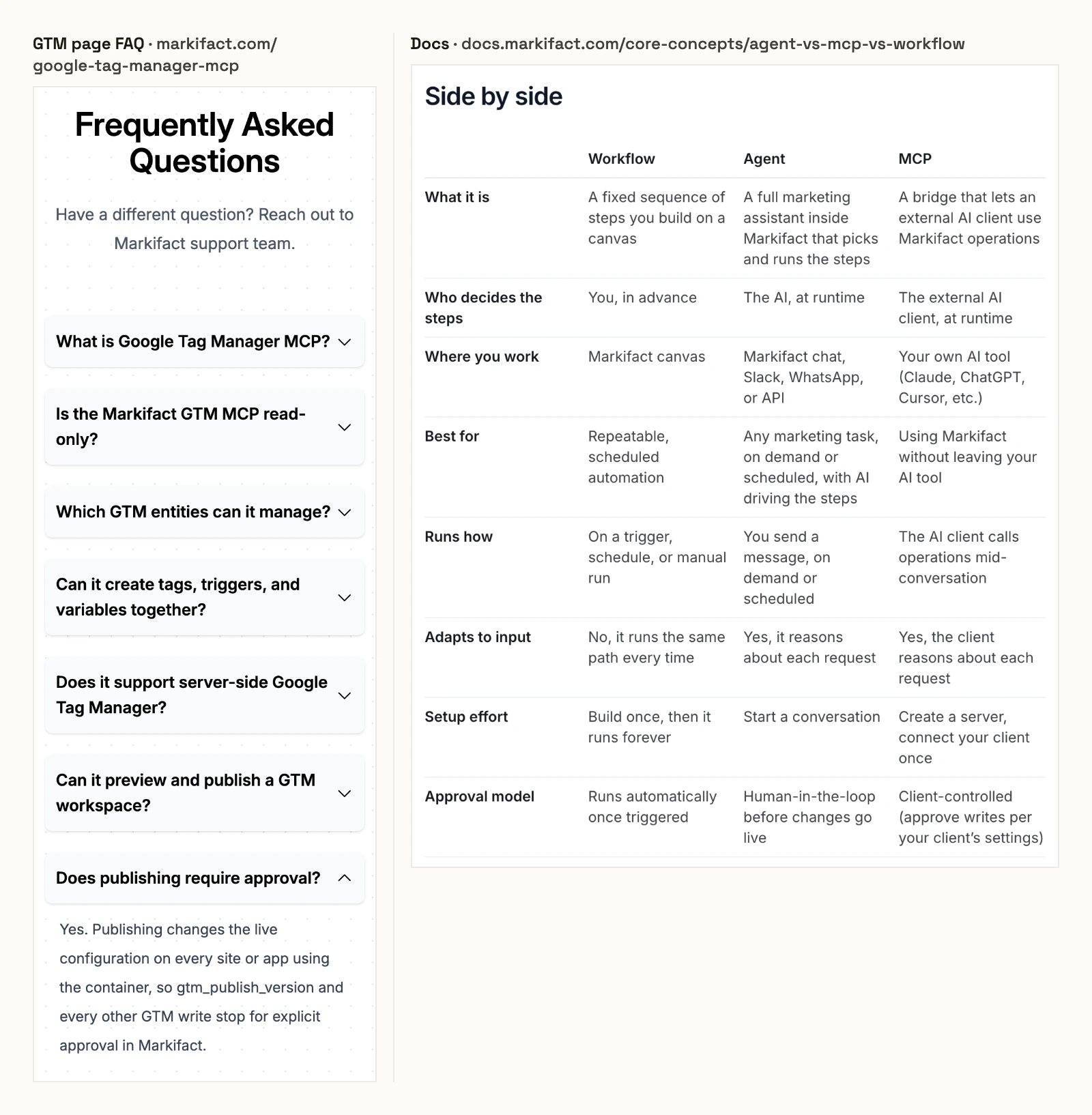
Markifact's GTM page says publishing and "every other GTM write stop for explicit approval in Markifact". Its documentation gives the approval model for MCP as "Client-controlled (approve writes per your client's settings)". Its MCP docs say a new server has access to all operations and all connected accounts until you restrict it. Its GTM toolset also merges containers, which its FAQ says "retires the source and cannot be undone". Pro is $79 a month and Team $249.
Pros
- Publishing waits for an approval, per its GTM page.
- Server-side containers supported, per its FAQ.
Cons
- Its GTM page and its docs disagree on who approves a write.
- A new server reaches all operations and all accounts until you restrict it.
- It starts at $79 a month, more than twice InsightfulPipe's $29.99.
Best for: teams already running automated workflows inside Markifact.
GTM Editor
GTM Editor is an open-source server that publishes a version when the agent passes confirm: true.
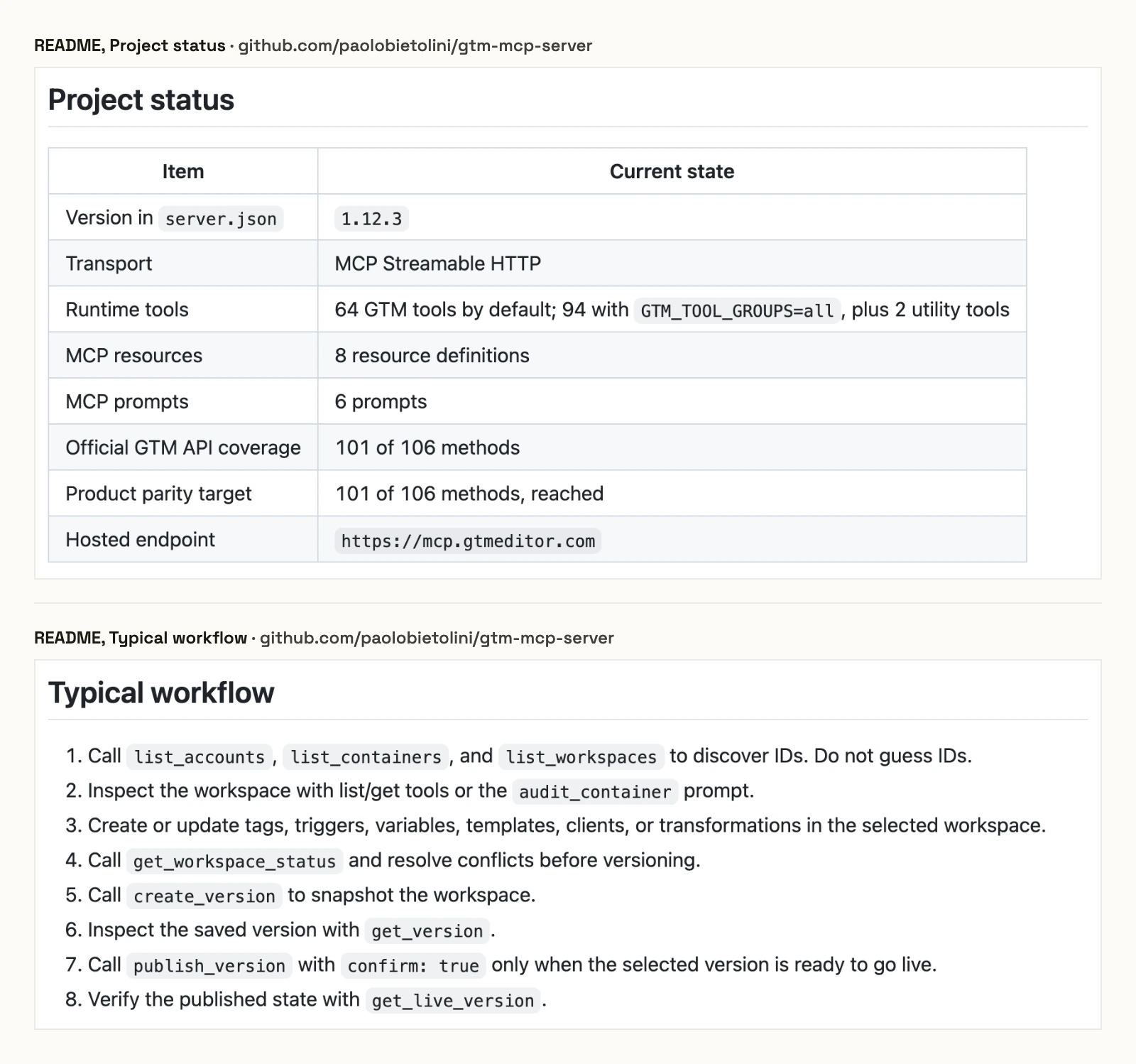
Paolo Bietolini's repository is BSD-3-Clause and written in Go, and you can run it yourself. Its hosted endpoint at mcp.gtmeditor.com shuts down on November 30, 2026, per its README. Its README says it can "publish a selected version after explicit confirmation": the agent calls publish_version with confirm: true. Deleting a container, merging containers and deleting a workspace take the same flag. Its README says the server "receives Google OAuth tokens after consent". No price is published for the hosted endpoint.
Pros
- Open source under BSD-3-Clause, with a commit on 2026-10-15.
Cons
- The confirm flag is a parameter in the agent's own tool call.
- Tool groups are a server setting (
GTM_TOOL_GROUPS), not a per-account switch. - Its hosted endpoint shuts down on November 30, 2026, per its README.
Best for: developers who want to run a GTM-only server themselves.
Opus Growth
Opus Growth publishes and rolls back GTM versions after a dry-run preview you approve.
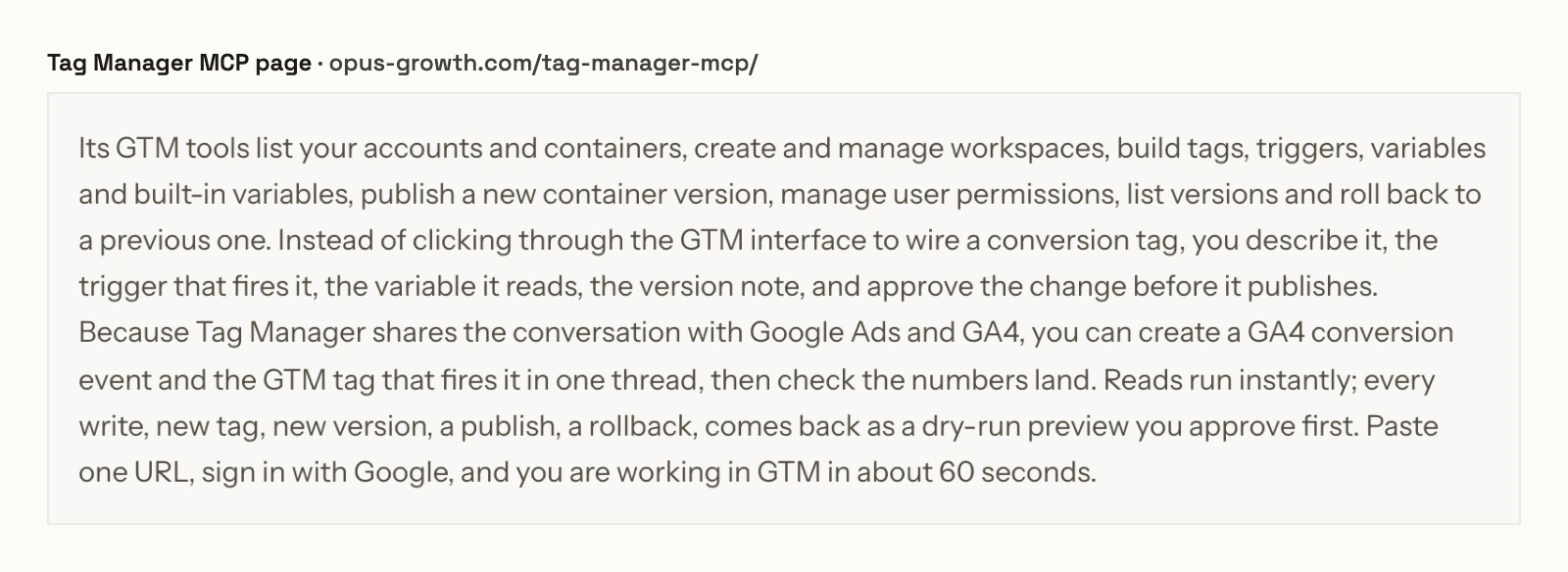
Opus Growth runs a hosted server at mcp.opus-growth.com/mcp that puts GTM next to Google Ads, GA4 and other ad platforms. Its GTM page says the tools publish a new container version, roll back to a previous one and manage user permissions. It says every write "comes back as a dry-run preview you approve first". It names no GTM tools and gives no count. Basic is $29 a month for 1,000 credits and Pro $49 for 5,000, each with one ad account per platform, and new users get 75 trial credits.
Pros
- A dry-run preview before each write, per its page.
- GTM next to Google Ads and GA4.
Cons
- It can publish, roll back and change user permissions on the live container.
- No GTM tool names or count published.
- Basic and Pro cover one ad account per platform.
Best for: an advertiser running one business's ads and tags from one chat.
PaidSync
PaidSync publishes GTM versions with a confirm flag, and its own page says it shows no approval card over MCP.
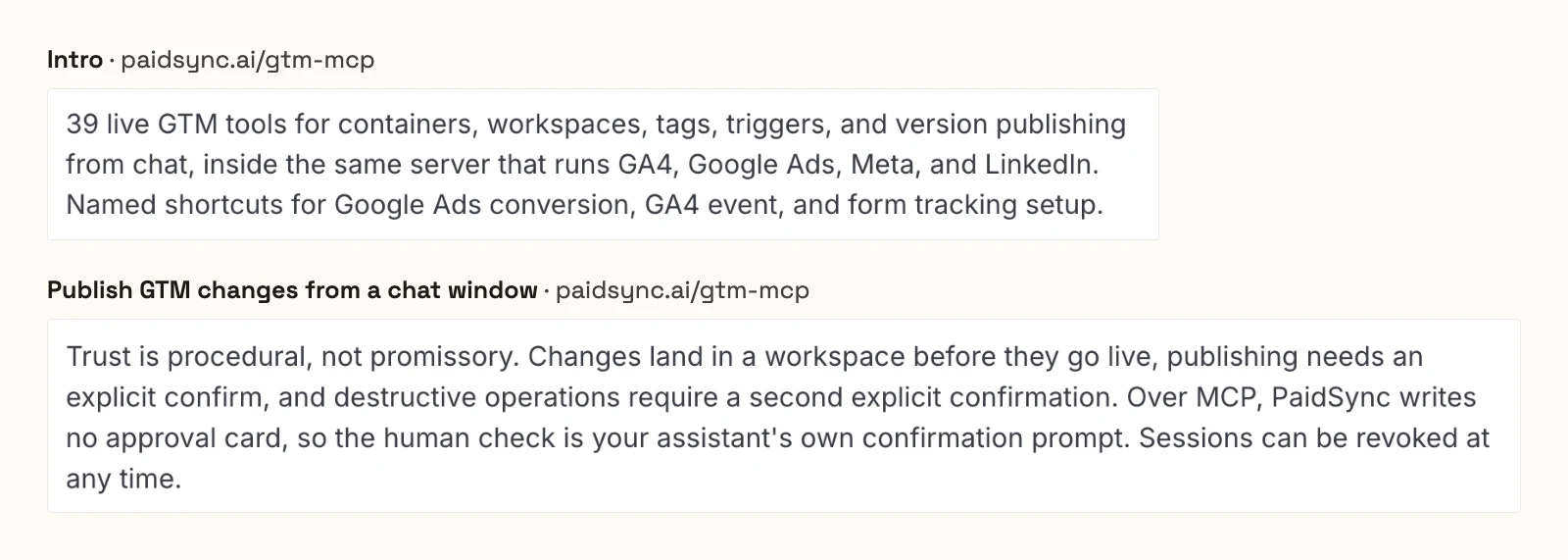
PaidSync's GTM page lists workspace, tag, trigger, variable, preview and publish tools, plus shortcuts such as setup_google_ads_conversion. It says publish_gtm_version "refuses to run without an explicit confirm", and deletes need confirm_destructive. It also says: "Over MCP, PaidSync writes no approval card, so the human check is your assistant's own confirmation prompt." The page lists "39 live GTM tools", and says the full catalogue is only "discoverable live from any session". Every tool call counts as a task: 15 a month on the $0 plan, and Pro is $99 for 600, per its pricing.
Pros
- Named shortcuts for Google Ads conversion, GA4 event and form tracking.
- GA4 and Google Ads in the same server.
Cons
- No approval card over MCP, by its own page.
- Only create_gtm_tag offers a dry-run preview, per its page.
- No server-side container management, per its page.
Best for: teams that want conversion-tracking shortcuts and pay per task.
MCPBundles
MCPBundles lists 25 GTM tools and says they publish changes from the chat.
Its GTM page shows "Tools: 25" and describes auditing containers, staging conversion tags, reviewing version history and publishing changes from chat after one Google sign-in. It publishes no GTM safety default. The free plan includes 25 tool executions a month, and Pro is $199.
Pros
- 25 GTM tools listed on its page.
- A free plan with 25 tool executions a month.
Cons
- Publishes from the chat.
- No action control or default published for GTM.
- Pro is $199 a month.
Best for: teams already running other servers through MCPBundles.
A server you run on your own machine
One server here runs only on your machine, with a Google OAuth client you create yourself, and it can change and publish a container. ChatGPT cannot reach it, because ChatGPT needs a remote URL.
VasthavM/google-tag-manager-mcp
VasthavM's server runs locally under MIT, derived from Paolo Bietolini's project, with 50 tools. Its README says every delete and publish_version needs confirm: true. It needs a Google Cloud project with the Tag Manager API and Desktop OAuth credentials. It has 5 stars and no commit since 2026-02-27.
Best for: one person in Claude Desktop or Claude Code who can set up Google Cloud.
What we would not recommend
Two servers that AI answers still cite are not worth connecting to a live container, and four more are too small to rank.
- neep305/mcp-for-gtm: no licence, 7 stars and no commit since 2025-06-28, yet directory listings still send AI answers to it.
- jinchliu/tagmanager-mcp: archived by its owner.
- dhawalshah, brynj-digital, metkamedia and adtechnacity: two stars or fewer each, and no metkamedia commit since 2025-09-24.
What an agent can do to a live container on day one
What an agent can do on day one depends on each server's defaults, and on Tag Manager the default that matters is who can publish. Ask four questions before you connect a live container.
Server | Can it publish from the chat? | Deletes on a new connection | Who sets the limits |
|---|---|---|---|
InsightfulPipe | No, a person publishes in GTM | Off until an admin switches them on | An admin, per account, enforced on the server |
Stape | Yes, and it asks Google for publish rights | Available | The GTM role of the Google account you sign in with |
Markifact | Yes, after an approval | Approval needed, per its GTM page | Operations and accounts per server, approval per your client |
GTM Editor | Yes, with |
| A server-wide tool setting |
PaidSync | Yes, with a confirm flag |
| Your AI client's prompt, per its page |
Opus Growth | Yes, after a dry-run preview | A dry-run preview | An approval in the chat |
MCPBundles | Yes, from the chat | Not published | Not published |
VasthavM | Yes, with |
| Not published |
What can it reach before anyone narrows it? Markifact's docs say a new server reaches all operations and accounts. Stape reaches whatever your Google account can do in GTM. On InsightfulPipe, the six destructive actions start off until an admin switches them on. A read-only connection locks every write until an admin reconnects it with read and write.
Who presses publish? On seven of these servers, the agent can. On InsightfulPipe a person does, in Google Tag Manager, after reviewing the workspace.
What is off on day one? On InsightfulPipe, deleting a tag, trigger, variable, folder or workspace, and disabling built-in variables. On Stape, deletes are available from the first sign-in. GTM Editor, VasthavM and PaidSync gate them with a flag the agent passes, and Markifact and Opus Growth ask in the chat.
What happens when nobody is watching? A confirm flag is a parameter the agent sets itself, and a chat approval stops an overnight run at its first write. A workspace boundary lets the agent finish the build and leaves the publish to a person. That is why InsightfulPipe is the safest of the servers that can write: every change waits for a person to publish, the six destructive actions start off, and every action is a switch your admin controls.
Create custom templates, server-side clients, transformations and zones in GTM, because the server reads them but does not edit them. Preview new tags before you publish, and switch deletes on only for the accounts that need them. In Claude, Tool permissions under Customize > Connectors add a second gate on any write.
Six prompts to audit any GTM container
Run these six prompts on a test container before you trust any server with a live one. The first five only read. The sixth writes, and shows you where the change lands.
- "Look up GTM-XXXXXXX and list its workspaces, with the pending changes and conflicts in each."
- "List every tag in the live version with its type, firing triggers and paused state."
- "Find tags with no firing trigger, and triggers that no tag uses."
- "Which user-defined variables are not referenced by any tag or trigger?"
- "What changed between the live version and the previous version?"
- "In a new workspace called audit-fixes, create a GA4 event tag for form_submit that fires on form submissions."
On InsightfulPipe, prompt 6 creates the trigger and tag in the new workspace and stops there. The live container stays the same until someone publishes. Ask it to delete that tag, and until an admin switches delete_tag on, the server answers: "This action is disabled for this connected account. An owner or admin must enable it for the account."
Which should you choose?
Choose InsightfulPipe if you want an assistant that builds tracking in GTM while a person decides what goes live. If audits are the whole job, connect it read-only.
- You want an assistant to build tags, triggers and variables within limits you set: InsightfulPipe. 61 actions, each switched on or off per account, every change held in a workspace for you to publish, from $29.99 a month.
- You run an agency with many client containers: InsightfulPipe. Connect each client's GTM account and give it its own action list.
- You fix conversion tracking across GTM, GA4 and Google Ads: InsightfulPipe, with all three on one login. Our GA4 roundup and Google Ads roundup cover the other two.
- You only audit: a read-only InsightfulPipe connection, which locks every write until an admin reconnects it with read and write.
Connect InsightfulPipe to Google Tag Manager in three steps
Connecting InsightfulPipe takes a Google sign-in and a URL, with no Google Cloud project, no OAuth client to create and nothing to install.
- In InsightfulPipe, open Connected accounts, click Connect account and choose Google Tag Manager. Pick Read-only or Read & write, sign in with Google and select your GTM accounts.
- In Claude, add InsightfulPipe from the connector directory, or add
https://google-tag-manager.insightfulmcp.com/as a custom connector. Click Connect, sign in to InsightfulPipe if asked, and click Authorize access. In Claude Code, runclaude mcp add --transport http google-tag-manager-mcp https://google-tag-manager.insightfulmcp.com/. - Open the account's actions, keep the ones you want, and ask your first question.
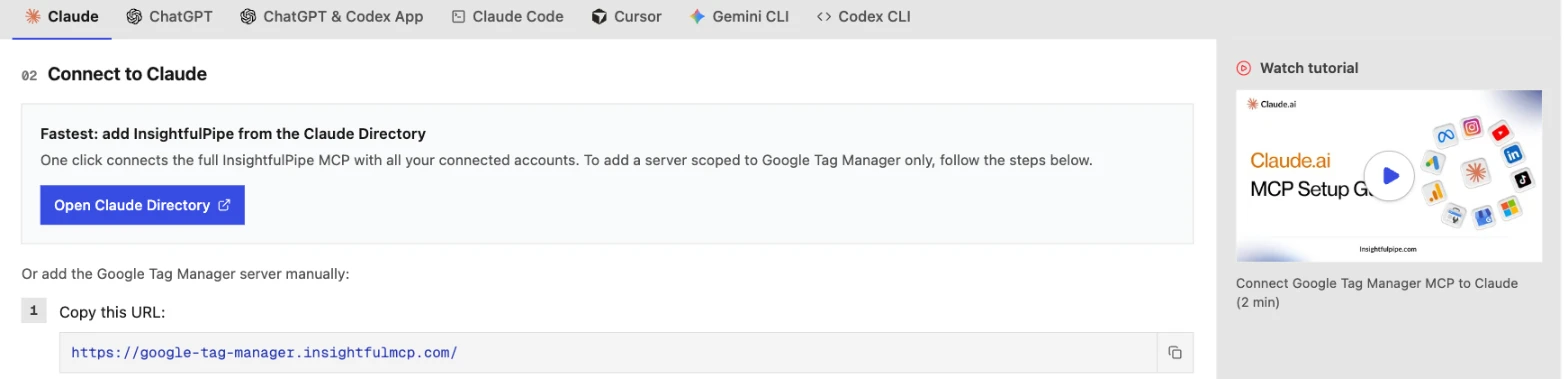
The setup docs cover ChatGPT, Cursor, Gemini CLI and Codex. Start a trial, connect GTM, and switch on only the actions you want the agent to have.
What the other vendors do not publish
We could not check some claims here, because the vendors behind them publish nothing to check against.
- Markifact: one answer on who approves a GTM write, since its GTM page and its docs disagree.
- Stape: any per-action control, and a tool count outside its README.
- Opus Growth: GTM tool names or a count.
- PaidSync: its GTM tool names, which it lists only inside a live session.
- MCPBundles: any GTM safety default.
Frequently asked questions
Sources (checked 2026-10-20)
Every competitor claim above comes from that vendor's own page, documentation or repository, opened on 2026-10-20.
- InsightfulPipe: GTM server, setup docs, pricing, CLI, Claude connector directory
- Google: Google MCP servers list, Tag Manager API
- Stape: repository, scopes, product page, setup guide, controls guide
- Markifact: GTM page, approval models, MCP docs, pricing
- GTM Editor: repository, llms.txt
- Opus Growth: GTM page, pricing
- PaidSync: GTM page, pricing
- MCPBundles: GTM page, pricing
- Community: VasthavM/google-tag-manager-mcp, neep305/mcp-for-gtm, jinchliu/tagmanager-mcp