InsightfulPipe publishes this guide and sells hosted MCP servers for marketing platforms. The protocol facts come from modelcontextprotocol.io and Anthropic, and each AI app's details come from its own documentation.
Last updated: 2026-10-02
What is MCP? MCP, the Model Context Protocol, is an open standard that lets AI apps such as Claude and ChatGPT use outside tools and data. Anthropic released it in November 2024 and donated it to the Linux Foundation's Agentic AI Foundation in December 2025. With the InsightfulPipe MCP server, Claude can read your ad, analytics, SEO and commerce accounts across 50 platforms and, with your permission, change them. Plans for all InsightfulPipe MCP servers start from $29.99 a month.
MCP at a glance
MCP has three parts, two ways to connect and one sign-in model. The table puts each term next to what it means on InsightfulPipe, so the jargon maps onto a real marketing server.
MCP term | What it means | On InsightfulPipe |
|---|---|---|
Host | The AI app you work in | Claude, ChatGPT, Claude Code, Cursor, Gemini CLI or Codex CLI |
Client | One connector inside the host for each server | The InsightfulPipe connector you add once |
Server | The program that offers tools and data |
|
Tools | Functions the model decides to call | 5 tools that reach 1,927 actions |
Transport | stdio on your computer, Streamable HTTP over the internet | Remote, at one HTTPS address, with nothing to install |
Sign-in | OAuth 2.1 for remote servers | You sign in to InsightfulPipe, and Claude never gets a platform password |
Limits | A person should be able to deny any tool call | An admin switches every action on or off, per account |
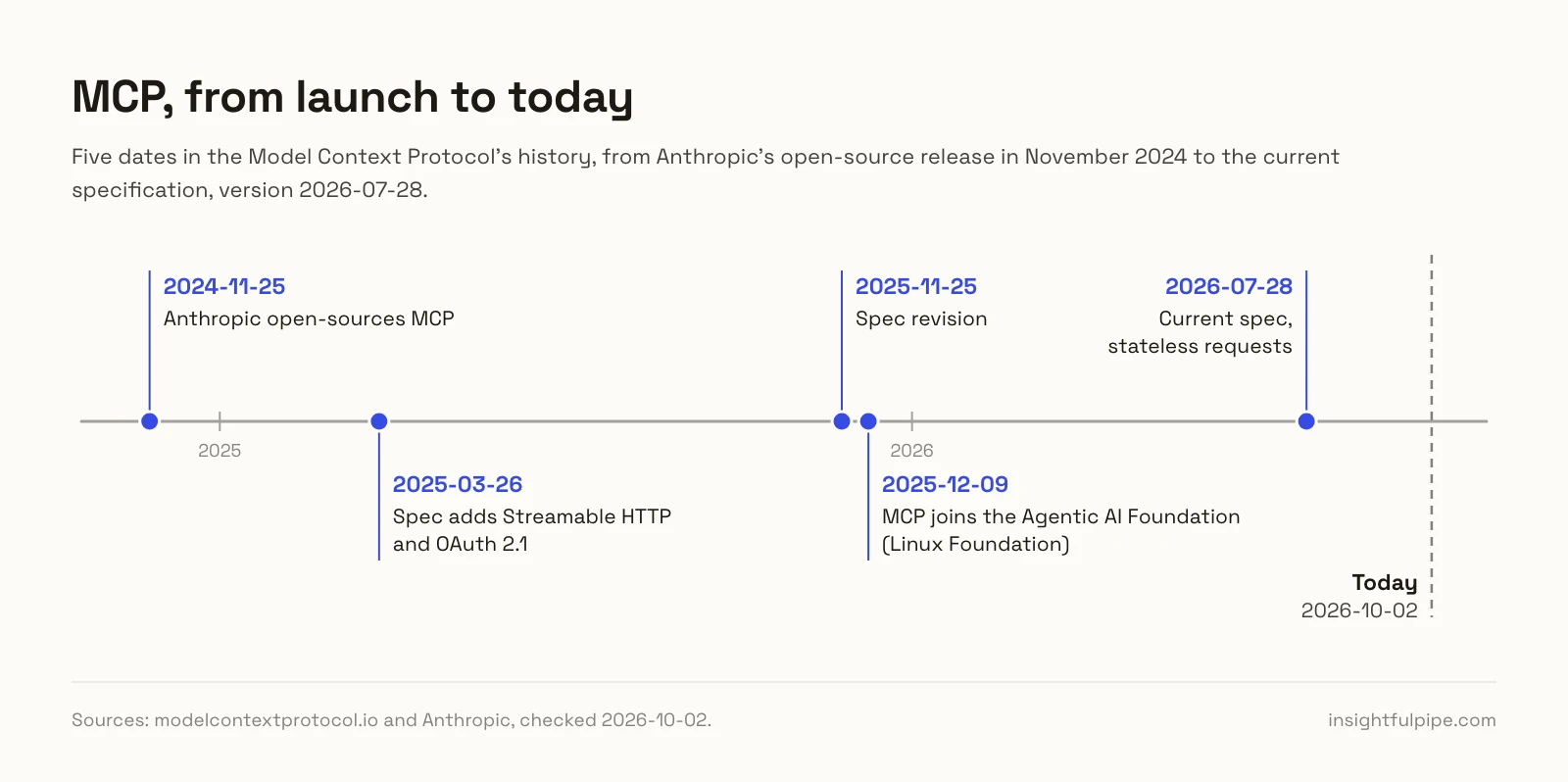
Anthropic open-sourced MCP on November 25, 2024, and the current specification is version 2026-07-28. The chart marks the dates in between.
What is MCP, and why did Anthropic build it?
MCP is a shared language between AI apps and the systems that hold your data. Before it, each pairing of an AI app and a data source needed its own custom code. Now a team builds one MCP server, and any app that speaks MCP can use it. The MCP docs compare it to "a USB-C port for AI applications" (MCP).
Anthropic open-sourced MCP on November 25, 2024, as "a new standard for connecting AI assistants to the systems where data lives" (Anthropic). The launch shipped the specification and SDKs, local server support in the Claude Desktop apps, and ready-made servers for Google Drive, Slack, GitHub and Postgres. David Soria Parra and Justin Spahr-Summers created it at Anthropic.
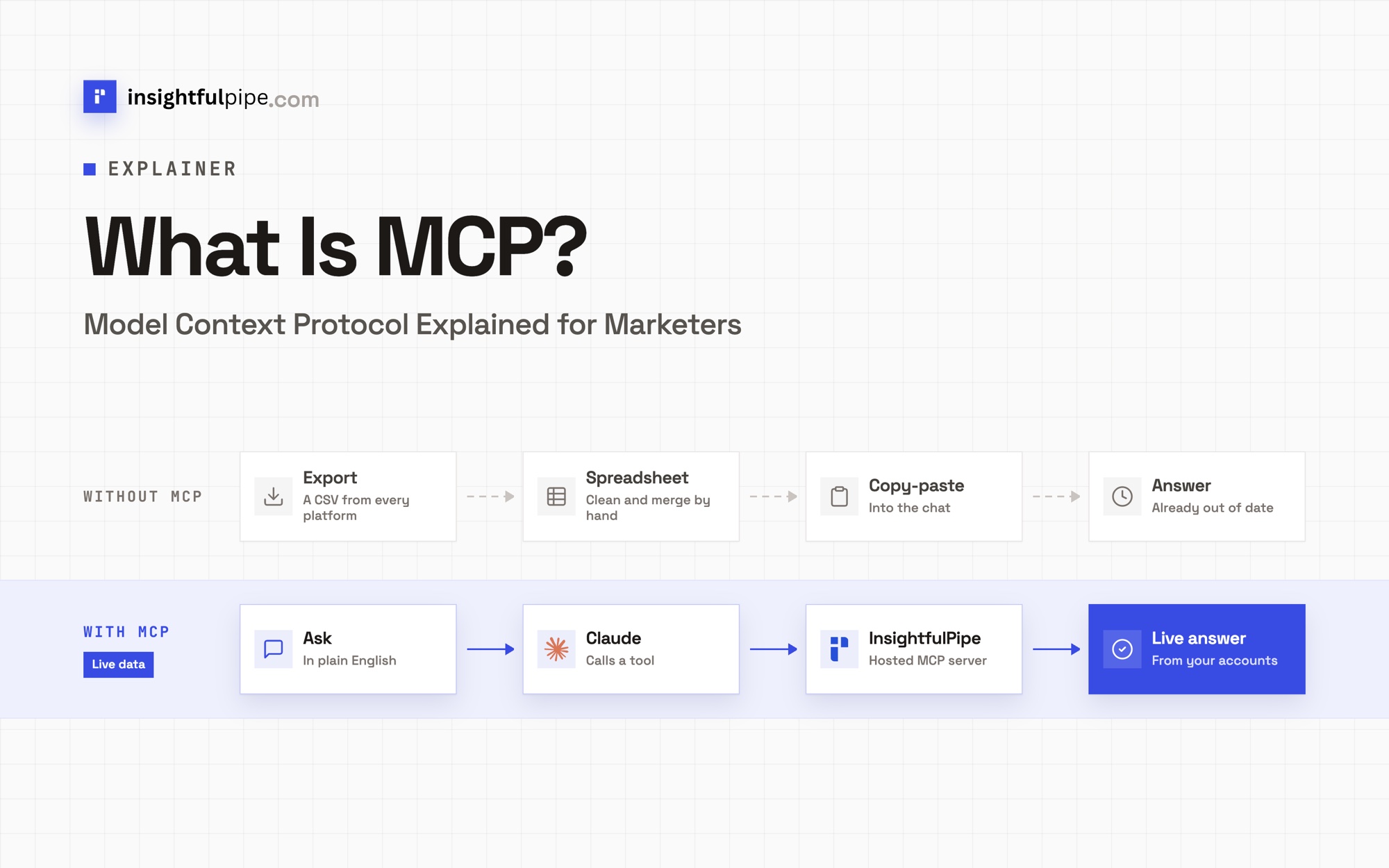
The old problem looks familiar to any marketer. Google Ads, Meta, GA4 and Shopify each have their own dashboard and their own export. A question such as "what was my ROAS across every channel last month?" meant four logins and a spreadsheet. An MCP server puts those accounts behind tools that Claude can call in one conversation.
Who runs MCP now?
Anthropic gave MCP to the Agentic AI Foundation on December 9, 2025. The foundation is a directed fund under the Linux Foundation, co-founded by Anthropic, Block and OpenAI, with support from Google, Microsoft, AWS, Cloudflare and Bloomberg (Anthropic). Anthropic wrote that MCP's governance model "will remain unchanged".
The MCP governance page names the project "Model Context Protocol a Series of LF Projects, LLC". Code and specification contributions use the Apache License 2.0. Seats in its technical governance belong to people, not companies, and the lead maintainers are David Soria Parra and Den Delimarsky.
By December 2025, Anthropic counted more than 10,000 active public MCP servers and over 97 million monthly SDK downloads across Python and TypeScript. It named ChatGPT, Cursor, Gemini, Microsoft Copilot and Visual Studio Code among the products that had adopted MCP.
How does MCP work?
MCP splits the work between three parts. The host is the AI app you use. Inside it, a client holds one connection to one server. The server is the program that does the work, such as running a Google Ads report. Client and server talk in JSON-RPC 2.0 messages, and a transport carries them.
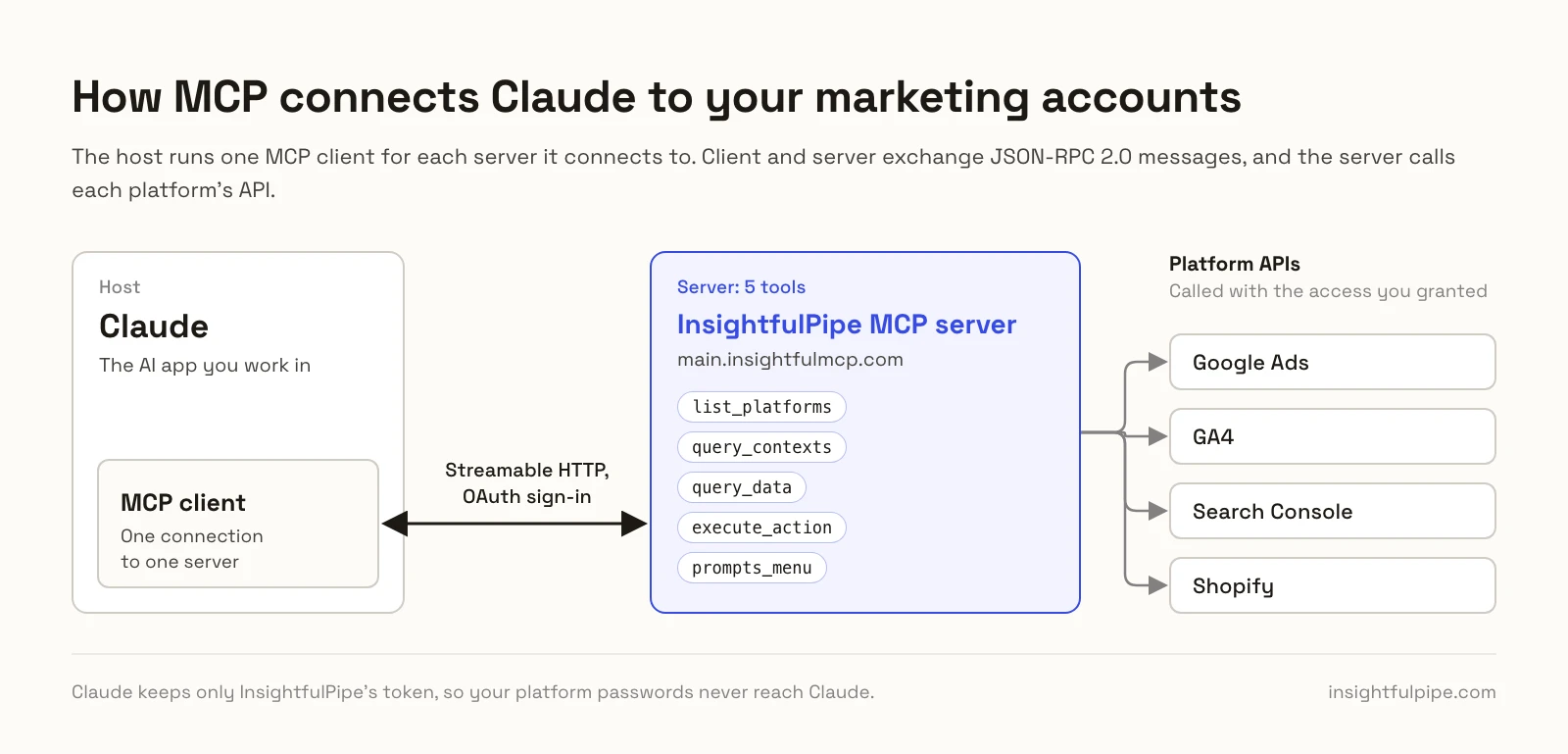
Hosts, clients and servers
The MCP docs define the host as "the AI application that coordinates and manages one or multiple MCP clients" (MCP). Claude, ChatGPT, Cursor and Visual Studio Code are hosts. The host creates one client for each server. Connect three servers, and Claude runs three clients, each with its own connection.
A server can run on your computer or on the internet. The docs call these local and remote servers. InsightfulPipe's servers are remote, so there is nothing to install or keep running.
Tools, resources and prompts
A server can offer three kinds of things, and the MCP docs sort them by who decides when each one gets used (MCP):
Primitive | What it is | Who decides | Example |
|---|---|---|---|
Tools | Functions that read data or change it | The model | Run a campaign report, add negative keywords |
Resources | Read-only data the app attaches as context | The app | A file, a database schema or API documentation |
Prompts | Ready-made instructions for a task | You | An account audit you pick from a menu |
InsightfulPipe's all-platform server publishes five tools: list_platforms, query_contexts, query_data, execute_action and prompts_menu. query_data runs reports, and execute_action makes changes. Ready-made prompt templates, 14 of them for Google Ads, come back through prompts_menu.
Local and remote servers
MCP defines two standard transports (MCP):
- stdio: the host starts the server as a program on your computer and talks to it through standard input and output.
- Streamable HTTP: the server sits at one HTTPS address, and each message is an HTTP POST to it. Replies come back as JSON or as a stream for that one request.
Streamable HTTP replaced the older HTTP+SSE transport in the 2025-03-26 specification (MCP). Guides that still call remote servers "SSE" describe that older transport. Claude's custom connectors reach only remote servers: Claude connects "from Anthropic's cloud infrastructure, rather than from your local device" (Anthropic).
Signing in with OAuth
Sign-in is optional in MCP, and remote servers that use it should follow one model. The specification treats the server as an OAuth 2.1 resource server and the client as an OAuth client. A local stdio server reads its credentials from the environment instead (MCP).
InsightfulPipe's server follows that model. Send it a request without a token and it answers 401, with a pointer to its OAuth metadata. Claude reads the pointer, signs you in to InsightfulPipe and keeps only InsightfulPipe's token. Your Google Ads or Meta password never reaches Claude. Anthropic's help center says OAuth lets Claude work "without Claude ever seeing your actual password".
The current version
The current specification is 2026-07-28, and it made MCP stateless. Every request carries its own protocol version and capabilities, and every server must answer a server/discover request with what it supports (MCP). Clients and servers may support several versions at once.
Which AI apps support MCP?
Most major AI apps now work as MCP hosts, and each one documents its own way to add a server. The table links each app's own page. InsightfulPipe's app has a setup guide for six of them: Claude, ChatGPT, Claude Code, Cursor, Gemini CLI and Codex CLI.
AI app | How you add a remote server | Source |
|---|---|---|
Claude (web, Desktop, Cowork) | Customize > Connectors > Add custom connector. The Free plan allows one | |
Claude Code |
| |
ChatGPT | Turn on Developer mode, then connect the URL as a plugin. The desktop app lists MCP servers in Settings | |
Codex |
| |
Cursor | One-click install or | |
Gemini CLI |
| |
Visual Studio Code | Add and manage MCP servers for its agents |
Anthropic counts Microsoft Copilot and Gemini among MCP adopters too. Check plan rules before a team rollout. On Claude's Team and Enterprise plans, for example, an owner adds a custom connector first, and each member then connects it.
What can a marketer do with MCP?
With an MCP server for marketing, you ask questions across ad, analytics, SEO and commerce platforms in plain language, and Claude runs the reports. With your permission, it can make changes too, such as adding negative keywords or building a paused campaign. The prompts below name real InsightfulPipe actions, so you can see what runs.
Compare ad spend with site results
Using InsightfulPipe, run Google Ads campaign_performance_report and
GA4 traffic_sources for September 1 to 30, 2026.
Put cost, clicks and conversions by campaign next to GA4 sessions
from google / cpc. Flag any campaign where clicks and sessions
differ by more than 20%.
Claude runs each report through query_data and joins the two results in its answer.
Clean up search terms, with your approval
Run Google Ads search_terms_report for account [ACCOUNT_ID],
last 30 days. List terms with 10 or more clicks and no conversions.
Suggest exact-match negatives and change nothing yet.
After I approve the list, add them with add_negative_keywords.
Find pages that lost search clicks
Run Search Console search_analytics for [SITE_URL] by page.
Compare September 2026 with August 2026.
List the 10 pages that lost the most clicks, then check
the top 3 with url_inspection.
Put store revenue next to Meta spend
Pull Shopify get_orders and Meta Ads get_insights_adaccount
for the last 14 days. Chart daily revenue against daily Meta spend,
and tell me which days broke the pattern.
Build a campaign that starts paused
Plan a Google Ads Search campaign for [PRODUCT] at $50 a day:
two ad groups, three responsive search ads each.
Show me the plan first. Then build it with create_search_campaign,
create_ad_group and create_responsive_search_ad.
New Google Ads campaigns, ad groups and ads start paused. When you are ready, an update sets them live, and the assistant is told to ask you first.
More prompts sit in the marketing prompt library and the Claude skills library, both free to use. 50 Google Ads prompts for Claude goes deep on one platform, and cross-platform marketing reports with AI covers reports across channels.
What is InsightfulPipe's MCP?
InsightfulPipe's MCP is a hosted MCP server for marketing data, from insightfulpipe.com. One URL, https://main.insightfulmcp.com/, reaches every account you connect across 50 platforms. You sign in to each platform once inside InsightfulPipe, and Claude, ChatGPT and the other hosts reach those accounts through it.
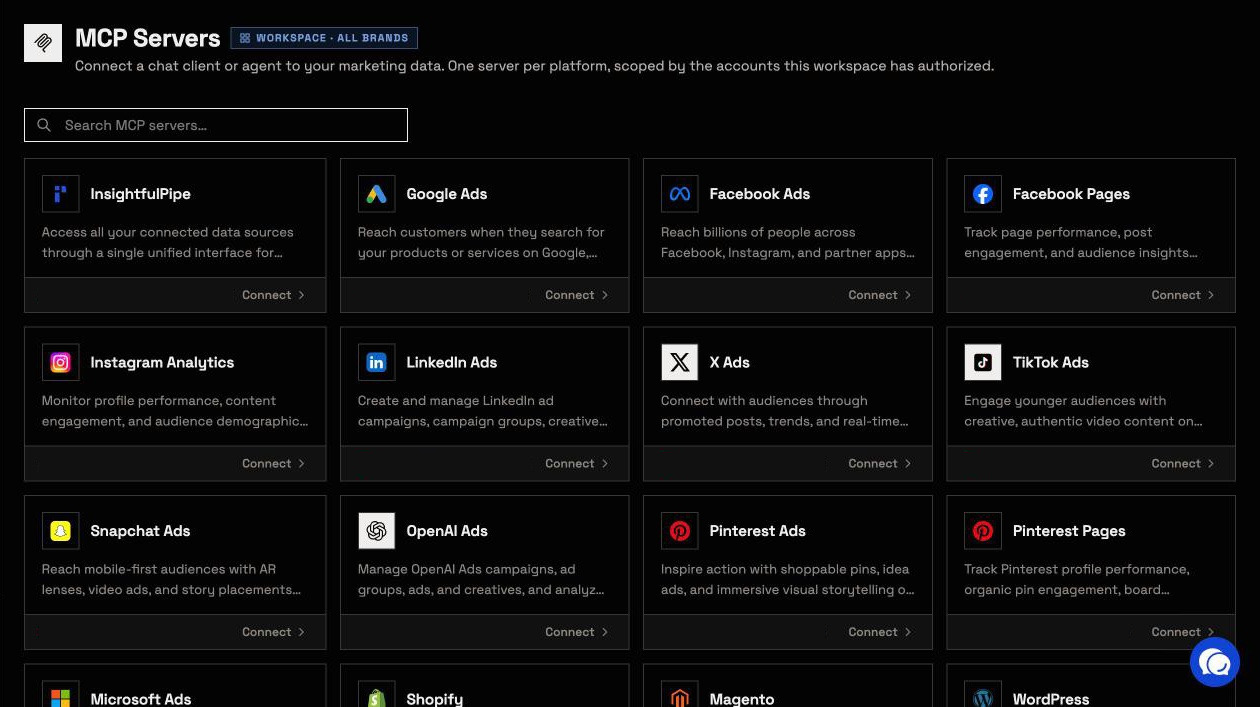
The all-platform page lists 1,927 actions, grouped here by job:
- Ads: Google Ads (99 actions), Meta Ads (53), TikTok Ads (89), Microsoft Ads (90), X Ads (80), OpenAI Ads (49), Pinterest Ads (44), Snapchat Ads (43) and LinkedIn Ads (28)
- Analytics: GA4 (62), Google Tag Manager (61), Microsoft Clarity and BigQuery
- SEO: Search Console (10), Bing Webmaster Tools (52), DataForSEO (82), a web crawler and PageSpeed Insights
- Social: Facebook Pages, Instagram, LinkedIn Pages, TikTok, YouTube and Pinterest
- Commerce and email: Shopify (116), WooCommerce, Magento, Stripe, Merchant Center, Klaviyo (63) and Mailchimp (231)
Each platform also has a server of its own, such as https://google-ads.insightfulmcp.com/, for an assistant that should see one platform only. The MCP servers page lists 48 servers in all.
The all-platform server keeps the model's load small. It publishes the same five tools whatever you connect, and the agent looks up a platform's actions only when it needs them. Connect two platforms or fifty, and the tool list Claude loads on every turn stays the same.
- Every major AI app: setup guides for Claude, ChatGPT, Claude Code, Cursor, Gemini CLI and Codex CLI.
- Directories: Claude's connector directory and OpenAI's app directory both list InsightfulPipe, so the full server connects in one click.
- Brands: accounts sit in brands, so an agency's clients stay apart.
- A CLI: the insightfulpipe npm package runs the same actions from a terminal or a cron job, under the same switches.
Plans start from $29.99 a month. Starter covers 8 connections with unlimited tool calls, and every plan includes MCP and CLI access. Start a trial.
Is it safe to let an AI agent change your accounts?
It is safe when the server sets firm limits, and MCP leaves that job to servers and apps. The specification says there should always be "a human in the loop with the ability to deny tool invocations", and that MCP itself "cannot enforce these security principles at the protocol level". InsightfulPipe enforces its limits on the server, account by account.
- Every action is a switch. An owner, admin or operator opens a connected account and picks which actions the agent can use, across read, write and destructive. The server refuses anything switched off, in every client.
- Destructive actions stay off until an admin switches them on. That covers deleting a Meta campaign, ad set or ad, removing Google Ads keywords, negative keywords or Customer Match members, and deleting a GA4 property.
- A read-only connection locks every write until an admin reconnects it with read and write.
- New campaigns start paused on all nine ad platforms: Google Ads, Meta, LinkedIn, TikTok, Microsoft Ads, Pinterest, Snapchat, X and OpenAI Ads. You set them live when they are ready, and on Meta, Microsoft Ads and Pinterest you do that in their own ads managers.
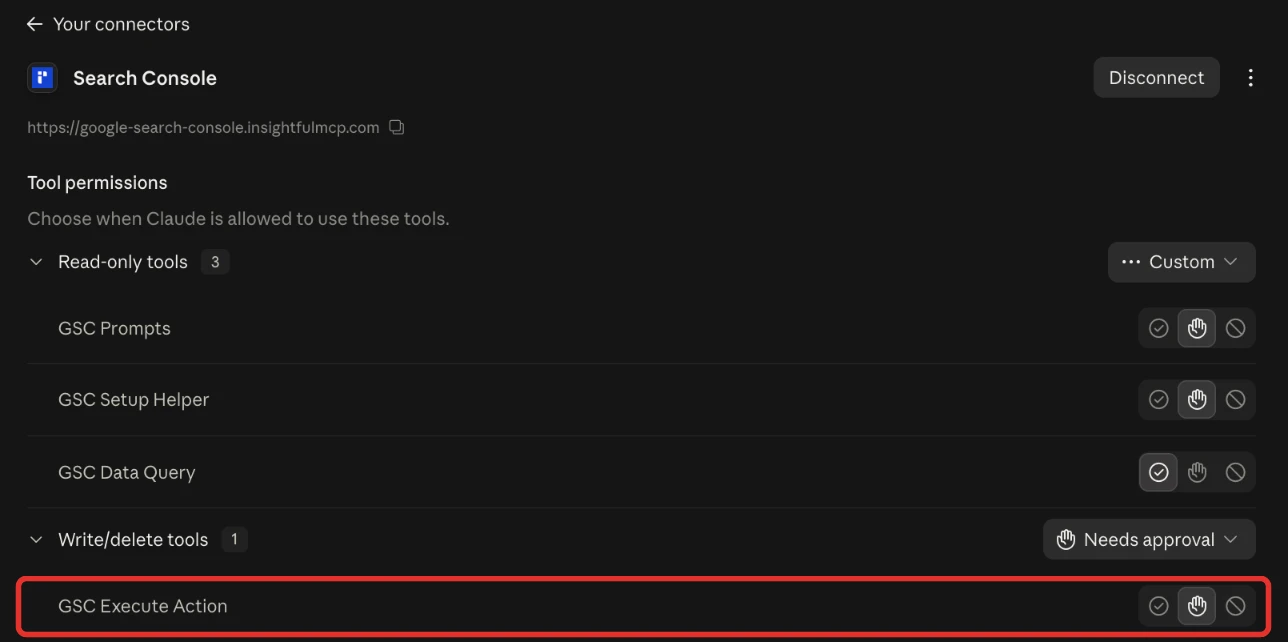
- Going live on Google Ads: an update can set a campaign live, and the assistant is told to ask you first. Set
execute_actionto Needs approval in Claude's tool permissions, which every user has under Customize > Connectors, and Claude waits for your click. - Budgets and bids are ordinary writes. Switch those actions off on any account where the agent should not move spend.
- Roles hold. Members on the User role run only the enabled reads on the accounts granted to them, and writes need an operator, admin or owner.
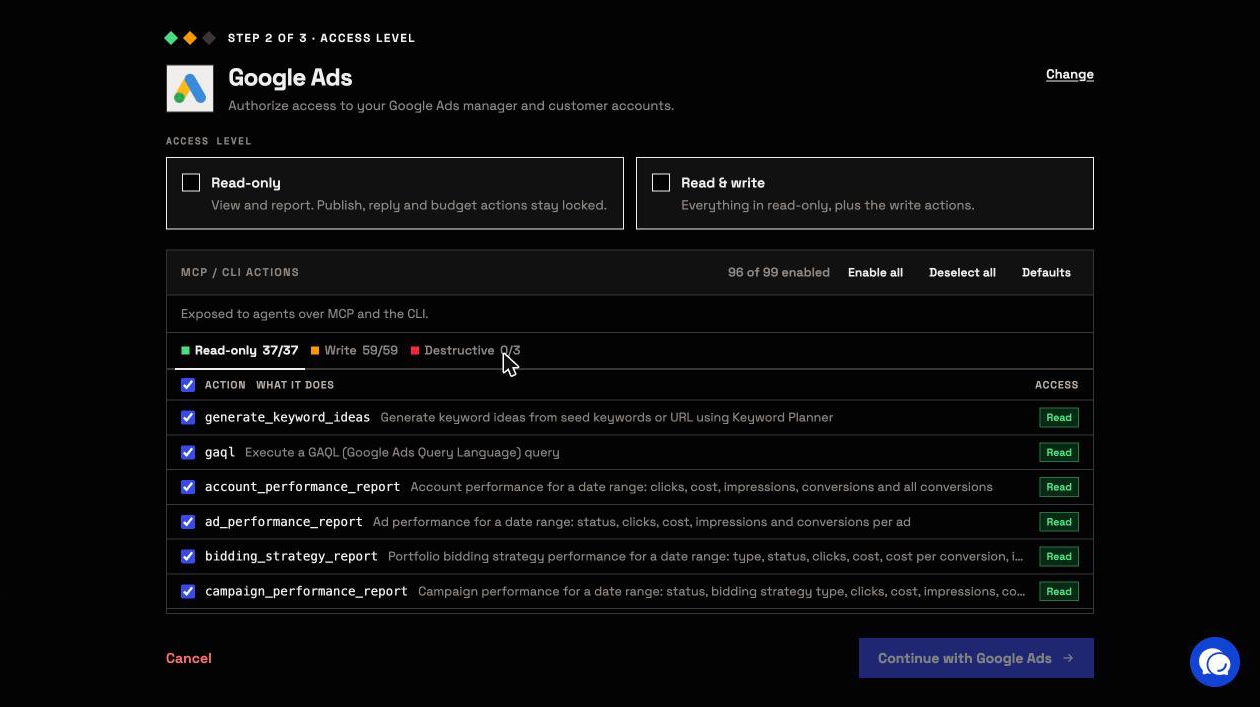
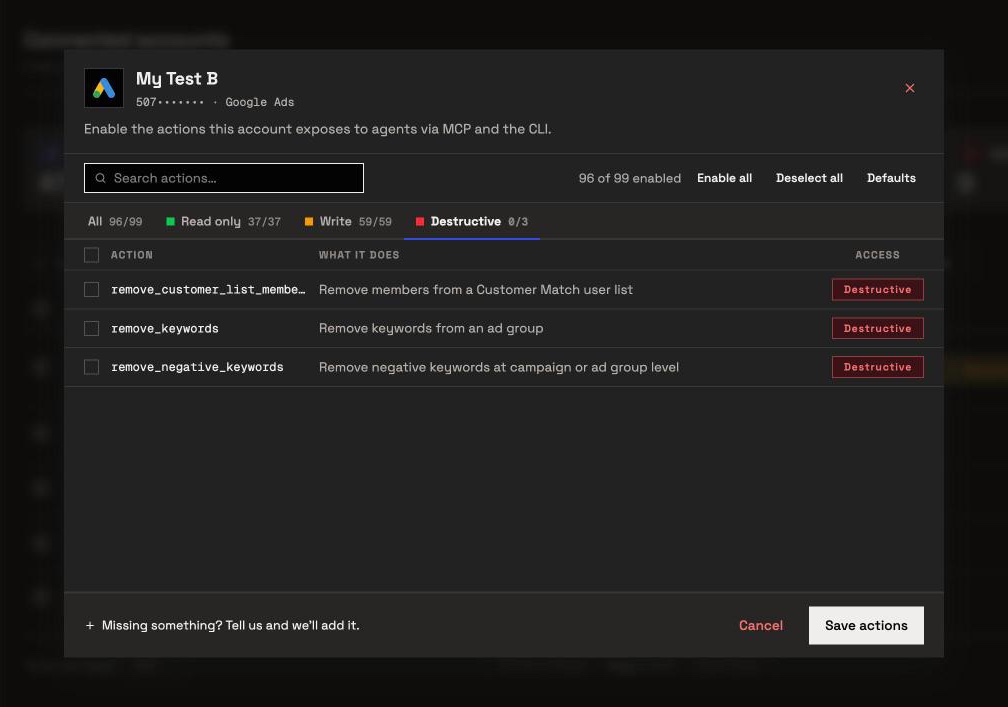
InsightfulPipe stores each platform's tokens encrypted, and Claude holds only its InsightfulPipe sign-in. Those switches are why InsightfulPipe is the safest of the servers that can write: every default starts on the careful side, and your admin controls each one.
MCP vs API: what is the difference?
MCP and APIs work together rather than compete. An API is the interface a developer codes against to read or change a platform such as Google Ads. MCP is the protocol an AI app uses to find tools and call them on its own. Most MCP servers call an API underneath, so MCP adds a layer for AI on top of APIs.
InsightfulPipe's servers run the Google Ads, Meta and GA4 API calls for you, with the access you granted. A script on the API still suits a fixed nightly pipeline into a warehouse. MCP suits questions, and changes inside limits your admin sets. MCP vs API: what's the difference for marketers compares both routes with a Python script and the same report through MCP. Supermetrics vs Fivetran vs MCP covers warehouse connectors.
Other MCP servers for marketing
InsightfulPipe is one of several MCP servers marketers use, and the big platforms now publish servers of their own. Each of those covers its own product. Google's Google Ads server is "strictly read-only" and runs on your computer or in your own Cloud Run project (Google). HubSpot's remote server gives AI tools "read and write access" to CRM data such as contacts and deals (HubSpot).
InsightfulPipe puts 50 platforms behind one connection, with every action a switch an admin controls. Our roundup of the best MCP servers for marketing compares 15 options, from multi-platform vendors to Meta's and TikTok's own servers.
How to connect an MCP server to Claude
Connecting InsightfulPipe takes a sign-in per platform and one URL, with no code and no server to host. These steps add the all-platform server to Claude, and every other app finishes with the same InsightfulPipe sign-in.
- In InsightfulPipe, open Connected accounts and click Connect account.
- Pick a platform, choose Read-only or Read & write, and sign in to that platform. Repeat for each platform.
- In Claude, open Customize > Connectors, click + Add, then Add custom connector. Paste
https://main.insightfulmcp.com/and follow the prompts to add it. - Click Connect, and sign in to InsightfulPipe if asked.
- In a new chat, click +, open Connectors and switch InsightfulPipe on.
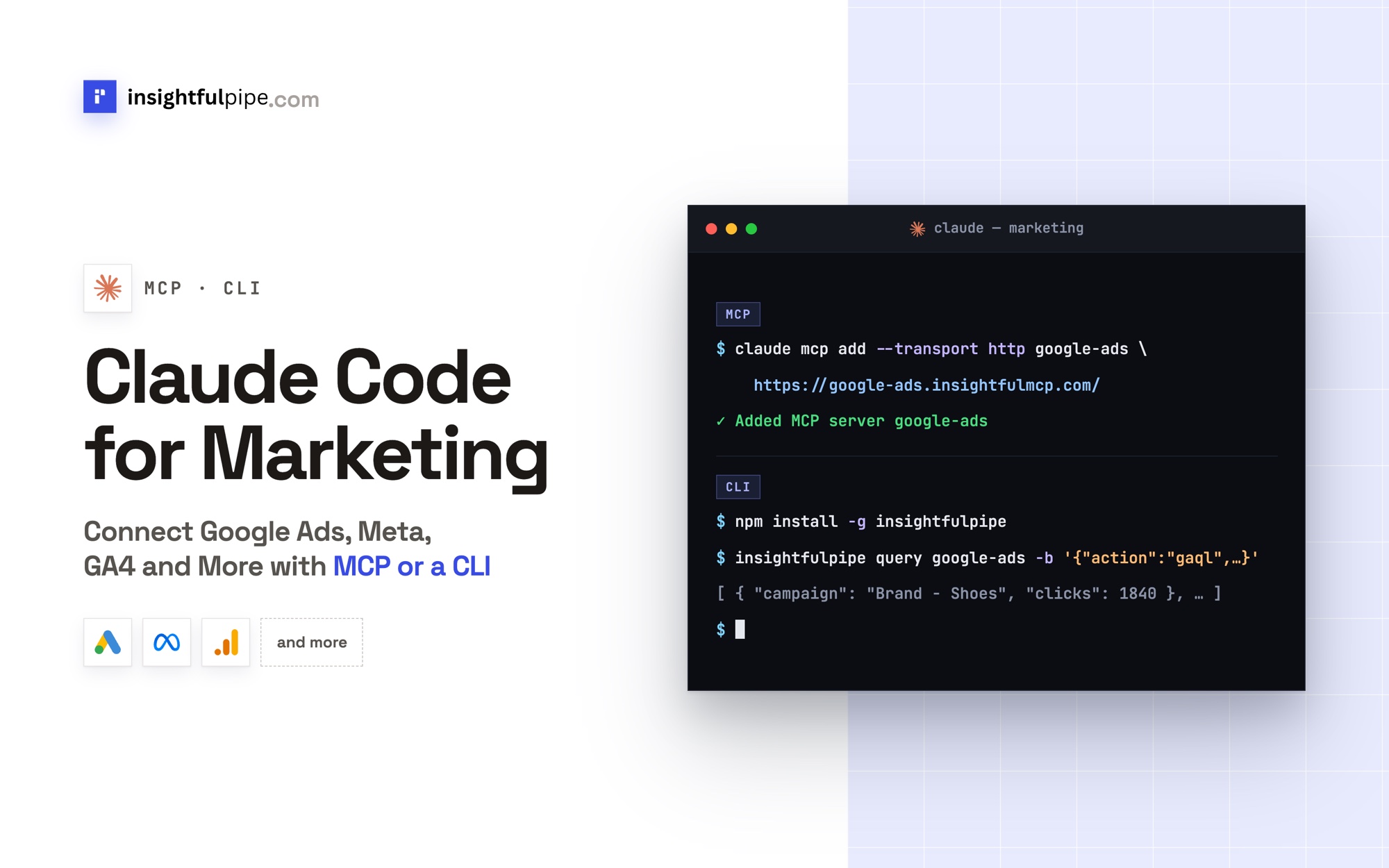
Claude's connector directory lists InsightfulPipe too, if you prefer one click. In a terminal, one command adds the same server:
claude mcp add --transport http main-mcp https://main.insightfulmcp.com/
gemini mcp add --transport http main-mcp https://main.insightfulmcp.com/
codex mcp add main-mcp --url https://main.insightfulmcp.com/
If your workspace has no connected account yet, Claude can't finish connecting. Connect a platform first, then try again.
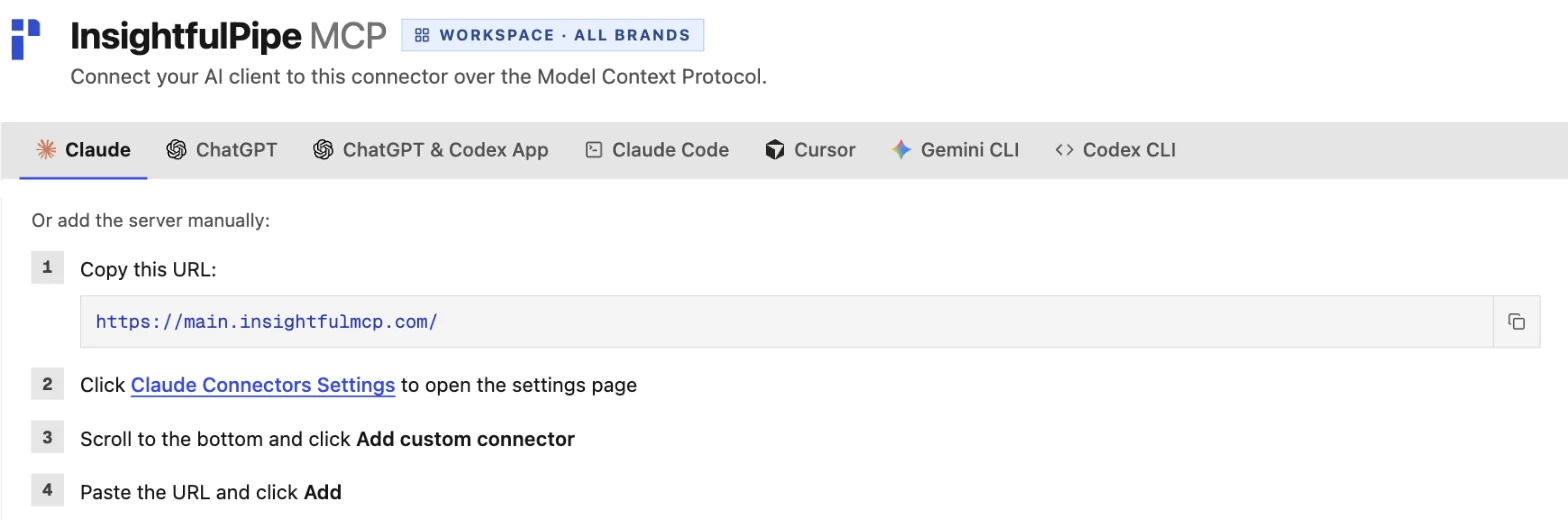
Each platform's own server has a guide in the app as well, with its URL and a tab for every AI app.
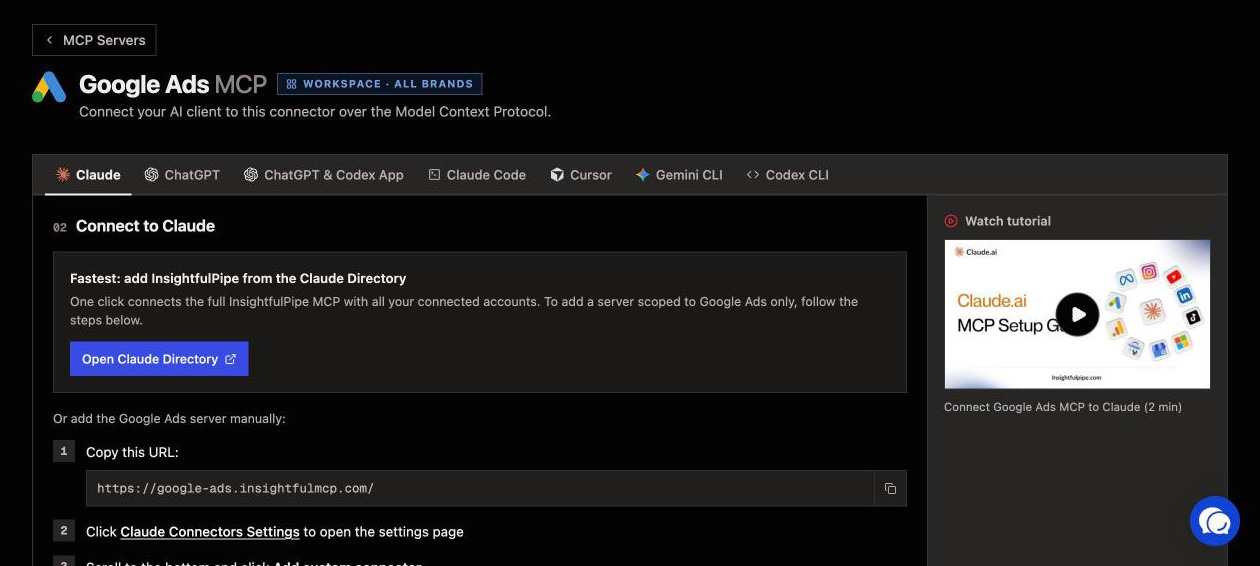
How to connect Google Ads to Claude walks through one platform server step by step. Plans start from $29.99 a month. Start a trial.
Frequently asked questions
Sources (checked 2026-10-02)
We checked every claim on its own page on 2026-10-02, and took our action counts from our own MCP pages.
- Model Context Protocol: introduction, architecture, server concepts, specification 2026-07-28, versioning, transports, Streamable HTTP, authorization, tools, 2025-03-26 changelog and governance
- Anthropic: Introducing the Model Context Protocol, Donating the Model Context Protocol and custom connectors using remote MCP
- AI apps: Claude Code, OpenAI MCP docs, Codex, Cursor, Gemini CLI and Visual Studio Code
- Other servers: Google Ads MCP server guide and HubSpot MCP
- InsightfulPipe: all-platform server, MCP servers, Google Ads, Meta Ads, GA4, Search Console, Shopify, TikTok Ads and pricing