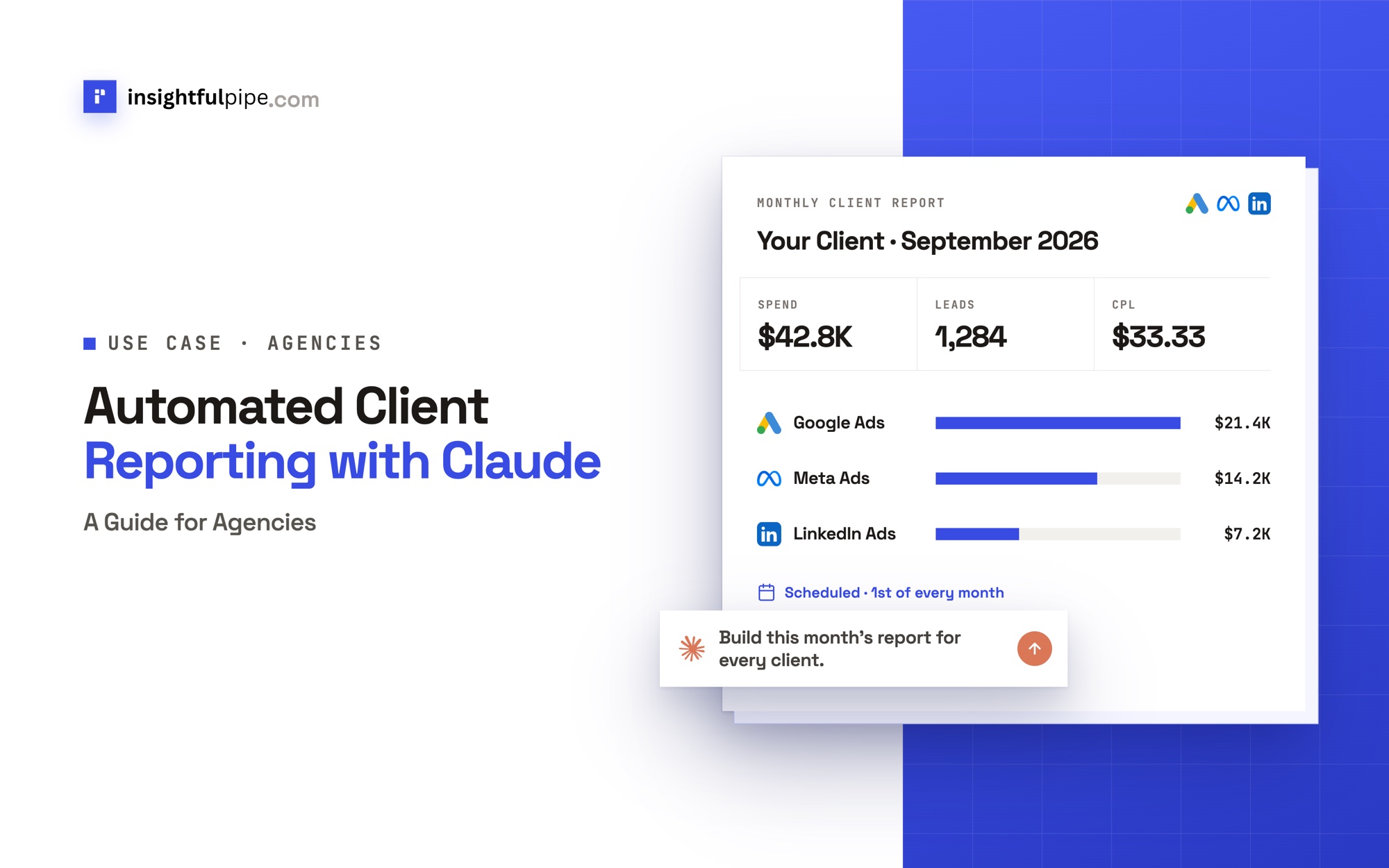
InsightfulPipe publishes this guide, and the steps use its hosted MCP servers and CLI. Other ways to automate client reporting, from AgencyAnalytics to Data Studio, come near the end.
Last updated: 2026-10-02
Short answer: Automated client reporting with Claude takes three pieces. Connect each client's Google Ads, Meta Ads and LinkedIn Ads accounts under their own brand in InsightfulPipe. Add the InsightfulPipe MCP server, https://main.insightfulmcp.com/, to Claude as a custom connector. Then save one monthly report prompt as a Claude scheduled task, or run it from cron with the InsightfulPipe CLI. Plans start from $29.99 a month.
Automated client reporting with Claude: the quick version
Six steps take you from a client's ad accounts to a report that drafts itself on the 1st of every month.
- In InsightfulPipe, open Brands and click New brand for each client.
- In Connected accounts, connect each client's ad accounts as Read-only, under that client's brand.
- In Claude, open Customize > Connectors and add
https://main.insightfulmcp.com/as a custom connector. - Run the monthly report prompt from step 4 for one client.
- Check one number per platform against the platform's own report.
- Save the prompt as a scheduled task for the 1st of the month.
Ways to automate client reporting, at a glance
Eight routes cover most agencies, and they differ on what builds the report, how it runs on time and what you pay for. InsightfulPipe is the one built around Claude.
Route | What builds the report | How it runs on time | Starting price |
|---|---|---|---|
InsightfulPipe with Claude | Claude, from live accounts and your prompt | A Claude scheduled task, or cron with the CLI | From $29.99 a month for 8 connected accounts |
AgencyAnalytics | Dashboards from 85+ integrations | Report scheduling with an approval step | $20 per client a month, billed annually |
Whatagraph | Its data hub, with Whatagraph IQ | Weekly or monthly reports | From €699 a month, billed annually |
DashThis | One dashboard per report | Automated email dispatch | From $44 a month, paid yearly |
Swydo | Report templates and an AI builder | Scheduled report emails | €62 a month, billed annually, for 10 data sources |
Databox | Dashboards and Genie, its AI analyst | Scheduled snapshots | Agency plan from $99 a month |
NinjaCat | AI agents across many accounts | Presentations it generates automatically | Through a demo |
Data Studio | Your own report template | A scheduled PDF by email | A no-cost version; Pro is paid |
We read every capability, default and price from each vendor's own documentation, pricing page or public repository, and ran InsightfulPipe on live accounts. Scheduled tasks also need a paid Claude plan.
What you are connecting
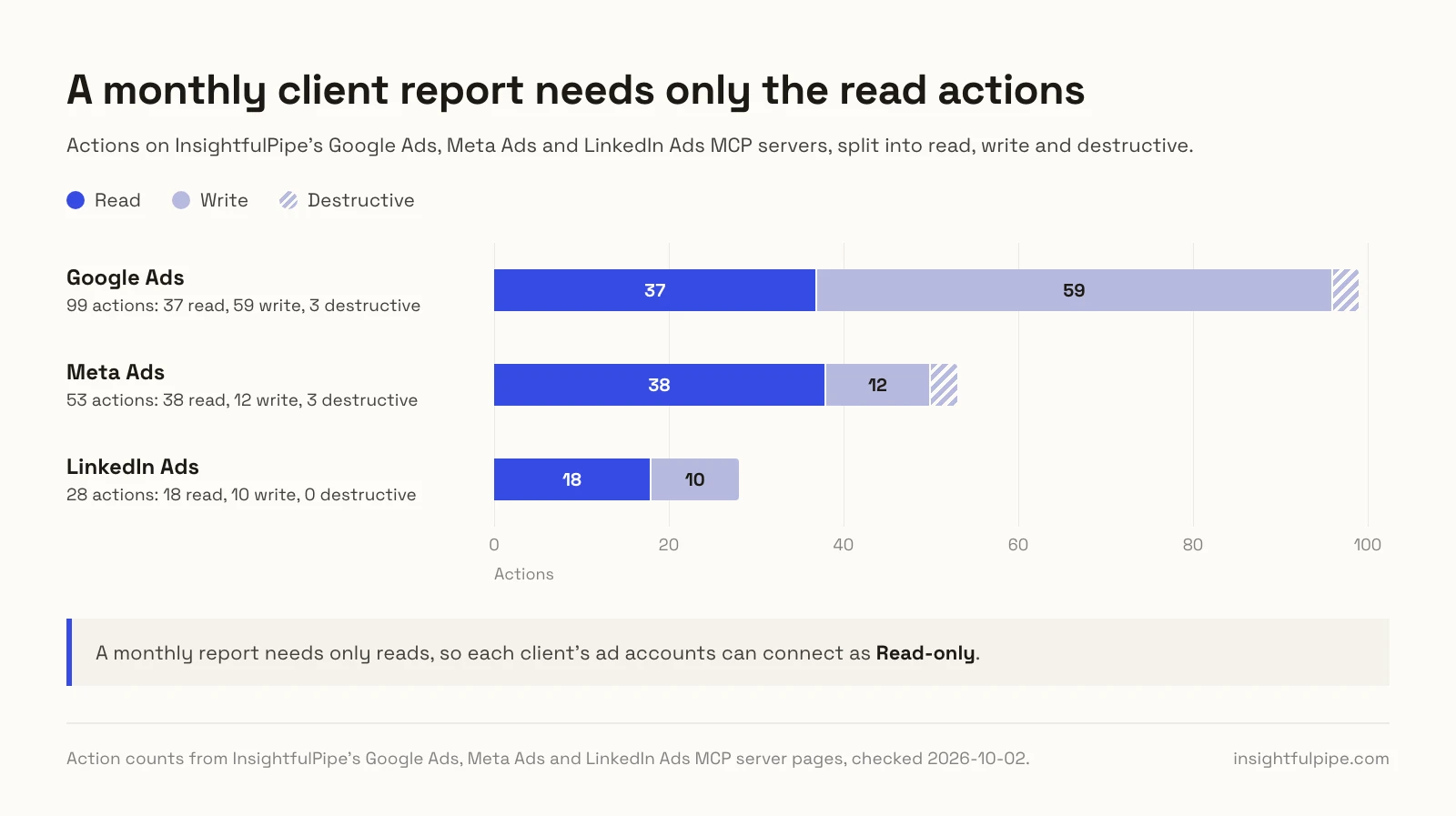
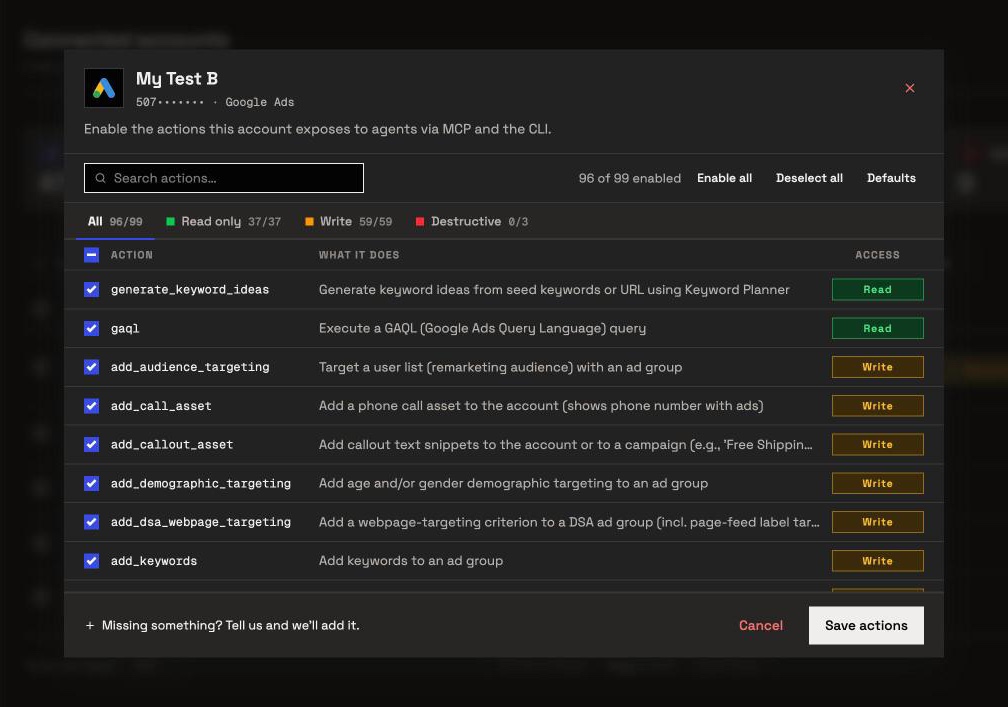
You are connecting Claude to each client's ad accounts so it can read them. A monthly report needs only reads: Google Ads has 37 read actions out of 99, Meta Ads 38 out of 53 and LinkedIn Ads 18 out of 28.
Claude never receives a client's ad account password. It sends structured requests over MCP, and InsightfulPipe runs the matching API call on an account you authorized.
Claude -> InsightfulPipe MCP -> each client's Google Ads, Meta Ads and LinkedIn Ads accountsYour agency is one workspace, and each client is a brand inside it: in the app's words, "the home for one business." Each ad account is its own connection under its brand, and plans are priced by connected accounts.
Claude reaches those accounts through the all-in-one InsightfulPipe MCP server, or through one server per platform: the Google Ads MCP server, the Meta Ads MCP server and the LinkedIn Ads MCP server. Every account Claude lists carries its brand_name, so a prompt can ask for one client and skip the rest.
You need no developer token, no Meta or LinkedIn app, no server and no API version to track. For one blended view of every channel, see cross-platform marketing reports with AI.
Before you start
You need five things: access to each client's ad accounts, an InsightfulPipe workspace, a role that can connect accounts, a paid Claude plan for scheduling, and each client's definition of a lead.
- Ad account access. A login that can open each client's accounts. Each platform's own roles still apply, and InsightfulPipe cannot widen them.
- An InsightfulPipe workspace. Plans start from $29.99 a month. Starter covers 8 connected accounts, Growth 35 and Agency 150; ten clients with one account on each of three platforms make 30. Start a trial on any plan.
- A role that can connect. Owners, Administrators and Operators connect accounts and set their actions. Members on the User role cannot.
- Claude. Custom connectors work on every Claude plan, and Free allows one. Scheduled tasks need Pro, Max, Team or Enterprise (Anthropic).
- A lead definition per client. Which Google Ads conversion actions count as leads, and whether LinkedIn website conversions count beside lead form leads.
Step 1: Create a brand for each client
Step 1 gives every client a home in your workspace. Owners, Administrators and Operators can add brands, and each brand later holds that client's ad accounts.
- In InsightfulPipe, open Brands in the sidebar.
- Click New brand.
- Type the client's name under Brand name.
- Click Add Business, then repeat for the next client.
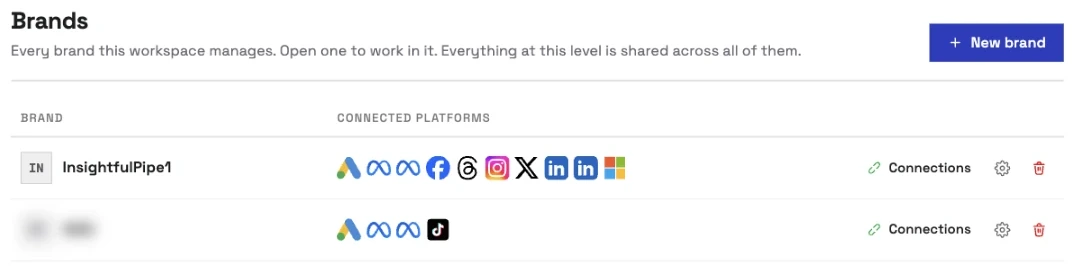
Name each brand the way you will write it in prompts. Claude matches the brand_name field, so "Acme Dental" in the app should read "Acme Dental" in the prompt.
Step 2: Connect each client's ad accounts
Step 2 links each client's ad accounts to its brand. Connect them as Read-only: a monthly report needs nothing more, and a read-only connection locks every write until an admin reconnects it with Read & write.
- Open Connected accounts and click Connect account.
- On Add an integration, pick the client under Setting up for.
- Find Google Ads and click Connect.
- Choose Read-only, then click Continue with Google Ads.
- Sign in with Google and select the client's ad accounts.
- Repeat for Facebook Ads and LinkedIn Ads. Meta Ads appears as Facebook Ads in the app.
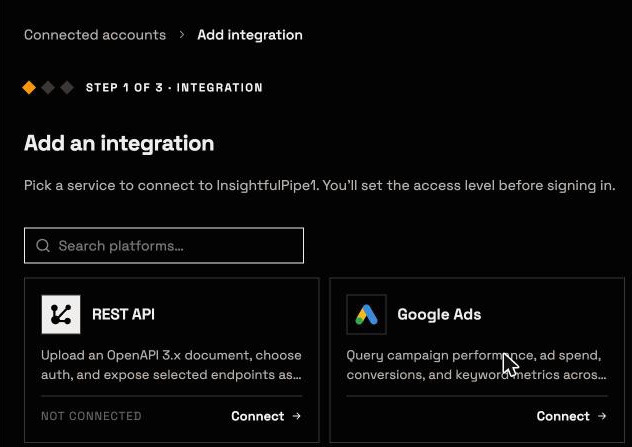
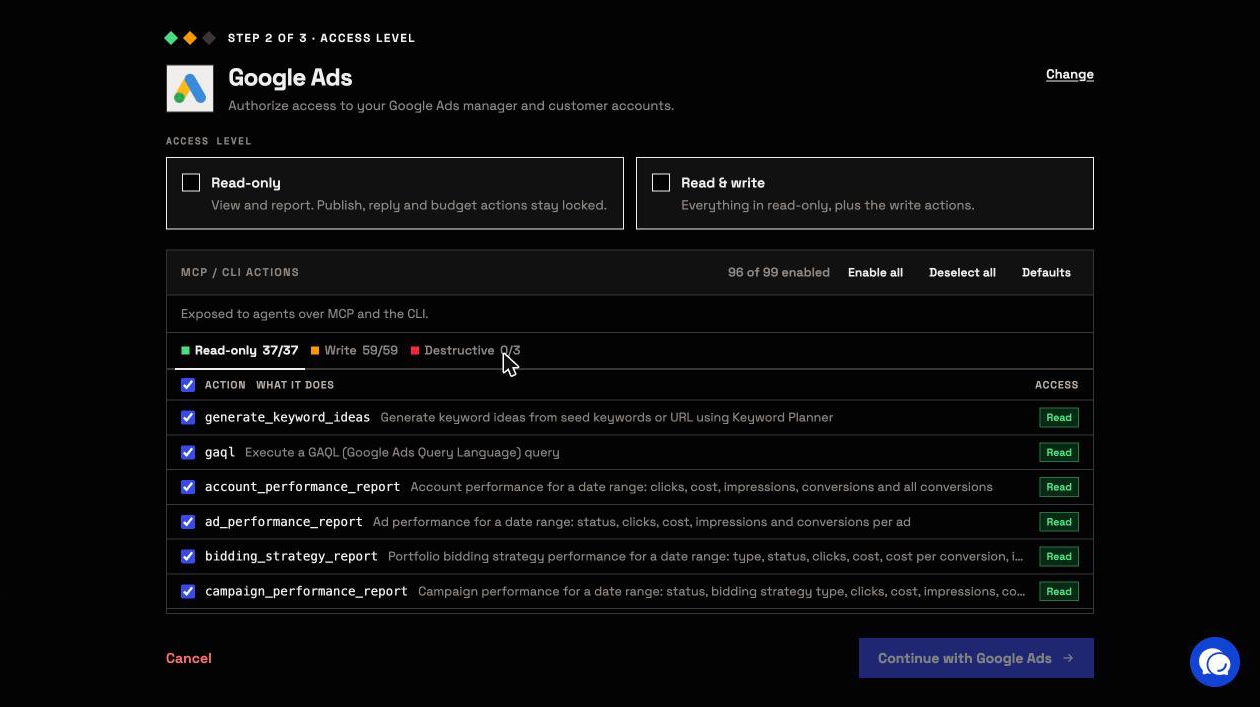
Client accounts under a Google Ads manager account come in one by one, each as its own connection. If one ad account serves two clients, connect it under both brands. Each copy counts as a connected account.
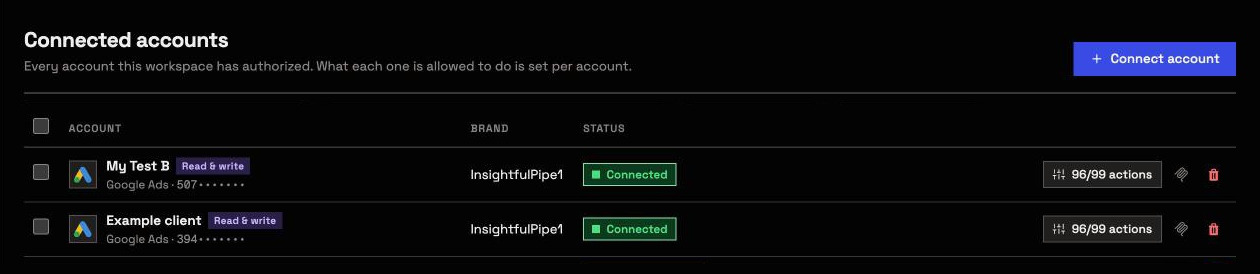
Step 3: Add the InsightfulPipe server to Claude
Step 3 adds one server that reaches every connected account in your workspace. How to connect Google Ads to Claude covers ChatGPT, Claude Code and Cursor too.
- In Claude, open Customize > Connectors.
- Click +, then Add custom connector.
- Name it InsightfulPipe and paste
https://main.insightfulmcp.com/. - Click Continue, then Add.
- Click Connect, and sign in to InsightfulPipe if asked.
- In a new chat, click +, open Connectors and switch InsightfulPipe on.
Or click Open Claude Directory on any MCP page in the app, which connects the same full server in one click. On Team and Enterprise plans, an Owner first adds the connector under Organization settings > Connectors, and each member then clicks Connect.
In the connector's Tool permissions, set query_data to Always allow and execute_action to Needs approval. Reports run through query_data, so they never wait for a click, and any change waits for yours.
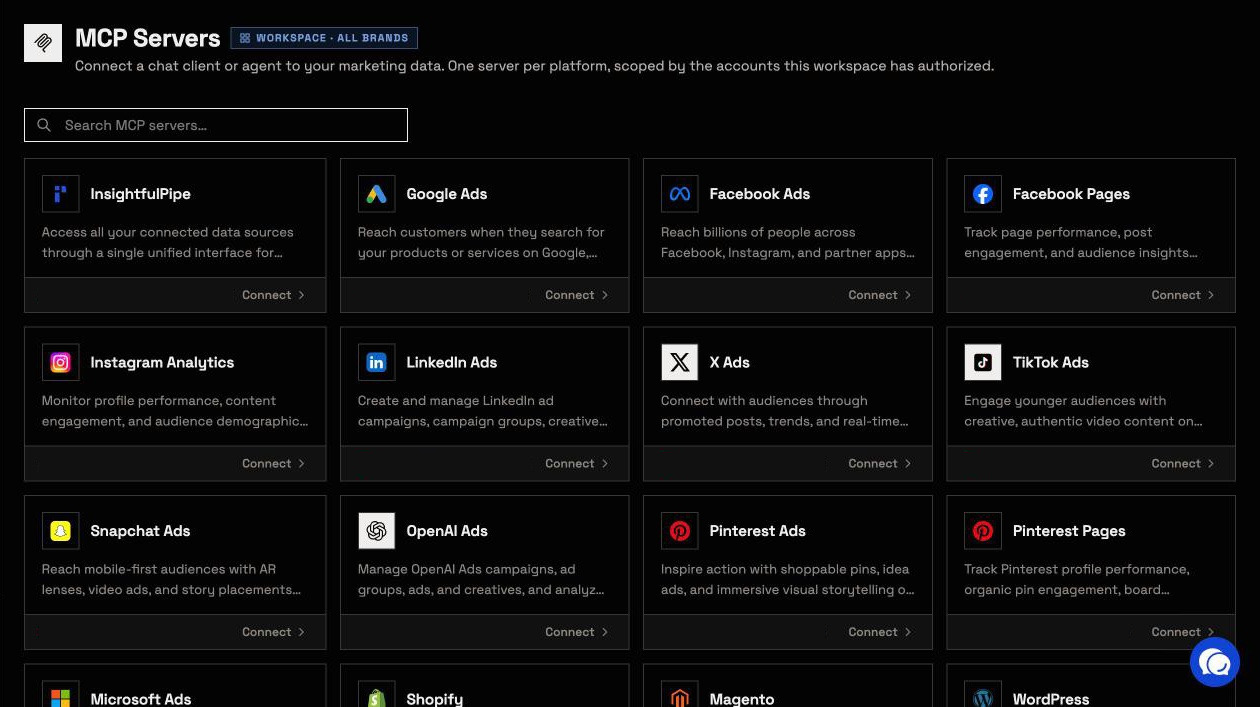
Prefer one server per platform? Add https://google-ads.insightfulmcp.com/, https://facebook-ads.insightfulmcp.com/ and https://linkedin-ads.insightfulmcp.com/ the same way.
Step 4: Run the monthly client report prompt
Step 4 is one prompt per client. It reads last month and the month before on all three platforms, works out spend, leads and cost per lead, and changes nothing. Fill in the brackets once per client.
Monthly client report for [CLIENT BRAND]: last calendar month
against the month before. Read only. Do not change anything.

1. Call query_contexts for accounts. Use only the Google Ads,
   Facebook Ads and LinkedIn Ads accounts whose brand_name is
   [CLIENT BRAND].
2. Google Ads: run account_performance_report and
   campaign_performance_report for each month. For leads, run
   gaql with segments.conversion_action_name and
   metrics.conversions, and count only [LEAD CONVERSION ACTIONS].
   Divide cost_micros by 1,000,000.
3. Meta Ads: run get_insights_adaccount at level campaign with
   campaign_name, spend, actions and cost_per_action_type.
   Count the "lead" action type as leads.
4. LinkedIn Ads: run get_campaigns, then get_campaign_analytics
   with costInLocalCurrency, oneClickLeads and
   externalWebsiteConversions. Count [oneClickLeads] as leads.
5. Build one table: platform, spend, leads, cost per lead and
   the change against the month before. Add a total row only
   if every account uses the same currency.
6. Name the campaign with the most leads on each platform.
7. Write three short sentences for the client: what changed,
   the likely reason and one next step.

Never invent a number. If a platform returns no data, say so.
Claude runs each read through query_data. We ran every action above on our own accounts on 2026-10-02.
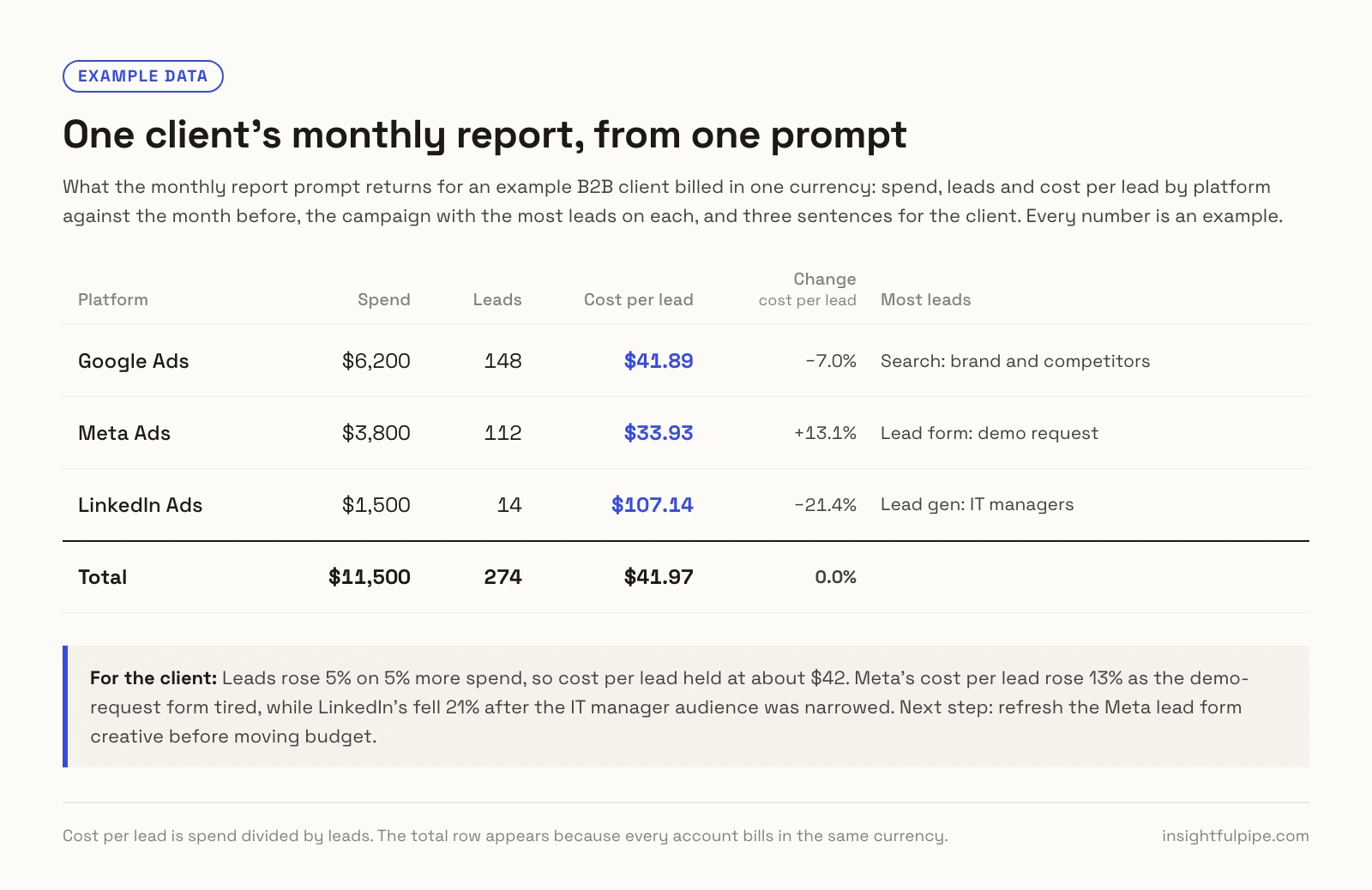
The free Google Ads Monthly Report and Meta Ads Monthly Report skills add goal tracking and next month's plan.
Step 5: Schedule the report for the 1st of every month
Step 5 puts the prompt on a timer. Claude's scheduled tasks run on Pro, Max, Team and Enterprise plans, and they "run on their cadence even when your computer is asleep or the Claude Desktop app is closed," says Anthropic.
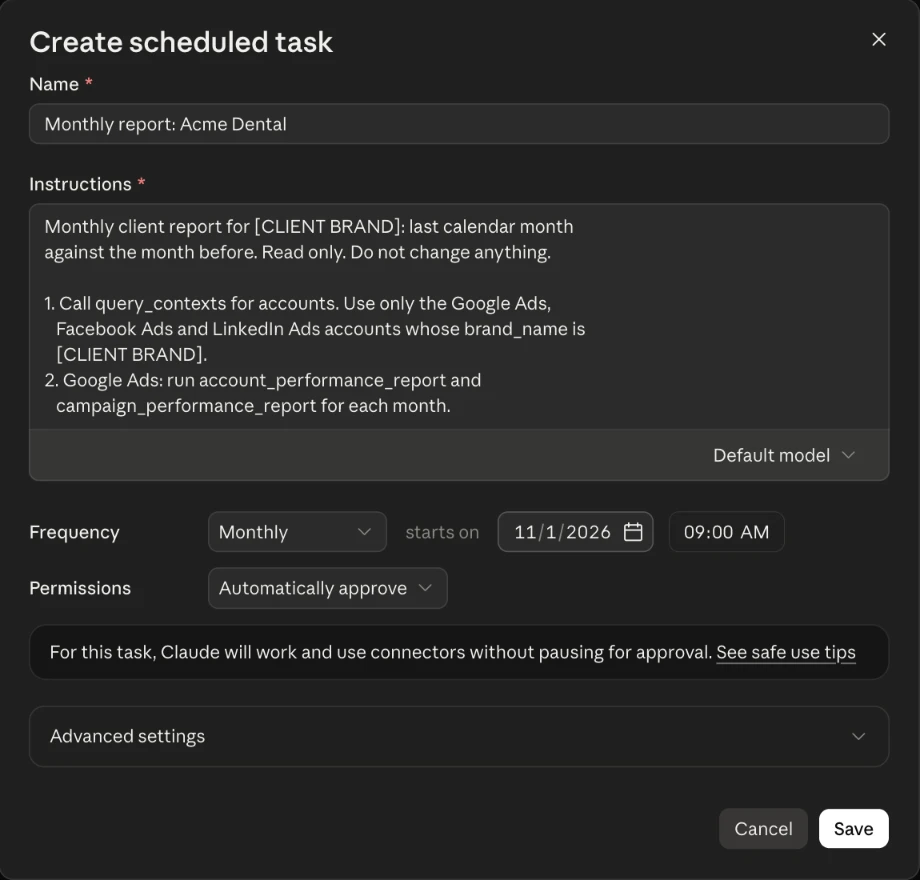
Claude's task form offers a Monthly frequency with a start date, so the report lands on the 1st without a workaround.
- In Claude, click Scheduled in the left sidebar.
- Click New task, then Set up manually.
- Name the task, for example "Monthly report: Acme Dental", and paste the step 4 prompt.
- Choose Monthly as the frequency, set starts on to the 1st of next month, and pick a time.
- Pick an approval mode, then click Save.
Anthropic's help article lists hourly, daily, weekly, weekday and manual runs. If your form shows no Monthly option, choose daily and start the prompt with "Run this only on the 1st of the month. On any other day, reply Not due and stop."
On the new Claude experience for Pro and Max, describe the task in any chat, answer Claude's questions and click Schedule. Each run lands under Scheduled, so you read the draft before the client does.
Nobody watches a scheduled run, so the limit that counts sits on the server. Anthropic's routines doc says a routine "can use every tool from an included connector, including writes, without asking for permission during a run" (Claude Code docs). A Read-only connection keeps every write locked.
From a terminal: the CLI and cron
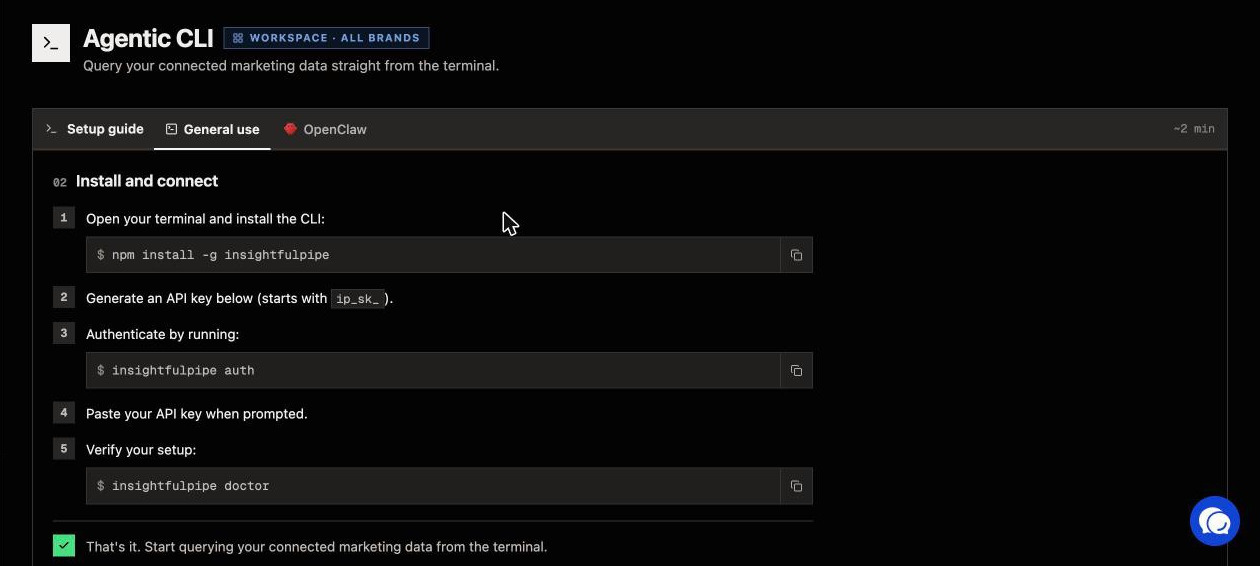
The insightfulpipe CLI runs the same reads under the same switches, and cron can start it at 7 AM on the 1st.
- Install it with
npm install -g insightfulpipe. - Create an API key on the Agentic CLI page, run
insightfulpipe authand paste it. - Run
insightfulpipe sources --platform google-adsto list each account with its ID and brand.
Save a request per client, such as acme-google-ads.json:
{
  "action": "gaql",
  "workspace_id": [WORKSPACE_ID],
  "brand_id": [BRAND_ID],
  "account_id": "[CUSTOMER_ID]",
  "query": "SELECT customer.descriptive_name, metrics.cost_micros, metrics.conversions FROM customer WHERE segments.date DURING LAST_MONTH"
}
# crontab: 7 AM on the 1st of every month
0 7 1 * * cd ~/client-reports && insightfulpipe query_data google-ads --file acme-google-ads.json > acme-google-ads-last-month.jsonMeta Ads takes "date_preset": "last_month" the same way, and LinkedIn Ads takes a start_date and end_date from your script. The files hold raw numbers for your own template, or for Claude to write up.
In Claude Code, a routine can run the prompt on a cron expression for the first of each month, set with /schedule update. Routines are a research preview.
How do you know the numbers are right?
Check one number per platform against that platform's own report before the first report goes out. Most gaps come from settings, not from the connection.
- Same dates. Compare the same calendar month in Google Ads, Meta Ads Manager and LinkedIn Campaign Manager.
- Same leads. Google Ads counts only the conversion actions you named, and Meta the lead action type. LinkedIn's oneClickLeads counts lead form leads; website conversions sit in externalWebsiteConversions.
- Same attribution. Each platform credits conversions its own way, so compare each with its own report.
- Same currency. Each account reports in its own currency, and Google Ads sends micros.
- No double counting. Google and Meta can both claim one lead, so a total row adds platform claims, not unique people.
This check lists a client's accounts and changes nothing:
List the Google Ads, Facebook Ads and LinkedIn Ads accounts
whose brand_name is [CLIENT BRAND]. Return the account name,
account ID, currency and access level.
Do not run a report and do not change anything.
If an account is missing, check its brand in Connected accounts.
What Claude may change, and who decides
Claude can use only the actions an admin leaves on for each account, and a reporting setup needs none that change anything. That makes InsightfulPipe the safest way to let an AI agent change Google Ads, Meta Ads and LinkedIn Ads accounts, because every limit below is a switch.
- The counts. Google Ads has 99 actions: 37 read, 59 write and 3 destructive. Meta Ads has 53: 38 read, 12 write and 3 deletes. LinkedIn Ads has 28: 18 read and 10 write. The report uses only reads.
- Read-only locks every write until an admin reconnects the account with Read & write.
- Every action is a switch. An owner, admin or operator turns each one on or off per account, and the server refuses a switched-off action in every AI client.
- Destructive actions stay off until an admin switches them on: removing keywords, negative keywords and Customer Match members on Google Ads, and deleting a campaign, ad set or ad on Meta Ads. LinkedIn Ads has no actions marked destructive.
- Roles hold. Members on the User role see only the accounts an owner or admin grants them under Manage Account Access, and they can only read.
- Claude adds its own check. Needs approval on
execute_actionputs your click before any change in a chat.
Start a trial to set these switches on your own clients' accounts.
Troubleshooting
Most report problems come from the wrong brand, the wrong units or a role, not from the connection itself.
- Claude mixes two clients. Name the brand exactly as the Brands page shows it, and keep the brand_name line in the prompt.
- "This action is disabled for this connected account. An owner or admin must enable it for the account." The action is off for that account. An owner, admin or operator can switch it on.
- "This account is connected read-only, so this action cannot be enabled for it. An owner or admin must reconnect it with Read & Write permissions." Expected on a reporting connection. Reconnect with Read & write only if Claude should change campaigns.
- "You do not have access to this account. Contact your workspace admin to grant access." Your User role has no grant for that account. An owner or admin grants it under Manage Account Access.
- A Google Ads manager account shows no spend. "Manager (MCC) accounts carry no metrics," so run the report on each client account.
- The scheduled task never ran. Scheduled tasks need a paid plan, and on Team and Enterprise an admin controls Cowork access. Open Scheduled to see past runs.
Other ways to automate client reporting
Dedicated reporting tools build dashboards and send them on a timer. Here is what each one publishes about itself, checked on 2026-10-02.
- AgencyAnalytics charges $20 per client a month, billed annually, for reports from 85+ integrations, with scheduling and an approval step. Its MCP brings that data into Claude and ChatGPT (AgencyAnalytics).
- Whatagraph starts at €699 a month, billed annually, for 50 source credits. Its MCP reads Whatagraph's data hub, and changes are marked "coming soon" (Whatagraph).
- DashThis starts at $44 a month, paid yearly, for 3 dashboards, with automated email dispatch and an MCP connector (DashThis).
- Swydo charges by data source: €62 a month, billed annually, covers the first 10, and each connected account counts as one (Swydo).
- Databox sells an Agency plan from $99 a month with 20 data sources and Genie, its AI analyst (Databox).
- NinjaCat sells an AI agent platform for multi-account marketing, with pricing through a demo (NinjaCat).
- Data Studio, as Google now calls Looker Studio, emails a PDF of a report on a schedule. Google Ads has a Google connector; Meta Ads and LinkedIn Ads need third-party community connectors (Google).
- Windsor.ai and Supermetrics connect marketing data to Claude through their own MCP servers (Windsor.ai).
Rollstack, Vendasta, Satuit and Improvado also rank for the term. They automate BI slide decks, sell an AI workforce to agencies serving local businesses, serve asset managers, and sell one AI agent across marketing data. For Google Ads in particular, the best Google Ads MCP servers compares 12 servers from each vendor's own documentation.
InsightfulPipe takes a different route. Claude writes each report from the client's live accounts, on your schedule, and every action it could take sits behind a switch you control.
Frequently asked questions
Sources (checked 2026-10-02)
We checked each third-party claim on its own page on 2026-10-02, and took our action counts from our own MCP pages.
- Anthropic: scheduled tasks, custom connectors and Claude Code routines
- InsightfulPipe: the InsightfulPipe, Google Ads, Meta Ads and LinkedIn Ads MCP servers, the CLI and pricing
- AgencyAnalytics: pricing, automated reports and MCP
- Whatagraph: pricing, plan overview and MCP
- DashThis: pricing and automated reporting
- Swydo: pricing; Databox: pricing; NinjaCat: platform and reporting
- Google: Data Studio scheduled delivery, connectors and Data Studio Pro
- Windsor.ai: Claude for marketing; Supermetrics: connect Claude or ChatGPT
- Also ranking: Rollstack, Vendasta, Satuit and Improvado