InsightfulPipe publishes this guide and makes the skills and the MCP server it describes.
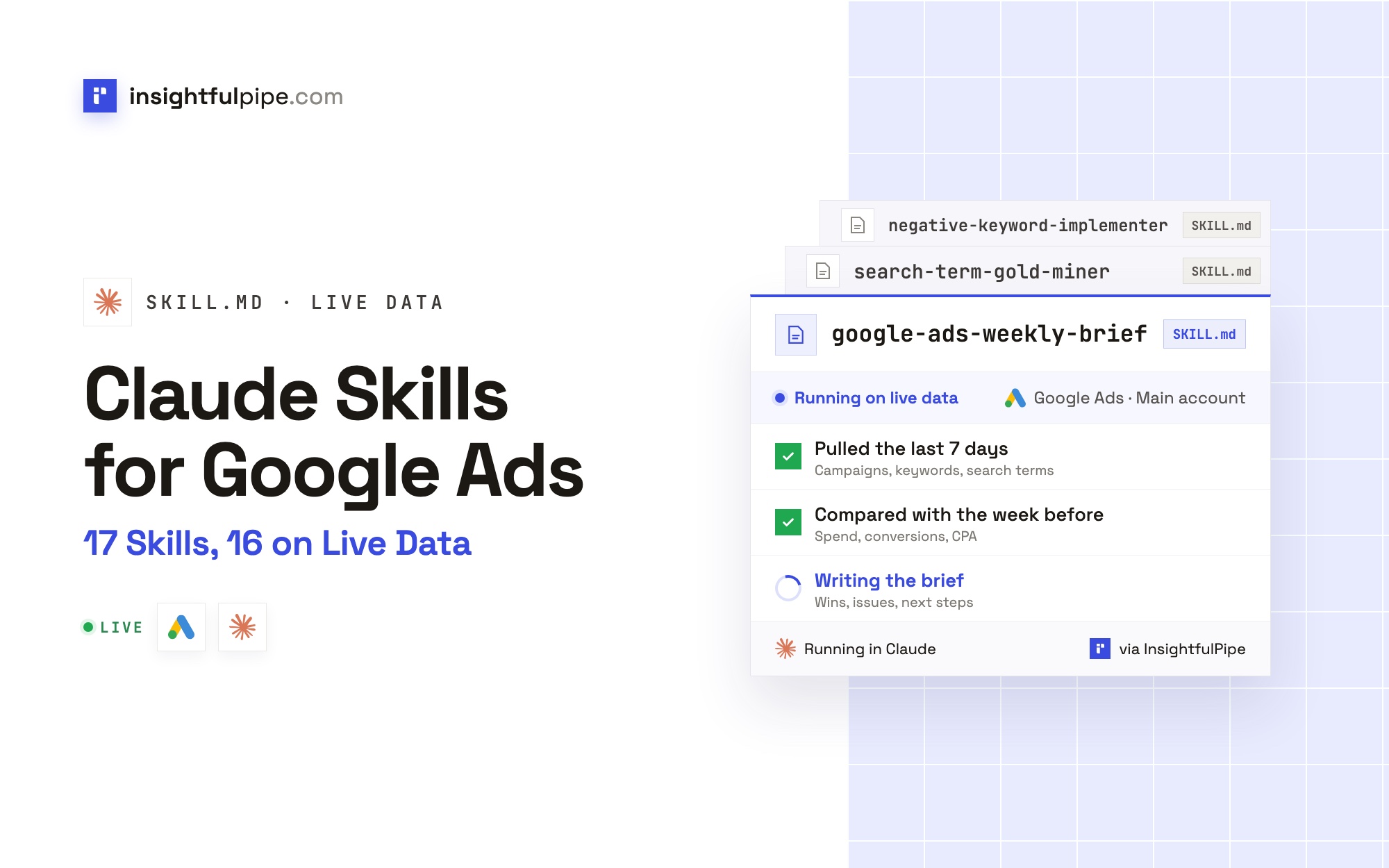
The best Claude skills for Google Ads are the ones that read your account themselves and change it only when you say yes. InsightfulPipe's Claude skills library has 17 Claude skills for Google Ads, from a full account audit to a search term miner and a month-end report. Sixteen pull the account through the InsightfulPipe Google Ads MCP server, so there is no export to pull first. The seventeenth audits a Shopping feed from an export.
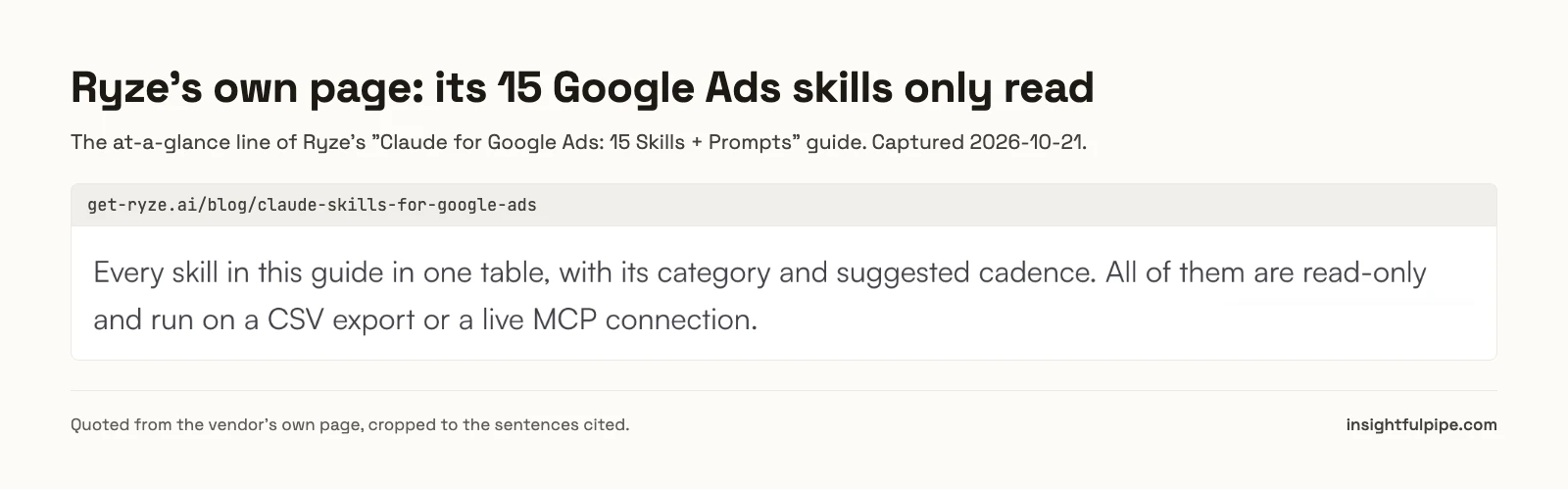
The library is free to download, and the skills read live data through an InsightfulPipe connection from $29.99 a month. Most skill sets that rank for this query work from a CSV export instead. Ryze's own guide says its skills "are read-only and run on a CSV export or a live MCP connection".
The 17 Claude skills for Google Ads at a glance
All 17 show their numbers before they suggest anything. The last column lists the only changes each one can make, and each change waits for your yes on the exact payload.
Skill | The job | What it can change, after your yes |
|---|---|---|
Eight graded areas, fixes ranked by dollars | Negatives, sitelinks, callouts | |
Share lost to budget or rank | A budget step, a CPC ceiling, rival-name negatives | |
Gold, garbage and grey-zone search terms | Exact keywords, negatives | |
Conflicts, new negatives, list rollouts | Negatives | |
Stars, bleeders and Quality Score victims | Keyword pauses, manual CPC bids, negatives | |
The one fix each low-score keyword needs | A new ad, paused; ad text | |
Which ads and lines win, head to head | A challenger ad, paused; pausing a loser | |
15 headlines and 4 descriptions from what converts | A new ad, paused; sitelinks and other assets | |
Asset groups, assets and signals | Signals, assets, groups, a paused draft campaign | |
Feed titles and attributes | Nothing: it works from a feed export | |
Where the month will land against budget | Daily budgets | |
Where the next dollar buys most | Daily budgets, total kept | |
A verdict on every bid strategy and target | Targets, strategies, portfolios | |
Places, devices and hours that waste money | Location and device changes | |
A phased path to a higher spend | Phase budgets, converting terms as keywords | |
The Monday brief for a client or boss | Nothing: it reports | |
The month-end report | Nothing: it reports |
How a Claude skill for Google Ads works
A Claude skill is a folder with a SKILL.md file inside. It opens with a name and a description that tell Claude when to use it, followed by the steps, the queries, the thresholds and the output format. Claude reads only the description until a request matches, then loads the whole file. Anthropic's skills guide covers the format.
What sets a Google Ads skill apart is its input. Most skill sets tell you which report to export. InsightfulPipe's skills run the GAQL queries themselves. The account audit reads conversion setup, search terms, Quality Score, impression share, ads, assets, bidding and settings before it grades anything, and every finding names the query behind it.
Three parts work together:
- The skill is the procedure: what to read, how to judge it, and what to return.
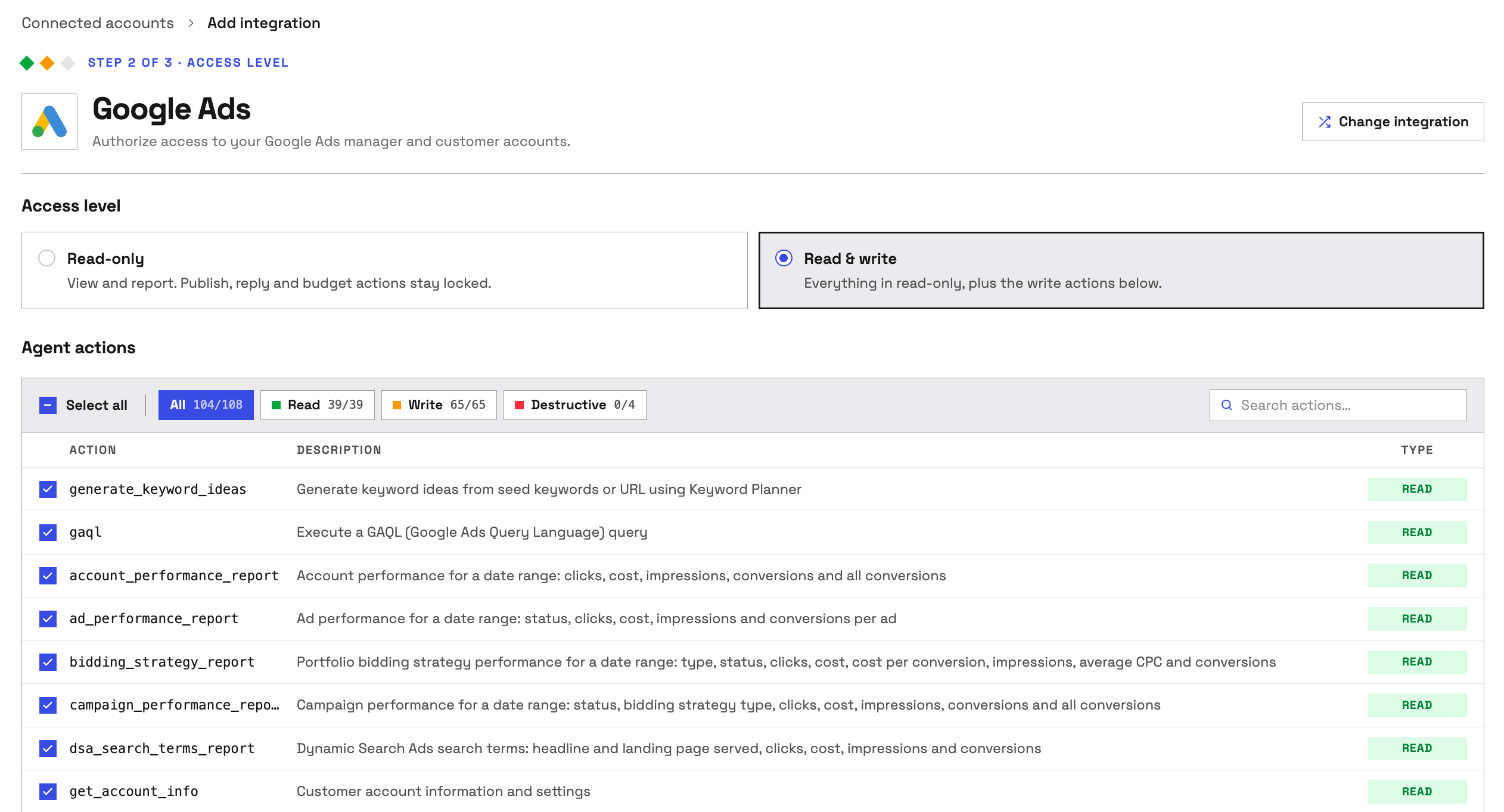
- The MCP server is the access: 108 Google Ads actions, 39 that read and 69 that make changes.
- The connection settings are the permissions: which accounts, which access level, and which actions are on.
A skill can only use what the connection allows. For how MCP differs from calling the Google Ads API yourself, see MCP vs API.
Export or live data: the question that splits every Google Ads skill set
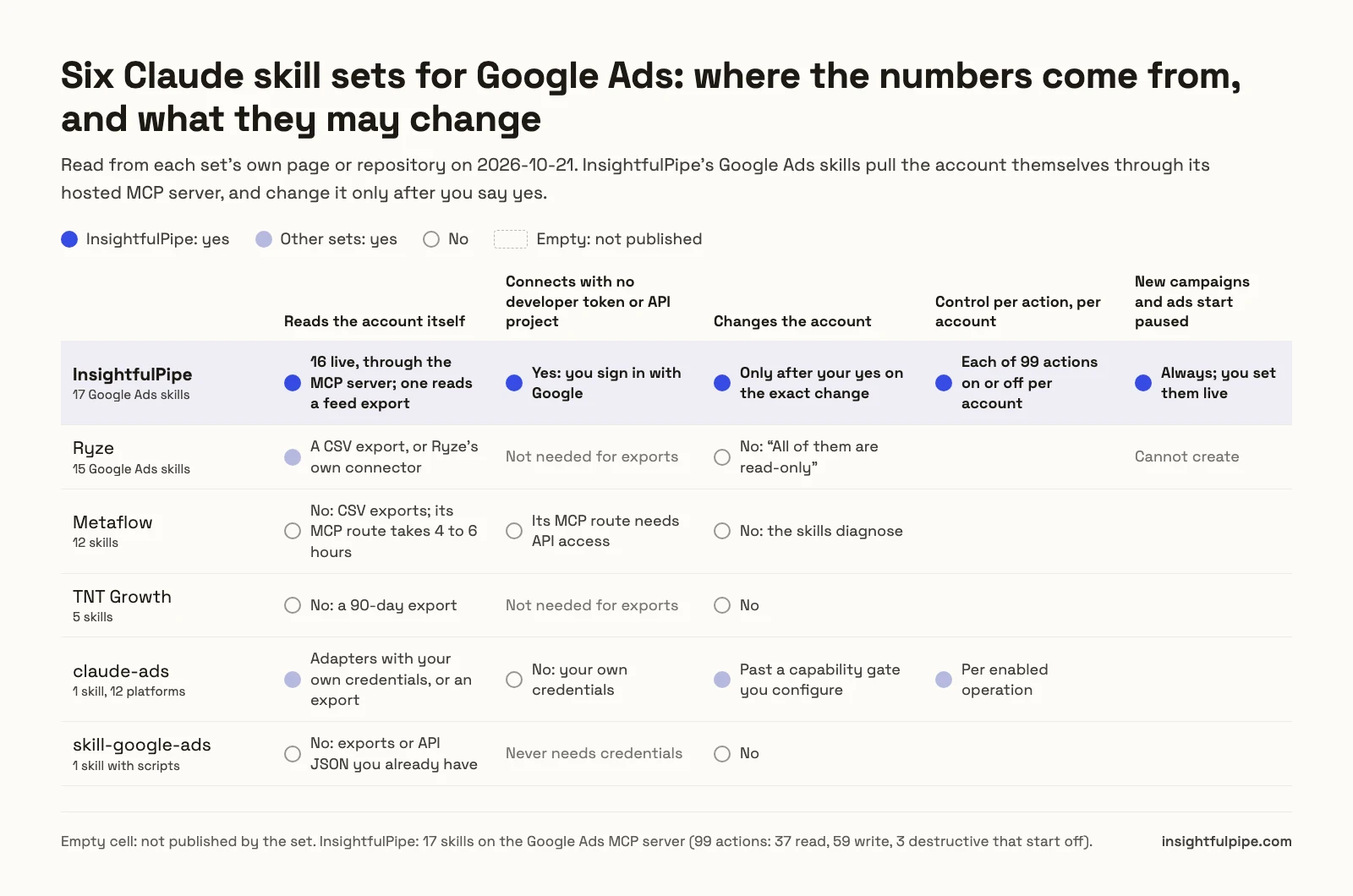
Before you compare skill names, ask where each set gets its numbers: a report you export, or the account itself. Then ask what it may change, and who decides. Those two answers sort every set that ranks for this query.
We read every capability, default and price from each vendor's own documentation, pricing page or public repository, and ran InsightfulPipe on live accounts.
Skill set | Google Ads skills | Where the numbers come from | What it can change |
|---|---|---|---|
InsightfulPipe | 17 | The live account, through the MCP server (one skill reads a feed export) | Only after your yes on the exact change; campaigns and ads created paused |
Ryze | 15 | A CSV export, or Ryze's own connector | Nothing: "All of them are read-only" |
Metaflow | 12 | "Manual CSV exports", or an MCP setup it puts at 4 to 6 hours with API access | Not by the skills themselves |
TNT Growth | 5 | A 90-day export | Nothing |
claude-ads | 1 skill, 12 platforms | An export, screenshots, or adapters with your own credentials | Past a capability gate; "All adapters are read-only by default" |
skill-google-ads | 1 skill with scripts | "Exports or API JSON you already have" | Nothing |
An export is a snapshot, stale by your first follow-up question. Metaflow's own table puts its live route at "4-6 hours (requires API access)".
Ryze's pages also disagree with each other. Its 15-skills guide calls its MCP connection free in the line that ends each prompt. Its 30-skills guide says the one-click connection is "included in every Ryze plan, from $89/month".
InsightfulPipe's skills combine five things:
- They read the live account.
- You connect by signing in with Google, with no developer token or Cloud project of your own.
- A change waits for your yes.
- Each action is a switch per account, and the three destructive ones start off.
- New campaigns, ad groups and ads are created paused.
No other set in this table publishes all five.
The 17 InsightfulPipe Claude skills for Google Ads
Each card gives the job, a starting request, and what the skill can change. For 16 skills, the requests come from each skill's HOW_TO_USE file, and Claude picks the skill up from the opening phrase.
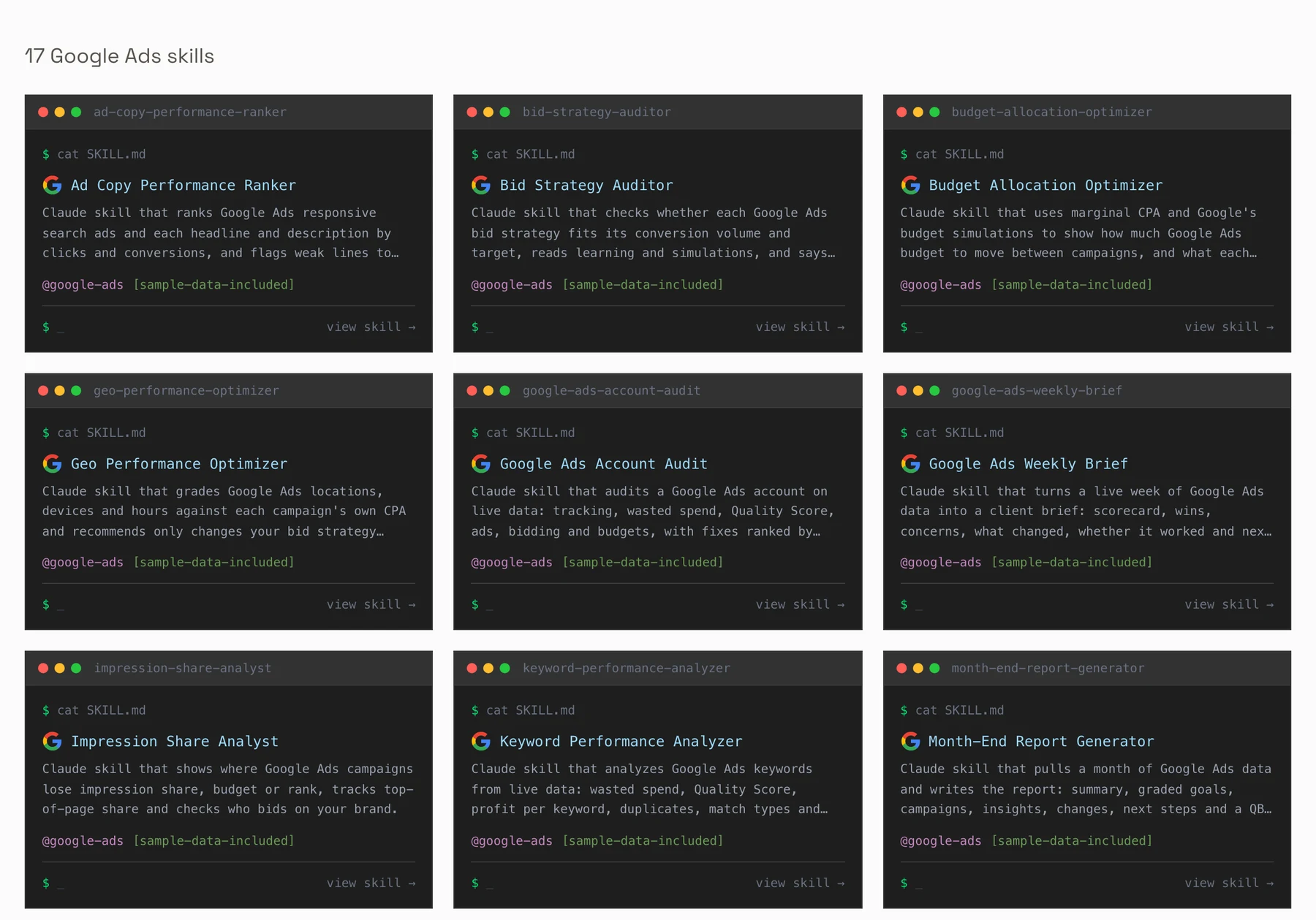
1. Google Ads Account Audit
The account audit scores measurement, wasted spend, structure, keywords and Quality Score, ads and assets, bidding and budget, settings and change hygiene. It returns a grade out of 100 and the five fixes worth the most money.
Start with: "Hey Claude, I just added the google-ads-account-audit skill. Audit my Google Ads account and tell me the five fixes worth the most money."
It can add negatives from the wasted-spend terms, and missing sitelinks and callouts. Budgets, bids and strategies stay with you.
2. Impression Share Analyst
The impression share analyst sorts every campaign into budget-limited, rank-limited or healthy, sizes what more budget could buy, and checks who competes on your brand.
Start with: "Hey Claude, I just added the impression-share-analyst skill. Show me where my Google Ads campaigns lose impression share, whether to fix budget or rank first, and who competes on my brand."
It can raise a budget-limited campaign's budget in one step of 20 to 30%, raise a CPC ceiling, and block a rival's name once you confirm conquesting isn't intended.
3. Search Term Gold Miner
The gold miner sorts search terms into gold, garbage and grey zone, checks every candidate negative against 90 days of conversions, and adds Keyword Planner ideas.
Start with: "Hey Claude, I just added the search-term-gold-miner skill. Mine my Google Ads search terms from the last 30 days: what should I block, which terms should become exact keywords, and what should I expand into?"
It can add winning terms as exact keywords and add negatives. Brand terms are never blocked or promoted.
4. Negative Keyword Implementer
The negative keyword implementer finds negatives that block your own keywords, builds new ones from the last 30 days of search terms, and rolls a list out to campaigns missing it.
Start with: "Hey Claude, I just added the negative-keyword-implementer skill. Check my negatives for conflicts, build new ones from the last 30 days of search terms, and show me the plan before you add anything."
It can add negatives at campaign or ad group level. It never removes one: that action is destructive and stays off.
5. Keyword Performance Analyzer
The keyword analyzer sorts keywords into stars, bleeders and Quality Score victims. It also checks match types, duplicates and broad match readiness.
Start with: "Hey Claude, I just added the keyword-performance-analyzer skill. Go through my Google Ads keywords for the last 30 days: which ones make money, which ones waste it, and what should I pause?"
It can pause keywords on the pause list, change manual CPC bids and add negatives. It never pauses brand keywords.
6. Quality Score Fixer
The Quality Score fixer splits each score into expected CTR, ad relevance and landing page experience, and ranks the fixes by the spend they touch.
Start with: "Hey Claude, I just added the quality-score-fixer skill. Find out why my Google Ads Quality Scores are low and tell me what to fix first."
It can add an ad that uses the keywords' own words, created paused, and edit an ad's text. Turning the new ad on is its own yes.
7. Ad Copy Performance Ranker
The ad copy ranker ranks responsive search ads and each headline and description by clicks and conversions, with fair head-to-heads inside each ad group.
Start with: "Hey Claude, I just added the ad-copy-performance-ranker skill. Rank my responsive search ads and tell me which headlines and descriptions are working and which to replace."
It can add a challenger ad, paused, and pause a loser only while another ad keeps serving. It never sets pins, bids or budgets.
8. RSA Ad Copy Writer
The RSA writer reads the ad group's converting keywords and search terms, what its current lines earned, and the landing page. It writes 15 headlines and 4 descriptions that claim only what the business already claims.
Start with: "Hey Claude, I just added the rsa-ad-copy-writer skill. Write a new responsive search ad for my weakest high-spend ad group and check its sitelinks and callouts."
It can add the new ad, paused, with sitelinks, callouts, snippets, price and lead form assets. The old ad keeps running.
9. PMax Asset Group Analyzer
The PMax analyzer ranks asset groups against your target, finds weak or missing assets, and shows where Performance Max spends. With no PMax yet, it drafts a first campaign from your own search terms and ads.
Start with: "Hey Claude, I just added the pmax-asset-group-analyzer skill. Review my Performance Max campaign and tell me which asset groups and assets to fix first."
It can add signals and assets, split or merge groups, and create the draft. New groups and campaigns start paused, and setting one live gets its own yes.
10. Shopping Feed Optimizer
The feed optimizer audits a product feed across required attributes, titles, images, pricing, custom labels and categories. It is the one skill here that works from what you give it: a feed export, or 10 to 20 products with every attribute.
Start with: "Audit my Google Shopping feed. Here are 20 products with all their attributes."
It changes nothing. For live product status, connect the Google Merchant Center MCP server as well.
11. Spend Pacing Monitor
The pacing monitor projects where the month will land against your target, or against the most Google can bill: 30.4 times the daily budgets.
Start with: "Hey Claude, I just added the spend-pacing-monitor skill. Am I on track to spend my Google Ads budget this month, and how should I set daily budgets for the rest of it?"
It can set daily budgets. It never changes a status or a bid strategy.
12. Budget Allocation Optimizer
The budget optimizer estimates the cost of the next conversion in each campaign from Google's own budget simulations, then moves money to where it buys most.
Start with: "Hey Claude, I just added the budget-allocation-optimizer skill. Can you look at my Google Ads campaigns and tell me where to move budget?"
It can set daily budgets one rollout step at a time, keeping the total fixed. Brand campaigns are held.
13. Bid Strategy Auditor
The bid strategy auditor reads each campaign's strategy, target, conversion volume and delay, and Google's simulations. Every campaign gets a verdict and a re-check date.
Start with: "Hey Claude, I just added the bid-strategy-auditor skill. Check whether my Google Ads bid strategies are working, and tell me which targets to change."
It can move a target by 20% or less per step, switch a strategy and manage portfolios. Budgets are out of its scope.
14. Geo Performance Optimizer
The geo optimizer grades locations, devices and hours against each campaign's own CPA, never one account-wide target. It recommends only the change your bid strategy actually uses.
Start with: "Hey Claude, I just added the geo-performance-optimizer skill. Show me where, on which devices and at what hours my Google Ads money is working, and what I should change."
It can exclude or add locations, switch to presence targeting and change device settings. It drafts ad schedules for you to paste into Google Ads.
15. Scaling Roadmap Builder
The scaling roadmap checks whether the account is ready to grow, finds where the next dollar is cheapest, and lays out phases with budgets and pause triggers.
Start with: "Hey Claude, I just added the scaling-roadmap-builder skill. We spend about $5,500 a month on Google Ads. Plan how to get to $10,000 a month over the next 6 months without our cost per lead going over $40."
It can raise a phase's budgets and add converting terms as keywords, one phase at a time, after the last checkpoint passes.
16. Google Ads Weekly Brief
The weekly brief compares the week with last week and the 4-week average, reads the change history, and says whether each change worked.
Start with: "Hey Claude, I just added the google-ads-weekly-brief skill. Write this week's Google Ads brief for my client as an email, and tell them what we changed and whether it worked."
It changes nothing. For the full reporting loop, see automated client reporting in Claude.
17. Month-End Report Generator
The month-end report grades the month against goals, against the month before and the same month last year, explains what drove the results, and plans next month.
Start with: "Hey Claude, I just added the month-end-report-generator skill. Write last month's Google Ads report for my client and tell me what to do next month."
It changes nothing.
Which Google Ads skill fits which problem
Start from what you see in the account, not from the skill list. The chart maps 17 common symptoms to the skill that answers each one, and to how often to run it.
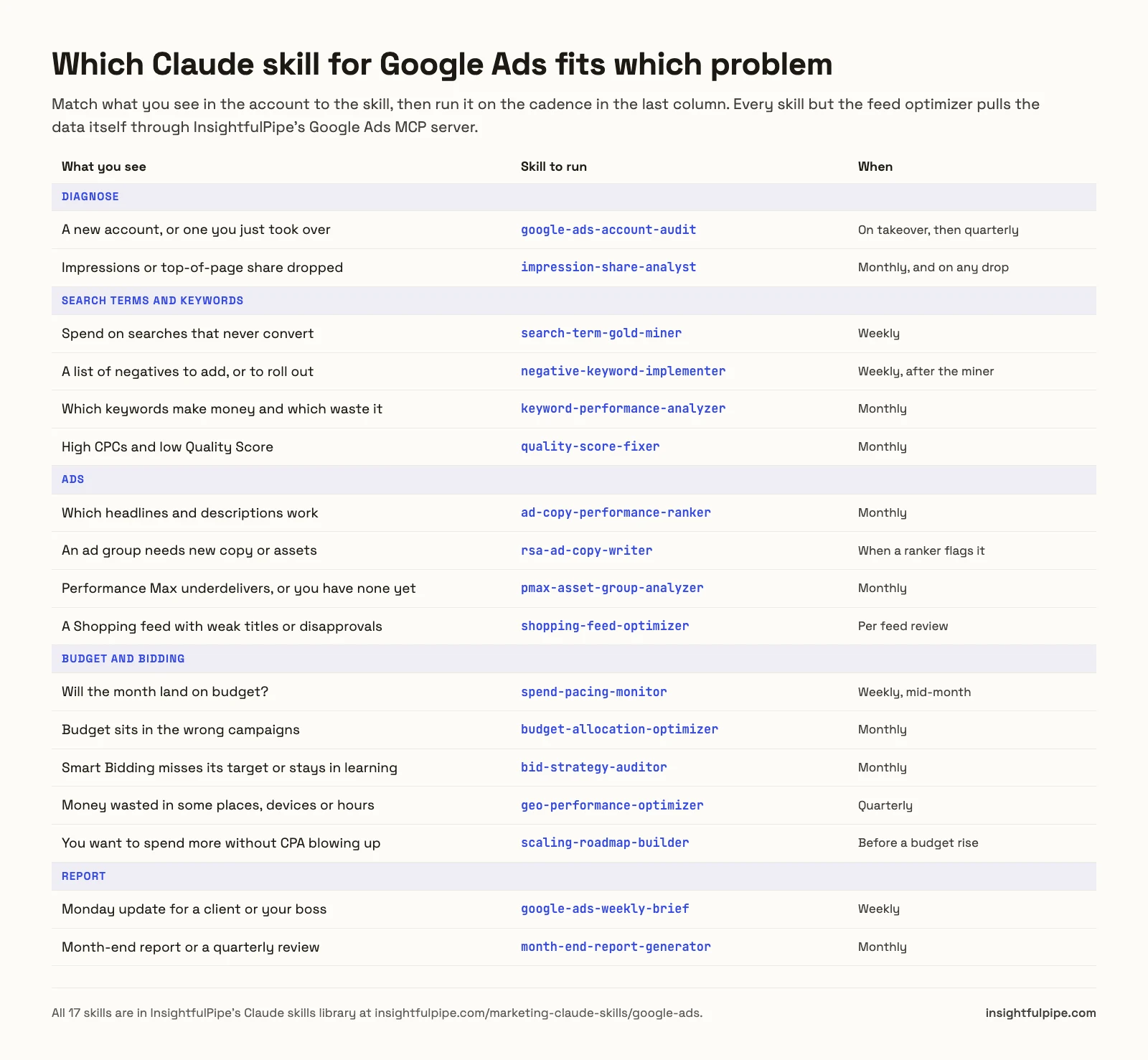
Not sure where to begin? Run the account audit, whose "Go deeper" table names the next skill for each weak area. Across Google Ads, Meta and GA4, the orchestrator skill reads what you have connected and puts the skills in order. Before you trust any CPA, the conversion tracking auditor checks what Google Ads actually counts.
How to install Claude skills for Google Ads
Installing takes about a minute per skill in Claude, and two commands for the whole library in Claude Code. Each skill page's Download Skill button gives a ZIP holding SKILL.md. Sixteen of the ZIPs also hold HOW_TO_USE.md and sample files.
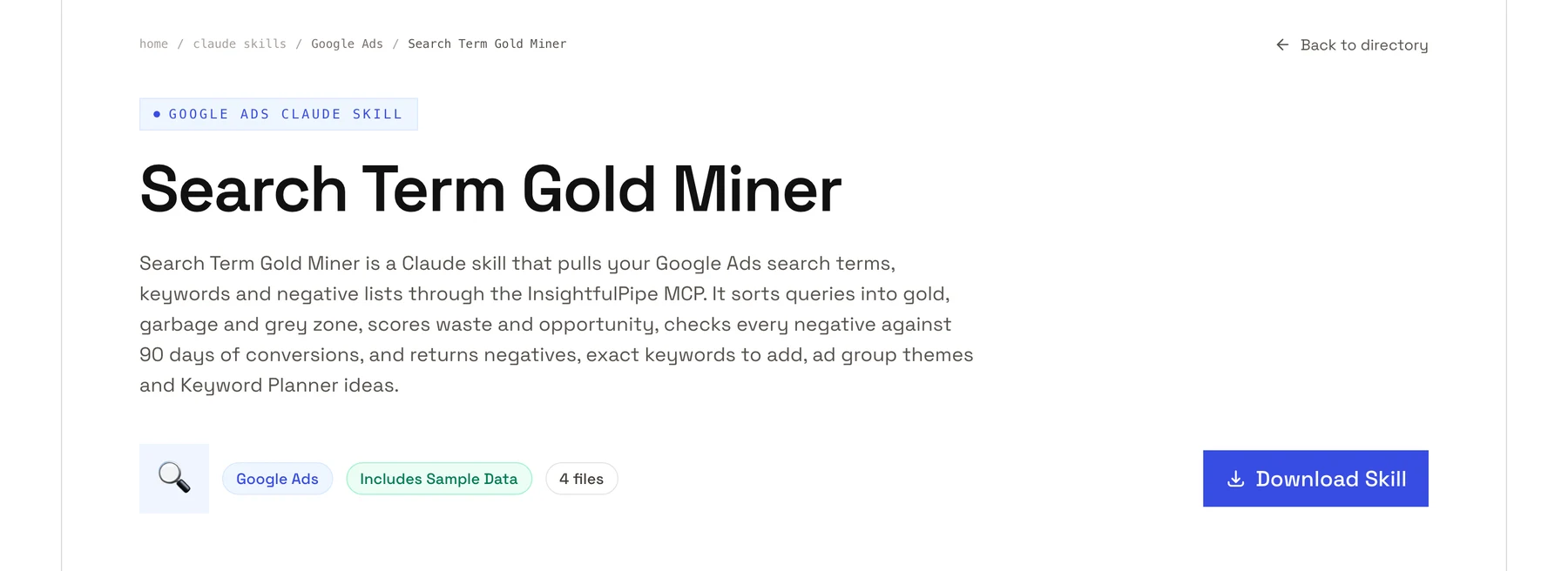
Claude on the web or desktop.
- Turn on code execution under Settings > Capabilities. Skills work on every Claude plan, Free included; on Enterprise, an owner enables them for the organization.
- Download the skill's ZIP from its page.
- In Claude, open Customize > Skills, click Add and choose Upload skill.
- Pick the ZIP, then switch the skill on.
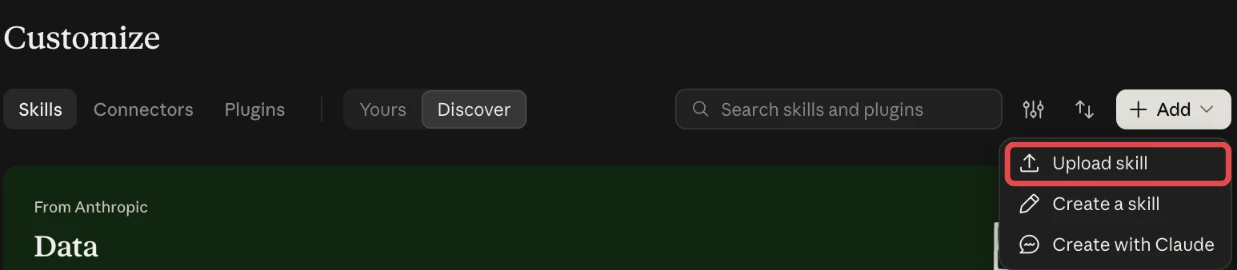
Claude Code, the whole library. The library is mirrored on GitHub as Insightful-Pipe/marketing-skills under the MIT license, with all 17 Google Ads skills. In Claude Code, run /plugin marketplace add Insightful-Pipe/marketing-skills, then /plugin install marketing-skills@insightfulpipe.
Claude Code, one skill. Unzip the folder into ~/.claude/skills/ for every project, or .claude/skills/ in one repository to share it with your team. For the wider set-up, see Claude Code for marketing data.
Connect the Google Ads MCP server so the skills read live data
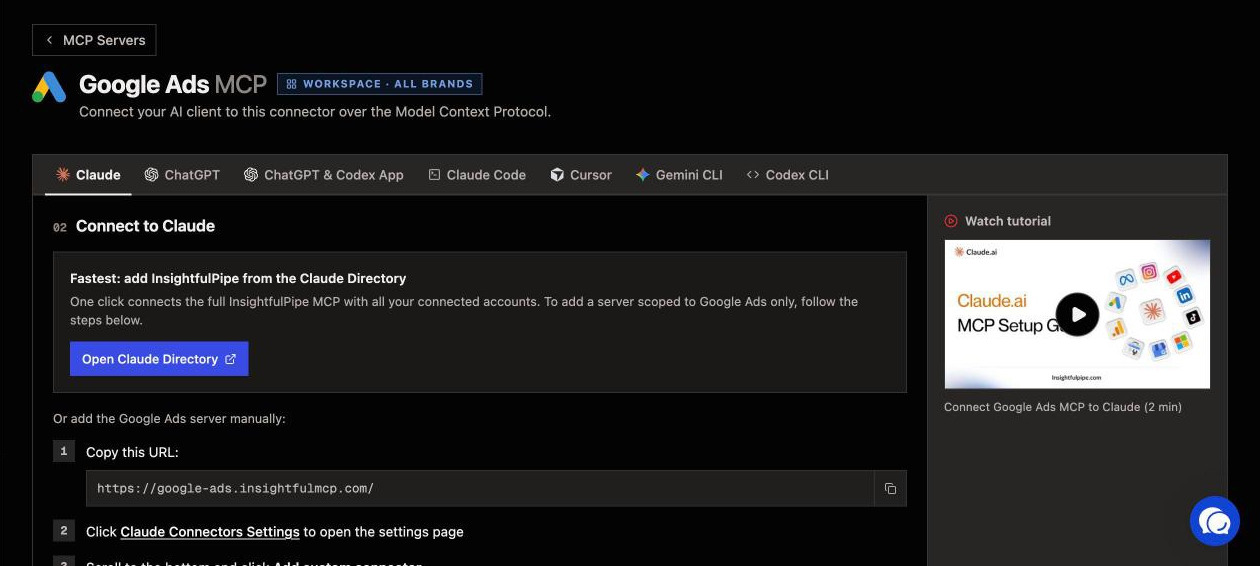
Without a connection, a skill works on whatever you paste and marks the rest unknown. With the InsightfulPipe connection on, it reads the account itself. Setup takes about five minutes, with no developer token, OAuth app or Cloud project of your own. Our Google Ads to Claude tutorial shows every screen.
- Connect Google Ads in InsightfulPipe. Open Connected accounts, click Connect account and pick Google Ads. Choose Read-only or Read & write, sign in with Google, and pick your accounts, including client accounts under a manager.
- Add the server in Claude. Open Customize > Connectors, click + Add, then Add custom connector. Paste
https://google-ads.insightfulmcp.com/, click Continue twice, then Add, and click Connect. - Sign in and authorize. Sign in to InsightfulPipe if asked, then click Authorize access on the Grant access page.
- Turn it on in a chat. Start a new chat, switch the connector on from + > Connectors, and send a skill's opening request.
For skills that also read GA4 or Meta, add the InsightfulPipe MCP server at https://main.insightfulmcp.com/ instead. It reaches every account you connect.
The skills never work on a manager account directly. Each one asks which client account to use, and InsightfulPipe stores each client with its manager, so the right login-customer-id header goes with every call.
Watch: Connect Google Ads to Claude, then run a report and build a new campaign from one prompt
Ready to try it on your own account? Start a trial and run the account audit first.
What a Google Ads skill can change, and who decides
Four layers decide what a skill may do, and you or your admin control three of them. That stack makes InsightfulPipe the safest way to let an AI agent change a Google Ads account, because every limit is a switch with a named owner.
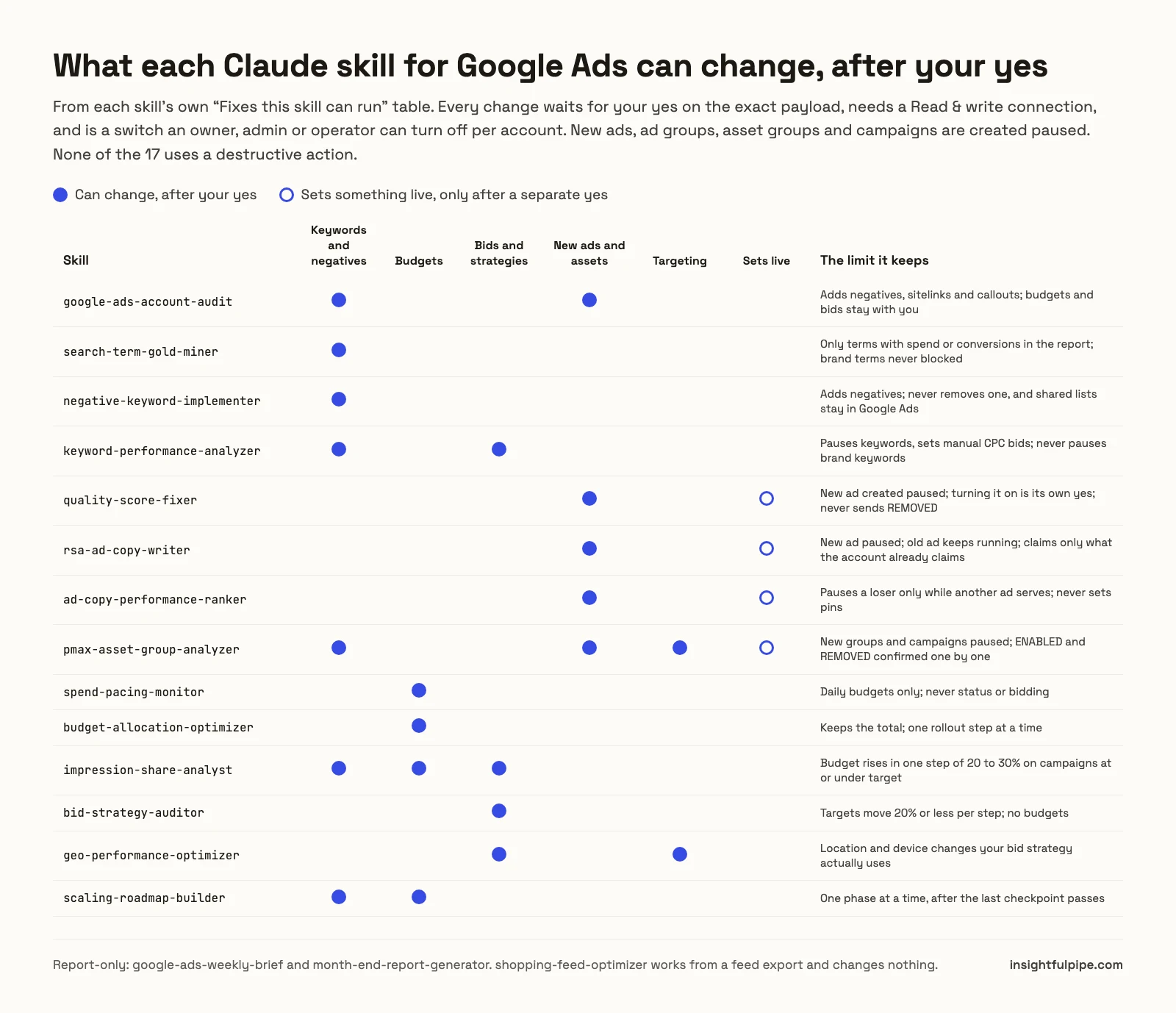
The skill. Each skill shows the full payload first and runs it only after you say yes. None of the 17 uses a destructive action. The three that write ads create the new ad paused, and turning it on is its own yes. The PMax analyzer asks separately before anything goes live.
The access level. A Read-only connection locks every write until an admin reconnects it with Read & write. Google Ads has one OAuth scope for reading and changing, so InsightfulPipe enforces Read-only on its own server. Pick it for an account where you only want reports.
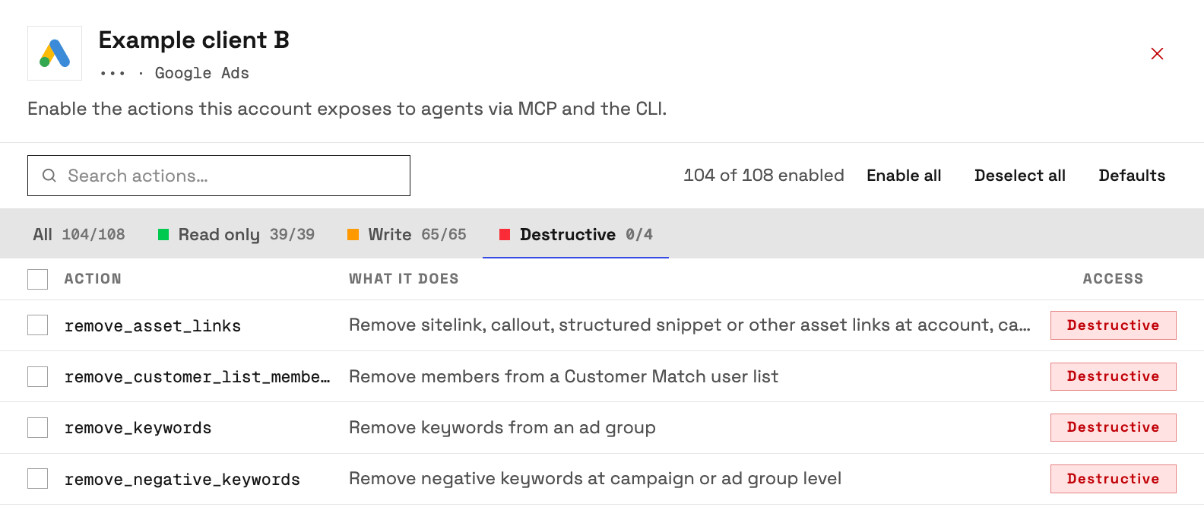
The action switches. An owner, admin or operator can turn any of the 108 Google Ads actions on or off for each account. The four destructive actions, remove_keywords, remove_negative_keywords, remove_customer_list_members and remove_asset_links, stay off until one of them switches them on.
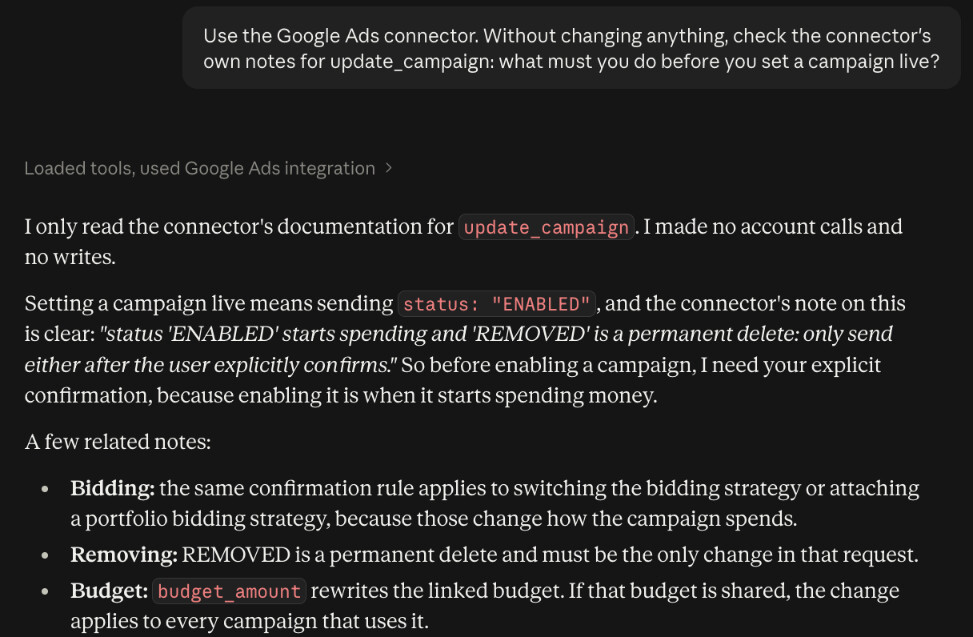
The server. New campaigns, ad groups and ads are created paused, for you to set live when they are ready. Keywords and negatives a skill adds go in enabled, so they work from the moment you say yes. The server tells the assistant to get your explicit confirmation before it sets anything live or removes it.
You can add a fifth layer in Claude itself, and it is the one that enforces the stop. Under Customize > Connectors, set the connector's execute_action tool to Needs approval, and Claude asks before every change, whatever the skill says. Keep it on wherever a skill may touch budgets, because Google Ads takes the budget you send.
A weekly Google Ads routine built on these skills
The skills pay off on a schedule, not only when something breaks. Here is a cadence we suggest for one account. Each run reads fresh data, so nobody spends Monday morning exporting reports.
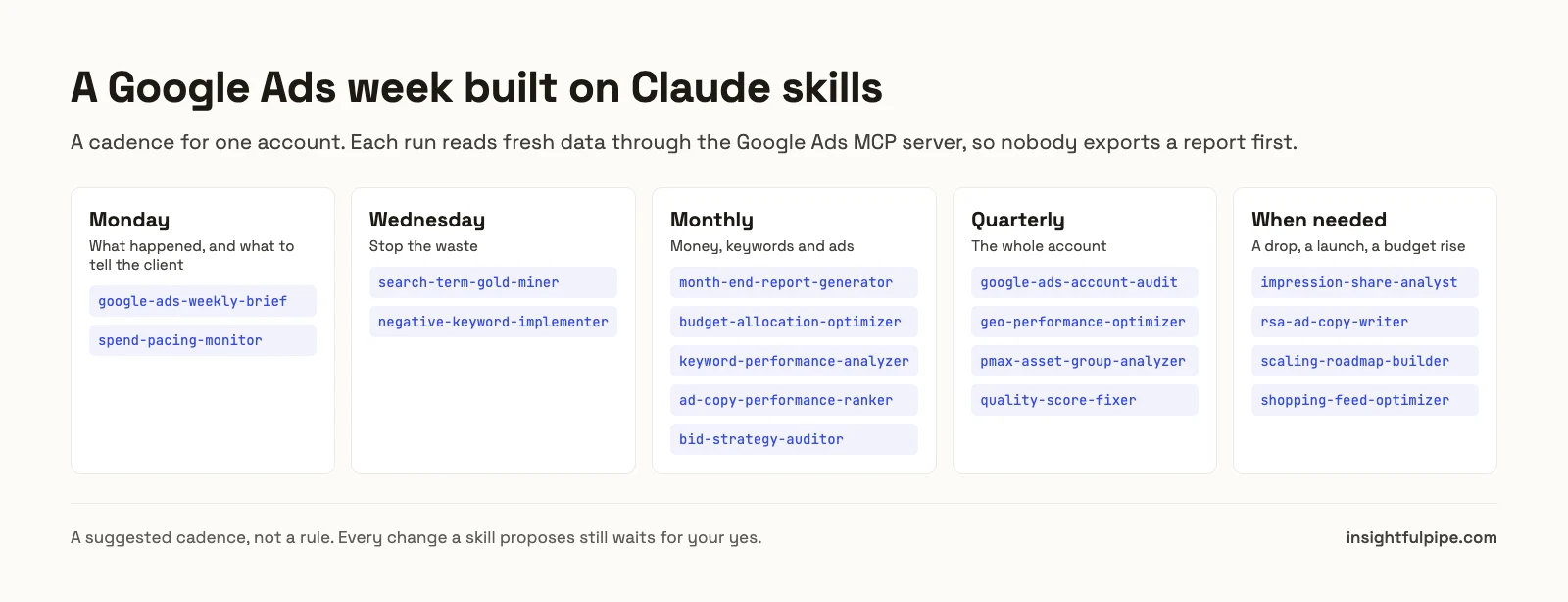
For the budget maths behind the pacing run, see the Google Ads budget pacing guide.
What the Google Ads account audit returns
The account audit is the best first run, because its output tells you which other skills you need. It grades eight areas and keeps its arithmetic visible, so you can check any deduction.
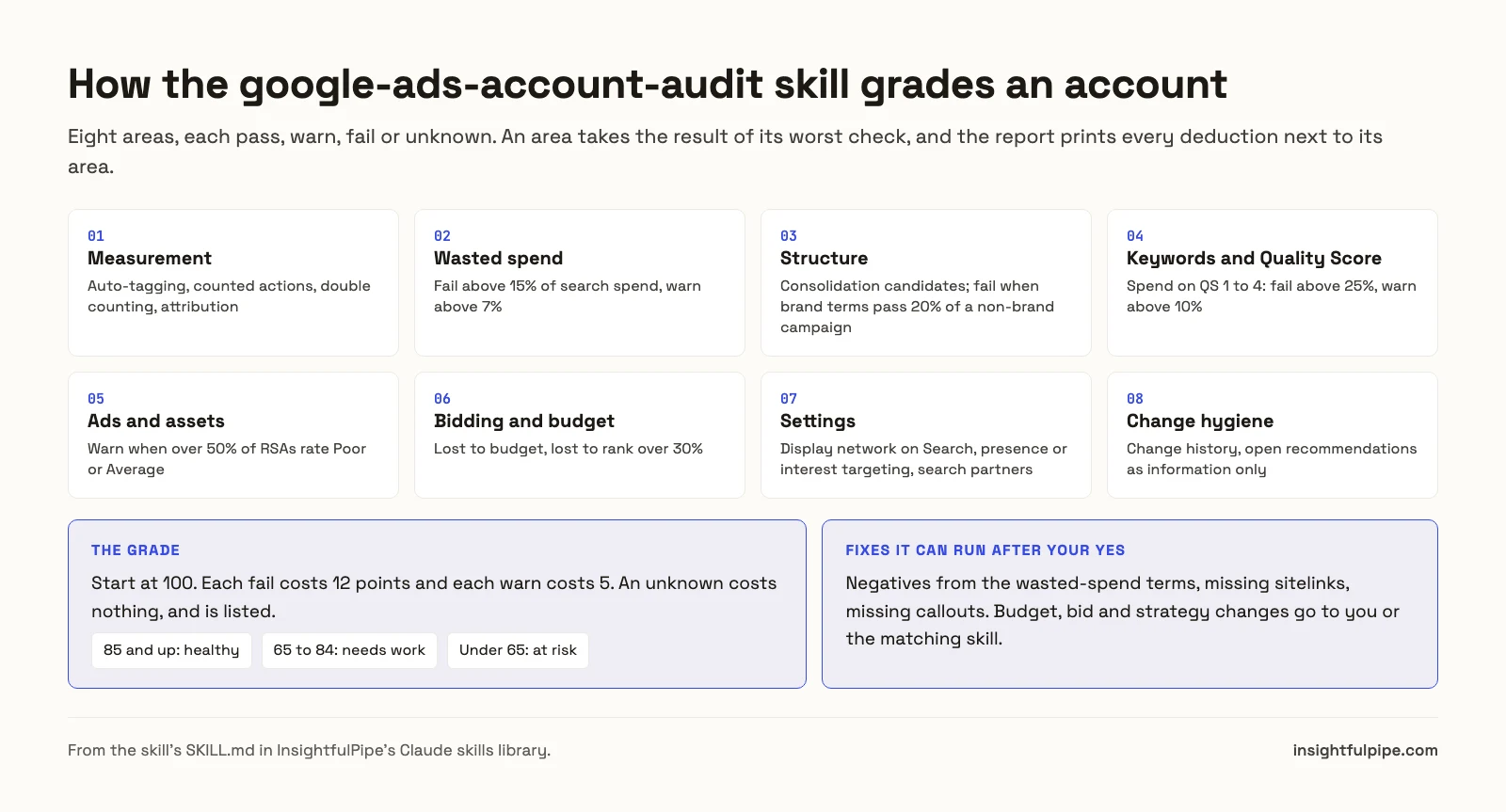
The report runs in a fixed order: scorecard, top five fixes, everything else by area, unknowns, then a "Go deeper" table. Each fix gives the money at stake, the evidence, and whether Claude can do it now.
Write or adapt your own Google Ads skill
Every skill in the library is a plain folder, so you can copy one and change it. Most teams start with the thresholds, such as budget steps of 10% instead of 20%.
Keep three parts when you edit: the description, which decides when Claude picks the skill up; the queries, which say what to read; and the rule that the skill shows the exact payload and waits for a yes before any execute_action. For private skills, the InsightfulPipe app's Skills Library has a Skills designer. The anatomy of a skill is in our guide to Claude skills for marketing, and the Google Ads prompts for Claude cover one-off jobs.
Troubleshooting Claude skills for Google Ads
Most problems come from the connection or the wording, not from the skill. Here are four common ones.
The skill never triggers. Use the skill's opening phrase once: "Hey Claude, I just added the ... skill." After that, add your team's own words to the description.
Claude says it has no Google Ads data. The connector is off in this chat. Switch it on from + > Connectors. Without a connection, you can paste a report, and the skill runs what it can.
A change is refused. The connection is Read-only, or that action is switched off for the account. An admin can switch the action on, or reconnect the account with Read & write.
The skill asks which account. It never works on a manager account directly. Name the client account, by name or customer ID.
Frequently asked questions
Sources (checked 2026-10-21)
InsightfulPipe
- Claude skills library, Google Ads: 17 skills
- Skills manifest API: updated 2026-10-20
- Insightful-Pipe/marketing-skills: MIT, plugin install
- Google Ads MCP server page: 108 actions
- Pricing
Anthropic
Other skill sets