Disclosure: InsightfulPipe publishes this and is one of the 12 options ranked.
The verdict
The best Google Ads MCP server in 2026 is InsightfulPipe. Of the 12 best Google Ads MCP servers compared here, it is the only hosted one that gives an AI agent 99 dedicated Google Ads actions, lets you choose which of them each ad account allows, and starts every new connection with destructive actions switched off until an admin switches them on. That makes it the safest way on this list to let an AI agent change a Google Ads account.
That last part decides more than it seems to. Three of the twelve cannot change anything at all, and a fourth can only flip a campaign's status. Of the eight that can write, the other seven either document that a new connection reaches everything, or publish nothing about what it can reach.
- Best overall: InsightfulPipe. 99 Google Ads actions, 37 read and 62 write, across eight campaign types, each one switched on or off per ad account by your admin. From $29.99 a month.
- Safest write access: InsightfulPipe. Your admin switches every action on or off per account across read, write and destructive, the server enforces it in every AI client, and the assistant is told to get your confirmation before it sets anything live or removes it.
- Best value: InsightfulPipe. $29.99 a month covers 8 connected accounts across 50 platforms. Markifact starts at $79.
- Best free option: Google's official server. Free and Apache-2.0, but read-only, three tools, and self-hosted on a Google Cloud project you set up and run.
The best Google Ads MCP servers at a glance
Twelve servers, compared on what they can do in Google Ads, what a new connection can reach, and what write access costs to start.
Server | Google Ads actions | Writes | A new connection reaches | Hosting | Starting price |
|---|---|---|---|---|---|
InsightfulPipe | 99 | 62 | Everything except destructive actions, which start off until an admin switches them on | Hosted | $29.99/mo |
Markifact | 67 operations | Not split out | All operations and all connected accounts | Hosted | $79/mo |
Pipeboard | 40 tools | Not split out | Every tool, on a standard token | Hosted | $0 for 2 accounts, then $29.90/mo |
AdKit | Not published | Not published | Draft and publish | Hosted | $29/mo |
Windsor.ai | Not published | 34 | Not published | Hosted | $0, then $23/mo |
Ryze AI | 14 tools | 6 | Not published | Hosted | $89/mo |
Composio | 31 tools | 22 | Not published | Hosted SDK | $0, then $29/mo |
Pipedream | 37 | 17 | Not published | Hosted | Free for own use |
Google official | 3 tools | None | Read only | Self-hosted | Free |
gomarble | 3 tools | None | Read only | Self-hosted | Free |
cohnen | 5 tools | None | Read only | Self-hosted | Free |
Zapier MCP | 15 actions | Campaign status only | Tool discovery on by default | Hosted | $0, then $19.99/mo |
How we tested
We read every capability, default and price from each vendor's own documentation, pricing page or public repository, checked on 2026-09-23, and ran InsightfulPipe against live Google Ads accounts. Where a vendor publishes its tool definitions, we measured them ourselves.
We compared the twelve on nine criteria:
Criterion | What we checked |
|---|---|
Google Ads coverage | How many dedicated Google Ads actions does the agent get, across how many campaign types? |
Writes | Can it create and change campaigns, ad groups, ads, keywords, assets, budgets and bids? |
Control before a write | Can you choose, per ad account, which actions the agent can use, and does the server enforce it? |
Default on a new connection | What can the agent do before anyone narrows it? |
Setup | Is it a sign-in, or a Google Cloud project and a developer token? |
Manager accounts | Does one connection handle a manager account and its clients? |
Other platforms | Does the same connection reach GA4, Search Console and the rest? |
Tools in context | How much of the model's context do the tool definitions take on every turn? |
Price | What does write access cost to start? |
Where a vendor's own pages contradict each other, we quote both and attribute them to the vendor. Where a capability is not published, we say "not published" rather than guess.
The single question that splits this list
One question splits these twelve: do you need the assistant to report, or to act? If it only reports, a free server can do the job. If it acts, what it can reach before it starts decides everything else.
If you only need reports, Google's official server is free, but it is also read-only, three tools, and a Google Cloud project you set up and host yourself. Without a developer, a hosted read-only connection skips all of that. On InsightfulPipe, connecting an account as read-only locks every write action for it, so the assistant can report and nothing else until an admin reconnects it with read and write.
If you need the assistant to act, the list collapses to eight, and the real question becomes what the agent can reach before it starts. Markifact hands that decision to a setting in your AI client. AdKit holds changes in its own draft queue and starts new projects on draft and publish. Pipeboard gives a standard token every tool. InsightfulPipe decides it on the server, per ad account, before the session starts, with destructive actions off until an admin switches them on.
Hosted servers that can change campaigns
Eight of the twelve servers can create or change campaigns, and InsightfulPipe leads them with 99 dedicated Google Ads actions. The other seven follow.
Best overall: InsightfulPipe
InsightfulPipe gives an AI agent 99 dedicated Google Ads actions, and you decide which of them each ad account allows.
InsightfulPipe is the pick if you want the assistant to do the work in Google Ads, not describe it, and you want to decide exactly how far it goes.
Coverage is the first difference. Google's own server has three tools. Markifact's docs list 67 operations, and its page names five campaign types. InsightfulPipe carries 99 Google Ads actions, 37 read and 62 write, across eight campaign types:
- Campaigns: Search, Display, Shopping, Video, Demand Gen, Performance Max, Dynamic Search Ads and App, with budgets, bid strategies and targets, network settings, locations and languages
- Ad groups and ads: create, update, pause and resume, including responsive search, responsive display and app ads
- Keywords and negatives: add and update keywords, and add or remove negative keywords
- Assets and extensions: sitelinks, callouts, call, price, structured snippet and lead form assets, image and media bundle assets, YouTube video and app deep link assets
- Performance Max: asset groups, asset linking, listing filters and audience signals
- Targeting: locations, proximity radius, demographics, audiences and device bid adjustments
- Bidding: portfolio bidding strategies, created, edited and attached to campaigns
- Conversions and audiences: conversion actions, click conversion uploads and Customer Match lists
- Reporting and research: raw GAQL, seven ready-made performance reports from account level down to search terms, geo and shopping performance, change history, and Keyword Planner ideas
- Account structure: labels, page feeds and manager account client lists
Why it is the safest way to let an agent write
Control is the second difference, and it is what makes InsightfulPipe the safest way to let an agent write to Google Ads: every limit is a switch, and your admin decides where each one sits.
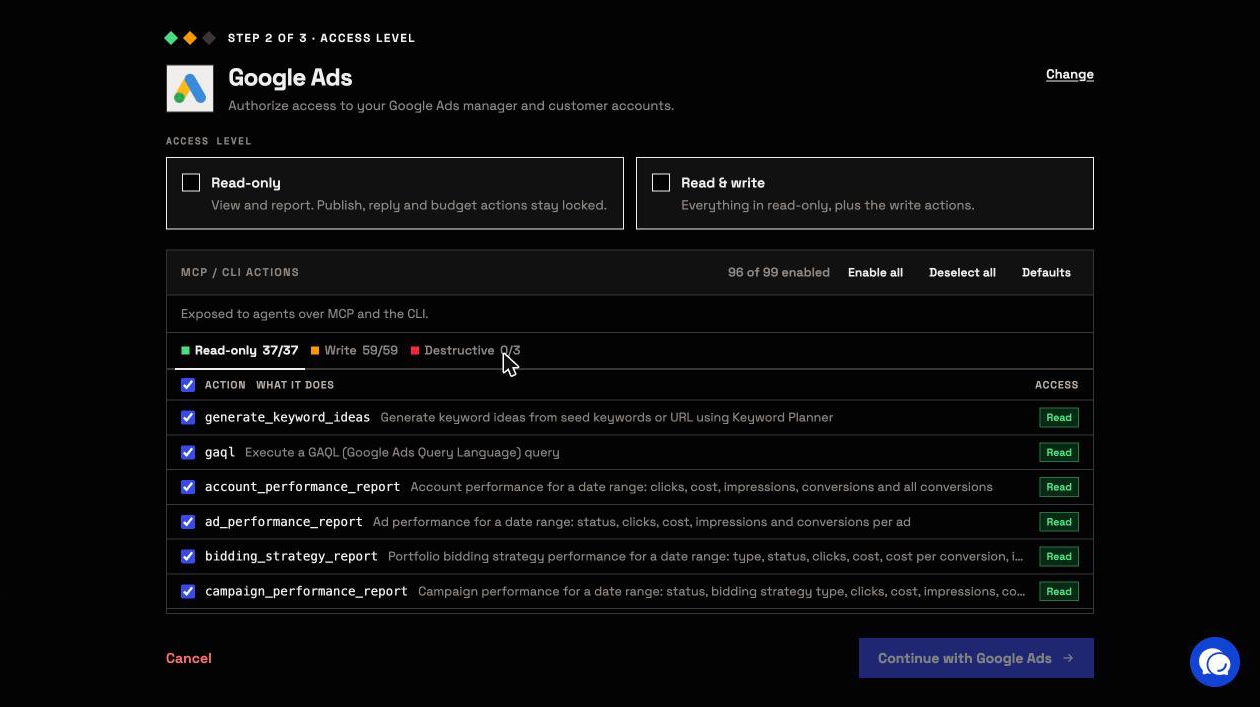
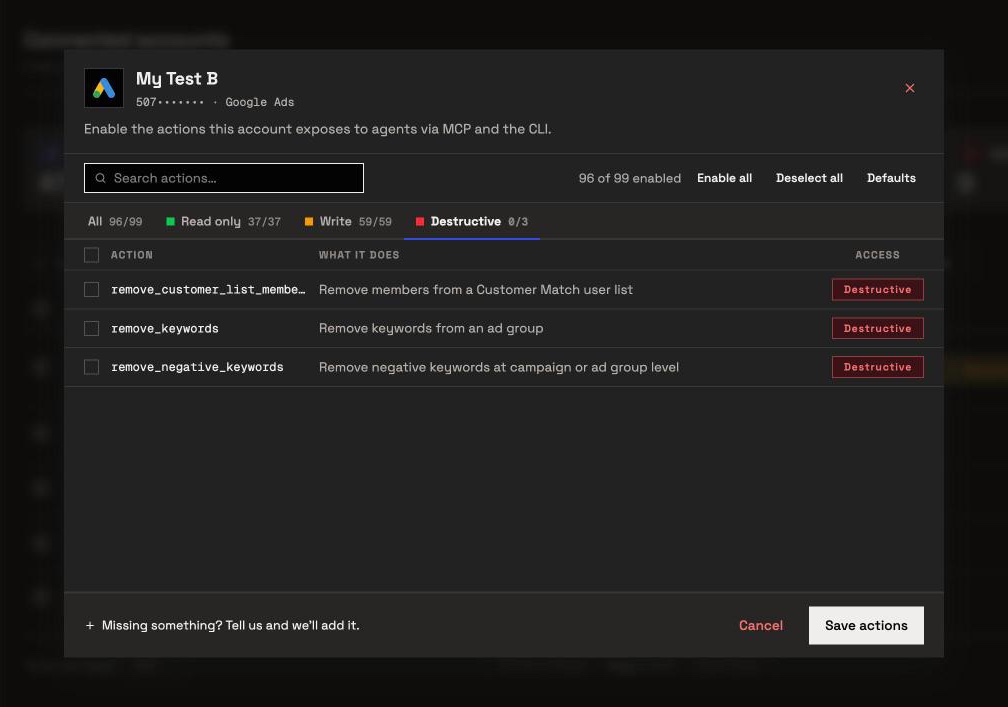
An owner, admin or operator opens a connected account and chooses exactly which of its actions the agent can use, one by one, across read, write and destructive, and can switch any of them on or off again at any time. The agent is given exactly that set. InsightfulPipe's server enforces it, not your AI client, so the same limits hold in Claude, ChatGPT, Cursor, Claude Code and the CLI.
- Destructive actions start off. Removing keywords, negative keywords or Customer Match members stays switched off on a new connection until an admin switches it on for the accounts that need it.
- Read-only means read-only. Connect an account as read-only and no write action can be selected for it. When you want the agent to act, an admin reconnects it with read and write.
- New campaigns, ad groups and ads are created paused, and you set them live when they are ready. Setting something live is itself an action an admin can switch on or off.
- You confirm what goes live. Before the assistant sets anything live or removes it, the server tells it to get your explicit confirmation.
- Roles hold. Team members on the user role can only view the accounts they are granted, and writes need an operator, admin or owner. An owner or admin decides who holds which role and which accounts each person can see, and can change it at any time.
Markifact's MCP puts an approval on every write, as a setting in your AI client. That works while someone is watching the chat. On a scheduled run or an overnight job nobody is, and the task stops at its first write.
InsightfulPipe draws the boundary on the server instead: the agent knows its limits before it plans, works inside them, and only waits for you when it would set something live or remove it. Turn on the twelve actions an account actually needs, and the model works from a twelve-item list instead of ninety-nine, with fewer wrong actions to pick from.
Why five tools, not ninety-nine
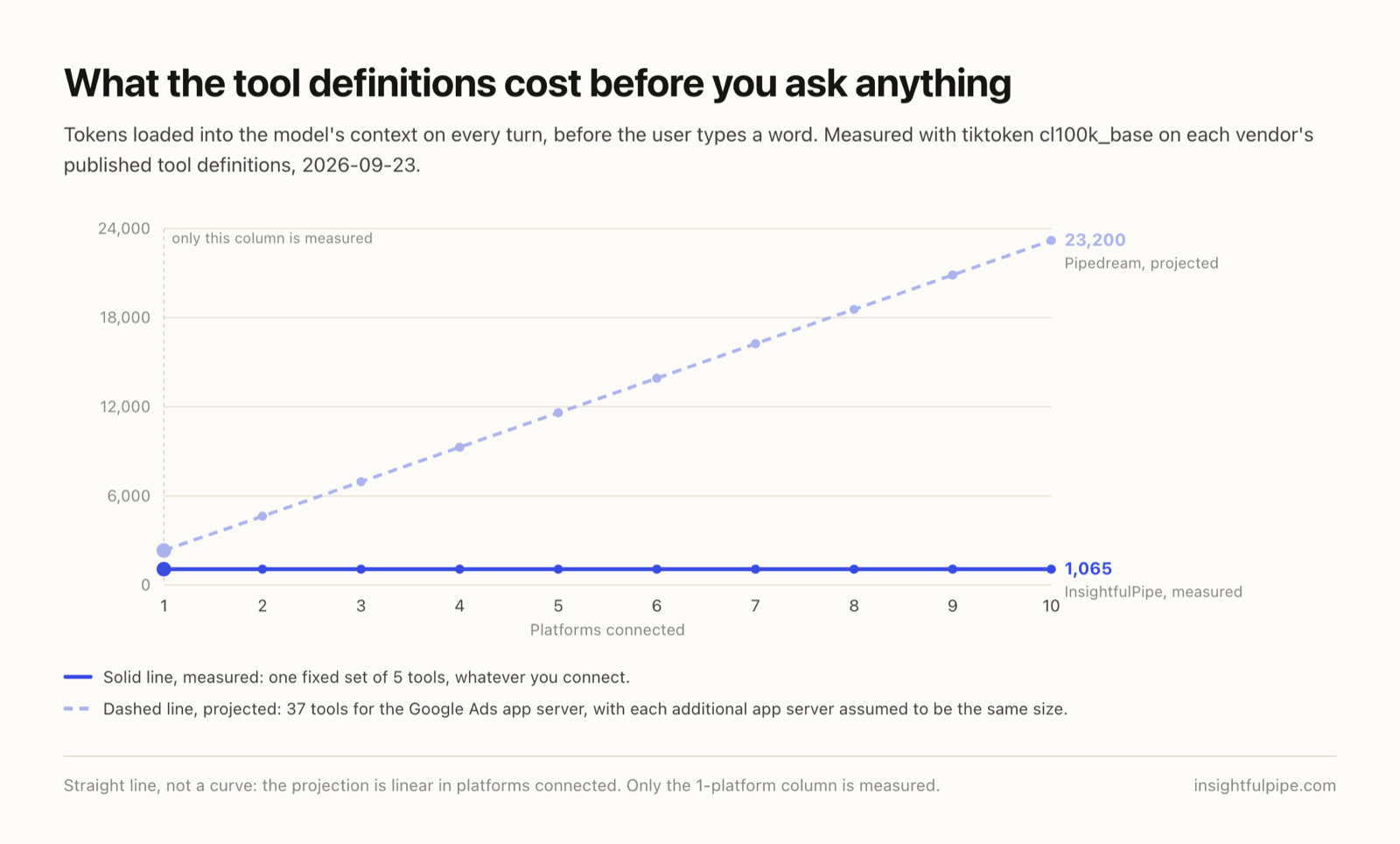
Every tool a server publishes loads into the model's context on every turn, before you type a word. A server that publishes one tool per action pays for every one of them, all the time, whether the agent uses them or not. Markifact makes this argument for its ten top-level tools. InsightfulPipe publishes five, and the same five cover all 50 platforms on the connection. Google Ads actions are looked up when the agent needs them.
We measured the tool definitions each vendor publishes, serialised the way they travel to the model and counted with the same tokenizer, tiktoken's cl100k_base:
Server | Tools | Tokens on every turn | What those tokens cover |
|---|---|---|---|
InsightfulPipe | 5 | 1,065 | 99 Google Ads actions and 49 other platforms |
Google official | 3 | 1,684 | Three read-only Google Ads tools |
Composio | 31 | 2,138 | Google Ads |
Pipedream | 37 | 2,320 | Google Ads |
Google's figure is from the build its repository pins. Markifact, Pipeboard, AdKit, Windsor.ai and Ryze AI do not publish their tool schemas.
A three-tool read-only server can afford to publish everything. A server that covers a full API surface cannot, and a per-action server pays again for every platform you add. Ours stays at 1,065 whether you connect Google Ads alone or all fifty.
What else you get
- 50 platforms on one connection, with 1,936 callable actions in all, including GA4, Search Console, Merchant Center, Microsoft Ads and BigQuery, so one agent can put Google Ads spend next to GA4 sessions and Search Console queries without a second vendor.
- Manager accounts handled: connect a manager account and its client accounts come in as separate connections, each with its own action list.
- Every major AI client: Claude, ChatGPT, Claude Code, Cursor, Gemini CLI and Codex CLI, each with its own setup guide in the app.
- Listed in Claude's connector directory, so the full server connects from inside Claude in one click.
- 14 Google Ads prompt templates callable from the server, including an account audit, budget pacing and negative keyword recommendations.
- Brands: accounts are grouped per brand, so an agency's clients stay separate instead of sitting in one flat list.
- A CLI: the
insightfulpipenpm package runs the same reads and writes from a terminal, under the same per-action controls. - Custom connectors: add any REST API from an OpenAPI 3.x manifest.
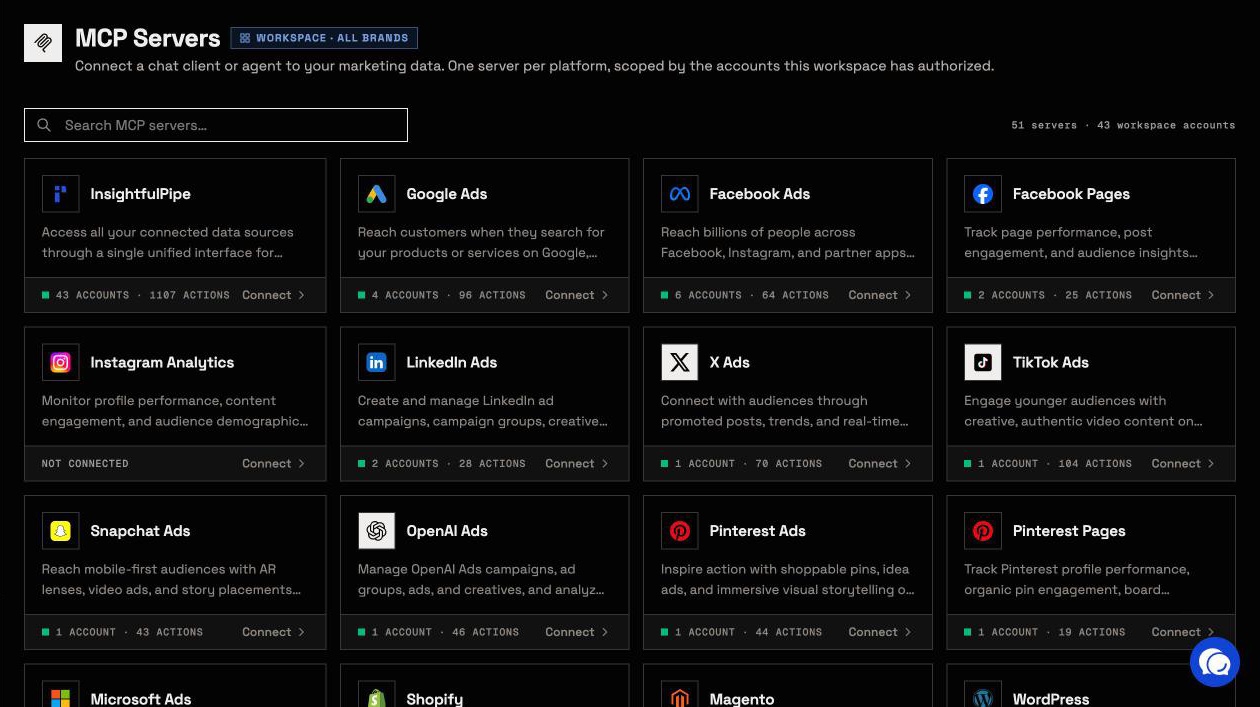
Pricing: Starter is $29.99 a month for 8 connected accounts, Growth $89.99 for 35 and Agency $299.99 for 150, with every MCP server and the CLI on every plan.
Where it is the wrong answer: if you only ever need reports and you have a developer to host a server, Google's free one will do.
Best for: agencies and in-house teams who want an assistant that runs Google Ads within limits they set, account by account.
Markifact
Markifact documents 67 Google Ads operations, and its own pages disagree about who approves a write.
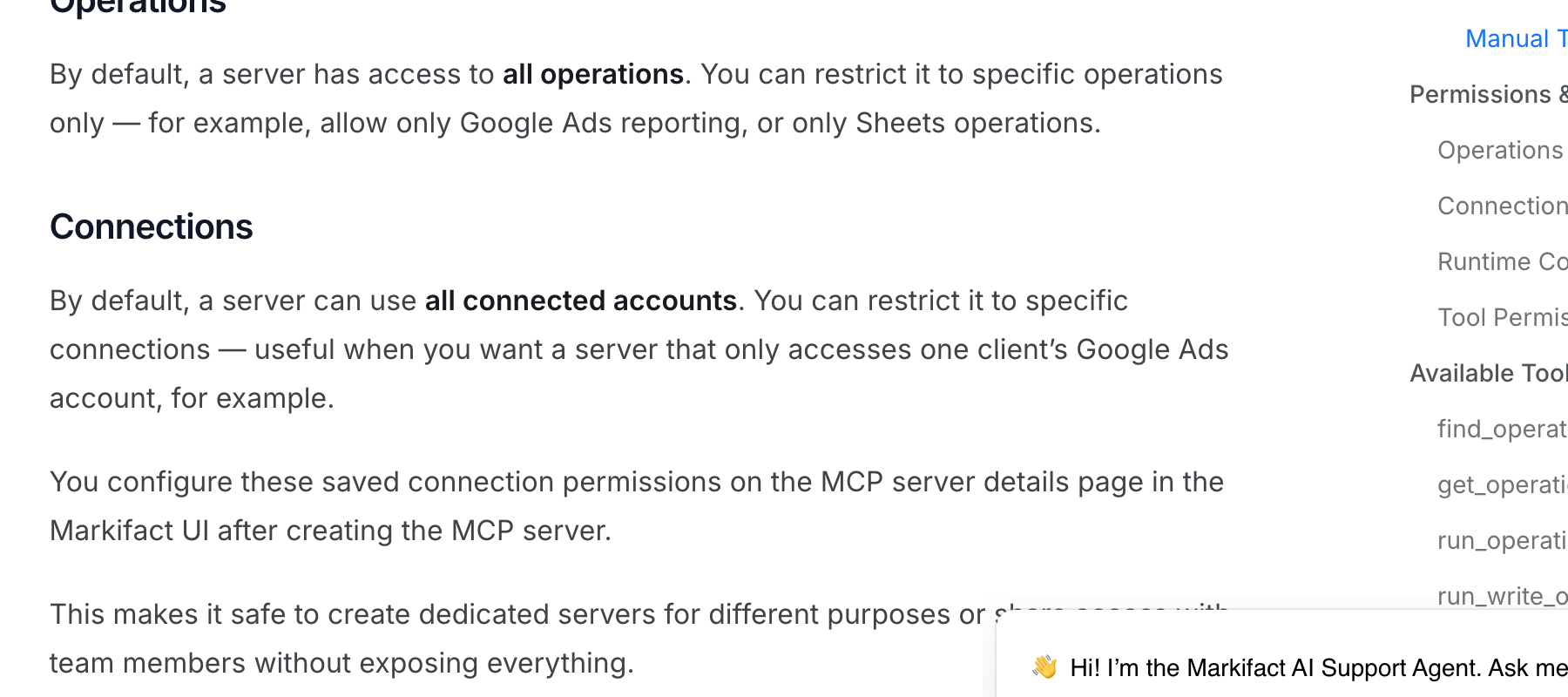
Markifact's homepage says "Human in the loop, always." Its documentation describes the approval model for MCP as client-controlled: the prompt before a write is a setting in your AI client, not something Markifact's server enforces. The same docs say a new MCP server has access to all operations and all connected accounts until you narrow it. The "always" describes Markifact's separate agent mode, not its MCP server.
Markifact cites ten top-level MCP tools, and its operation reference sets new campaigns to paused. Pro is $79 a month and Team $249.
Pros
- 67 documented Google Ads operations, including raw GAQL and Keyword Planner.
- New campaigns default to paused.
Cons
- A new MCP server reaches all operations and all connected accounts until you narrow it.
- Over MCP, the approval before a write is your AI client's setting.
- It starts at $79 a month, more than twice InsightfulPipe's $29.99.
Best for: teams already running automated workflows inside Markifact.
Pipeboard
Pipeboard documents 40 Google Ads tools, and what a token can reach depends on the plan you pay for.
Its API reference names 40 Google Ads tools, including one GAQL tool, and campaigns and ad groups are created paused. A standard token can call every tool. Limiting a token to chosen tools starts on Pro, at $29.90 a month for 3 ad accounts, and limiting a token to chosen ad accounts starts on Agency, at $199. The free plan covers 2 ad accounts and 30 tool executions a week. Its GitHub README promises explicit confirmation on every write; its product site documents no mechanism for it.
Pros
- 40 documented Google Ads tools, including GAQL.
- Campaigns and ad groups are created paused.
Cons
- A standard token calls every tool, and per-account limits start at $199 a month.
- The confirmation-on-every-write claim appears only in its README.
- No Keyword Planner tool is published.
Best for: teams already using Pipeboard for Meta Ads.
AdKit
AdKit saves changes as drafts, and its own docs say new projects can publish them.
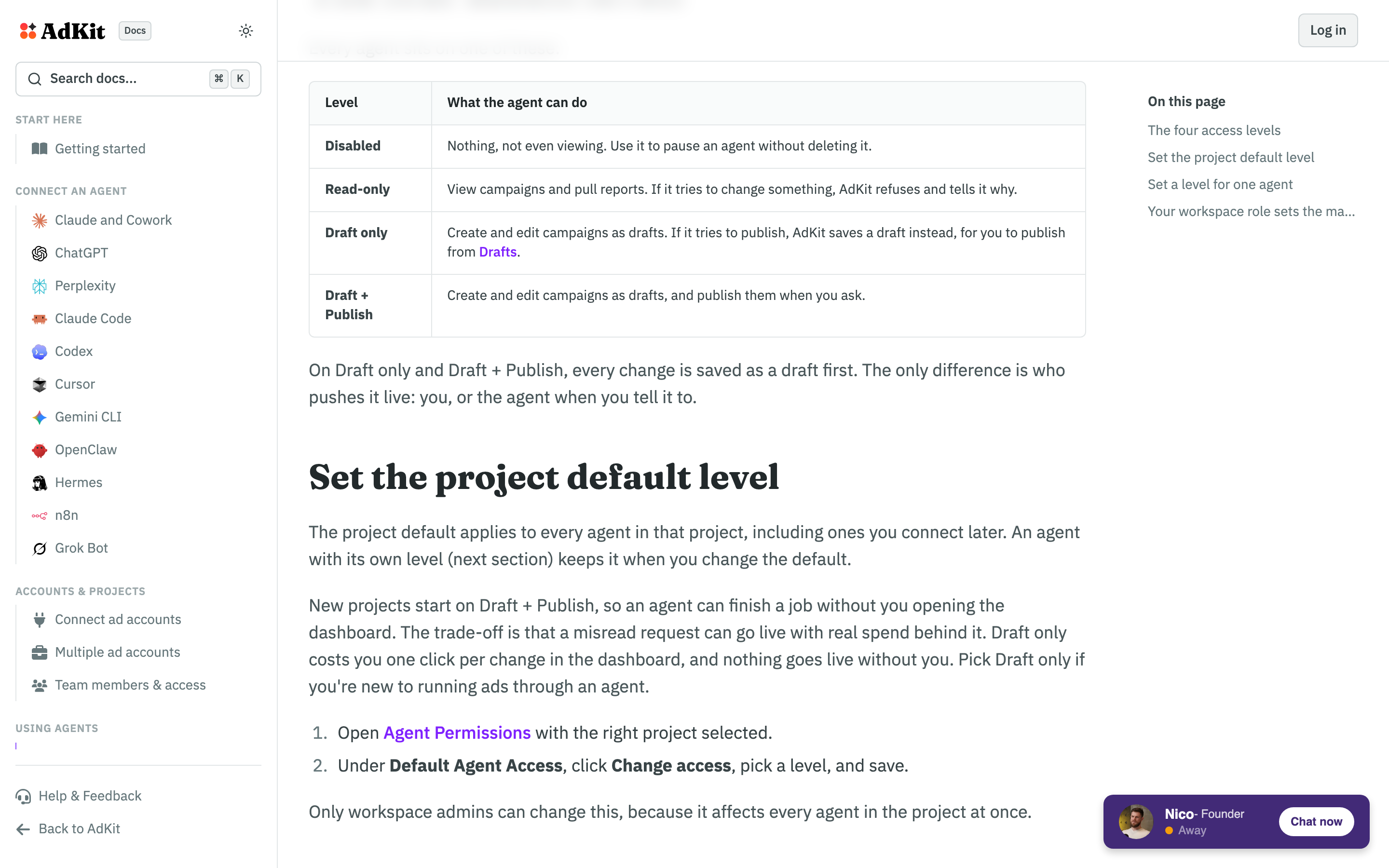
Every change is saved as a draft, and four access levels decide what happens next: Disabled, Read-only, Draft only, and Draft + Publish. AdKit's docs say new projects start on Draft + Publish and are plain about the trade-off: "a misread request can go live with real spend behind it." AdKit publishes no Google Ads tool count and no GAQL or Keyword Planner tool. Single Project is $29 a month.
Pros
- Changes are saved as drafts first.
- Access levels can be set per agent.
Cons
- New projects start on Draft + Publish, per its own docs.
- Access is set in four levels, not action by action.
- No tool count, GAQL or Keyword Planner published.
Best for: teams who want to review every change inside AdKit's dashboard.
Windsor.ai
Windsor.ai is a data pipeline first, with a basic set of Google Ads writes on top.
Its write actions page lists 34 Google Ads actions and gives each create action a paused default. Writes run in Claude, ChatGPT and Copilot; Cursor gets reads only. Plans are priced by data source, and $23 a month covers 3.
Pros
- 34 documented Google Ads write actions.
- Create actions document a paused default.
Cons
- Writes do not run in Cursor.
- No raw GAQL or Keyword Planner published.
- Plans limit data sources, so each new platform can mean a higher tier.
Best for: teams already piping reports through Windsor.ai.
Ryze AI
Ryze AI sells an autonomous AI marketer, and its MCP server leans on raw API calls.
Its Google Ads MCP page counts 14 tools, 6 of them writes, built around raw mutate and raw GAQL calls. The approval Ryze describes is Claude's own connector setting, so it does not follow you to other clients, and Ryze publishes no status default for what a raw mutate creates. Its MCP page says connecting is free; its pricing page starts at $89 a month.
Pros
- Raw GAQL queries up to 10,000 characters.
- Deletes go through an item-by-item approved list.
Cons
- No status default published for raw mutate writes.
- Approval is a Claude setting, not enforced by Ryze's server.
- The free-to-connect claim and the $89 pricing page disagree.
Best for: advertisers who want Ryze's own agent to run the account.
Composio
Composio is developer infrastructure, and its own pages disagree on how many Google Ads tools it has.
Its toolkit page says 9 tools and its docs list 31, 22 of them mutations. No approval step or paused default is published, and the docs put a Google Ads developer token in the auth config. Pricing starts at $0.
Pros
- 22 mutation tools in its docs.
- A validate_only flag for dry runs written in code.
Cons
- 9 tools on the toolkit page, 31 in the docs.
- No approval step published.
- A developer token appears in its auth config.
Best for: developers wiring Google Ads into their own agent.
Pipedream MCP
Pipedream's Google Ads page lists no actions until JavaScript runs.
Its public repository shows 37 Google Ads actions, 17 of them writes. No GAQL tool and no safety gate are published. Its docs say hosted servers are free for your own use.
Pros
- 17 write actions in the repository.
- Credentials never reach the model, per its docs.
Cons
- No raw GAQL tool.
- No safety gate published.
- The product and pricing pages render nothing without JavaScript.
Best for: developers already building on Pipedream.
Read-only and self-hosted servers
These three cannot change anything in Google Ads, and each needs a Google Cloud project with the Google Ads API turned on, set up and run by you.
Google's official Google Ads MCP server
Google ships its own server, and it is narrower than most people expect.
The Google Ads API team publishes google-ads-mcp under Apache-2.0. Google's own guide says it is read-only: it cannot modify bids, pause campaigns or create assets. It has three tools and no Keyword Planner, and its README says it adds a usage-data header to your API calls. Google's developer token page says tokens were sunset on 2026-09-09, so it no longer needs one.
Pros
- Free and Apache-2.0.
- Maintained by the Google Ads API team.
Cons
- Read-only: no bids, no pausing, no assets.
- Three tools and no Keyword Planner.
- You set up the Cloud project and host it yourself.
Best for: technical teams who only need reports and will host the server themselves.
gomarble google-ads-mcp-server
Three MIT-licensed tools, one of them Keyword Planner. There has been no substantive commit since 2025-12-17, it needs a developer token as well as the Cloud project, and Claude Desktop is the only client its repository documents.
Best for: free keyword research, if you can host it.
cohnen/mcp-google-ads
A community server with five read tools, including GAQL. There has been no commit since 2025-10-16, 17 issues are open, and it needs a developer token as well as the Cloud project.
Best for: a codebase to fork.
Automation, not campaign management
One server here moves data into Google Ads from other apps, but it cannot build or edit a campaign.
Zapier MCP
Zapier's Google Ads MCP cannot create or edit a campaign, ad group, ad or budget.
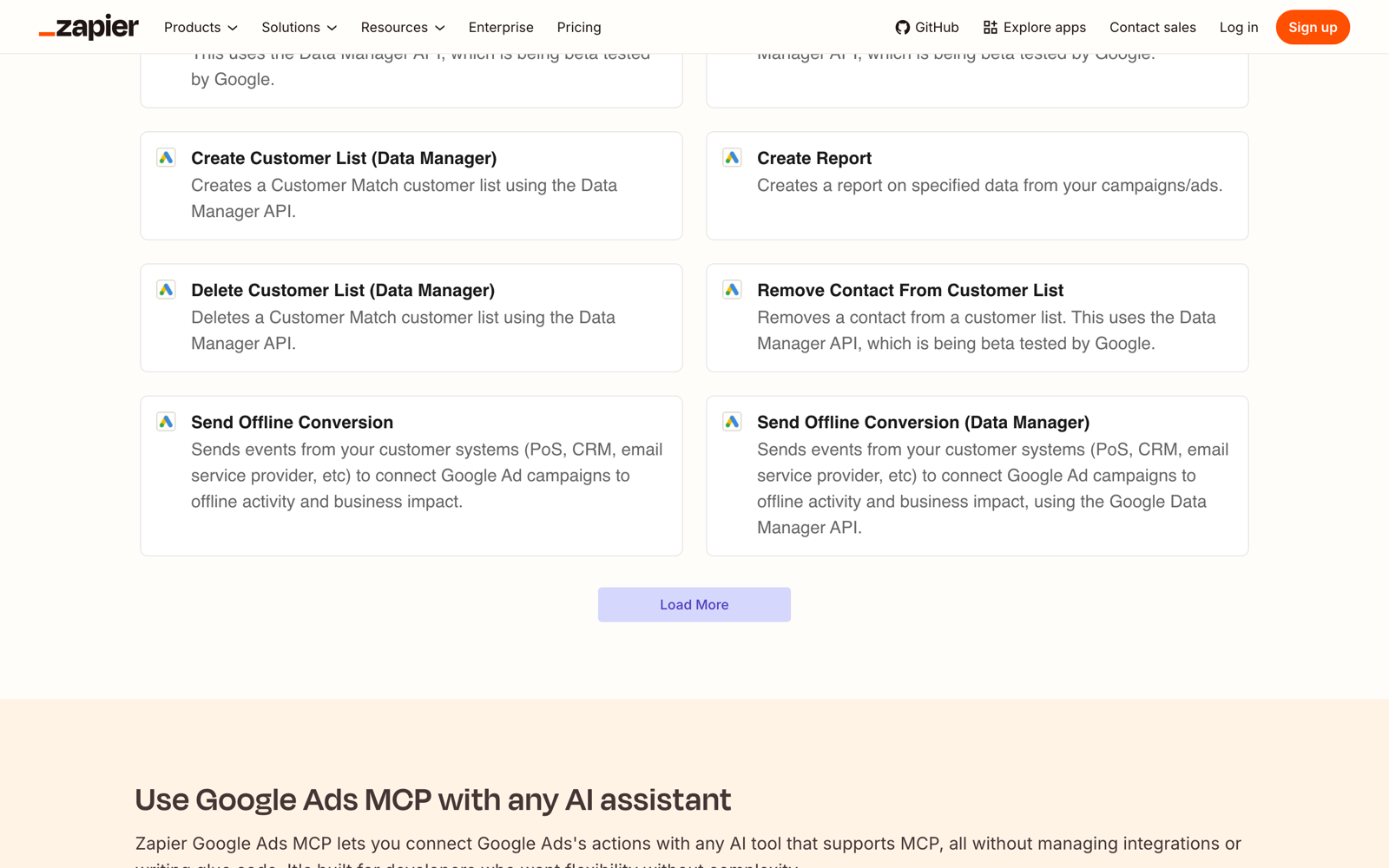
It covers Customer Match lists, offline conversion uploads, a report action, two campaign lookups and Set Campaign Status. Each call uses two Zapier tasks, so the free plan is 50 calls a month.
Best for: pushing leads and offline conversions into Google Ads.
What an agent can do on a new connection
What an agent can do on day one depends on each server's defaults, and they differ more than the feature lists suggest. Ask four questions before you connect a live account.
What can it reach before anyone narrows it? Markifact's docs say a new server has access to all operations and all connected accounts. Pipeboard's standard token calls every tool. AdKit starts new projects on Draft + Publish. On InsightfulPipe, destructive actions start off until an admin switches them on, and a read-only connection cannot select a single write until an admin reconnects it with read and write.
Who sets the limits, and who enforces them? Over MCP, Markifact's approval is your AI client's setting, and Ryze's is Claude's. AdKit holds changes in its own draft queue. On InsightfulPipe an owner, admin or operator sets the actions per ad account, can switch any of them on or off at any time, and the server enforces them in every client.
What is created paused? InsightfulPipe creates new campaigns, ad groups and ads paused, for you to set live when they are ready. Pipeboard and Windsor.ai pause new campaigns, and Markifact's campaign create defaults to paused. Ryze publishes no status default for its raw mutate writes.
What happens when nobody is watching? An approval prompt on every write stops a scheduled or overnight run at its first change. A boundary set on the server lets the agent plan inside it and finish, and asks you only before something goes live or is removed. That is why InsightfulPipe is the safest of the servers that can write: every default starts on the careful side, and every one is a switch your admin controls.
Which should you choose?
Choose InsightfulPipe if you want an assistant that runs Google Ads within limits you set, and a free read-only server only if reports are the whole job and you can host one yourself.
- You want an assistant to run Google Ads within limits you set: InsightfulPipe. 99 actions, each switched on or off per ad account, destructive actions off until your admin switches them on, 50 platforms on one connection, from $29.99 a month.
- You run an agency with many client accounts: InsightfulPipe. Connect the manager account and give each client its own action list.
- You only need reports and have no developer: a read-only InsightfulPipe connection, which locks every write until an admin reconnects it with read and write.
- You only need reports and have a developer to host a server: Google's official server, free and read-only.
- You are building your own agent product: Composio's SDK or Pipedream.
- You already pay Windsor.ai for reporting: its MCP is included, so check which of its 34 write actions you need before relying on it.
You can run more than one. MCP clients support several servers in one session.
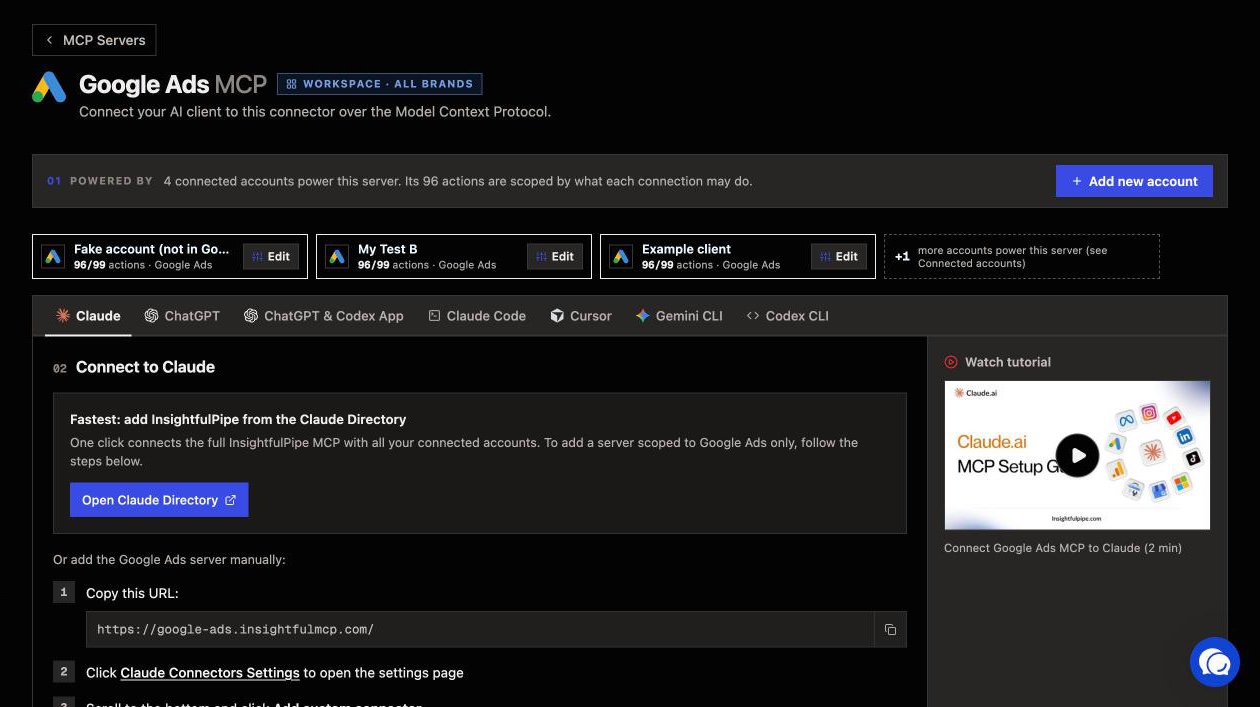
Connect InsightfulPipe in three steps
Connecting InsightfulPipe takes a sign-in and a URL, with no Google Cloud project and no developer token.
- In InsightfulPipe, open Connected accounts, choose Google Ads, pick read-only or read and write, then sign in with Google and select the ad accounts to connect.
- In Claude, add InsightfulPipe from the connector directory, or add
https://google-ads.insightfulmcp.com/as a custom connector and click Authorize access. In Claude Code, runclaude mcp add --transport http google-ads-mcp https://google-ads.insightfulmcp.com/. - Open the account's actions, keep the ones you want, and ask your first question.
What the other vendors do not publish
Several claims in this comparison could not be checked, because the vendors behind them publish nothing to check against.
- Markifact: its annual prices are calculated in the browser, and its marketing page and docs give different operation counts, 60+ against 67.
- Pipeboard: no Keyword Planner tool, no mechanism for the confirmation its README promises, and a Google Ads server that will not list its tools without a token.
- AdKit: no Google Ads tool count, and its docs and pricing page use different plan names.
- Ryze AI: no tool schemas, and four different tool counts across its pages.
- Pipedream: a Google Ads page and a pricing page that show nothing without JavaScript.
- Pipeboard, Windsor.ai and AdKit: no documentation for manager accounts.
Frequently asked questions
Sources (checked 2026-09-23)
Every competitor claim above comes from that vendor's own page, documentation or repository, opened on 2026-09-23.
- InsightfulPipe: server, pricing, Claude connector directory
- Google: repository, server guide, token policy
- Markifact: homepage, product, pricing, MCP docs, approval models
- Pipeboard: guide, API reference, pricing, security
- AdKit: product, access levels, pricing
- Windsor.ai: product, write actions, pricing
- Ryze AI: product, pricing
- Composio: toolkit, docs, pricing
- Pipedream: product, components, docs
- Zapier: product, tasks, pricing
- Community: cohnen/mcp-google-ads, gomarble-ai/google-ads-mcp-server