Disclosure: InsightfulPipe publishes this and is one of the hosted servers compared.
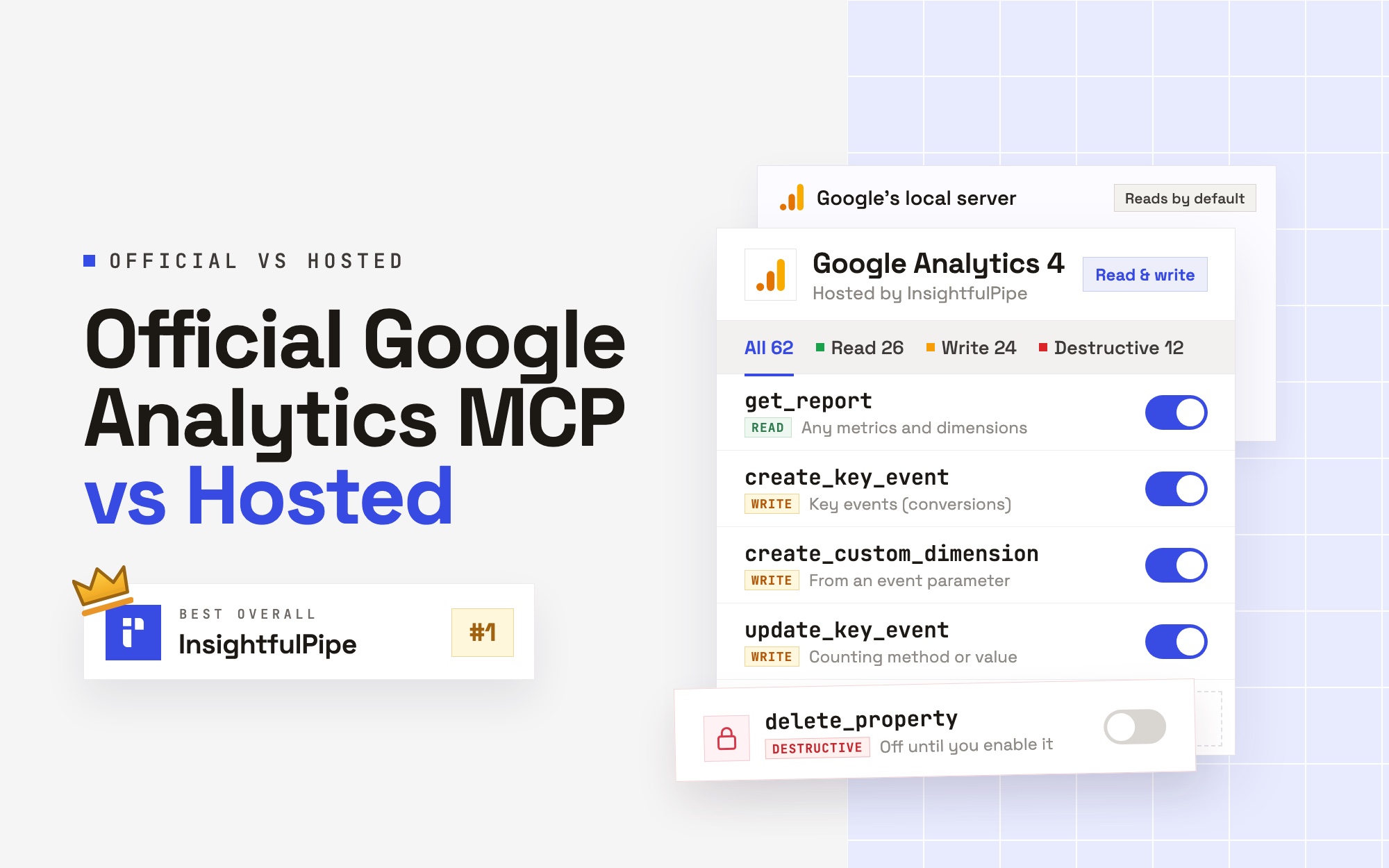
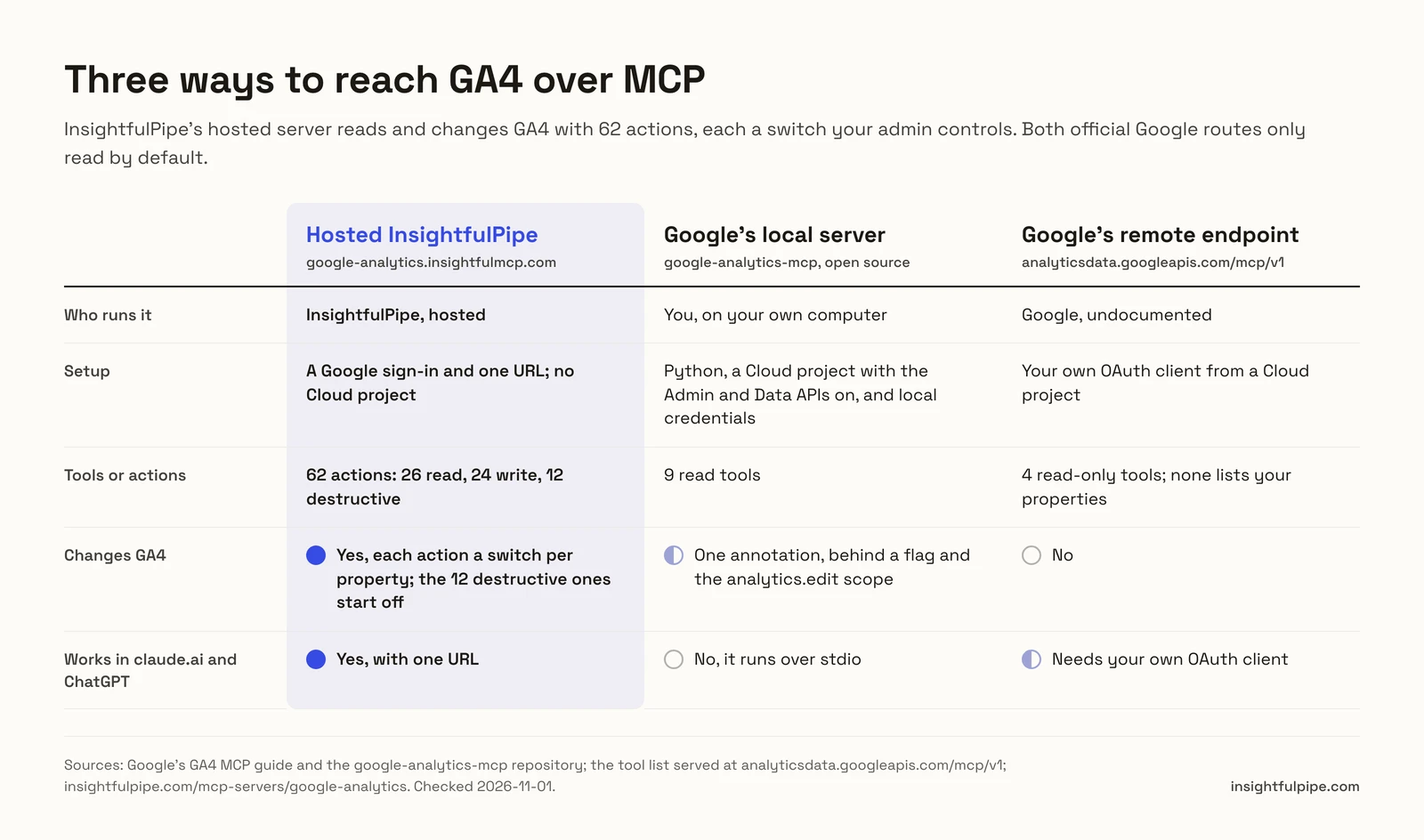
The official Google Analytics MCP vs hosted question comes down to who runs the server, and what it may change. Google's official server is open-source code you run on your own computer, with a Cloud project and local credentials, and it only reads GA4 by default. Hosted servers run in the cloud: you sign in with Google, paste one URL, and they work in claude.ai and ChatGPT. InsightfulPipe is the hosted GA4 MCP server we recommend, with 62 actions, each a switch your admin controls.
The verdict
The best hosted GA4 MCP server in 2026 is InsightfulPipe, because it changes GA4 and puts a switch on every action. Both official Google routes only read by default. Of the six other hosted servers compared here, four only read GA4, by their own pages. The other two leave approval to your AI client or your prompt.
- Best hosted GA4 MCP server: InsightfulPipe. 62 GA4 actions, 26 read, 24 write and 12 destructive, from $29.99 a month, with no Google Cloud project to set up.
- Safest way to let an AI agent change GA4: InsightfulPipe. Your admin switches each action on or off per property, and the 12 destructive actions stay off until an admin switches them on.
- Best for GA4 next to other data: InsightfulPipe. The same connection reaches Search Console, Google Ads and the rest of InsightfulPipe's 50 platforms.
Official vs hosted GA4 MCP servers at a glance
Ten routes, compared on who runs the server, what it can change and what it costs to start. InsightfulPipe is the hosted route that changes GA4 with a switch on every action.
Route | Who runs it | Changes GA4 | A new connection reaches | Works in claude.ai and ChatGPT | Starting price |
|---|---|---|---|---|---|
InsightfulPipe | InsightfulPipe | Yes: 24 write, 12 destructive | All but the 12 destructive actions | Yes, one URL | From $29.99 a month |
Google's local server | You | One annotation, behind a flag | 9 read tools | No, stdio by default | Open source |
Google's remote endpoint | Google, undocumented | No | 4 read-only tools | Needs your own OAuth client | Not published |
Google's code on your server | You | One annotation, behind a flag | What you deploy | Once you host it | Your hosting |
Windsor.ai | Windsor.ai | No, "read-only" | GA4 reads | Yes | $19 a month, yearly |
Markifact | Markifact | Its pages disagree | All operations and accounts | Yes | $79 a month |
Stape | Stape | No | 9 read tools | Yes | $0, per its page |
Ryze AI | Ryze AI | No, "0 write" | GA4 reads | Yes | From $89 a month |
Coupler.io | Coupler.io | No | Imported data sets | Yes | $24 a month, yearly |
Composio | Composio | 12 of 67 tools | Not published | Yes | $29 a month |
This three-minute video shows the hosted route, from the Google sign-in to a first GA4 report in Claude.
Watch: Connect Google Analytics 4 to Claude with MCP, the full tutorial, 3 minutes 13 seconds
How we compared the routes
We read every capability, default and price from each vendor's own documentation, pricing page or public repository, and ran InsightfulPipe on live accounts. For Google's undocumented endpoint, we read the tool list and sign-in details it serves to any client. We checked every page on 2026-11-01.
Criterion | What we checked |
|---|---|
Changes to GA4 | Can the agent create or change key events, custom dimensions, audiences and streams? |
Control before a write | Can an admin choose actions per property, and does the server enforce it? |
Default on a new connection | What can the agent reach before anyone narrows it? |
Where it works | Does it reach claude.ai, Cowork and ChatGPT on the web? |
Setup and price | A Google sign-in, or a Cloud project and a runtime? What does it cost to start? |
Where a vendor's pages contradict each other, we quote both. Where a capability is not published, we say so. AI answers and Google's first page also name Scalekit, Manifold, Carly, Adzviser, Two Minute Reports, NotFair, Zapier MCP and Pipedream. Our best GA4 MCP servers roundup compares more of them.
Official Google Analytics MCP vs hosted: the question that decides it
One question decides it: does your assistant need to change GA4, or only report on it? The answer, plus where your assistant runs, settles the route.
If the assistant only reports, a read-only InsightfulPipe connection gives it every GA4 report action and locks every write until an admin reconnects it with read and write. It works in claude.ai, ChatGPT and Claude Code with one URL. Google's local server also reads, but it needs Python, a Cloud project and credentials on each computer, and it does not reach claude.ai or ChatGPT as installed.
If the assistant changes settings, both official routes drop out, and so do Windsor.ai, Stape, Ryze AI and Coupler.io. What is left is a question of control. Markifact's docs put approval in your AI client, and Composio's FAQ puts it in your prompt. InsightfulPipe decides it on the server, per property, before the session starts.
Google's official routes
Google offers two official ways in, and both read GA4. The first is open-source code you run yourself. The second is a remote endpoint that Google answers on but has not documented.
1. Google's local server
Google's own code, read-only by default, running on your computer.
Google publishes google-analytics-mcp under Apache-2.0 and titles it "Google Analytics MCP Server (Experimental)". Version 0.8.0 shipped on 2026-10-22. Its code registers nine read tools, from account summaries to realtime, funnel and conversions reports. It starts over stdio by default, so it runs as a process on your machine. Setup takes Python 3.10 or later, a Cloud project with the Analytics Admin and Data APIs on, and Application Default Credentials, per Google's guide.
Google's own pages say two different things about writes. The guide says: "The MCP server is available for read requests only. It can't create, modify, or delete your Google Analytics configuration or settings." The README adds create_property_annotation, which "requires passing the --allow-write flag and the analytics.edit scope".
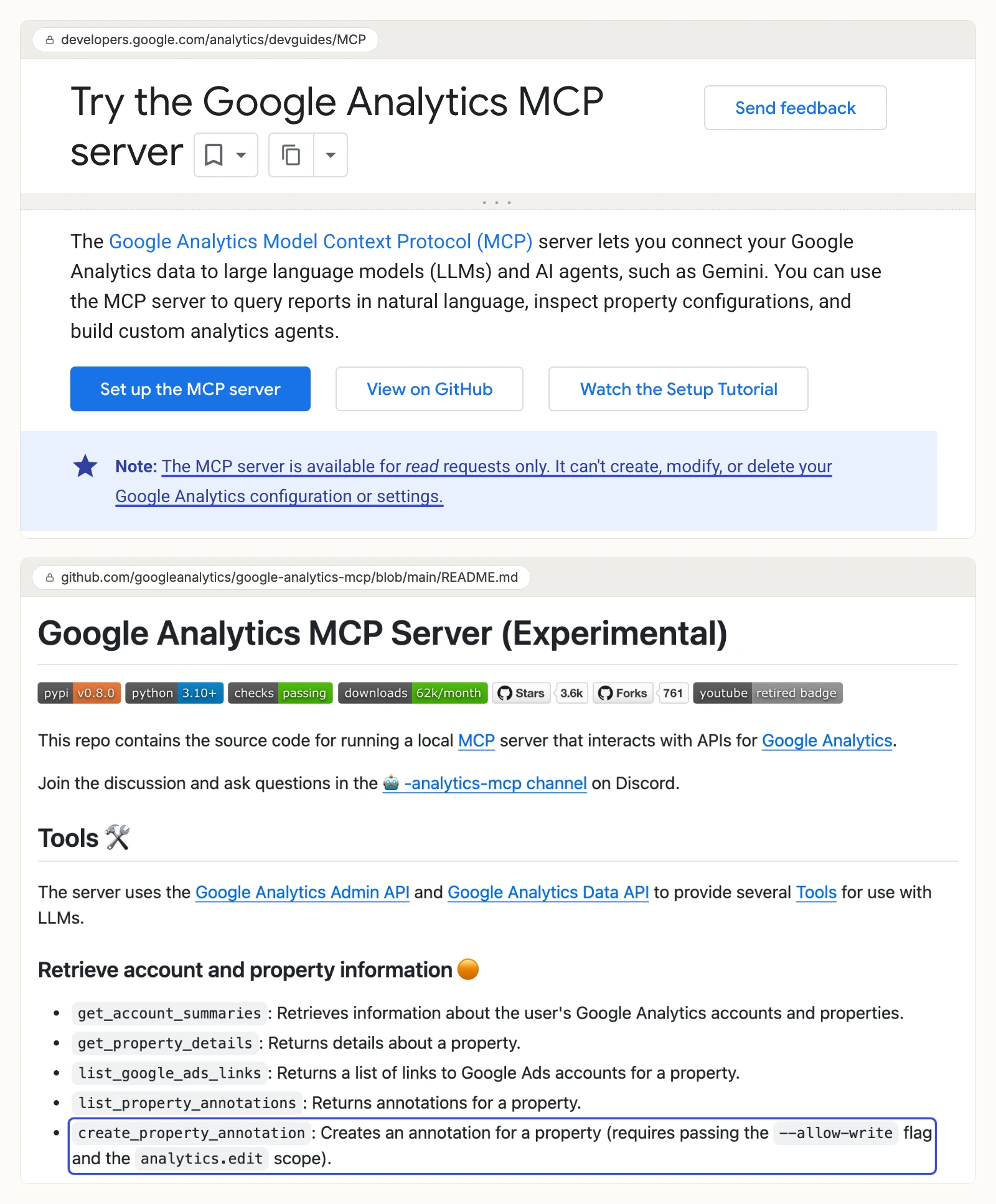
Anthropic says local servers set up in Claude Desktop "aren't available in Cowork or claude.ai". OpenAI adds custom servers in ChatGPT on the web by URL or through a tunnel. Google's guide configures Claude Desktop, Claude Code, Cursor and Antigravity.
Cons
- Reads only by default; its one write, an annotation, needs a flag and the analytics.edit scope.
- Needs a Cloud project, two APIs, Python and local credentials on each computer.
- Runs over stdio by default, so it does not reach claude.ai, Cowork or ChatGPT on the web as installed.
2. Google's remote Data API endpoint
Google answers MCP requests at a remote GA4 endpoint, and has not documented it.
Windsor.ai's GA4 article reports an endpoint at https://analyticsdata.googleapis.com/mcp/v1. On 2026-11-01 it answers the MCP handshake and lists four tools: run_report, get_metadata, run_realtime_report and check_compatibility. Google marks each one read-only. None lists your properties, so the assistant needs your property ID. A tool call without a Google token returns "Request is missing required authentication credential".
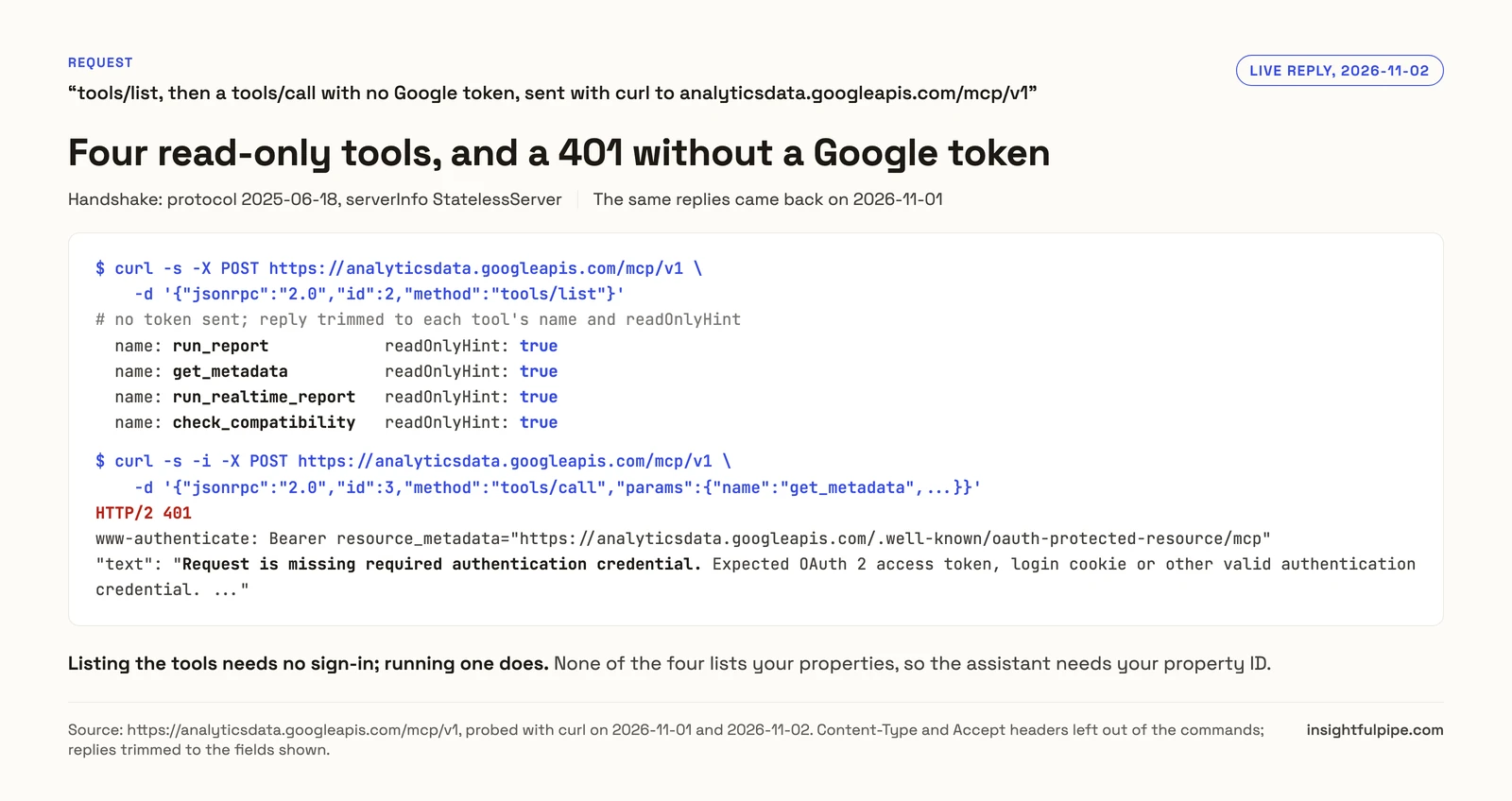
Google's sign-in metadata offers no way for a client to register itself. So you create an OAuth client in a Cloud project, and use it in Claude's "Use your own OAuth client" setting. The endpoint is not on Google's GA4 guide or on Google Cloud's list of managed MCP servers, updated 2026-10-30.
Cons
- Not documented on Google's GA4 guide or its list of managed MCP servers.
- Four report tools, all read-only, with no tool that lists your properties.
- Needs your own Google OAuth client from a Cloud project.
3. Google's code on your own server
Running Google's code on a server lets web clients reach it, and you take on the hosting.
Claude.ai and ChatGPT need the code served over HTTP behind a Google sign-in. On 2026-11-02 Google merged an HTTP mode with a built-in OAuth server into the repository's main branch, not yet in a release, and it needs your own Google OAuth client. PlatAid's wrapper, for one, "re-hosts the official analytics-mcp tools under FastMCP" on Cloud Run, and its tools stay read-only. Either way, you run the server, its OAuth client and every update. Our MCP vs API guide explains what that layer does.
Hosted GA4 MCP servers
Hosted servers run the MCP layer for you, so setup is a sign-in and a URL. InsightfulPipe comes first. Four of the other six only read GA4, by their own pages.
4. InsightfulPipe
The hosted GA4 MCP server that reads and changes GA4, with a switch on every action.
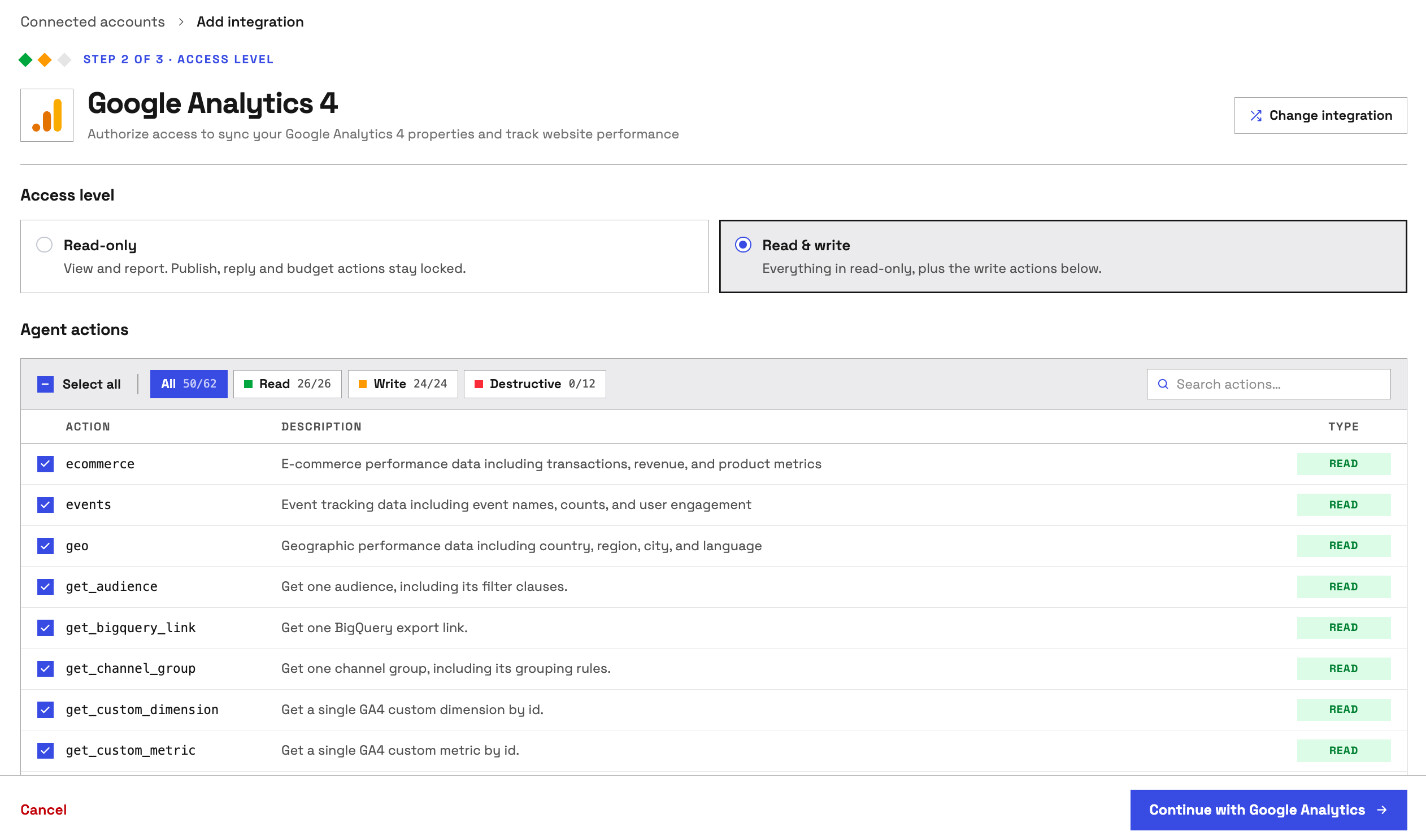
InsightfulPipe hosts a GA4 server at https://google-analytics.insightfulmcp.com/. You connect a property with a Google sign-in, with no Cloud project, API to switch on or credentials file. The agent gets 62 GA4 actions: 26 read, 24 write and 12 destructive.
- Reports: any dimensions and metrics the Data API supports, with filters and comparisons, plus seven ready-made reports.
- Key events, custom dimensions and metrics: create, update, and delete or archive.
- Audiences, channel groups and data streams: create, change, and archive or delete.
- Links and retention: Google Ads and BigQuery links, Measurement Protocol secrets and data retention.
- Properties: create one, or change its name, time zone, currency or industry.
Why it is the safest way to let an agent change GA4
Every limit is a switch, and your admin decides where each one sits. That makes InsightfulPipe the safest way to let an AI agent change a GA4 property.
- Control over every single action. An owner, admin or operator chooses which actions the agent can use on each property, across read, write and destructive. The server enforces it in every client.
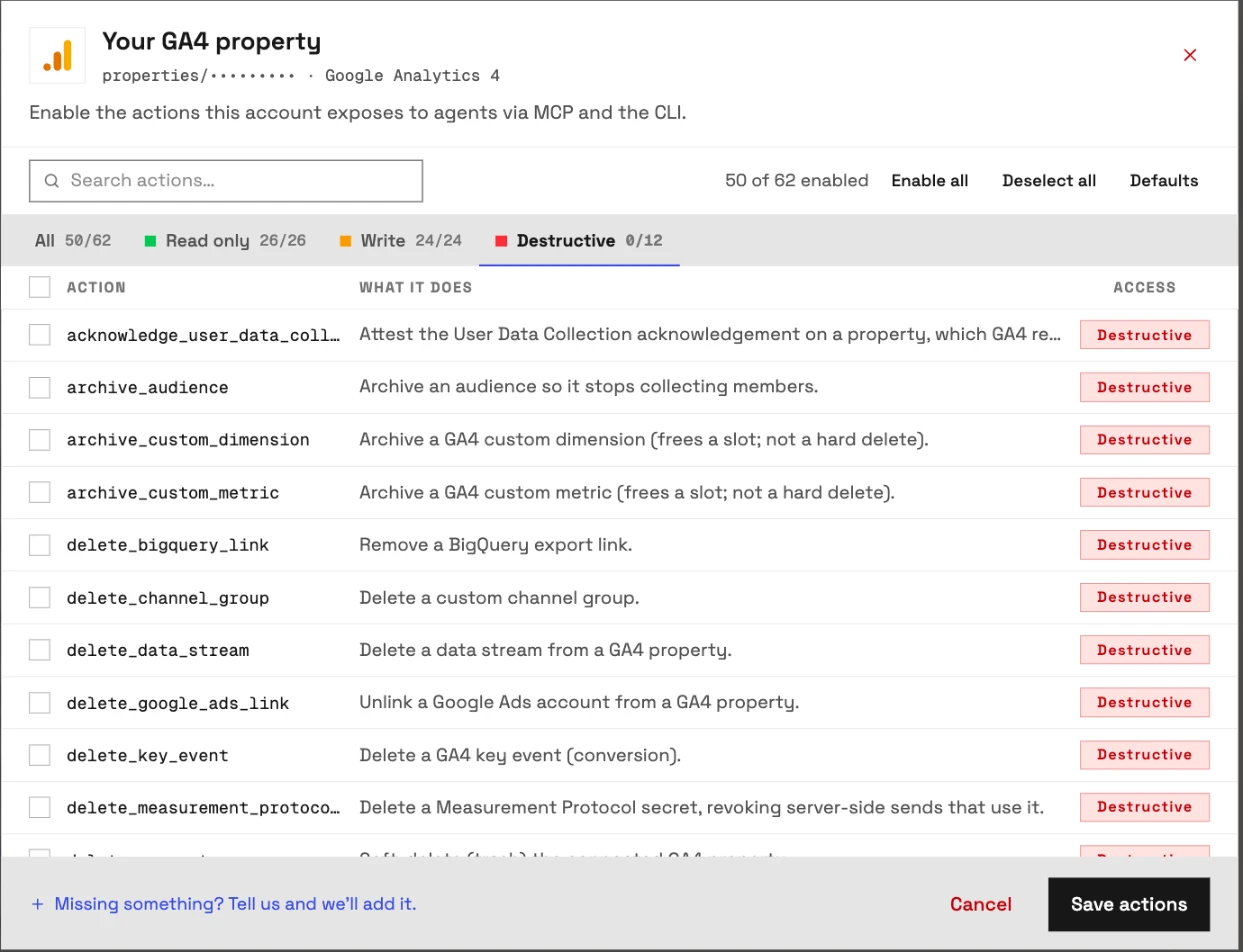
- Destructive actions start off. Deleting a property, stream, key event, channel group, link or Measurement Protocol secret stays off until an admin switches it on. So do archiving an audience or custom definition, changing data retention and the user-data acknowledgement.
- Read-only means read-only. A read-only property holds Google's analytics.readonly scope and locks every write until an admin reconnects it with read and write.
- Roles hold. Writes need an operator, admin or owner, per the workspace roles.
What else you get
- 50 platforms on one connection. The full InsightfulPipe server puts GA4 next to Search Console, Google Ads and Meta Ads in one chat.
- Every major client: Claude, ChatGPT, Claude Code, Cursor, Gemini CLI and Codex, plus one-click listings in Claude's directory and ChatGPT Plugins.
- A CLI that runs the same GA4 actions from a terminal, under the same switches.
- Free prompts and skills: the prompt library and Claude skills, such as the GA4 weekly report.
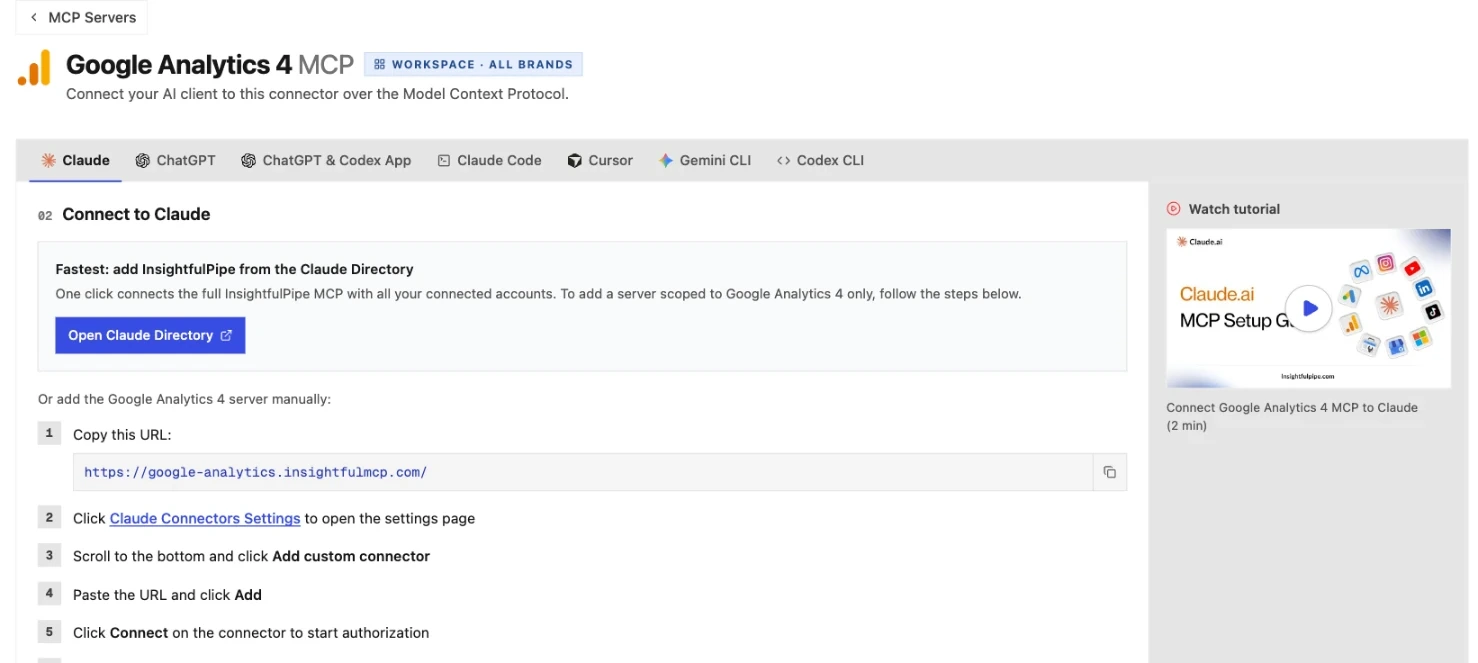
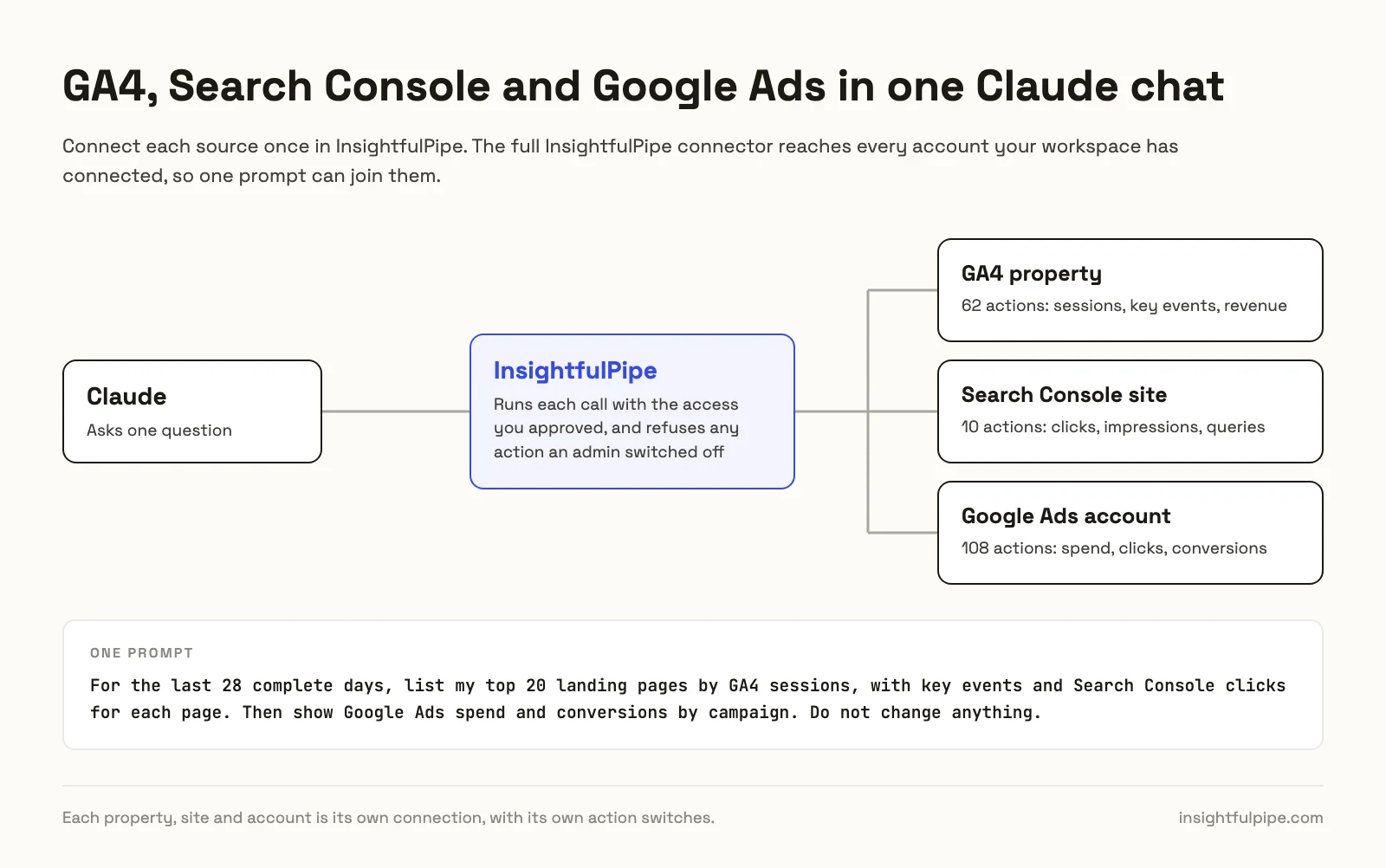
Pricing: from $29.99 a month, with unlimited tool calls, every MCP server and the CLI. Each GA4 property counts as one connection.
Where it is the wrong answer: if you only pull an occasional GA4 report, you would be paying for more than you use.
Best for: agencies and in-house teams who want an assistant that reads and changes GA4 within limits they set. Start a trial, connect GA4, and switch on only the actions the agent needs.
5. Windsor.ai
A reporting connector for 350+ sources, and GA4 is read-only on it.
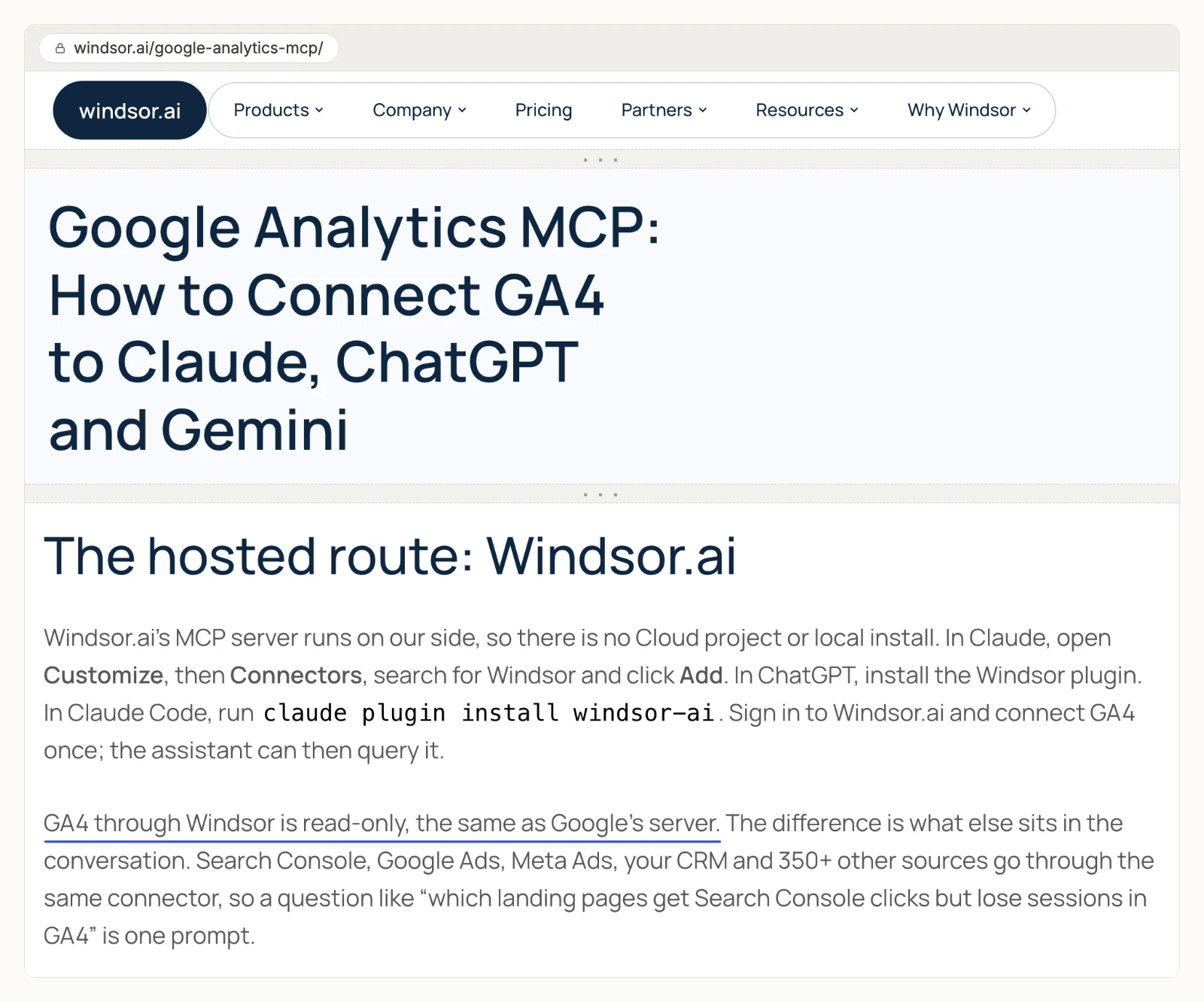
Windsor.ai's GA4 article says: "GA4 through Windsor is read-only, the same as Google's server." Its MCP README lists write actions for ad platforms and a few others, then says "Other connectors are read-only". Basic costs $23 a month, or $19 billed yearly, for 3 data sources, per its pricing page.
Cons
- No GA4 writes, by its own article and README.
- No GA4 tool names or count published.
- Plans count data sources: Basic covers 3, and Standard's 7 cost $99 a month billed yearly.
6. Markifact
Its GA4 page sells write access, and its GA4 tutorial says the connection is read-only.
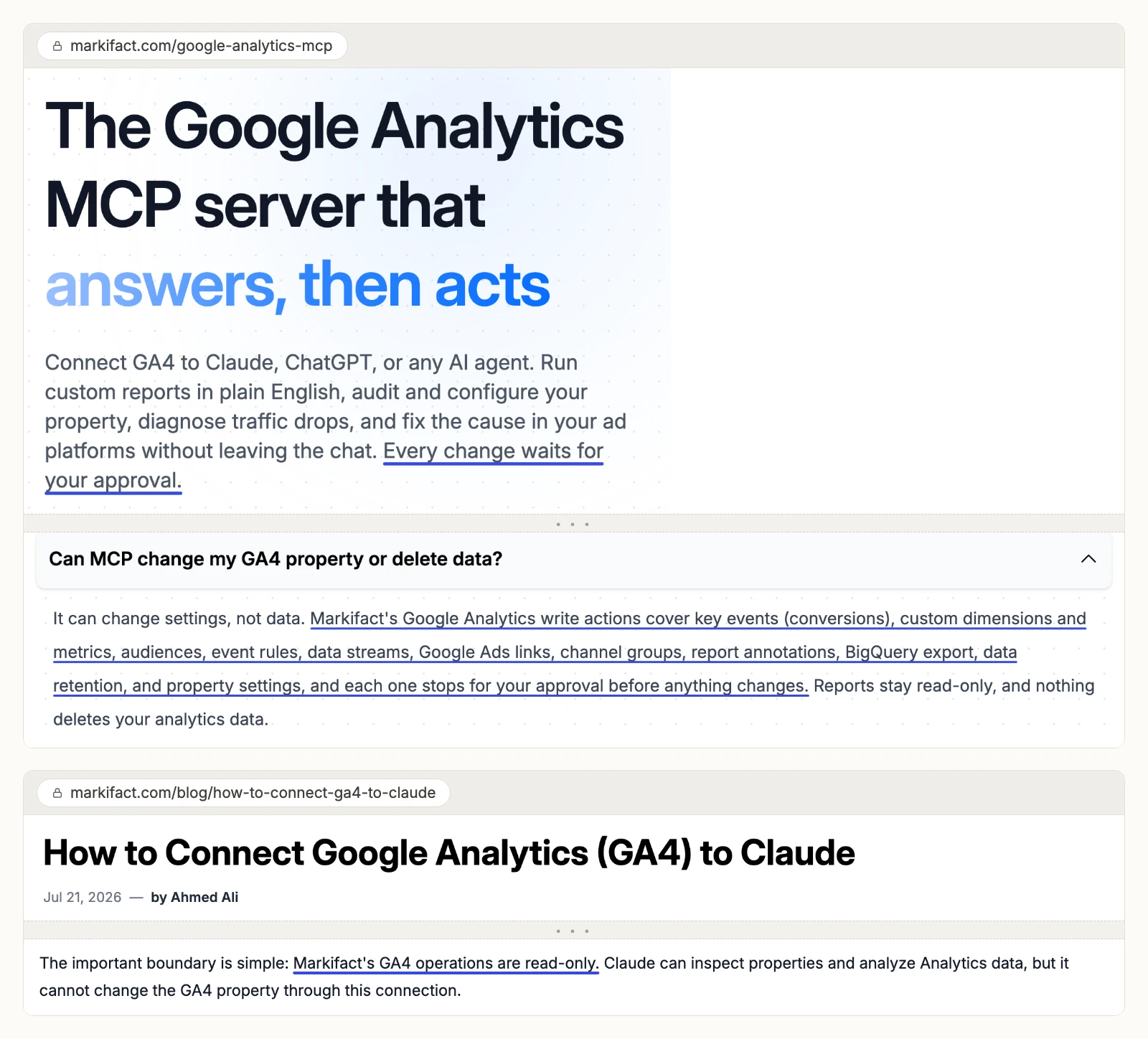
Markifact's GA4 page is headed "The Google Analytics MCP server that answers, then acts" and says "Every change waits for your approval." Its GA4 tutorial, live the same day, says: "Markifact's GA4 operations are read-only." Its MCP docs say a new server "has access to all operations" and "all connected accounts". Pro costs $79 a month for one seat, per its pricing page.
Cons
- Two of its own pages disagree on whether it changes GA4.
- A new MCP server reaches all operations and all connected accounts by default, per its docs.
- Its docs leave write approval to a setting in your AI client.
7. Stape
A hosted copy of Google's server, read-only by its own README.
Stape runs a fork of Google's code at a remote URL, with Google sign-in built in. Its README says "All tools are read-only" and the server can "never modify anything". Its GA4 page says "you need Node.js v18 or higher", while the README connects Claude, ChatGPT and Cursor straight to the URL.
Cons
- No GA4 writes, by its README.
- Its page asks for Node.js v18, which its README needs only for mcp-remote clients.
- The fork has 6 stars and no releases on GitHub.
8. Ryze AI
Nine GA4 tools, all read-only, on an endpoint built around ad platforms.
Ryze AI's GA4 page lists "9 read · 0 write" and says "runAdminRead rejects :create, :update and :delete paths". It adds: "One connection maps to one workspace, so agencies with several client workspaces reconnect per workspace." Plans start at $89 a month, per its pricing page.
Cons
- No GA4 writes; its admin tool rejects changes by design.
- One connection per workspace, so agencies reconnect for each client.
- Plans start at $89 a month.
9. Coupler.io
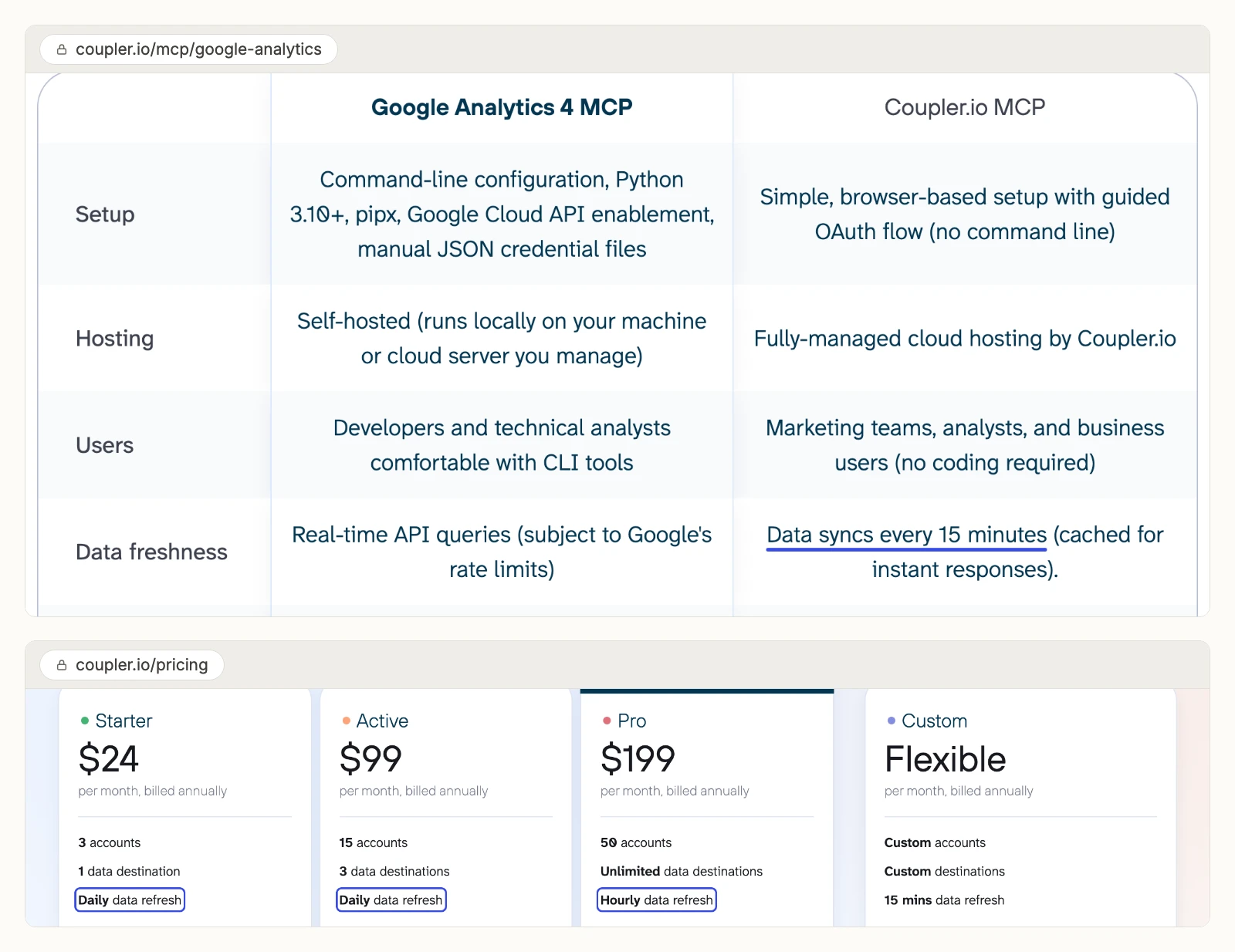
Answers come from data Coupler.io imports on a schedule, and its pages disagree on how often.
Coupler.io's MCP docs say the AI reads data sets from the data flows you send it, and "Queries are read-only". Its GA4 page says "Data syncs every 15 minutes". Its pricing page lists a daily refresh on Starter and Active, hourly on Pro, and 15 minutes on a custom plan. Starter costs $24 a month billed yearly.
Cons
- No GA4 writes; it queries imported data sets.
- Its GA4 page and pricing page give different refresh times.
- Each AI tool sees only the data flows you add it to.
10. Composio
Developer infrastructure with 67 GA4 tools, and approval left to your prompt.
Composio's toolkit page lists 67 GA4 tools. Twelve create, update, archive or send something, such as Update Property and Send Events. None creates key events, data streams or links. Its FAQ says: "Keep an approval step in your prompt for actions with side effects". Pro costs $29 a month, per its pricing page.
Cons
- No key event, data stream or link writes.
- Approval sits in your prompt, per its FAQ.
- No published default that keeps archives or deletes off on a new connection.
What an agent can change in GA4 on each route
GA4 has no paused state, so every change lands the moment an agent makes it. The defaults on each route matter more than the feature lists.
- Google's two routes: read by default. The local server's annotation write needs a flag and the edit scope.
- Windsor.ai, Stape, Ryze AI and Coupler.io: read only, by their own pages.
- Markifact and Composio: approval sits in your AI client or your prompt, per their docs.
- InsightfulPipe: your admin decides on the server, per property. Destructive actions stay off until an admin switches them on, and a read-only connection locks every write until an admin reconnects it with read and write.
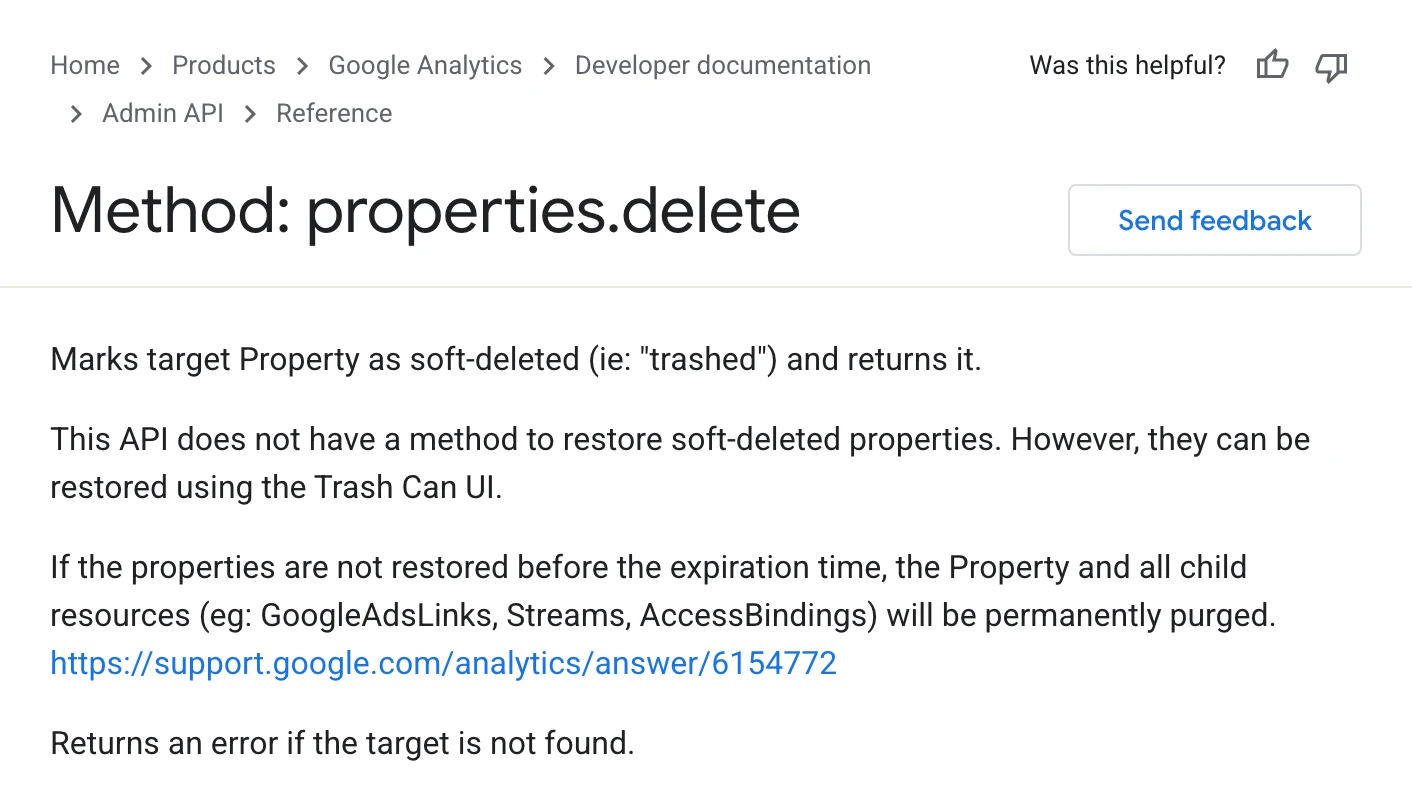
Some changes cannot be undone from the API. Google's properties.delete reference says the API "does not have a method to restore soft-deleted properties". So InsightfulPipe treats every delete, archive and retention change as destructive.
Two setup habits keep it tight. Switch a destructive action on only for the property and task that need it, then off again. And create_property can add a property under any account your Google login can edit, so switch it off where nobody should add one. With those defaults, InsightfulPipe is the safest of the servers that can write.
Which route should you choose?
Choose InsightfulPipe if you want an assistant that reads and changes GA4 within limits you set.
- You want GA4 reports in claude.ai or ChatGPT: a read-only InsightfulPipe connection, which locks every write until an admin reconnects it with read and write.
- You want the assistant to manage key events, custom dimensions and audiences: InsightfulPipe, with each action switched on or off per property.
- You run an agency with many client properties: InsightfulPipe. One Google sign-in, and each property gets its own action list.
- You want GA4 next to Search Console and ad spend: InsightfulPipe's full server, with cross-platform prompts ready to copy.
- You build your own agent or scripts: the InsightfulPipe CLI, under the same switches.
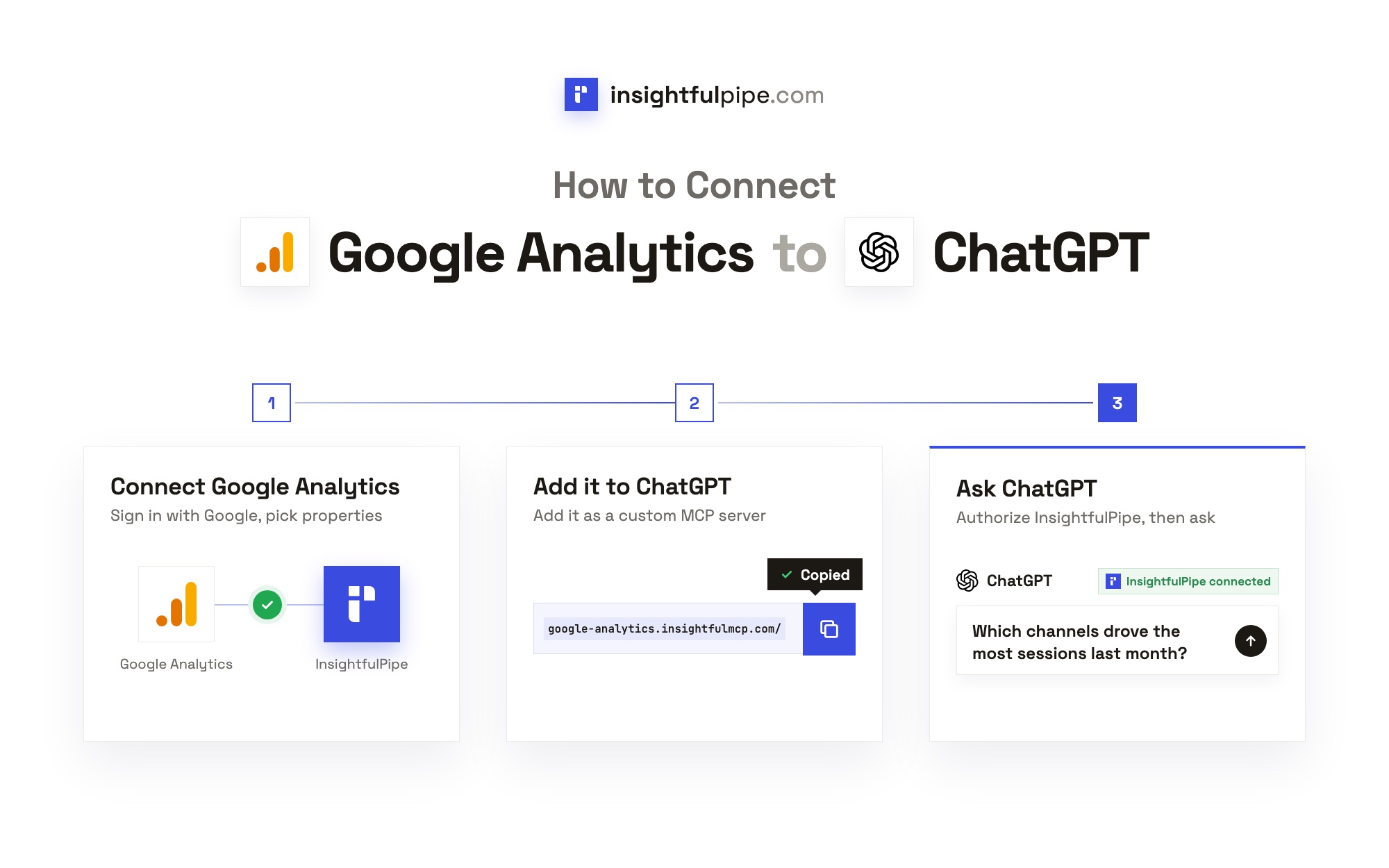
Step 1: Connect GA4 in InsightfulPipe
Connecting takes a Google sign-in, and you choose the access level before Google asks for anything.
- In InsightfulPipe, open Connected accounts, click Connect account and choose Google Analytics 4.
- Under Access level, pick Read-only or Read & write. On Read & write the Agent actions list shows All 50/62, and Destructive shows 0/12.
- Click Continue with Google Analytics 4, sign in with Google, pick your properties and click Connect 1 property, or the count you picked.
Each property becomes its own connection, as the GA4 connector docs explain.
Step 2: Add the hosted GA4 server to Claude or ChatGPT
Claude and ChatGPT both take the same server URL, and both finish with the same InsightfulPipe sign-in.
- Claude: open InsightfulPipe in the Claude Directory for the full server. For GA4 alone, open Customize > Connectors, click + Add, then Add custom connector, paste
https://google-analytics.insightfulmcp.com/, click Continue twice, then Add. Click Connect, sign in to InsightfulPipe if asked, then click Authorize access. See the Claude setup guide. - ChatGPT: on the web, open Plugins, click + and choose Add custom MCP server. Paste the URL under Connection, keep OAuth, tick I understand and want to continue and click Create as a plugin. It finishes with the same sign-in and Authorize access, per the ChatGPT setup guide.
- Claude Code: run
claude mcp add --transport http google-analytics-mcp https://google-analytics.insightfulmcp.com/, then type/mcpand choose Authenticate.
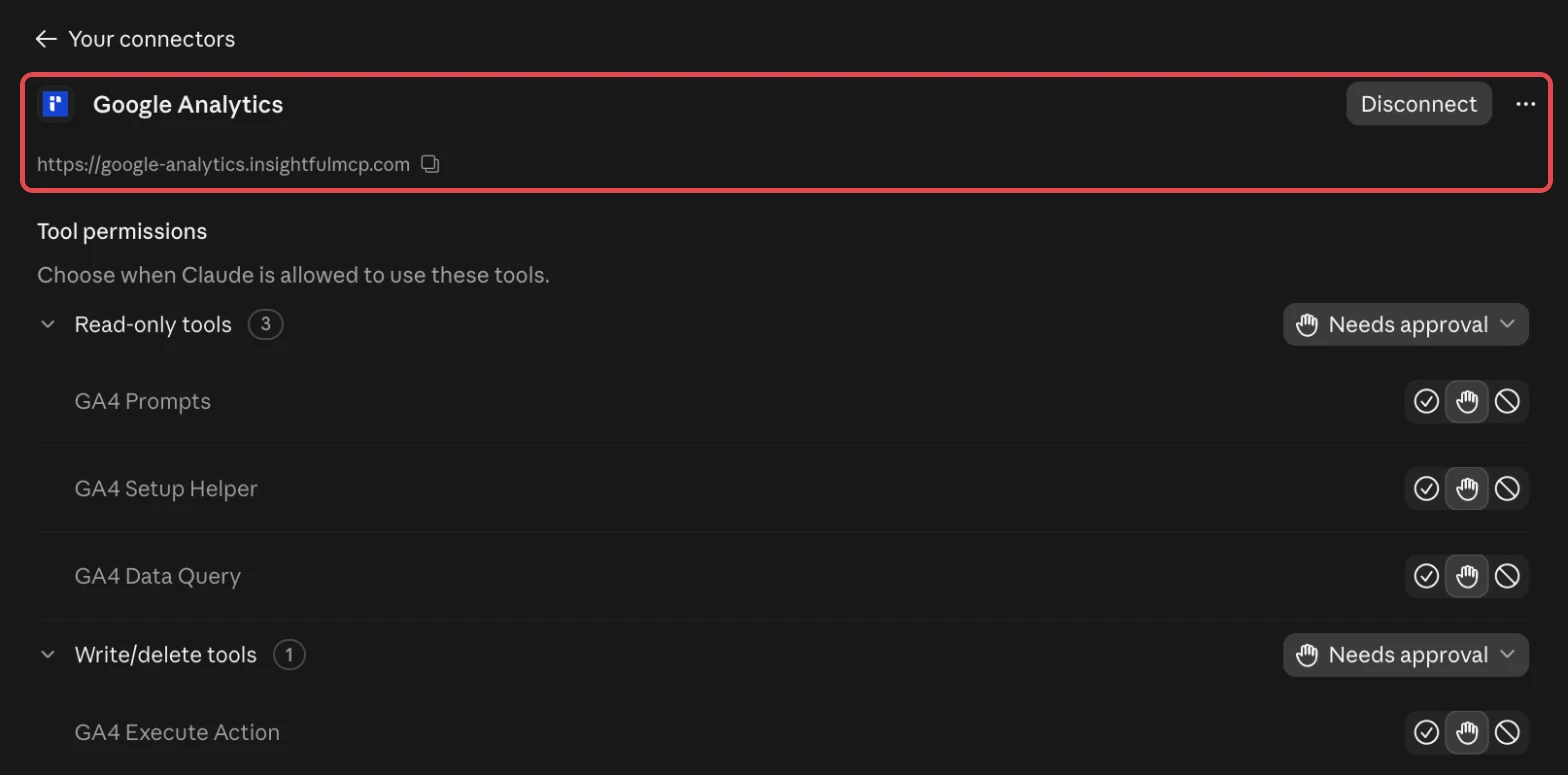
Claude adds a switch of its own. Under the connector's Tool permissions, each tool can be Always allow, Needs approval or Blocked.
The full GA4 to Claude walkthrough adds Cursor, Gemini CLI, Codex and troubleshooting. A two-minute ChatGPT video shows a GA4 report end to end.
Step 3: Choose which actions the agent may run
Every GA4 action on a property has its own switch, and the server refuses any action that is off, whichever client asks.
- In Connected accounts, find the property and click its actions button, such as 50/62 actions.
- Open the Write tab and switch off any write the agent does not need.
- Leave the Destructive tab at 0/12 unless a task needs one, then click Save actions.
Then paste a check that cannot change anything:
List the Google Analytics 4 properties available to this connection.
Return the property name, property ID, time zone and currency.
Do not run a report and do not change anything.
Once it passes, the GA4 property audit skill makes a good first job.
What the other vendors do not publish
Some claims here could not be checked, because the vendors do not publish these:
- Google: documentation for the remote endpoint, and the annotation write in its own MCP guide.
- Windsor.ai: GA4 tool names or a count.
- Markifact: which of its two GA4 statements is current.
- Coupler.io: which listed plan gets the 15-minute sync its GA4 page promises.
- Composio: a default that keeps archives or deletes off on a new connection.
Frequently asked questions
These are the questions people ask AI assistants most about official and hosted GA4 MCP servers, each answered on its own.
Sources (checked 2026-11-01)
Every third-party claim above comes from that vendor's own page, documentation or repository, opened on 2026-11-01.
- InsightfulPipe: GA4 MCP server, pricing
- Google: repository, README, release 0.8.0, tool registration, MCP guide, managed MCP servers, sign-in metadata, properties.delete, and the endpoint analyticsdata.googleapis.com/mcp/v1
- Anthropic: custom connectors; OpenAI: custom MCP server
- Windsor.ai: GA4 article, README, pricing
- Markifact: GA4 page, GA4 tutorial, MCP docs, pricing
- Stape: GA4 page, README
- Ryze AI: GA4 page, pricing
- Coupler.io: GA4 page, MCP docs, pricing
- Composio: GA4 toolkit, pricing
- PlatAid: google-analytics-mcp-oauth