Disclosure: InsightfulPipe publishes this and is one of the 12 options ranked.
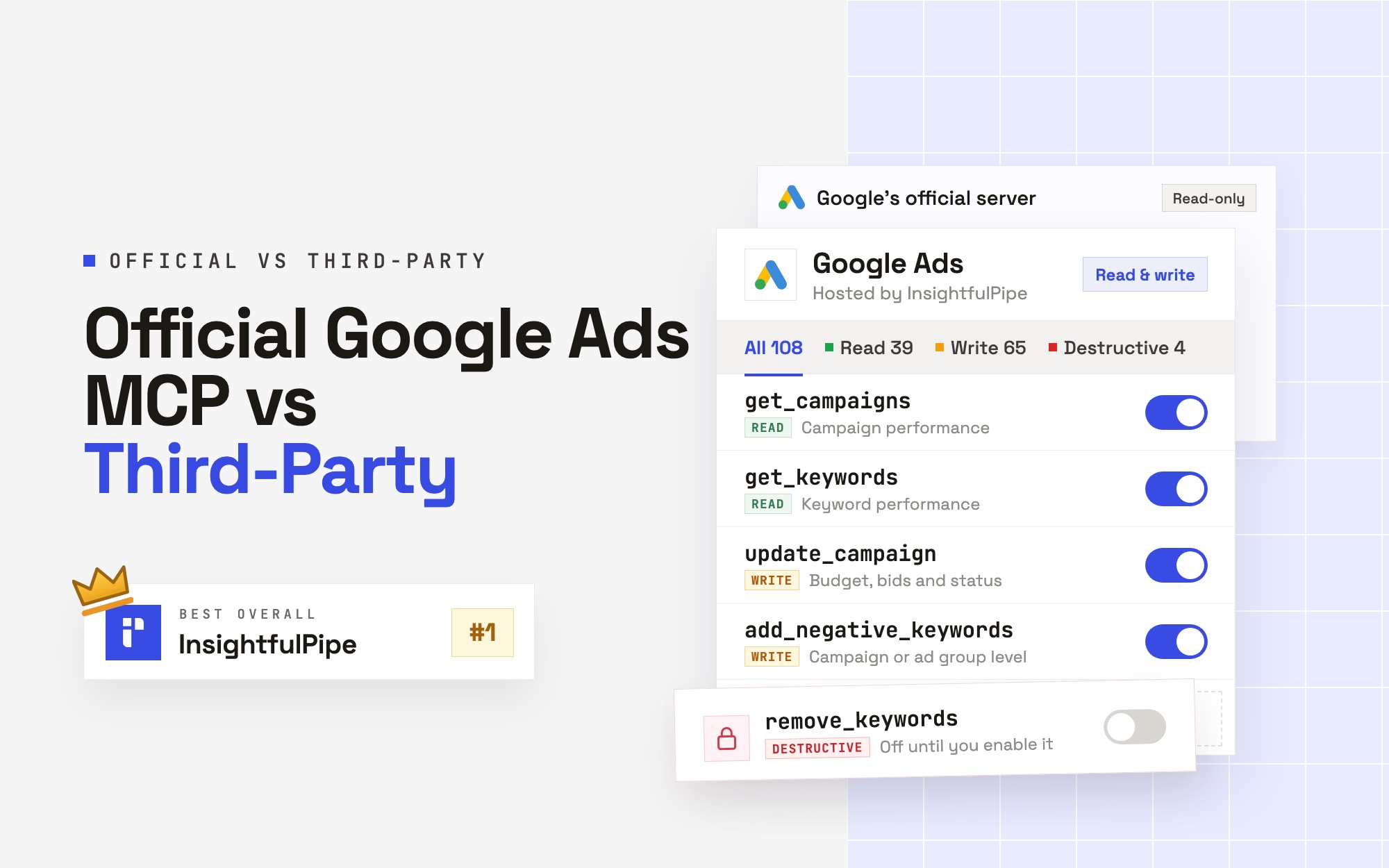
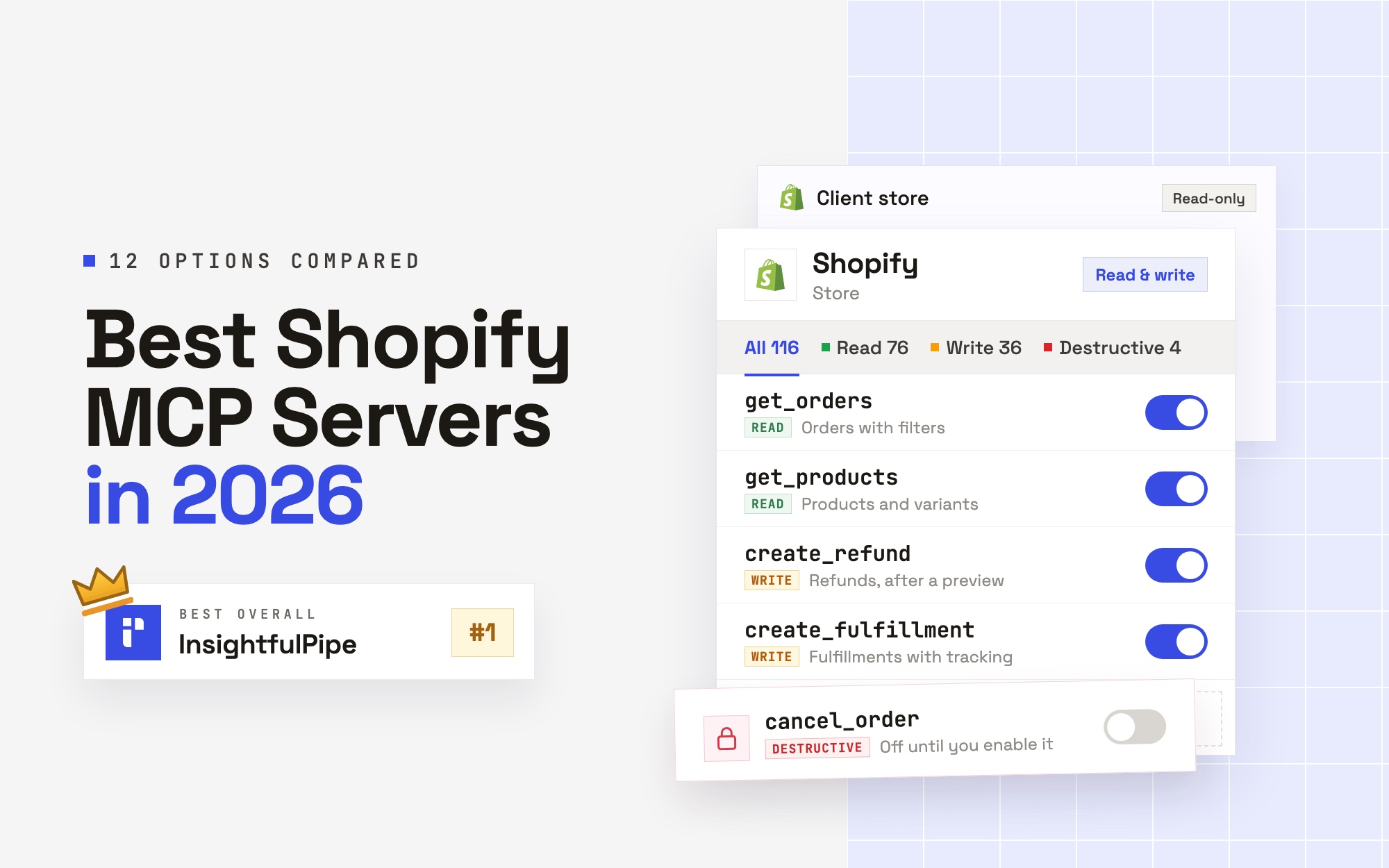
The best Shopify MCP server in 2026 is InsightfulPipe, because it lets an AI agent run real store work within limits you set. Its hosted Shopify MCP server gives Claude, ChatGPT and Cursor 116 Shopify actions, including refunds, fulfillments and draft orders. You switch each action on or off for each store, and destructive actions start off until an admin switches them on.
Shopify also publishes its own options, and each one does a narrower job. Its connectors for Claude, ChatGPT and five other AI tools manage products, inventory and discounts, but they block refunds and order cancellations even when you approve write access. The Dev MCP server helps developers write code against Shopify's docs. The UCP servers built into every store serve shopping agents, not store owners.
- Best overall: InsightfulPipe. 116 Shopify actions, 76 read and 40 that make changes, each one a switch per store. From $29.99 a month.
- Best for store operations: InsightfulPipe. Refunds with a preview first, fulfillments with tracking, draft orders and invoices, and customer records, on as many stores as you connect.
- Best for Shopify plus marketing data: InsightfulPipe. The same account reaches Google Ads, Meta Ads, GA4, Klaviyo and 45 more platforms.
The best Shopify MCP servers at a glance
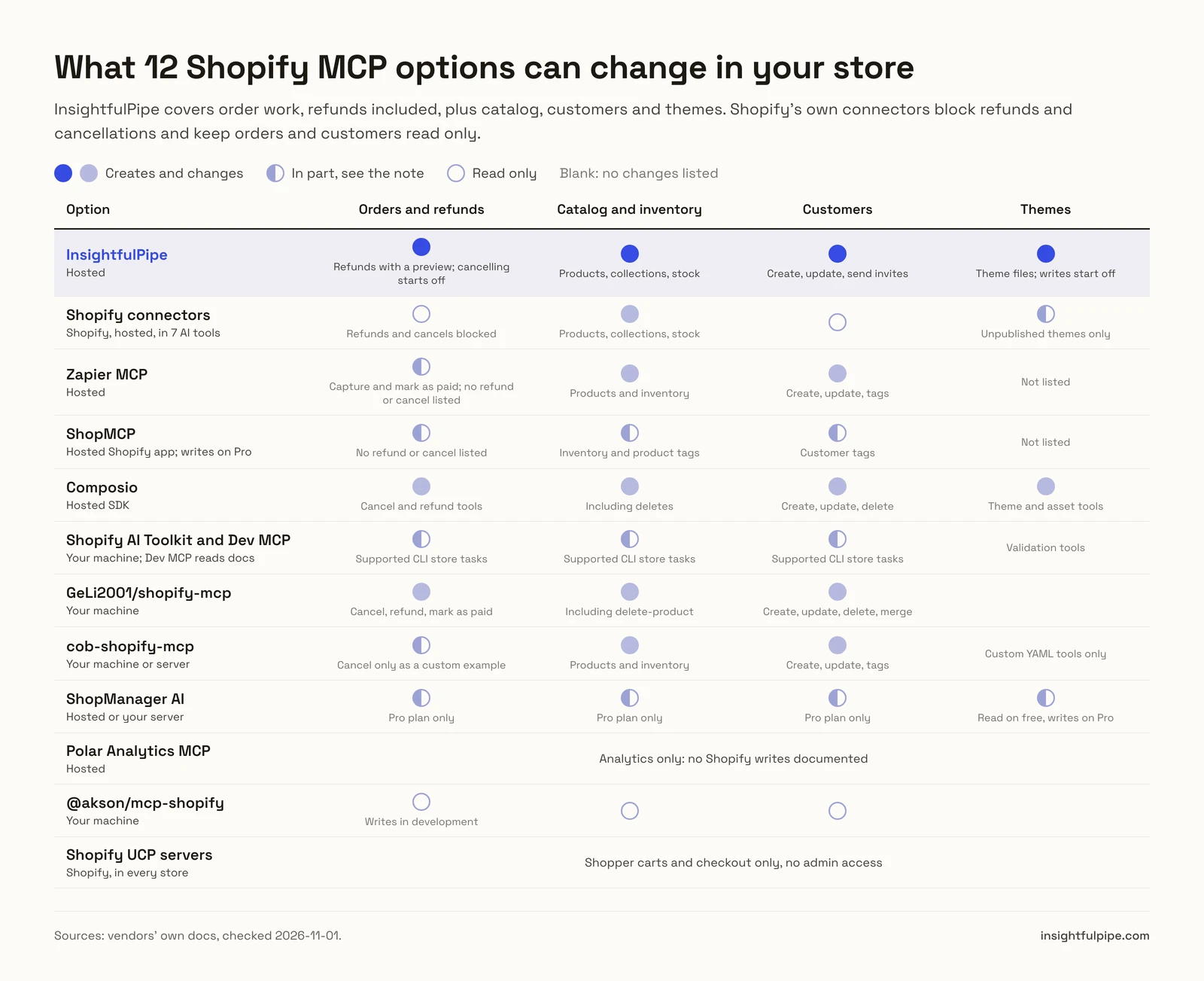
Twelve options, ranked on what they can change in a live store, what limits you can set before a write, and what they cost to start.
Rank | Option | Who runs it | What it can change in your store | Control before a write | Price to start |
|---|---|---|---|---|---|
1 | InsightfulPipe | Hosted | 116 actions: orders, refunds, fulfillments, draft orders, products, inventory, customers, pages, theme files | Every action a switch per store; 4 destructive actions start off | From $29.99/mo |
2 | Shopify connectors (Claude, ChatGPT and 5 more) | Shopify, hosted | Products, collections, inventory, percentage discounts, unpublished themes; orders and customers read only | Access level approved at install; refunds and cancels blocked | No extra Shopify fee |
3 | Zapier MCP | Hosted | 39 Shopify actions, 24 of them writes | Pre-enables actions for apps you already connected | 100 tasks/mo at $0, Professional from $19.99/mo yearly |
4 | ShopMCP | Hosted Shopify app | Write and delete tools on Pro | Read, write and delete per resource, per connection | 50 reads/mo at $0, Pro $19/mo |
5 | Composio | Hosted SDK | 315 tools, including deletes | Not published | $0 for 100,000 calls/mo, Pro $29/mo |
6 | Shopify AI Toolkit and Dev MCP | Your machine | Dev MCP: none. Toolkit: store tasks through Shopify CLI | You choose when CLI tasks run | No charge |
7 | GeLi2001/shopify-mcp | Your machine | 31 tools, including deletes, cancels and refunds | Your app's scopes only | MIT license |
8 | cob-shopify-mcp | Your machine or server | 62 built-in tools | Read-only flag and per-tool disable list | MIT license |
9 | ShopManager AI | Hosted or your server | Free tier: recovery writes only. Pro: products, content, orders, themes | Routine changes need Pro | Pro $24.99/mo per store |
10 | Polar Analytics MCP | Hosted | None documented | Analytics only | Price after a GMV band and a demo |
11 | @akson/mcp-shopify | Your machine | Writes "in development", per its README | None published | MIT license |
12 | Shopify UCP servers | Shopify, in every store | Shopper carts and checkout, no admin | Agent profile on every request | Built into every store |
How we tested
We read every capability, default and price from each vendor's own documentation, pricing page or public repository, and ran InsightfulPipe on live accounts. Every rival fact below was checked on 2026-11-01, and each one links to its source.
We compared the twelve on six criteria:
Criterion | What we checked |
|---|---|
Store operations | Can the agent refund, cancel, fulfill and invoice, or only read orders? |
Catalog and customers | Can it create and update products, inventory and customer records? |
Control before a write | Can you choose, per store, which actions the agent may use, and who enforces it? |
Default on a new connection | What can the agent do before anyone narrows it? |
Setup | Is it a hosted sign-in, or code you install and run yourself? |
Price | What does write access cost to start? |
Where a vendor's own pages contradict each other, we quote both and name the vendor. Where a capability is not published, we write "not published" rather than guess. Features on a roadmap do not count. We left out Peliqan, a data warehouse with its own MCP server rather than a Shopify server, and general connector catalogs such as Gumloop and Merge.
The question that splits this list
One question splits these twelve: does the assistant need to work on your live store, or only know about Shopify? Many "Shopify MCP" results online help developers write code. A store owner needs something else.
If you only need reports, connect your store to InsightfulPipe with a custom app that has read scopes only. The store then connects as Read-only, which locks every write until an admin reconnects it with write scopes. Shopify's Dev MCP server cannot do this job, because it reads Shopify's documentation, not your store. ShopManager AI's free tier leaves orders, customers and analytics to its per-store Pro plan.
If the assistant needs to act, the real question becomes what it can reach before it starts. Shopify's own connectors stop short of order work: refunds, cancellations and payment captures stay blocked. Zapier pre-enables actions for the apps you already connected. GeLi2001's community server hands the agent whatever your app's scopes allow. InsightfulPipe decides it per store, action by action, with destructive actions off until an admin switches them on.
Side by side: what each server can change
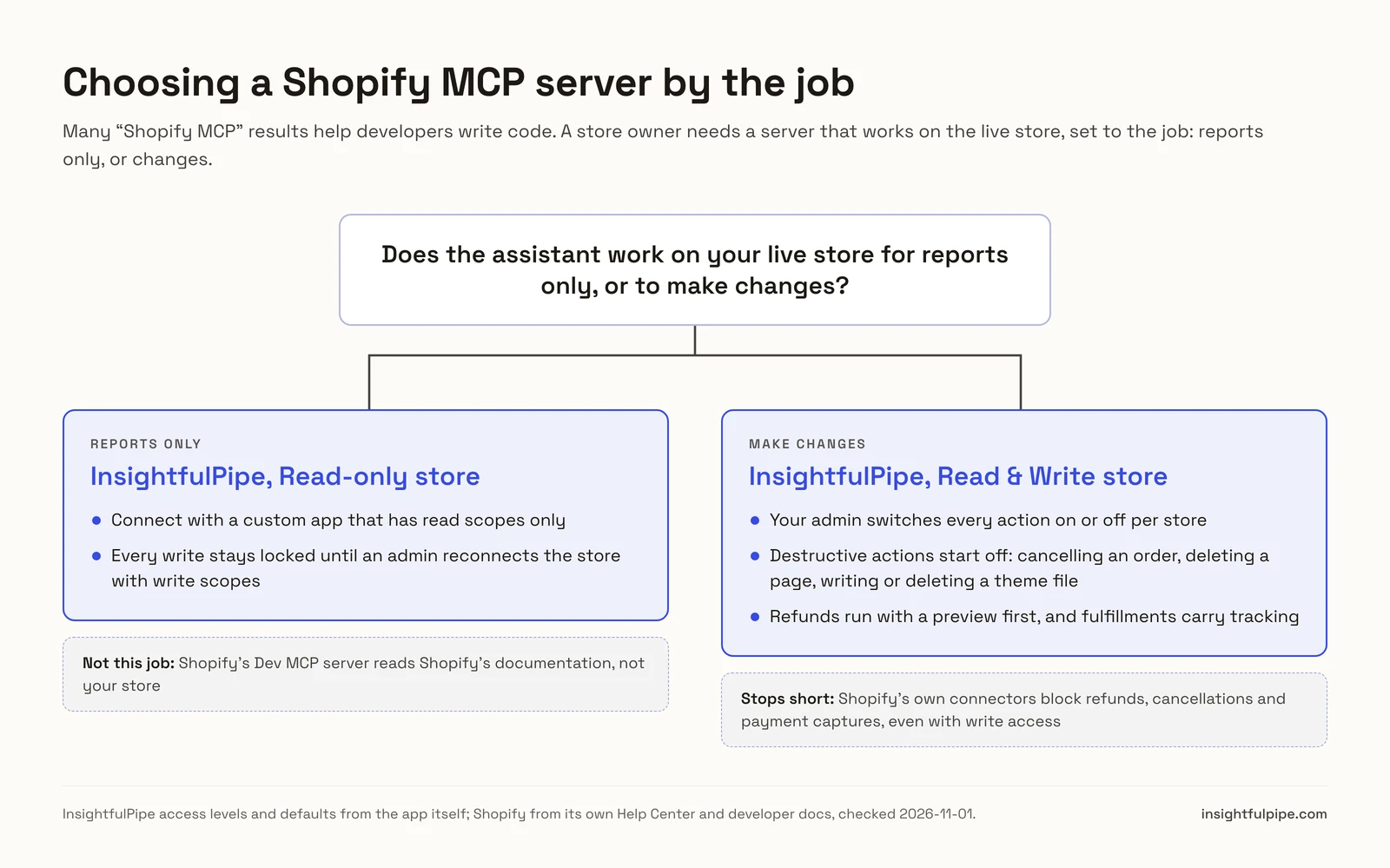
The spec table shows the capability that decides most purchases: whether the agent can do order work, and on how many stores at once.
Option | Refunds and cancels | Customers | Themes | Stores at once | Setup |
|---|---|---|---|---|---|
InsightfulPipe | Refunds with a preview; cancelling starts off | Create, update, send invites | Theme files; writes start off | As many as you connect | Custom app, then one URL |
Shopify connectors | Blocked, even with write access | Read only | Unpublished themes only | One at a time | Install from the AI tool |
Zapier MCP | Not listed | Create, update, tags | Not listed | Not published | Zapier account |
ShopMCP | Not listed | Customer tags listed | Not listed | One connection per store | Shopify app install |
Composio | Cancel and refund tools | Create, update, delete | Theme and asset tools | Not published | Developer SDK |
Shopify AI Toolkit and Dev MCP | Supported CLI store tasks only | Supported CLI store tasks only | Validation tools | The CLI's store context | npx or plugin install |
GeLi2001/shopify-mcp | Cancel, refund, mark as paid | Create, update, delete, merge | None | One per config | npx with your app's credentials |
cob-shopify-mcp | Cancel as a custom example tool | Create, update, tags | Custom YAML tools only | Not published | npm or Docker |
ShopManager AI | Pro only | Pro only | Read on free, writes on Pro | One per subscription | Hosted token or self-host |
Polar Analytics MCP | None | Analytics only | None | Not published | Sales demo |
@akson/mcp-shopify | In development | Read | None | One per config | npm with a static token |
Shopify UCP servers | None (shopper side) | Customer Accounts MCP | None | Each store's own endpoint | Agent profile |
Shopify's own MCP servers and connectors
Shopify publishes three different kinds of MCP tools, and each one fits a narrower job than running the store from chat. Start here before you compare anyone else.
Shopify connectors for Claude, ChatGPT and five more AI tools
Shopify's own connectors bring a store into the chat, and Shopify is plain about what they will not do.
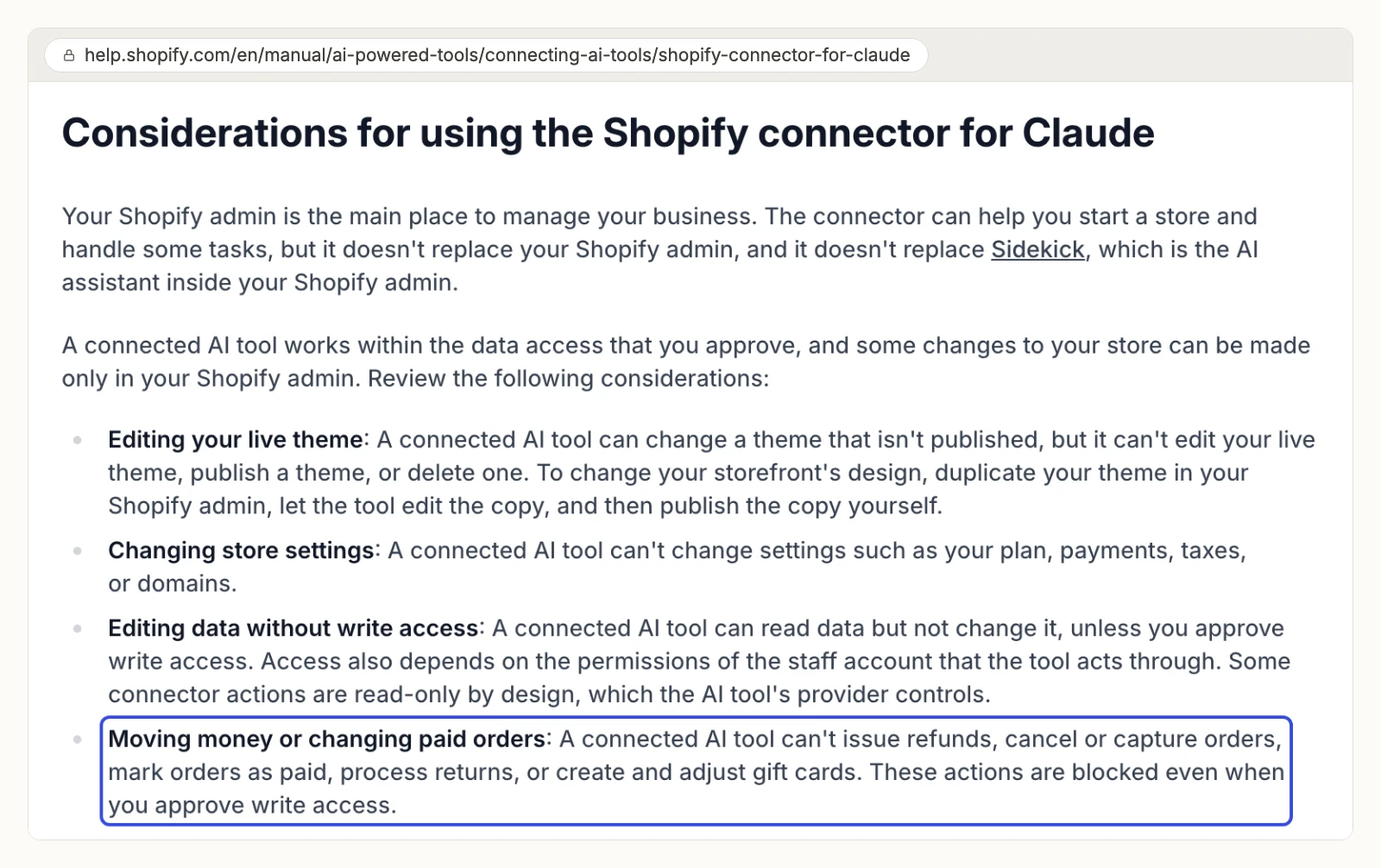
Shopify's Help Center lists integrations for ChatGPT, Claude, Gemini, Grok, Perplexity, Muse and Microsoft Copilot. You install each one from the AI tool and approve access in your Shopify admin, with no extra Shopify fee. The Claude connector creates and updates products, collections and stock counts, creates percentage-off discount codes, edits unpublished themes and answers analytics questions. It reads orders and customers but does not change them.
The same page says a connected tool "can't issue refunds, cancel or capture orders, mark orders as paid, process returns, or create and adjust gift cards," and that "these actions are blocked even when you approve write access." Its access page adds that you connect one store at a time, and that to lower a tool's access you uninstall it and install it again.
Shopify's pages also disagree. The Help Center says a connected tool can't "publish a theme", while the action table on the same page lists theme_publish, which "publishes a theme to your online store, after you confirm." Claude's directory shows 25 tools for the connector, and the Help Center table names 43.
Pros
- Built by Shopify, with no extra Shopify fee.
- Works in seven AI chat tools, including Claude and ChatGPT.
Cons
- Refunds, cancellations, payment captures, returns and gift cards stay blocked, even with write access.
- One store at a time, and lowering access means uninstalling.
- Orders and customer records are read only.
Who it is built for: a merchant who wants help with products, stock and discounts from a chat window.
Shopify AI Toolkit and Dev MCP
Shopify's developer tools help an AI agent write correct Shopify code, and the Dev MCP server reads Shopify's docs rather than your store.
The Shopify AI Toolkit connects coding agents to developer docs and API schemas, validates GraphQL, Liquid and extension code, and runs "supported store-management tasks through Shopify CLI's authenticated store context, with you choosing when to execute them." It supports coding agents such as Claude Code, Codex, Cursor and VS Code. The Dev MCP server, [@shopify/dev-mcp](https://www.npmjs.com/package/@shopify/dev-mcp) 1.18.0 from 2026-10-27, "runs locally over standard input/output without authentication." Its README says release builds send usage events that "can include tool inputs and results" unless you opt out.
Pros
- Maintained by Shopify; version 1.18.0 shipped on 2026-10-27.
- One-line plugin installs for the main coding agents.
Cons
- The Dev MCP server reads docs and schemas, not your orders or customers.
- No support listed for Claude or ChatGPT on the web, only coding tools.
- Usage events can include tool inputs and results unless you opt out.
Who it is built for: developers building Shopify apps, themes and Hydrogen storefronts.
Shopify's UCP shopping servers
Every Shopify store now carries shopper-facing MCP servers, and they serve shopping agents, not store owners.
Shopify removed the catalog and cart tools on the old Storefront MCP endpoint, https://{shop}/api/mcp. The Universal Commerce Protocol now provides them at https://{shop}/api/ucp/mcp: Storefront Catalog MCP for product search, Cart MCP, Checkout MCP, and Ask MCP for policy questions. Every request must include an agent profile, and Checkout MCP requests must be authenticated or signed. Shopify sends merchants who want a store chat assistant to the Inbox agent instead.
Pros
- Built into every store, with nothing to install.
- Covers product search, carts, checkout and policy questions.
Cons
- No admin access: no order reports, refunds or inventory changes.
- Each request needs an agent profile, and checkout needs signed requests.
- Guides written before the change still describe the removed
/api/mcptools.
Who it is built for: developers building AI shopping assistants.
Hosted servers that can change your store
InsightfulPipe leads the hosted servers built to change a store, with 116 actions you control per store. Zapier, ShopMCP and Composio follow.
InsightfulPipe
InsightfulPipe gives an AI agent 116 Shopify actions, and you decide which of them each store allows.
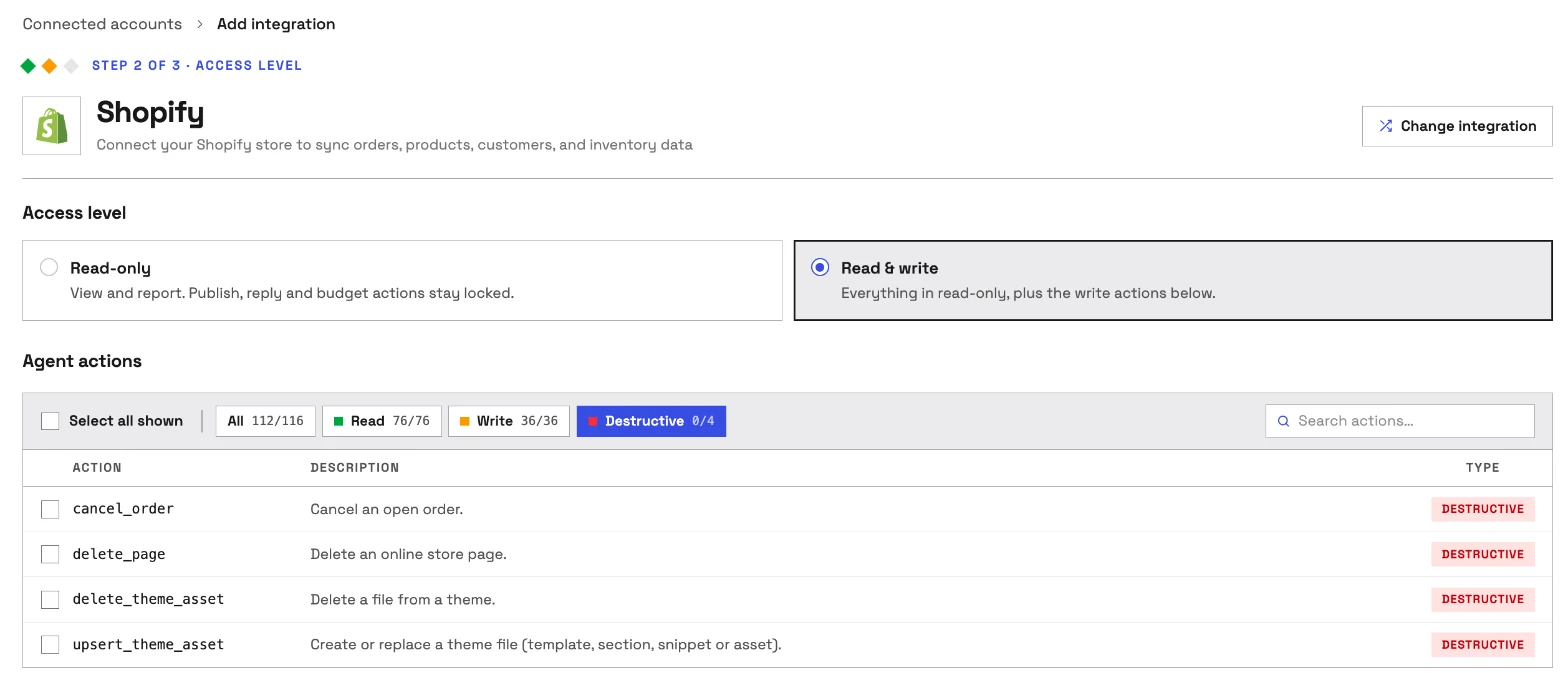
InsightfulPipe is the pick if you want the assistant to do store work, not describe it, and decide exactly how far it goes. It connects through the Shopify Admin API with a custom app you own, so the app's scopes set the outer limit. Then you narrow it, action by action.
Coverage is the first difference. Shopify's connector reads orders and stops there. InsightfulPipe carries 116 actions, 76 read and 40 that make changes:
- Orders: list and count orders, transactions and fraud risk; calculate a refund before you issue it; create refunds; close, reopen and cancel orders
- Fulfillment: fulfillment orders, create fulfillments with tracking details, and update tracking later
- Draft orders: create, update, complete and send the invoice
- Catalog: products, variants, images, and custom and smart collections
- Inventory: stock levels by location, set or adjust counts, and connect items to locations
- Customers: search, create and update customers, read their orders, and send account invites
- Content: online store pages, blogs and articles, metafields, redirects and theme files
- Money and marketing: Shopify Payments balance, payouts and disputes, abandoned checkouts, price rules and discount codes, gift cards on Shopify Plus, and marketing events
Why it is the safest of the servers that can write
Control is the second difference, and it makes InsightfulPipe the safest of the servers that can write: every limit is a switch, and your admin decides where each one sits.
An owner, admin or operator opens a connected store and chooses exactly which actions the agent can use, across read, write and destructive. They can switch any action on or off again at any time. InsightfulPipe's server enforces that list, not your AI client, so the same limits hold in Claude, ChatGPT, Cursor, Claude Code and the CLI.
- Destructive actions start off. Cancelling an order, deleting a page, and writing or deleting a theme file stay off on a new store until an admin switches them on.
- Read-only means read-only. A store whose app grants only read scopes connects as Read-only, and that locks every write until an admin reconnects it with write scopes.
- Every store gets its own list. Connect a client's store with refunds off and your own store with refunds on.
- Roles hold. Team members on the user role only see the stores they are granted, and writes need an operator, admin or owner. An owner or admin can change who holds which role at any time.
Shopify's connector draws a fixed line for every merchant, and to lower its access you uninstall it. InsightfulPipe lets you draw your own line per store and move it whenever you like.
Why four tools, not 116
Every tool a server publishes loads into the model's context on every turn. The cob-shopify-mcp README puts its own 62 tool schemas at about 19,000 tokens before the first question, and it ships a special mode to cut that. InsightfulPipe's Shopify server publishes four tools. It looks up the 116 Shopify actions only when the agent needs one. Switch on the twenty actions a store needs, and the model picks from twenty instead of 116.
What else you get
- 49 more platforms on one account, including Google Ads, Meta Ads, GA4, Klaviyo and Google Merchant Center. One agent can put Shopify orders next to ad spend without a second vendor.
- Every major AI client: Claude, ChatGPT, Claude Code, Cursor, Gemini CLI and Codex, each with a setup guide.
- One server for everything: add InsightfulPipe from Claude's connector directory or ChatGPT Plugins, and the unified server reaches every connected account at once.
- Brands: stores sit under brands, so an agency's clients stay apart instead of in one flat list.
- A CLI: the
insightfulpipenpm package runs the same reads and writes from a terminal, under the same switches. - Claude skills: the free Claude skills library includes an ecommerce ads playbook that can audit a Shopify store's orders, products and traffic.
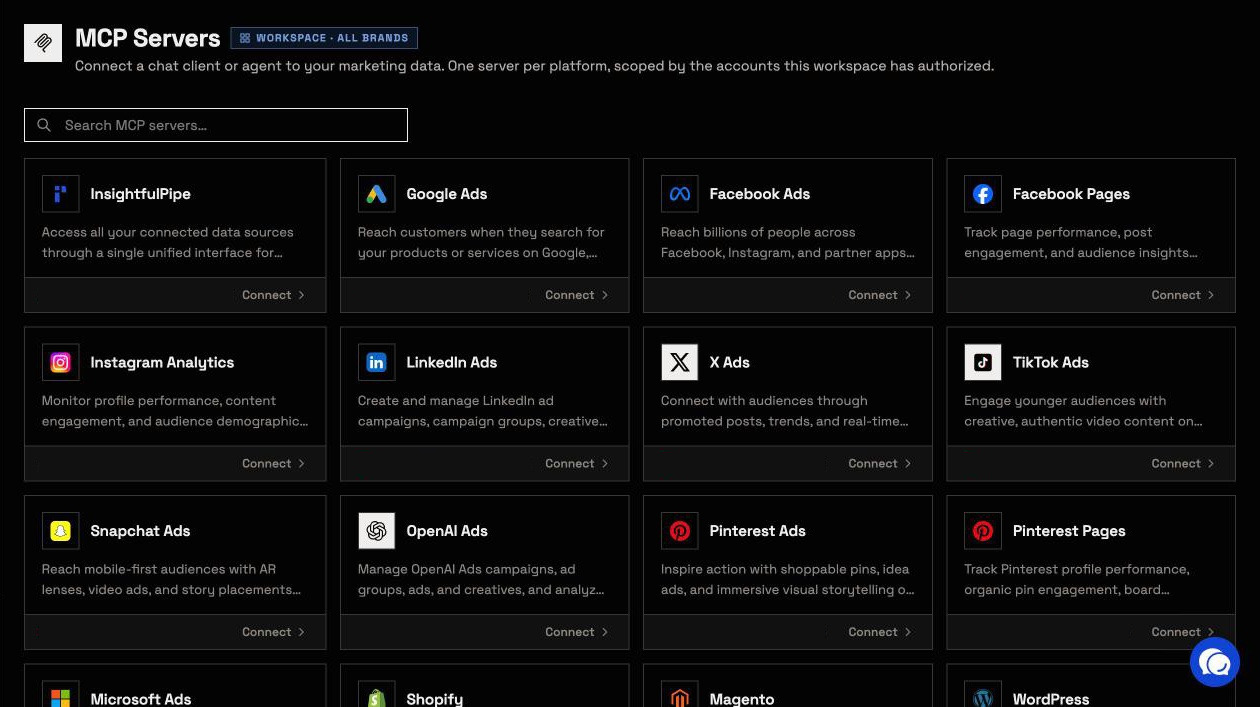
Pricing: every plan includes the Shopify MCP server, every other MCP server and the CLI, from $29.99 a month. Each store counts as one connection on your plan.
Best for: brands and agencies who want an assistant to run store work within limits they set, store by store.
Zapier MCP
Zapier's Shopify MCP reaches orders and payments, but it lists no refund or cancel action.
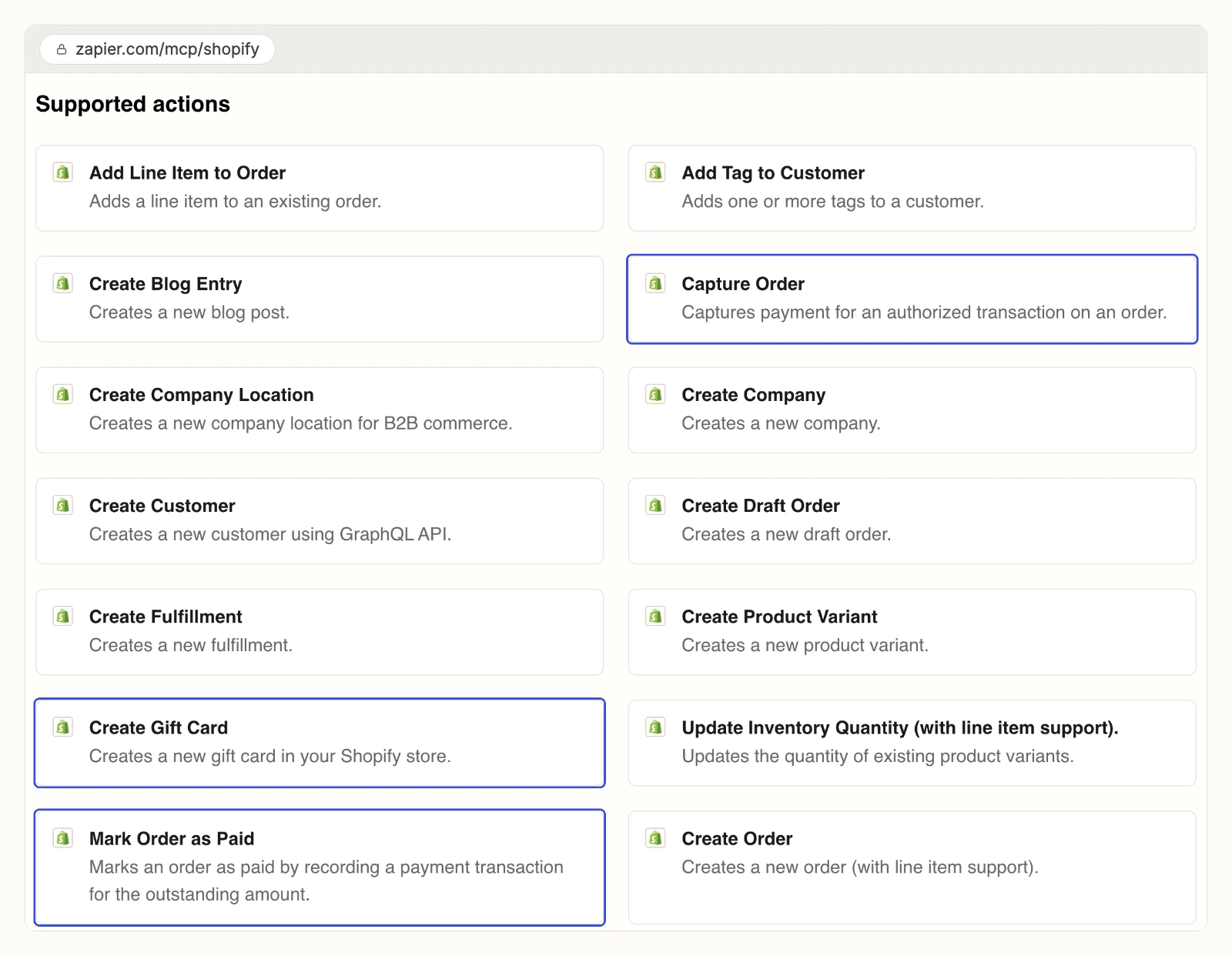
Zapier's Shopify page lists 24 write actions, 12 search actions and 3 find-or-create actions, plus a raw API Request (Beta) action. The writes include Capture Order, Mark Order as Paid, Create Gift Card and Create Fulfillment. Its quickstart says Zapier "pre-enables actions for the apps already connected to your own Zapier account." Its pricing page counts one MCP tool call as 2 tasks. The $0 plan has 100 tasks a month, and Professional starts at $19.99 a month billed yearly for 750 tasks.
Pros
- 39 Shopify actions, including payment capture.
- 20 Shopify triggers for order and customer events.
Cons
- No refund or cancel action on its Shopify page.
- A new server pre-enables actions for apps you already connected.
- Each call uses 2 tasks, so the $0 plan covers 50 calls a month.
Who it is built for: teams already automating Shopify in Zapier.
ShopMCP
ShopMCP is a Shopify App Store app with per-resource permissions, and it has no reviews yet.
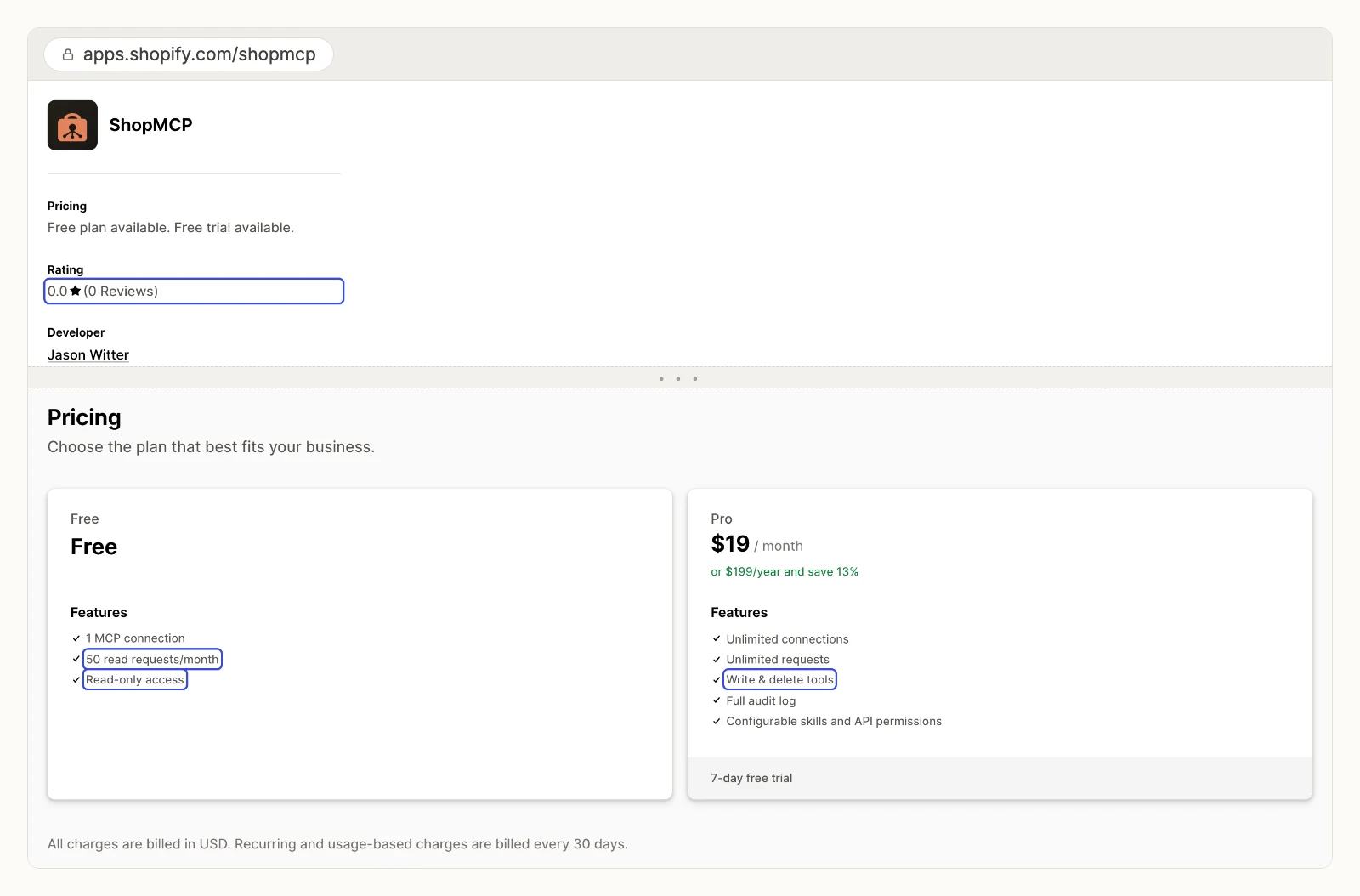
The ShopMCP listing lets you "choose read, write and delete per resource, separately for each connection," and keeps an audit log of every request, blocked ones included. It lists Claude Code, Claude Desktop, Cursor and Windsurf. The free plan allows 1 connection and 50 read requests a month, read only. Pro costs $19 a month and adds write and delete tools. On 2026-11-01 the listing showed 0 reviews.
Pros
- Read, write and delete set per resource, per connection.
- An audit log that records blocked requests too.
Cons
- Zero reviews on its App Store listing.
- ChatGPT is not in its Works with list.
- The free plan stops at 50 read requests a month.
Who it is built for: developers working on Shopify stores from Claude Code or Cursor.
Composio
Composio is developer infrastructure with a large Shopify toolkit, and it publishes no approval step for it.
The Composio Shopify toolkit lists 315 tools and 45 triggers. They include Create order refund, Cancel an order, Delete a customer and Delete theme. Its pricing page gives 100,000 tool calls a month at $0, then Pro at $29 a month with a $29 usage credit. The same page calls its shared Composio-managed OAuth apps "not recommended for scaling." We compare the two products in detail in InsightfulPipe vs Composio.
Pros
- 315 Shopify tools and 45 triggers.
- 100,000 tool calls a month at $0.
Cons
- Deletes and refunds with no approval step or default published.
- No per-store action control published.
- Its shared OAuth apps are "not recommended for scaling," per its own pricing page.
Who it is built for: developers wiring Shopify into their own agent product.
Read-only and analytics servers
These two read a store or its data for reporting. ShopManager AI makes routine changes only on its paid plan, and Polar documents no Shopify writes at all.
ShopManager AI
ShopManager AI reads a store for free and makes routine changes only on a paid plan, and its own pages give different tool counts.
Its open-source repository lists 122 read-only tools under Apache-2.0, with themes, Liquid and store settings, and "0 write to a Shopify store's content or theme." Its pricing page says 577 tools, 123 of them free, and that Free "includes supported recovery writes." Pro adds orders, customers, analytics, and product, content and theme writes at $24.99 a month per store, or $209 a year.
Pros
- The open-source server makes no writes to a store's content or theme.
- Theme and Liquid inspection tools.
Cons
- 122 tools in the repository, 123 free tools on the website.
- Every write needs Pro, priced per store.
- The repository dates from 2026-09-15 and has 2 stars.
Who it is built for: theme developers who want a read-only view of a live store.
Polar Analytics MCP
Polar puts cleaned ecommerce data in front of Claude and ChatGPT, and it publishes no price.
Polar MCP connects AI tools to "Shopify, Meta, Google and 45+ sources already cleaned, mapped, and blended." Polar says it is an official connector for Claude and for ChatGPT. Its pricing page shows a price only after you pick a GMV band, and every plan routes to "Book a demo." Each plan includes a dedicated Snowflake database.
Pros
- Shopify, Meta, Google and 45 more sources in one data layer.
- Defined metrics such as CAC, ROAS and LTV.
Cons
- No published price without a GMV band and a sales call.
- No Shopify write tools documented.
- A full data platform, built on its own Snowflake database.
Who it is built for: ecommerce brands already paying for Polar.
Self-hosted community servers
Three community servers wrap the Shopify Admin API, and each one runs on a machine you manage with credentials you paste into its config.
GeLi2001/shopify-mcp
A community server that AI answers often name can delete products and issue refunds, and it documents no switch to stop either.
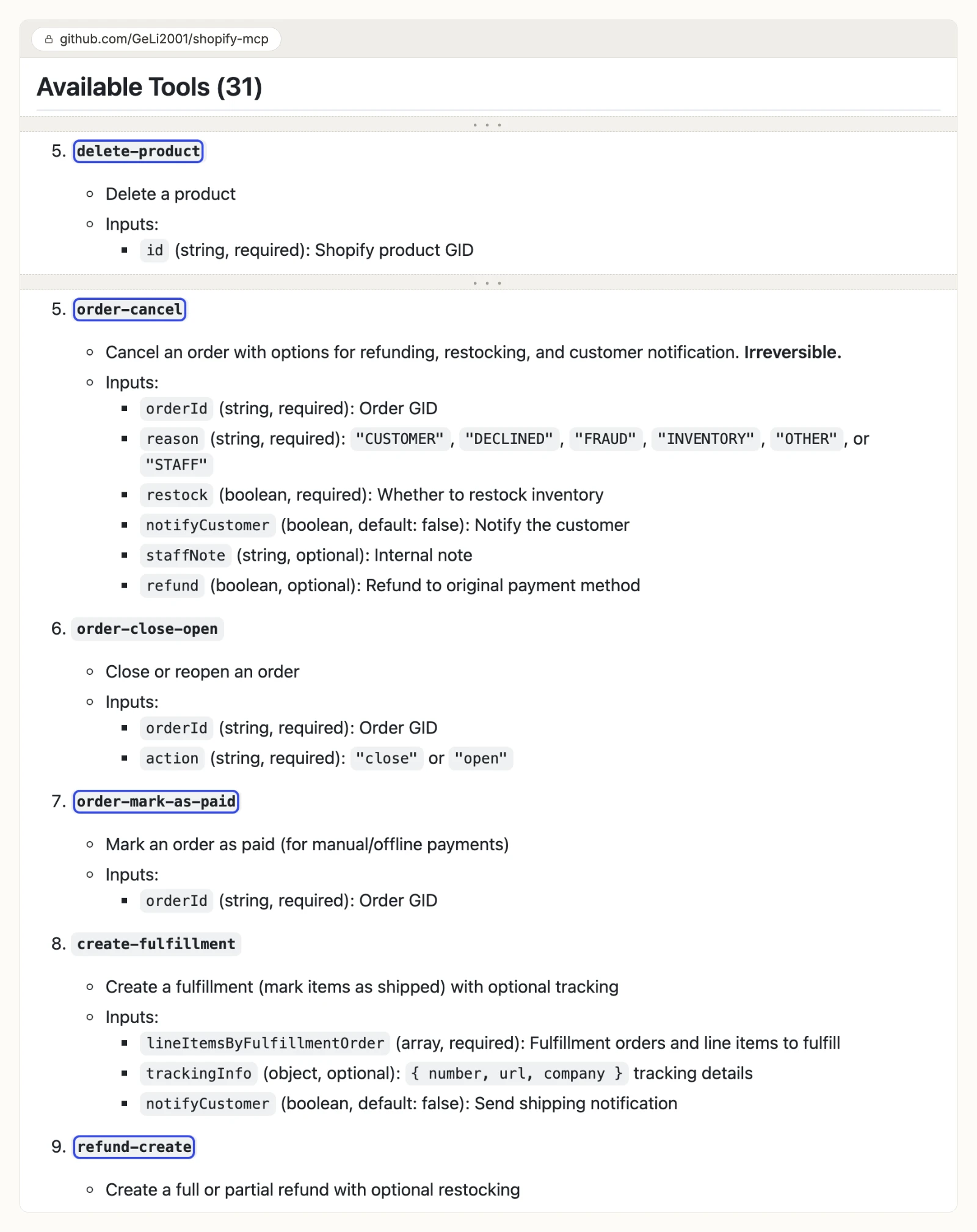
The GeLi2001 repository lists 31 tools across products, customers, orders, metafields, inventory and tags. They include delete-product, delete-customer, order-cancel, order-mark-as-paid and refund-create. It supports Shopify's Dev Dashboard client credentials and refreshes the token itself. It runs through npx on your machine, MIT licensed, with 239 stars. The last commit landed on 2026-04-05, and 10 issues and pull requests are open.
Pros
- 31 tools, including order and customer writes.
- Supports Dev Dashboard client credentials.
Cons
- Deletes, cancels and refunds with no switch or approval documented.
- Runs on your machine, with your app's secret in the client config.
- No commit since 2026-04-05.
Who it is built for: developers who will host and watch it themselves.
cob-shopify-mcp
A community server with a read-only flag and a per-tool disable list, and three different tool counts on its own pages.
The cob-shopify-mcp README says "62 built-in tools + 2 custom tool examples," its badge says 64, and its GitHub About line says "49+ tools." It offers 16 ShopifyQL analytics tools, runs over stdio or Streamable HTTP in Docker, and needs Node 22 or later. A read_only setting turns off every write. MIT licensed, 18 stars.
Who it is built for: developers who want a CLI and an MCP server in one package.
@akson/mcp-shopify
A community server whose own README says its writes are not finished.
The antoineschaller/shopify-mcp-server README says "read-only tools are fully implemented; write/update operations are in development." It connects with a static access token, and its npm package last shipped on 2025-08-04. AI answers still name it, but its tool list mixes shipped and planned features.
Who it is built for: a codebase to fork.
What an agent can do on a new connection
What an agent can do on day one depends on each option's defaults, and they differ more than the feature lists suggest. Ask four questions before you connect a live store.
What can it reach before anyone narrows it? Zapier pre-enables actions for apps you already connected. GeLi2001's server gets whatever your custom app's scopes allow, deletes included. Shopify's connectors get the access level you approve at install. On InsightfulPipe, destructive actions start off until an admin switches them on, and a Read-only store cannot run a single write until an admin reconnects it with write scopes.
Who sets the limits, and can you change them later? Shopify's connectors cannot lower their access without an uninstall. ShopMCP sets read, write and delete per resource. On InsightfulPipe, an owner, admin or operator sets the actions per store and can switch any of them on or off at any time, and the server enforces them in every client.
Which actions reach customers? On InsightfulPipe, refunds, draft order invoices and customer invites take effect at once, and each can email the customer. Switch off the ones an agent should not use on each store. Aim theme work at an unpublished theme, since edits to the published one show on the storefront right away.
Can you add a second check? In Claude, set any connector's write tool to Needs approval under Customize > Connectors. Combined with per-store switches, that is why InsightfulPipe is the safest of the servers that can write: destructive actions start off, and every action is a switch your admin controls.
How to choose the best Shopify MCP server for your store
Choose InsightfulPipe for any job that touches a live store, and set its switches to match the job. These are the common cases.
- You want an assistant to run store work within limits you set: InsightfulPipe. 116 actions, each a switch per store, destructive actions off until your admin switches them on, from $29.99 a month.
- You manage several stores or client stores: InsightfulPipe. Connect each store with its own custom app and give each one its own action list.
- You only need reports: a Read-only InsightfulPipe store, which locks every write until an admin reconnects it with write scopes.
- You want Shopify next to ads and analytics: InsightfulPipe, with Google Ads, Meta Ads and GA4 on the same account. Our marketing MCP server roundup compares that field.
- You build apps or themes and need live store data: InsightfulPipe in Claude Code, Cursor or Codex, under the same switches.
- You sell on more than one platform: InsightfulPipe also connects WooCommerce and Magento stores.
You can run more than one server. MCP clients support several servers in one session, and the protocol differs from a plain API in ways this guide explains.
How to connect InsightfulPipe to Shopify in five steps
Connecting takes a Shopify app you create once and one server URL. Nothing runs on your machine, and the store's scopes decide whether it connects as Read-only or Read & write.
Step 1: Start the Shopify connection in InsightfulPipe
In the InsightfulPipe app, open Connectors, choose Shopify and click Connect. Pick Read-only or Read & write to match the scopes you will grant, untick any action this store should not allow under Agent actions, and click Continue. The next page shows the store fields and a scope list you will paste into Shopify. Our Shopify connector docs list every field.
Step 2: Create a Shopify app in the Dev Dashboard
Go to dev.shopify.com, open Apps and click Create app. Under Versions, create a version: set the App URL to any valid URL, turn off Embed app in Shopify admin, turn on Use legacy install flow, and paste the scope list from InsightfulPipe. Keep only read scopes for a reporting connection. Click Release, then install the app from Settings > Apps in your store admin.
Step 3: Paste the credentials into InsightfulPipe
On the app's Overview page, copy the Client ID and the Client secret. Paste them into InsightfulPipe with your store name, and save. InsightfulPipe stores the secret encrypted and refreshes the 24-hour store tokens in the background.
Step 4: Add the Shopify MCP server to your AI client
In Claude, open Customize > Connectors, add https://shopify.insightfulmcp.com/ as a custom connector, click Connect, sign in to InsightfulPipe if asked, then click Authorize access. In Claude Code, run claude mcp add --transport http shopify-mcp https://shopify.insightfulmcp.com/. ChatGPT, Cursor, Gemini CLI and Codex finish with the same InsightfulPipe sign-in and Authorize access. The Claude setup guide and ChatGPT setup guide show each screen.
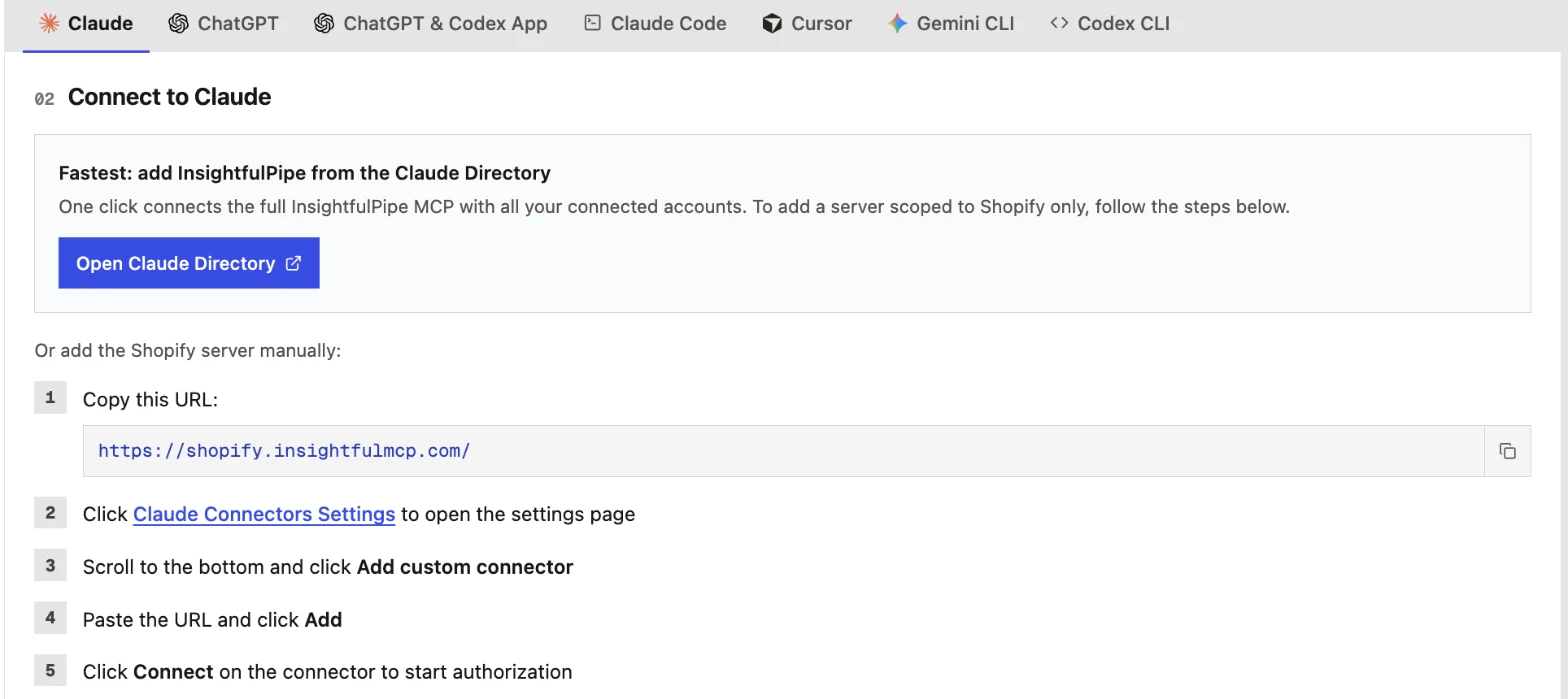
Step 5: Choose the actions for each store
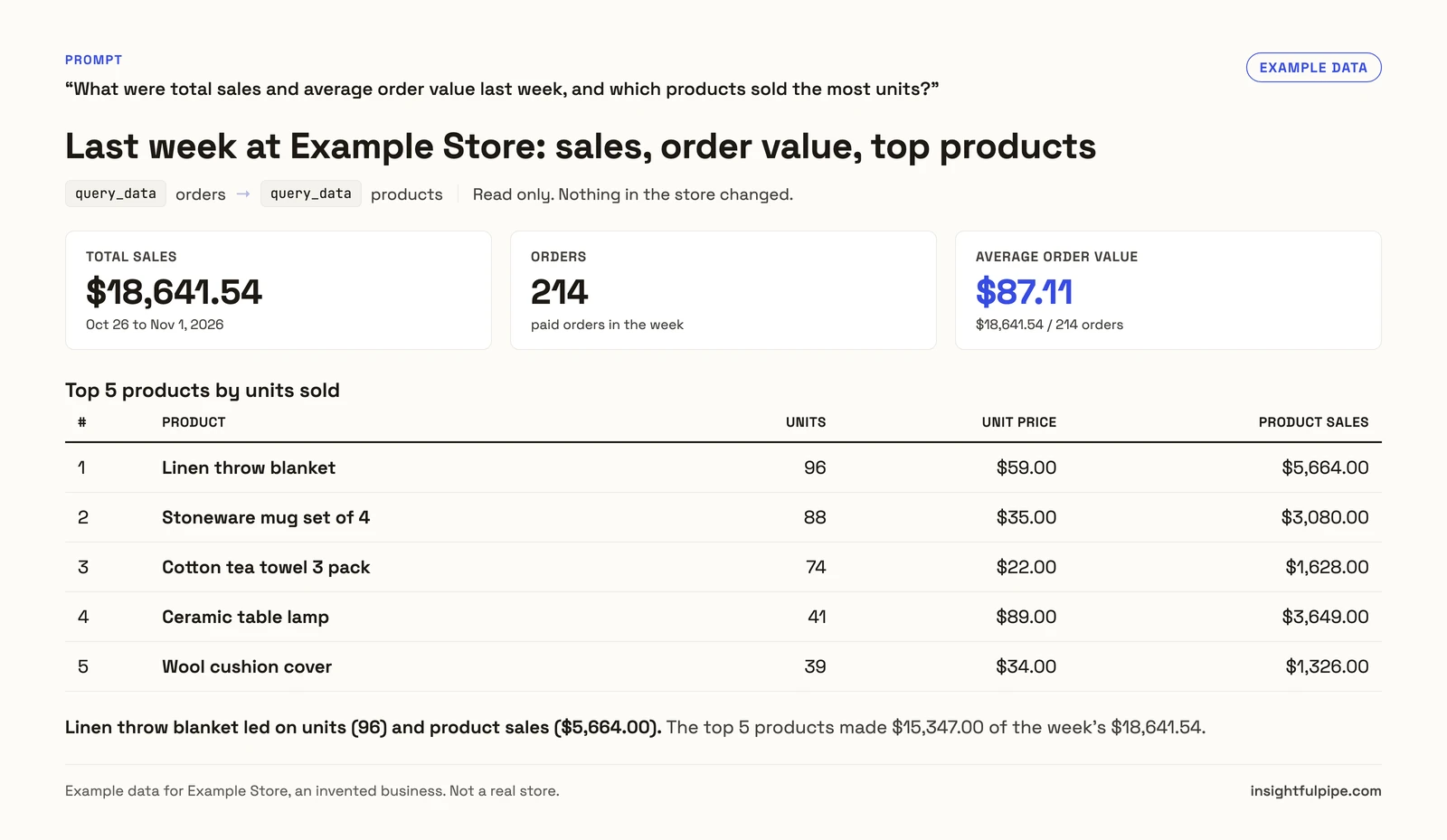
Open the store's actions in InsightfulPipe, keep the ones this store should allow, and save. Then ask your first question, such as "What were total sales and average order value last week?"
The final ranking
The ranking follows the six criteria above, led by store operations and control before a write, with InsightfulPipe first.
- InsightfulPipe: 116 actions with per-store switches, hosted
- Shopify connectors: catalog work from chat, money moves blocked
- Zapier MCP: 39 actions, payment capture, no refunds listed
- ShopMCP: per-resource permissions, no reviews yet
- Composio: 315 tools for developers, no approval step published
- Shopify AI Toolkit and Dev MCP: coding help, docs not store data
The other six follow in the table at the top of this page.
For most brands and agencies, the pick is InsightfulPipe. It handles refunds, cancellations and fulfillments, which Shopify's own connectors cannot. It connects every store you run, and every action it can take is a switch your admin controls.
What we would not recommend: amir-bengherbi/shopify-mcp-server and pashpashpash/shopify-mcp-server have had no commits since early 2025. Guides that still point shopping agents at the old /api/mcp catalog tools describe tools Shopify removed.
What the other vendors do not publish
Several claims in this comparison could not be checked, because the vendors publish nothing to check them against.
- Shopify: whether its connectors can publish a theme, since one page says no and its action table says yes; and why Claude's directory shows 25 tools against 43 in the Help Center.
- Zapier: which Shopify actions a new server pre-enables for your account.
- ShopMCP: what the Pro plan's delete permission defaults to, and any review history.
- Composio: any approval step or default for its 315 Shopify tools.
- ShopManager AI and cob-shopify-mcp: one consistent tool count.
- Polar: a price that does not need a GMV band and a demo.
Frequently asked questions
Sources (checked 2026-11-01)
Shopify
- Building and managing your store with third-party AI tools
- Shopify connector for Claude
- Shopify plugin for ChatGPT
- Authorizing AI tool access to your store
- Shopify AI Toolkit
- @shopify/dev-mcp on npm
- Migrate from Storefront MCP
- Checkout MCP server
- Shopify connector in Claude's directory
Zapier
ShopMCP
Composio
ShopManager AI
Polar Analytics
Community servers
InsightfulPipe