Disclosure: InsightfulPipe publishes this and is one of the two products compared.
The verdict
In InsightfulPipe vs Windsor.ai, the better marketing MCP for an AI agent that changes ad accounts is InsightfulPipe, because it lets you choose, account by account, which actions the agent can use. Windsor.ai publishes no way to do that. Its agent guide tells the assistant to fetch every write action a connector supports.
That gap decides more than it seems to. Windsor.ai now lists 137 write actions across 19 connectors, and one of them permanently deletes a Customer Match list. InsightfulPipe starts every new connection with destructive actions off until an admin switches them on.
- Best for an agent that changes ad accounts: InsightfulPipe. 62 Google Ads actions that make changes to Windsor.ai's 34, each switched on or off per account.
- Safest write access: InsightfulPipe. New Google Ads, Meta and LinkedIn campaigns start paused whatever status the assistant sends, destructive actions stay off until an admin switches them on, and on Meta our server never sets an ad live.
- Best value across platforms: InsightfulPipe. From $29.99 a month for 8 connected accounts across 50 platforms. Windsor.ai's Basic plan covers 3 data sources.
- Best outside the chat window: InsightfulPipe. The same limits hold in Claude, ChatGPT, Claude Code, Cursor, Gemini CLI, Codex CLI and our CLI.
Start with the InsightfulPipe Google Ads MCP server if Google Ads is where your agent will work first.
InsightfulPipe vs Windsor.ai at a glance
InsightfulPipe is a set of hosted MCP servers built for an agent that acts. Windsor.ai is a data pipeline with an MCP server and write actions on top. Here is what each lets an agent reach before anyone narrows it.
InsightfulPipe | Windsor.ai | |
|---|---|---|
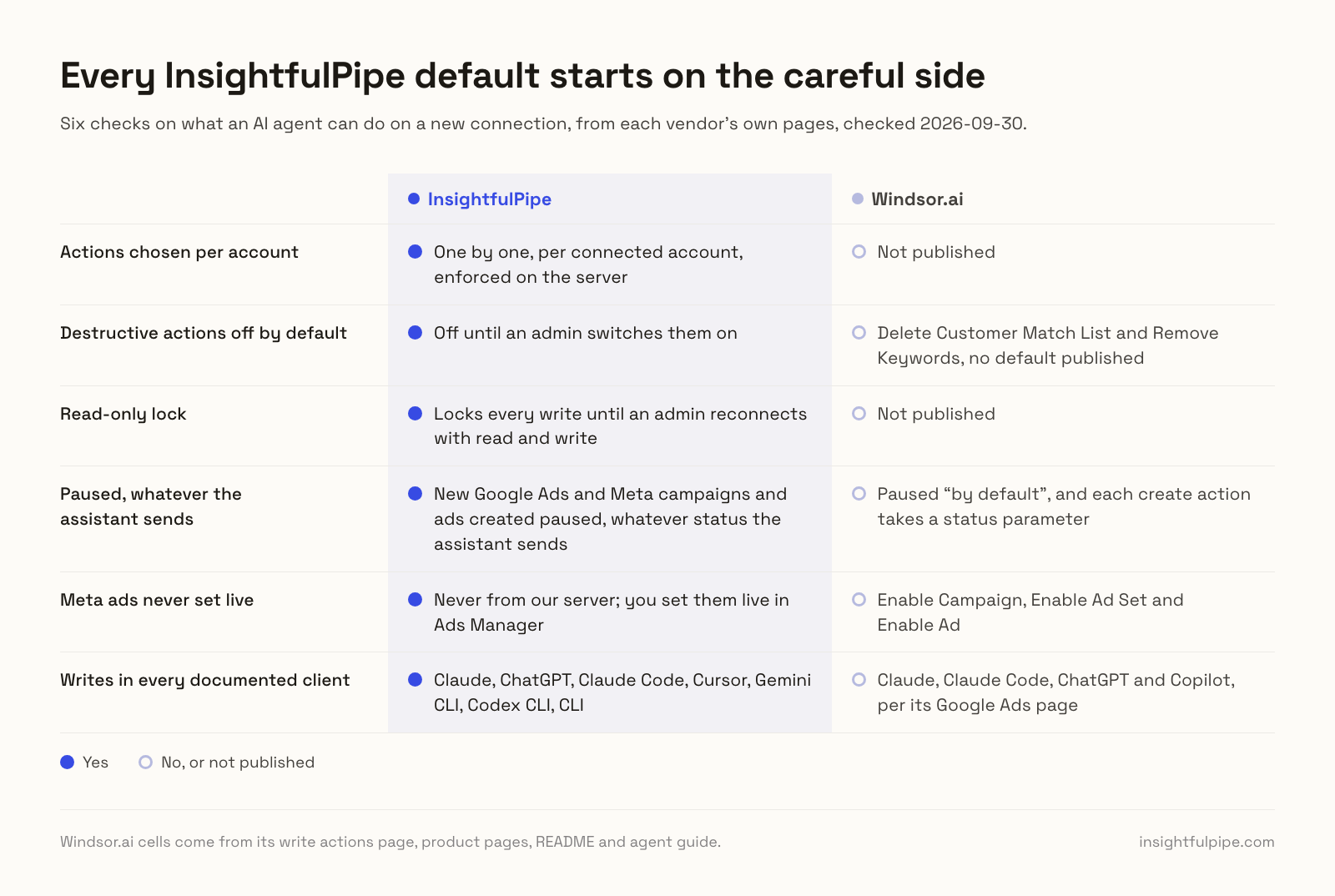
Choose which actions an agent can use | Yes, one by one, per connected account, enforced on the server | Not published |
Destructive actions on a new connection | Off until an admin switches them on, such as removing keywords or deleting a Meta ad | Delete Customer Match List and Remove Keywords, no default published |
Read-only connection | Locks every write until an admin reconnects with read and write | Not published |
New Google Ads and Meta campaigns and ads | Created paused, whatever status the assistant sends | Paused "by default", and each create action takes a status parameter |
Meta ads going live | Never from our server; you set them live in Ads Manager | Enable Campaign, Enable Ad Set and Enable Ad |
Google Ads actions that make changes | 62 of 99: 59 write, 3 destructive | 34 |
Clients where writes run | Claude, ChatGPT, Claude Code, Cursor, Gemini CLI, Codex CLI, CLI | Claude, Claude Code, ChatGPT and Copilot, per its Google Ads page |
Platforms on every plan | All 50 | 3, 7, 10 or 14 data sources on priced plans |
Entry paid plan | From $29.99 a month for 8 connected accounts | $23 a month billed monthly for 3 data sources |
How we compared them
We read every capability, default and price from each vendor's own documentation, pricing page or public repository, and ran InsightfulPipe on live accounts. We checked Windsor.ai's pages and prices on 2026-09-30.
Windsor.ai's write actions page served a cached copy reading 131 actions; the live page reads 137, and we use it. This head-to-head covers two products; our roundups, such as the best Google Ads MCP servers, compare the wider field.
Criterion | What we checked |
|---|---|
Control before a write | Can you choose, per account, which actions the agent can use, and who enforces it? |
Defaults | What can the agent do before anyone narrows it, and do destructive actions start off? |
Going live | What starts paused, and can the agent set an ad live? |
Depth | How many actions can change something on each ad platform? |
Clients | In which AI clients do writes run, under the same limits? |
Price | What does it cost to connect the platforms a team uses? |
Reporting and exports | Which sources can it read, and where can it send the data? |
Where a vendor's own pages contradict each other, we quote both and attribute them to the vendor. Where a capability is not published, we say "not published" rather than guess. Features on a roadmap do not count.
The question that splits these two
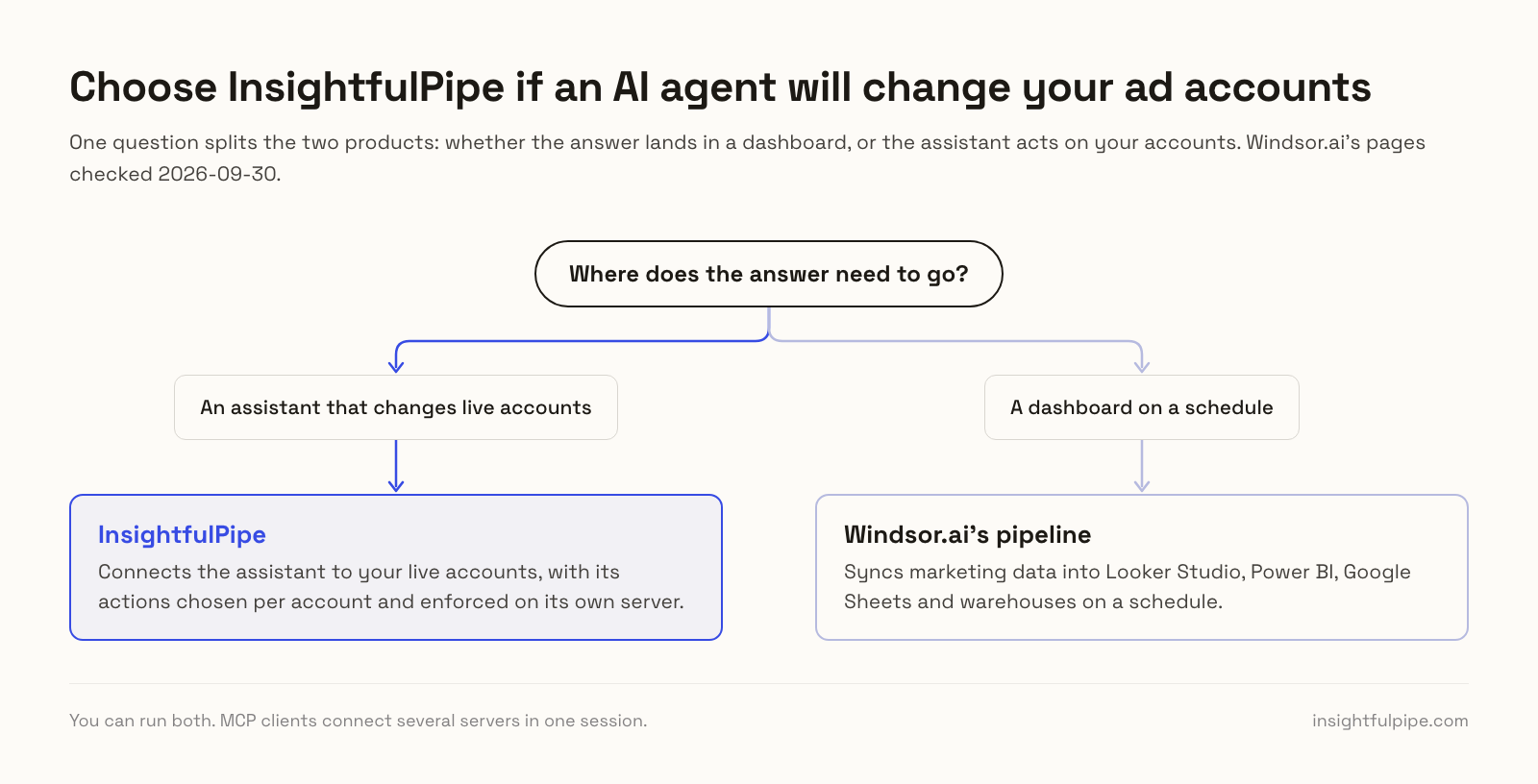
One question splits these two products: whether the answer lands in a dashboard, or the assistant acts on your accounts. They start from opposite ends of it.
If the answer lands in a dashboard, Windsor.ai syncs marketing data into Looker Studio, Power BI, Google Sheets and warehouses on a schedule. InsightfulPipe connects the assistant to your live accounts and to the warehouses you already fill, through its BigQuery and Google Sheets servers.
If the assistant acts, the question becomes what it can reach before it starts. Windsor.ai's MCP page sells the fix "at 2 AM". InsightfulPipe decides, per account and on its own server, which actions exist at 2 AM.
Side by side, platform by platform
On six ad and analytics platforms both products connect, InsightfulPipe's pages list 254 actions that change something, and Windsor.ai's write actions page lists 79.
InsightfulPipe | Windsor.ai | |
|---|---|---|
Google Ads | 99 actions: 37 read, 59 write, 3 destructive | 34 writes; creates Search or Display campaigns |
Meta Ads | 53 actions: 38 read, 12 write, 3 deletes | 20 writes, including three Enable actions |
GA4 | 62 actions: 26 read, 24 write, 12 destructive | No write actions |
LinkedIn Ads | 28 actions, 10 write, including campaign creation | 12 writes, no campaign creation |
TikTok Ads | 89 actions: 64 write, 10 destructive | 8 writes: pause, enable, budgets |
Microsoft Ads | 92 actions: 54 write, 3 destructive | 5 writes: pause, enable, budget |
Sources it can read | 50 platforms | 350+ data sources |
Exports to BI tools and warehouses | Queries BigQuery, Sheets and databases you connect | 20+ destinations on a schedule |
Team members | 1, 6 or 25 by plan | Unlimited on paid plans |
Entry paid plan | From $29.99 a month, 8 accounts | $23 a month, 3 data sources, 75 accounts |
InsightfulPipe: built for an agent that acts
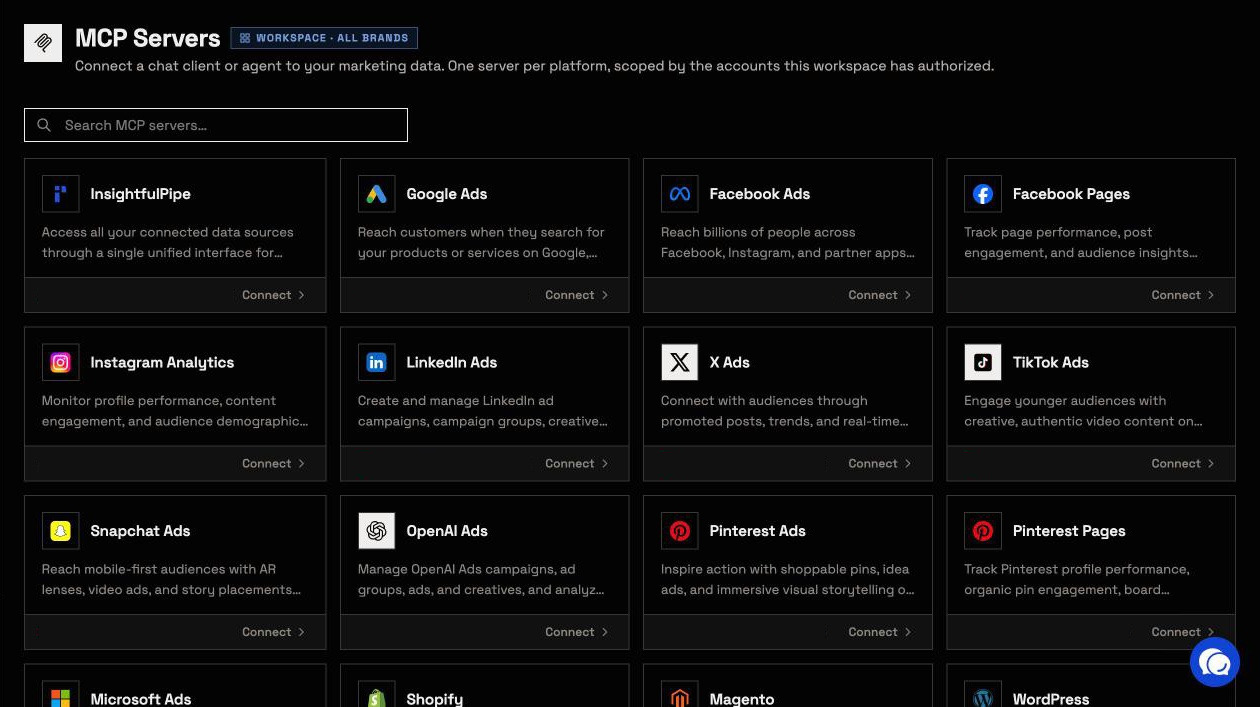
InsightfulPipe connects an AI agent to 50 platforms through hosted MCP servers, including one that reaches every connected account. You decide which actions each account allows, and the server holds that line in every AI client.
What an agent can change
Depth is the first difference. Here is what the agent can change on six platforms both products connect:
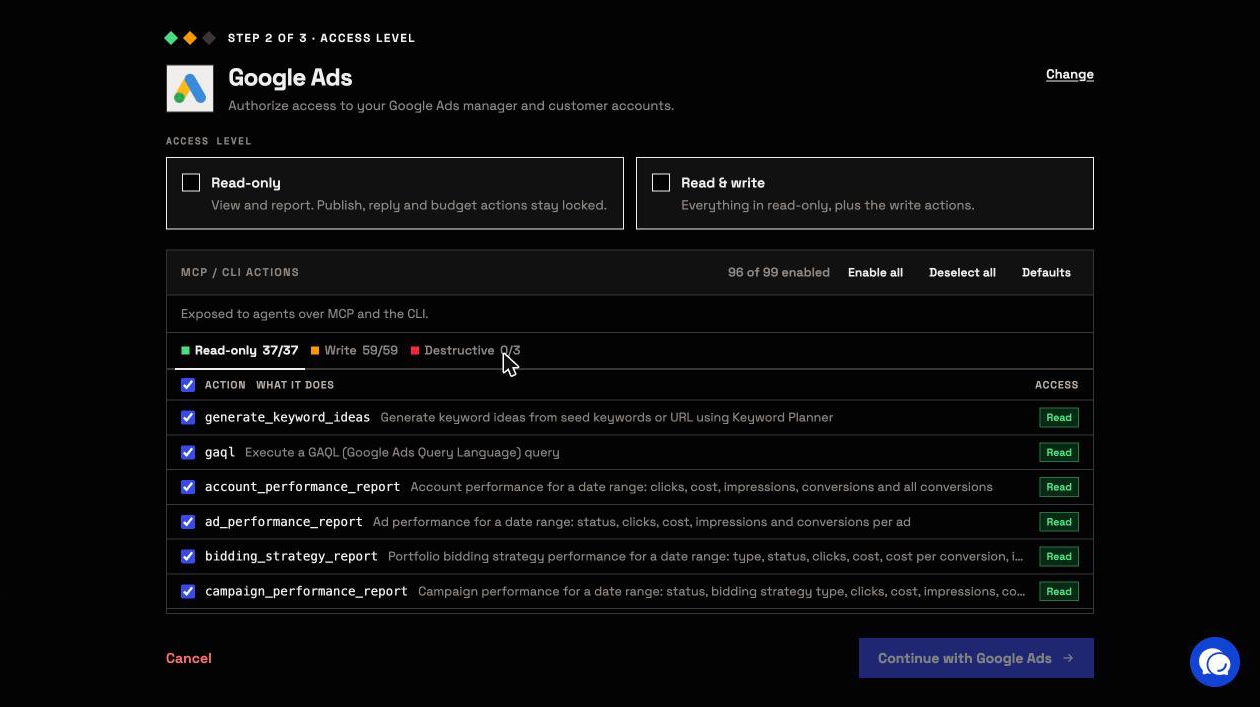
- Google Ads: 99 actions, 37 read, 59 write and 3 destructive, with create actions for Search, Display, Performance Max, Dynamic Search Ads and App campaigns, plus raw GAQL and Keyword Planner. Windsor.ai's 34 writes create Search or Display campaigns only.
- Meta Ads: 53 actions, 38 read, 12 write and 3 deletes, from campaigns and creatives to custom conversions and lead forms.
- GA4: 62 actions, 26 read, 24 write and 12 destructive, for key events, custom dimensions, audiences and data streams. Windsor.ai lists no GA4 write action.
- LinkedIn Ads: 28 actions, 10 of them write, including campaigns, campaign groups and creatives. Windsor.ai's LinkedIn writes cannot create a campaign.
- TikTok Ads: 89 actions, 64 write and 10 destructive, from campaigns and Smart+ to audiences and creatives. Windsor.ai lists 8.
- Microsoft Ads: 92 actions, 54 write and 3 destructive. Windsor.ai lists 5.
Watch: Connect Google Ads to Claude, a report and a new campaign from one prompt
Why it is the safest way to let an agent write
Control is the second difference, and it makes InsightfulPipe the safest way to let an AI agent change Google Ads or Meta Ads. Every limit is a switch, and your admin decides where each one sits.
- You choose every action, per account. An owner, admin or operator switches each action on or off, across read, write and destructive, at any time. The server enforces that list in every client, and the agent only sees the actions you left on.
- Destructive actions start off. Removing keywords, negative keywords or Customer Match members on Google Ads, and deleting a campaign, ad set or ad on Meta, stays off until an admin switches it on.
- Read-only means read-only. A read-only connection locks every write until an admin reconnects it with read and write.
- New work starts paused. New Google Ads campaigns, ad groups and ads, Meta campaigns, ad sets and ads, and LinkedIn campaigns start paused, whatever status the assistant sends, for you to set live when they are ready. On Meta, our server never sets an ad live; you do that in Ads Manager.
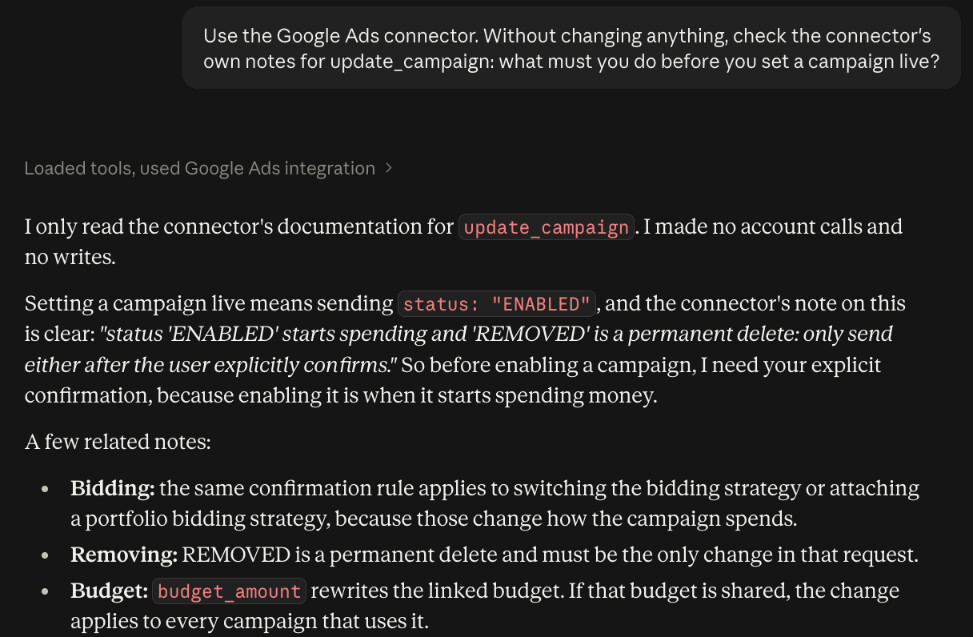
- On Google Ads, the assistant is told to ask first. Update actions can set a campaign live, and the server instructs the assistant to get your confirmation before it sets anything live or removes it.
- Roles hold. Members on the user role only view the accounts an owner or admin grants them, and writes need an operator, admin or owner. An owner or admin decides who holds which role, and can change it at any time.
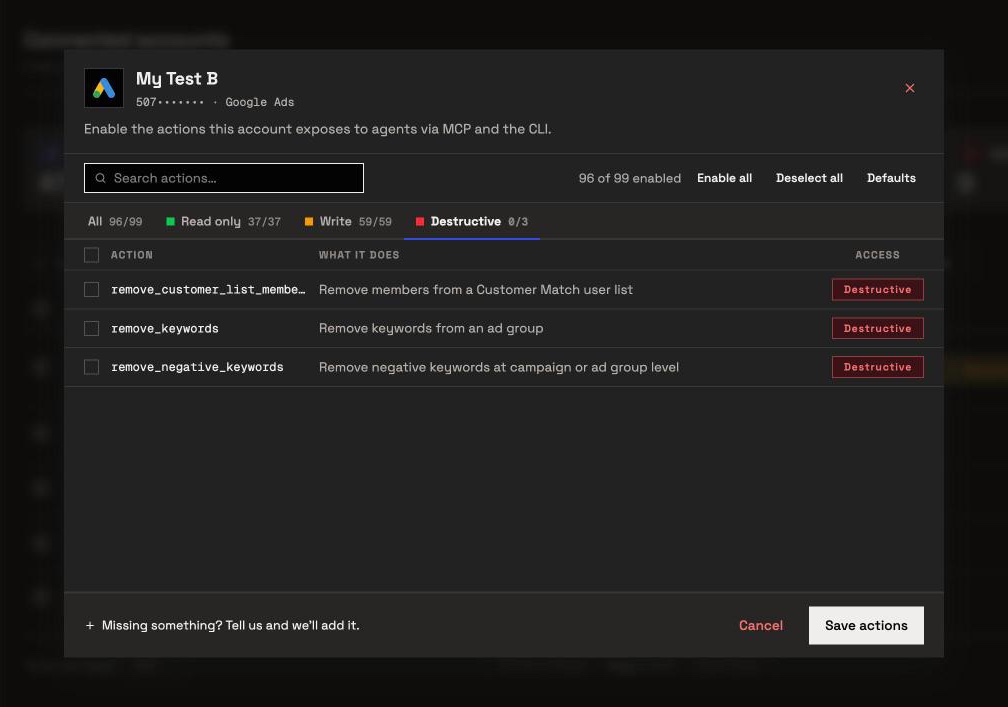
Windsor.ai's MCP page sells a different reflex: "If Claude flags a leaking budget at 2 AM, you fix it right there." A fix at 2 AM is only as safe as the list of actions the agent can reach. On InsightfulPipe, you set that list per account before the session starts. Turn on the twelve actions an account needs, and the model picks from twelve, not ninety-nine.
What else you get
- 50 platforms on one connection, so one agent can put Google Ads spend next to GA4 sessions and Search Console queries.
- Manager accounts: connect a manager account and its client accounts arrive as separate connections, each with its own action list.
- A CLI: the insightfulpipe npm package runs the same reads and writes from a terminal, under the same controls.
- Claude skills and a prompt library, both free.
Pros
- Every action switched on or off per connected account, enforced on the server in every client.
- 62 Google Ads and 36 GA4 actions that make changes, on hosted servers you connect with a sign-in.
- All 50 platforms on every plan, from $29.99 a month.
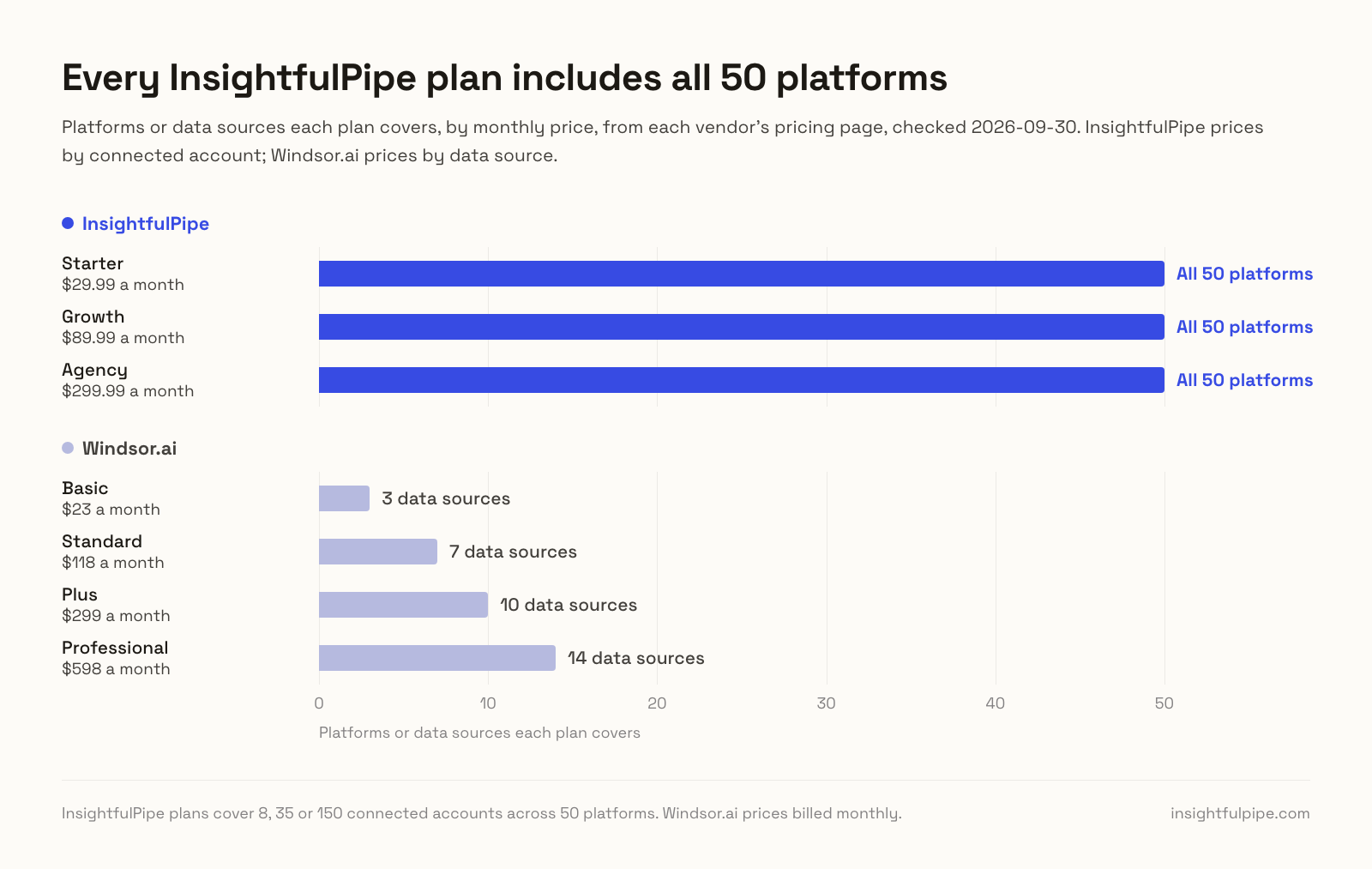
Pricing: Starter is $29.99 a month for 8 connected accounts, Growth $89.99 for 35 and Agency $299.99 for 150, with unlimited tool calls, every MCP server and the CLI on every plan. See pricing.
Where it is the wrong answer: if the whole job is a Looker Studio report refreshed every morning, you would be paying for an agent you never use.
Best for: agencies and in-house teams that want an assistant to change Google Ads, Meta, LinkedIn or TikTok within limits they set, account by account. Start a trial.
Windsor.ai: a reporting pipeline with writes added
Windsor.ai is a data pipeline first: it moves marketing data into BI tools, spreadsheets and warehouses. Its MCP server reads that data, and a write layer on top now lists 137 actions across 19 connectors.
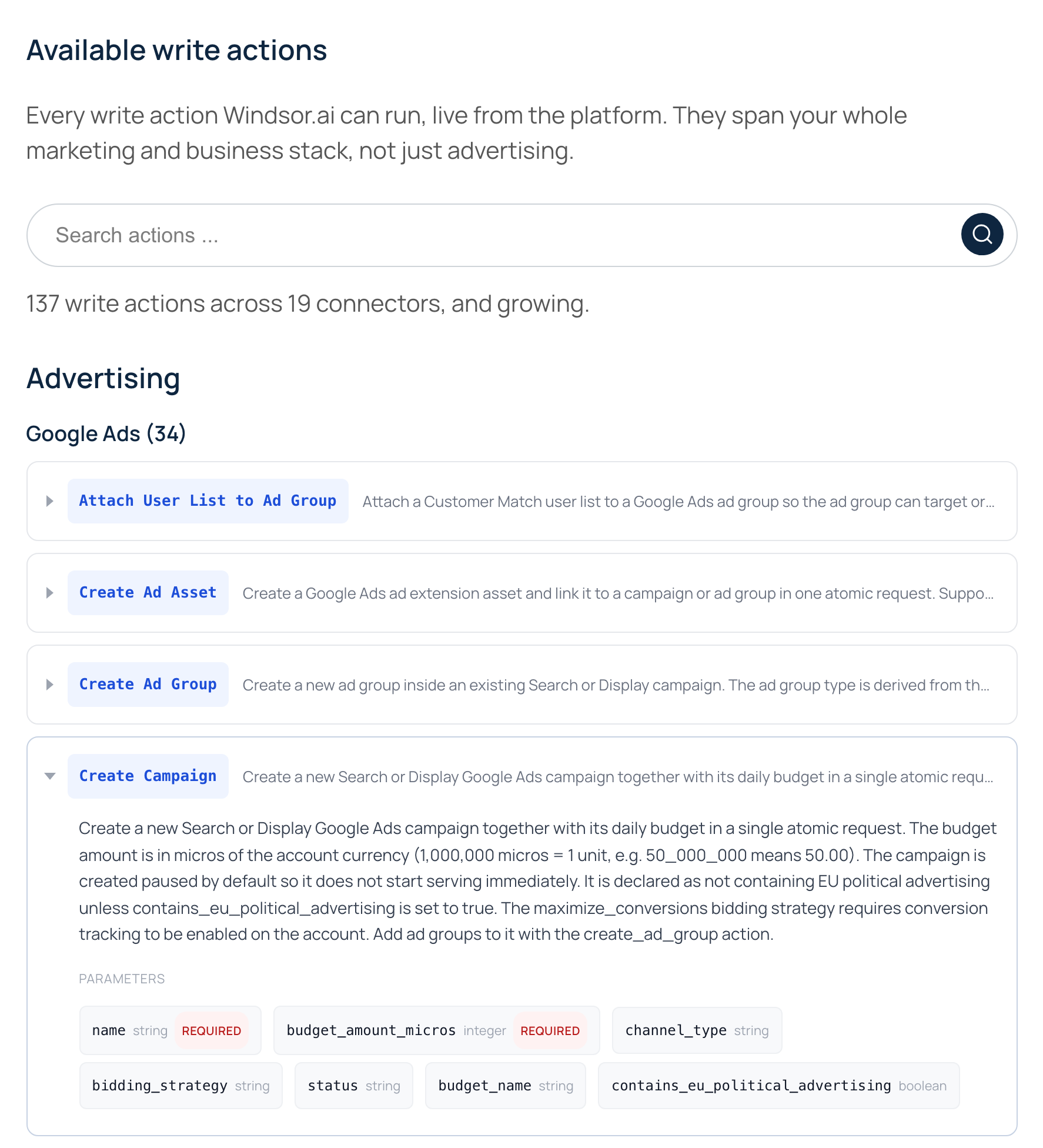
Its write actions page lists 34 Google Ads actions. Campaign creation covers "Search or Display" only. The campaign, ad group and responsive search ad creates start paused "by default", and each takes a status parameter. Enable actions set campaigns, ad groups and ads live, and Delete Customer Match List says it "Cannot be undone". On Meta, Enable Campaign, Enable Ad Set and Enable Ad do the same. GA4 is not among the 19 connectors that write.
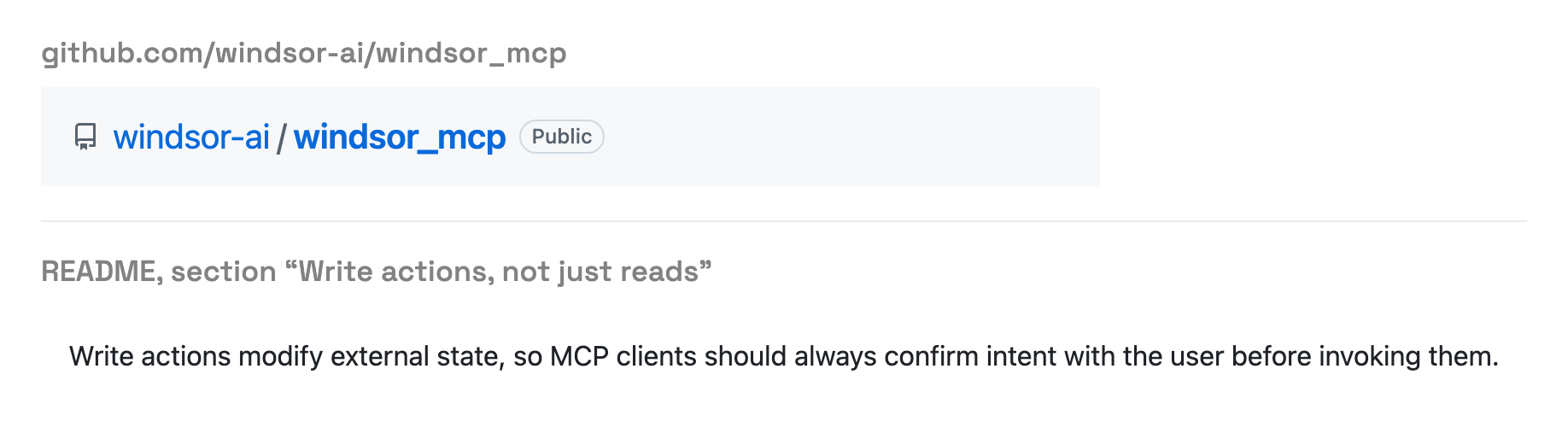
Its agent guide asks the assistant to "confirm intent" before a write, and its README says write actions are "flagged as destructive to MCP clients, which prompt you to confirm intent". By Windsor.ai's own description, the prompt comes from your AI client.
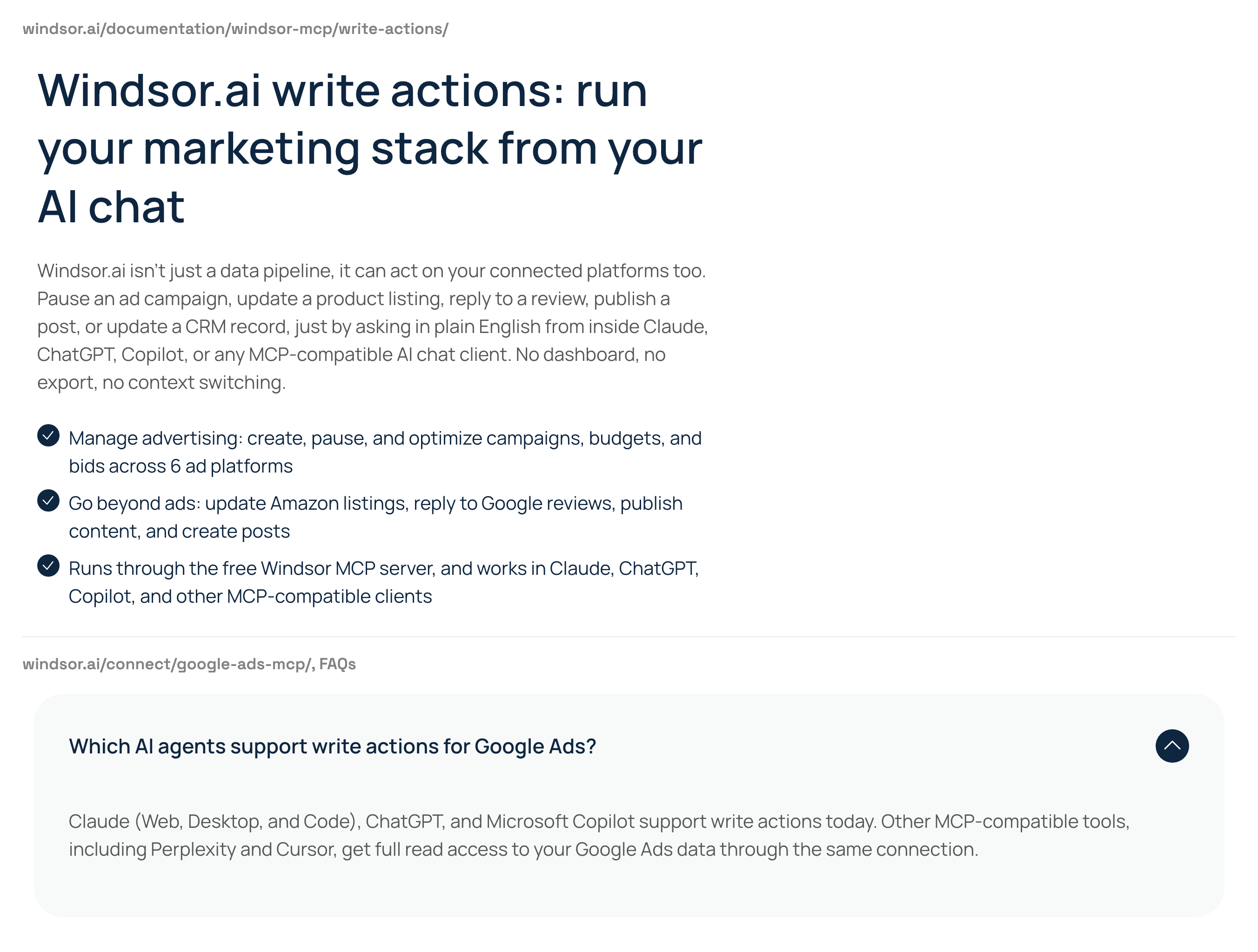
Its own pages say two different things about who can write. The write actions page says writes work in "Claude, ChatGPT, Copilot, and other MCP-compatible clients". Its Facebook Ads page says Claude, ChatGPT and Copilot write, while tools "including Perplexity, Cursor, and Gemini, get full read access", and its Google Ads page says the same of Perplexity and Cursor. Confirm which applies before you plan around Cursor.
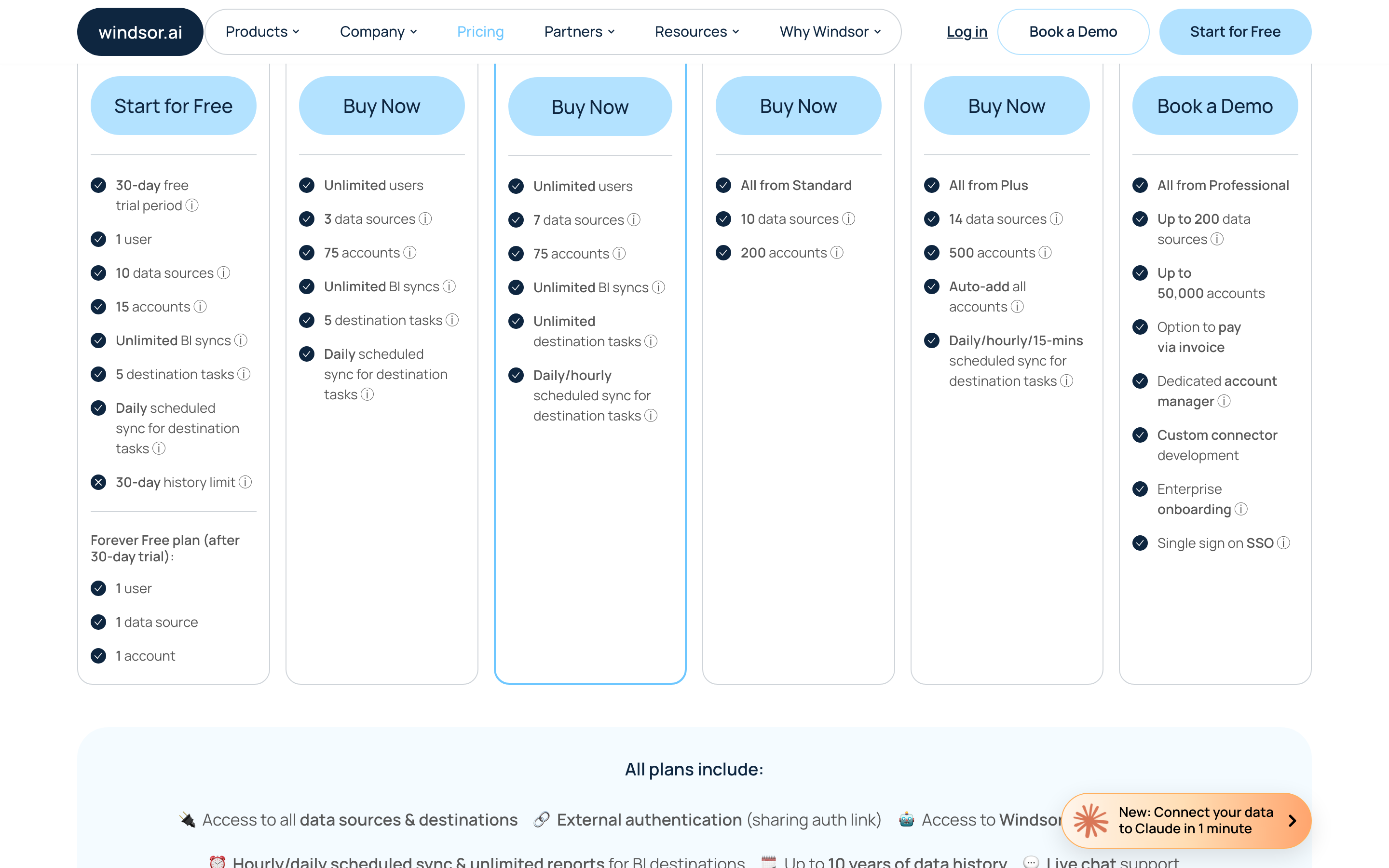
Pricing runs by data source. Basic is $23 a month billed monthly for 3 data sources and 75 accounts, Standard $118 for 7, Plus $299 for 10 and Professional $598 for 14.
Pros
- Scheduled syncs into Looker Studio, Power BI, Google Sheets and warehouses.
- Create actions document a paused default.
Cons
- No published way to choose which write actions an agent can use.
- Its pages disagree on which AI clients can write.
- Plans cap data sources, so a fourth platform means Standard at $118 a month.
Best for: teams already piping reports into Looker Studio, Power BI or BigQuery through Windsor.ai.
Where Windsor.ai fits
Windsor.ai fits a team whose output is a dashboard: data from many sources, synced into a BI tool or warehouse on a schedule. Its MCP server lets that team ask questions of the same data in chat.
What an agent can do on a new connection
What an agent can do on day one depends on each product's defaults, and the two differ more than their feature lists suggest. Ask four questions before you connect a live account.
What can it reach before anyone narrows it? On Windsor.ai, every write action a connector supports, including Delete Customer Match List, Remove Keywords and Remove Negative Keywords, with no published default. On InsightfulPipe, destructive actions start off until an admin switches them on, and a read-only connection locks every write until an admin reconnects it.
Who sets the limits, and who enforces them? Windsor.ai's README leaves the check to your AI client's confirmation prompt. On InsightfulPipe, an owner, admin or operator sets the actions for each account, and the server enforces them in every client.
What starts paused, and what can go live? On Google Ads and Meta, both start new campaigns and ads paused. Windsor.ai documents paused as the default and takes a status parameter. InsightfulPipe creates them paused whatever status the assistant sends. On Meta, Windsor.ai's Enable actions set ads live; our server never does.
What happens when nobody is watching? A confirmation prompt works while someone reads the chat. A list set on the server holds on a scheduled run too. That is why InsightfulPipe is the safest of the servers that can write: every default starts on the careful side, and every one is a switch your admin controls.
Two setup habits help on either product. Switch on destructive actions only for the accounts that need them, and keep spend limits in each ad platform's own settings.
What each costs as you add platforms
InsightfulPipe prices by connected account and includes all 50 platforms on every plan. Windsor.ai prices by data source and caps how many platforms each plan can connect. For a team that works across more than three platforms, that difference decides the bill.
- Five platforms, one account each: InsightfulPipe Starter, $29.99 a month. Windsor.ai needs Standard, $118 a month, because Basic stops at 3 data sources.
- Eight platforms, one account each: still $29.99 on InsightfulPipe. Windsor.ai needs Plus, $299 a month.
- An agency with 10 clients on Google Ads, Meta, GA4 and LinkedIn Ads, 40 accounts: InsightfulPipe Growth plus 5 extra connections, $99.99 a month. Windsor.ai Standard, $118 a month.
Windsor.ai's pages disagree on price too. Its Supermetrics comparison says Windsor "starts at $19/month", while its pricing page shows $19 as the annual rate and $23 billed monthly. Check which billing period a quote assumes before you compare.
Which should you choose?
Choose InsightfulPipe if an AI agent will change your ad accounts, and keep a pipeline only for the dashboards it already feeds.
- You want an assistant to run Google Ads, Meta, LinkedIn or TikTok within limits you set: InsightfulPipe. Every action switched per account, destructive actions off until an admin switches them on, from $29.99 a month.
- You run an agency: InsightfulPipe. Brands keep clients apart, manager accounts arrive as separate connections, and each account gets its own action list.
- You only need reports in chat: a read-only InsightfulPipe connection, which locks every write until an admin reconnects it with read and write.
- You work in Cursor, Claude Code or a terminal: InsightfulPipe. The same limits hold in every documented client and in the CLI.
- You already pay Windsor.ai to feed Looker Studio or BigQuery: keep the pipeline for the dashboards, and connect InsightfulPipe for the changes.
You can run both. MCP clients connect several servers in one session.
Connect InsightfulPipe in three steps
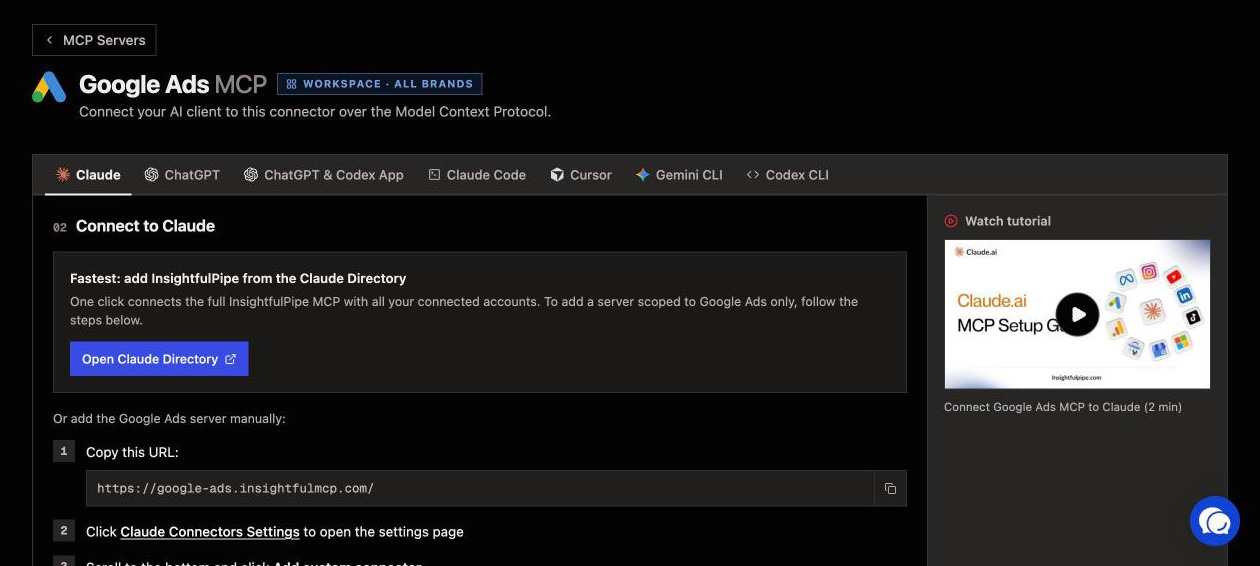
Connecting InsightfulPipe takes a sign-in and a server URL, with no developer token and no code.
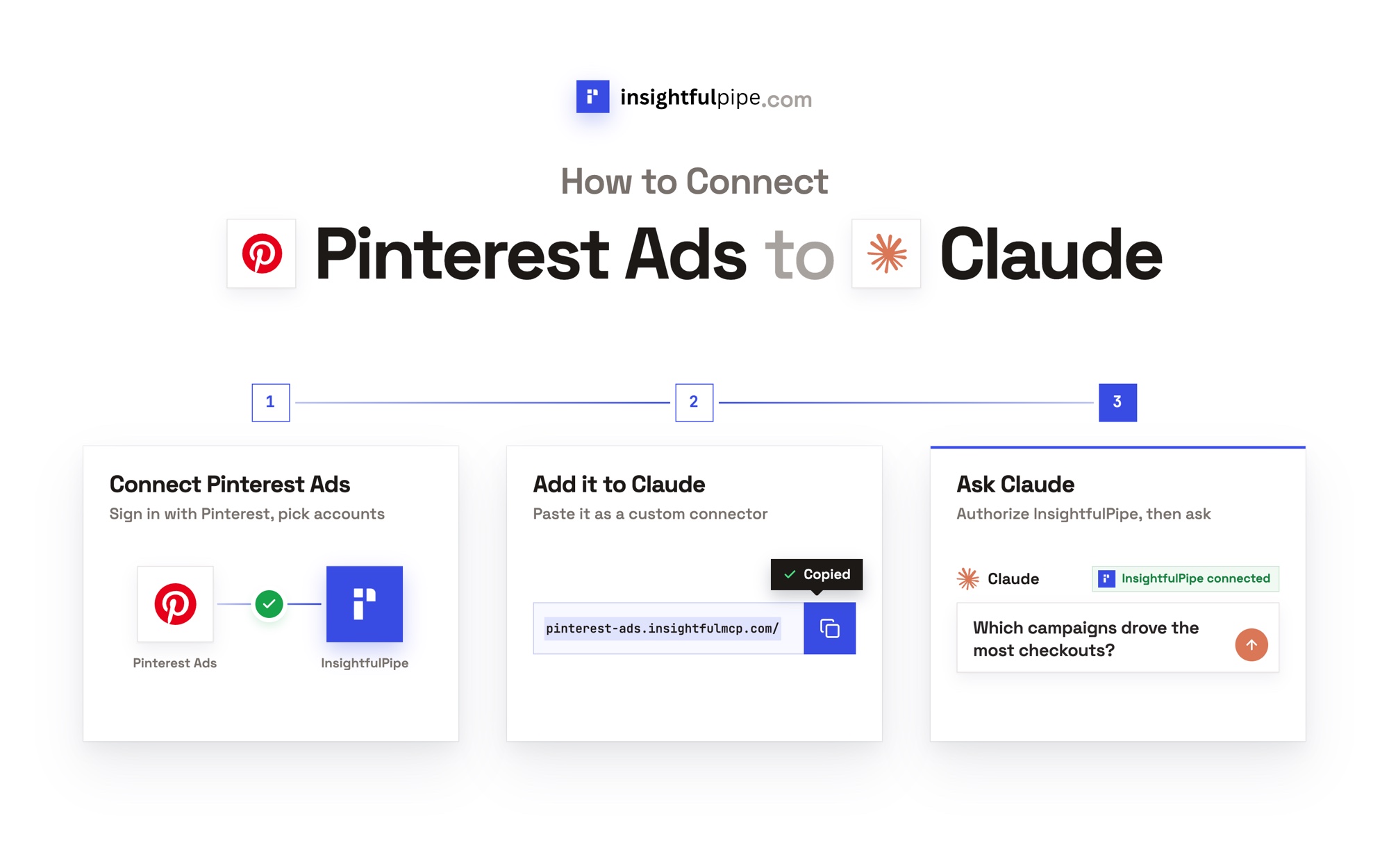
- In InsightfulPipe, open Connected accounts, choose a platform such as Google Ads or Facebook Ads, and pick read-only or read and write. Then sign in and select the accounts to connect.
- In Claude, add InsightfulPipe from the connector directory, or add
https://main.insightfulmcp.com/as a custom connector and click Connect. For one platform, use its own URL, such ashttps://google-ads.insightfulmcp.com/. In Claude Code, runclaude mcp add --transport http main-mcp https://main.insightfulmcp.com/. - Open each account's actions, keep the ones you want, and ask your first question.
Start a trial and connect your first account, from $29.99 a month.
What Windsor.ai does not publish
Several things an agency would check before letting an agent write are missing from Windsor.ai's write actions page, product pages, README and agent guide.
- A way to choose which write actions an agent can use, per account or at all.
- A default for its deletes: Delete Customer Match List, Remove Keywords, Remove Negative Keywords, Delete Comment on Instagram and Delete Object on Salesforce.
- A read-only mode for connectors that can write.
- Manager account handling for Google Ads.
- One answer on which AI clients can write, and one starting price: $19 on one page, $23 billed monthly on another.
Frequently asked questions
Sources (checked 2026-09-30)
Every Windsor.ai claim above comes from Windsor.ai's own pages, documentation or repository, opened on 2026-09-30.
- InsightfulPipe: Google Ads, Meta Ads, GA4, LinkedIn Ads, TikTok Ads, Microsoft Ads, all platforms, pricing
- Windsor.ai: write actions, Google Ads MCP, Facebook Ads MCP, Windsor MCP, pricing, Supermetrics comparison, agent guide, README