InsightfulPipe publishes this guide, and the steps use its hosted Pinterest Ads connector. The end of the guide covers other ways to connect, including Pinterest's own MCP.
Last updated: 2026-09-30
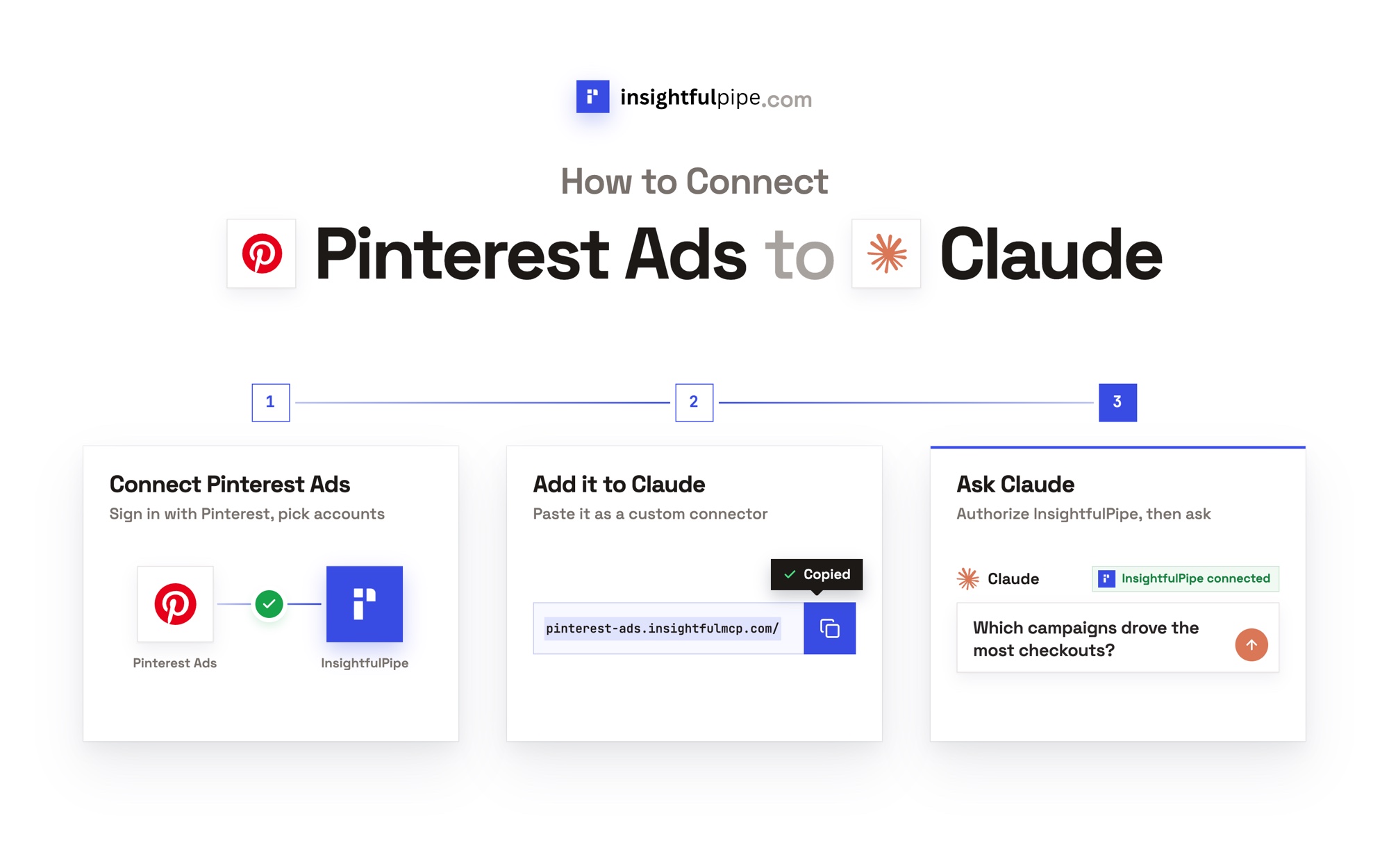
To connect Pinterest Ads to Claude, connect Pinterest Ads in InsightfulPipe, add https://pinterest-ads.insightfulmcp.com/ as a custom connector in Claude, and click Connect. You sign in with Pinterest, so you need no developer app, no API access request and no server to host. Claude gets 44 Pinterest Ads actions, and new campaigns stay paused until you launch them. Plans start from $29.99 a month.
The quick version
Six lines cover the whole setup. Each has its own section below, with the exact labels you will see.
- In InsightfulPipe, open Connected accounts, click Connect account and choose Pinterest Ads.
- Pick Read-only or Read & write, then sign in with Pinterest and select your ad accounts.
- In Claude, add
https://pinterest-ads.insightfulmcp.com/as a custom connector. - Click Connect, and sign in to InsightfulPipe if asked.
- Turn the connector on in a new chat.
- Run the read-only check in "Verify it worked" before you let Claude change anything.
Pinterest Ads on InsightfulPipe at a glance
InsightfulPipe hosts the Pinterest Ads MCP server this guide connects. Here is what Claude gets on the other side of the URL.
Feature | InsightfulPipe Pinterest Ads MCP server |
|---|---|
Server URL |
|
Actions | 44: 28 read, 16 write |
Reads | Accounts, campaigns, ad groups, ads, keywords, audiences, catalogs, analytics, targeting analytics, trending keywords |
Writes | Create and update campaigns, ad groups, ads, keywords, audiences and customer lists; create conversion tags and reports |
New campaigns, ad groups and ads | Start paused, for you to set live in Pinterest Ads Manager |
Status updates | Pause only |
Deletes | None |
Who decides | Owners, admins and operators switch each action, per ad account |
Price | From $29.99 a month |
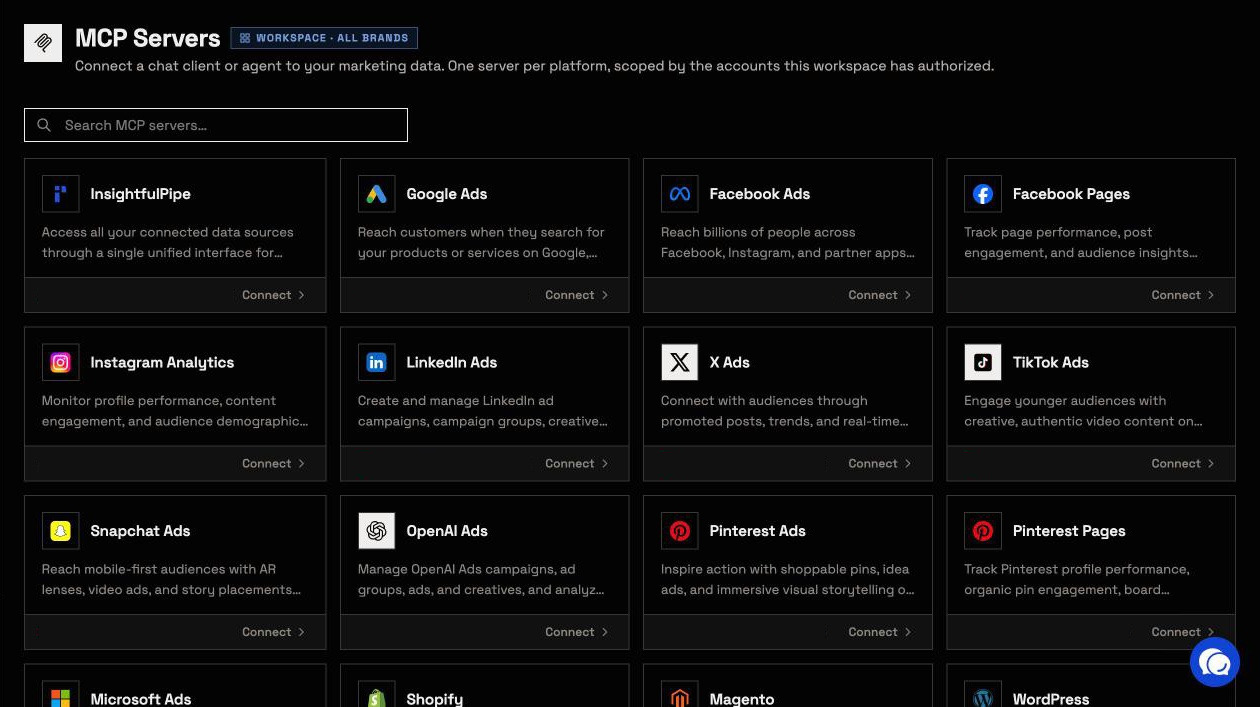
Watch: Connect Pinterest Ads to Claude with a custom connector and run a full report, 1 minute 35 seconds
The video starts at the server URL and may show an earlier layout. The steps below carry the current labels.
What you are actually connecting
The trust path is short: Claude → InsightfulPipe MCP → your authorized Pinterest ad account. Nothing else sits in between.
Claude never receives your Pinterest password. It sends a structured request over MCP, and InsightfulPipe runs the matching Pinterest API v5 call with the access you approved. Claude holds an InsightfulPipe token for your workspace, not your Pinterest login.
You choose the Pinterest access too. A Read-only connection asks Pinterest for ads:read, user_accounts:read and catalogs:read. Read & write adds ads:write.
Four things bound what Claude can do: your workspace, the connection you authorized, the action switches on that ad account, and your own role on Pinterest.
You do not need your own Pinterest developer app, an API access request, a server to host or an API version to track.
Before you start
You need four things before the first click, and the roles on both sides matter.
- A Pinterest login that can open the ad account in Pinterest Ads Manager.
- An InsightfulPipe workspace. Plans start from $29.99 a month, every MCP server and the CLI come with each plan, and each connected ad account counts as one connection. Start a trial.
- A workspace role that can connect accounts. Owners, Administrators and Operators can. Members on the User role cannot.
- A client that supports remote MCP servers. Claude on Free, Pro, Max, Team and Enterprise can add custom connectors, and Free allows one (Anthropic). ChatGPT, Claude Code, Cursor, Gemini CLI and Codex CLI work too.
Pinterest's own roles still apply. Its permission table lets Admin and Campaign access create and edit campaigns, ad groups and ads. Analyst access can view reporting but cannot edit campaigns. InsightfulPipe cannot expand the authority of the Pinterest login you connect.
Total time: about 5 minutes, most of it on the two sign-in screens.
Step 1: Choose Pinterest Ads and an access level
Start in InsightfulPipe. You set the access level before any Pinterest sign-in, so you decide what Claude may do before it can do anything.
- Open Connected accounts and click Connect account.
- On Add an integration, find Pinterest Ads and click Connect.
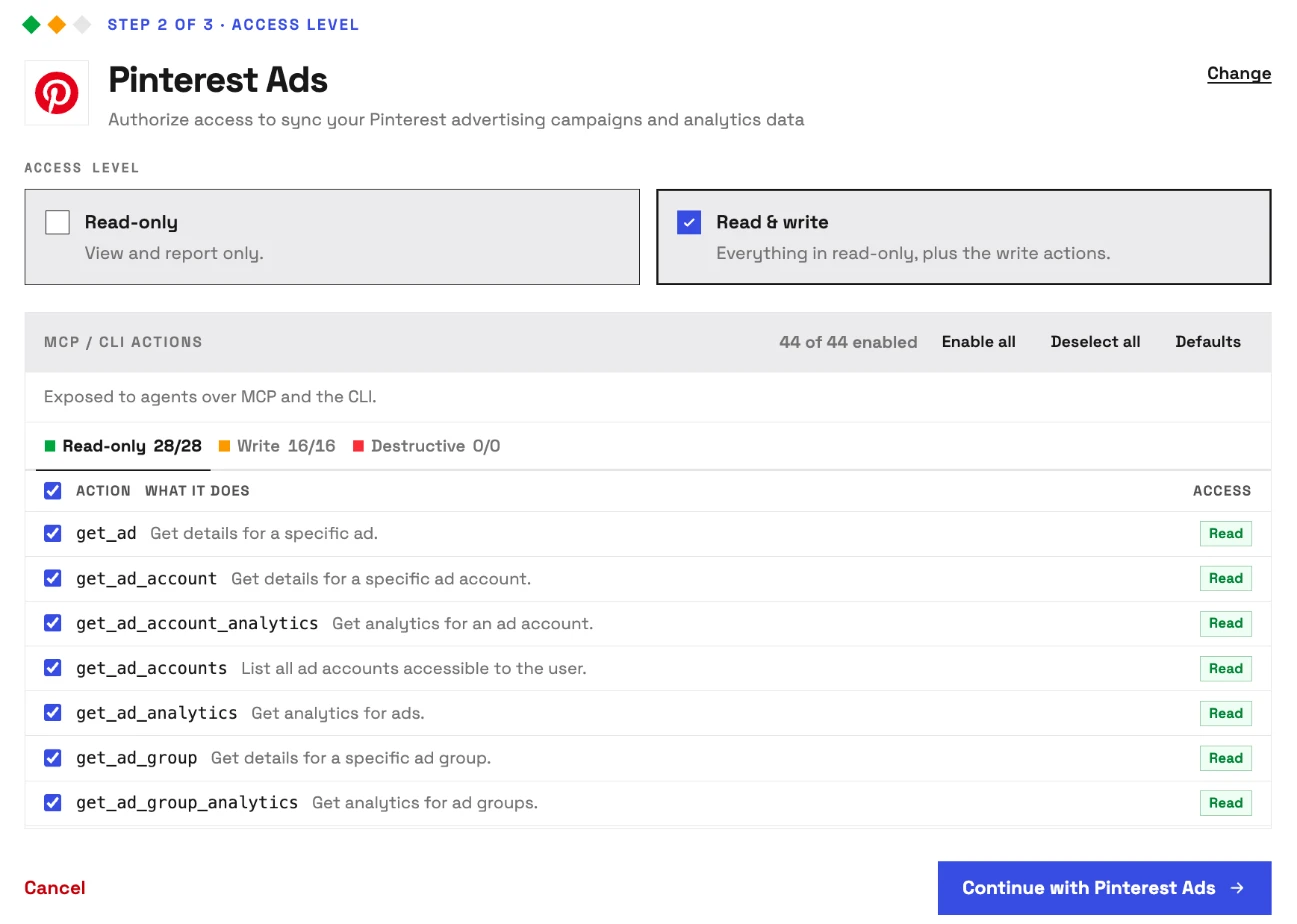
- Under Access level, choose Read-only or Read & write.
- Check the MCP / CLI actions list and untick anything you want off.
- Click Continue with Pinterest Ads.
Read-only locks every write action for the account until an owner or admin reconnects it with read and write. The Destructive tab shows 0, because the server has no delete actions.
Step 2: Sign in with Pinterest and pick your ad accounts
Pinterest's own page handles the sign-in, so InsightfulPipe never sees your Pinterest password. Approve the access, then choose the ad accounts Claude may reach.
- Sign in to Pinterest with the login that can open your ad account.
- Approve the access InsightfulPipe requests.
- Select the ad accounts to connect. Each one becomes its own connection.
- Click Connect 1 account under the list. The number follows your selection.
Step 3: Connect Pinterest Ads to Claude with the connector URL
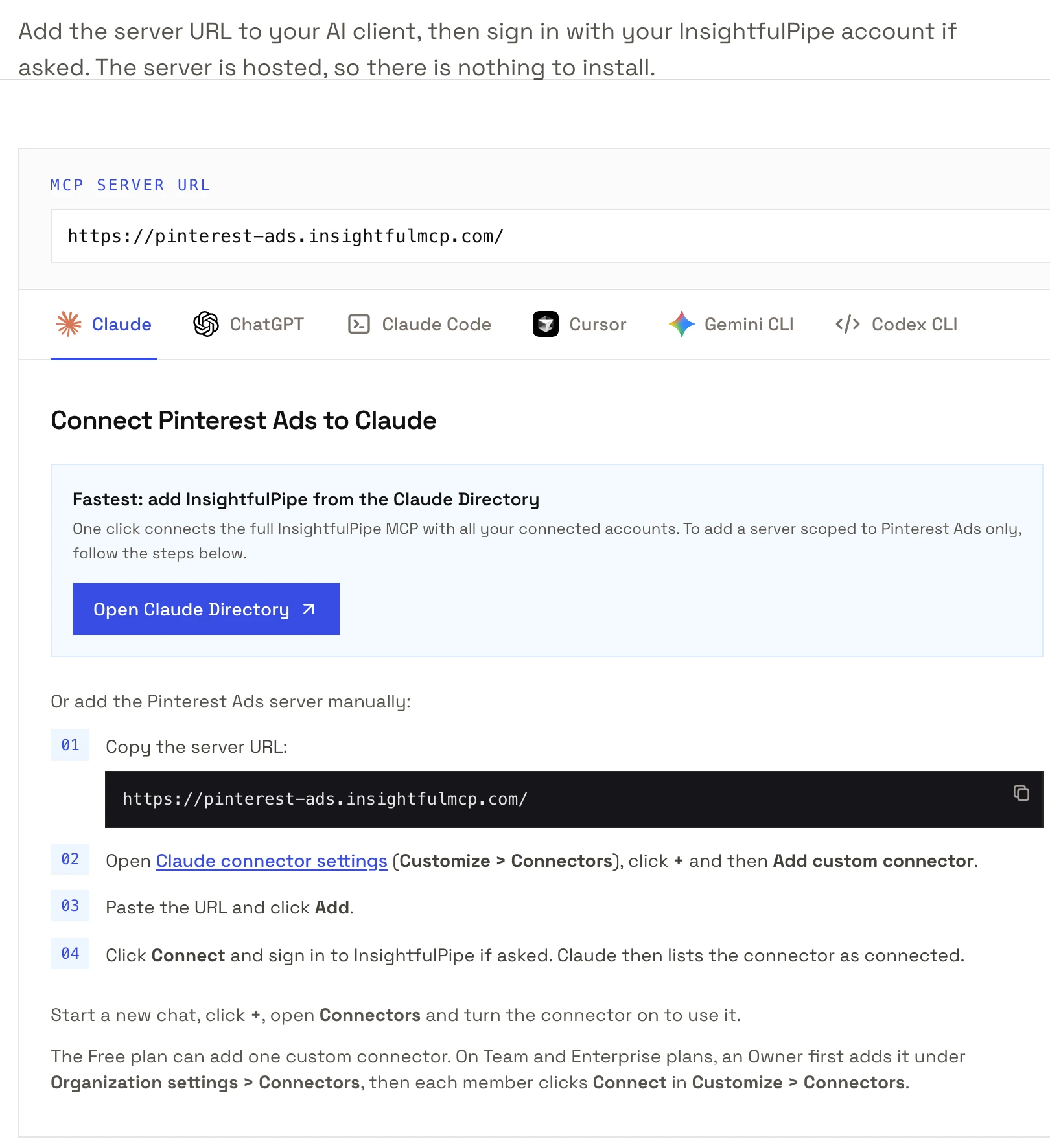
Claude needs one URL and two clicks, on claude.ai or in Claude Desktop. Our Pinterest Ads page shows the same steps with a copy button.
- Copy the server URL:
https://pinterest-ads.insightfulmcp.com/ - In Claude, open Customize > Connectors.
- Click +, then Add custom connector.
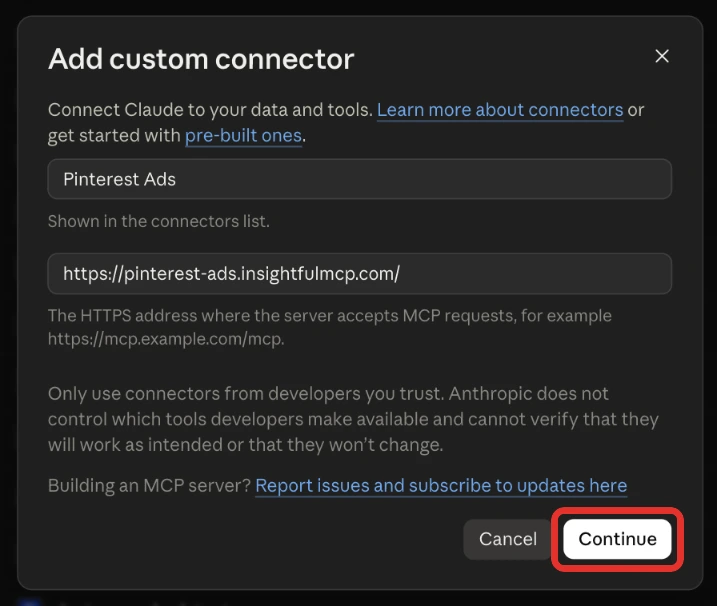
- Name it, paste the URL, click Continue, then Add.
- Click Connect on the new connector.
- Sign in to InsightfulPipe if asked. Claude then lists the connector as connected.
On Team and Enterprise plans, an Owner adds the connector first under Organization settings > Connectors, then each member clicks Connect. Claude's connector directory also lists InsightfulPipe for all your accounts at once; the URL above keeps Claude to Pinterest Ads.
Step 4: Turn the connector on in a new chat
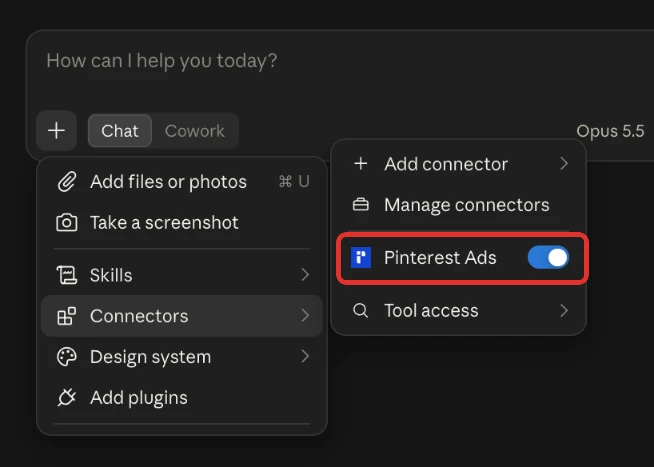
A connector you add stays off in each chat until you switch it on. Claude Desktop uses the same toggle.
- Start a new chat in Claude.
- Click + and open Connectors.
- Switch the Pinterest Ads connector on.
Step 5: Choose which actions Claude may run
Every action on the ad account is a switch, and the server enforces your choice in every client. Change it whenever the job changes.
- In InsightfulPipe, open Connected accounts and find the Pinterest ad account.
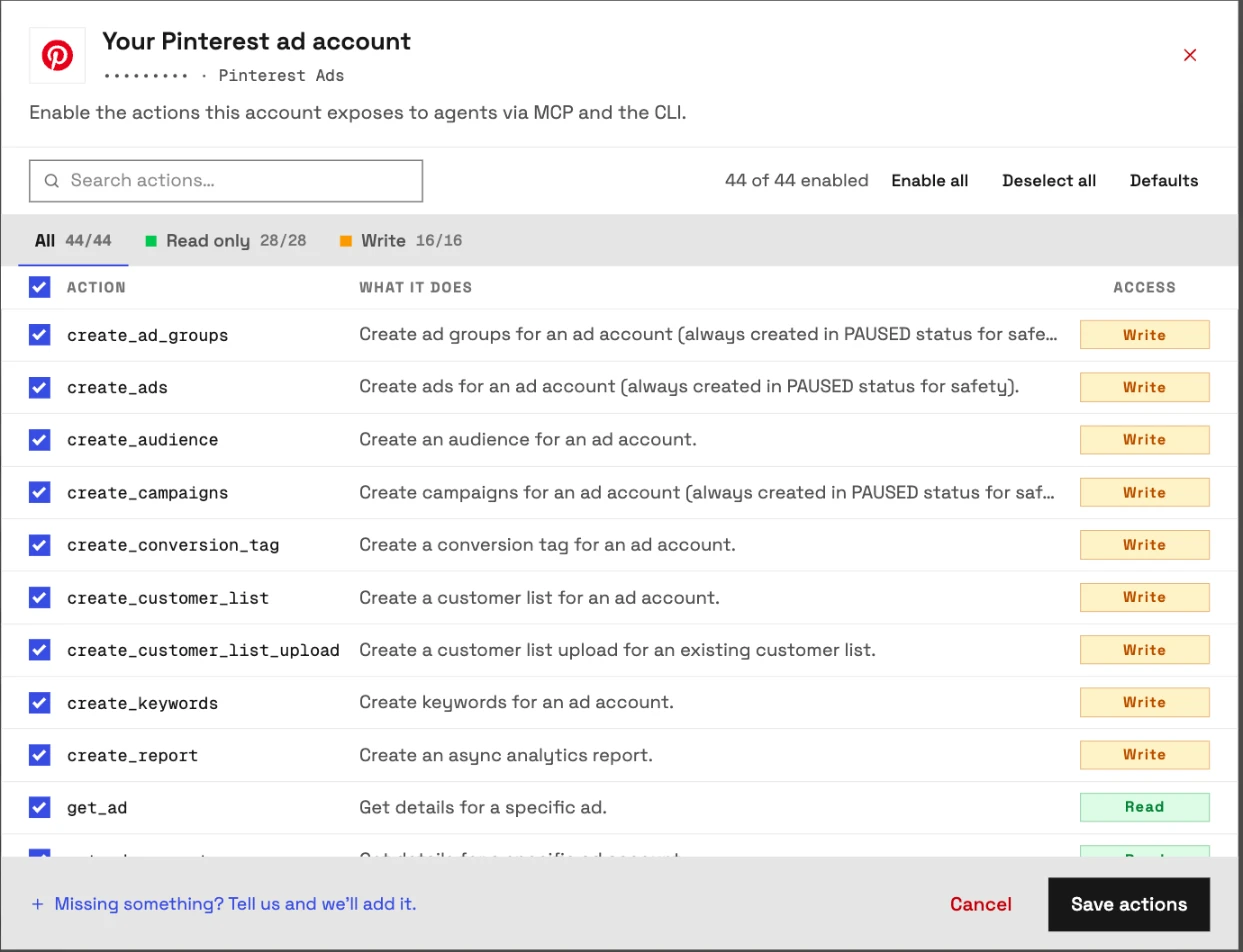
- Click its actions button, for example 44/44 actions. Its tooltip reads Configure actions for this account.
- Switch actions on or off on the All, Read only, Write and Destructive tabs.
- Click Save actions.
For reports only, switch off all 16 write actions or connect the account as Read-only. Owners, admins and operators flip these switches.
Connect Pinterest Ads to ChatGPT (optional)
ChatGPT takes the same URL through Developer mode, which OpenAI offers on Plus, Pro, Business, Enterprise and Education accounts on the web (OpenAI).
- In ChatGPT, open Settings, then Security and login, and turn on Developer mode.
- Go to Plugins and select +.
- Name the app, paste
https://pinterest-ads.insightfulmcp.com/and create it. - Sign in to InsightfulPipe if asked.
- In a new chat, choose Developer mode from the + menu and select the app.
Select the app again in each new chat. ChatGPT also asks you to confirm write actions by default.
Claude Code, Gemini CLI, Codex and Cursor (optional)
Terminal clients take one command each, then the same InsightfulPipe sign-in in a browser.
claude mcp add --transport http pinterest-ads-mcp https://pinterest-ads.insightfulmcp.com/
gemini mcp add --transport http pinterest-ads-mcp https://pinterest-ads.insightfulmcp.com/
codex mcp add pinterest-ads-mcp --url https://pinterest-ads.insightfulmcp.com/- Claude Code: type
/mcp, select pinterest-ads-mcp and choose Authenticate. Add--scope userfor every project (Claude Code docs). - Gemini CLI: type
/mcp auth pinterest-ads-mcp. - Codex CLI: sign-in starts on its own; if no browser opens, run
codex mcp login pinterest-ads-mcp. - Cursor: add the server to
~/.cursor/mcp.json, or.cursor/mcp.jsonfor one project.
{ "mcpServers": { "pinterest-ads-mcp": { "url": "https://pinterest-ads.insightfulmcp.com/" } } }Cursor then shows Needs authentication. Click Connect, then Open, and sign in to InsightfulPipe if asked.
Verify it worked
Three checks, shortest first, tell you whether the connection works and where a failure sits.
The connection is live. In Claude, the + menu shows the Pinterest Ads connector under Connectors. In Claude Code, claude mcp list shows pinterest-ads-mcp as Connected. Needs authentication means you still need to run /mcp.
A prompt that cannot do harm. Paste this into a new chat. It reads account details and changes nothing.
List the Pinterest ad accounts available to this connection.
Return the account name, account ID and currency.
Do not run a report and do not change anything.
If Claude lists your ad accounts, the sign-in and the workspace link both work. If it reports no access, see Troubleshooting.
A real read. Ask for last week's spend by campaign and check one number against Pinterest Ads Manager. A match means the account and the dates line up. An empty result usually means a date range or a filter, not a broken connection.
Prompts to run first
Start with reads, then try a write that InsightfulPipe creates paused. Replace the bracketed parts with your own values.
Prompt | What Claude does |
|---|---|
"What was ROAS by campaign over the last 30 days?" | Pulls campaign analytics and ranks the campaigns |
"Which keywords drove checkouts but cost the most last month?" | Reads keyword targeting analytics |
"What is the save rate on our top ten ads?" | Compares ads on a Pinterest-specific metric |
"What are the trending keywords in the United States right now?" | Uses the trending keywords lookup |
"Pause the three ad groups with the worst cost per checkout" | Sets their status to paused, the one status it may set |
Two prompts worth copying as they are:
Use Pinterest ad account [AD_ACCOUNT_ID].

Compare the last 30 complete days with the previous 30 complete days.
Break the report down by campaign.
Include spend, impressions, clicks, saves, checkouts, cost per checkout and ROAS.
Use Pinterest ad account [AD_ACCOUNT_ID].
Draft a campaign for [PRODUCT_LINE] with two ad groups and a daily budget of [AMOUNT].
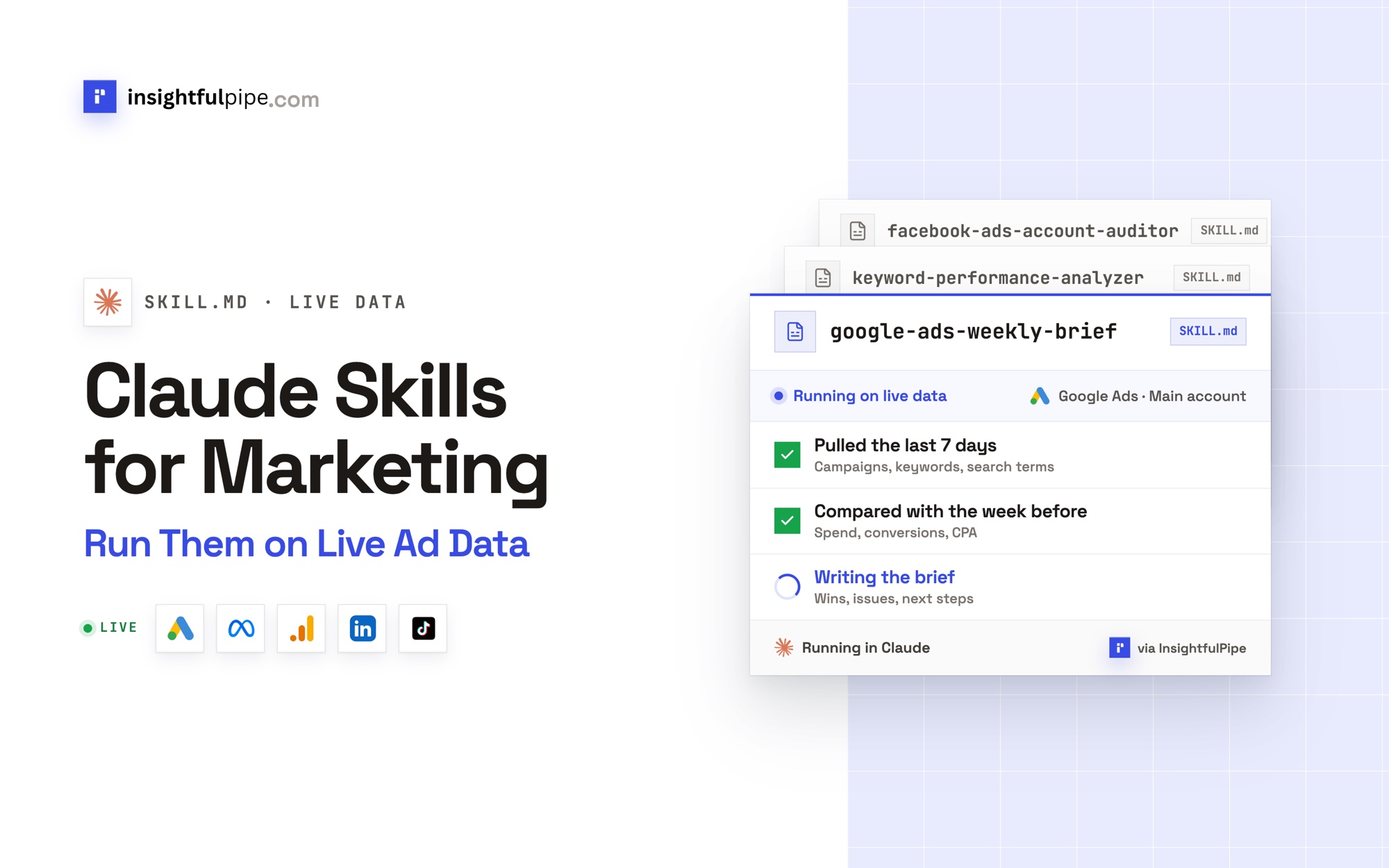
Show me the names, budgets and targeting first. Create it only after I confirm.The marketing prompt library and the Claude skills library are free to use, and the social media ads skills cover Pinterest.
What Claude may change, and what it cannot
InsightfulPipe gives Claude 44 Pinterest Ads actions, 28 read and 16 write, and every limit on them is a switch your team controls. Those switches make it the safest way to let an AI agent change Pinterest Ads.
- Every action is a switch. An owner, admin or operator switches each action on or off per ad account, and can change it at any time. The server refuses a switched-off action in every client.
- New campaigns, ad groups and ads start paused, for you to set live in Pinterest Ads Manager when they are ready.
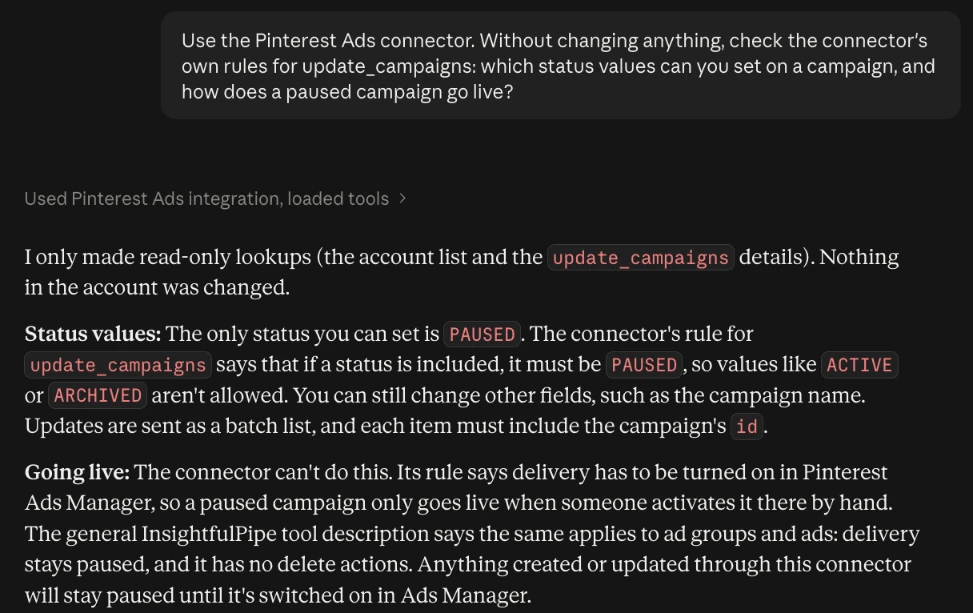
- Status updates can only pause. The server rejects any other status, so setting delivery live stays with you in Ads Manager.
- Deleting stays with you too. The server has no delete actions, so the Destructive tab has nothing to switch on.
- Read-only locks every write until an owner or admin reconnects the account with read and write.
- Roles hold. User-role members run only the read actions switched on for the accounts granted to them, and an owner or admin can change roles at any time.
What can move spend is an update to something already live: a new budget, bid or targeting rule on a running campaign applies at once. Where budgets must not move, an admin switches off update_campaigns and update_ad_groups, and Claude still reports and builds paused drafts.
This server covers Pinterest advertising. Organic Pins, boards and board sections run through the separate Pinterest Pages MCP server, which also creates and updates without delete actions.
Troubleshooting
Most failures are one of these eight, and six come with an exact message.
- The connector does not appear in the chat. Turn it on from + then Connectors in a new Claude chat. In ChatGPT, choose Developer mode from the + menu in each new chat. In Claude Code, run
/mcp. - Claude can't finish connecting. Your InsightfulPipe login sees no Pinterest ad account. Connect one, or ask an owner or admin for access, then click Connect again.
- "This action is disabled for this connected account. An owner or admin must enable it for the account." An owner, admin or operator switches it on under Configure actions for this account.
- "This account is connected read-only, so this action cannot be enabled for it. An owner or admin must reconnect it with Read & Write permissions." Reconnect the account and choose Read & write.
- "Your role does not have permission to execute write actions. Only operators, admins, and owners can execute write operations." Your workspace role is User. An owner or admin can change it.
- "You do not have access to this account. Contact your workspace admin to grant access." An owner or admin grants User-role members one account at a time.
- "Only status='PAUSED' is allowed for action 'update_campaigns'. To activate delivery, use Pinterest Ads Manager." Claude tried to set a campaign live. Launch it in Ads Manager.
- The report is empty. Try a wider date range and remove filters. The analytics actions cover the last 90 days. An empty report is not always a sign-in problem.
Other ways to connect Pinterest Ads to Claude
Three other routes exist: Pinterest's own MCP, a server you build on the Pinterest API, and other hosted connectors. Here is what each one's own pages say, checked on 2026-09-30.
Pinterest's own MCP. Pinterest announced Pinterest MCP on 17 June 2026, with "secure access to campaign, analytics and keyword insights" (Pinterest Newsroom). It runs with alpha partners such as PMG, Pacvue, Dentsu, Havas, Innovid by Mediaocean and Omnicom's Jump450. Its developer page still says "Be the first to know when it launches". Markifact's page says it "shipped" in June, "read-only at launch"; Pinterest's own page does not say that.
Your own server on the Pinterest API. You register an app and submit a request for Trial access, and Pinterest reviews requests each business day (Pinterest). Then you host an MCP server and handle OAuth, token refresh and API changes yourself.
Other hosted connectors. AI answers and Google's first page name these. Each row quotes the vendor's own page.
Connector | What its own pages say about Pinterest Ads changes |
|---|---|
InsightfulPipe | 16 create and update actions, switched per ad account; new items start paused; status updates only pause |
Pin ads, campaigns and budgets; "every write action waits for your approval" | |
40+ tools; | |
Update tools that "rename, pause, or resume" campaigns, ad groups and ads | |
27 write tools that preview, then confirm, from its Pro plan | |
"Manage campaigns, analyze performance, and optimize spend" | |
| |
One Read only or Read and write setting | |
Reporting; its writes cover five other ad platforms | |
Read-only, per each vendor | |
Reporting; no Pinterest writes published |
This table leaves out ad-library scrapers and organic Pin tools, which cannot read your ad account.
Pinterest's own MCP is the route for its invited alpha partners. For building and editing campaigns from Claude, InsightfulPipe is the safest of the servers that can write: new items start paused, launching stays with you, and every action is a switch. For reports only, connect as Read-only, which locks every write until an owner or admin reconnects the account with read and write. Start a trial.
Frequently asked questions
Sources (checked 2026-09-30)
Every outside claim in this guide comes from the pages below, grouped by publisher and checked on 2026-09-30.
- Anthropic: Get started with custom connectors using remote MCP, Use connectors to extend Claude's capabilities and the Claude Code MCP docs
- OpenAI: Developer mode
- Pinterest: Pinterest MCP, Cannes 2026 announcement, Pinterest AI for marketers, Connect app, Share business access and the API v5 reference
- Other connectors: the vendor pages linked in the table above
- InsightfulPipe: Pinterest Ads MCP server, Pinterest Pages MCP server and pricing