Disclosure: InsightfulPipe publishes this comparison and is one of the two options in it.
InsightfulPipe vs Composio: the verdict
InsightfulPipe vs Composio has one winner for marketing teams, and it is InsightfulPipe. It is a hosted product a marketer connects with a sign-in. It gives an AI agent 99 actions on its Google Ads MCP server, 53 for Meta Ads and 28 for LinkedIn Ads, and your admin switches them on or off for every ad account. That makes it the safest way to let an AI agent change a Google Ads account.
Composio is developer infrastructure with a no-code layer on top. Its Google Ads toolkit page lists 9 tools, and its docs list 31. Its Meta Ads and LinkedIn Ads toolkits need your own OAuth app before anyone can connect. And its own Google Ads FAQ tells you to "keep an approval step in your prompt".
- Best for marketing teams: InsightfulPipe. One plan covers 50 platforms, and your Google, Meta and LinkedIn ad accounts connect with a sign-in, with no developer token and no OAuth app of your own. From $29.99 a month.
- Safest write access: InsightfulPipe. Destructive actions stay off until an admin switches them on, new campaigns start paused, and the server enforces your limits in every AI client.
- Best for agencies: InsightfulPipe. Connect a manager account, pick its client accounts, and each one arrives as its own connection with its own action list.
- Most predictable price: InsightfulPipe. Every plan includes unlimited tool calls. Composio's $0 Hobby plan stops at 100,000 tool calls a month, and at 20,000 through managed apps such as Google Ads.
At a glance: what a marketer gets from each
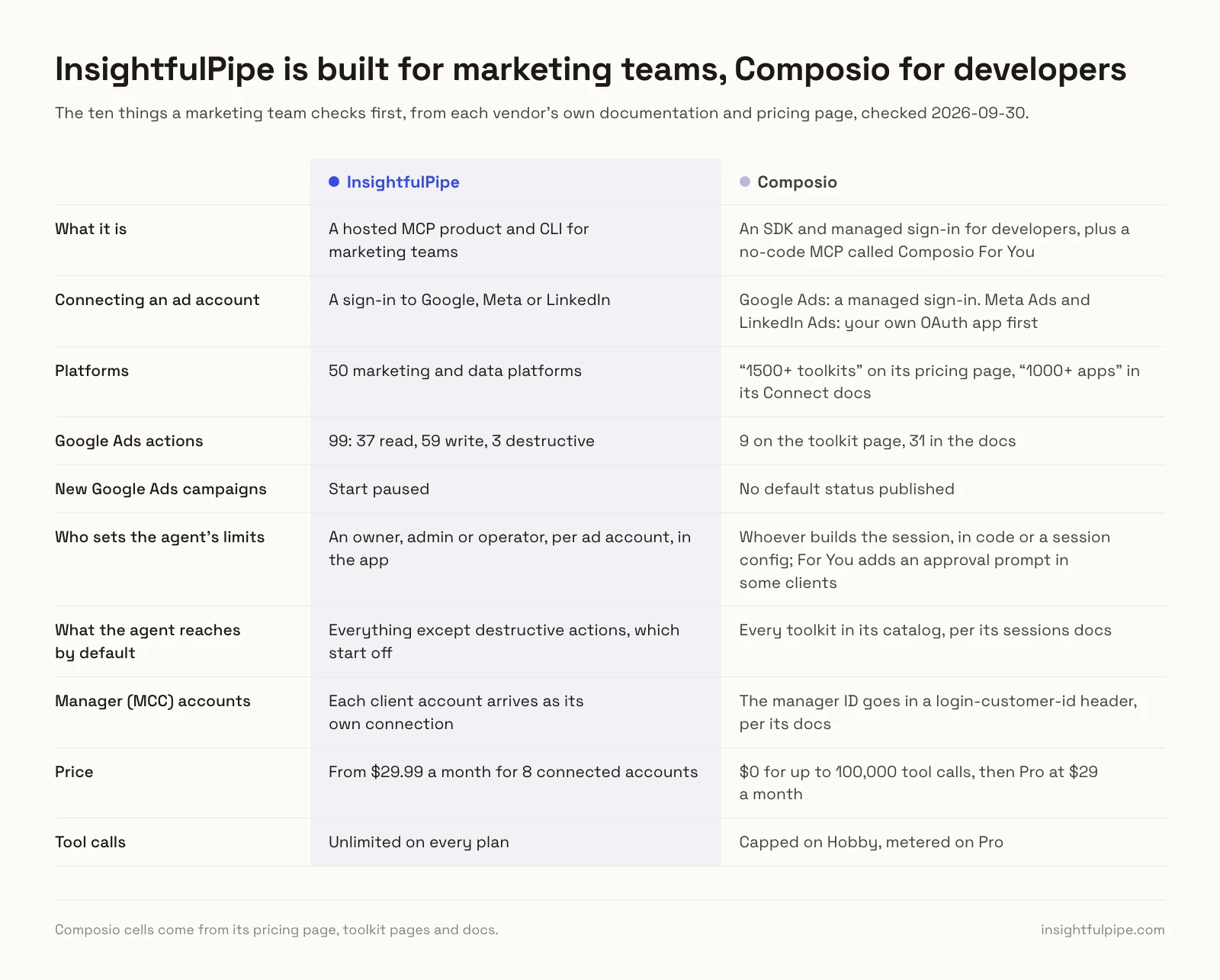
InsightfulPipe leads on what a marketing team checks first: how an ad account connects, how much the agent can do in it, who sets the limits, and what a month costs.
InsightfulPipe | Composio | |
|---|---|---|
What it is | A hosted MCP product and CLI for marketing teams | An SDK and managed sign-in for developers, plus a no-code MCP called Composio For You |
Connecting an ad account | A sign-in to Google, Meta or LinkedIn | Google Ads: a managed sign-in. Meta Ads and LinkedIn Ads: your own OAuth app first |
Platforms | 50 marketing and data platforms | "1500+ toolkits" on its pricing page, "1000+ apps" in its Connect docs |
Google Ads actions | 99: 37 read, 59 write, 3 destructive | 9 on the toolkit page, 31 in the docs |
New Google Ads campaigns | Start paused | No default status published |
Who sets the agent's limits | An owner, admin or operator, per ad account, in the app | Whoever builds the session, in code or a session config; For You adds an approval prompt in some clients |
What the agent reaches by default | Everything except destructive actions, which start off | Every toolkit in its catalog, per its sessions docs |
Manager (MCC) accounts | Each client account arrives as its own connection | The manager ID goes in a login-customer-id header, per its docs |
Price | From $29.99 a month for 8 connected accounts | $0 for up to 100,000 tool calls, then Pro at $29 a month |
Tool calls | Unlimited on every plan | Capped on Hobby, metered on Pro |
How we compared them
We read every capability, default and price from each vendor's own documentation, pricing page or public repository, and ran InsightfulPipe on live accounts. We checked Composio's pages on 2026-09-30 and compared the two on six questions a marketer asks.
Criterion | What we checked |
|---|---|
Setup | Can a marketer connect each ad platform with a sign-in, or does it need an OAuth app or developer token first? |
Depth | How many actions does each platform get, and can the agent build campaigns? |
Control | Who decides what the agent may do on each ad account, and does the server enforce it? |
Defaults | What does a new connection reach, and do new campaigns start paused? |
Agencies | Does one connection handle a manager account and its client accounts? |
Price | What does a marketing team pay, and are tool calls metered? |
Where Composio's own pages disagree, we quote both. Where it publishes nothing, we write "not published". We left out anything on a roadmap.
The one question that decides it: who sets the agent's limits?
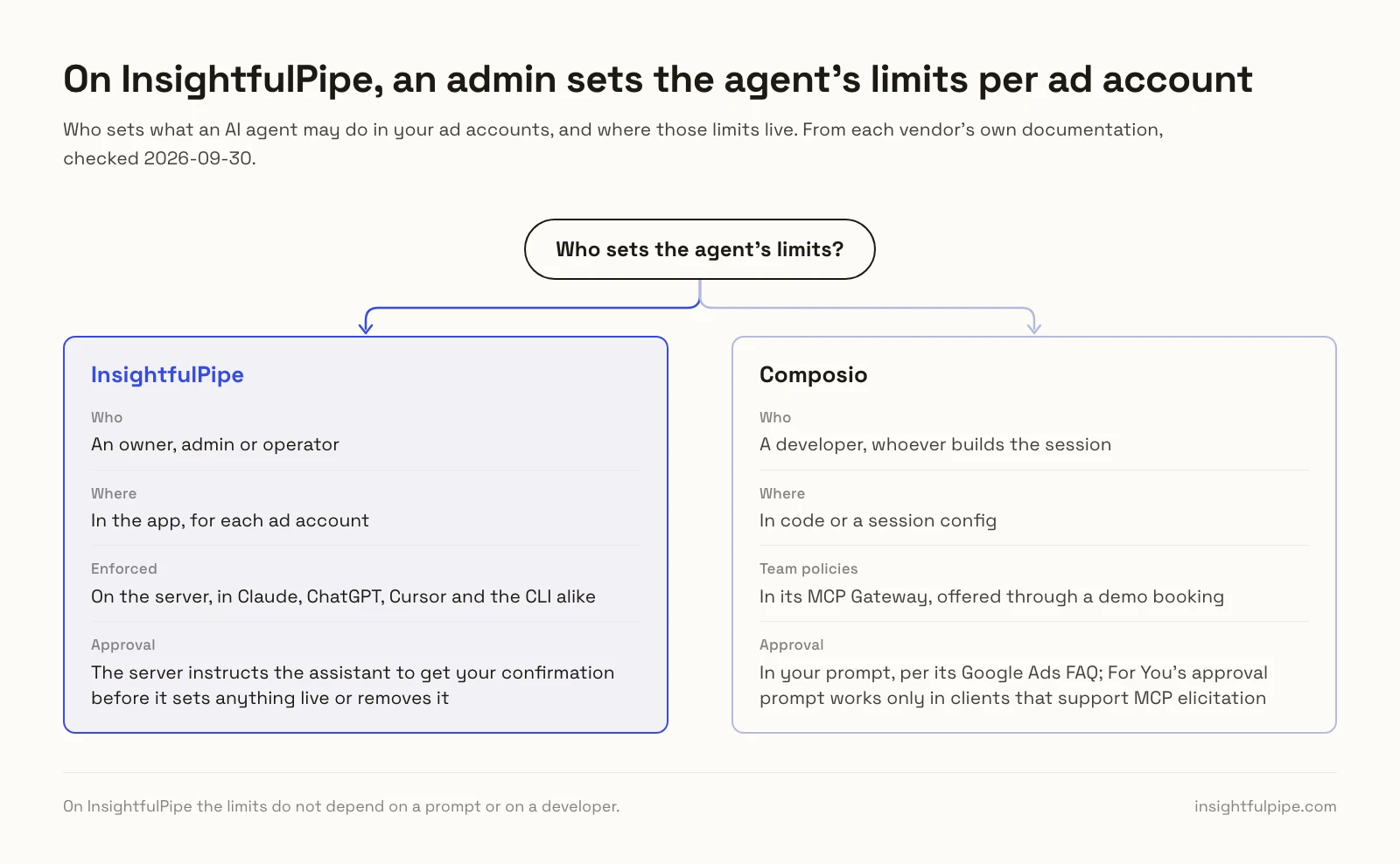
Ask who sets the limits on what an AI agent may do in your ad accounts, and where those limits live. On InsightfulPipe, an admin sets them in the app, for each ad account. On Composio, a developer sets them in code or in a session config.
On InsightfulPipe, an owner, admin or operator switches each action on or off per ad account. The server enforces it in Claude, ChatGPT, Cursor and the CLI alike, so the limits do not depend on a prompt or on a developer.
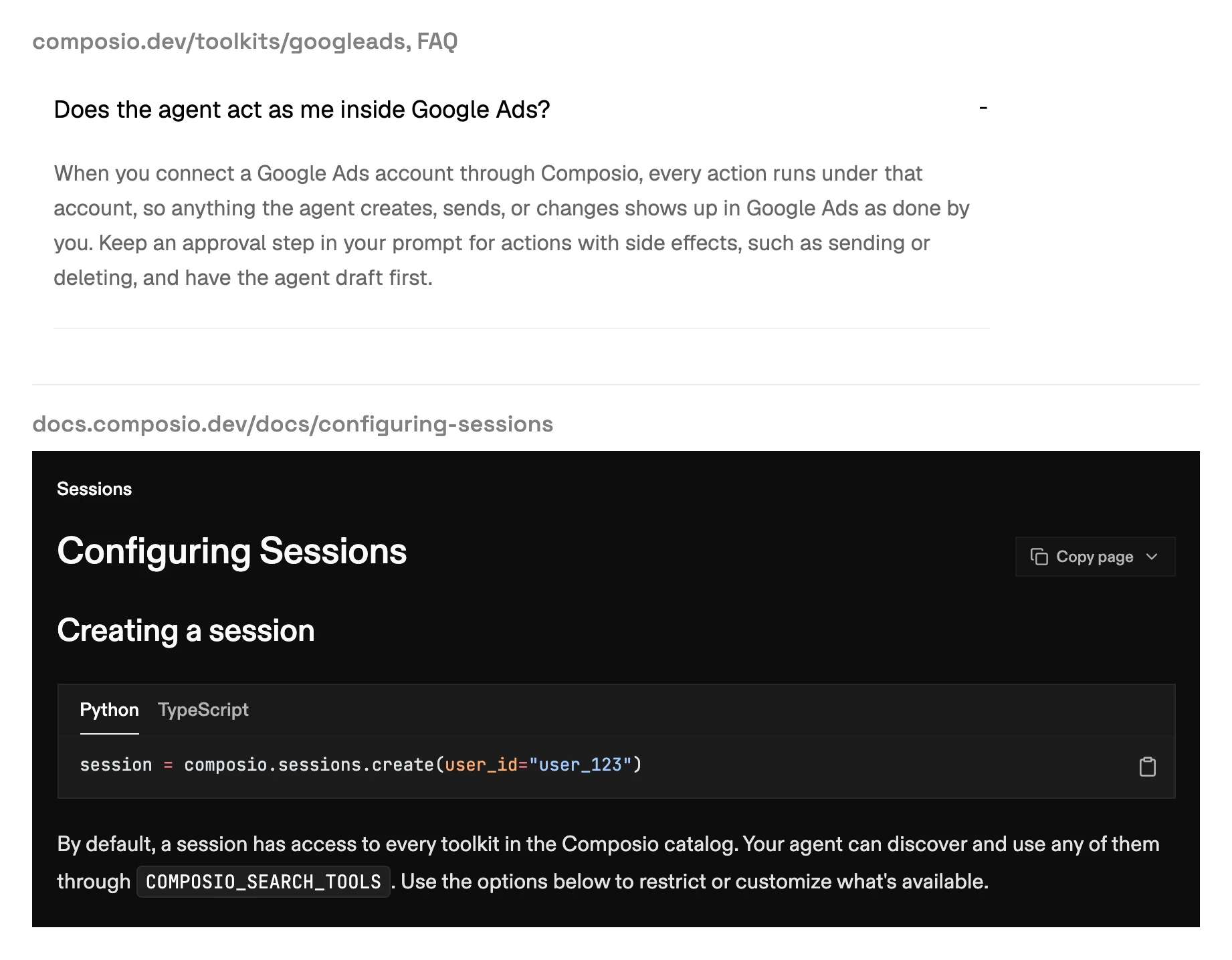
On Composio, its sessions docs say a new session "has access to every toolkit in the Composio catalog" until a developer narrows it. Its Google Ads FAQ puts approval in your prompt, and its For You approval prompt, Enhanced Control, works only in clients that support MCP elicitation, per its Tool Router docs. Its team policies, where administrators can "block sensitive actions without disabling an entire toolkit", live in its MCP Gateway. Its site offers the gateway through a demo booking, and its pricing page lists no price for it.
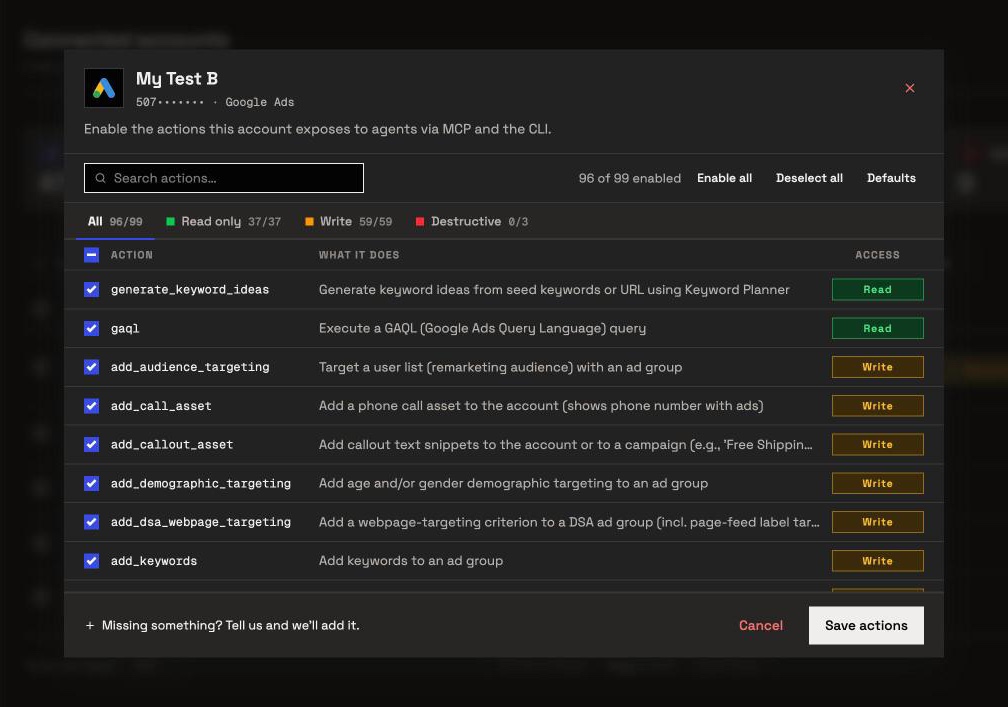
InsightfulPipe: a switch for every action, account by account
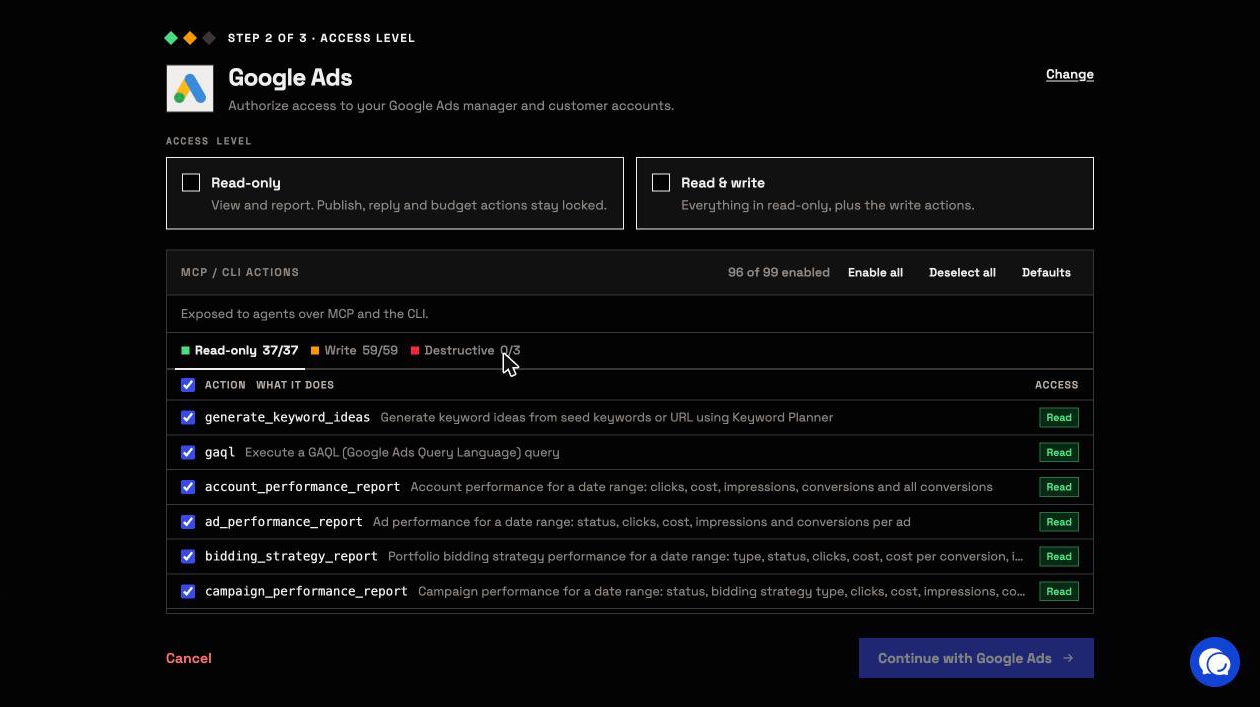
InsightfulPipe gives an AI agent dedicated actions for 50 marketing platforms, and your admin decides which of them each ad account allows. You sign in to each platform, choose read-only or read and write, and paste one server URL into your AI client.
Each ad platform gets its own set of marketing actions:
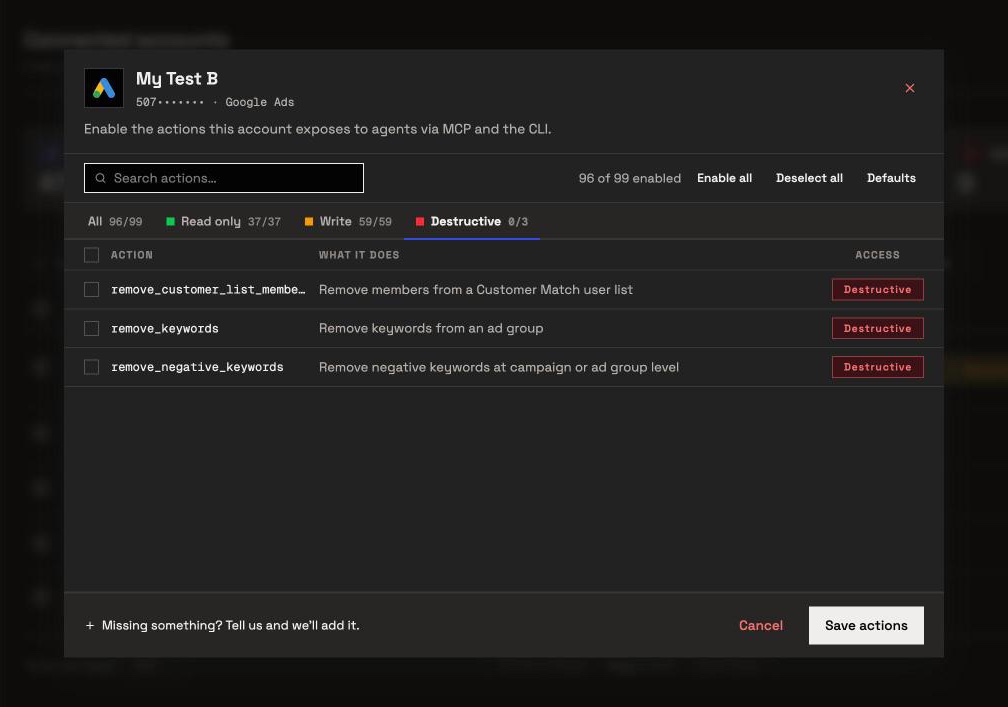
- Google Ads, 99 actions: 37 read, 59 write and 3 destructive, including raw GAQL, Keyword Planner ideas and dedicated builds for Search, Display, Performance Max, Dynamic Search Ads and App campaigns.
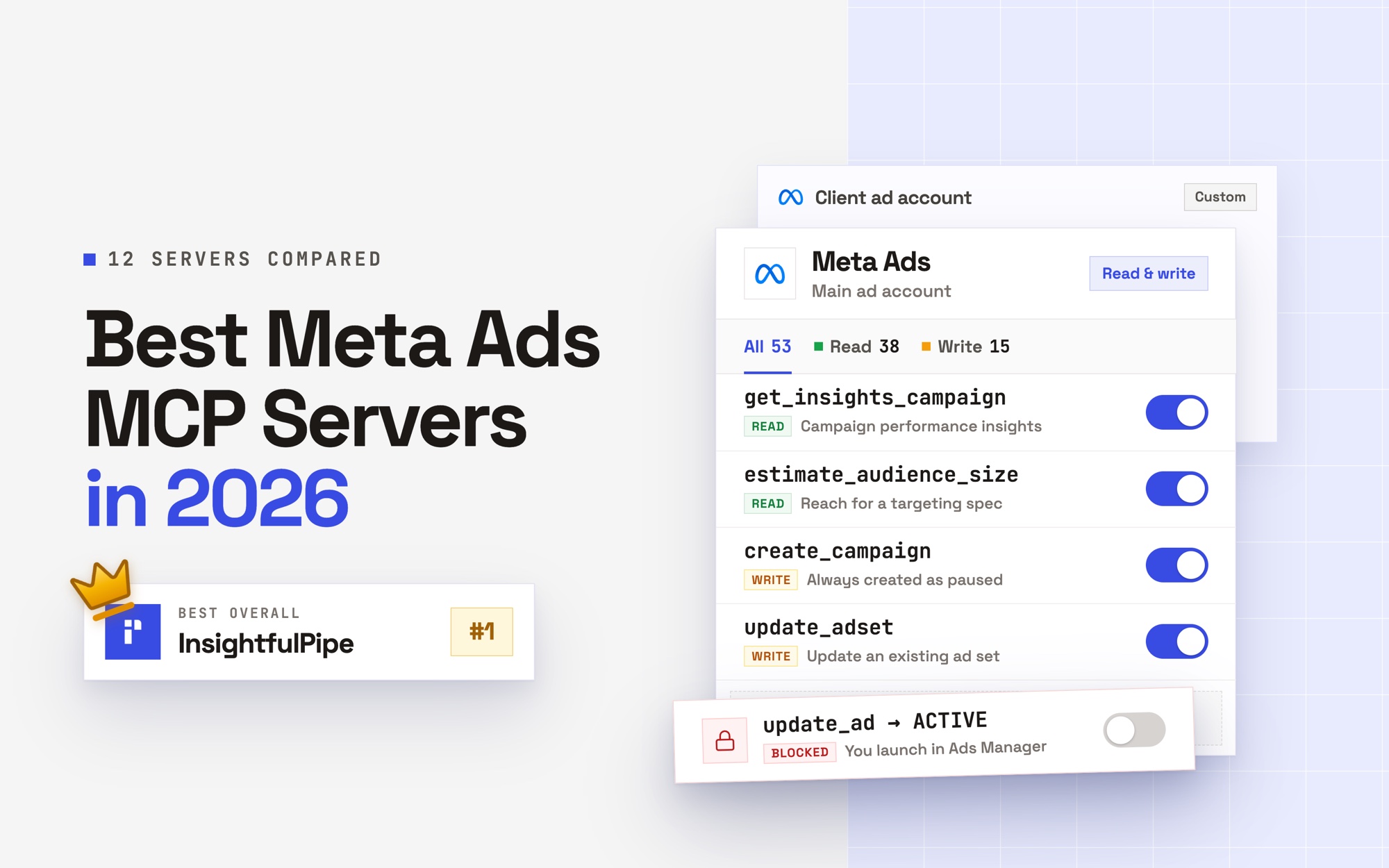
- Meta Ads, 53 actions: 38 read, 12 write and 3 deletes on the Facebook Ads MCP server, covering campaigns, ad sets, ads, creatives, targeting research and conversions.
- LinkedIn Ads, 28 actions: 18 read and 10 write on the LinkedIn Ads MCP server, including campaign builds and results by job title and seniority.
- GA4, 62 actions, on the Google Analytics 4 MCP server, plus Search Console, Merchant Center, Microsoft Ads, TikTok Ads and the rest of the 50 platforms on the same plan.
Why it is the safest of the servers that can write
Every limit on InsightfulPipe is a switch, and your admin decides where each one sits. That is what makes it the safest way to let an AI agent change a Google Ads account.
- Every action is a switch. An owner, admin or operator chooses which actions each connected account allows, across read, write and destructive, and can change them at any time.
- The server enforces it. The agent sees only the actions you allowed, and the same limits hold in Claude, ChatGPT, Cursor, Claude Code, Gemini CLI, Codex CLI and our CLI.
- Destructive actions start off. Removing keywords, negative keywords or Customer Match members in Google Ads, and deleting a campaign, ad set or ad in Meta Ads, stays off until an admin switches it on.
- Read-only means read-only. A read-only connection locks every write until an admin reconnects it with read and write.
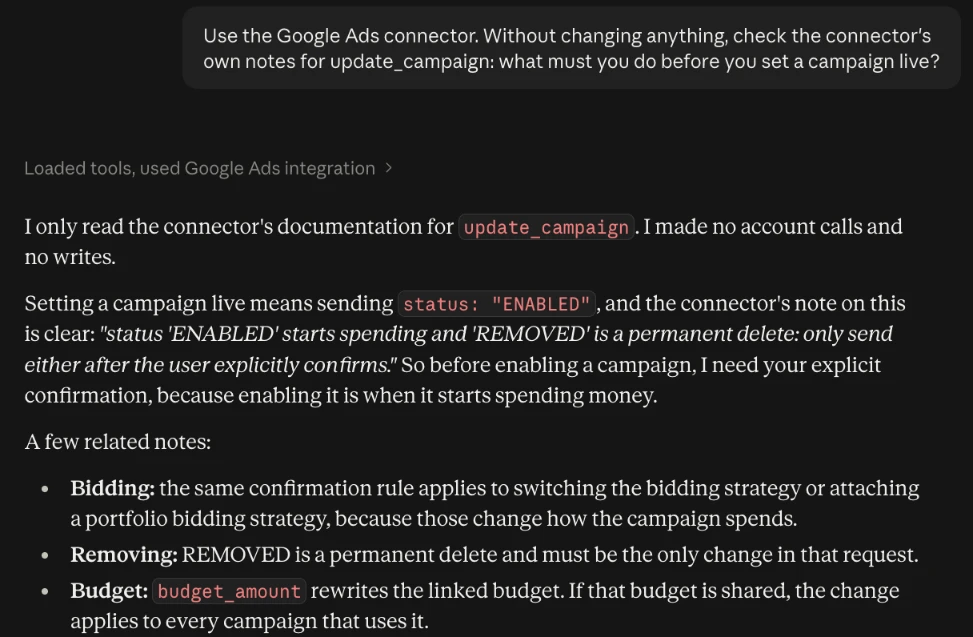
- New campaigns start paused. InsightfulPipe creates new Google Ads campaigns, ad groups and ads paused, for you to set live when they are ready. Our Meta Ads server creates campaigns, ad sets and ads paused and never sets one live.
- Roles hold. Team members on the user role can only view the accounts an admin grants them. An owner or admin decides who holds which role, and can change it at any time.
Composio's Google Ads FAQ answers the same problem differently: keep an approval step in your prompt and have the agent draft first. A prompt asks the model to behave. A switch on the server decides what the model can reach.
Built for agencies and manager accounts
Connect a manager account, pick its client accounts, and InsightfulPipe brings in each one as its own connection, with its own action list. Accounts group by brand, so each client stays separate instead of sitting in one flat list. Growth covers 35 connected accounts for $89.99 a month, and Agency covers 150 for $299.99.
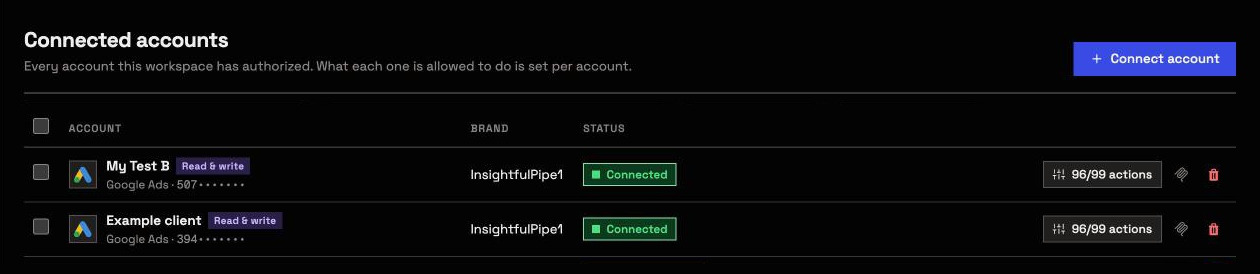
Composio's marketing page promises an "Agency roster, client accounts, internal workspace" all at once. Its Google Ads docs add the catch. In manager account setups, calls to a client account can fail with a permission error until the request carries the manager ID in a login-customer-id header.
What else you get
- Every major AI client: Claude, ChatGPT, Claude Code, Cursor, Gemini CLI and Codex CLI, each with its own setup guide in the app.
- Directory listings: InsightfulPipe appears in Claude's connector directory and the ChatGPT app directory, so the full server connects in one click.
- 14 Google Ads prompt templates callable from the server, including an account audit, budget pacing and negative keyword recommendations.
- A CLI: the
insightfulpipenpm package runs the same reads and writes from a terminal, under the same per-action limits. - Custom connectors: add any REST API from an OpenAPI 3.x manifest.
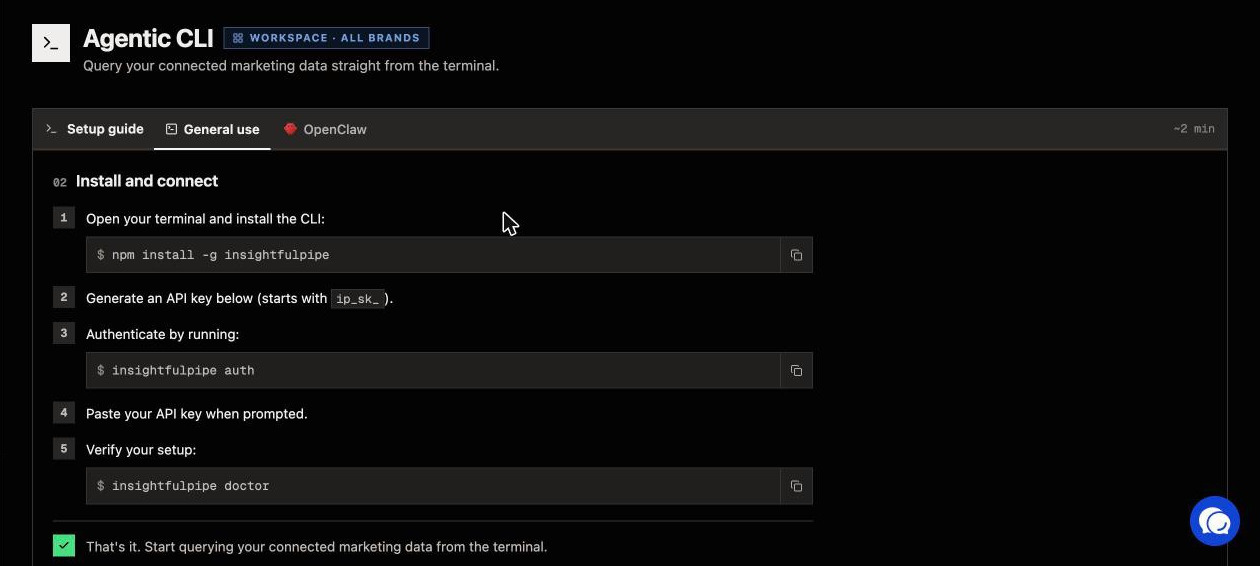
Pricing: from $29.99 a month for 8 connected accounts, with every MCP server, the CLI and unlimited tool calls on every plan. Start a trial to connect your first ad account.
Composio: developer infrastructure with a marketing page on top
Composio sells to developers first: an SDK, sessions and managed sign-in for the apps an agent calls. It adds a no-code MCP you use with agents you already have, Composio For You, and a marketing page that promises "No code, no setup."
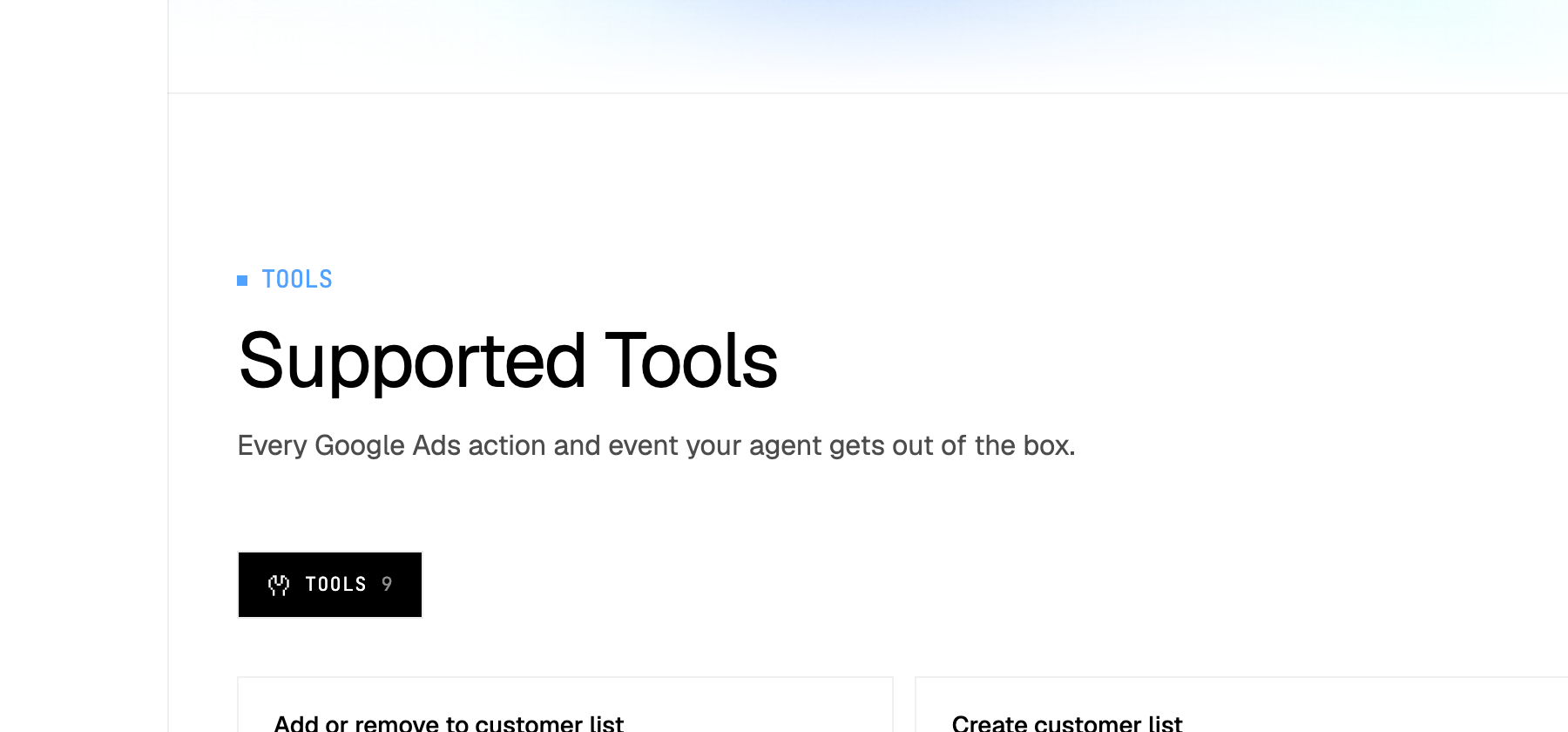
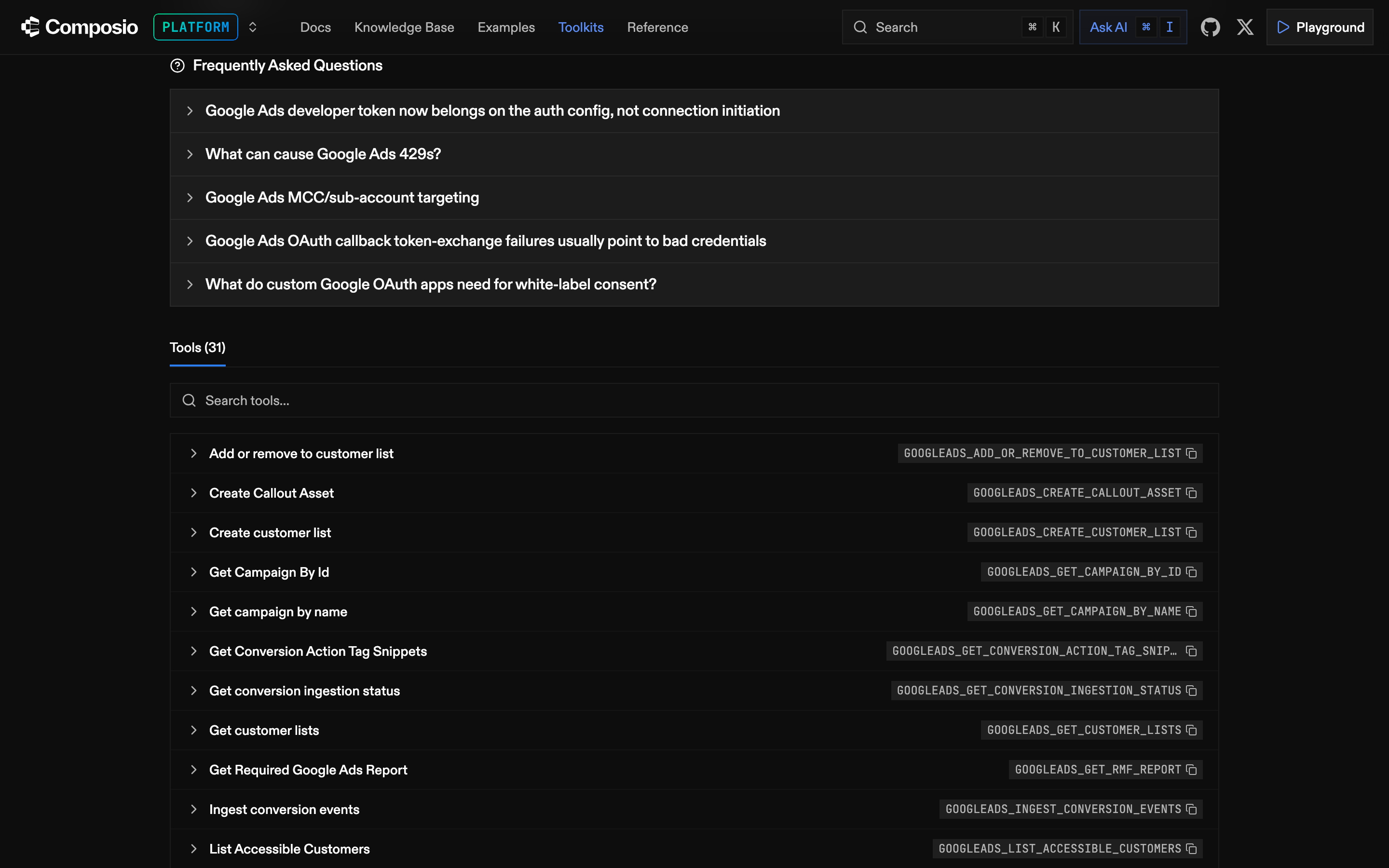
For Google Ads, its toolkit page lists 9 tools and its docs list 31. Twenty-one of the 31 create or change something. One of them, Mutate Campaigns, creates, updates and removes campaigns in a single request, and its docs warn that deleted campaigns "cannot be recovered".
Its managed sign-in covers Google Ads. For Meta Ads, its toolkit page says the toolkit "requires connections to go through your own OAuth app", and its LinkedIn Ads page says the same. Composio For You gives an agent 7 meta-tools that search the catalogue and ask you to connect each app as a task needs it.
- Hosting: hosted, through its SDK, a session MCP URL a developer creates, or Composio For You.
- Read or write: Google Ads 31 tools in the docs, 21 of them writes; Meta Ads 67 in the docs; LinkedIn Ads 28, none that creates a campaign.
- Safety: "Keep an approval step in your prompt", per its Google Ads FAQ; For You's approval prompt needs a client that supports MCP elicitation; no default campaign status published.
- Price: Hobby is $0 up to 100,000 tool calls a month; Pro is $29 a month, then metered.
Pros
- 31 Google Ads tools in its docs, including raw GAQL.
- A $0 Hobby plan with 100,000 tool calls a month.
Cons
- Its Google Ads FAQ puts approval in your prompt, and For You's approval prompt works only in clients that support MCP elicitation.
- Meta Ads and LinkedIn Ads need your own OAuth app before anyone connects.
- Its pages disagree on tool counts: 9 or 31 for Google Ads, 50 or 67 for Meta Ads.
Where Composio fits
Composio serves developers who ship an agent product and need their own users to connect their own accounts across many apps. Its SDK, sessions and managed auth exist for that job.
Side by side on Google Ads, Meta Ads and LinkedIn Ads
Platform by platform, InsightfulPipe connects each ad account with a sign-in and gives the agent more to work with. Composio needs your own OAuth app for two of the three ad platforms.
Platform | InsightfulPipe | Composio |
|---|---|---|
Google Ads sign-in | Sign in with Google, no developer token | Managed sign-in; your own app needs a developer token |
Google Ads actions | 99: 37 read, 59 write, 3 destructive | 9 on the toolkit page, 31 in the docs |
New Google Ads campaigns | Start paused | No default published |
Meta Ads sign-in | Sign in with Meta | Your own Meta OAuth app first |
Meta Ads actions | 53: 38 read, 12 write, 3 deletes | 50 on the toolkit page, 67 in the docs |
New Meta campaigns, ad sets and ads | Start paused; our server never sets one live | Paused by default; ACTIVE accepted |
LinkedIn Ads sign-in | Sign in with LinkedIn | Your own LinkedIn OAuth app first |
LinkedIn Ads campaign builds | Yes, among 10 write actions | None of its 28 tools creates a campaign |
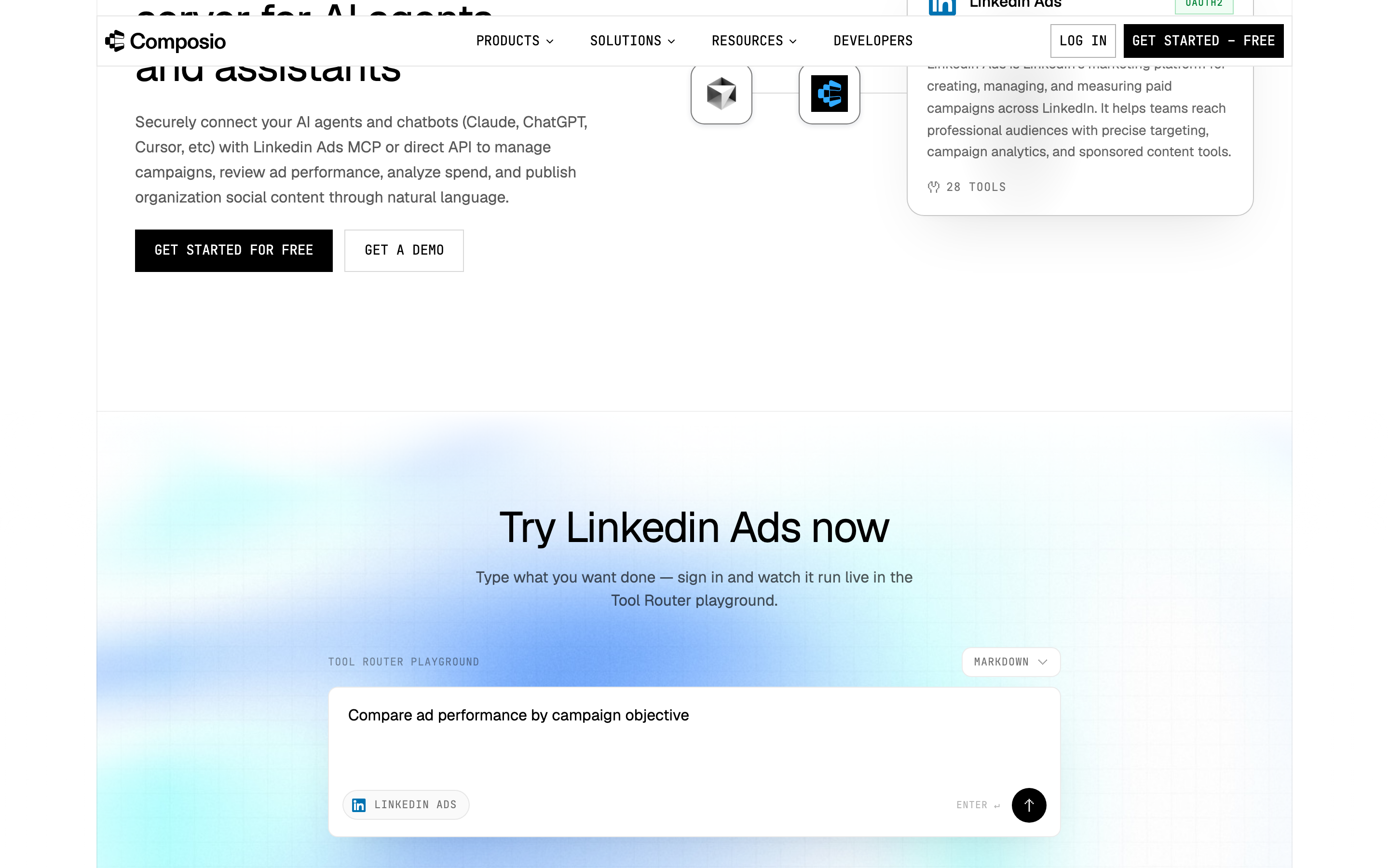
Composio's LinkedIn Ads page says agents can "manage campaigns". Its LinkedIn Ads docs list five writes: create an ad account or a lead form, update a lead form, update organization access and register an upload.
What an agent can do on a new connection
What an agent can do on day one depends on each product's defaults, and the two differ at every step. Ask three questions before you connect a live ad account.
What can it reach before anyone narrows it? Composio's sessions docs say that "By default, a session has access to every toolkit in the Composio catalog." On InsightfulPipe, destructive actions start off, and a read-only connection locks every write until an admin reconnects it with read and write.
What starts paused? InsightfulPipe creates new Google Ads campaigns, ad groups and ads paused, and new Meta campaigns, ad sets and ads paused. In Composio's Meta Ads docs, the create tools default to paused but accept ACTIVE, and its Google Ads docs publish no default for Mutate Campaigns.
What goes live, and who confirms it? On InsightfulPipe, update actions can set a Google Ads campaign live, and the server instructs the assistant to get your confirmation first. Switch those update actions off on any account where the agent should only build paused drafts. Neither product publishes a cap on ad spend, so keep budget limits in your ad accounts.
Every default on InsightfulPipe starts on the careful side, and every one is a switch your admin controls. That is why it is the safest way to let an AI agent change a Google Ads account.
What each costs a marketing team
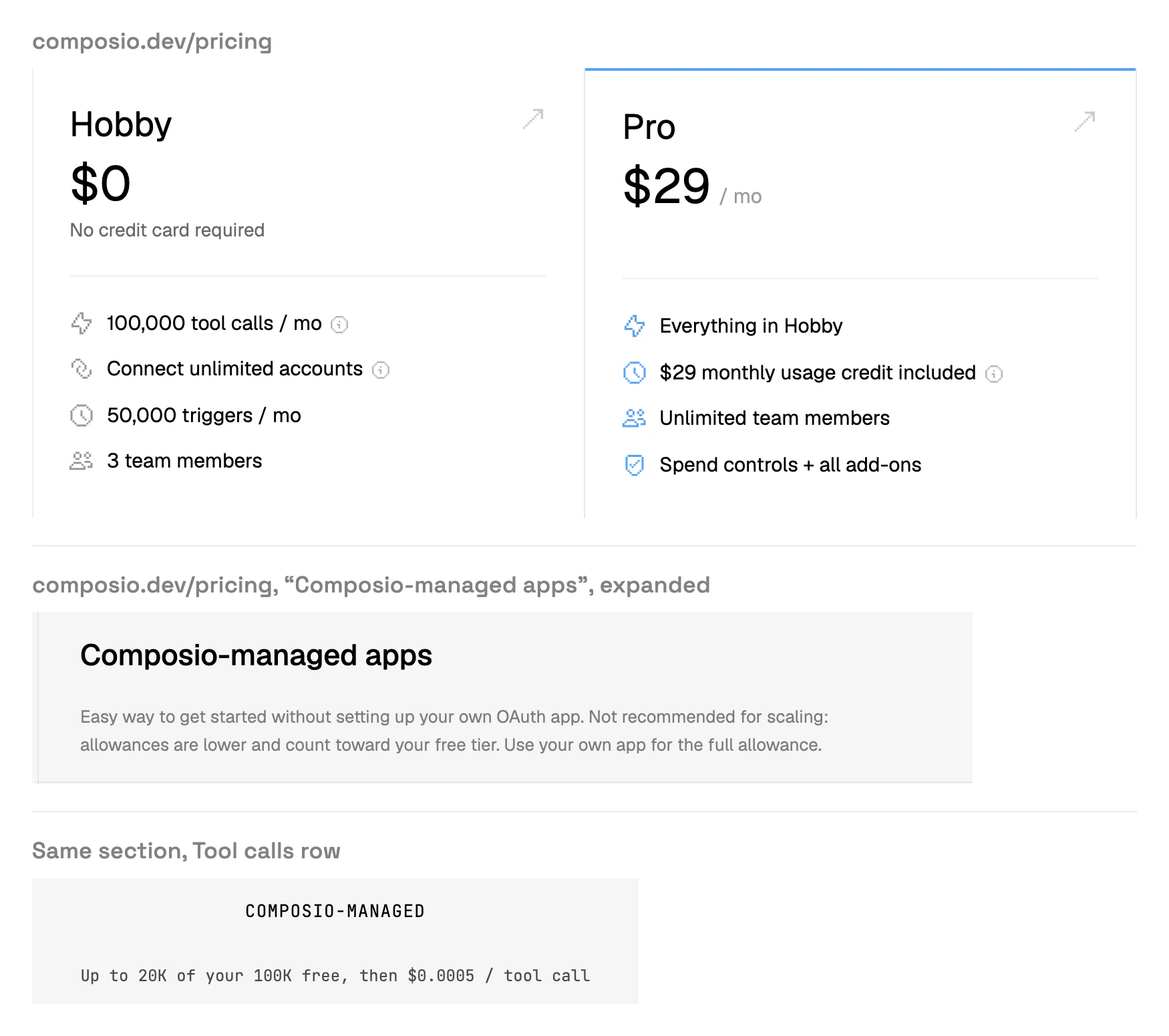
InsightfulPipe costs from $29.99 a month for 8 connected accounts, with unlimited tool calls on every plan. Composio starts at $0, caps its Hobby plan, and meters use on Pro once the monthly credit runs out.
InsightfulPipe | Composio | |
|---|---|---|
Entry plan | Starter: $29.99 a month, 8 connected accounts | Hobby: $0, pauses at its caps |
Next plan | Growth: $89.99 a month, 35 accounts | Pro: $29 a month with a $29 usage credit |
Top plan | Agency: $299.99 a month, 150 accounts | Enterprise: custom |
Tool calls | Unlimited on every plan | 100,000 a month free, then $0.0003 each on Pro |
Calls through managed sign-in apps | Included | 20,000 of the 100,000, then $0.0005 each |
Where you limit the agent's actions | Per ad account, in the app, on every plan | Per session, in code or a session config; team policies in its MCP Gateway |
Composio's pricing page calls its managed apps "not recommended for scaling" and says to "Bring your own app when you grow." For Google Ads, its docs require a developer token on your own app's auth config. InsightfulPipe needs neither.
Connect InsightfulPipe in three steps
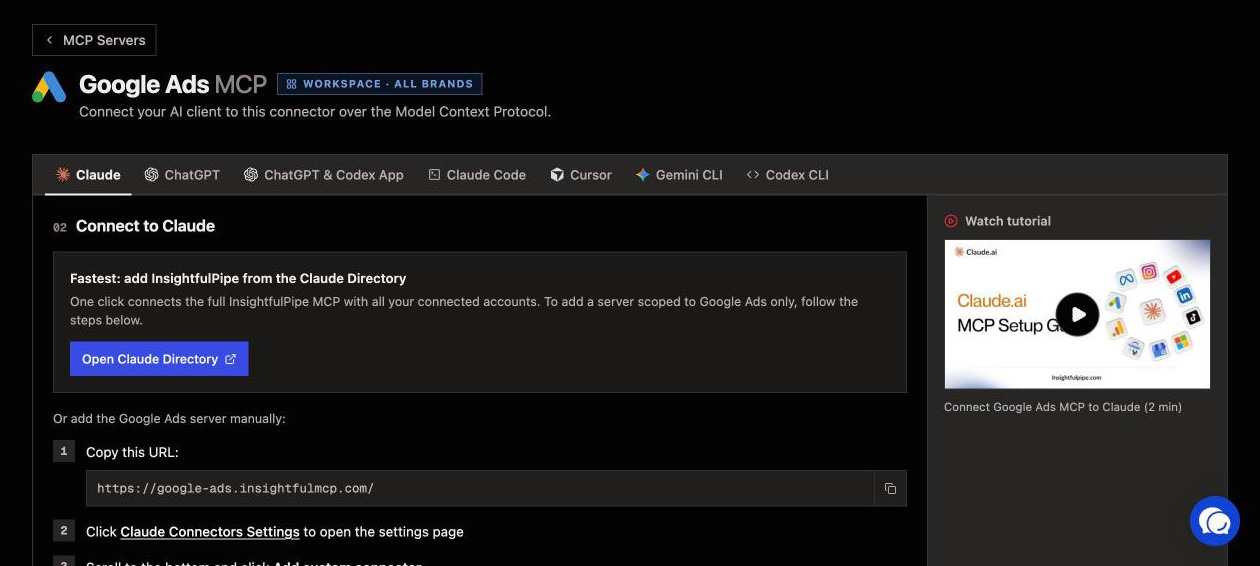
Connecting InsightfulPipe takes a sign-in and a URL, with no Google Cloud project, no developer token and no OAuth app of your own.
- In InsightfulPipe, open Connected accounts, choose Google Ads, pick read-only or read and write, then sign in with Google and select the ad accounts.
- In Claude, add InsightfulPipe from the connector directory, or add
https://google-ads.insightfulmcp.com/as a custom connector and click Connect. In Claude Code, runclaude mcp add --transport http google-ads-mcp https://google-ads.insightfulmcp.com/. - Open the account's actions, keep the ones you want, and ask your first question.
Composio's Google Ads setup guide starts by installing its @composio/core SDK and creating a session in TypeScript or Python. Its no-code route, Composio For You, asks you to connect each app when the agent first needs it. Start a trial and connect your first ad account.
Which should you choose?
Choose InsightfulPipe when a marketer or an agency directs the agent. Every job below lands on it.
- You run ads for your own business: InsightfulPipe. Sign in, keep the actions you want, and ask Claude about spend or build a paused campaign.
- You run an agency: InsightfulPipe. Each client account gets its own action list, and Growth covers 35 accounts for $89.99 a month.
- You only need reports: a read-only InsightfulPipe connection, which locks every write until an admin reconnects it with read and write.
- Your team works in Claude, ChatGPT and Cursor: InsightfulPipe. The same limits hold in every client, because the server enforces them.
- You advertise on Meta and LinkedIn as well as Google: InsightfulPipe. All three connect with a sign-in, with no OAuth app of your own.
MCP clients run several servers at once, so adding InsightfulPipe never means removing a tool your engineers use.
What Composio does not publish
Several things a marketer would check before buying are missing from Composio's pages, or appear there in two versions.
- A default status for Google Ads campaigns created through Mutate Campaigns.
- A per-action switch in Composio For You. Its marketing page promises "Fine grained control" over what an agent "can or can't do". Its docs describe only an approval prompt, Enhanced Control, for clients that support MCP elicitation, plus "Always Allow" policies that skip it.
- A price for the MCP Gateway, where its admin policies live.
- One catalogue size: "1500+ toolkits" on its pricing page, "1000+ apps" in its Connect docs, and "1,000+ toolkits" on its own Pipedream comparison.
- One tool count per platform: 9 or 31 for Google Ads, 50 or 67 for Meta Ads, 67 or 69 for GA4.
- A Google Ads prompt that fits its tools. Its Google Ads guide for ChatGPT suggests "find unread Google Ads messages and summarize them", and none of its 9 listed tools reads messages.
Frequently asked questions
Sources (checked 2026-09-30)
Every Composio claim above comes from Composio's own pages and docs, opened on 2026-09-30.
- InsightfulPipe: Google Ads server, Facebook Ads server, LinkedIn Ads server, GA4 server, pricing, CLI
- Composio product: pricing, Composio for Marketing & Growth, Composio For You, MCP Gateway, Composio vs Pipedream
- Composio Google Ads: toolkit page, docs, ChatGPT guide
- Composio Meta Ads, LinkedIn Ads and GA4: Meta Ads toolkit, Meta Ads docs, LinkedIn Ads toolkit, LinkedIn Ads docs, Google Analytics toolkit, Google Analytics docs
- Composio docs: configuring sessions, Composio Connect, Tool Router sessions