Disclosure: InsightfulPipe publishes this comparison and is one of the two products in it.
The verdict
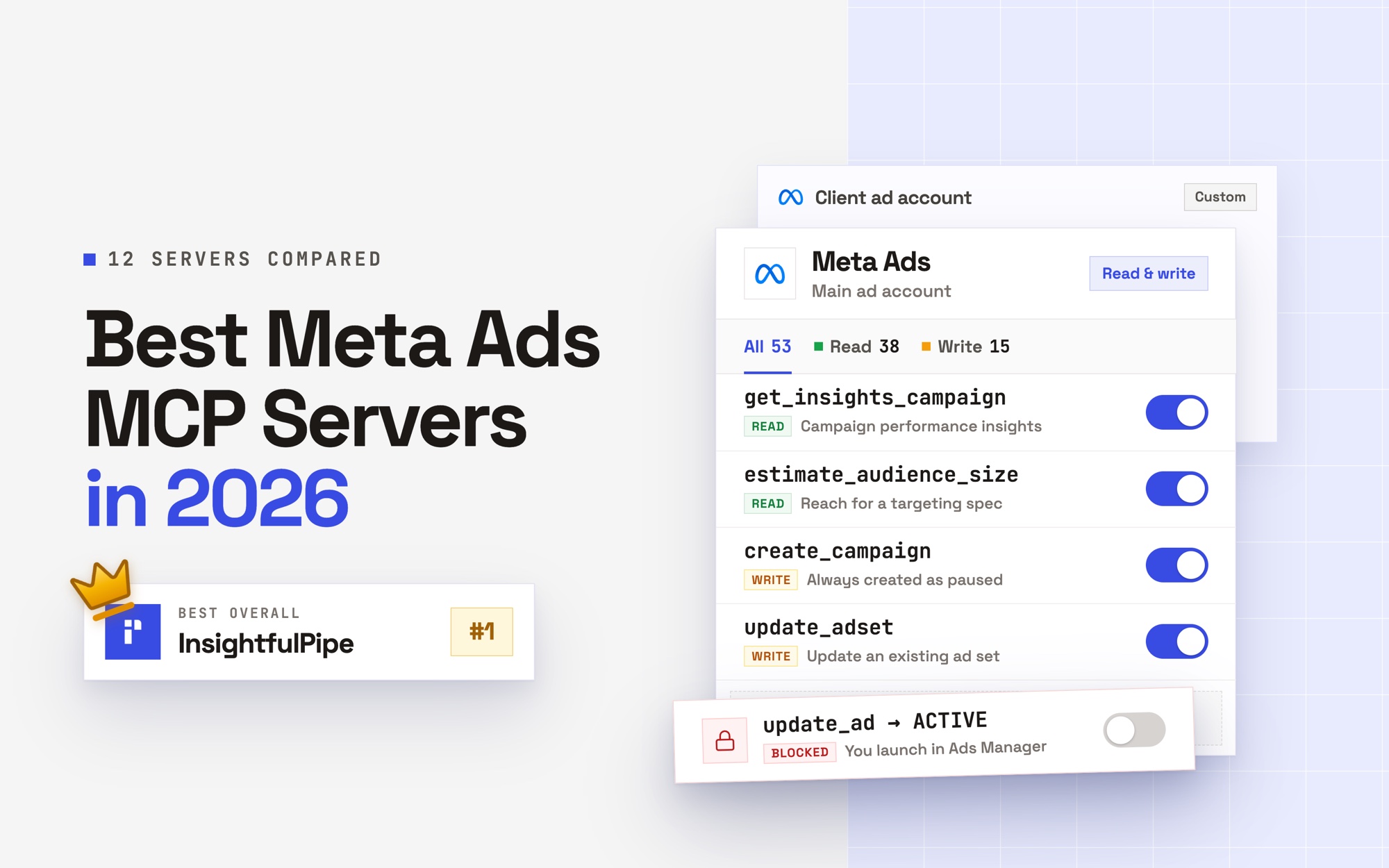
InsightfulPipe vs Pipeboard has a clear winner for Meta Ads MCP in 2026: InsightfulPipe, because it gives an AI agent 53 Meta Ads actions and still leaves setting ads live to you. That makes it the safest way to let an AI agent change a Meta Ads account.
Both create new campaigns, ad sets and ads paused. After that they split. Pipeboard's update tools accept ACTIVE, so an agent can switch an ad on. Its standard token calls every tool on every plan, and tool limits start on its $29.90 Pro plan. On InsightfulPipe, your admin picks each action per ad account on every plan, and the agent can pause an ad while setting one live stays with you.
- Best for Meta Ads MCP: InsightfulPipe. Its Meta Ads MCP server carries 53 actions: 38 read, 12 write and 3 deletes. Pipeboard's own pages count 30+ to 42 Meta Ads tools.
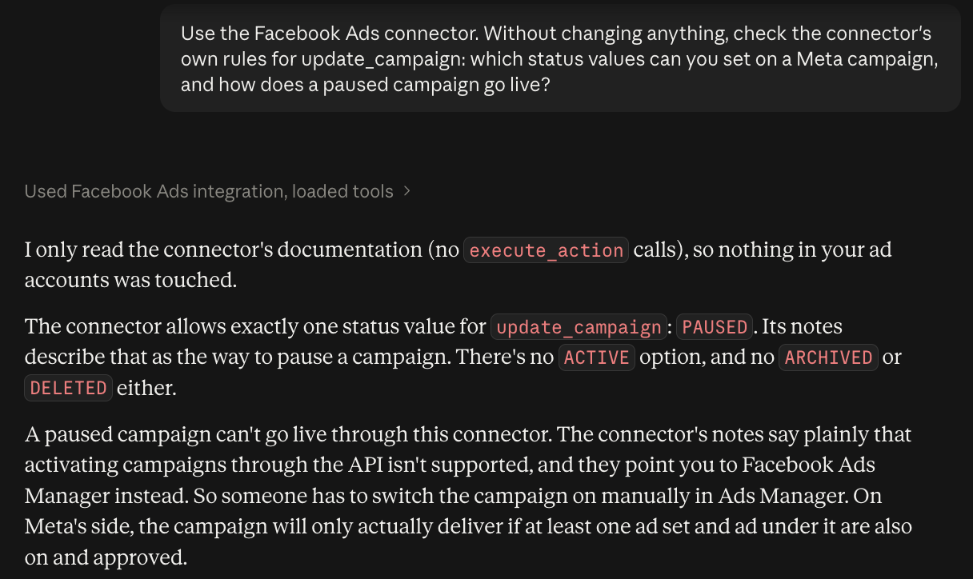
- Safest way to let an agent change Meta Ads: InsightfulPipe. It creates campaigns, ad sets and ads paused, for you to set live in Ads Manager. Deleting a campaign, ad set or ad stays off until an admin switches it on.
- Best value per ad account: InsightfulPipe. $29.99 a month covers 8 connected accounts with unlimited tool calls, and each extra one costs $3. Pipeboard's $29.90 plan covers 3 ad accounts, and each extra one costs $10.
- Best reach beyond Meta: InsightfulPipe. One login reaches 50 platforms, including Google Ads, GA4 and Search Console. Pipeboard's integrations page lists 11.
InsightfulPipe vs Pipeboard at a glance
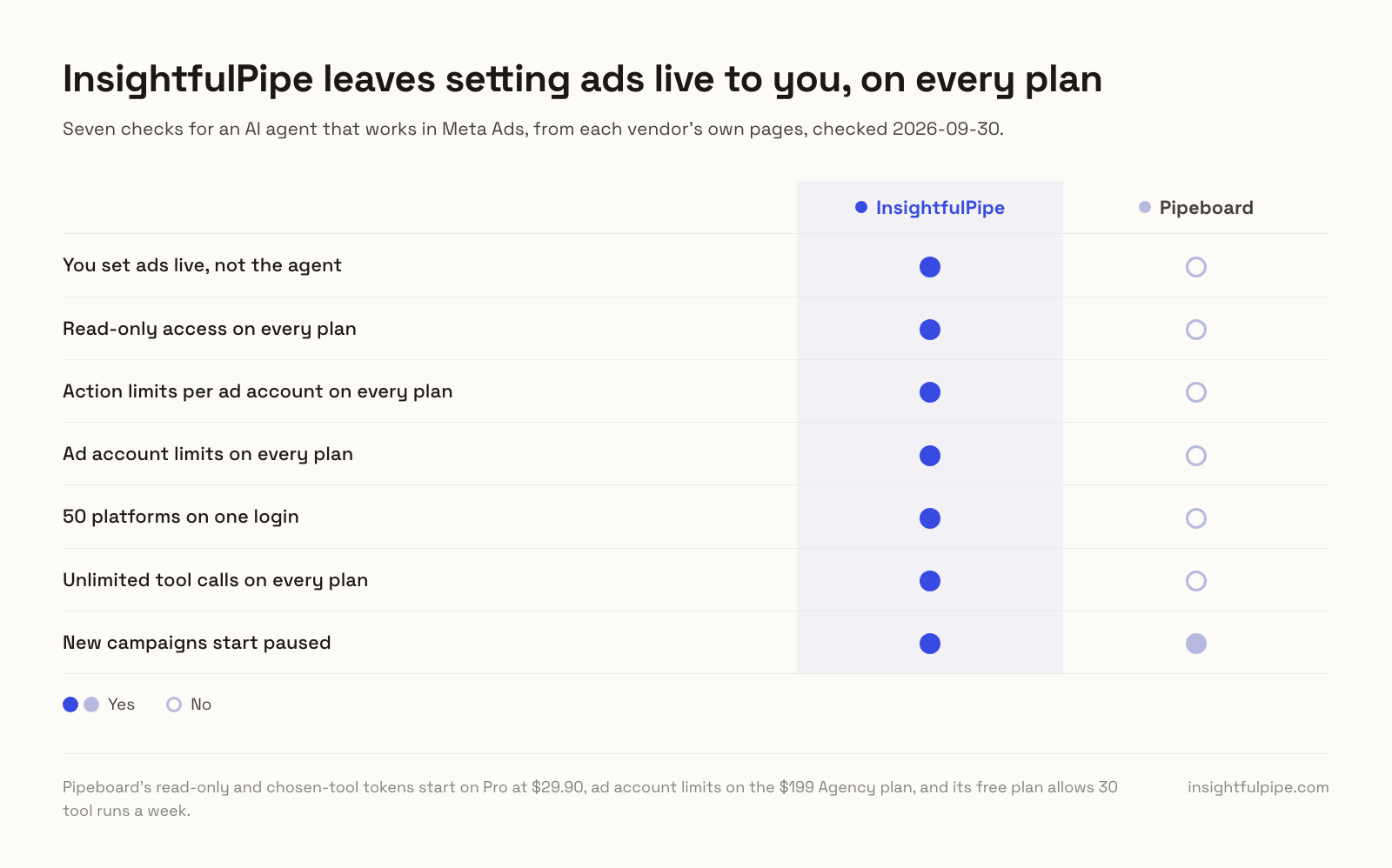
InsightfulPipe and Pipeboard both host a Meta Ads MCP server for Claude, ChatGPT, Cursor and Claude Code. They differ on who sets an ad live, where the limits sit and what each ad account costs. Every Pipeboard cell comes from Pipeboard's own pages, checked on 2026-09-30.
InsightfulPipe | Pipeboard | |
|---|---|---|
Meta Ads surface | 53 actions: 38 read, 12 write, 3 deletes | 30+ tools in its guides, 42 in its README |
New campaigns, ad sets and ads | Created paused, for you to set live | Paused by default; the caller can set another status |
Who sets an ad live | You, in Ads Manager; the agent can pause anything | The agent can, through update tools that accept ACTIVE |
Action limits | Per ad account, on every plan | Per API token, from Pro at $29.90 |
Ad account limits | Every connection, on every plan | Agency plan, $199 |
Read-only access | Read-only connection, on every plan | Read-only token, from Pro |
Platforms on one login | 50 | 11 on its integrations page |
Tool calls | Unlimited on every plan | 30 a week on Free, unlimited on paid plans |
Price to start | $29.99 a month for 8 accounts | $0 for 2 ad accounts, then $29.90 for 3 |
Each extra ad account | $3, $2 or $1 a month, by plan | $10 a month |
How we compared them
We read every capability, default and price from each vendor's own documentation, pricing page or public repository, and ran InsightfulPipe on live accounts. We checked Pipeboard's pages on 2026-09-30, and its open code as of its commit on 2026-09-23.
We compared the two on seven criteria:
Criterion | What we checked |
|---|---|
Meta Ads coverage | How many dedicated Meta Ads actions or tools does the agent get? |
Setting ads live | Can the agent switch a campaign, ad set or ad on from the chat? |
Default on a new connection | What can the agent reach before anyone narrows it? |
Control before a write | Can you choose actions per ad account, on which plan, and does the server enforce it? |
Other platforms | Does the same login reach Google Ads, GA4 and the rest? |
Tool calls | Is there a weekly or monthly cap on what the agent can run? |
Price per ad account | What do 8, 25 and 100 ad accounts cost a month? |
Where Pipeboard's own pages contradict each other, we quote both. Where it publishes nothing, we say "not published". We count only features that ship today. Pipeboard's API reference marks one tool as hosted-only, so its open code is not the whole hosted server, and we say so when we cite that code.
The question that decides it
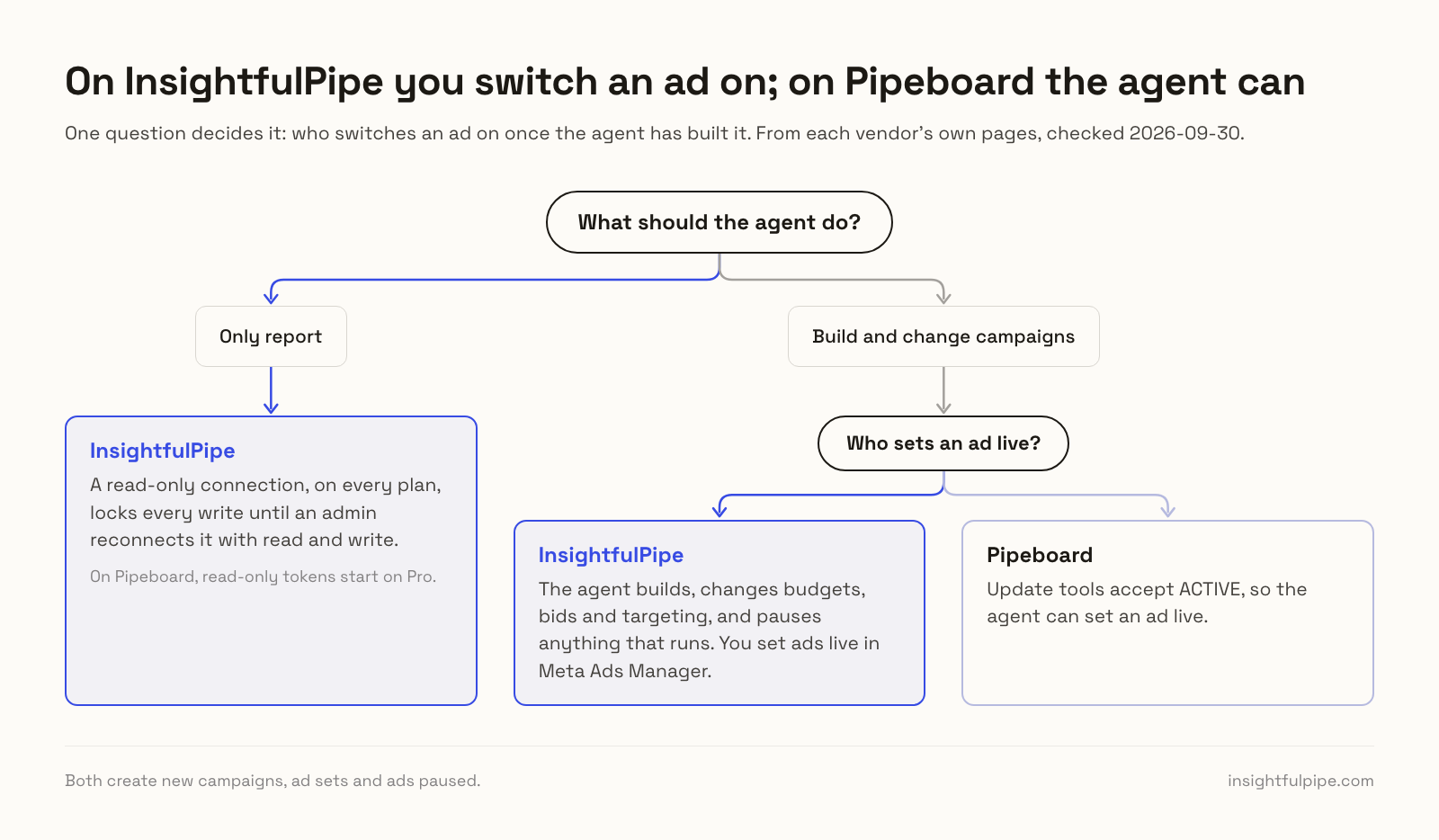
One question decides InsightfulPipe vs Pipeboard: who switches an ad on once the agent has built it. On Pipeboard, the agent can. On InsightfulPipe, you do, in Meta Ads Manager, and the agent handles everything up to that point.
If the agent should only report, an InsightfulPipe read-only connection locks every write until an admin reconnects it with read and write, on every plan. On Pipeboard, read-only tokens start on Pro. Its free plan runs on a standard token, which calls every tool.
If the agent should build and change campaigns, the split widens. Pipeboard scopes tokens tool by tool. Its own example, the "Campaign Manager Token", exists to "view and adjust budgets and statuses" with the same three update tools. So a token that can move a budget through those tools can also switch a campaign on. InsightfulPipe separates the two: the agent can change budgets, bids and targeting and pause anything that runs, while switching ads on stays with you.
InsightfulPipe's Meta Ads MCP server
InsightfulPipe gives an AI agent 53 dedicated Meta Ads actions, and an owner, admin or operator decides which of them each ad account allows. It works in Claude, ChatGPT, Cursor, Claude Code, Gemini CLI and Codex CLI, and from a terminal CLI.
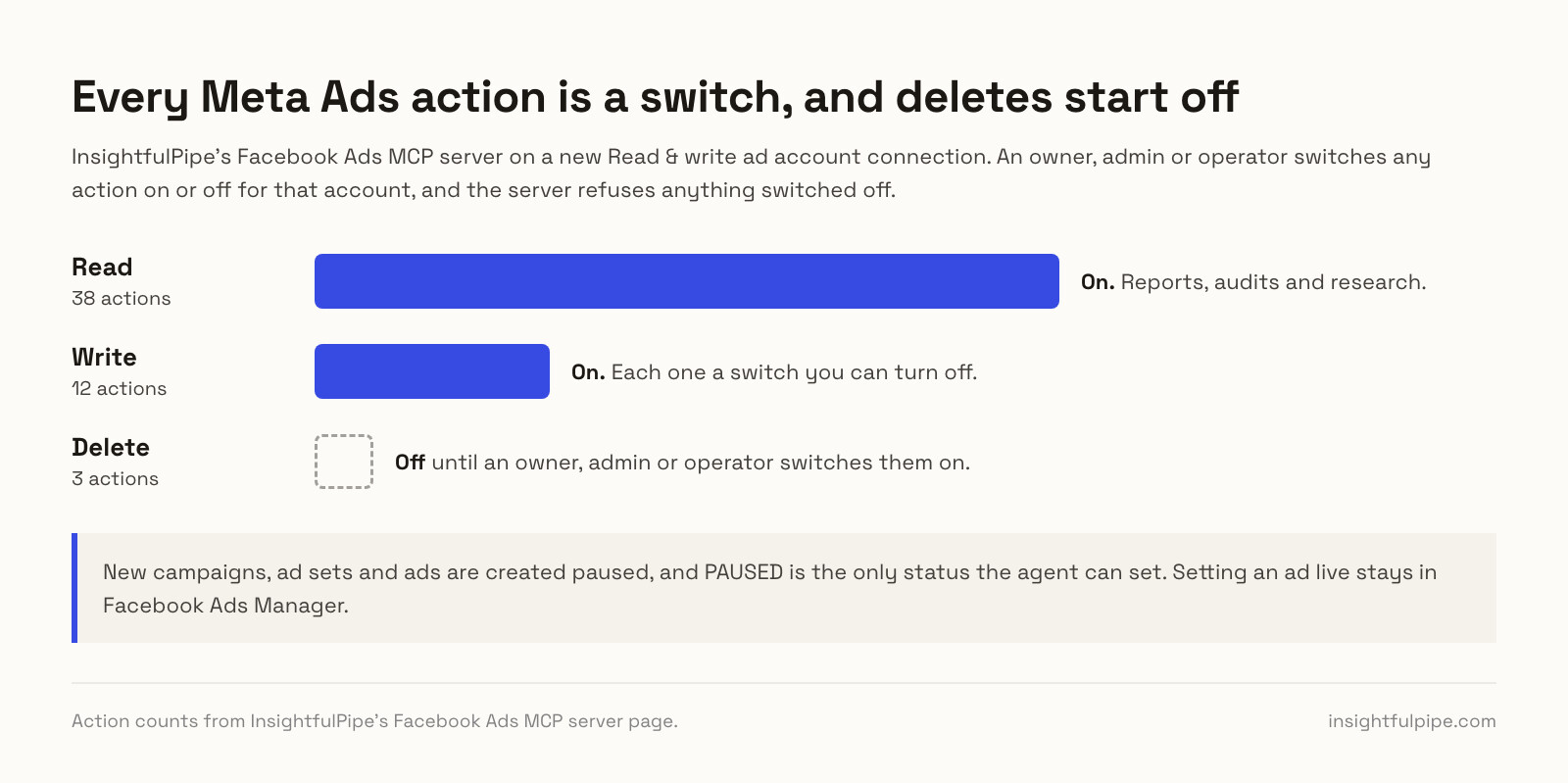
Coverage comes first. The server carries 53 Meta Ads actions, 38 read, 12 write and 3 deletes, across the life of a campaign:
- Reporting: insights for the ad account and its campaigns, ad sets and ads, with breakdowns such as age, placement and device, plus change history
- Campaigns, ad sets and ads: list, read, create and update each one, including budgets, bids, schedules and targeting, and pause anything that runs
- Creatives and media: create ad creatives, upload images and videos, build a slideshow and preview any ad
- Targeting research: search interests, behaviors, demographics and locations, and estimate audience size before you build an ad set
- Audiences, pixels and conversions: read custom and saved audiences and pixels, and create custom conversions
- Lead generation: list lead forms and create new ones on a Facebook Page you connect
- Account context: ad account details, Meta's minimum budgets, and the Pages and Instagram accounts it can advertise with
- Deletes: remove a campaign, ad set or ad, off until an admin switches them on
Why it is the safest way to let an agent change Meta Ads
Control comes second, and it makes InsightfulPipe the safest way to let an AI agent change a Meta Ads account. Every limit is a switch, and your admin decides where each one sits.
An owner, admin or operator opens a connected ad account and picks exactly which of its actions the agent can use, across read, write and destructive. They can switch any action on or off at any time. InsightfulPipe's server enforces the list, not your AI client, so the same limits hold in every client and in the CLI.
- Deletes start off. Removing a campaign, ad set or ad stays switched off on a new connection until an admin switches it on.
- Read-only means read-only. Connect an ad account as read-only and it locks every write until an admin reconnects it with read and write.
- You set ads live. New campaigns, ad sets and ads start paused, for you to set live in Meta Ads Manager when they are ready. The agent can pause anything that runs.
- Every ID gets checked. Each campaign, ad set, ad, creative, audience or pixel ID in a request must belong to the ad account you picked.
- Roles hold. Members on the user role only view the accounts an owner or admin grants them, and writes need an operator, admin or owner.
Why a server-side line beats a confirmation prompt
A confirmation prompt works while someone watches the chat. On a scheduled run nobody does, and the task stops at its first change. InsightfulPipe draws the line on the server instead. The agent knows its limits before it plans, finishes the work inside them, and leaves the switch-on to you.
The line also separates two jobs that Pipeboard's update tools carry together: moving a budget and setting an ad live. Turn on the twelve actions an account needs, and the model works from a twelve-item list instead of fifty-three, with fewer wrong actions to pick from.
What else you get
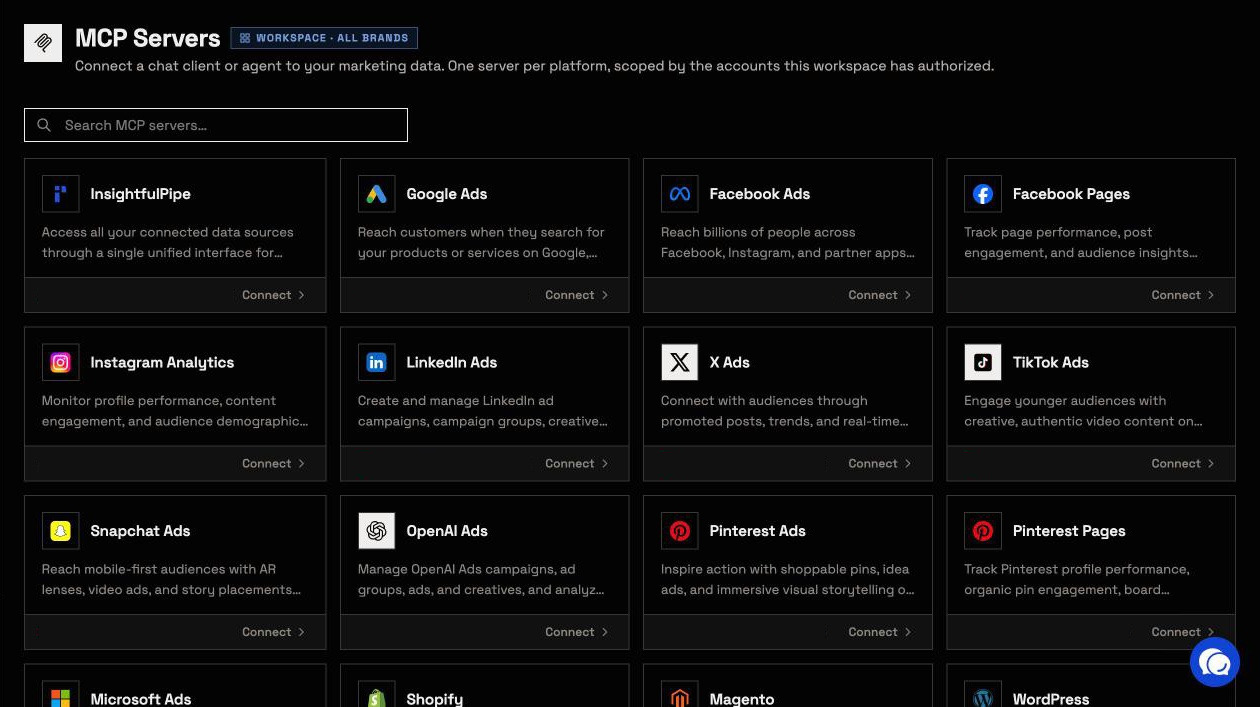
- 50 platforms on one login, including Facebook Pages, Instagram, Google Ads, GA4 and Search Console, so one agent can put Meta spend next to organic reach and site sessions.
- Meta's public Ad Library: the Ads Libraries server searches competitors' Facebook ads by keyword or by Page.
- Many ad accounts, kept apart: each ad account you connect gets its own action list, grouped under brands.
- 8 Facebook Ads Claude skills, free, including an account auditor and a budget allocator, plus a free prompt library.
- A CLI: the
insightfulpipenpm package runs the same reads and writes from a terminal, under the same limits.
Pricing: Starter is $29.99 a month for 8 connected accounts, Growth $89.99 for 35 and Agency $299.99 for 150, with unlimited tool calls, every MCP server and the CLI on every plan. Start a trial and connect your first ad account.
Best for: agencies and in-house teams who want an agent that runs Meta Ads within limits they set, ad account by ad account.
Pipeboard's Meta Ads MCP server
Pipeboard hosts MCP servers for Meta and other ad platforms, and what a token can reach depends on the plan you pay for.
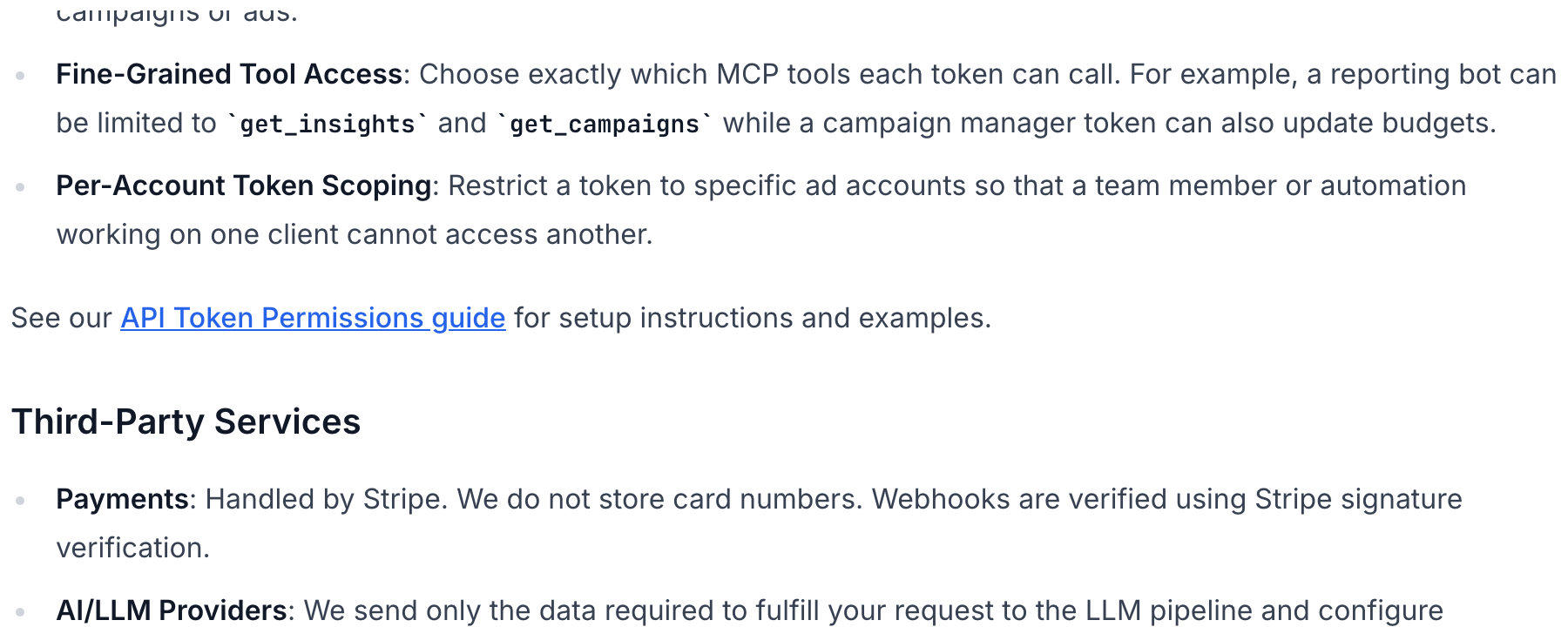
Its API reference lists 33 Meta Ads tools, 14 of them writes, and its guides say 30+. Its README gives the create tools a status field that defaults to PAUSED, and its update tools accept ACTIVE. Per its token guide, a standard token calls every tool on every plan, read-only and chosen-tool tokens start on Pro, and ad account limits start on Agency.
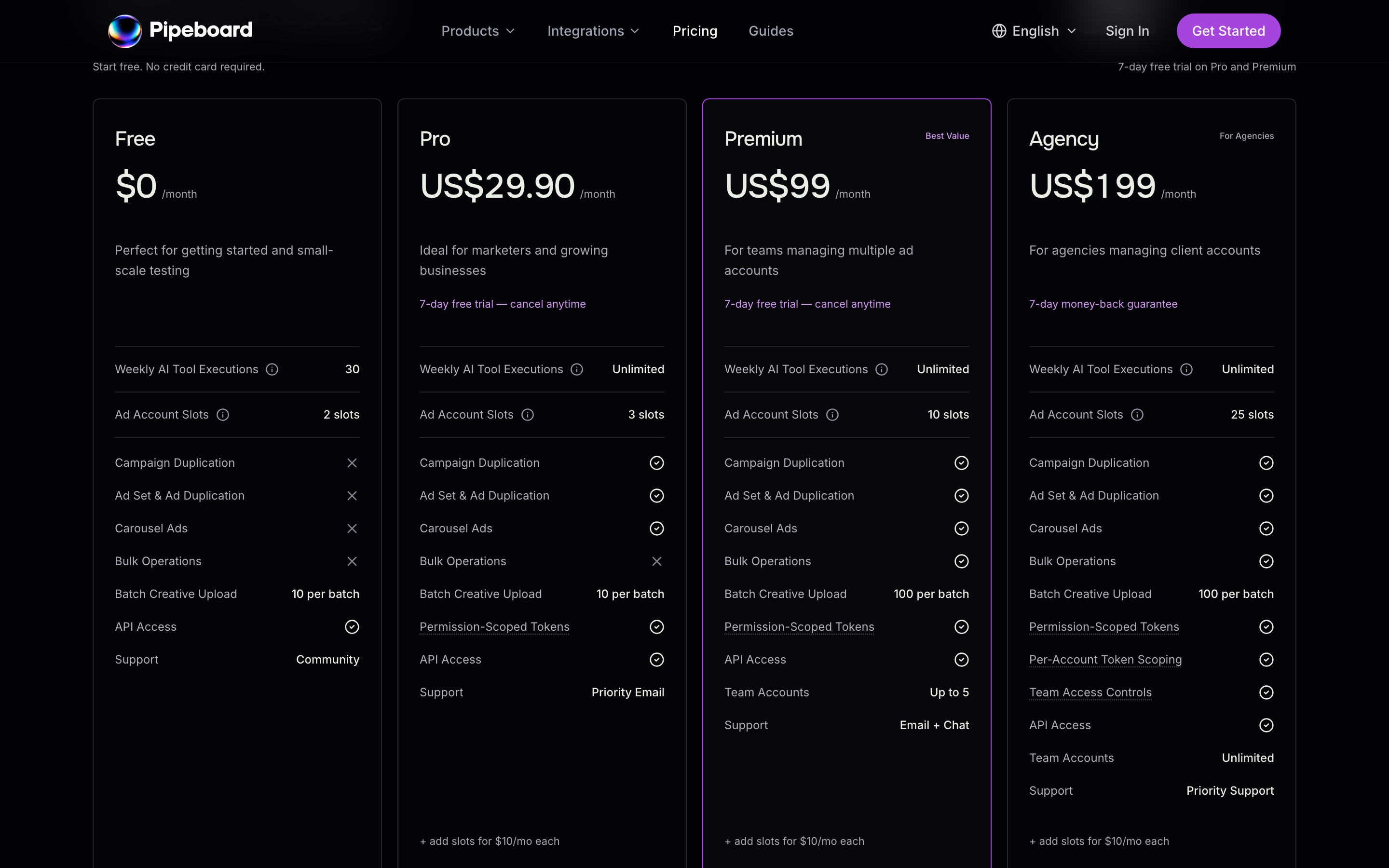
Its paid plans add duplication tools, and Premium adds bulk edits. The Meta server's code is public under the Business Source License 1.1, and its repository lists 12 security advisories, each with a patched version. Pricing runs $0 for 2 ad accounts and 30 tool runs a week, then $29.90 for 3, $99 for 10 and $199 for 25. Each extra account costs $10 a month.

- Hosting: hosted, one server per ad platform plus a CLI; the Meta server also runs self-hosted with your own Meta developer app.
- Read or write: 33 tools in its API reference, 14 of them writes, with no delete tool listed.
- Safety: new campaigns, ad sets and ads default to paused, and update tools accept ACTIVE.
- Price: $0 for 2 ad accounts and 30 tool runs a week, then from $29.90 a month for 3.
Pros
- A free plan covers 2 ad accounts and 30 tool runs a week.
- New campaigns, ad sets and ads default to paused.
Cons
- A standard token calls every tool; read-only tokens start on Pro and ad account limits on the $199 Agency plan.
- Its update tools accept ACTIVE, so an agent can set an ad live.
- Each ad account past a plan's slots costs $10 a month.
Where Pipeboard fits
Pipeboard fits a developer who wires ad platform calls into scripts, n8n flows or a terminal agent, where its CLI exposes each tool as a shell command.
Who sets an ad live, and what to check before an agent writes
What an agent can do on day one depends on each server's defaults, and InsightfulPipe and Pipeboard differ more than their feature lists suggest. Ask four questions before you connect a live ad account.
What can it reach before anyone narrows it? Pipeboard's standard token calls every tool, on every plan. Read-only and chosen-tool tokens start on Pro, and ad account limits and team read-only caps start on the $199 Agency plan. On InsightfulPipe, deleting a campaign, ad set or ad starts off until an admin switches it on. A read-only connection locks every write until an admin reconnects it with read and write.
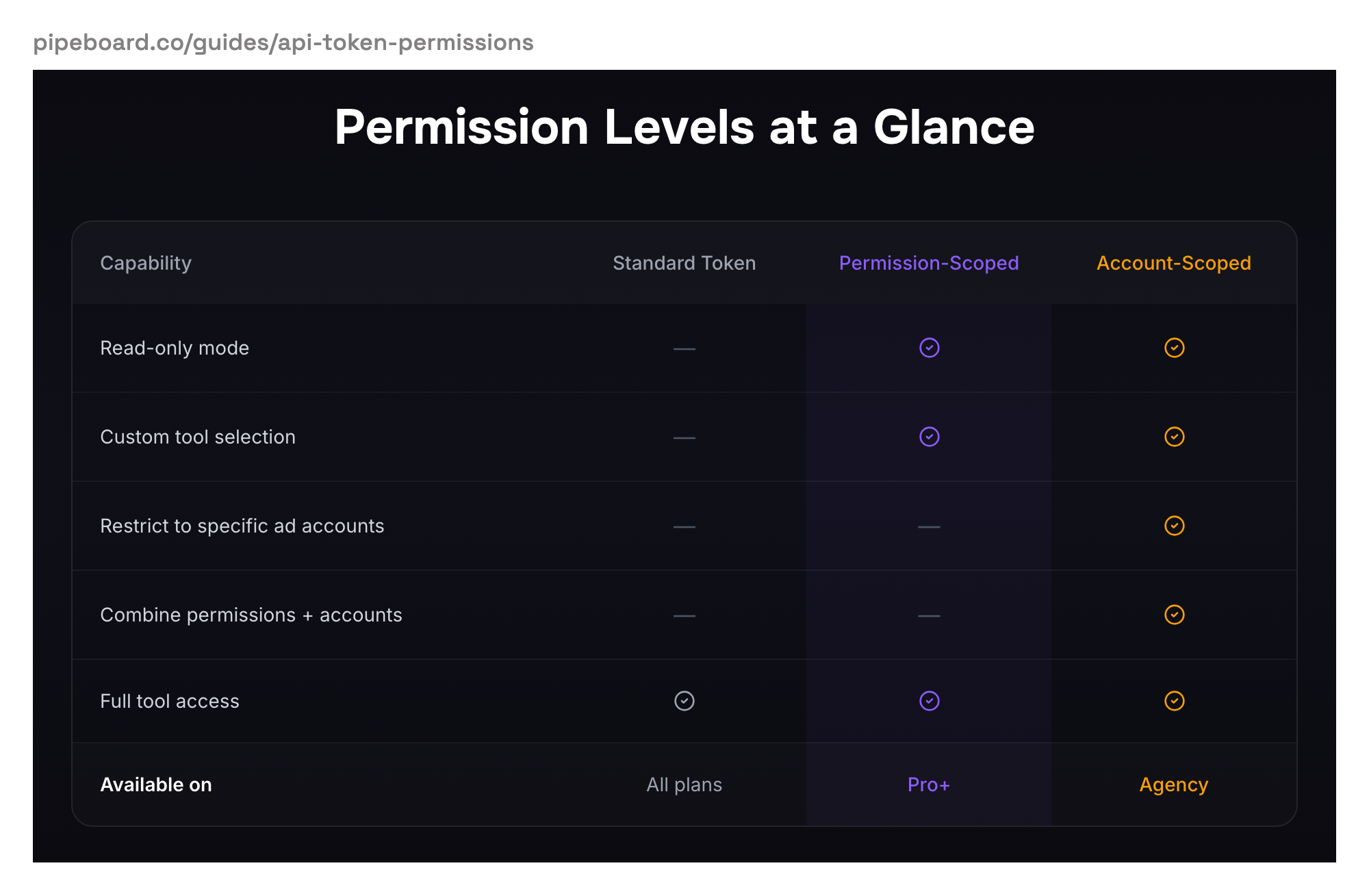
Who sets the limits? On InsightfulPipe, an owner, admin or operator sets the actions per ad account, and the server enforces them in every client. On Pipeboard, the limits live on tokens, and your plan decides which limits a token can carry.
Can the agent set an ad live? On Pipeboard, yes. Its README documents update_ad with "status: Update ad status (ACTIVE, PAUSED, etc.)". Its token guide lists "Pause or activate campaigns" among the things a read-only token cannot do. Yet its Why Pipeboard page says "Nothing goes live without your say-so." On InsightfulPipe, ask the agent to set a campaign live and the server refuses, because PAUSED is the only status it accepts.
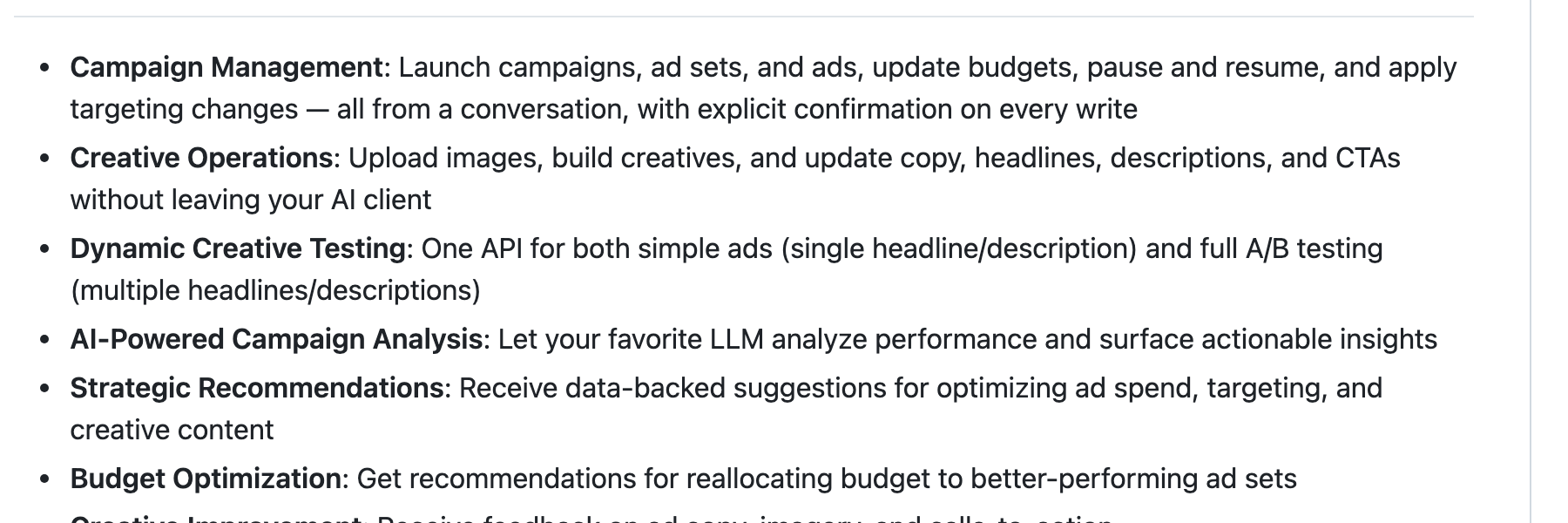
What happens when nobody is watching? Pipeboard's README promises "Explicit confirmation on every write". Its open code, as of 2026-09-23, has no confirmation step, and its update tools return "a confirmation link" after the change.
InsightfulPipe needs no prompt to hold the line. The boundary sits on the server, the agent finishes its work inside it, and switching ads on waits for you. Budgets and bids on campaigns that already run change at once on either server, so set an account spending limit in Meta Ads Manager before any agent changes a budget. That is why InsightfulPipe is the safest way to let an AI agent change a Meta Ads account. Every default starts on the careful side, and every one is a switch your admin controls.
What each Meta ad account costs
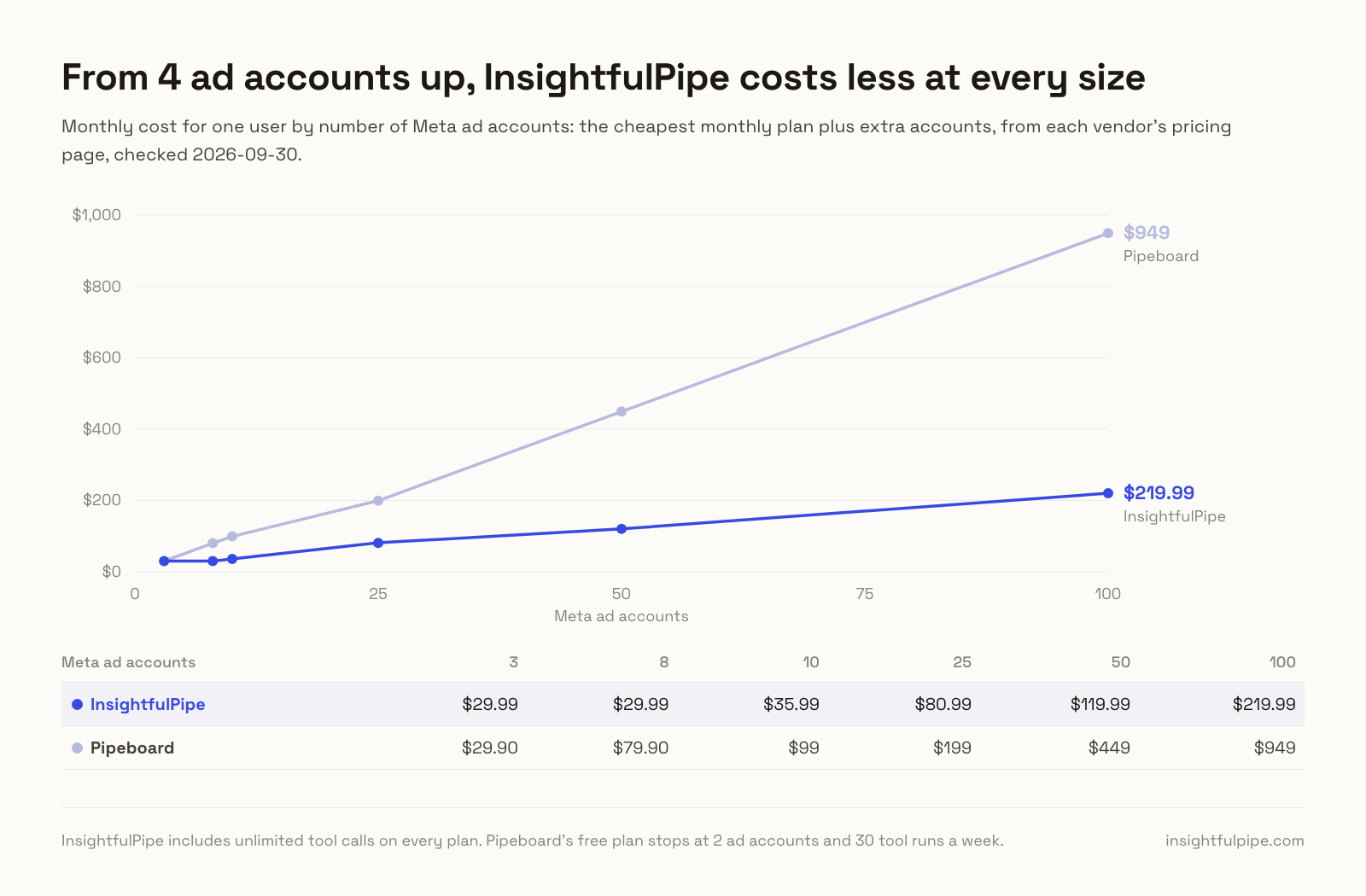
For one user, from 4 ad accounts up, InsightfulPipe costs less at every size. Its plans include more accounts, and each extra one costs $1 to $3 a month instead of Pipeboard's $10.
Meta ad accounts | InsightfulPipe | Pipeboard |
|---|---|---|
3 | $29.99 | $29.90 |
8 | $29.99 | $79.90 |
10 | $35.99 | $99 |
25 | $80.99 | $199 |
50 | $119.99 | $449 |
100 | $219.99 | $949 |
Each price is the cheapest monthly plan plus extra accounts, taken from the InsightfulPipe and Pipeboard pricing pages on 2026-09-30. InsightfulPipe includes unlimited tool calls on every plan. Pipeboard's free plan stops at 2 ad accounts and 30 tool runs a week.
Which should you choose?
Choose InsightfulPipe if you want an agent that runs Meta Ads within limits you set, at a lower price per ad account. Each line below matches a common job.
- You want an agent to run Meta Ads within limits you set: InsightfulPipe. 53 actions switched on or off per ad account, deletes off until an admin switches them on, and new ads paused for you to set live.
- You run an agency with many client ad accounts: InsightfulPipe. Each ad account gets its own action list on every plan, and 35 accounts cost $89.99 a month on Growth.
- You only need reports: a read-only InsightfulPipe connection, which locks every write until an admin reconnects it with read and write.
- You want Meta next to Google Ads, GA4 and Search Console: InsightfulPipe, with 50 platforms on one login.
- You work from a terminal or a coding agent: the
insightfulpipeCLI runs the same reads and writes under the same limits.
MCP clients run several servers in one session, so you can add InsightfulPipe beside anything you already use.
Connect InsightfulPipe to Meta Ads in three steps
Connecting InsightfulPipe to Meta Ads takes a Facebook sign-in and one server URL. You need no Meta developer app, no app review and no token to create or renew.
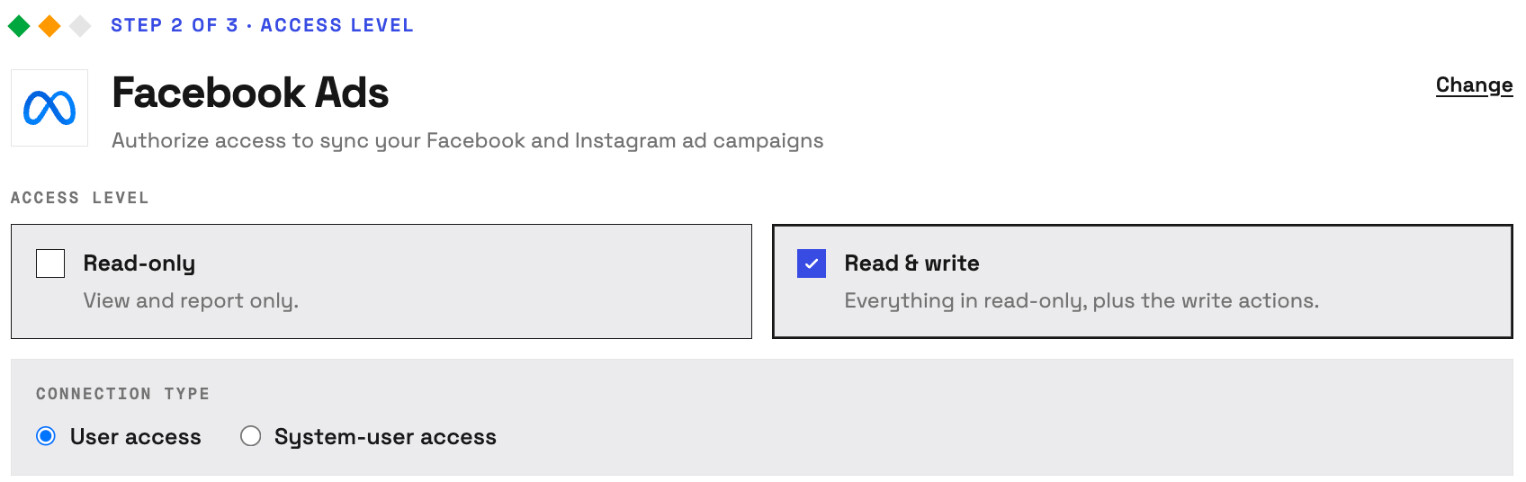
- In InsightfulPipe, open Connected accounts, choose Facebook Ads, pick Read-only or Read & write, then sign in with Facebook and select the ad accounts to connect.
- In Claude, add InsightfulPipe from the connector directory, or add
https://facebook-ads.insightfulmcp.com/as a custom connector and click Connect. In Claude Code, runclaude mcp add --transport http facebook-ads-mcp https://facebook-ads.insightfulmcp.com/. - Open the ad account's actions, keep the ones you want, and ask your first question.
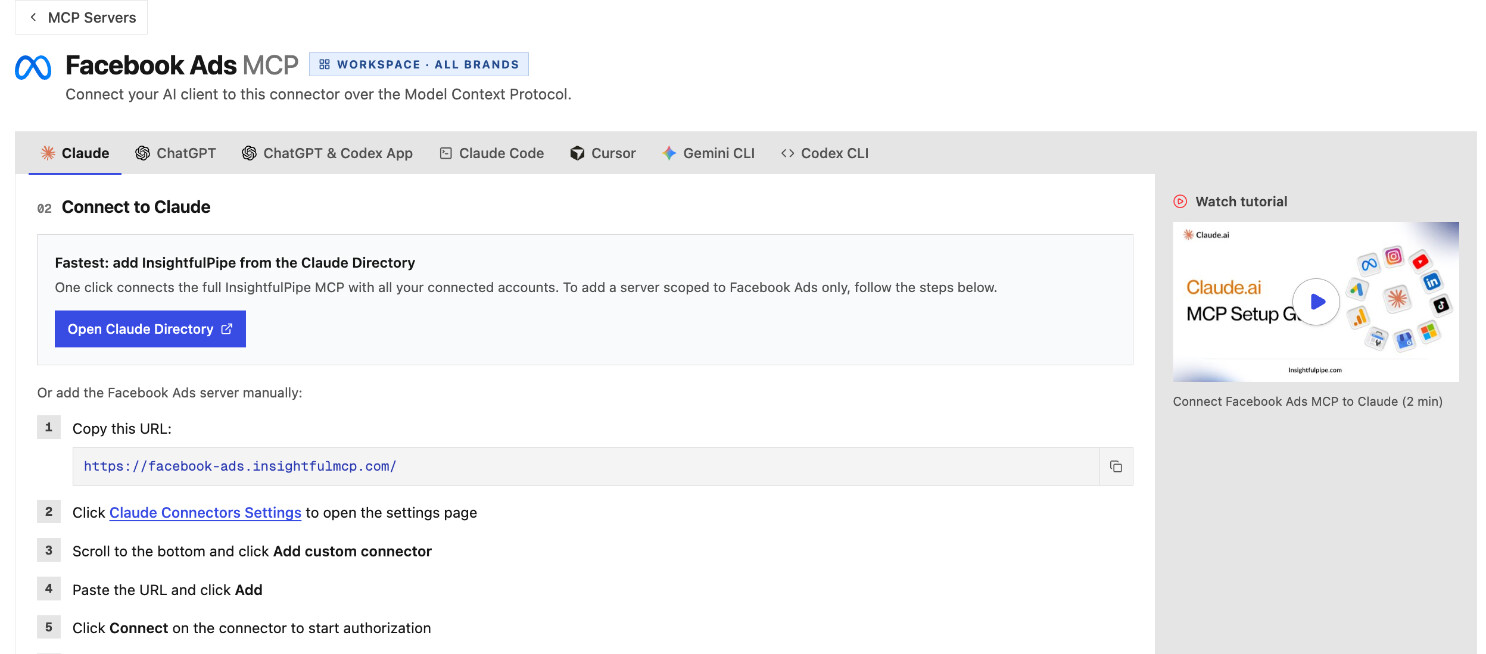
Watch: Connect Meta Ads to Claude and audit spend and ROAS from one prompt, 2 minutes 39 seconds
Start a trial to connect your first ad account. Plans start from $29.99 a month.
What Pipeboard's own pages do not settle
We could not settle several Pipeboard claims, because its own pages say different things or publish nothing to check against.
- Platforms: its README says five ad platforms, its Why Pipeboard page says 8, and its integrations page lists 11.
- Read-only on Free: its homepage shows "Start with read-only access" beside "Free plan available", while its token guide starts read-only tokens on Pro.
- Meta tools: its guides say 30+, its API reference lists 33 and its README table says 42, while the README's own tool list documents 28.
- Deletes: its token guide lists deletion among a full-access token's powers; its API reference and open code list no delete tool.
- Confirmation: its README promises "Explicit confirmation on every write", with no confirmation step in its open code.
- Plan limits: a May 23, 2026 post lists 1 ad account on Free and 50 on Enterprise. Its pricing page shows 2 on Free and 25 on Agency, and says Enterprise, now Agency, kept its slots.
Frequently asked questions
Sources (checked 2026-09-30)
Every Pipeboard and Meta claim above comes from that vendor's own page, documentation or repository, opened on 2026-09-30.
- InsightfulPipe: Meta Ads MCP server, Ads Libraries server, pricing, Facebook Ads Claude skills
- Pipeboard: pricing, security, token guide, team access controls, Meta Ads API reference, Meta Ads guide, Why Pipeboard, integrations, plan change post, CLI guide, repository, security advisories, licence
- Meta: ads MCP server overview, ad creation tools