Disclosure: InsightfulPipe publishes this and is one of the 12 options ranked.
The verdict
The best X (Twitter) MCP server in 2026 is InsightfulPipe. Of the 12 best X (Twitter) MCP servers compared here, it is the only one that posts, reads your mentions, sends direct messages and runs X Ads on one login, with a switch for every action on every account.
Seven of the twelve publish organic posts, and five run X Ads. InsightfulPipe is the only one on both lists, and it also reads your mentions, searches X for your brand and sends DMs. X's own hosted X MCP reads and searches, but its docs list no tool for creating a post.
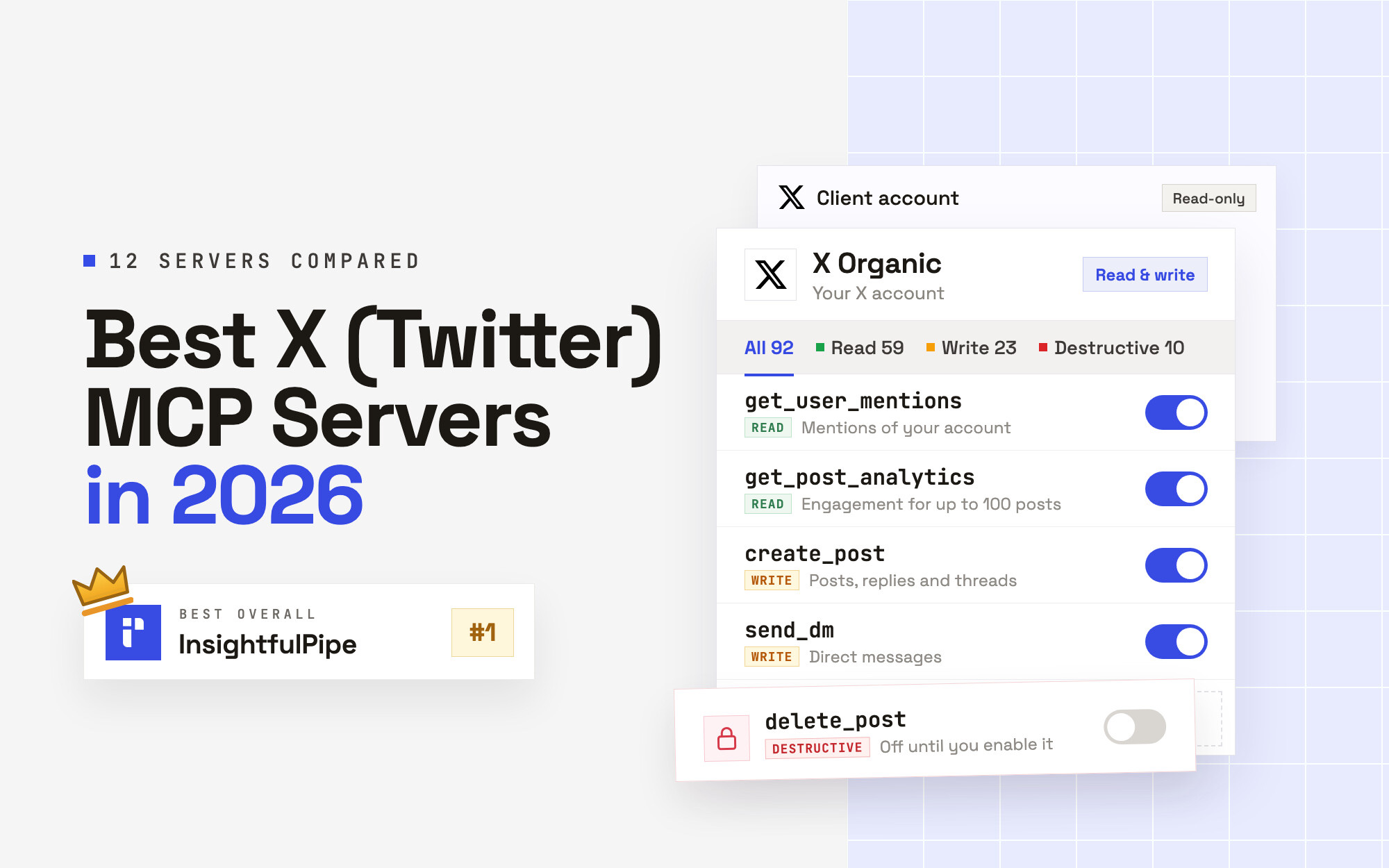
- Best overall: InsightfulPipe. Its X (Twitter) MCP server, X Organic, carries 92 actions: 59 read, 23 write and 10 destructive. Its X Ads MCP server adds 80 more. From $29.99 a month.
- Safest way to let an AI agent post to X or change X Ads: InsightfulPipe. Every action is a switch per account, all 21 destructive actions stay off until an admin switches them on, new campaigns start paused, and a write is sent once and never retried automatically.
- Best value: InsightfulPipe. $29.99 a month covers 8 connections across 50 platforms, with unlimited tool calls, and X bills X Organic's API calls straight to your own app. DemandBird's MCP needs its $69 Business plan, and Markifact starts at $79 for X Ads.
The best X (Twitter) MCP servers at a glance
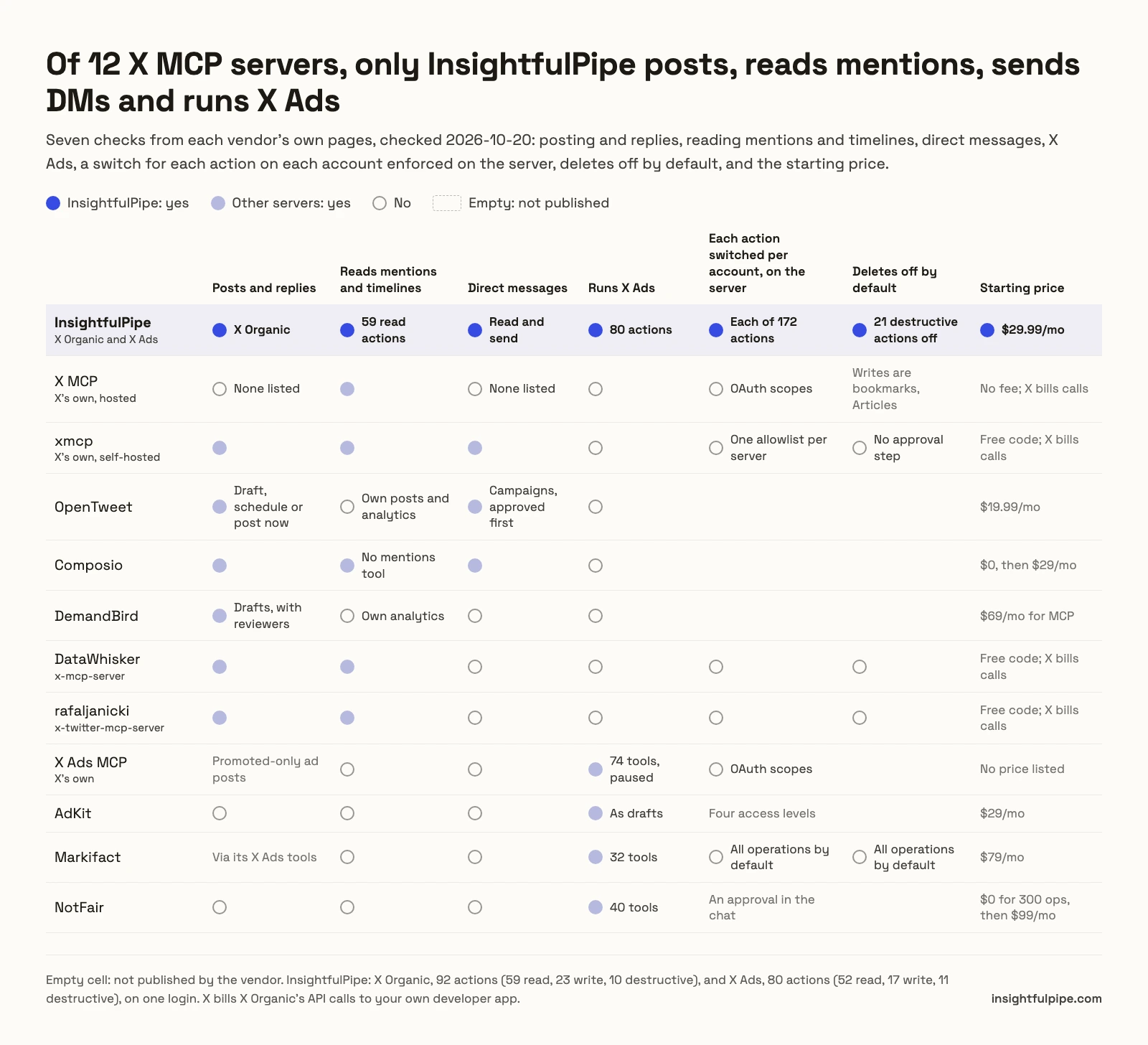
Twelve servers, compared on what they do on X and what they cost to start.
Server | Posts and replies | Reads mentions and timelines | DMs | Runs X Ads | Who holds the X connection | Starting price |
|---|---|---|---|---|---|---|
InsightfulPipe | Yes, X Organic | Yes, 59 read actions | Read and send | Yes, 80 actions | Your own X app for X Organic; an X sign-in for X Ads | $29.99/mo |
X MCP (X's own, hosted) | None listed | Yes | None listed | No | Your own X developer app, through X's bridge | No fee; X bills calls |
xmcp (X's own, self-hosted) | Yes | Yes | Yes | No | Your own X developer app | Free code; X bills calls |
OpenTweet | Yes | Own posts and analytics only | Campaigns, approved first, on Advanced and Agency | No | OpenTweet | $19.99/mo |
Composio | Yes | Timelines and search, no mentions tool | Yes | No | Your own X OAuth app | $0, then $29/mo |
DemandBird | Yes, as drafts | Own analytics only | No | No | DemandBird | $69/mo for MCP |
DataWhisker x-mcp-server | Yes | Yes | No | No | Your own X API keys | Free code; X bills calls |
rafaljanicki x-twitter-mcp-server | Yes | Yes | No | No | Your own X API keys | Free code; X bills calls |
X Ads MCP (X's own) | Promoted-only ad posts | No | No | Yes, 74 tools | Your own developer app with Ads API access | No price listed |
AdKit | No | No | No | Yes, as drafts | AdKit | $29/mo |
Markifact | Drafts, through its X Ads tools | No | No | Yes, 32 tools | Markifact | $79/mo |
NotFair | No | No | No | Yes, 40 tools | NotFair | $0 for 300 operations, then $99/mo |
How we tested
We read every capability, default and price from each vendor's own documentation, pricing page or public repository, and ran InsightfulPipe on live accounts. We checked every page on 2026-10-20, with the same method as our Google Ads comparison.
We compared the twelve on eight criteria:
Criterion | What we checked |
|---|---|
Posting | Can it publish posts, threads and replies, and does a post go live at once or wait? |
Reading | Can it read your timeline, your mentions, search results and post analytics? |
Direct messages | Can it read and send DMs? |
X Ads | Can it build and change campaigns, and what does a new campaign start as? |
Control before a write | Can you choose, per account, which actions the agent can use, and does the server enforce it? |
Default on a new connection | What can the agent do before anyone narrows it, and do deletes start off? |
Who holds the X connection | Do you bring your own X developer app, sign in with X, or hand the account to the vendor? |
Price | What does it cost to start, and who pays X for the API calls? |
Where a vendor's own pages contradict each other, we quote both and attribute them to the vendor. Where a capability is not published, we write "not published" rather than guess. We count only features that ship today.
We left out EnesCinr's twitter-mcp, with two tools and no commit since July 2025, the scraper servers, whose data sources are not disclosed, and new multi-network posting tools such as First100 and PostOnce. Reporting-only X Ads connectors get one line each below.
The single question that splits this list
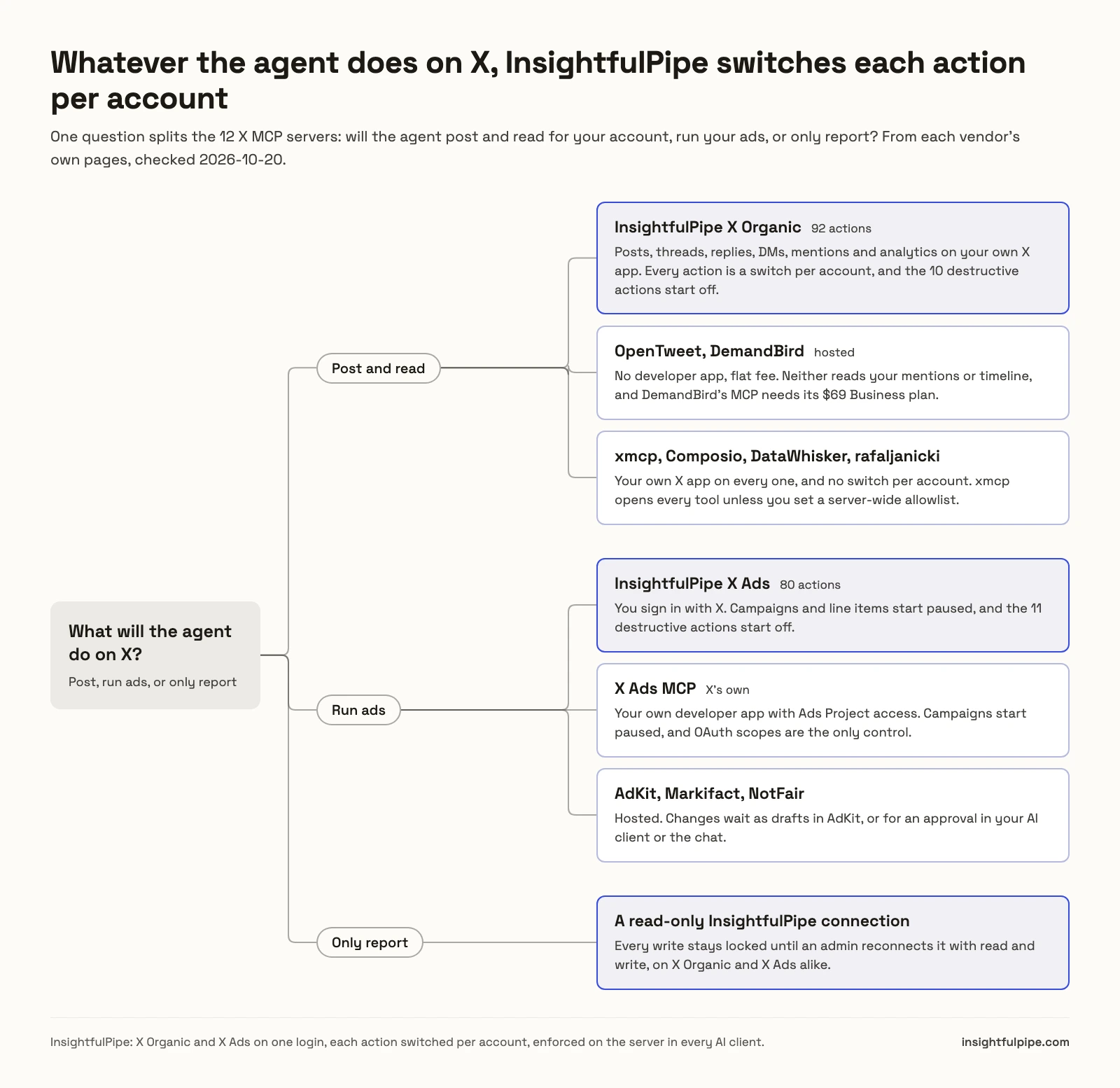
One question splits these twelve: will the agent post and read for your account, run your ads, or only report? The answer decides which servers are left, and InsightfulPipe stays on the list for all three.
If the agent posts and reads, seven servers remain. OpenTweet and DemandBird post for a flat fee with no developer app, but neither reads your mentions or timeline. xmcp, Composio, DataWhisker and rafaljanicki run on your own X app with no switch per account. InsightfulPipe X Organic runs on your own app too, and switches each of its 92 actions per account.
If the agent runs ads, five servers remain. X's own X Ads MCP limits the agent by OAuth scope, AdKit holds changes as drafts, and Markifact and NotFair wait for approvals. InsightfulPipe X Ads decides on its server, per ads account, before the session starts.
If the agent only reports, a read-only InsightfulPipe connection does the job and locks every write until an admin reconnects it with read and write.
Is there an official X MCP server?
Yes, three, and all three need your own X developer app. X hosts the X MCP for reading and searching, publishes the open-source xmcp to run yourself, and hosts a separate X Ads MCP for campaigns.
The X MCP sits at https://api.x.com/mcp. X's docs list posts (fetch, likers, reposters, quote posts and counts), full-archive search, users, timelines, mentions, bookmarks, news and trends, and Articles. You reach it through X's local xurl mcp bridge, which needs your own app with OAuth 2.0 on X's Pay-per-use plan, or with an app-only token that reads without acting as you. The docs say the bridge is "Required for writes (bookmarks, Articles)".
xmcp is X's open-source server on GitHub. It runs on your machine and posts with your own keys.
The X Ads MCP sits at https://ads-api.x.com/mcp. X's docs list 74 X Ads tools and say "campaigns and line items are always created PAUSED".
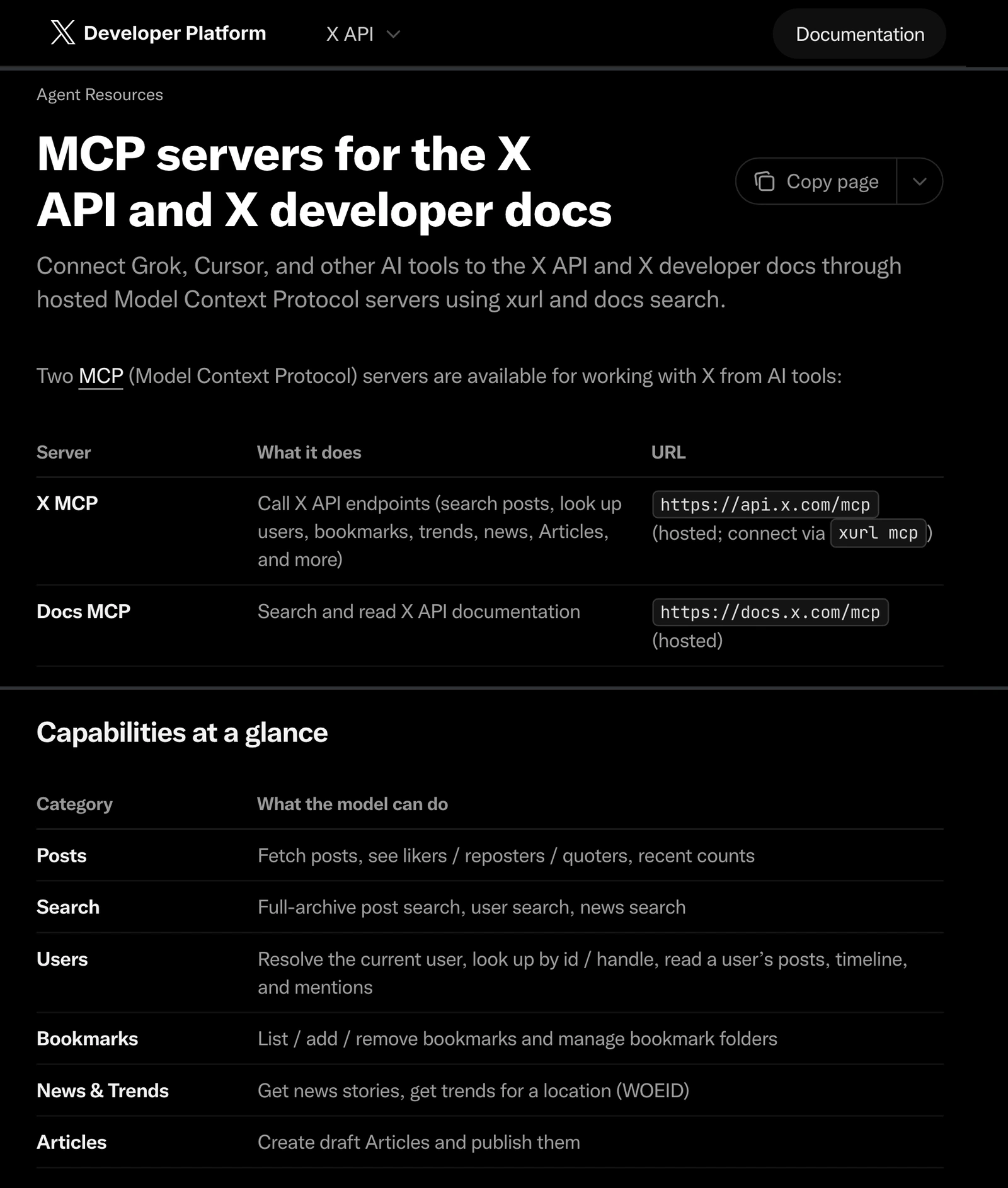
NotFair and Porter Metrics still say X has no official MCP; X's own docs describe an X MCP and an X Ads MCP.
Servers that post and read on X
Eight servers here post or read on X: seven publish posts, and X's hosted X MCP reads and searches. InsightfulPipe leads them as the only one that also runs X Ads.
Best overall: InsightfulPipe
InsightfulPipe gives an AI agent two X servers on one login, X Organic and X Ads, and you decide which actions each account allows.
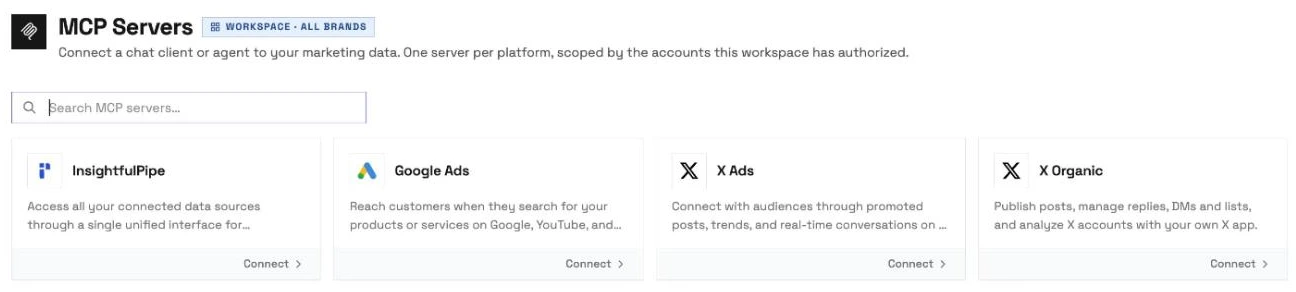
InsightfulPipe is the pick if you want the assistant to work your X account and your X Ads from the same chat, within limits you set.
Coverage comes first. X's hosted server lists no posting tool, OpenTweet lists 43 tools and Composio 81. InsightfulPipe's X Organic carries 92 actions on your own X developer app:
- Posts and threads: publish posts, replies and thread legs, edit a recent post where X allows it, repost, hide replies, and draft and publish Articles
- Media: upload images, GIFs and videos, and add alt text and subtitles
- Reading and search: your timeline, mentions, replies and quote posts, 7-day search, the full archive where your X plan allows it, trends, news and Spaces
- Analytics: engagement for up to 100 posts at a time, and video playback
- Direct messages: read conversations, send a message to one user or into a conversation, and start a group
- Lists and housekeeping: create and manage lists, members, mutes and blocks
- Your X app: its API usage by day and its remaining credit
X Ads adds 80 actions, 52 read and 28 that make changes: campaigns and line items, promoted-only ad posts, promoted accounts, cards, media, targeting, tracking tags and reports of up to 90 days. You connect X Ads with an X sign-in and no developer app.
Why it is the safest way to let an agent post to X or change X Ads
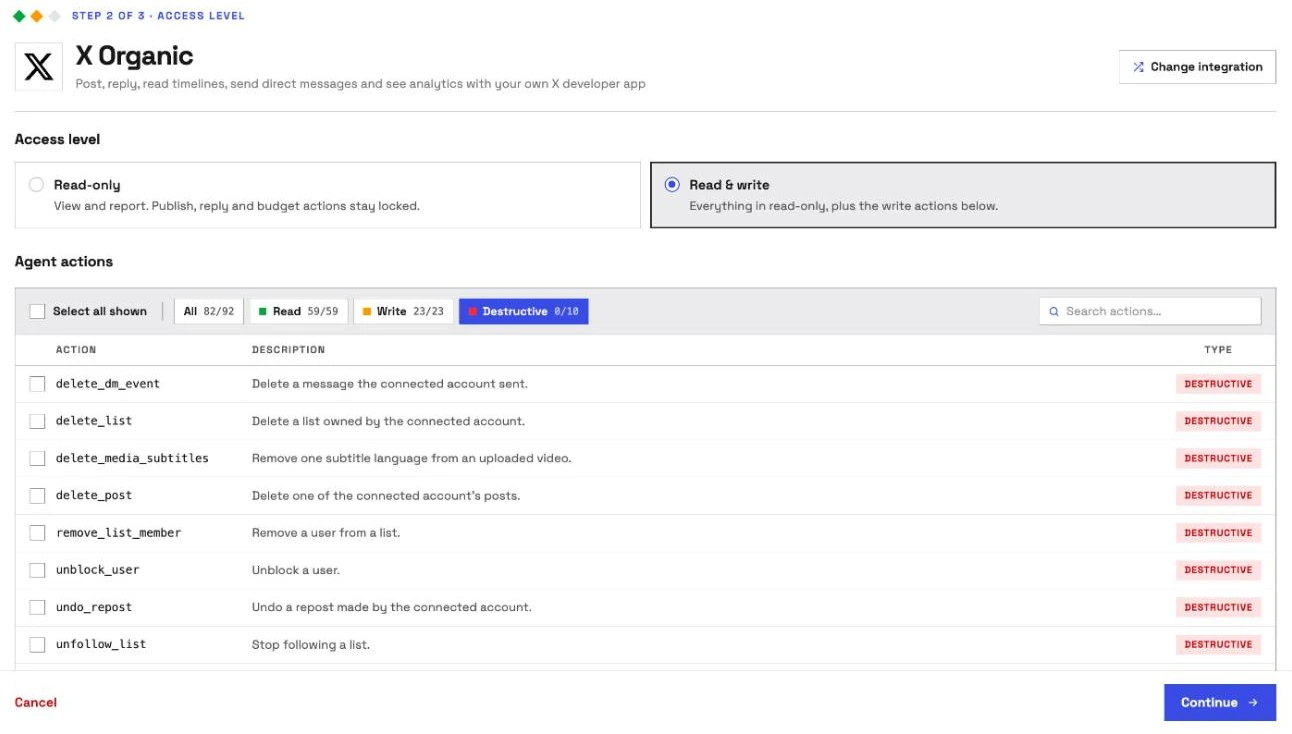
Control comes second, and it makes InsightfulPipe the safest way to let an AI agent change an X account. Every limit is a switch, and your admin decides where each one sits.
An owner, admin or operator opens a connected account and picks exactly which actions the agent can use, across read, write and destructive. They can switch any action on or off at any time. InsightfulPipe's server enforces that list, not your AI client, so the same limits hold in Claude, ChatGPT, Cursor, Claude Code, Gemini CLI and Codex.
- Destructive actions start off. X Organic's 10, from delete_post and delete_dm_event to undo_repost, and X Ads' 11, from delete_campaign to delete_tracking_tag, stay off until an owner, admin or operator switches them on for that account.
- Read-only means read-only. A read-only connection locks every write until an admin reconnects it with read and write.
- Publishing is a switch per account. A post goes live the moment create_post runs, so an admin switches create_post and send_dm off on any account where the agent should only read, or draft in the chat.
- No double posts. Each write is sent once and never retried automatically, so a slow response does not publish the same post twice.
- No runaway spend. X bills every call to your app, so results come 10 at a time, nothing pages automatically, and the agent can check your remaining credit with get_credit_balance.
- New campaigns and line items start paused, for you to set live when they are ready, and ad posts are created promoted-only, off your timeline.
- Going live is a switch. update_campaign and update_line_item can set a campaign or line item active, so an admin switches them off wherever the agent should not launch anything.
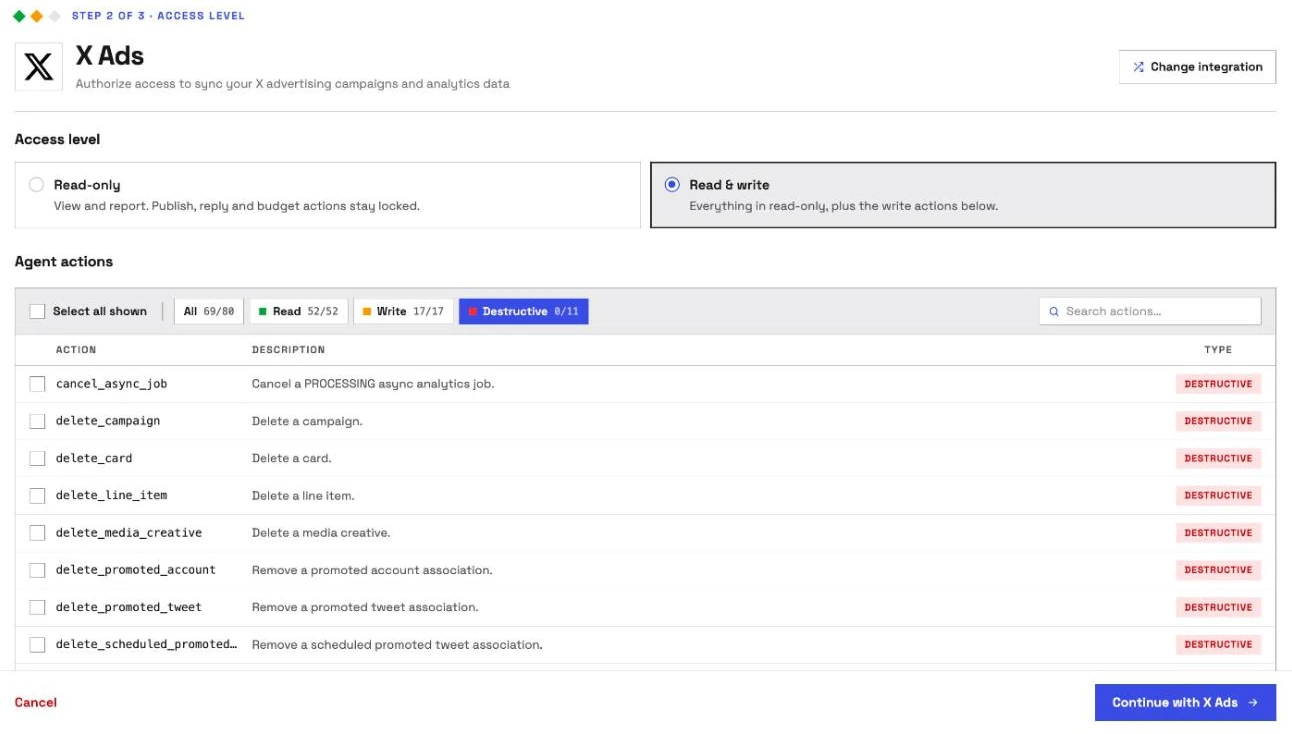
OpenTweet publishes no per-action control, and xmcp loads every tool unless you set one server-wide allowlist. InsightfulPipe draws the boundary on the server, per account, before the session starts. For a human check on top, set execute_action to Needs approval under Claude's Tool permissions, which every Claude user can do.
Why four tools, not 119
Every tool a server publishes loads into the model's context before you type a word. xmcp's README lists 119, Composio's toolkit 81 and OpenTweet 43. Each InsightfulPipe server publishes four: query_contexts, query_data, execute_action and prompts_menu. The agent looks up the 92 X Organic actions when it needs them, and reads go through query_data, which the server marks read-only. That is the MCP vs API trade made well: the agent sees a short menu instead of the whole X API.
Watch: X Ads MCP server, automate your Twitter Ads reporting with Claude and ChatGPT, 1 minute 17 seconds
What else you get
- Scheduling: InsightfulPipe's Social Media Scheduler server queues X posts through the same X Organic connection.
- 50 platforms on one plan, including Google Ads, Meta Ads, LinkedIn Pages and Instagram, so one agent can plan an X post next to the rest of your social calendar.
- Every major AI client: Claude, ChatGPT, Claude Code, Cursor, Gemini CLI and Codex, each with a setup tab on the MCP page.
- Claude's connector directory and the ChatGPT app directory both list InsightfulPipe, so the full server connects in one click.
- A CLI: the insightfulpipe CLI runs the same reads and writes from a terminal, under the same switches.
- Skills and prompts: the free Claude skills library, with an Ad Creative Fatigue Detector that covers X, and the free prompt library. Our guide to Claude skills for marketing shows how they work.
Pricing: Starter is $29.99 a month for 8 connections, Growth $89.99 for 35 and Agency $299.99 for 150, with unlimited tool calls and every MCP server on every plan. X bills X Organic's API calls to your own developer app.
Where it is the wrong answer: if you only ever schedule a few posts a week and never read mentions, send DMs or run ads, you would be paying for more than you use.
Best for: brands and agencies who want one assistant to post, reply, read mentions and run X Ads within limits they set, account by account. See the X (Twitter) MCP server and all 92 actions, or start a trial.
X MCP (X's own, hosted)
X hosts its own X MCP for reading and search, and you bring the developer app that connects it.
X's docs list posts, search, users, bookmarks, news, trends and Articles, and its writes are bookmarks and Articles. You run X's xurl bridge locally with your app's Client ID and Secret and a browser login on the first run. The app must sit on X's Pay-per-use plan, and X bills every call.
Pros
- Built and hosted by X, with full-archive search.
- No server fee.
Cons
- No tool for creating a post or a DM in its docs.
- User-context tools run through a local bridge on your machine.
- The only documented control is the OAuth scope of the account that logs in.
Best for: developers who want X's own read and search tools on an app they already run.
xmcp (X's own, self-hosted)
xmcp turns the whole X API into tools on your machine, and it posts with your own keys.
xmcp is a Python server from X's developer platform team that exposes the X API's spec as tools, 119 in its README. It needs your app's keys and an OAuth 1.0a consent at startup, and it runs at 127.0.0.1:8000/mcp. Every tool loads unless you set X_API_TOOL_ALLOWLIST. The repository has no licence file, and its last commit was on 2026-04-09.
Pros
- Posts, DMs, lists, media and search from X's own spec.
- No server fee.
Cons
- Every tool loads by default, including like and follow calls X's self-serve plans no longer support.
- No licence file in the repository.
- Runs on your machine; ChatGPT and other remote clients need a tunnel.
Best for: developers who host the raw X API themselves.
OpenTweet
OpenTweet posts and schedules from a hosted server with no developer app, and it reads only your own posts.
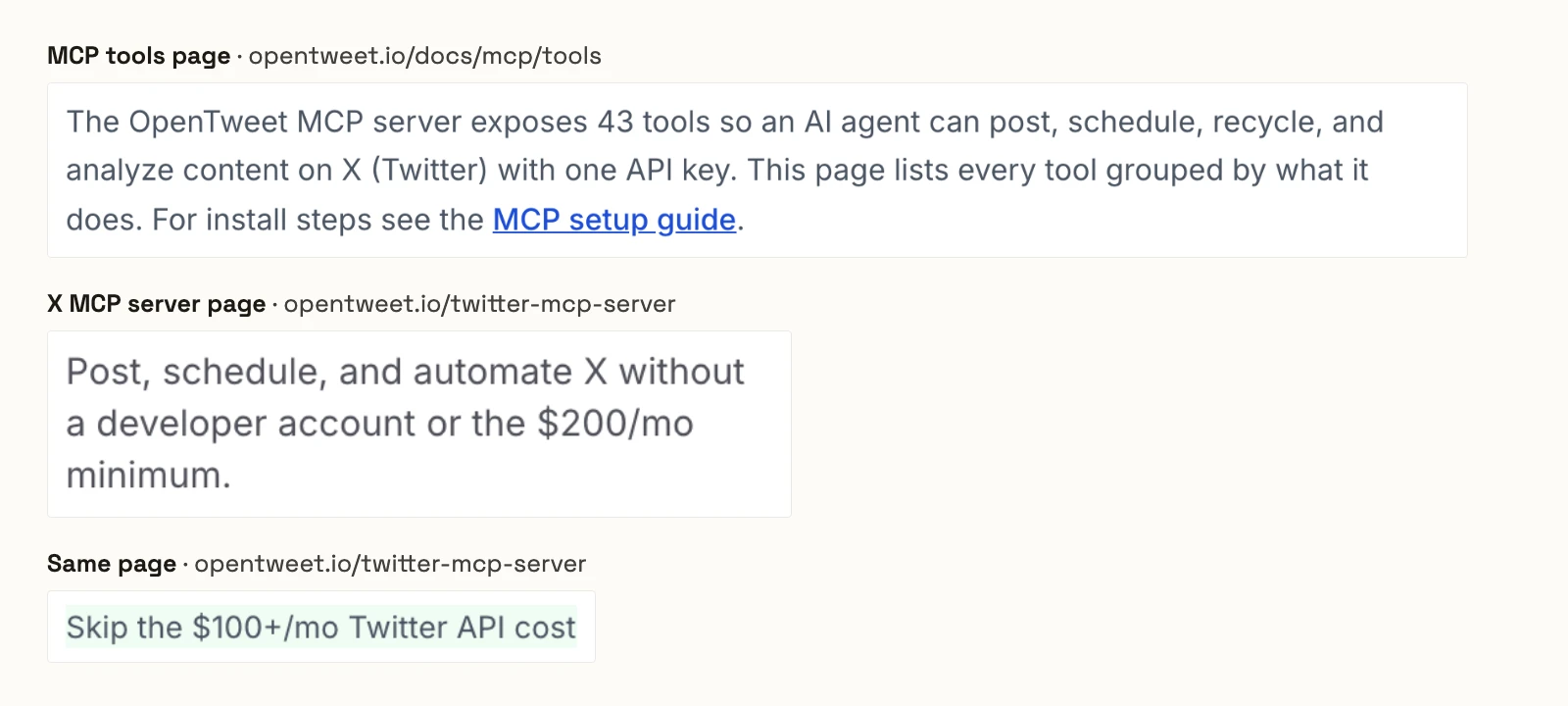
OpenTweet's tools page says its server "exposes 43 tools" to post, schedule, recycle and analyze content on X. Its create_tweet makes "a draft, scheduled, or published now". Its tools read your own posts and analytics, not your mentions or timeline. Pro is $19.99 a month, with link posts capped at 30 a month. Its X MCP page promises to skip "the $200/mo minimum", while X's pricing page says "No subscriptions".
Pros
- No X developer app.
- Threads of up to 25 posts, scheduling and post recycling.
Cons
- No tool for reading mentions or your timeline.
- Pro caps posts with a link at 30 a month.
- Its pages describe an X API minimum that X's own pricing does not have.
Best for: solo creators who want to schedule posts from Claude without a developer app.
Composio
Composio's Twitter toolkit carries 81 tools, and it connects through an X app you create.
Composio's Twitter toolkit lists 81 tools for posts, DMs, lists, search, timelines and analytics, and says "Twitter requires connections to go through your own OAuth app". It has no mentions tool. Hobby is $0 for 100,000 tool calls a month, and Pro is $29.
Pros
- DMs, lists and search in one toolkit.
- A $0 plan for 100,000 tool calls a month.
Cons
- No mentions tool in its list.
- Its own FAQ says to keep "an approval step in your prompt" before sending or deleting.
- Like and follow tools that X's self-serve plans no longer support.
Best for: developers building their own agent on Composio's SDK.
DemandBird
DemandBird drafts and schedules X posts with team approvals, and its MCP server needs the Business plan.

DemandBird's X MCP page lists 15 tools to draft, schedule and publish. "Required reviewers block publishing until everyone approves," and delete_post on a published post "leaves the live copy on X". The page shows "From $29.25/mo", the Pro price, while its docs put MCP on Business at $69 a month.
Pros
- Drafts and required reviewers before anything publishes.
- No X developer app.
Cons
- The MCP server needs the $69 Business plan.
- Deleting a published post leaves the live copy on X.
- No mentions or timeline reading in its tool list.
Best for: teams who want every X post reviewed inside DemandBird.
DataWhisker x-mcp-server
DataWhisker's open-source server posts and reads with your own X API keys.
The DataWhisker repository is MIT licensed with 26 tools for timelines, search, posting, mentions, lists and media. It needs four OAuth 1.0a keys plus OAuth 2.0 for media, and has no DM tools. Its README still prices X's API on the 2025 tiers. The last commit was on 2026-06-21.
Pros
- Mentions, timelines and posting in one MIT server.
- No server fee.
Cons
- No DMs.
- Like and quote tools that X's self-serve plans no longer support.
- Its README prices X's API on the 2025 tiers.
Best for: developers who want a small posting server to run themselves.
rafaljanicki x-twitter-mcp-server
rafaljanicki's Python server reads and posts with five X credentials.
The repository is MIT licensed with 24 tools for timelines, search, trends, mentions, posts and bookmarks. It needs five X credentials, plus an OAuth 2.0 user token for bookmarks. It has no DM tools, and its last commit was on 2026-05-24.
Pros
- Timelines, mentions and trends in one install.
- No server fee.
Cons
- No DMs.
- A delete_all_bookmarks tool, which its README calls "DESTRUCTIVE AND IRREVERSIBLE".
- A favourite tool that X's self-serve plans no longer support.
Best for: Python developers who want a self-hosted X reader and poster.
Servers that run X Ads
Five servers here can change X Ads campaigns. InsightfulPipe X Ads is covered in the card above; the other four follow.
X Ads MCP (X's own)
X hosts its own X Ads server, and you bring the developer app that connects it.
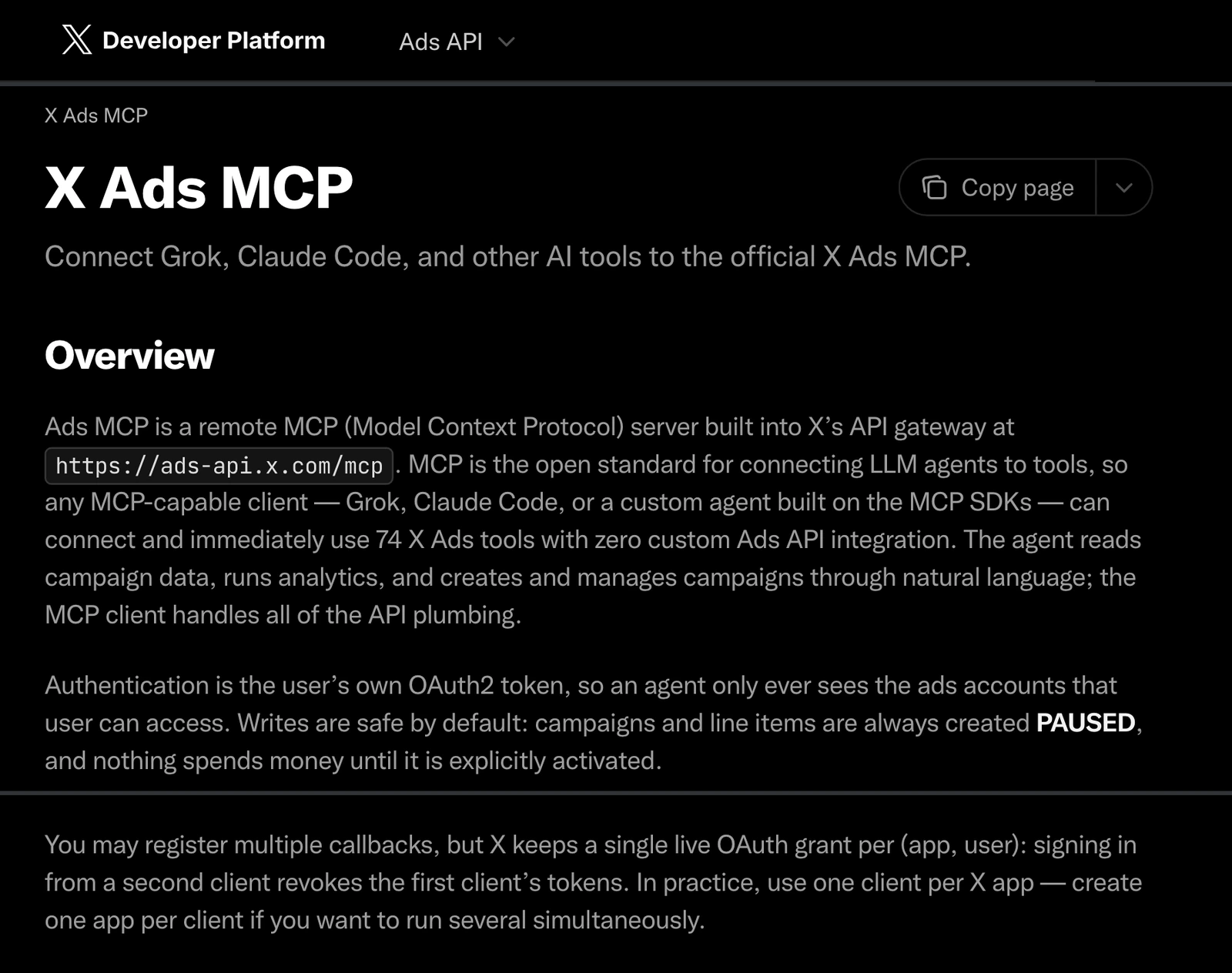
X's docs list 74 X Ads tools at ads-api.x.com/mcp, including audiences and conversion tags. "Campaigns and line items are always created PAUSED," and activate tools set them live. Setup takes a developer app with Ads Project access, and X keeps one live grant per app and user, so a second client revokes the first. The docs state no price.
Pros
- Built and hosted by X, with campaigns created paused.
- Audiences, do-not-reach lists and conversion tags.
Cons
- You create and maintain an X developer app with Ads Project access.
- One live sign-in per app and user.
- The only documented control over actions is the OAuth scope.
Best for: developers who already run an X developer app with Ads API access.
AdKit
AdKit saves every X change as a draft, and its own docs say new projects can publish them.
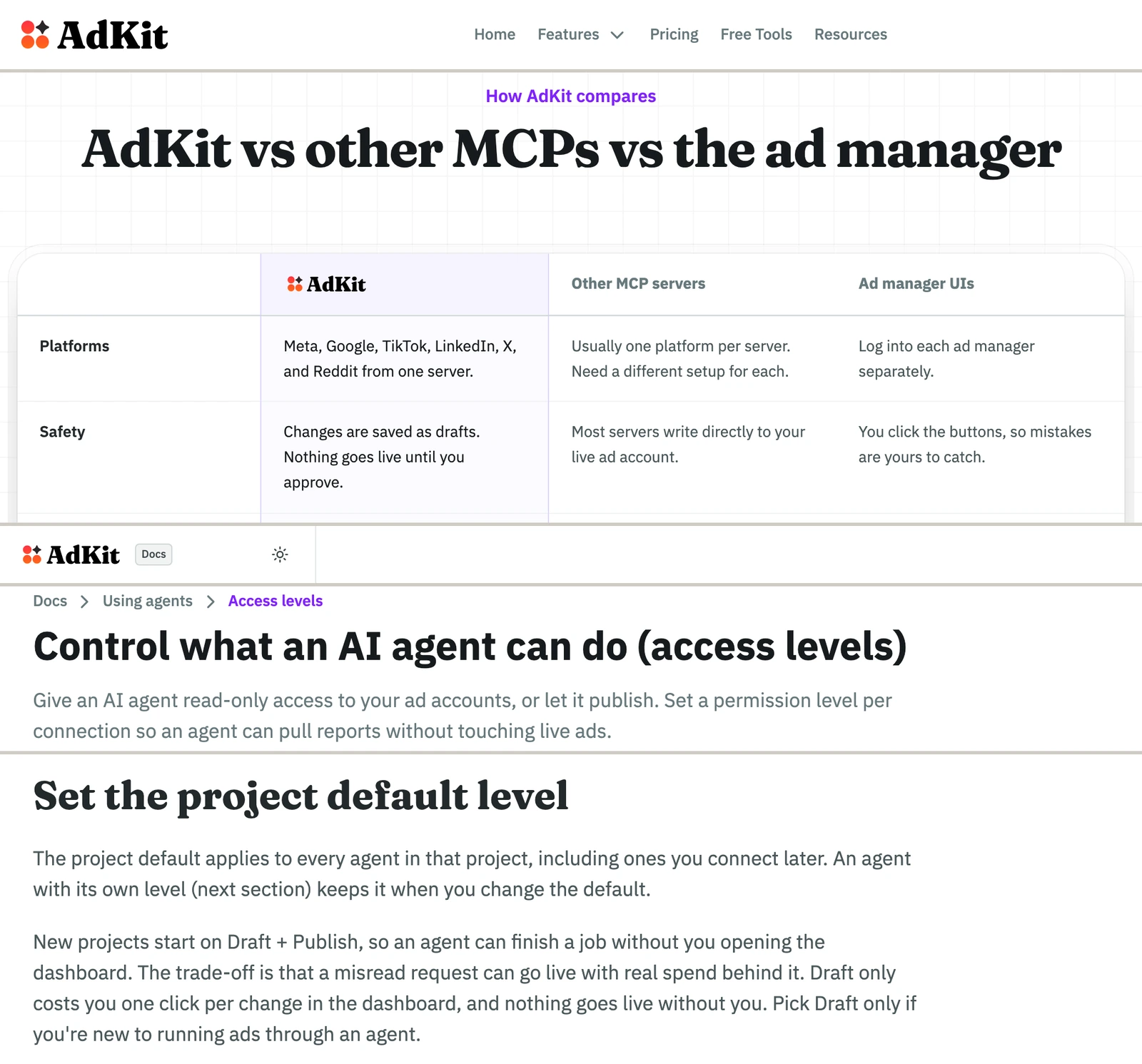
AdKit's X Ads page says "Every change lands as a draft you approve before X sees it." Its access level docs say "New projects start on Draft + Publish", where "a misread request can go live with real spend behind it." AdKit publishes no X tool count. One project is $29 a month, and unlimited projects are $49.
Pros
- Every change starts as a draft.
- Seven ad platforms on one server.
Cons
- New projects start on Draft + Publish, per its own docs.
- Access comes in four levels, not action by action.
- No X Ads tool count published.
Best for: teams who want to review every change inside AdKit's dashboard.
Markifact
Markifact lists 32 X Ads tools, and its approval step is a setting in your AI client.
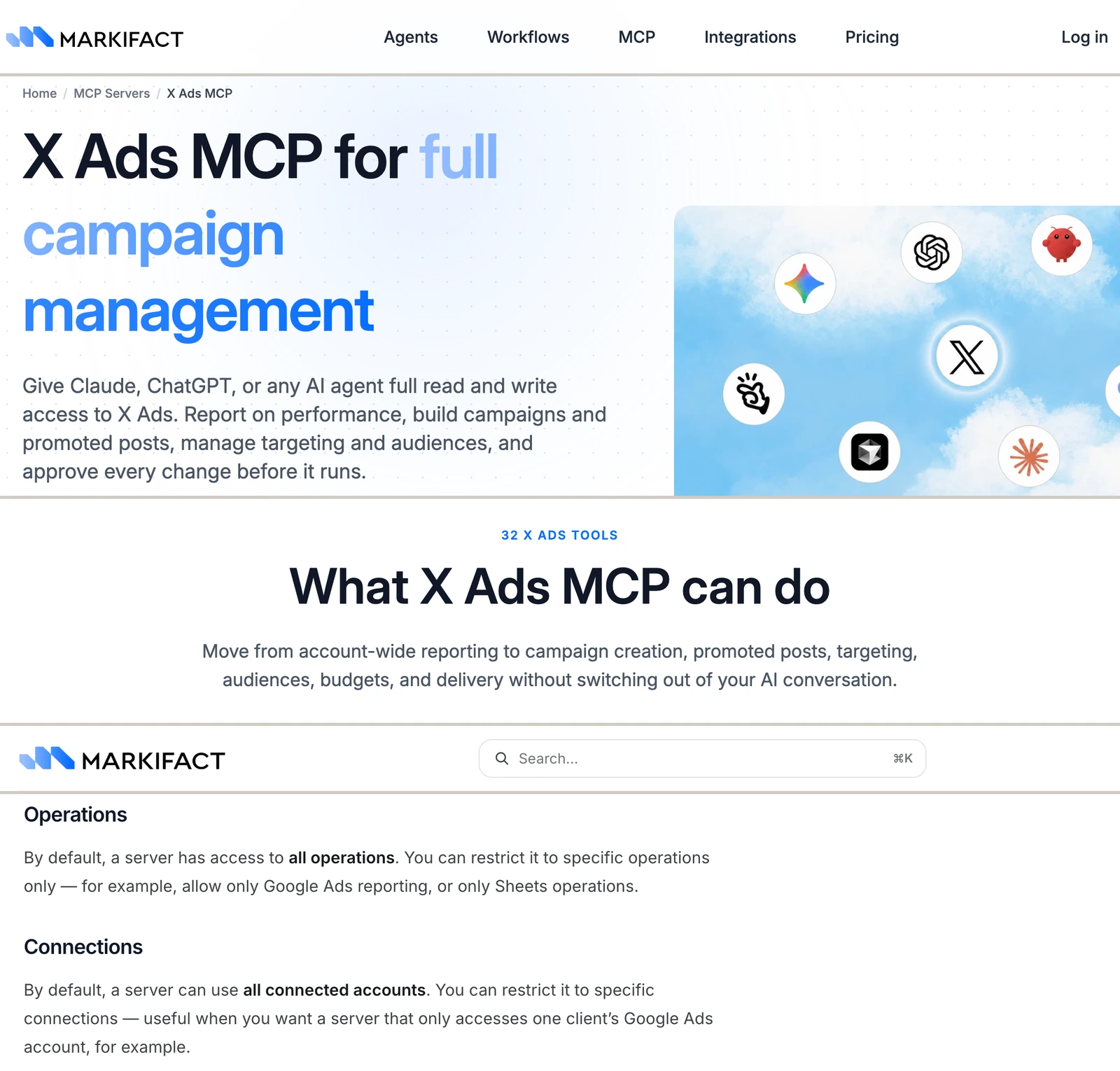
Its X Ads page says "The current connector exposes 32 operations", including audiences and organic or promoted-only posts. Its docs give the MCP approval model as "Client-controlled (approve writes per your client's settings)". Its MCP docs add that "By default, a server has access to all operations" and "can use all connected accounts." Pro is $79 a month with 2,500 credits.
Pros
- 32 named X Ads operations, including audiences.
- A server can be restricted to chosen operations.
Cons
- A new server reaches all operations and all accounts until you restrict it.
- Approval before a write is your AI client's setting.
- Pro starts at $79 a month.
Best for: teams already running workflows inside Markifact.
NotFair
NotFair lists 40 X Ads tools, and its X page says X has no Ads MCP of its own.
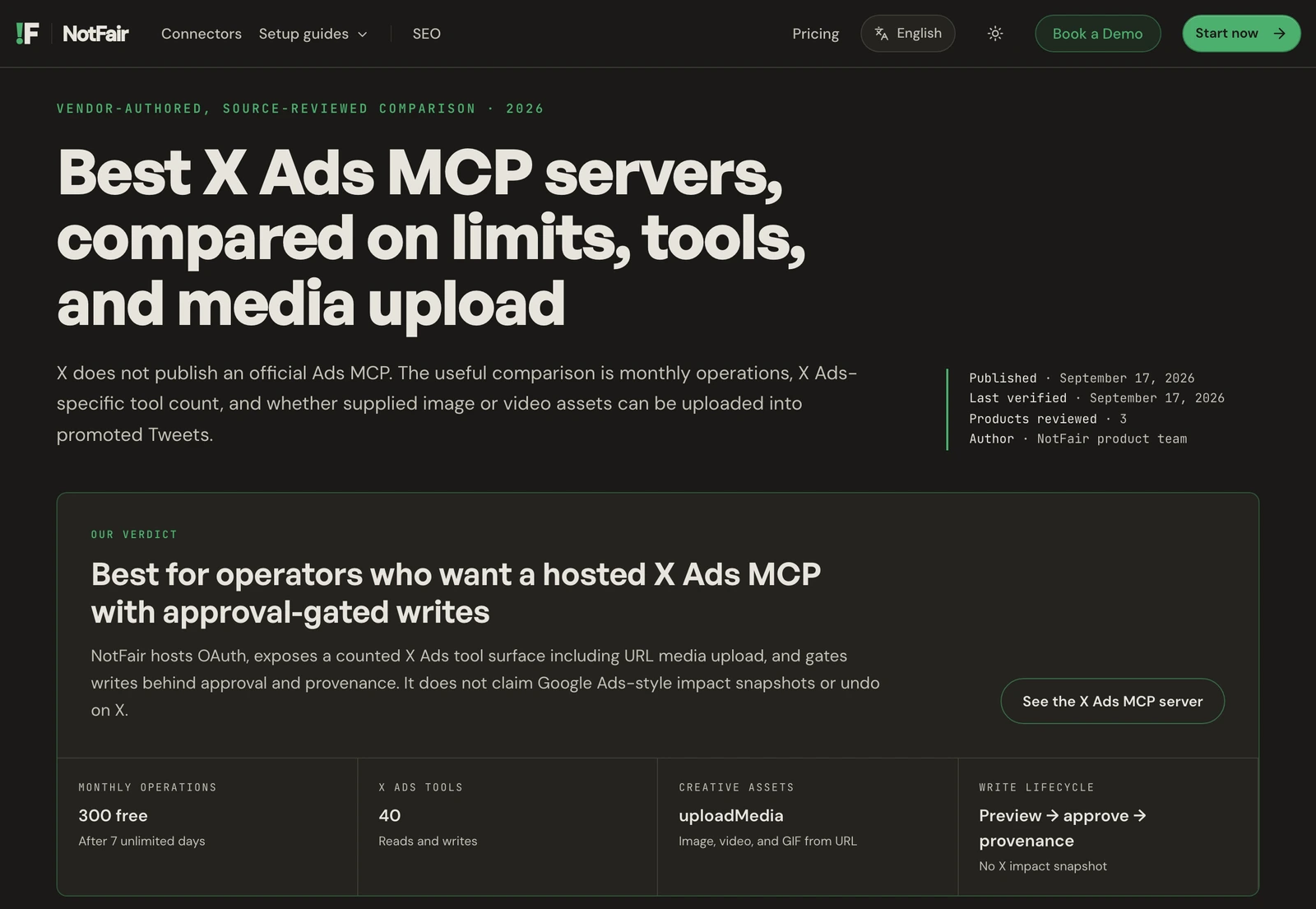
NotFair's X Ads page says "every write requires explicit human approval before it hits the X Ads API." It counts 40 X Ads tools and says "There is no official X Ads MCP," while X documents one. After a first week of unlimited use, the free plan covers 300 operations a month, and Growth is $99 a month.
Pros
- Writes wait for an approval in the chat.
- No X developer app.
Cons
- Its pages deny an X Ads MCP that X documents.
- The free plan stops at 300 operations a month after the first week.
- No per-action switches published.
Best for: operators who want to approve each X Ads change one by one.
Connectors that only report on X Ads
A read-only InsightfulPipe X Ads connection brings X Ads reports into Claude beside 49 more platforms, and it locks every write until an admin reconnects it with read and write. Several hosted connectors also report on X Ads and change nothing: Windsor.ai, Porter Metrics, Two Minute Reports, Adzviser and Supermetrics, whose write list names five other ad platforms, not X.
What an agent can do to your X account on day one
What an agent can do on day one depends on each server's defaults. Ask three questions before you connect a live account.
Server | A new post | Deletes on a new connection | Who sets the limits | What stops runaway API spend |
|---|---|---|---|---|
InsightfulPipe | Live at once; create_post is a switch per account | Off until an admin switches them on | An admin, per account, enforced on the server | 10 results a page, no auto-paging, writes sent once, a credit check |
X MCP | No post tool listed | Not published | OAuth scopes | Not published |
xmcp | Live at once | No approval step | One server-wide allowlist | Not published |
OpenTweet | Draft, scheduled or live, per the call | Not published | Not published | Its plan caps link posts |
DemandBird | Draft first, with optional reviewers | Its delete leaves the live copy on X | Required reviewers | A flat plan |
Composio | Not published | Not published | Not published | Not published |
What goes live? A post sent through the X API goes live at once on every server that can post. On InsightfulPipe, an admin switches create_post and send_dm off wherever the agent should only read, or draft in the chat.
What can it delete? xmcp loads every tool unless you set an allowlist. On InsightfulPipe, all 21 destructive actions start off until an admin switches them on.
What can it spend? Every X API call is billed, so a server that pages or retries by itself spends credit you did not plan. InsightfulPipe pages only when asked and sends each write once. That is why it is the safest of the servers that can write: all 21 destructive actions, from delete_post to cancel_async_job, start off, and every action is a switch your admin controls.
Two X rules apply to every server here. Likes, follows and quote posts are gone from X's self-serve API plans, and a reply goes through only to your own posts or when the post's author mentioned or quoted you.
What the X API costs an agent
X bills its API per call, with no subscription, so the cost of an X MCP server is the vendor's plan plus X's rates on your own app. X's pricing page lists these on 2026-10-20:
Action | X's price |
|---|---|
Read a post | $0.005 per post |
Read your own posts, mentions, followers or bookmarks, when your account owns the app | $0.001 each |
Read a user | $0.010 |
Read a DM event | $0.010 |
Create a post | $0.015 |
Create a post with a link | $0.200 |
Send a DM | $0.015 |
X charges a resource once per day, caps plans at 3 million post reads a month, and lets you set a spending limit. Because X Organic connects the account that owns your app, reads of your own posts and mentions come at X's $0.001 owned-read rate. InsightfulPipe adds nothing on top of X's rates: its plans include unlimited tool calls.
Which should you choose?
Choose InsightfulPipe if one assistant should post, reply and run X Ads within limits you set.
- You want an assistant to post, reply and read your mentions: InsightfulPipe X Organic. 92 actions switched per account, destructive actions off by default, on your own X app, from $29.99 a month.
- You run X Ads too: InsightfulPipe X Ads on the same login. 80 actions, campaigns created paused, an X sign-in and no developer app.
- You run X next to Google, Meta and LinkedIn: InsightfulPipe, with 49 more platforms on one plan. Our Google Ads roundup, Meta Ads roundup and LinkedIn Ads roundup cover those servers.
- You only need reports: a read-only InsightfulPipe connection, which locks every write until an admin reconnects it with read and write.
Connect InsightfulPipe to X in four steps
Connecting X Organic takes your X developer app's four keys and one server URL. X Ads takes only an X sign-in.
- In the X Developer Console, create an app, add credit, set its permissions to Read and write and Direct message, and generate the access token.
- In InsightfulPipe, open Connected accounts, click Connect account and choose X Organic. Pick Read-only or Read & write, and paste the Consumer Key, Secret Key, Access Token and Access Token Secret. For campaigns, choose X Ads and sign in with X.
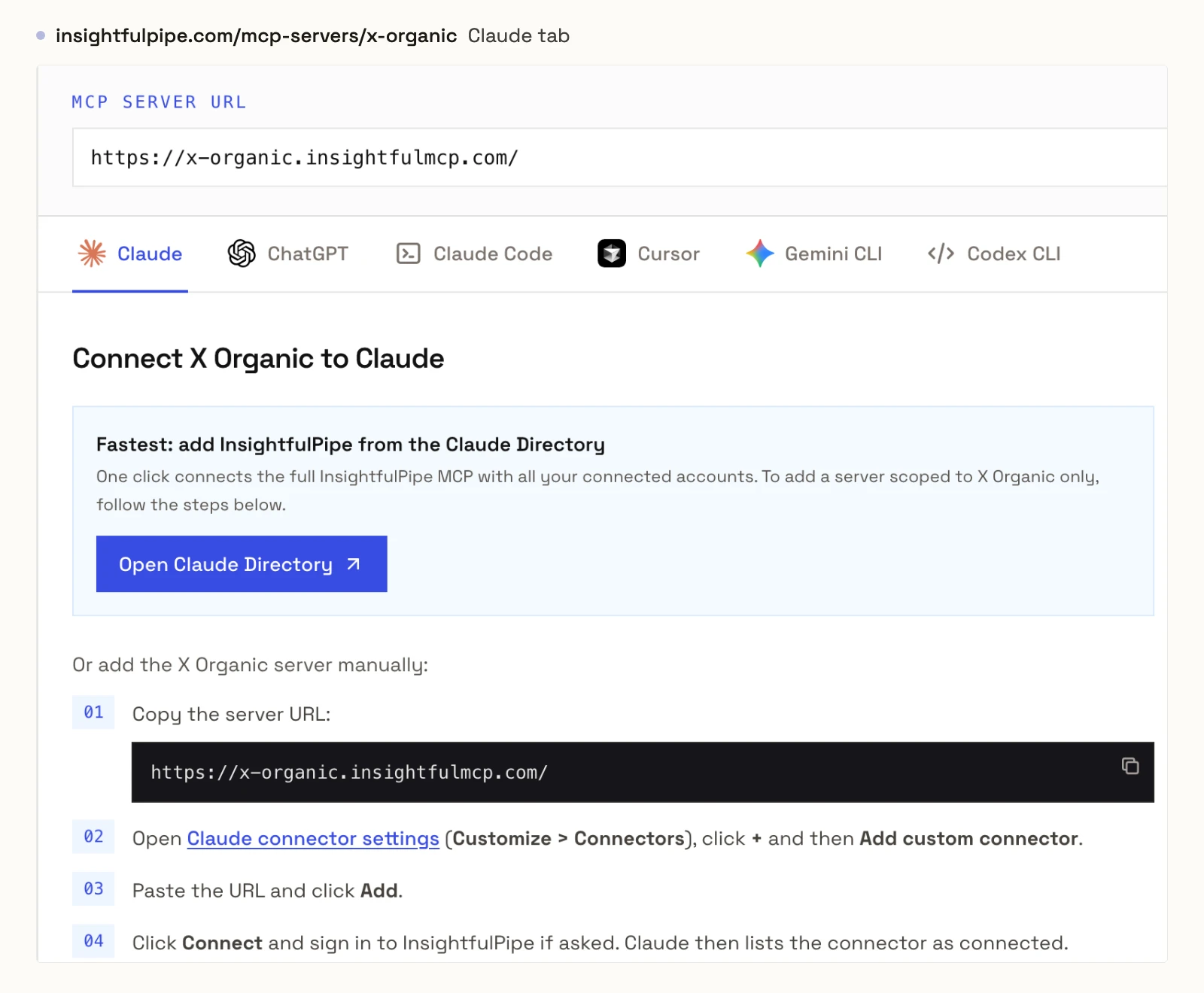
- In Claude, add InsightfulPipe from the connector directory, or add
https://x-organic.insightfulmcp.com/as a custom connector. Click Connect, sign in to InsightfulPipe if asked, and click Authorize access. In Claude Code, runclaude mcp add --transport http x-organic-mcp https://x-organic.insightfulmcp.com/. - Open the account's actions, keep the ones you want, and ask your first question.
For X Ads, our guide to connect X Ads to Claude and the setup docs cover every client. Start a trial, connect X, and switch on only the actions you want the agent to have.
What the other vendors do not publish
Several claims here could not be checked, because the vendors publish nothing to check or say two different things.
- X: a tool for creating posts or DMs on the hosted X MCP, a price for the X Ads MCP, and any limit narrower than an OAuth scope.
- OpenTweet: any per-action control, and a source for the X API minimum its page describes.
- AdKit: an X Ads tool count, and one answer on drafts, since its X page and its docs disagree.
Frequently asked questions
Sources (checked 2026-10-20)
Every competitor claim above comes from that vendor's own page, documentation or repository, opened on 2026-10-20.
- InsightfulPipe: X (Twitter) MCP server, X Ads MCP server, X Organic README, connect X Ads to Claude, X Ads connector docs, pricing, CLI
- X: X MCP and Docs MCP, X Ads MCP, X API pricing, xmcp, xurl
- OpenTweet: MCP tools, X MCP server, pricing
- Composio: Twitter toolkit, pricing
- DemandBird: X MCP, MCP docs
- DataWhisker: x-mcp-server
- rafaljanicki: x-twitter-mcp-server
- AdKit: X Ads MCP, access levels, pricing
- Markifact: X Ads MCP, MCP docs, approval models, pricing
- NotFair: X Ads MCP
- Reporting connectors: Windsor.ai, Porter Metrics, Two Minute Reports, Adzviser, Supermetrics
- Left out: EnesCinr/twitter-mcp