Disclosure: InsightfulPipe publishes this and is one of the 10 options ranked.
The verdict
The best TikTok Ads MCP server in 2026 is InsightfulPipe. Of the 10 best TikTok Ads MCP servers compared here, it is the only hosted one that combines 89 TikTok Ads actions, an on or off switch for each action on every advertiser, and delete-type actions that start off. That makes it the safest of the servers that can write to TikTok Ads.
That combination decides more than any tool count. Seven of the ten can change a TikTok ad account. TikTok's own server offers about 400 tools, and its help page and Claude listing publish no per-advertiser limits. Markifact's docs say a new server reaches all operations and all accounts. AdKit's docs say new projects start on Draft + Publish.
- Best overall: InsightfulPipe. Its TikTok Ads MCP server carries 89 actions, 15 read and 74 that make changes, across campaigns, Smart+, GMV Max, audiences, creatives and pixels. From $29.99 a month.
- Safest way to let an AI agent change TikTok Ads: InsightfulPipe. New campaigns, ad groups and ads start disabled for you to set live, and 10 delete-type actions stay off until an admin switches them on.
- Best value: InsightfulPipe. $29.99 a month covers 8 connections across 50 platforms, with unlimited tool calls. Markifact starts at $79, and Pipeboard's $29.90 plan covers 3 ad accounts.
The best TikTok Ads MCP servers at a glance
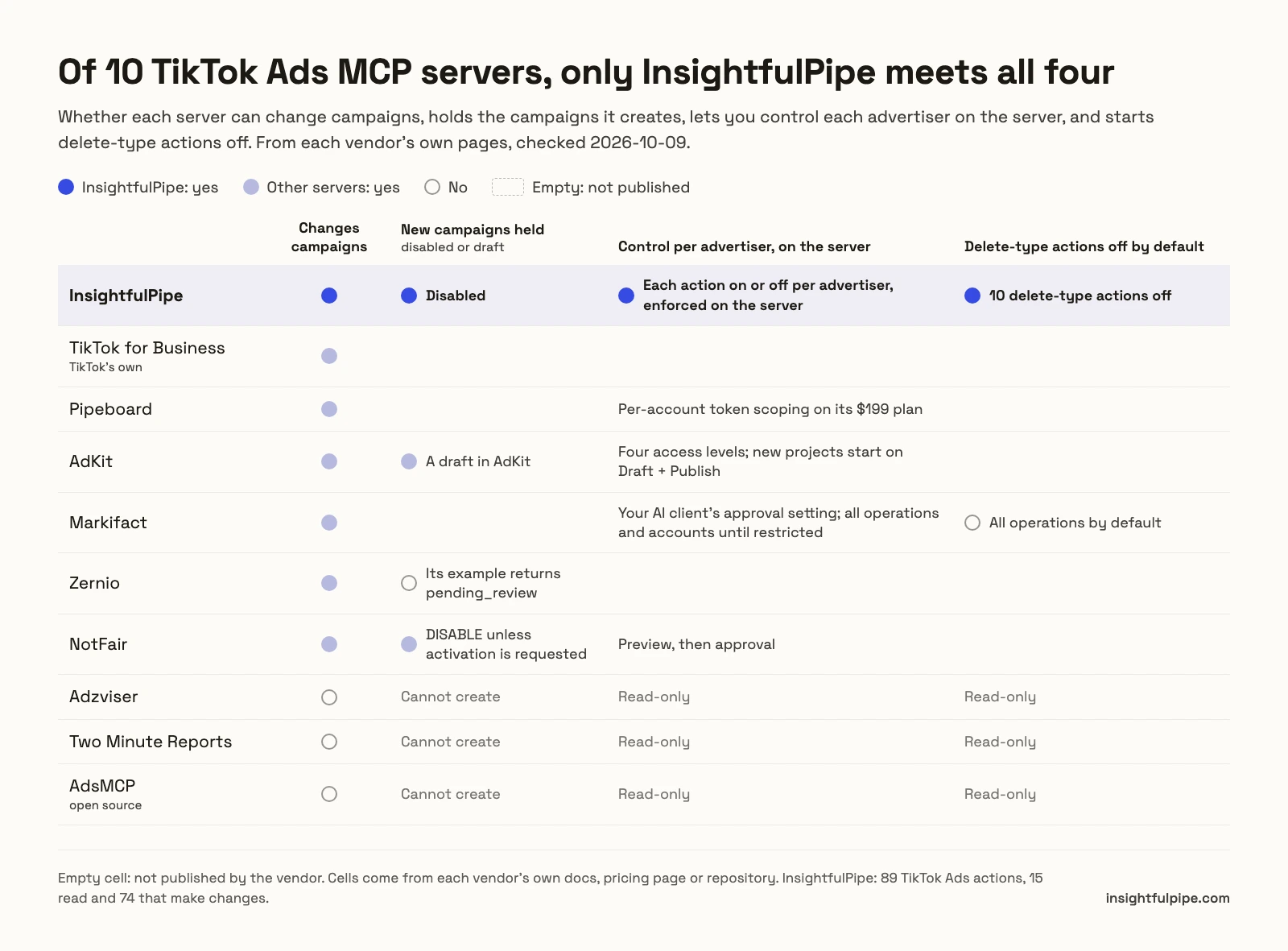
Ten servers, compared on what they can change in TikTok Ads, what a new campaign starts as, what limits a write, and what it costs to start.
Server | TikTok Ads tools | Changes campaigns | New campaigns start as | Control before a write | Starting price |
|---|---|---|---|---|---|
InsightfulPipe | 89 actions: 15 read, 74 that make changes | Yes | Disabled, for you to set live | Each action on or off per advertiser, enforced on the server; delete-type actions off by default | $29.99/mo |
TikTok for Business (TikTok's own) | About 400, or about 40 loaded first; 39 in Claude's directory | Yes | Not published | Not published | Not published |
Pipeboard | 20+ | Yes | Not published | Per-account token scoping on its $199 plan | $0 for 2 ad accounts, then $29.90/mo |
AdKit | Not published | Yes, through drafts | A draft in AdKit | Four access levels; new projects start on Draft + Publish | $29/mo |
Markifact | Not published for TikTok | Yes | Not published | Your AI client's approval setting; all operations and accounts until restricted | $79/mo |
Zernio | 496 across all its platforms | Yes | Live by default; paused only if the request asks | Not published | $0 for 2 accounts, then $6 per account |
NotFair | 96 | Yes | DISABLE unless activation is requested | Preview, then approval | $0 for 300 operations a month, then $99/mo |
Adzviser | Not published | No, read-only | Cannot create | Read-only | $48.99/mo |
Two Minute Reports | Not published | No, read-only | Cannot create | Read-only | $81/mo, billed annually |
AdsMCP (open source) | 20 | No, read-only | Cannot create | Read-only | Free to self-host |
How we tested
We read every capability, default and price from each vendor's own documentation, pricing page or public repository, and ran InsightfulPipe on live accounts. We checked every page on 2026-10-20, with the same method as our Google Ads comparison.
We compared the ten on eight criteria:
Criterion | What we checked |
|---|---|
TikTok Ads coverage | How many TikTok Ads tools or actions does the agent get, and do they reach Smart+, GMV Max, audiences and pixels? |
Writes | Can it create and change campaigns, ad groups, ads, creatives and budgets? |
Control before a write | Can you choose, per advertiser, which actions the agent can use, and does the server enforce it? |
Default on a new connection | What can the agent do before anyone narrows it? |
New campaigns | Does a campaign the agent creates start disabled, as a draft, or live? |
Setup | Is it a sign-in, or a TikTok developer app and tokens you manage? |
Other platforms | Does the same login reach Google Ads, Meta Ads, GA4 and the rest? |
Price | What does write access cost to start? |
Where a vendor's own pages contradict each other, we quote both and attribute them to the vendor. Where a capability is not published, we write "not published" rather than guess. We count only features that ship today, so roadmap items do not score.
Search results and AI answers name more options than these ten. We left out reporting tools whose TikTok pages are Claude setup pages rather than MCP server products, read-only dashboards, small repositories and servers that publish too little to compare, and the FAQ names several with their reasons.
The single question that splits this list
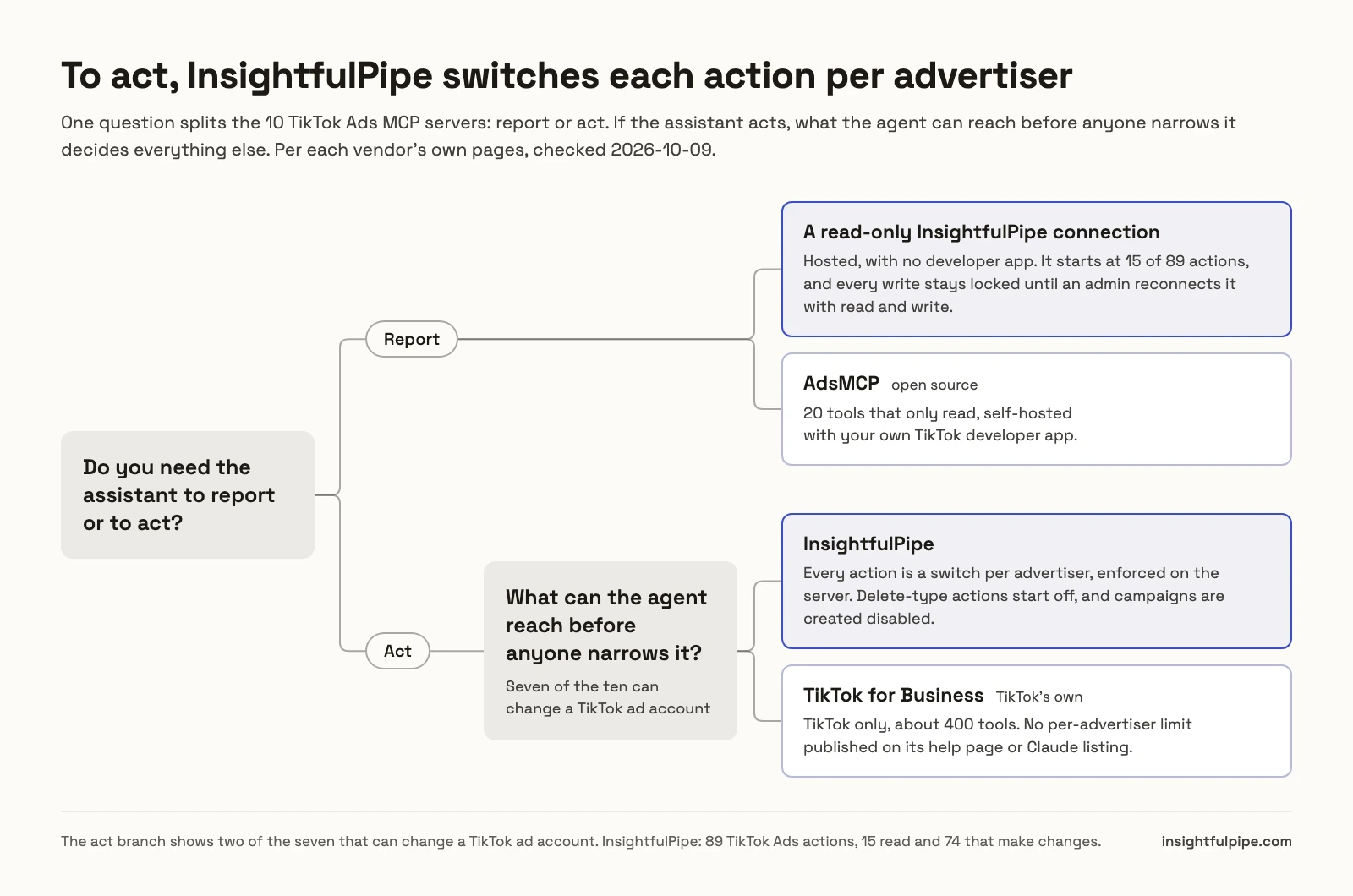
One question splits these ten: whether you need the assistant to report or to act. If it only reports, a read-only connection does the job. If it acts, what the agent can reach before anyone narrows it decides everything else.
If you only need reports, connecting an advertiser to InsightfulPipe as read-only locks every write until an admin reconnects it with read and write, with no developer app to set up. AdsMCP's open-source server also only reads, but you host it yourself with your own TikTok developer app.
If you need the assistant to act, the list collapses to seven, and the defaults matter most. TikTok's own server publishes no per-advertiser limit on its help page or Claude listing. Markifact leaves approval to a setting in your AI client. AdKit holds changes as drafts but starts new projects on Draft + Publish. InsightfulPipe decides on its server, per advertiser, before the session starts.
Hosted servers that can change TikTok campaigns
Seven of the ten are hosted and can create or change TikTok campaigns. InsightfulPipe leads them, and TikTok's own server comes next.
Best overall: InsightfulPipe
InsightfulPipe gives an AI agent 89 TikTok Ads actions, and you decide which of them each advertiser allows.
InsightfulPipe is the pick if you want the assistant to do the work in TikTok Ads Manager, not describe it, and you want to decide exactly how far it goes.
Coverage comes first. InsightfulPipe carries 89 TikTok Ads actions, 15 read and 74 that make changes, across everything an advertiser runs:
- Reporting: TikTok's integrated report by campaign, ad group or ad, plus full metadata for advertisers, campaigns, ad groups and ads
- Campaigns, ad groups and ads: create, update, enable and disable, including Smart+ campaigns, ad groups and ads
- GMV Max and TikTok Shop: GMV Max campaigns and sessions, linked TikTok Shops and TikTok's GMV Max report
- Creatives: image and video upload, creative portfolios, image edits, smart text, playables and shareable links
- Audiences: custom audiences from files or rules, lookalikes, saved audiences and audience sharing
- Measurement: set up pixels and pixel events, offline event sets and app registration
- Automated rules: create, update and bind TikTok's optimizer rules
- Comments and brand safety: reply to, hide and delete ad comments, blocked words and Pangle block lists
- Account settings: the advertiser's details, identities and TikTok's terms
- Planning: targeting search and recommendations, and bid recommendations for an ad group
Why it is the safest way to let an agent change TikTok Ads
Control comes second, and it makes InsightfulPipe the safest way to let an AI agent change a TikTok ad account. Every limit is a switch, and your admin decides where each one sits.
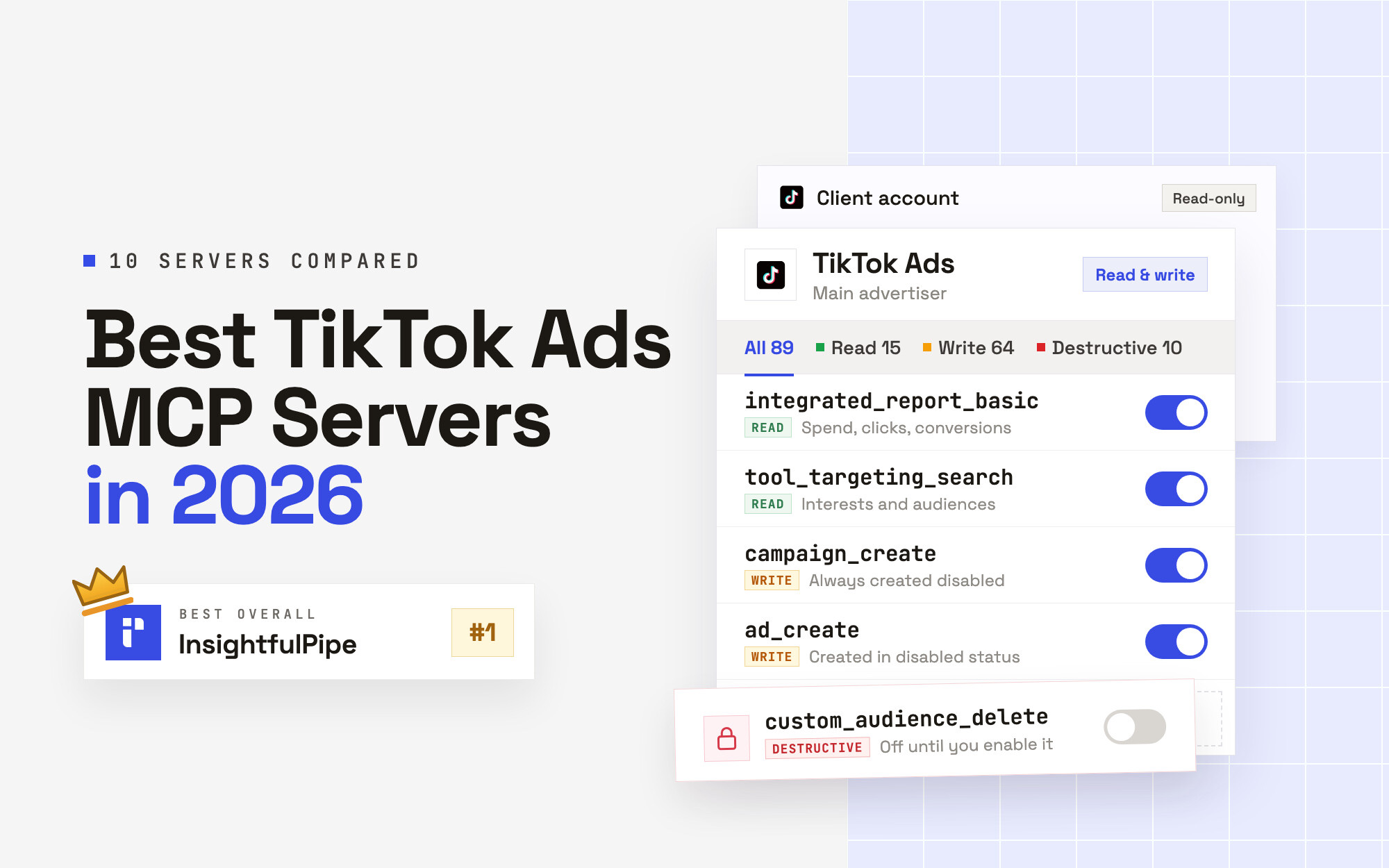
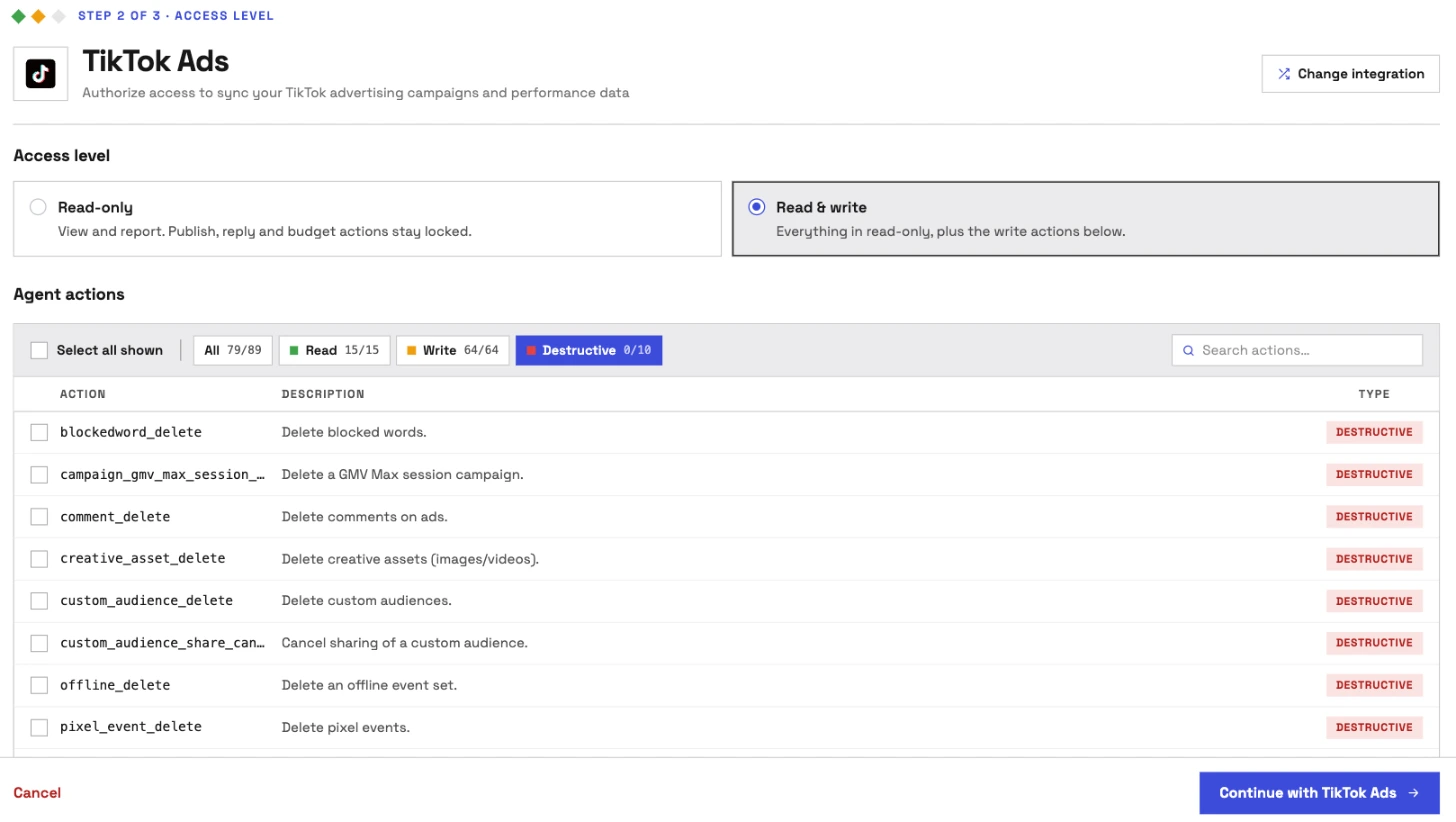
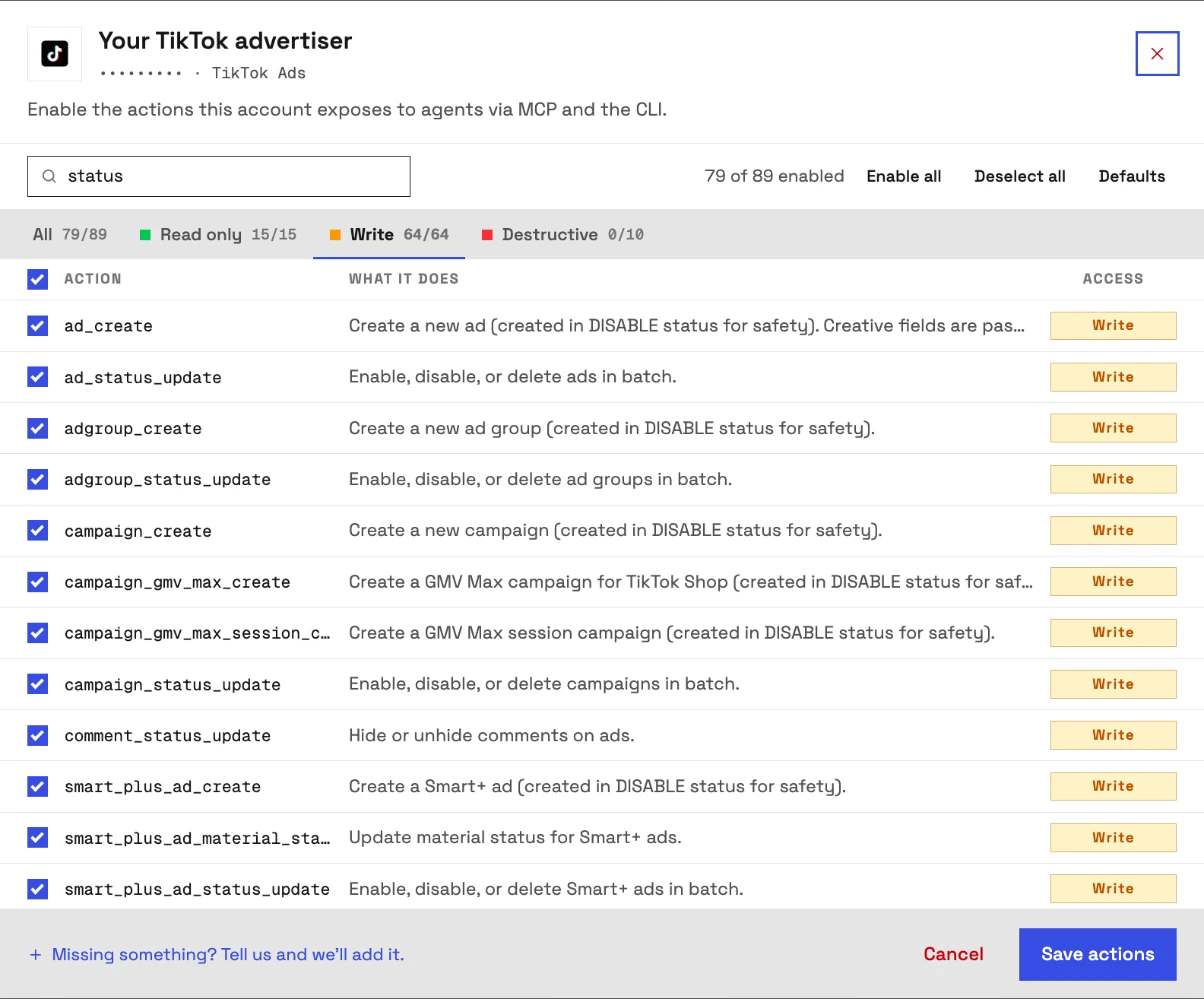
An owner, admin or operator opens a connected advertiser and picks exactly which of its 89 actions the agent can use, across read, write and destructive. They can switch any of them on or off at any time. InsightfulPipe's server enforces that list, not your AI client, so the same limits hold in Claude, ChatGPT, Cursor, Claude Code, Gemini CLI and Codex CLI.
- Delete-type actions start off. 10 actions, such as deleting audiences, pixel events, comments, playables and creative assets, or cancelling an audience share, stay off until an admin switches them on for that advertiser.
- Read-only means read-only. A read-only advertiser starts at 15 of 89 actions, and its writes stay locked until an admin reconnects it with read and write.
- New campaigns start disabled, for you to set live when they are ready. The server sets that status itself on campaigns, ad groups, Smart+ and GMV Max campaigns. New ads start disabled too, even when the request asks for ENABLE.
- Going live is a switch. Six status updates, for campaigns, ad groups and ads and their Smart+ versions, can enable or delete. They start on for a read and write advertiser, and an admin switches them off wherever the agent should not set anything live.
- Money and data are switches too. Campaign and ad group updates move budgets, and
custom_audience_sharehands an audience to other advertisers. Both start on for read and write, and an admin switches them off wherever the agent should not touch either. - One advertiser per connection. Every request is pinned to the advertiser it was connected for. A request that names another advertiser or a Business Center is refused, so one advertiser's switches can never be used to act on another.
- Roles hold. Members on the user role run only switched-on read actions, on the advertisers an owner or admin grants them.
TikTok's help page sells the opposite model: agents that run "complete advertising workflows" without "human intervention at every step." Markifact's approval lives in your AI client's settings, and NotFair stops every write for a preview and an approval. That works while someone watches the chat. On a scheduled run, nobody does.
InsightfulPipe draws the boundary on the server instead. The agent knows its limits before it plans and works inside them. For a human check on top, set execute_action to Needs approval under Claude's Tool permissions, which every Claude user can do.
Why four tools, not four hundred
Every tool a server publishes loads into the model's context before you type a word. TikTok's own help page admits the cost: its full mode loads about 400 tools, and it offers a second mode with about 40 "for token-conscious setups."
InsightfulPipe's TikTok Ads server publishes four tools: query_contexts, query_data, execute_action and prompts_menu. The agent looks up the 89 actions when it needs them. Switch off what an advertiser does not need, and the model picks from a shorter list, with fewer wrong actions to choose.
What else you get
- 50 platforms on one plan, including Google Ads, Meta Ads and GA4, so one agent can put TikTok spend next to the rest of your media.
- TikTok organic too: the TikTok Pages server adds 7 actions for publishing videos and photos and reading video metrics.
- Every major AI client: Claude, ChatGPT, Claude Code, Cursor, Gemini CLI and Codex CLI, each with a setup tab in the app.
- Listed in Claude's connector directory, where one click connects the full InsightfulPipe server.
- Many advertisers, kept apart: your TikTok sign-in lists every advertiser it grants, and each one you pick becomes its own connection with its own action list.
- Free TikTok Ads Claude skills and a free prompt library.
- A CLI: the
insightfulpipenpm package runs the same reads and writes from a terminal, under the same switches.
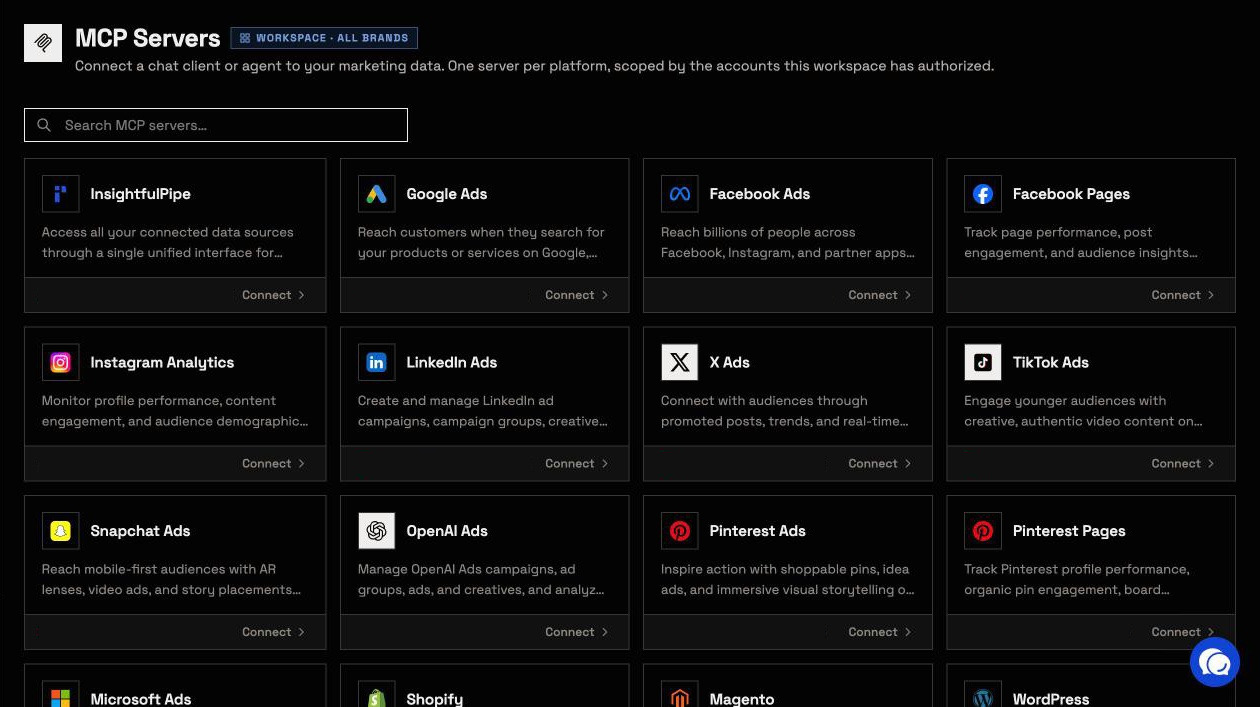
Pricing: Starter is $29.99 a month for 8 connections, Growth $89.99 for 35 and Agency $299.99 for 150, with unlimited tool calls and every MCP server on every plan. Start a trial and connect your first advertiser.
Where it is the wrong answer: if you only ever pull an occasional TikTok Ads report, you would be paying for more than you use.
Best for: agencies and in-house teams who want an assistant that runs TikTok Ads within limits they set, advertiser by advertiser.
TikTok for Business MCP Server
TikTok hosts its own server, and it is built for agents that act with few stops.
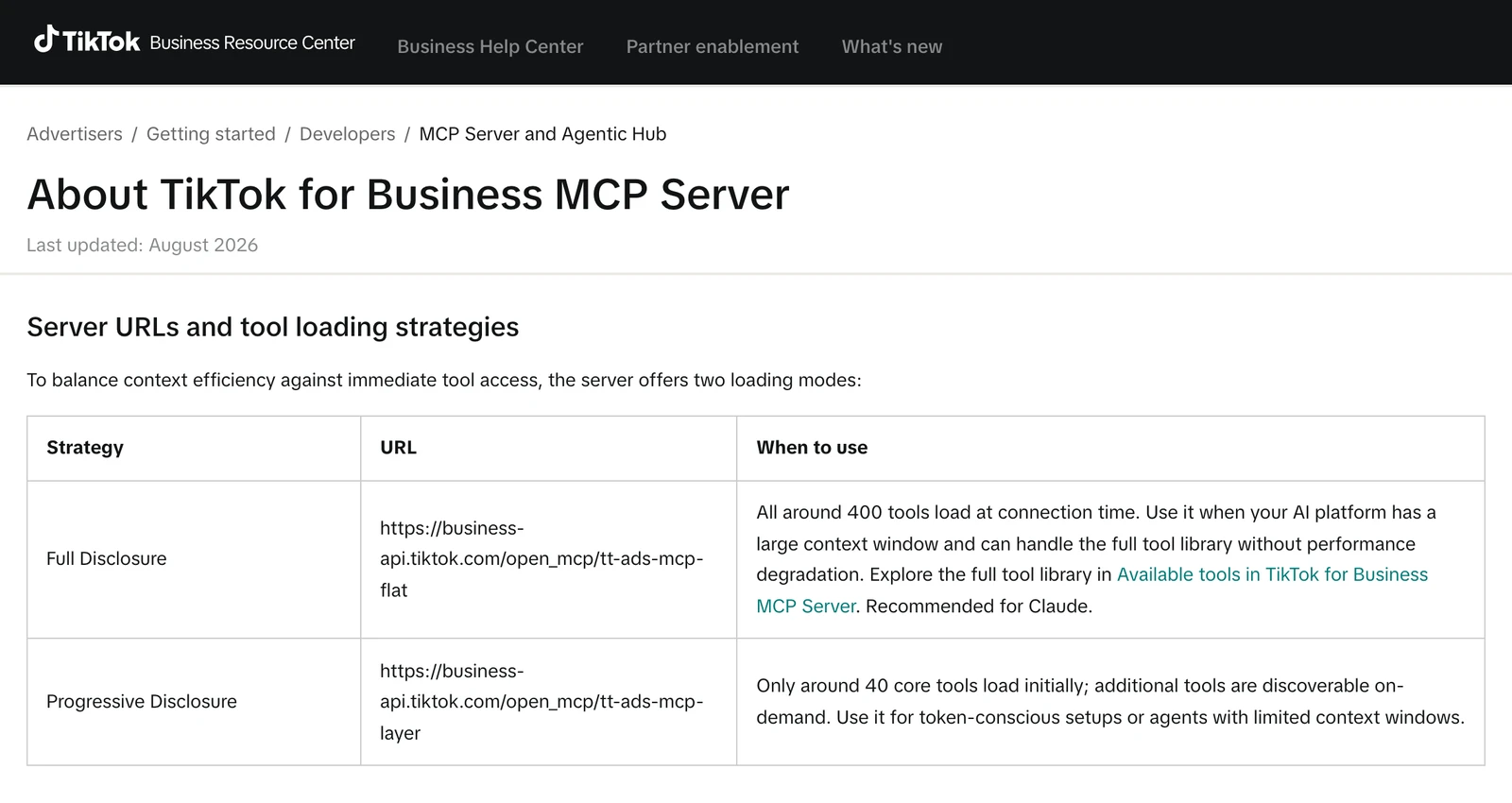
TikTok's help article, last updated in August 2026, offers two server URLs: about 400 tools at once, "Recommended for Claude", or about 40 core tools with the rest found on demand. It says "No developer credential, API key management, or custom coding is required," and pitches agents that run workflows "without human intervention at every step."
The Claude listing shows it as Anthropic verified, made by TikTok, added in August 2026, with 39 tools. Neither page states a price, a per-advertiser action control, a read-only mode or what a new campaign starts as. TikTok's developer guide renders only in a browser.
Pros
- Built and hosted by TikTok, with no developer credential to manage.
- About 400 tools in full mode, or about 40 loaded first.
Cons
- No per-advertiser action control or read-only mode on its help page or listing.
- No default for new campaigns and no price published there.
- TikTok only, so other ad platforms need another server.
Best for: advertisers who run TikTok alone and will set their own limits in their AI client.
Pipeboard
Pipeboard names 20+ TikTok Ads tools, and its status tools can switch campaigns on or delete them.
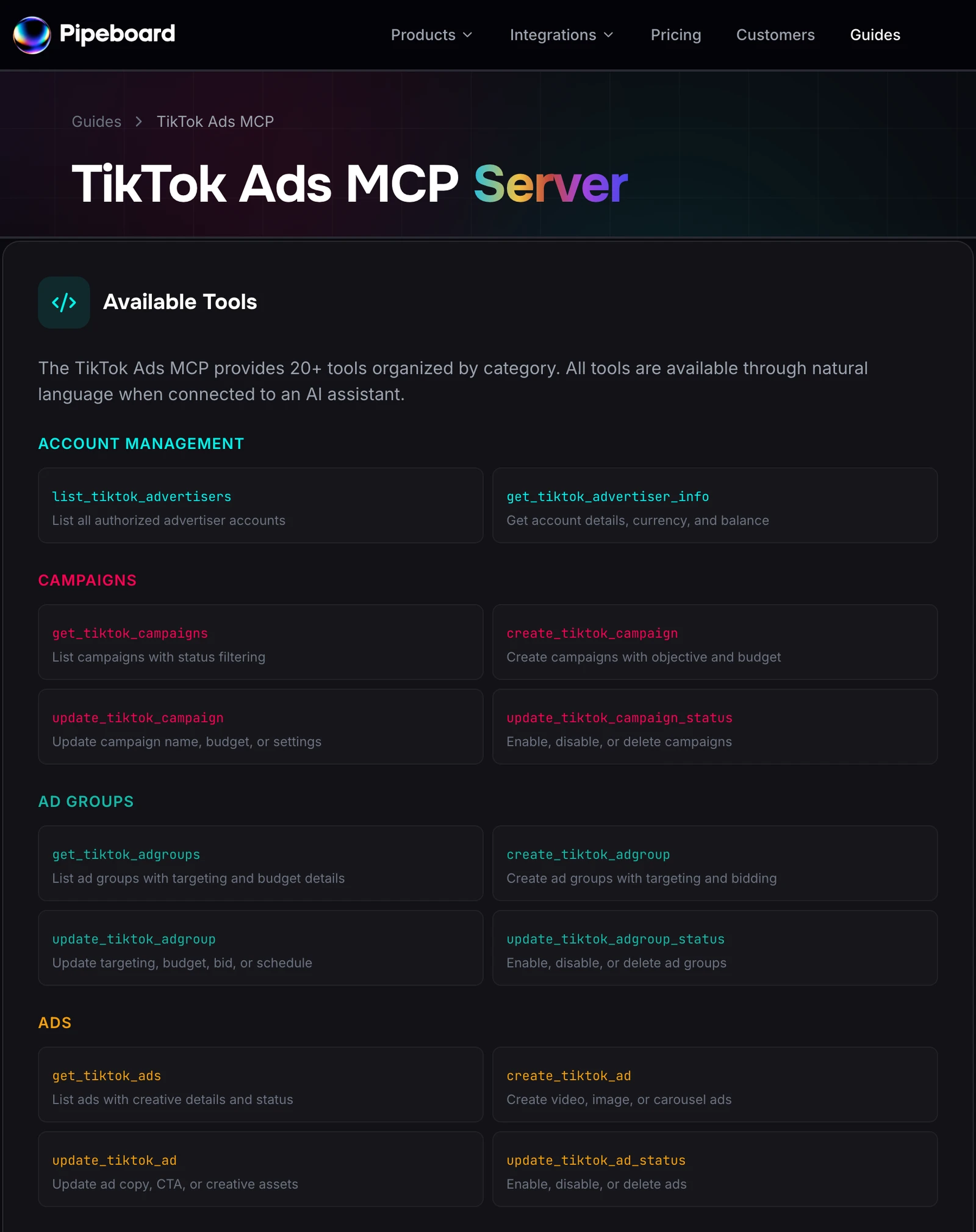
Its TikTok guide lists tools to create and update campaigns, ad groups and ads, upload images and videos, and pull insights. Three status tools "Enable, disable, or delete" campaigns, ad groups and ads. The page states no paused default for TikTok. Its pricing gives 2 ad account slots and 30 tool runs a week free, then $29.90 a month for 3 slots. Per-account token scoping starts on Agency, at $199.
Pros
- 20+ named tools, including image and video upload.
- Works with Claude, ChatGPT and n8n.
Cons
- Status tools can enable or delete, and no paused default is stated for TikTok.
- Per-account token scoping only on the $199 Agency plan.
- The free plan stops at 30 tool runs a week.
Best for: small teams testing TikTok writes on a couple of ad accounts.
AdKit
AdKit saves every TikTok change as a draft, and its own docs say new projects can publish them.
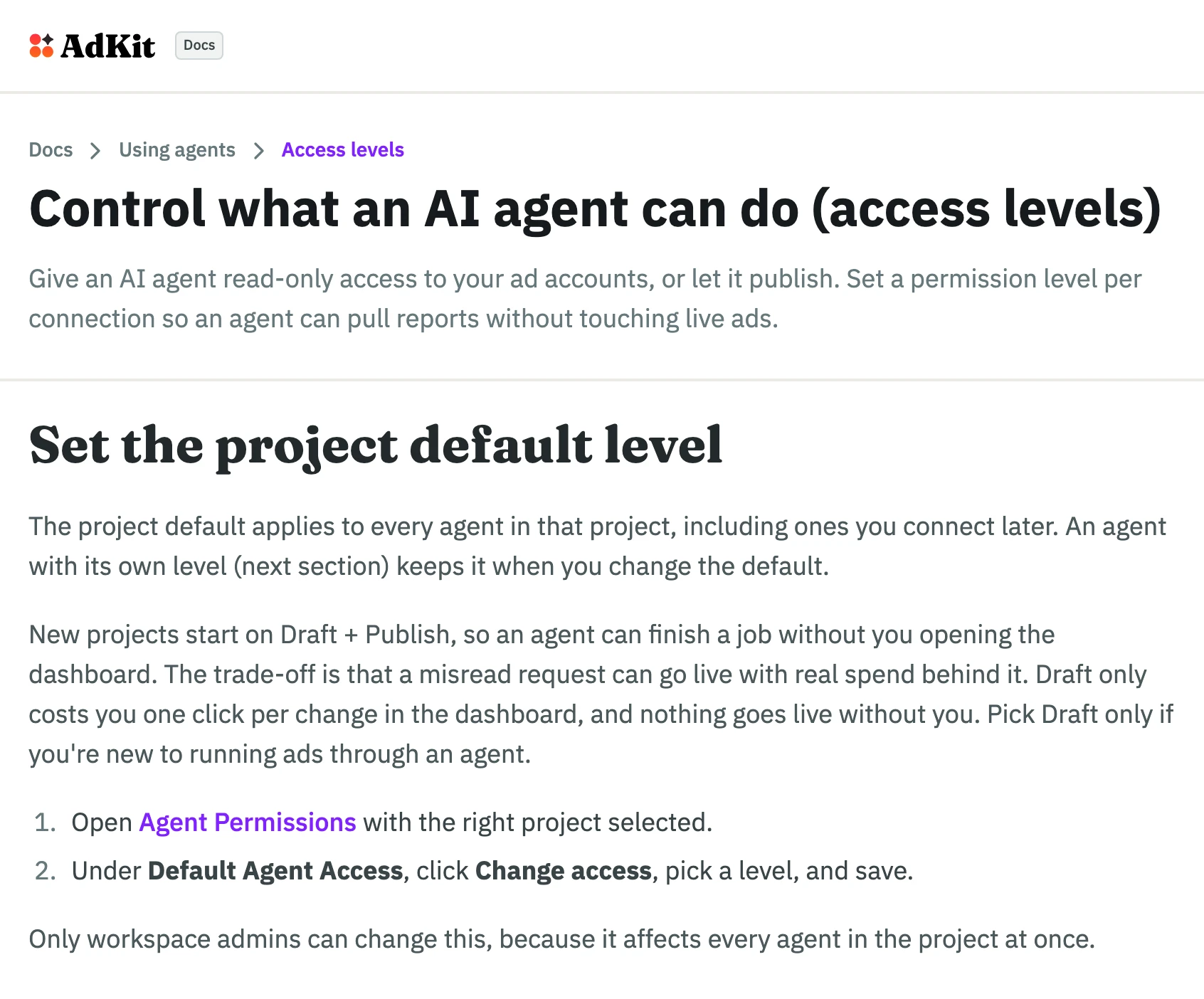
Its TikTok page says "Every change sits as a draft in AdKit until you approve it. Nothing goes live without your say." Its access level docs list four levels and add: "New projects start on Draft + Publish," where "a misread request can go live with real spend behind it." AdKit publishes no TikTok tool count. Single Project is $29 a month for one ad account per platform.
Pros
- Every change starts as a draft.
- An access level per agent.
Cons
- New projects start on Draft + Publish, per its own docs.
- Access comes in four levels, not action by action.
- No TikTok tool count published.
Best for: teams who want to review every change inside AdKit's dashboard.
Markifact
Markifact covers Spark Ads and Smart+, and its approval step is a setting in your AI client.
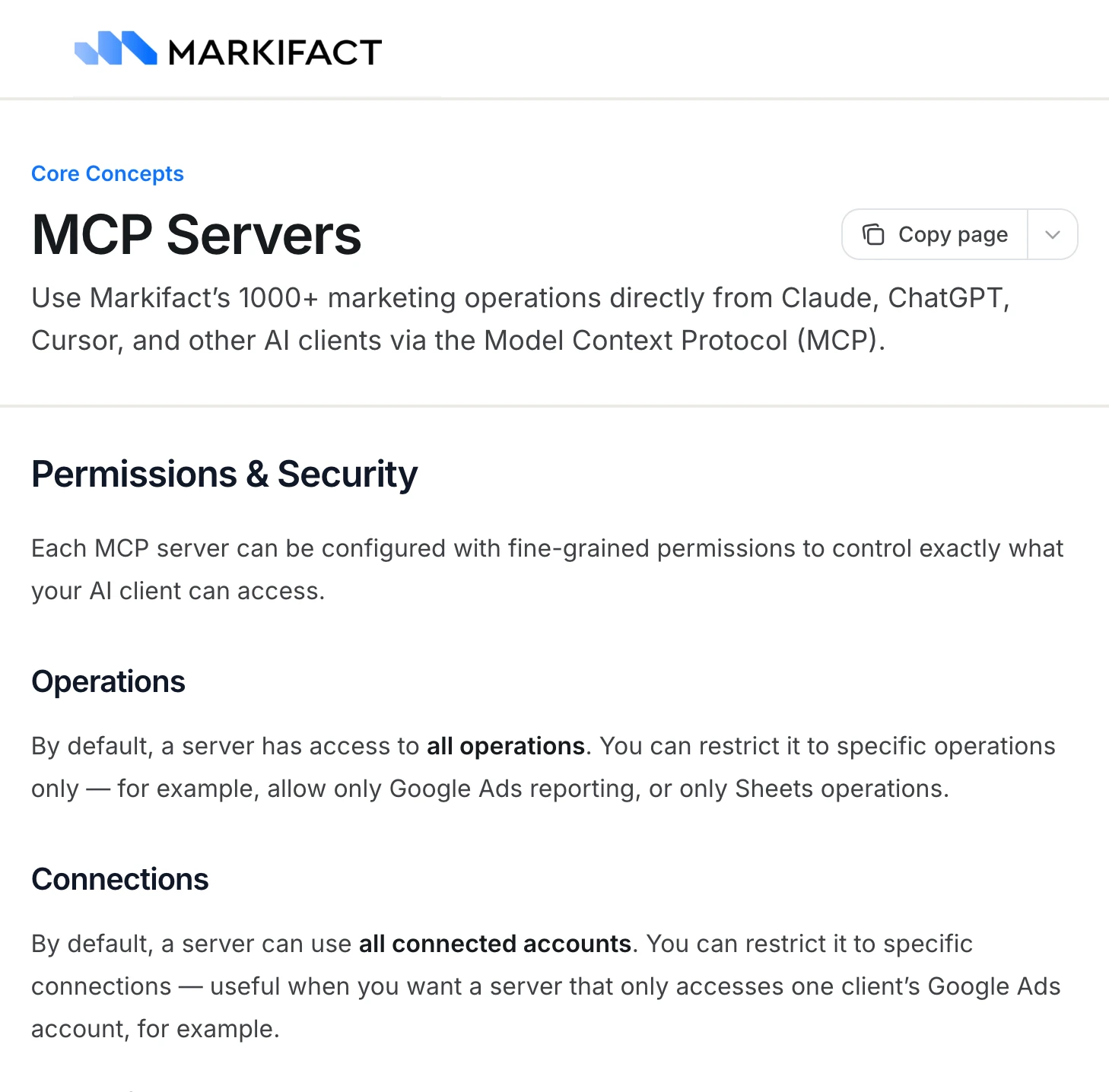
Its TikTok Ads page covers Spark Ads from organic posts and Upgraded Smart+, and says "Every write action stops for your approval first." Its MCP docs put that approval in Claude's Needs approval setting, and say that "By default, a server has access to all operations" and "can use all connected accounts." Pro is $79 a month with 2,500 credits, and MCP data operations use credits.
Pros
- Spark Ads from organic posts and Upgraded Smart+ campaigns.
- A server can be restricted to chosen operations and connections.
Cons
- A new server reaches all operations and all accounts until you restrict it.
- Approval before a write is your AI client's setting.
- Plans start at $79 a month, and MCP data operations use credits.
Best for: teams already running workflows inside Markifact.
Zernio
Zernio is a social and ads API with an MCP server on top, and TikTok Shop ads are still on its roadmap.
Zernio's roundup counts 496 MCP tools across its platforms, and its MCP docs keep about 50 visible, with the rest behind a search tool. Its TikTok Ads docs cover Spark Ads, video and website conversion campaigns, and list catalog and TikTok Shop ads as "Roadmap." Their API reference says a new boost publishes live by default unless the request sends status: PAUSED, and their example returns pending_review. Pricing is free for 2 accounts, then $6 per account.
Pros
- Spark Ads and campaign duplication.
- Per-account pricing.
Cons
- Catalog and TikTok Shop ads are on its roadmap.
- A new boost publishes live by default, paused only if the request asks.
- The agent searches for most tools before it can call them.
Best for: developers who post organic TikToks and boost them from the same API.
NotFair
NotFair counts 96 TikTok Ads tools and stops every write for a preview and an approval.
Its TikTok Ads page says delivery entities are created "DISABLE unless activation is explicitly requested", and that writes wait for approval. It also says its previews are "local validation; TikTok validates on apply." Its comparison page gives a free tier of 300 operations a month and Growth at $99 a month.
Pros
- New delivery entities start disabled unless you ask.
- Writes wait for approval and record provenance.
Cons
- Previews check the request locally; TikTok validates only on submit.
- The free tier stops at 300 operations a month.
- No per-action switches published; workspace roles decide who can make changes.
Best for: operators who want to approve each TikTok change one by one.
Hosted servers that only read TikTok Ads
Two hosted services connect TikTok Ads to Claude for reporting and cannot change anything, by their own description.
Adzviser
Adzviser's TikTok page calls itself "the read-only choice for comparing TikTok Ads performance with the rest of your funnel," and lists the reporting fields it reads. Its Starter plan is $48.99 a month for 3 data sources.
Best for: analysts who blend TikTok reporting with other data sources.
Two Minute Reports
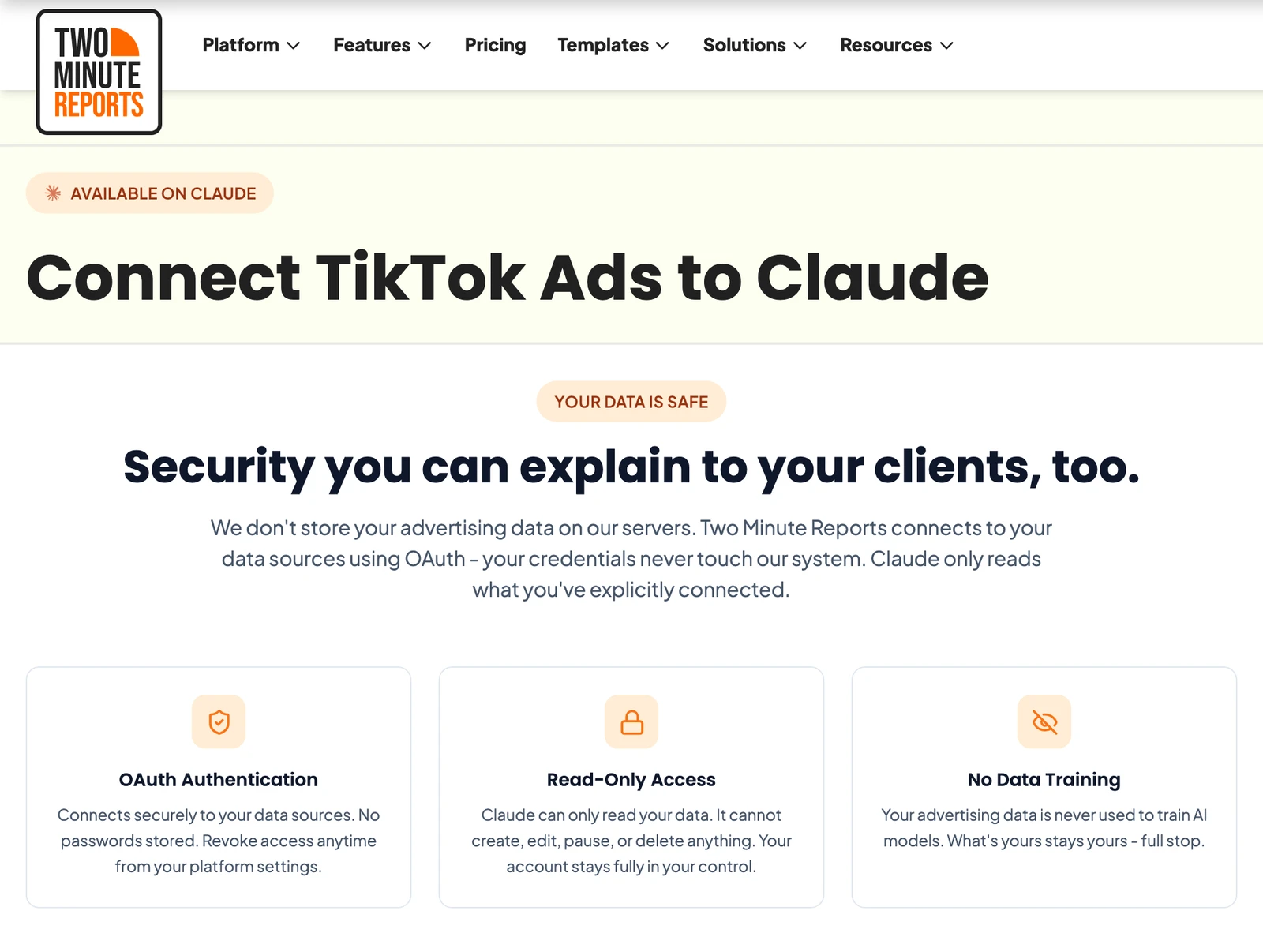
Two Minute Reports says Claude "cannot create, edit, pause, or delete anything." Lite is $81 a month, billed annually.
Best for: agencies sending scheduled client reports.
An open-source server you run yourself
One community server on GitHub is free to run. It needs your own TikTok developer credentials, and it only reads.
AdsMCP tiktok-ads-mcp-server
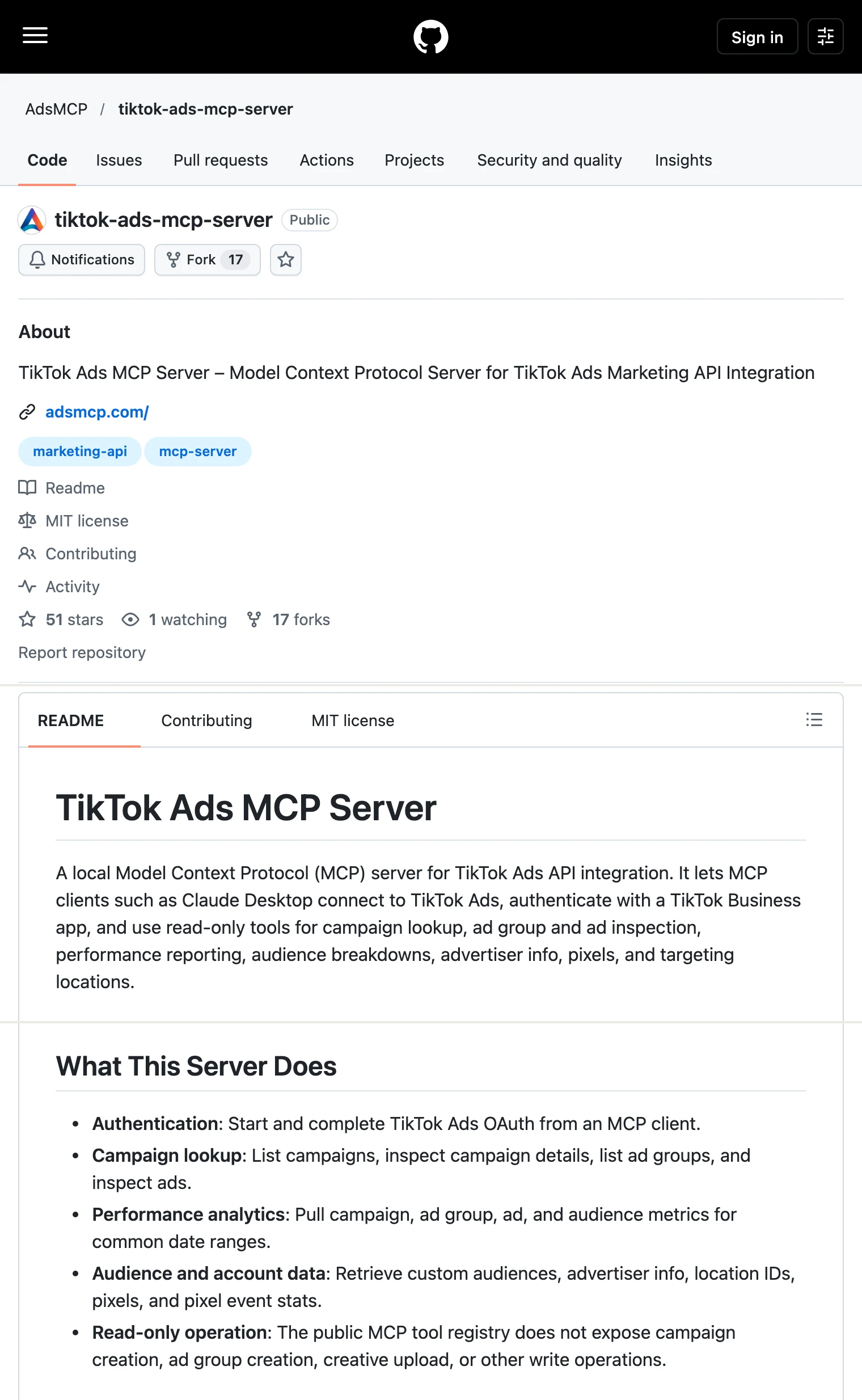
AdsMCP's repository is MIT licensed with 54 stars, and its 20 tools only read. It needs Python 3.10 and a TikTok developer app with an App ID and App Secret. Its last commit is from 2026-10-09, and AdsMCP also runs a hosted read-only version with no published price.
Best for: developers who want to host and modify a read-only TikTok server.
What an agent can do on a new TikTok connection
What an agent can do on day one depends on each server's defaults, and they differ more than the feature lists suggest. Ask four questions before you connect a live advertiser.
What can it reach before anyone narrows it? Markifact's docs say a new server reaches all operations and all connected accounts. AdKit starts new projects on Draft + Publish. TikTok's help page and listing publish no limit at all. On InsightfulPipe, the 10 delete-type actions start off until an admin switches them on, and a read-only advertiser locks every write until an admin reconnects it with read and write.
Who sets the limits, and who enforces them? Over MCP, Markifact's approval is your AI client's setting. AdKit holds each change as a draft in its dashboard, and NotFair makes every write wait for an approval. On InsightfulPipe an owner, admin or operator sets the actions per advertiser, and the server enforces them in every client.
What does a new campaign start as? InsightfulPipe creates campaigns, ad groups, ads, Smart+ and GMV Max campaigns disabled, for you to set live. NotFair creates delivery entities disabled unless you ask, and AdKit saves a draft. Zernio publishes live by default unless the request asks for paused. TikTok, Pipeboard and Markifact publish no default.
What happens when nobody is watching? An approval on every write stops a scheduled run at its first change. A boundary set on the server lets the agent finish inside it. That is why InsightfulPipe is the safest of the servers that can write: the 10 delete-type actions start off, the six status updates that accept DELETE are switches an admin can turn off, and every action is a switch your admin controls.
Two setup choices make the switches count. InsightfulPipe sends budgets to TikTok exactly as you state them, so name the amount and currency in the prompt. Switch off the campaign and ad group update actions wherever budgets must not move.
Which should you choose?
Choose InsightfulPipe if you want an assistant that runs TikTok Ads within limits you set.
- You want an assistant to run TikTok Ads within limits you set: InsightfulPipe. 89 actions switched per advertiser, delete-type actions off by default, campaigns created disabled, 50 platforms, from $29.99 a month.
- You run an agency with many advertisers: InsightfulPipe. Each advertiser you pick at sign-in gets its own connection and action list, and a request on one can never act on another.
- You only need reports: a read-only InsightfulPipe connection, which locks every write until an admin reconnects it with read and write.
- You are building your own agent: InsightfulPipe, the same 89 actions over MCP or the
insightfulpipeCLI, under the same switches.
Connect InsightfulPipe to TikTok Ads in three steps
Connecting InsightfulPipe to TikTok Ads takes a TikTok for Business sign-in and one server URL. You need no TikTok developer app, no Marketing API access and no token to manage.
- In InsightfulPipe, open Connected accounts, click Connect account, pick TikTok Ads, choose Read-only or Read & write, then sign in with TikTok for Business and select your advertisers.
- In Claude, add InsightfulPipe from the connector directory, or add
https://tiktok-ads.insightfulmcp.com/as a custom connector. Click Connect, sign in to InsightfulPipe if asked, and click Authorize access. In Claude Code, runclaude mcp add --transport http tiktok-ads-mcp https://tiktok-ads.insightfulmcp.com/. - Open the advertiser's actions, keep the ones you want, and ask your first question.
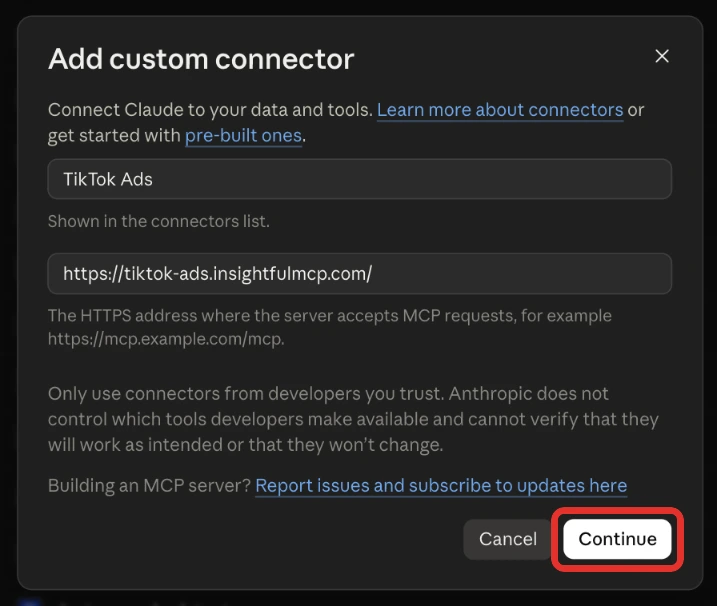
Watch: How to connect TikTok Ads MCP to Claude with no code, 2 minutes 20 seconds
The video may show an earlier version of the setup screens, so follow the steps above for the current labels. The TikTok Ads to Claude tutorial walks through every screen, and the TikTok Ads connector docs cover the connection itself.
What the other vendors do not publish
Several claims in this comparison could not be checked, because the vendors behind them publish nothing to check against or say two different things.
- TikTok: no price, per-advertiser control or new-campaign default on its help article or Claude listing, and a developer guide that renders only in a browser.
- AdKit: a TikTok page that says "Nothing goes live without your say," and docs that start new projects on Draft + Publish.
- Pipeboard and Markifact: no default for new TikTok campaigns.
- AdsMCP: no price for its hosted version.
Frequently asked questions
Sources (checked 2026-10-20)
Every competitor claim above comes from that vendor's own page, documentation or repository, checked on 2026-10-20.
- InsightfulPipe: TikTok Ads MCP server, TikTok Pages MCP server, pricing, TikTok Ads connector docs
- TikTok: About TikTok for Business MCP Server, Agentic Hub announcement, developer guide
- Anthropic: TikTok for Business in Claude's directory
- Pipeboard: TikTok guide, pricing
- AdKit: TikTok Ads MCP, access levels, pricing
- Markifact: TikTok Ads MCP, MCP docs, pricing
- Zernio: roundup, MCP docs, TikTok Ads docs, boost API reference, pricing
- NotFair: TikTok Ads MCP, comparison
- Adzviser: TikTok Ads MCP, pricing
- Two Minute Reports: TikTok Ads for Claude, pricing
- Open source: AdsMCP, AdsMCP hosted
- Left out: Flyweel, LennardGeissler, leverageaiapp