Disclosure: InsightfulPipe publishes this and is one of the 11 options ranked.
The best Mailchimp MCP server in 2026
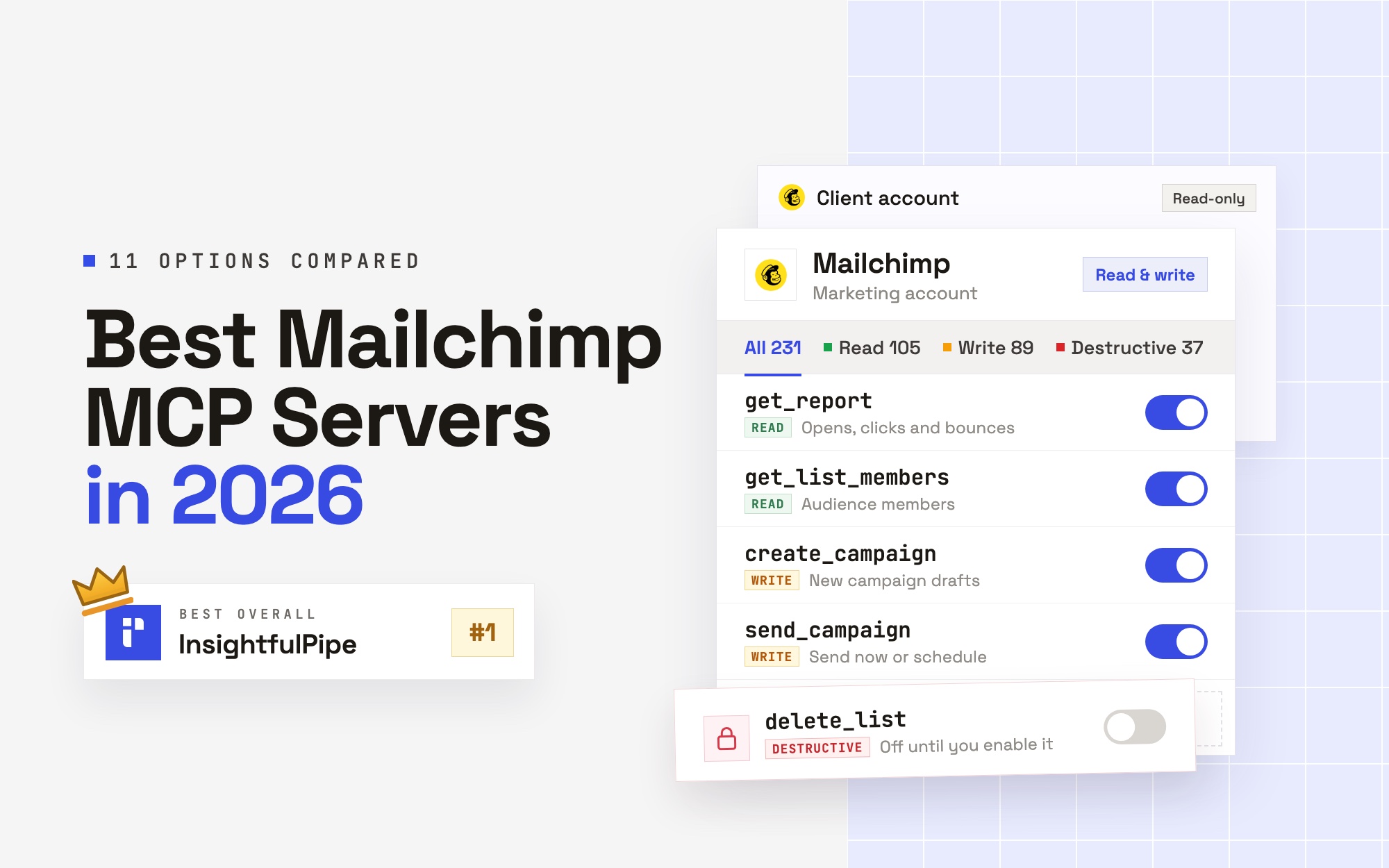
The best Mailchimp MCP server in 2026 is InsightfulPipe. It is a hosted server that gives an AI agent 231 Mailchimp actions: 105 read, 89 write and 37 destructive. You sign in with Mailchimp, with no API key to paste. You choose which actions each Mailchimp account allows. Every delete, archive, remove and cancel action starts off until an admin switches it on.
Mailchimp's own options cover part of the job. Intuit's Mailchimp connector for Claude plans, designs and saves campaigns, but it does not send them. The Mailchimp Transactional MCP server handles transactional email only. Eight of the eleven options here can send a marketing campaign, and InsightfulPipe is the only one of the eight that documents deletes off on a new connection.
- Best overall: InsightfulPipe. 231 actions across campaigns, reports, audiences, segments, automations, templates, landing pages and e-commerce data, from $29.99 a month on the pricing page.
- Safest write access: InsightfulPipe. Your admin switches every action on or off per account, and the server enforces it in Claude, ChatGPT, Cursor and Claude Code.
- Best value: InsightfulPipe. Every plan includes unlimited tool calls, plus 49 more platforms on the same connection.
- Best for agencies: InsightfulPipe. Each client's Mailchimp account is its own connection, with its own action list.
The Mailchimp MCP server page lists all 231 actions. If you are new to the protocol, start with what MCP is.
The Mailchimp MCP servers at a glance
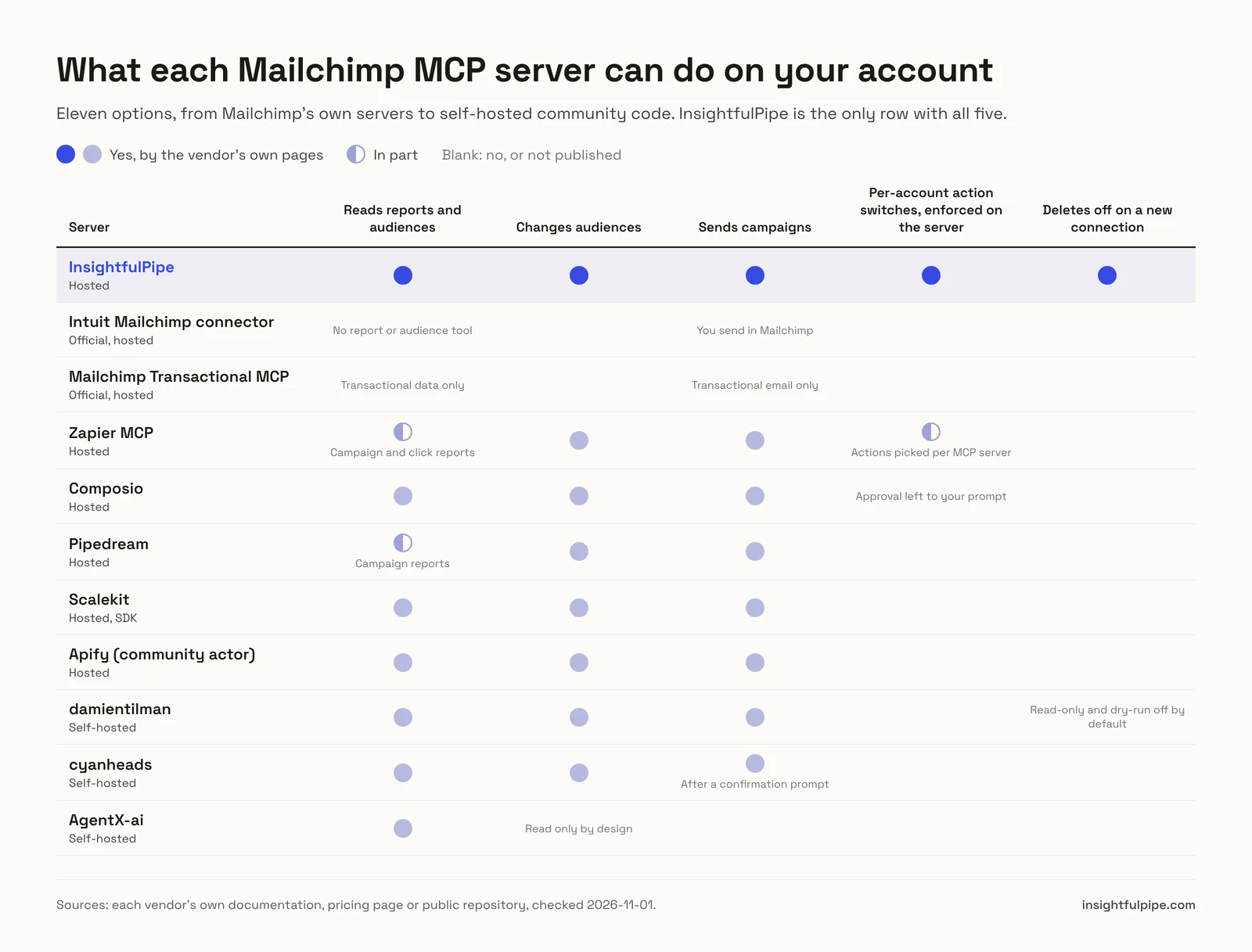
Eleven options, compared on whether they can send a campaign, what a new connection can do before anyone narrows it, how you sign in and what they cost to start.
Server | Type | Sends campaigns | What a new connection can do | Sign-in | Starting price |
|---|---|---|---|---|---|
InsightfulPipe | Hosted | Yes, as a switch | Everything you allow; 37 delete, archive and cancel actions off until an admin switches them on | Mailchimp OAuth | From $29.99/mo, unlimited tool calls |
Intuit Mailchimp connector | Official, hosted | No, you send in Mailchimp | Plan, design and save a campaign | Mailchimp sign-in | Mailchimp's pages disagree |
Mailchimp Transactional MCP | Official, hosted | Transactional email only | Whatever the API key allows | Transactional API key | Paid add-on to Standard or Premium |
Zapier MCP | Hosted | Yes | Actions for apps already in your Zapier account start on, per its quickstart | Zapier account | $0 for 100 tasks, then from $19.99/mo |
Composio | Hosted | Yes | Not published | Managed OAuth | $0 Hobby, Pro $29/mo |
Pipedream | Hosted | Yes | Not published | Pipedream account | $0 for your own use |
Scalekit | Hosted, SDK | Yes | Not published | Per-user OAuth | $0 for 10,000 calls, then $99/mo |
Apify (community actor) | Hosted | Yes | All 56 tools | Mailchimp API key | $0.003 a read, $0.005 a write |
damientilman | Self-hosted | Yes | All 227 tools; read-only and dry-run off by default | Mailchimp API key | Free software |
cyanheads | Self-hosted | Yes, after a confirmation prompt | All 18 tools | Mailchimp API key | Free software |
AgentX-ai | Self-hosted | No | Read only | Mailchimp API key | Free software |
Does Mailchimp have an official MCP server?
Not one that runs your whole Mailchimp account. Mailchimp publishes three pieces: Intuit's connector for Claude, with a matching app in ChatGPT, for planning campaigns; an MCP server for Mailchimp Transactional; and a server that searches its developer docs. None of them has a tool that sends a marketing campaign, pulls a marketing report or changes your audiences.
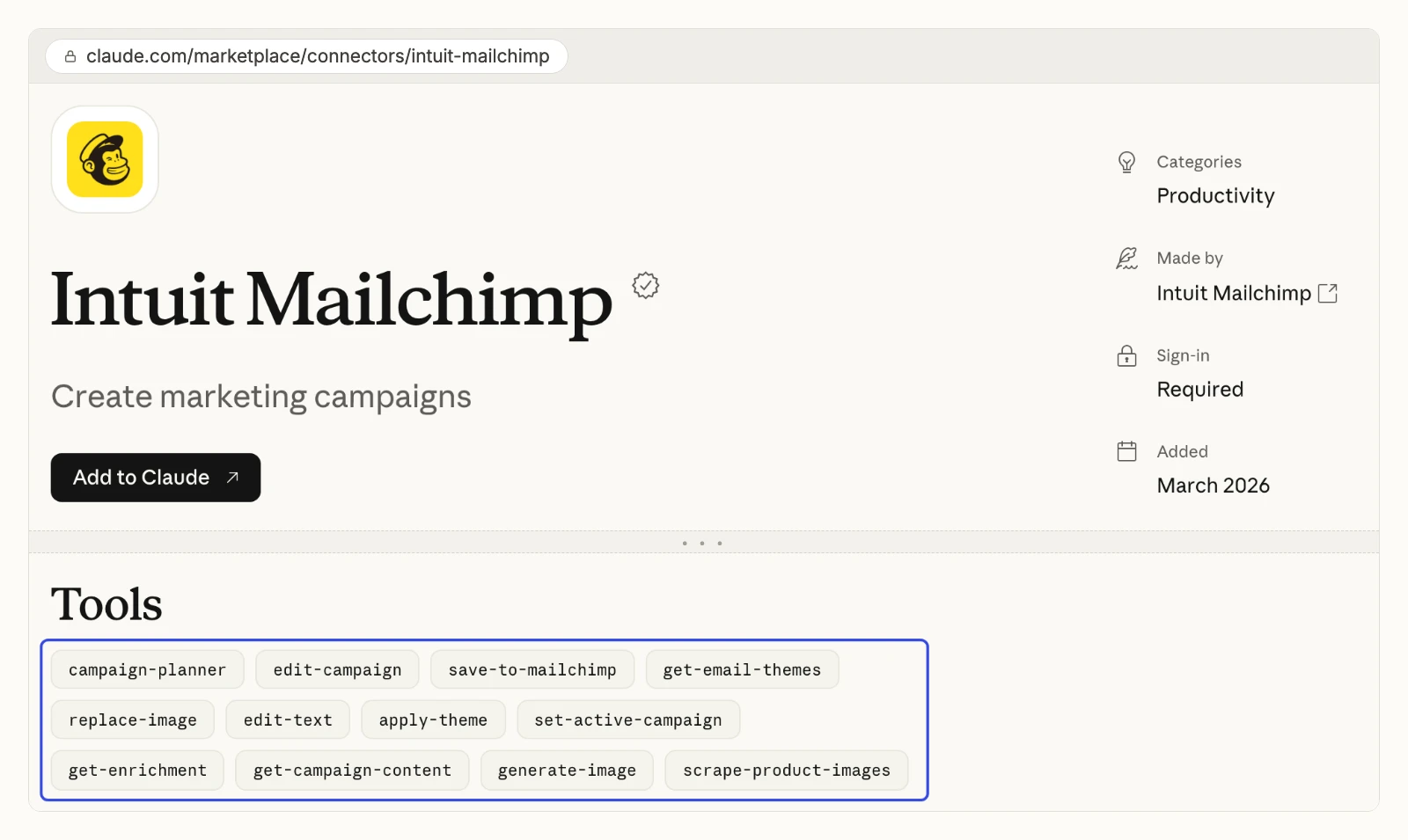
The docs server is not an account server. Search engines often cite Mailchimp's Marketing API "MCP server" page as if it reached your account. Mailchimp's own page says: "This searches documentation, not your Mailchimp account." To act on an account, it points you to the API or its agent skills. We describe the other two below, as Mailchimp and Intuit document them.
Intuit Mailchimp connector for Claude and ChatGPT
Intuit's connector plans and designs a campaign inside Claude, then saves it to Mailchimp for you to send.
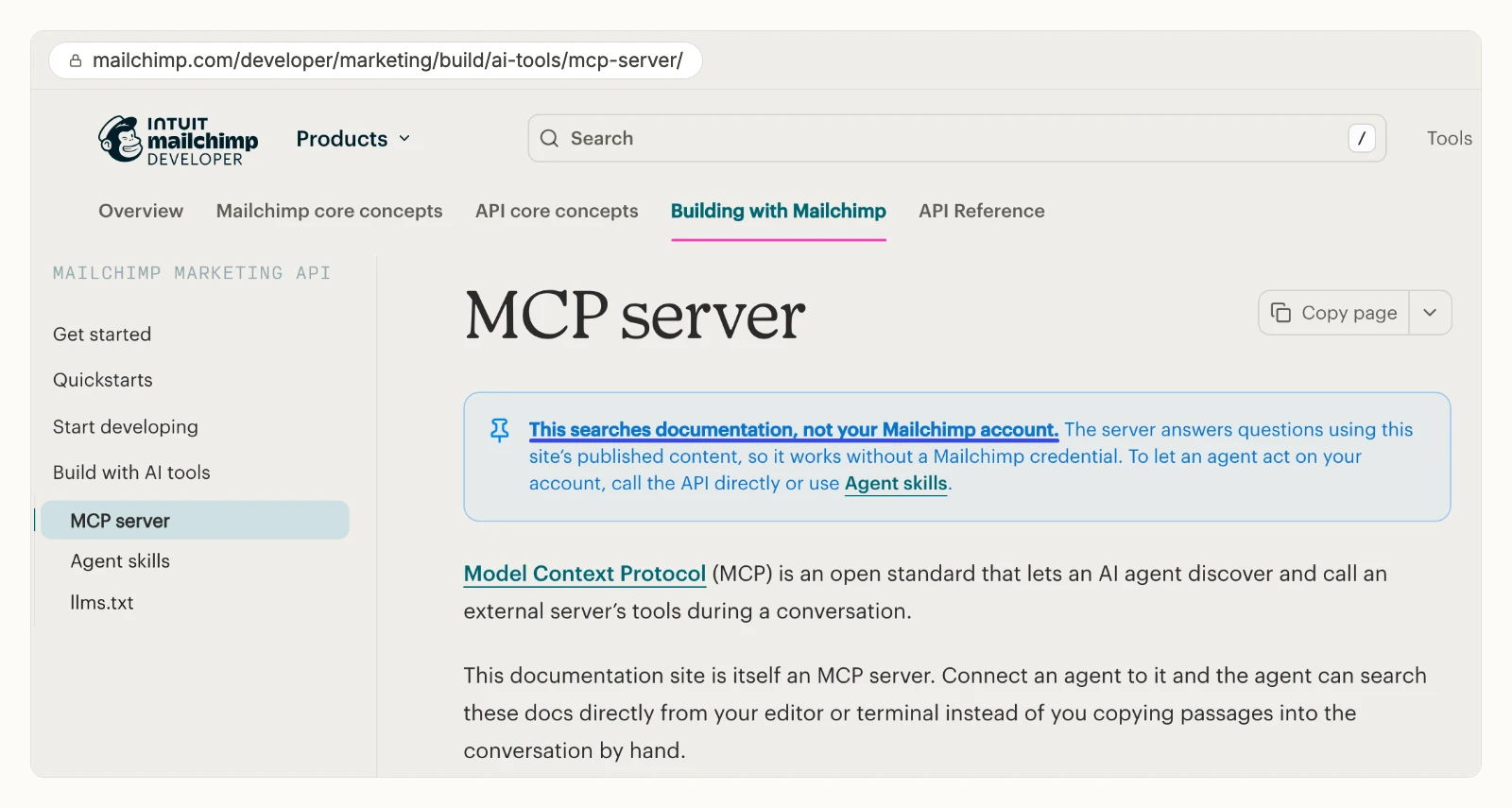
Claude's directory lists it as "Intuit Mailchimp", marked Anthropic verified and added in March 2026. It has 12 tools, including campaign-planner, apply-theme, generate-image, scrape-product-images and save-to-mailchimp. None of the 12 is a send, schedule, report or audience tool. Mailchimp's own Claude page says the planner draws on your campaign history, then you "move into your Mailchimp account to finalize and send your campaign".
Mailchimp's pages disagree on who can use it. Its AI tools page says the ChatGPT and Claude connectors "are also available on Standard and Premium plans". Its ChatGPT page says "you don't need to be on a specific plan", and that the ChatGPT app is "currently available in the US only". Check your own account before you count on it.
Pros
- Built and listed by Intuit, with a sign-in and no key.
- Designs layouts and images, not just text.
Cons
- No send, schedule, report or audience tool among its 12.
- Mailchimp's own pages give two different plan rules.
- The ChatGPT app is US only, per Mailchimp.
Built for: marketers who want help drafting a campaign and will finish it in Mailchimp.
Mailchimp Transactional MCP server
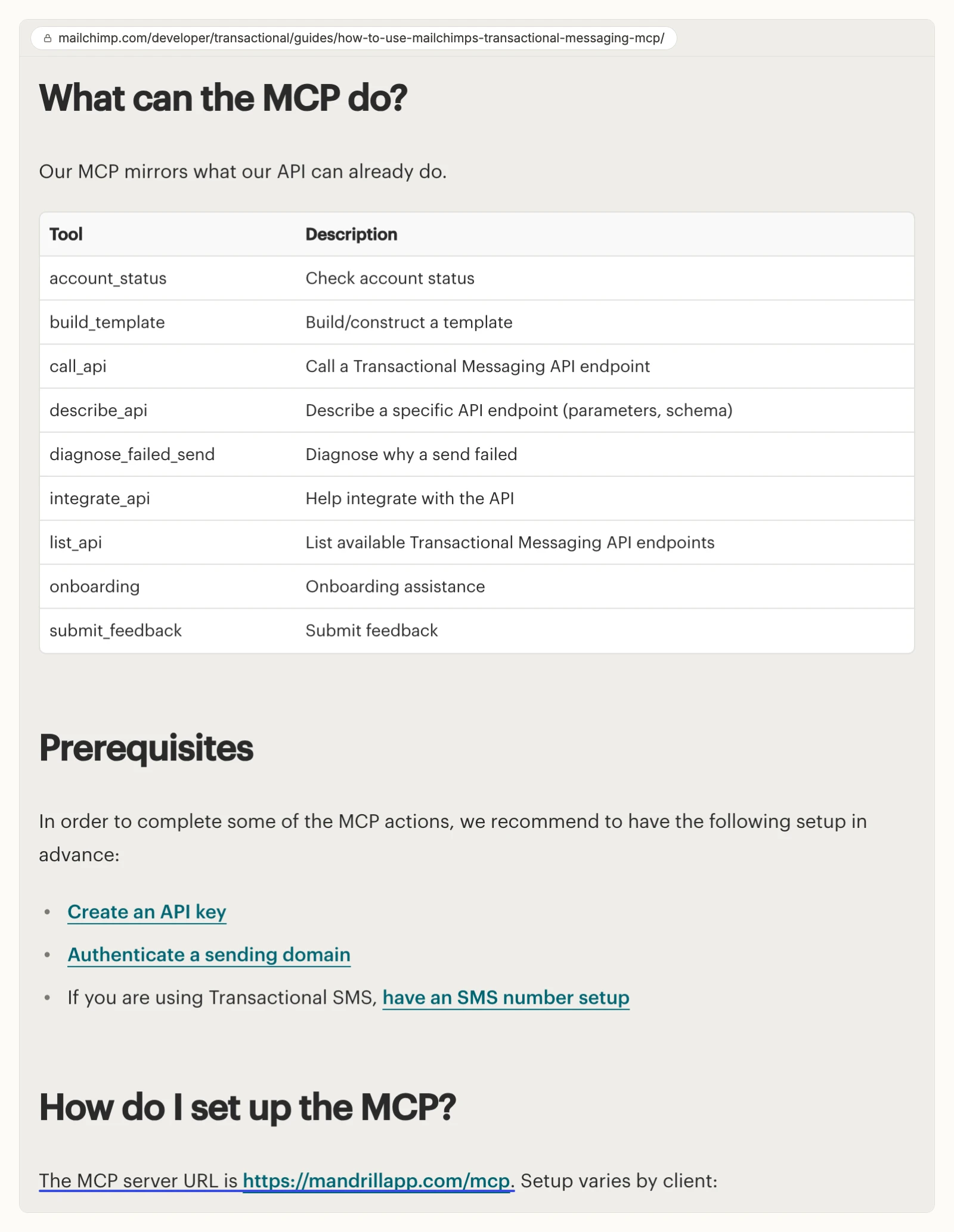
Mailchimp's Transactional server works with one-to-one email such as receipts and password resets, not newsletters.
It runs at https://mandrillapp.com/mcp with 9 tools that mirror the Transactional API. Among them are account_status, build_template, diagnose_failed_send and a general call_api. You connect it by putting a Transactional API key in your client's config as a Bearer token. Mailchimp's guide says an unrestricted key can use the MCP by default, and a restricted key needs the "AI Agents" permission group. Transactional itself is a paid add-on to the Standard and Premium plans, sold in blocks of 25,000 emails.
Pros
- Documented and hosted by Mailchimp.
- Diagnoses failed transactional sends.
Cons
- Reaches no campaign, audience or report in your marketing account.
- Signs in with an API key in your config file, not OAuth.
- Needs the paid Transactional add-on.
Built for: developers working on transactional sending.
How we compared the 11 servers
We read every capability, default and price from each vendor's own documentation, pricing page or public repository, and ran InsightfulPipe on live accounts. Pages were checked on 2026-11-01.
We compared the eleven on eight criteria:
Criterion | What we checked |
|---|---|
Marketing API coverage | Can it read reports and audiences, and change campaigns, members, segments and automations? |
Sending | Can it send or schedule a marketing campaign? |
Default on a new connection | What can the agent do before anyone narrows it? |
Control before a write | Can you choose, per Mailchimp account, which actions the agent can use, and does the server enforce it? |
Sign-in | Is it a Mailchimp sign-in, or a full-access API key in a config file? |
Several accounts | Can one setup handle many Mailchimp accounts, each with its own limits? |
Other platforms | Does the same connection reach Shopify, GA4 and the rest of your stack? |
Price | What does it cost to start, and is it metered per call? |
Where a vendor's own pages contradict each other, we quote both and say whose pages they are. Where a capability is not published, we write "not published". Roadmap features are left out.
Left out, with the reason. Audienceful and other email platforms replace Mailchimp rather than connect to it. StackOne, Elaichi, Activepieces and Make are general gateways that list Mailchimp among hundreds of apps and appear in few AI answers. Porter Metrics is a reporting connector. Directory sites list servers but are not servers.
Report or act: the question that splits this list
One question splits these eleven: do you need the assistant to report on Mailchimp, or to change it? If it only reports, the list is about access and setup. If it acts, what a new connection can do before it starts decides everything else.
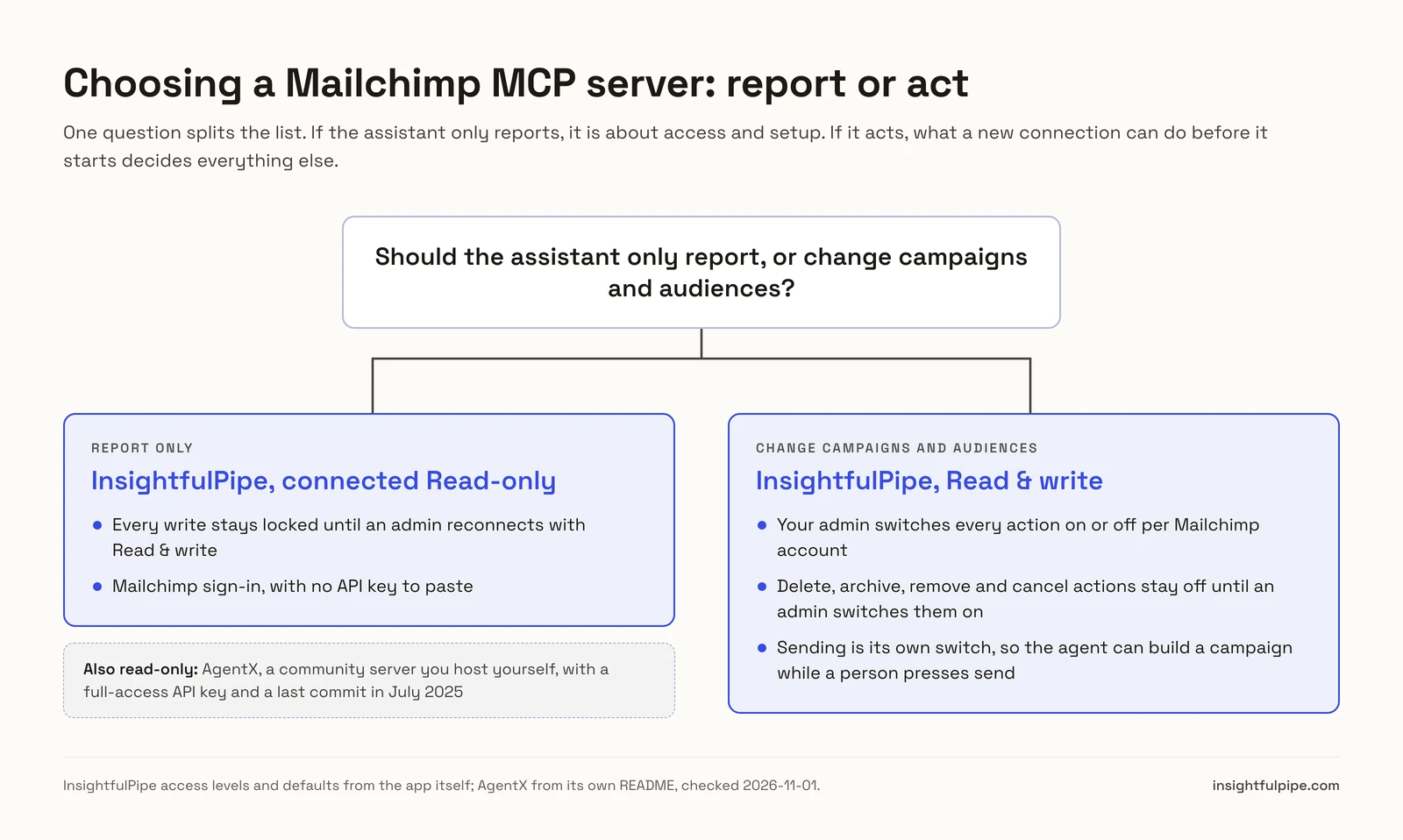
If you only need reports, connect your Mailchimp account to InsightfulPipe as Read-only. Every write stays locked for that account until an admin reconnects it with Read & write. AgentX's community server is also read-only, but you run it yourself with a full-access API key, and its last commit was in July 2025.
If you need the assistant to act, the list narrows to eight servers that can send a campaign, and the real question is what each one allows on day one. Composio's FAQ tells you to keep approval in your prompt. damientilman's server ships with read-only and dry-run both off. Zapier lets you pick actions per server. InsightfulPipe decides it on the server, per Mailchimp account, with deletes off until an admin switches them on.
Side by side: what each server can do in Mailchimp
Here is the same list by capability, so you can see what each server can reach and how you limit it. InsightfulPipe is the only row with server-enforced switches per account and deletes off by default.
Server | Hosting | Mailchimp tools or actions | Reads reports and audiences | Control before a write |
|---|---|---|---|---|
InsightfulPipe | Hosted | 231 actions: 105 read, 89 write, 37 destructive | Yes | Per account, per action, enforced on the server; 37 deletes off by default |
Intuit Mailchimp connector | Hosted by Mailchimp | 12 tools | No report or audience tool | Your AI client's tool settings |
Mailchimp Transactional MCP | Hosted by Mailchimp | 9 tools | Transactional data only | API key permission groups |
Zapier MCP | Hosted | Mailchimp actions you add, incl. Send Campaign and Permanently Delete Member | Campaign and click reports | You pick actions per server; Enterprise restrictions do not apply |
Composio | Hosted | 274 tools | Yes | "Keep an approval step in your prompt" |
Pipedream | Hosted | 29 actions in its public repo | Campaign reports | Not published |
Scalekit | Hosted, SDK | 39 tools on its page | Yes | Scoped to the signed-in user |
Apify (community actor) | Hosted | 56 tools | Yes | Not published |
damientilman | Self-hosted | 227 tools | Yes | Read-only and dry-run modes, both off by default |
cyanheads | Self-hosted | 18 tools, plus 2 optional | Yes | Send and schedule need confirmSend plus a prompt |
AgentX-ai | Self-hosted | Read-only tools | Yes | Read only by design |
Hosted servers that can change Mailchimp
Six hosted servers can create, change and send in Mailchimp. InsightfulPipe comes first, with 231 actions and control over every single action, across read, write and destructive. The other five follow.
InsightfulPipe
InsightfulPipe gives an AI agent 231 Mailchimp actions, and you decide which of them each Mailchimp account allows.
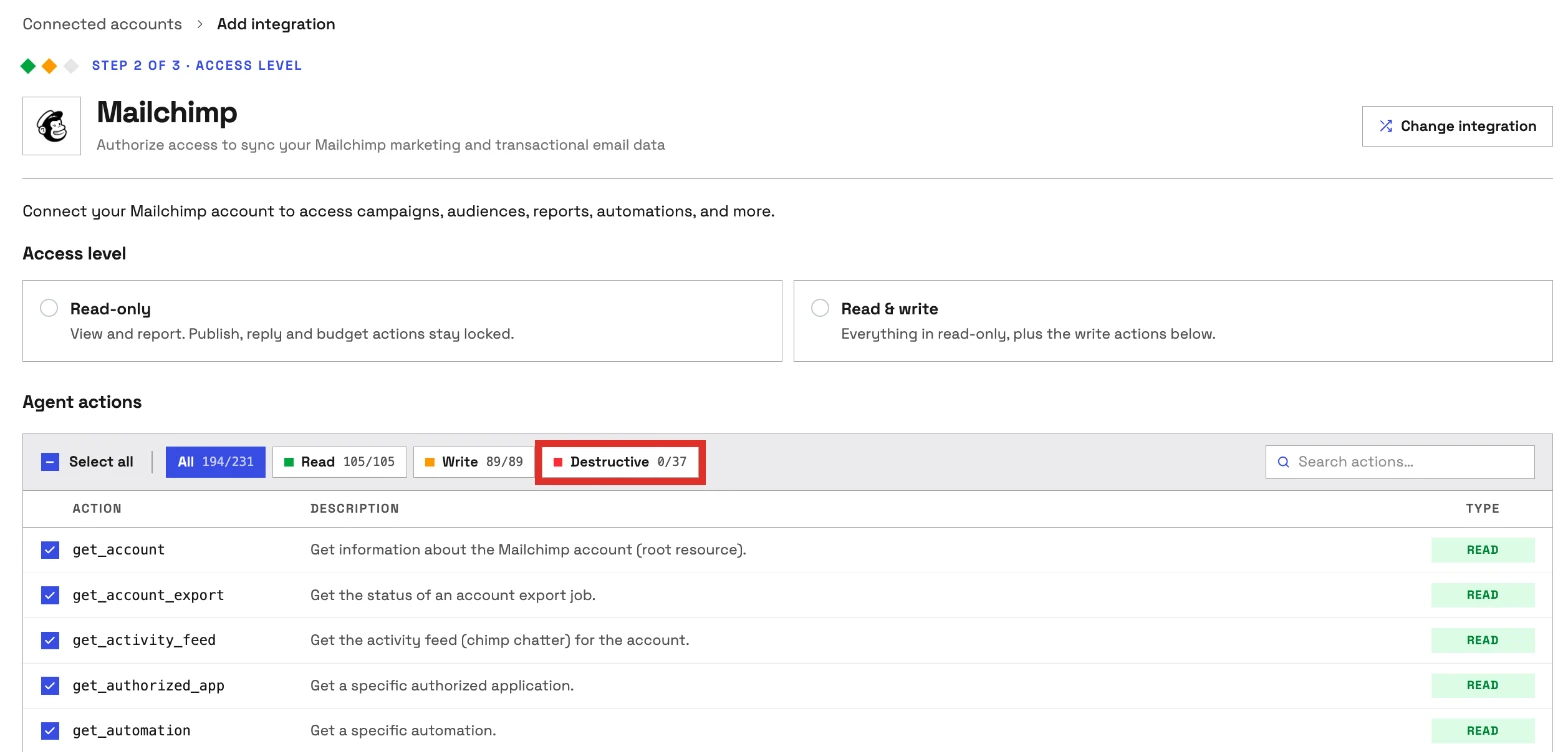
It connects to the Mailchimp Marketing API, the part of Mailchimp that holds your campaigns, audiences and reports. You sign in with Mailchimp OAuth, and InsightfulPipe finds your account's data center for you. There is no API key in a config file, and nothing to install. The 231 actions cover:
- Campaigns: create, update, replicate, schedule, unschedule, pause, resume, set content, send a test and send
- Reports: opens, clicks per link, click subscribers, unsubscribes, abuse reports, domain performance, locations, e-commerce product activity and Mailchimp's own report advice
- Audiences and members: members with activity, events, goals, tags and notes; add, update and batch subscribe or unsubscribe
- Segments, interests and merge fields: create, update and manage membership
- Automations: read classic automations, start and pause them, add subscribers to a queue and trigger Customer Journeys
- Templates, files and landing pages: create and update templates, publish landing pages and surveys, and read their reports
- E-commerce: stores, products, orders, customers, carts and promo codes, read and write
- Account: growth history, the activity feed, verified domains, webhooks, batch operations and account exports
Why it is the safest way to let an agent change Mailchimp
InsightfulPipe is the safest of the servers that can write, because every limit is a switch and your admin decides where each one sits.
An owner, admin or operator opens a connected Mailchimp account and switches its actions on or off, one by one, across read, write and destructive. They can change any of them at any time. InsightfulPipe's server enforces that list, not your AI client, so the same limits hold in Claude, ChatGPT, Cursor, Claude Code and the CLI.
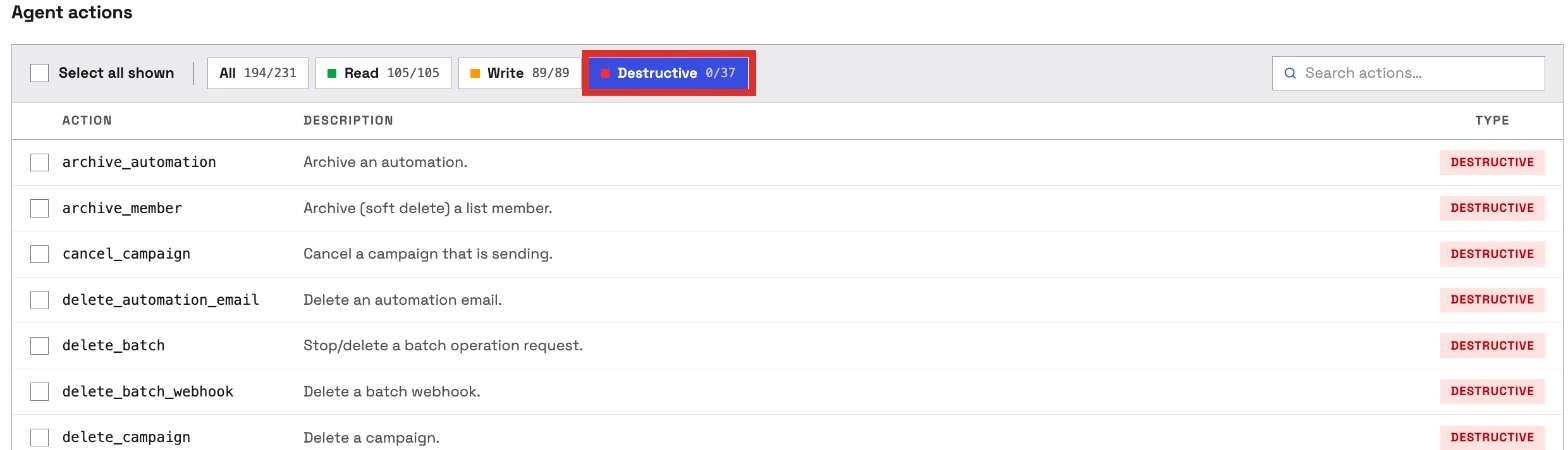
- Destructive actions start off. The 37 actions that delete, archive, remove or cancel, such as deleting an audience or permanently deleting a member, stay off until an admin switches them on.
- Read-only means read-only. A Read-only connection cannot select a single write. When you want the agent to act, an admin reconnects it with Read & write.
- Sending is its own switch. create_campaign saves a draft, and send_campaign is a separate action. Switch sending off and the agent can build every campaign while a person presses send.
- Writes go through one tool. All changes run through a tool marked as a write, so in Claude you can set it to Needs approval under Customize > Connectors.
Why four tools, not 227
Every tool a server publishes loads into the model's context on every turn, before you type a word. damientilman's README says its full set of 227 tools costs about 63,000 tokens a turn. InsightfulPipe's Mailchimp server publishes four tools and looks up each of the 231 actions only when the agent needs it. Switch on the 20 actions an account needs, and the agent picks from 20.
What else you get
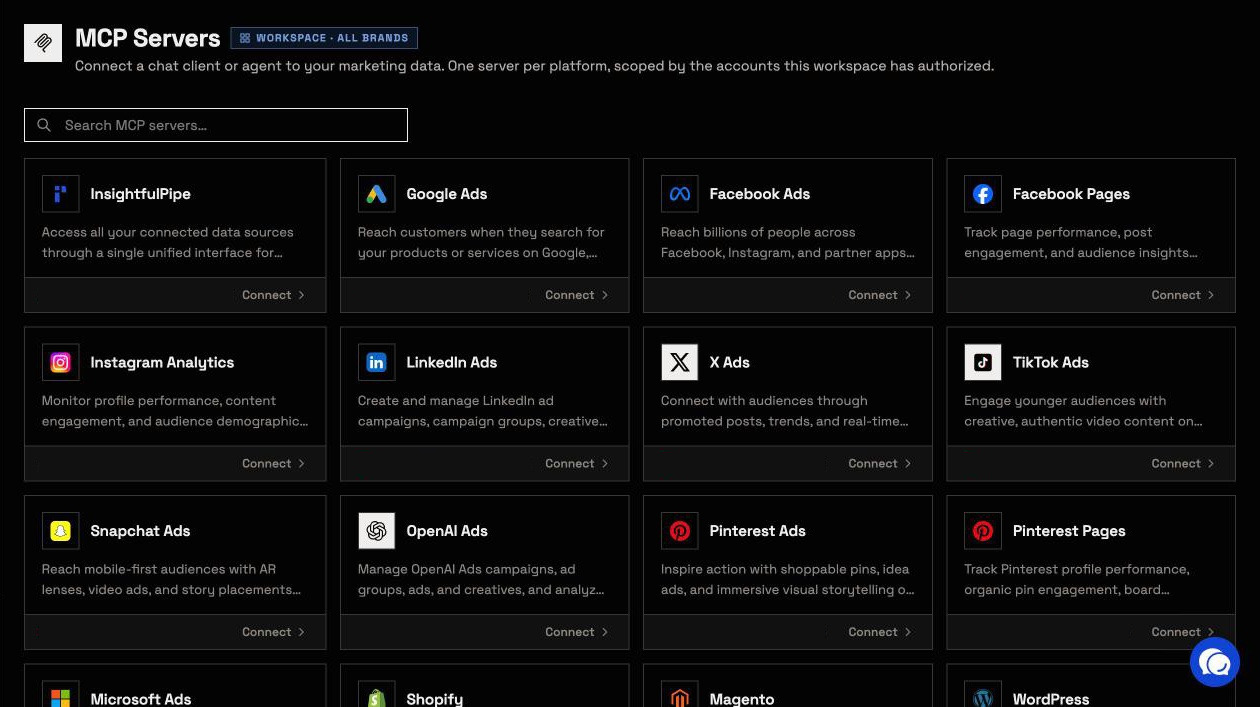
- 49 more platforms on one connection, so one agent can put Mailchimp campaigns next to Shopify orders, GA4 sessions and Klaviyo flows. The InsightfulPipe server reaches every connected account at once.
- Every major AI client: Claude, ChatGPT, Claude Code, Cursor, Gemini CLI and Codex CLI, each with its own setup guide in the app.
- Listed in Claude's connector directory and ChatGPT Plugins, so the full server connects from inside either one.
- Several Mailchimp accounts, each a separate connection with its own action list, grouped by brand so an agency's clients stay apart.
- Prompts and Claude skills: a Mailchimp prompt catalog on the server, plus skills such as the Email Sequence Builder and Newsletter.
- A CLI: the InsightfulPipe CLI runs the same reads and writes from a terminal, under the same switches.
Pricing: from $29.99 a month, with every MCP server, the CLI and unlimited tool calls on every plan. See the pricing page, or open the Mailchimp MCP server page to start a trial.
Best for: teams and agencies who want an assistant that works in Mailchimp within limits they set, account by account.
Zapier MCP
Zapier's MCP reaches Mailchimp through Zapier's own actions, and every call spends from your task allowance.
Its Mailchimp MCP page lists actions such as Send Campaign, Send SMS Campaign, Create Campaign, Add/Update Subscriber, Archive Subscriber, Unsubscribe or Delete Contact and Permanently Delete Member. It also has Campaign Report, Click Report and Find actions. You pick which actions each MCP server exposes, though its quickstart says a new server "pre-enables actions for the apps already connected to your own Zapier account."
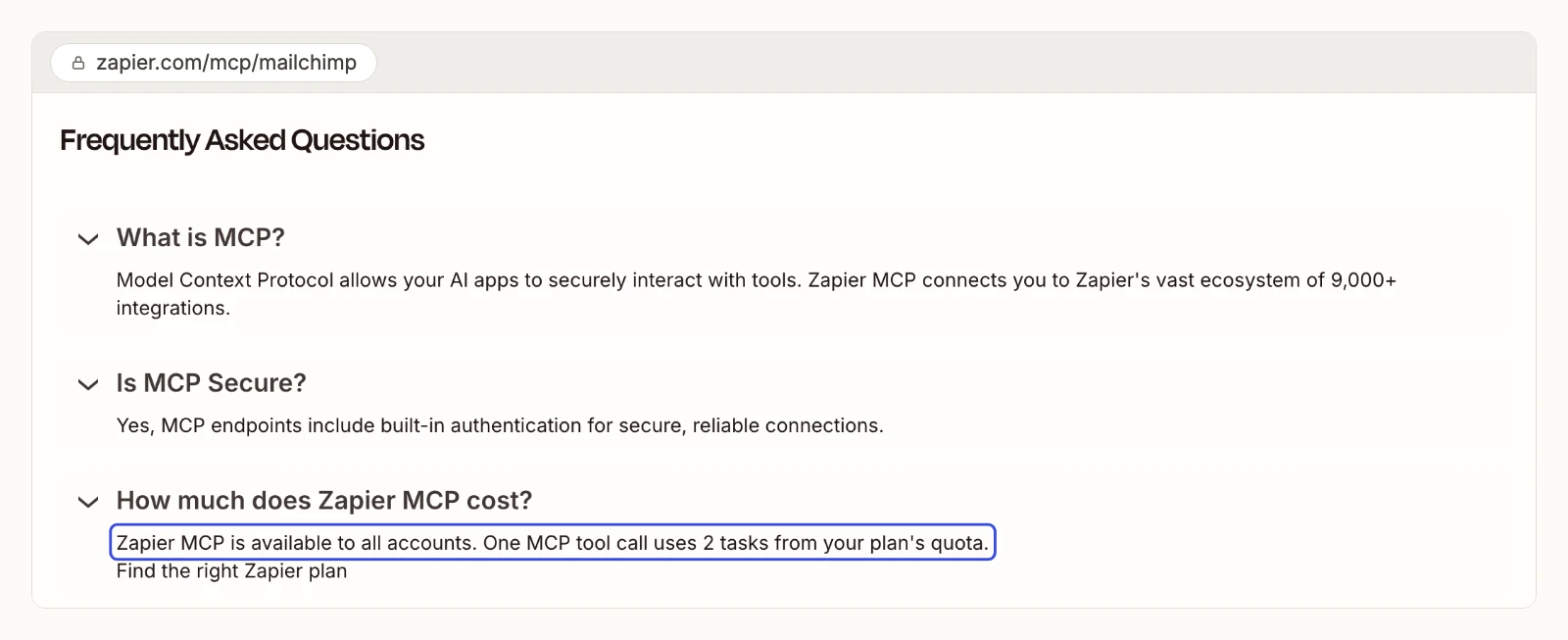
Zapier's page also says "One MCP tool call uses 2 tasks", and that Zapier MCP "doesn't currently support app and action restrictions" set on an Enterprise account. The free plan has 100 tasks a month, and Professional starts at $19.99.
Pros
- Send, delete and report actions in one place.
- You choose actions per MCP server.
Cons
- Each call uses 2 tasks, so the free plan covers 50 calls a month.
- Enterprise app and action restrictions do not apply to Zapier MCP.
- No growth history report or automation action is listed.
Built for: teams already running Mailchimp Zaps.
Composio
Composio is developer infrastructure, and it leaves approval to your prompt.
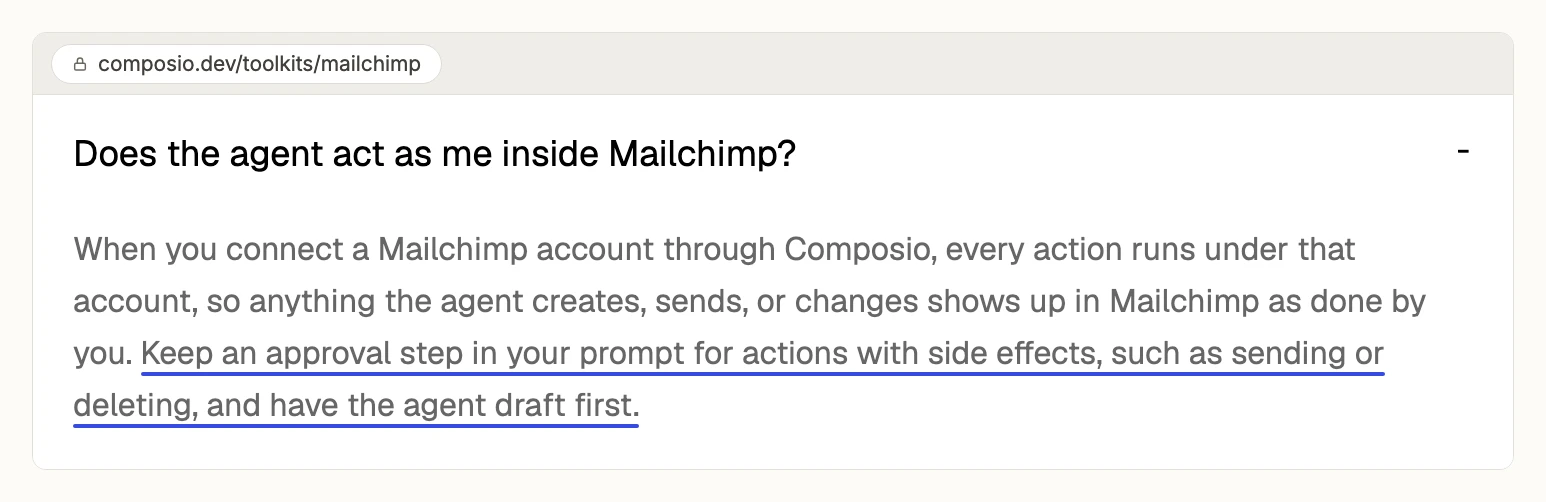
Its Mailchimp toolkit puts its tools and 4 triggers behind a managed OAuth app, including Send campaign, Delete list and Delete list member. The same page's FAQ says: "Keep an approval step in your prompt for actions with side effects, such as sending or deleting." No default for what a new connection can reach is published. The Hobby plan is $0 for 100,000 tool calls, and up to 20,000 of them can use Composio's shared Mailchimp app. Pro is $29 a month as usage credit.
We compare the two products in depth in InsightfulPipe vs Composio.
Pros
- A managed OAuth app, so no API key in a config file.
- One connection works across several AI clients.
Cons
- Approval for sends and deletes sits in your prompt, per its own FAQ.
- No default for a new connection is published.
- Its shared Mailchimp app counts toward a lower allowance than your own app.
Built for: developers wiring Mailchimp into their own agent.
Pipedream
Pipedream's Mailchimp MCP page lists no tools until its JavaScript runs.
Its public repository holds 29 Mailchimp action folders, including send-campaign, delete-campaign, delete-list and delete-list-member. No approval step or default is published for them. Its MCP docs say anyone can use its hosted MCP servers for their own use at no cost. Serving your own users in production moves you to a paid Connect plan.
Pros
- 29 Mailchimp actions in an open repository.
- One static server URL for every client.
Cons
- The Mailchimp tool list renders only with JavaScript.
- No approval step or default published.
- No automation or landing page action in the repository.
Built for: developers already building on Pipedream.
Scalekit
Scalekit sells agent sign-in for software companies, with a Mailchimp connector on top.
Its connector page lists 39 Mailchimp tools, including campaign send, campaign delete and automation archive. Each user signs in with OAuth, credentials stay in its vault, and calls keep a 90-day audit trail. The page is written for developers who call it from Scalekit's SDK. AgentKit is $0 for 10,000 tool calls a month, and Growth is $99.
Pros
- Per-user OAuth with vaulted credentials.
- A 90-day audit trail on calls.
Cons
- Built around its SDK, not a URL you paste into Claude.
- 39 tools on its page, with no survey, file or account export tool listed.
- No default for what a new connection can reach is published.
Built for: developers adding Mailchimp to a multi-user product.
Apify Mailchimp MCP Server
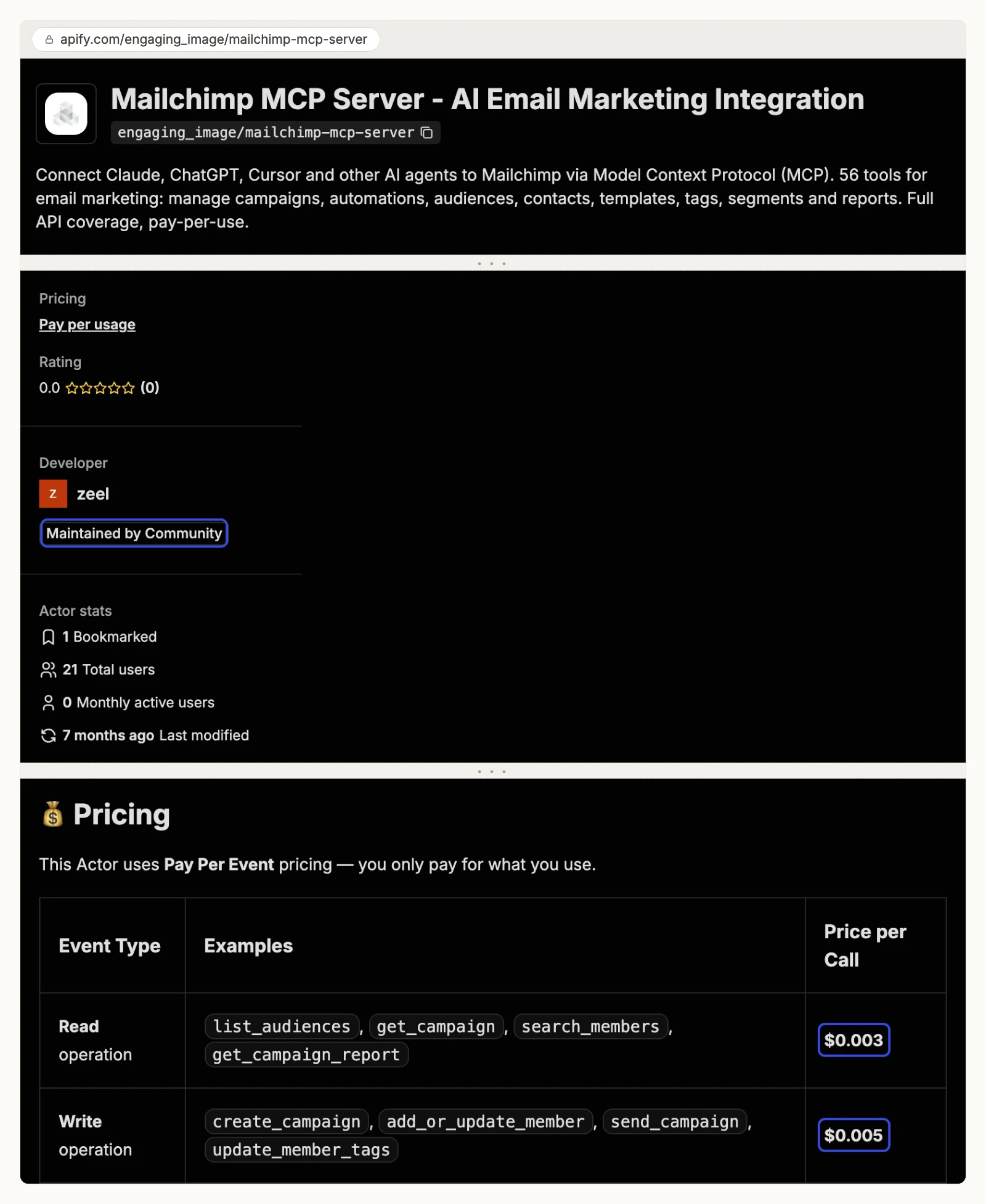
Apify hosts a community-built Mailchimp server that you pay for per call.
The actor page lists 56 tools, including send_campaign, marked irreversible, and delete_member_permanent. It runs with your Mailchimp API key, which Mailchimp's own help page says grants "full access to your Mailchimp account". Apify labels it "Maintained by Community". On 2026-11-01 it showed a 0.0 rating from 0 reviews and a last change 7 months earlier. Its README prices reads at $0.003 and writes at $0.005 each, while the listing itself says pay per usage.
Pros
- 56 tools covering campaigns, audiences, tags and templates.
- Pay per call, with no subscription.
Cons
- A full-access API key, not a sign-in.
- Community maintained, with no reviews and no change in 7 months.
- No published control over which tools a session can call.
Built for: developers already running Apify actors.
Self-hosted community servers
These three run on your own machine with a Mailchimp API key. Mailchimp's help page says such a key grants full access to your account and should be protected like a password.
damientilman/mailchimp-mcp-server
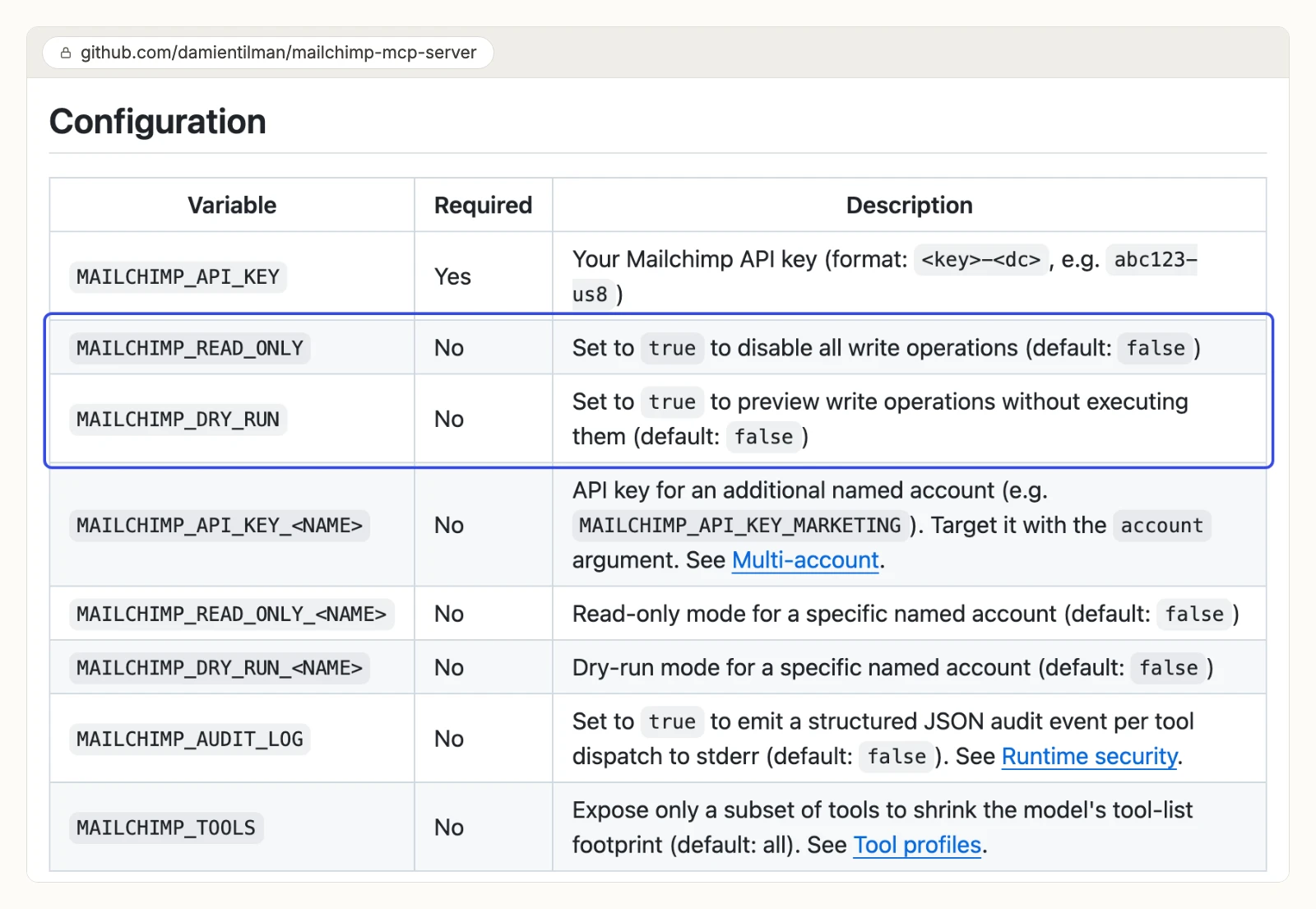
A Python server with 227 tools, and its safety modes start off.
Its README covers campaigns, reports, audiences, segments, automations, e-commerce, landing pages and surveys, with several accounts through extra keys. MAILCHIMP_READ_ONLY and MAILCHIMP_DRY_RUN both default to false, so a fresh install can send and delete. The README also says the full tool list costs about 63,000 tokens on every turn, or about 29,000 for the read-only subset. It is MIT licensed, and its last commit was on 2026-08-04.
Pros
- 227 tools, MIT licensed.
- Per-tool risk labels and an optional audit log.
Cons
- Read-only and dry-run are off on a fresh install.
- About 63,000 tokens of tools load on every turn by default, per its README.
- You host it and hold a full-access API key.
Built for: developers who want the source and will host it.
cyanheads/mailchimp-mcp-server
A TypeScript server built around sending, with a confirmation gate on every send.
Its README lists 18 tools, plus 2 that switch on with local folders. Campaigns default to draft. Send and schedule need confirmSend: true and then a single-use confirmation prompt. It runs on Bun 1.4 or Node 24, over stdio or HTTP, under Apache-2.0. It had 2 GitHub stars on 2026-11-01.
Pros
- A confirmation prompt before every send or schedule.
- New imports default to pending, so double opt-in applies.
Cons
- 18 tools, with no automation or store tool.
- A full-access API key and a server you run.
- 2 stars and version 0.6.0, so a small project.
Built for: developers sending newsletters from a local client.
AgentX-ai/mailchimp-mcp
A Node server that only reads.
Its README describes "read-only access to Mailchimp's Marketing API", run with npx and an API key that includes your data-center suffix. It covers lists, campaigns, reports, automations, templates and e-commerce data. Its last commit was on 2025-07-22.
Pros
- Read only, so it cannot change your account.
- Runs with one npx command.
Cons
- No commit since July 2025.
- A full-access API key, even for reading.
- No sending, editing or audience changes.
Built for: developers who want local, read-only access.
What to check before an agent can change Mailchimp
What an agent can do on day one depends on each server's defaults. Ask these four questions before you connect a live Mailchimp account.
What can it reach before anyone narrows it? damientilman's server can send and delete on a fresh install. Apify's actor exposes all 56 tools. Composio publishes no default. On InsightfulPipe, the 37 delete, archive, remove and cancel actions start off until an admin switches them on. A Read-only connection locks every write until an admin reconnects it with Read & write.
Who sets the limits, and who enforces them? Composio puts approval in your prompt. Zapier scopes actions per server, outside Enterprise restrictions. On InsightfulPipe, an owner, admin or operator sets the actions per Mailchimp account, and the server enforces them in every client.
Can it reach your subscribers? On InsightfulPipe, sending, scheduling and resending are ordinary writes, on by default for a Read & write account. Switch them off on accounts where agents should only draft. The agent then builds the campaign, and a person sends it.
What sits outside the API? Mailchimp's Marketing API can trigger a Customer Journey but not build one, so you design journeys in Mailchimp and let the agent start them. Transactional email needs Mailchimp's separate server. Mailchimp's rate limits apply to every server, and InsightfulPipe retries when Mailchimp asks it to slow down.
Which is the best Mailchimp MCP server for your team?
For most teams the best Mailchimp MCP server is InsightfulPipe, connected Read-only or Read & write depending on the job.
- You only need reports: InsightfulPipe, connected Read-only. Every write stays locked until an admin reconnects it with Read & write.
- You want an assistant to work in Mailchimp within limits you set: InsightfulPipe. 231 actions, each switched on or off per account, deletes off until your admin switches them on, from $29.99 a month.
- You run an agency: InsightfulPipe. Connect each client's Mailchimp account and give it its own action list, as in our guide to automating client reporting with Claude.
- You report across channels: InsightfulPipe. Mailchimp, Shopify, GA4 and 47 more platforms sit on one connection, for cross-platform reports.
- You script Mailchimp work: InsightfulPipe's CLI, or Claude Code with the same server, under the same switches.
For the wider picture across channels, see the best MCP servers for marketing.
How to connect InsightfulPipe's Mailchimp MCP server
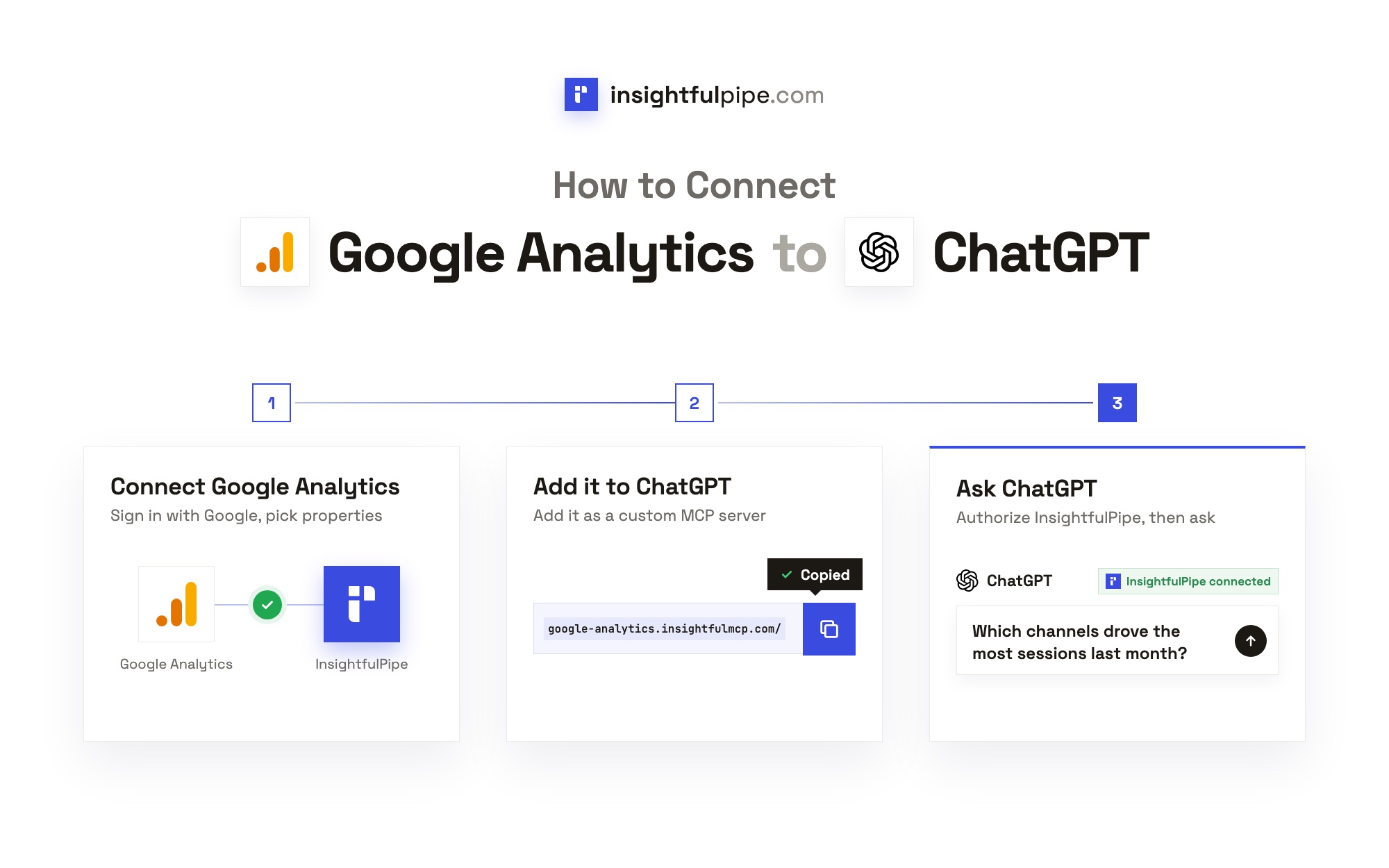
Connecting takes a Mailchimp sign-in and one server URL, with no API key and nothing to install. The steps below use Claude; the in-app guide covers the other clients.
Step 1: Connect Mailchimp in InsightfulPipe
In InsightfulPipe, open Connected accounts and choose Mailchimp. Pick Read-only or Read & write and review the Agent actions list below it, then sign in with Mailchimp and approve access. InsightfulPipe detects your data center and stores the token encrypted.
Step 2: Add the server URL to Claude
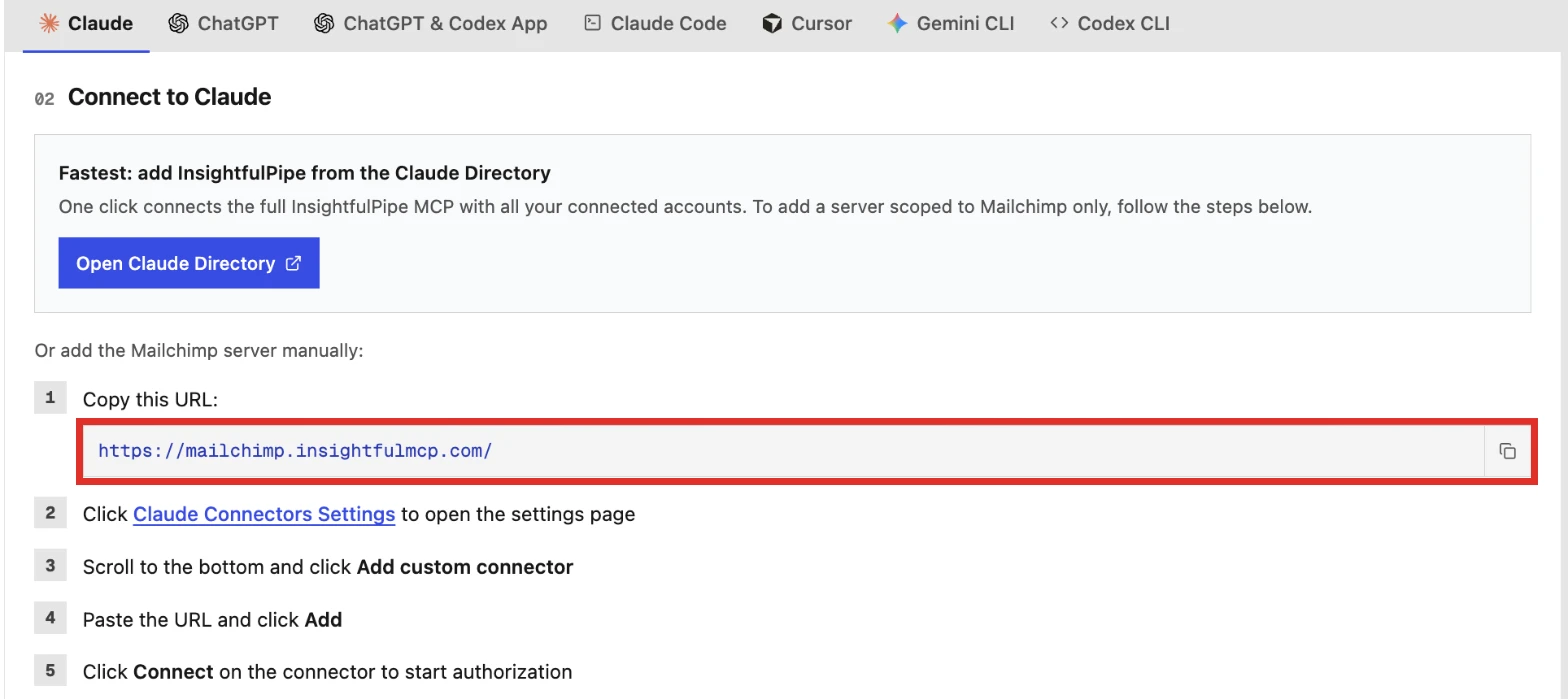
In Claude, open Customize > Connectors, click + Add, then Add custom connector. Paste https://mailchimp.insightfulmcp.com/, click Continue twice, then Add. Click Connect, sign in to InsightfulPipe if asked, then click Authorize access. To connect every platform at once, add InsightfulPipe from Claude's connector directory instead.
In Claude Code, run claude mcp add --transport http mailchimp-mcp https://mailchimp.insightfulmcp.com/, then /mcp, select the server and choose Authenticate. ChatGPT, Cursor, Gemini CLI and Codex CLI finish with the same InsightfulPipe sign-in and Authorize access.
Step 3: Choose the actions each account allows
Open the Mailchimp account's Agent actions, on the connect step or later from Connected accounts. On a new connection the Destructive filter reads 0/37. Keep the actions the agent needs, switch off sending if a person should press send, and leave the destructive actions off unless the account needs them.
Step 4: Ask your first question
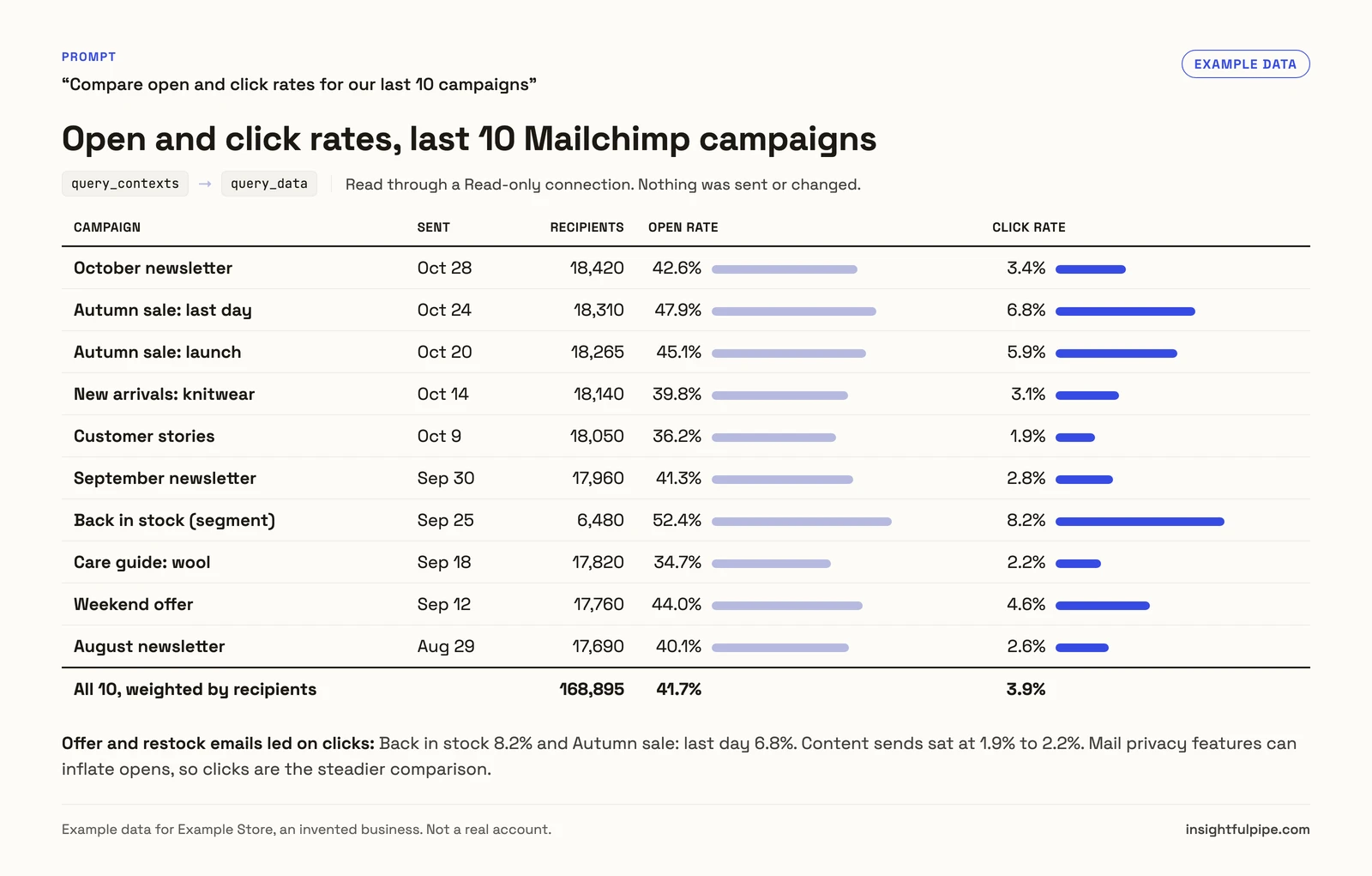
Start a new chat, turn the connector on, and ask: "Compare open and click rates for our last 10 campaigns." Then try "How did our main audience grow over the last 12 months?" More starting points sit in the prompt library.
Watch: Mailchimp MCP Server: connect your Mailchimp account to Claude, ChatGPT, Gemini or Cursor
If you also want the background on how a server differs from calling Mailchimp's API yourself, read MCP vs API.
What the other vendors do not publish
Several claims in this comparison could not be checked, because the vendors behind them publish nothing to check against.
- Intuit and Mailchimp: one plan rule for the connectors. The AI tools page says Standard and Premium; the ChatGPT page says no specific plan.
- Composio: a default for what a new Mailchimp connection can reach, or any approval outside your prompt.
- Pipedream: a Mailchimp tool list that renders without JavaScript.
- Scalekit: a default for what a new Mailchimp connection can reach.
- Apify: any control over which of its 56 tools a session can call.
- Zapier: when Enterprise app and action restrictions will apply to Zapier MCP. Its page says they do not today.
What we would not recommend
Three Mailchimp MCP entries come up in searches and AI answers but do not hold up as a pick for account work.
- Mailchimp's Marketing docs server at mailchimp.com/developer/_mcp/server: it searches documentation, not your account.
- mattcoatsworth/mailchip-mcp-server: no license and no commit since 2025-04-04.
- msmenzyk/mailchimp-mcp: 0 GitHub stars, and limited by design to drafts and test emails.
Frequently asked questions
Sources (checked 2026-11-01)
Every rival claim above comes from the vendor's own page below, each opened on 2026-11-01.
- InsightfulPipe: Mailchimp MCP server page, pricing
- Intuit and Mailchimp: Intuit Mailchimp in Claude's directory, Mailchimp + Claude, Mailchimp + ChatGPT, Mailchimp AI tools, Transactional MCP guide, Transactional pricing, Marketing API MCP server page, About API keys
- Zapier: Mailchimp MCP, MCP quickstart, pricing
- Composio: Mailchimp toolkit, pricing
- Pipedream: Mailchimp MCP server, MCP docs, Mailchimp actions on GitHub
- Scalekit: Mailchimp connector, pricing
- Apify: Mailchimp MCP Server actor
- Community servers: damientilman/mailchimp-mcp-server, cyanheads/mailchimp-mcp-server, AgentX-ai/mailchimp-mcp, mattcoatsworth/mailchip-mcp-server, msmenzyk/mailchimp-mcp