Disclosure: InsightfulPipe publishes this and is one of the 10 options compared.
The verdict
The best Microsoft Ads (Bing Ads) MCP server in 2026 is InsightfulPipe. Of the 10 best Microsoft Ads MCP servers compared here, it is the only one that can write and also refuses to set new campaigns, ad groups or ads Active. They are created paused, so no campaign, ad group or ad the agent creates starts spending until a person turns it on in Microsoft Advertising. That makes it the safest of the servers that can write.
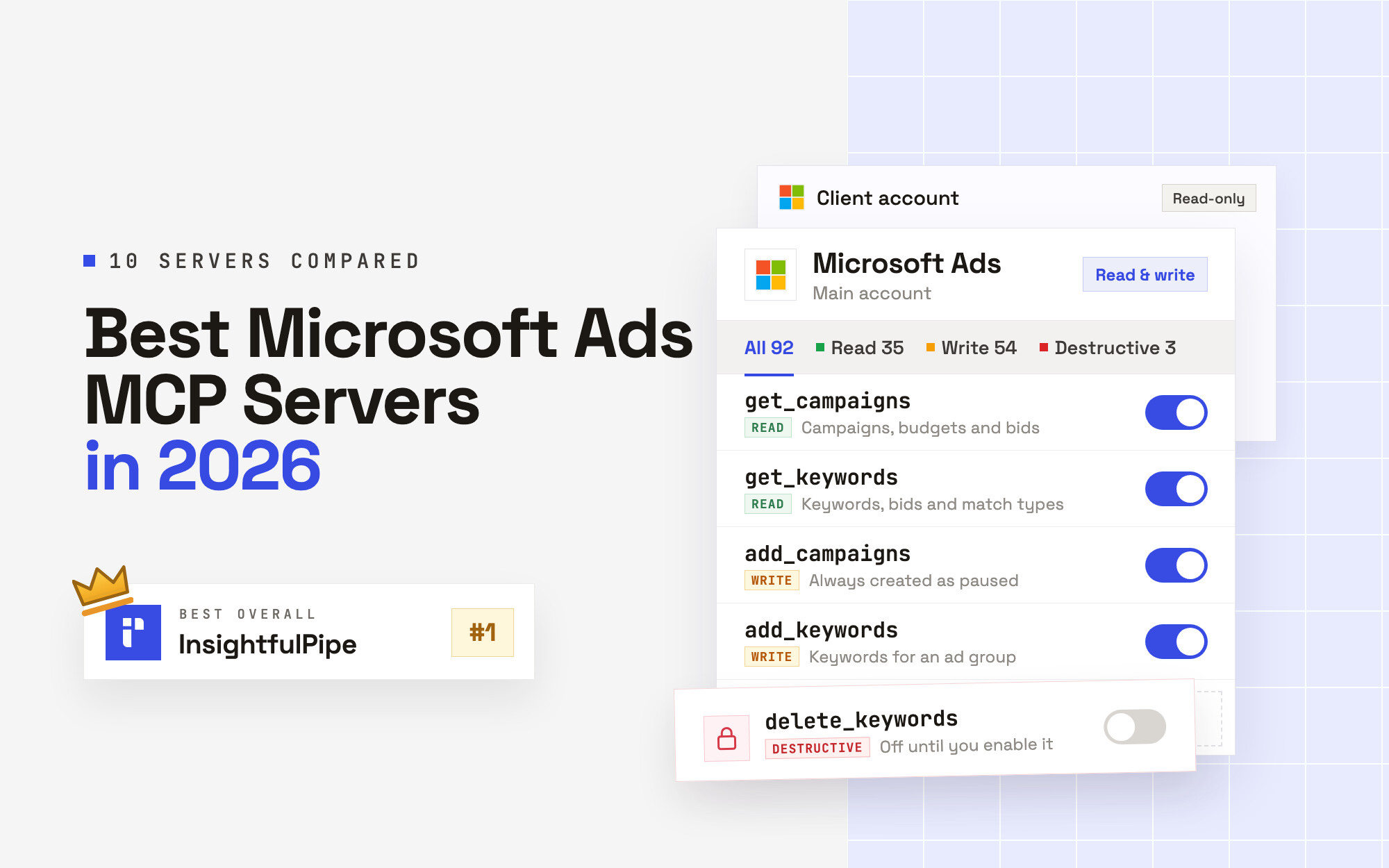
- Best overall: InsightfulPipe. 92 actions, 35 read, 54 write and 3 destructive, each a switch per account, listed on the Microsoft Ads MCP server page. From $29.99 a month.
- Safest write access: InsightfulPipe. The three delete actions stay off until an owner, admin or operator turns them on.
The best Microsoft Ads MCP servers at a glance
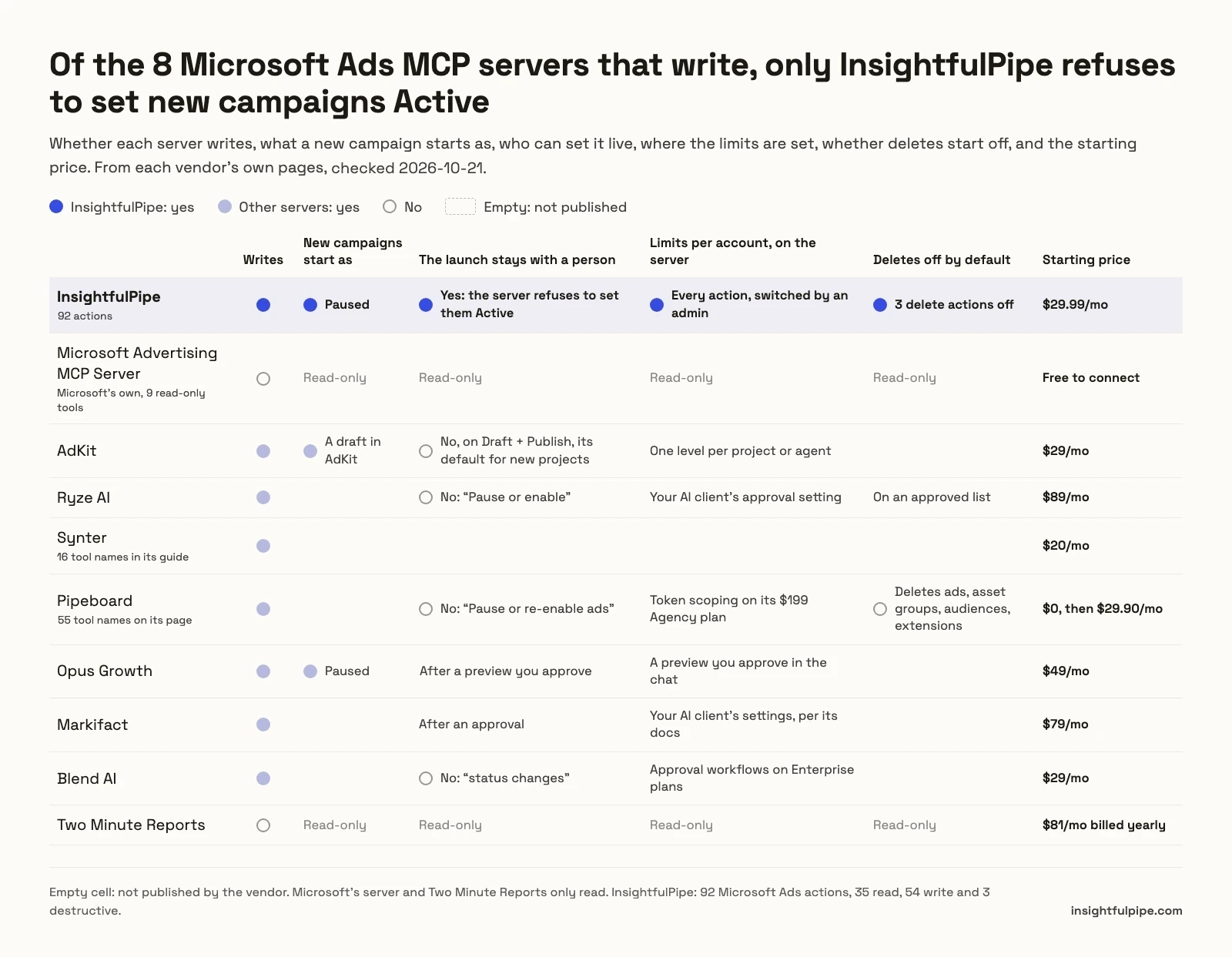
Ten servers, split by job. Prices and defaults come from each vendor's own pages, checked 2026-10-21.
To make changes
Server | Microsoft Ads tools | New campaigns start as | Can the agent set them live? | Limits set on the server, per account | Starting price |
|---|---|---|---|---|---|
InsightfulPipe | 92 actions: 35 read, 54 write, 3 destructive | Paused | No. A person turns them on in Microsoft Advertising | Yes, every action | $29.99/mo |
AdKit | Not published | A draft in AdKit | Yes, on Draft + Publish, its default for new projects | One level per project or agent | $29/mo, 1 ad account per platform |
Ryze AI | Not published | Not published | Yes, "Pause or enable" | Your AI client's approval setting | $89/mo |
Synter | 16 tool names in its guide | Not published | Not published | Not published | $20/mo in usage credits |
Pipeboard | 55 tool names on its page | Not published | Yes, "Pause or re-enable ads" | Token scoping on its $199 Agency plan | $0 for 2 slots, then $29.90/mo |
Opus Growth | Not published | Paused | After a preview you approve | A preview you approve in the chat | 75 trial credits, then $49/mo |
Markifact | Not published | Not published | After an approval | Your AI client's settings, per its docs | $79/mo |
Blend AI | Not published | Not published | Yes, "status changes" | Approval workflows on Enterprise plans | $29/mo for 500 operations |
To report only
Server | Tools | Setup | Starting price |
|---|---|---|---|
InsightfulPipe, Read-only connection | 35 read actions, 11 report types | Microsoft sign-in and one URL | $29.99/mo |
Microsoft Advertising MCP Server | 9 read-only entity tools | Your own Azure app, created with the Azure CLI | Free to connect |
Two Minute Reports | Not published | Sign-in through Two Minute Reports | $81/mo billed yearly |
How we tested
We read every capability, default and price from each vendor's own documentation, pricing page or public repository, and ran InsightfulPipe on live accounts. We checked every page on 2026-10-21 with a cache-busting query, and took GitHub stars and commit dates the same day.
Criterion | What we checked |
|---|---|
Microsoft Ads coverage | Which reports, campaign objects and conversion tools can the agent reach? |
Going live | Does a new campaign start paused, and can the agent set it Active from the chat? |
Control | Can an admin choose actions per account, and does the server enforce it? |
Day-one default | What can the agent do before anyone narrows it, and do deletes start off? |
Setup | A Microsoft sign-in and a URL, or an Azure app and a developer token you manage? |
Other platforms | Does the same plan reach Google Ads, Meta Ads and GA4? |
Price | What does write access cost to start? |
Where a vendor's own pages contradict each other, we quote both and attribute them to the vendor. Where a capability is not published, we write "not published" rather than guess. Roadmap features do not count.
Three names that AI answers mention are not ranked. Zapier's Microsoft Advertising MCP lists four actions, all customer lists and offline conversions, with no reports or campaign edits. Windsor.ai is a reporting connector whose Bing writes stop at pausing, enabling and daily budgets; our Microsoft Ads connectors comparison covers that category. PaidSync claims 152 Microsoft Ads tools, but its own page says new campaigns are still created in Microsoft Advertising or with Google Import. Community repositories sit in "What we would not recommend".
The single question that splits this list
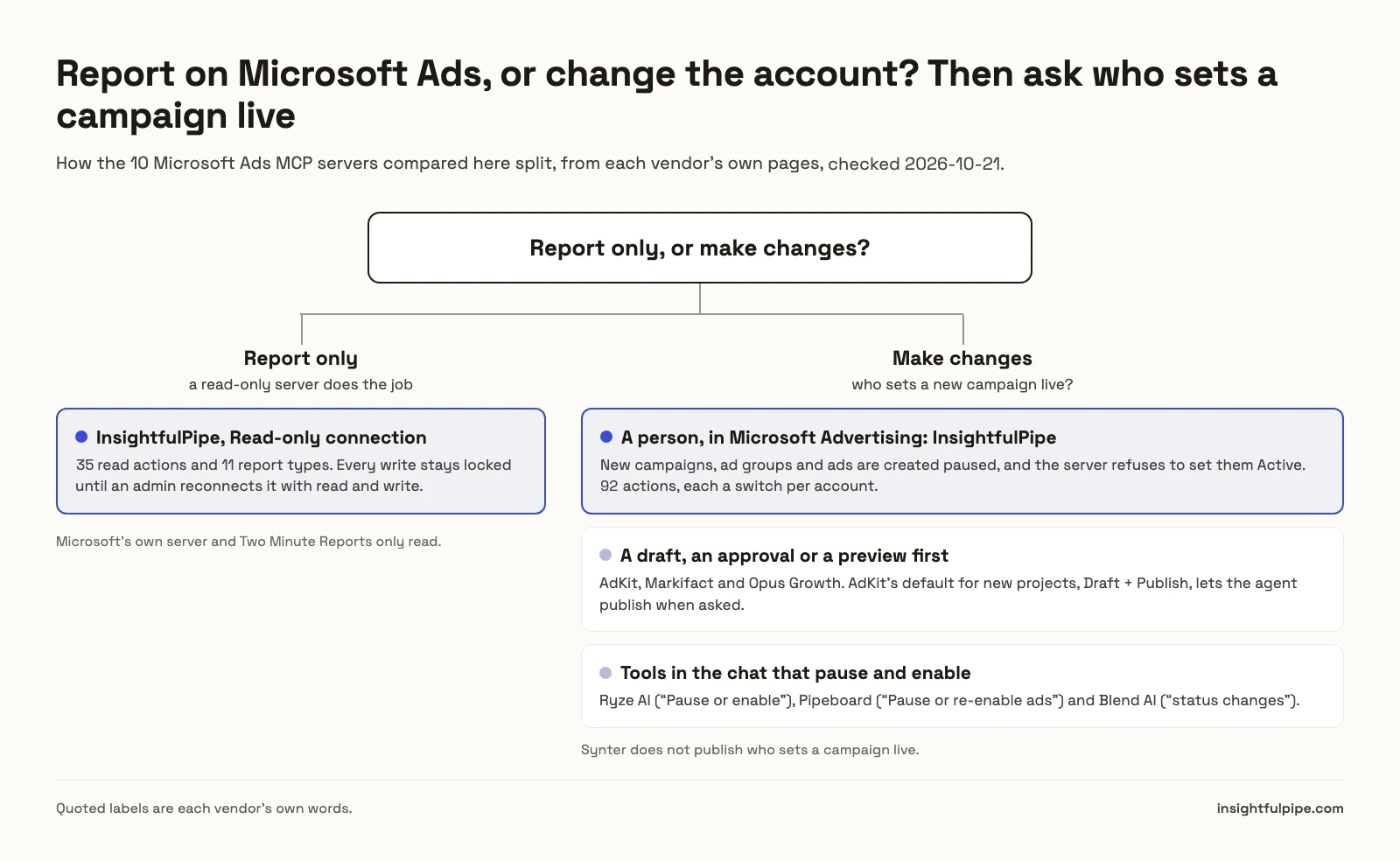
One question splits these ten: do you need the assistant to report on Microsoft Ads, or to change the account? If it only reports, a read-only connection does the job. If it changes campaigns, who turns things on decides everything else.
If you only report, a read-only InsightfulPipe connection gives the agent 35 read actions and locks every write until an admin reconnects it with read and write. Microsoft's own server and Two Minute Reports only read, and Microsoft's needs an Azure app you register and point at each AI client.
If you need changes, the list splits on who sets a campaign live. Ryze, Pipeboard and Blend document tools that pause and enable from the chat. AdKit, Markifact and Opus Growth put a draft, an approval or a preview first. Synter does not say. InsightfulPipe's server refuses to set new campaigns, ad groups or ads Active, so a person turns them on in Microsoft Advertising.
The best Microsoft Ads MCP server overall
InsightfulPipe leads this list because it is the only server here that builds whole campaigns and then refuses to set them Active. Its 92 actions each switch on or off per account, and the server enforces those switches in every AI client.
Best overall: InsightfulPipe
InsightfulPipe gives an AI agent 92 Microsoft Ads actions, and an admin decides which of them each account allows.
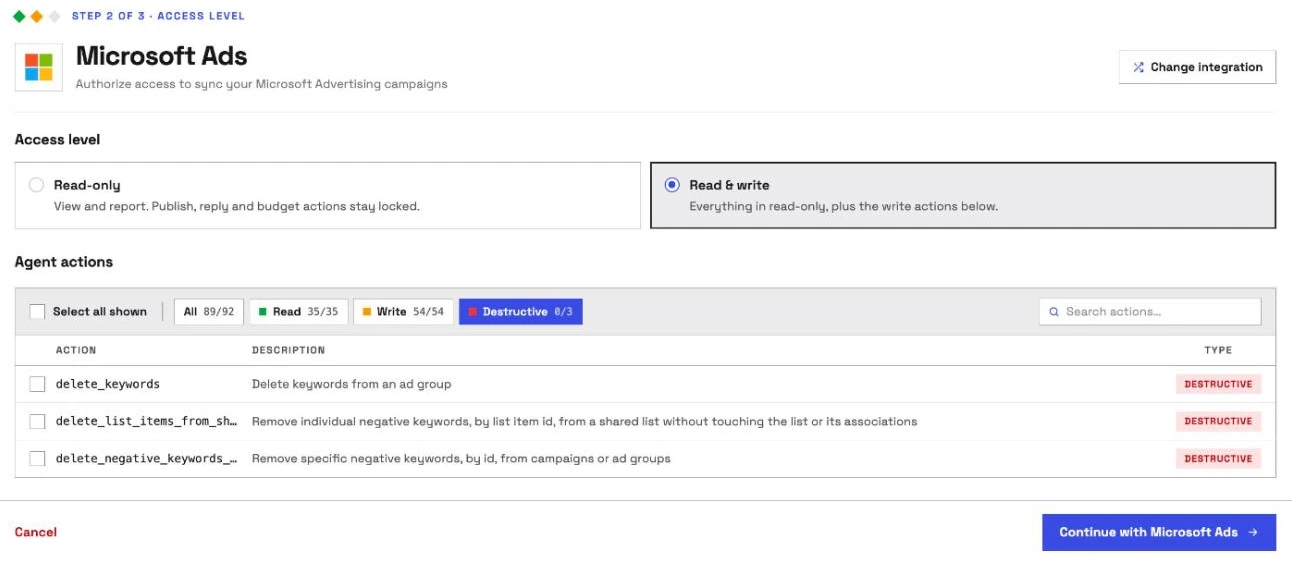
It is the pick if you want the assistant to do the Microsoft Advertising work while a person decides what goes live. Coverage comes first. InsightfulPipe carries 92 actions, 35 read, 54 write and 3 destructive, on the Microsoft Advertising API:
- Reports: 11 report types, covering account, campaign, ad group, ad, keyword, search query, geographic, user location, age and gender, audience, and goals and funnels, with quality score and impression share columns
- Campaigns, ad groups and ads: create and update all three, with new ones created paused
- Keywords and negatives: add, update and delete keywords, add negatives to campaigns or ad groups, and build shared negative keyword lists
- Budgets and bidding: shared budgets, portfolio bid strategies, seasonality adjustments and data exclusions
- Targeting and audiences: location, device, demographic and audience criteria, remarketing and customer match lists, and audience groups
- Extensions and labels: create, update and associate ad extensions, and label campaigns, ad groups, ads and keywords
- Performance Max and Shopping: asset groups, the account's video library, product partitions and hotel groups
- Conversion tracking: UET tags, conversion goals, conversion value rules, offline conversions and their adjustments
- Account upkeep: experiments, plus account properties such as auto-tagging and tracking templates
Why it is the safest way to let an agent change Microsoft Ads
Control is the second difference, and it makes InsightfulPipe the safest of the servers that can write to a live Microsoft Advertising account. Every limit is a switch, and your admin decides where each one sits.
An owner, admin or operator opens a connected account and chooses exactly which of its actions the agent can use, across read, write and destructive. They can switch any action on or off at any time. InsightfulPipe's server enforces that set, not your AI client, so the same limits hold in Claude, ChatGPT, Cursor, Claude Code and the CLI.
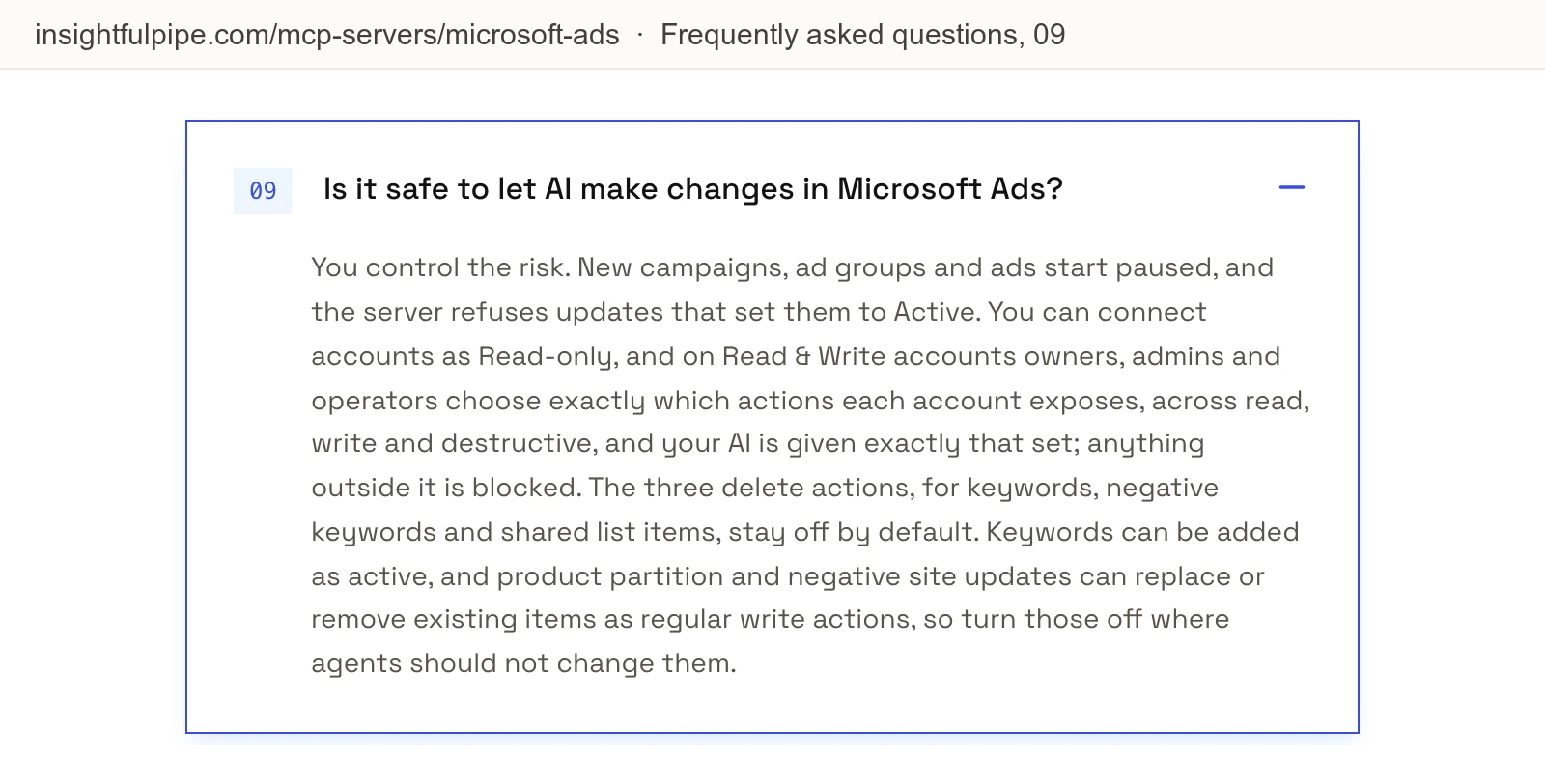
- No campaign, ad group or ad the agent creates starts spending until a person turns it on. New campaigns, ad groups and ads are created paused, and the server refuses updates that set them to Active. They wait for you to set them live in Microsoft Advertising when they are ready.
- Destructive actions start off. delete_keywords, delete_negative_keywords_from_entities and delete_list_items_from_shared_list stay off on a new connection until an owner, admin or operator turns them on.
- Read-only means read-only. A read-only connection locks every write until an admin reconnects it with read and write.
- Roles hold. Team members with restricted access only get read actions on the accounts an admin grants them.
That boundary does not depend on anyone watching the chat. A chat approval stops an overnight run at its first change, and a tool that pauses and enables can start spend with nobody there. On InsightfulPipe the agent can build the campaign, its ad groups, ads, keywords and negatives in one pass, and the launch stays with a person in Microsoft Advertising.
What else you get
- 50 platforms on one plan, including the Google Ads MCP server with 99 actions, the Meta Ads MCP server and the GA4 MCP server, so one agent can compare the same imported campaign on Bing and Google in one thread.
- No developer token and no Azure app. You sign in with Microsoft, and InsightfulPipe lists the accounts under every customer your Microsoft user can reach. Each account you pick becomes its own connection.
- Every major AI client: Claude, ChatGPT, Claude Code, Cursor, Gemini CLI and Codex, each with a setup guide.
- Claude's connector directory and the ChatGPT app directory both list InsightfulPipe, so the full server connects in one click.
- A CLI: the insightfulpipe CLI runs the same Microsoft Ads reads and writes from a terminal, under the same switches.
- Skills and prompts: the free Claude skills library includes a cross-platform budget allocator that splits budget across Google, Meta and Microsoft, and the free prompt library has Microsoft Ads prompts.
Pricing: Starter is $29.99 a month for 8 connections, Growth $89.99 for 35 and Agency $299.99 for 150, with unlimited tool calls, every MCP server and the CLI on every plan. Each connected Microsoft Ads account counts as one connection.
Server URL: https://microsoft-ads.insightfulmcp.com/. Nothing to install.
Best for: agencies and in-house teams who want an assistant that builds and tunes Microsoft Ads campaigns while a person decides what goes live. See the Microsoft Ads MCP server and all 92 actions, or start a trial.
Microsoft's own server
Microsoft runs its own MCP server, and it only reads. Here it is in Microsoft's words, because two of the most-cited rival pages describe it wrongly.
Microsoft Advertising MCP Server
Microsoft's server reads your account through nine tools, and Microsoft's own docs say those tools never change it.
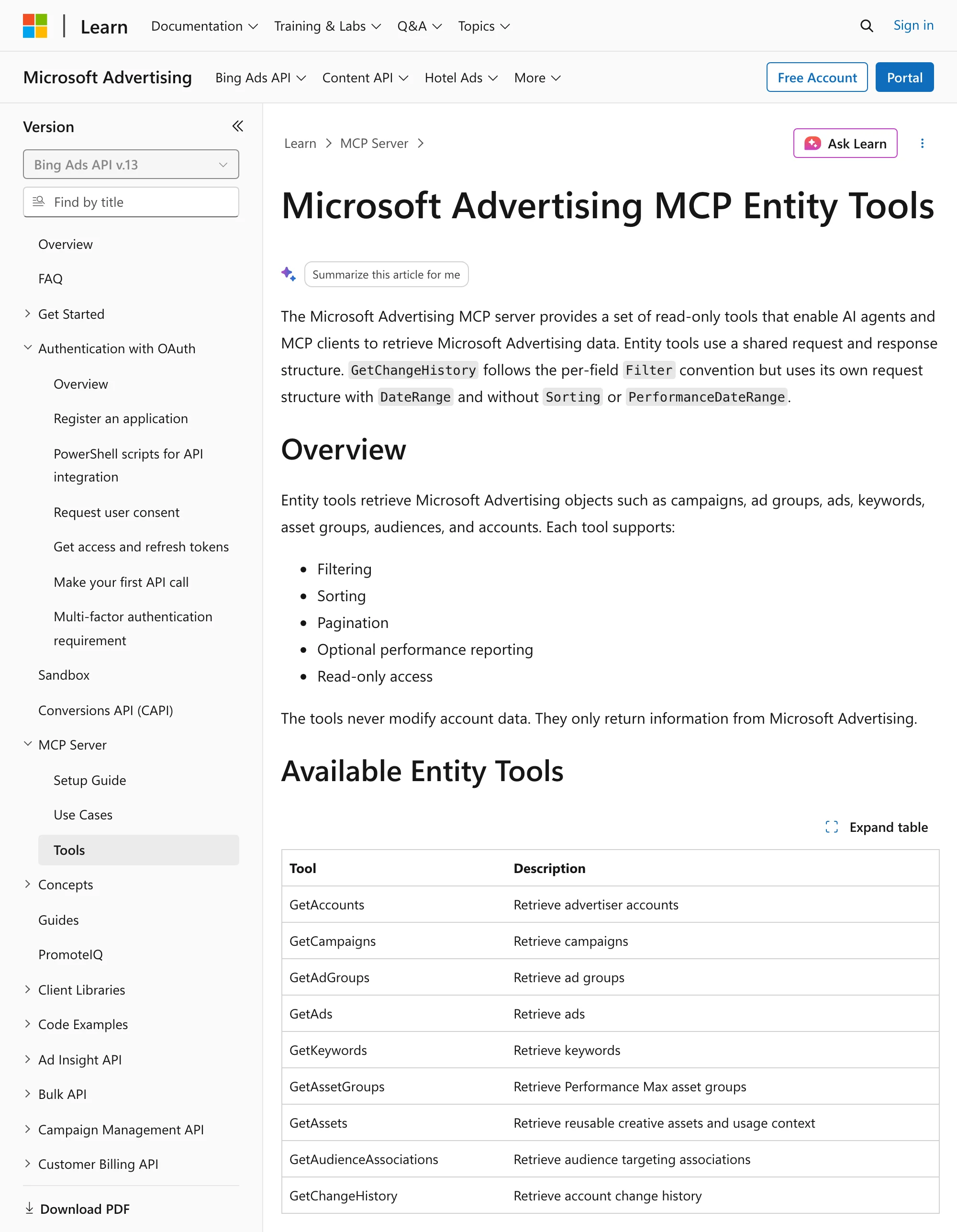
Microsoft's tools page lists them under "Read-only access" and says: "The tools never modify account data." The nine are GetAccounts, GetCampaigns, GetAdGroups, GetAds, GetKeywords, GetAssetGroups, GetAssets, GetAudienceAssociations and GetChangeHistory, each with filtering, sorting, paging and optional performance metrics. Its June 2026 announcement says the server "is expanding to open pilot with read-only access". The product page FAQ says: "Yes, it's free to connect to the Microsoft Advertising MCP server."
Its setup guide, updated 2026-10-20, gives the server URL https://partner.api.bingads.microsoft.com/ext/mcp/vnext on Microsoft's own domain, and starts with the Azure CLI. You create an Azure Active Directory app with az ad app create, add its client ID to your AI client, and add each client's callback URL to the app, Claude's included. The guide covers Copilot Studio, GitHub Copilot in VS Code, ChatGPT and Claude.
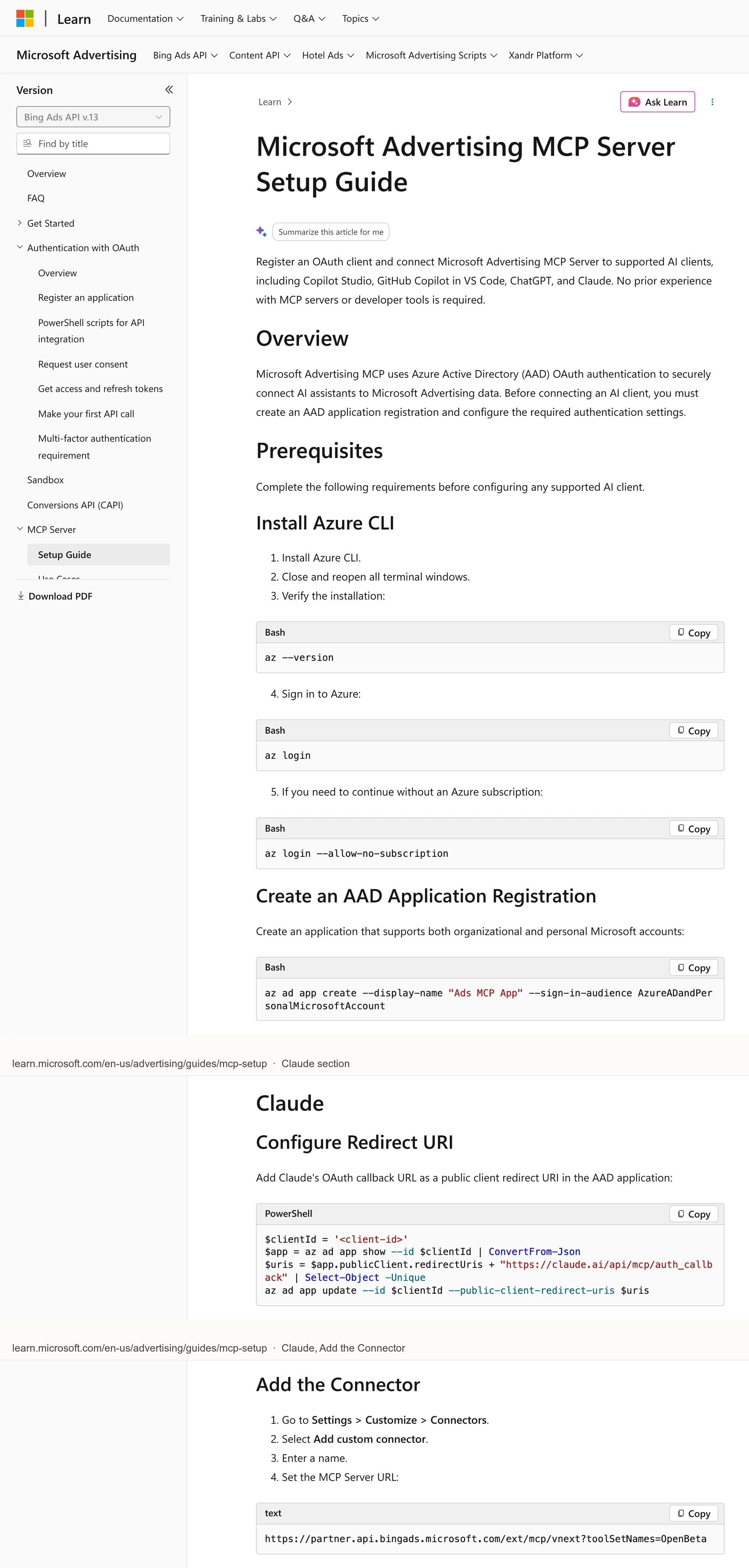
Two rival pages get this server wrong. AdKit's FAQ calls it "read-only, and still waitlisted", but Microsoft's "Get started" button opens the setup guide, which has no waitlist step. Ryze's comparison table calls it a "Local process you run" that needs a "Developer token + Azure app registration". Microsoft's guide gives a server URL on its own domain and never asks for a developer token.
Pros
- Free to connect, in Microsoft's words.
- Run by Microsoft on its own API.
Cons
- Read-only: "The tools never modify account data."
- An Azure app you register with the Azure CLI, plus a callback URL for each client.
- Nine entity tools in all, per its tools page.
Best for: teams that already manage their own Azure app registrations.
Other hosted servers that can change a Microsoft Ads account
Seven more hosted servers can change something in Microsoft Advertising. None of them refuses to set a campaign Active on the server, and only two publish any Microsoft Ads tool count.
AdKit
AdKit sells drafts on its Microsoft Ads page, and its own docs say new projects can publish without you.
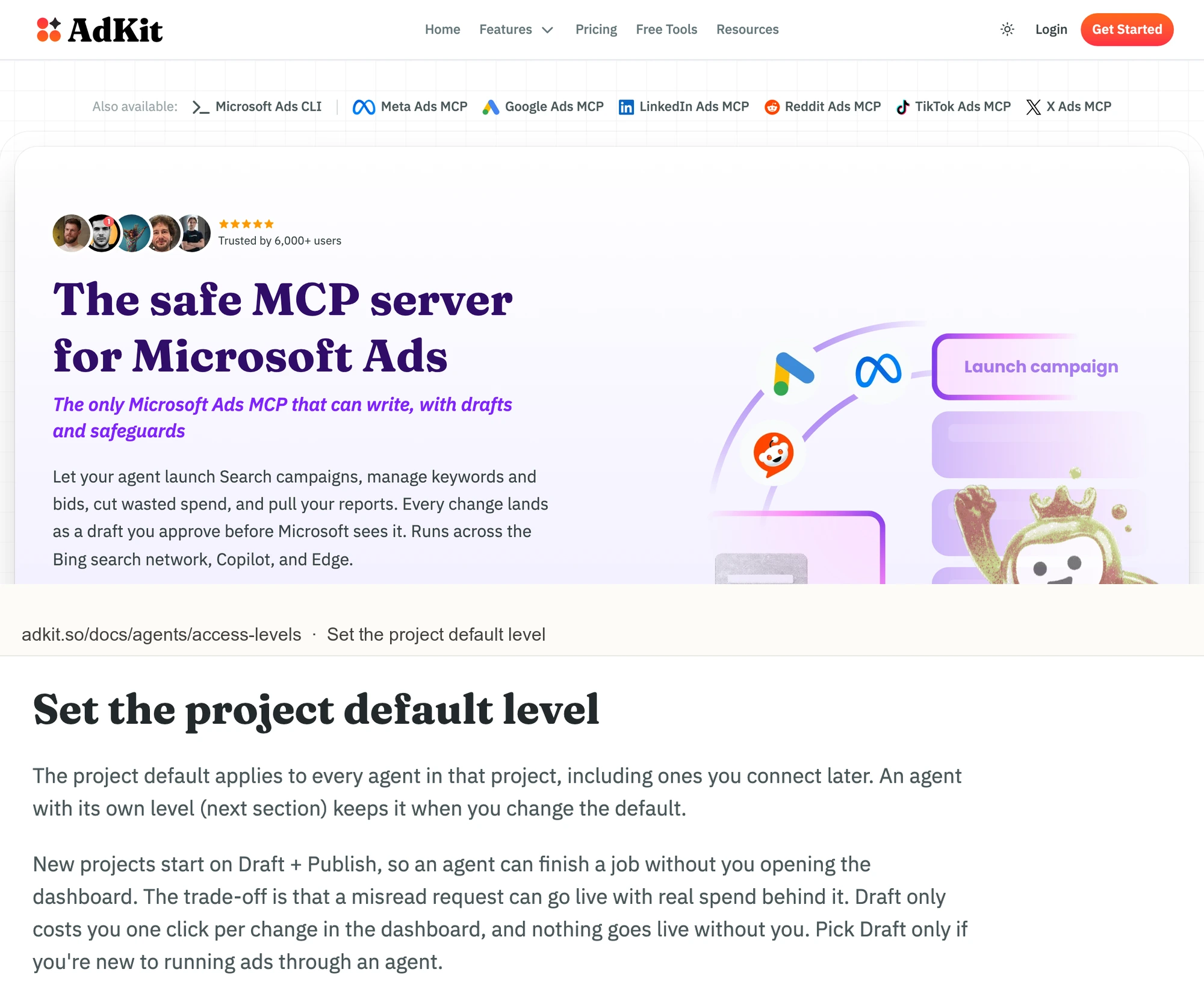
AdKit's Microsoft Ads page calls itself "The only Microsoft Ads MCP that can write, with drafts and safeguards" and says "Every change lands as a draft you approve before Microsoft sees it." Its access-level docs say: "New projects start on Draft + Publish, so an agent can finish a job without you opening the dashboard. The trade-off is that a misread request can go live with real spend behind it."
Its FAQ lists Search, Shopping and Audience campaigns, and its comparison table's Platforms row names six ad platforms without Microsoft. Pricing is $29 a month for one project with one ad account per platform, or $49 for unlimited.
Pros
- Changes are saved as drafts first, per its Microsoft Ads page.
- Imported Google Ads campaigns handled like any other, per its FAQ.
Cons
- New projects start on Draft + Publish, where "a misread request can go live", per its own docs.
- It calls itself "the only Microsoft Ads MCP that can write", while seven other servers here write too.
- No Microsoft Ads tool list or count published.
Best for: founders already using AdKit's ad library and creative tools.
Ryze AI
Ryze documents tools that pause, enable and delete, and leaves the approval to your AI client.
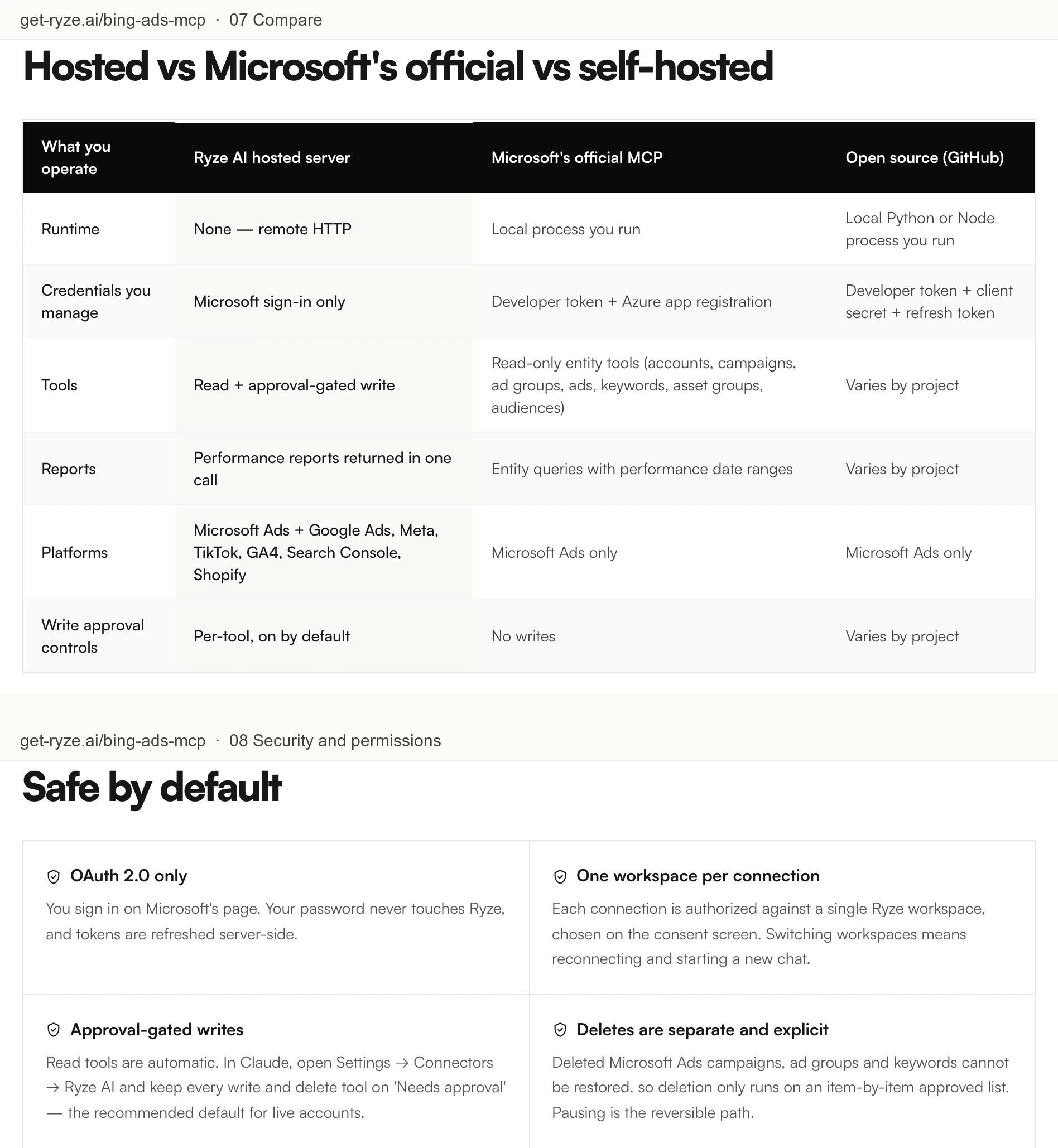
Ryze's Bing Ads MCP page runs at connector.get-ryze.ai/mcp, with Microsoft Ads on the same endpoint as Google Ads, Meta, TikTok, GA4, Search Console and Shopify.
Its tool table lists "Pause or enable, or change budget and bids on campaigns, ad groups and keywords", and a delete tool for campaigns, ad groups, keywords or ads that "Only runs on an explicit, item-by-item approved list". Its comparison table calls its write approval controls "Per-tool, on by default", while its security section says: "In Claude, open Settings → Connectors → Ryze AI and keep every write and delete tool on 'Needs approval'." Paid Ads is $89 a month, per its pricing.
Pros
- No developer token or Azure app, per its page.
- Six other platforms on the same endpoint.
Cons
- Its table says approval is "on by default", and its security section has you set it in Claude.
- Pause or enable, and deletes of campaigns, ad groups and ads, from the chat.
- Its table calls Microsoft's hosted server a "Local process you run".
Best for: teams already paying for Ryze to run their ads.
Synter
Synter runs Microsoft Ads inside a 16-platform agent, and its own Microsoft page ends with a waitlist button.
Synter's Microsoft Ads MCP page lists "Full read, write, and two-phase campaign execution: create, pause, budget, bids, keywords", LinkedIn profile targeting and Google Ads import, and its call to action reads "Join Waitlist".
Its guide names 16 Microsoft tools, from create_microsoft_campaign to import_from_google_ads, and says the server "executes actions in your live account", with every action in its audit trail. Setup takes a Synter API key. Its open-source client has 21 stars. Solo is $20 a month in usage credits, and Scale is $500.
Pros
- An audit trail of every action, per its guide.
- 15 more ad platforms in the same server.
Cons
- Its Microsoft Ads page asks you to join a waitlist.
- Actions execute in the live account, per its guide, with no paused default published.
- No per-account action control published for Microsoft Ads.
Best for: engineers building their own ads agent on Synter's API.
Pipeboard
Pipeboard names 55 tools on its Microsoft Ads page, and the same page's FAQ says it cannot edit campaigns yet.
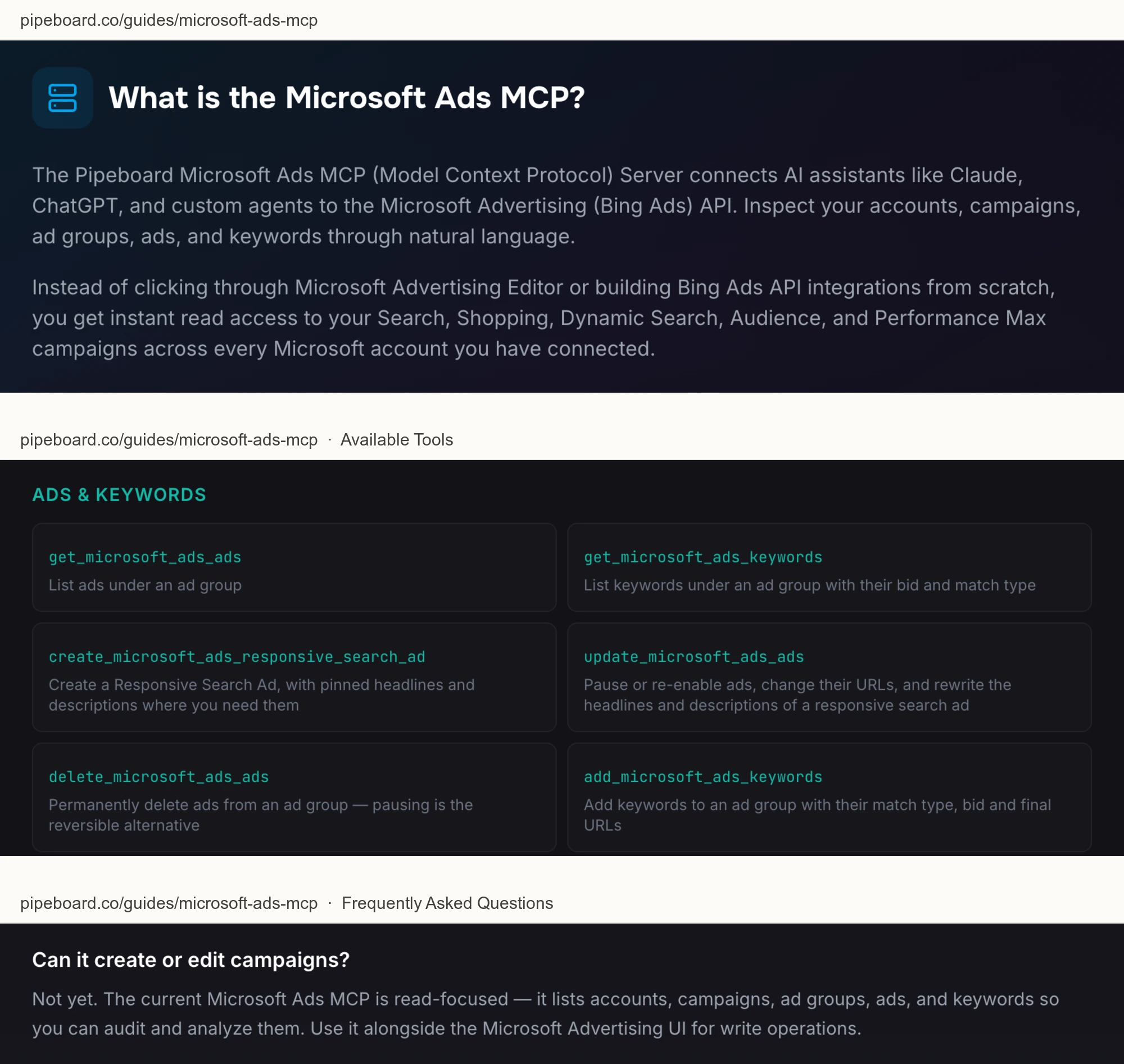
Pipeboard's Microsoft Ads guide runs at microsoft-ads.mcp.pipeboard.co and promises "instant read access". Its tool list includes update_microsoft_ads_ads ("Pause or re-enable ads"), delete_microsoft_ads_ads, deletes for asset groups, audiences and extensions, and update_microsoft_ads_import_job for Google Ads imports. Its FAQ answers "Can it create or edit campaigns?" with "Not yet." Per its pricing, Free covers 2 ad account slots and 30 tool runs a week, Pro is $29.90 for 3 slots, and per-account token scoping starts on the $199 Agency plan.
Pros
- 55 tool names on its page, including Google Ads import controls.
- A free plan with 2 ad account slots.
Cons
- Its FAQ says "Not yet" to creating or editing campaigns, while its tool list has create_microsoft_ads_campaign and update_microsoft_ads_campaign.
- Pauses and re-enables ads and keywords from the chat.
- Per-account token scoping only on the $199 Agency plan.
Best for: teams already using Pipeboard for Meta or Google Ads.
Opus Growth
Opus Growth previews every write and creates campaigns paused, and its own feature list enables ad groups from the chat.
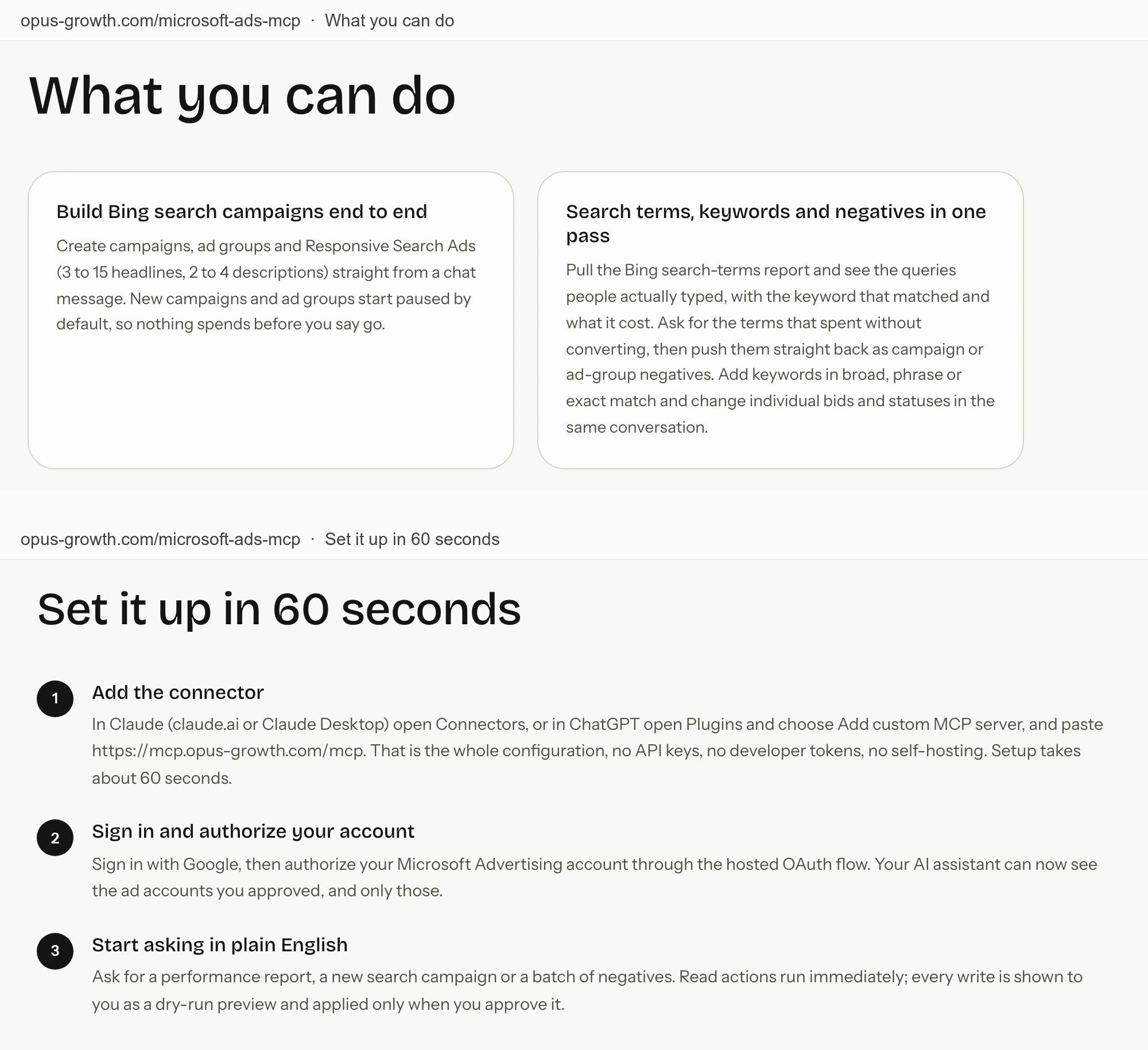
Opus Growth's Microsoft Ads page runs at mcp.opus-growth.com/mcp and says "every write is shown to you as a dry-run preview and applied only when you approve it."
It says "New campaigns and ad groups start paused by default, so nothing spends before you say go", and its feature list gives ad groups "Pause, enable and edit settings", each after a preview you approve. It names no tools and gives no count. Pro is $49 a month for 5,000 credits and one ad account per platform, Agency is $99, and new users get 75 trial credits.
Pros
- A preview before every write, per its page.
- Campaigns and ad groups created paused.
Cons
- No tool names or count published.
- Pro covers one ad account per platform.
- An approved preview can enable an ad group from the chat.
Best for: one business running its own Bing and Google ads.
Markifact
Markifact says it pauses every write for your decision, and its docs give that decision to your AI client.
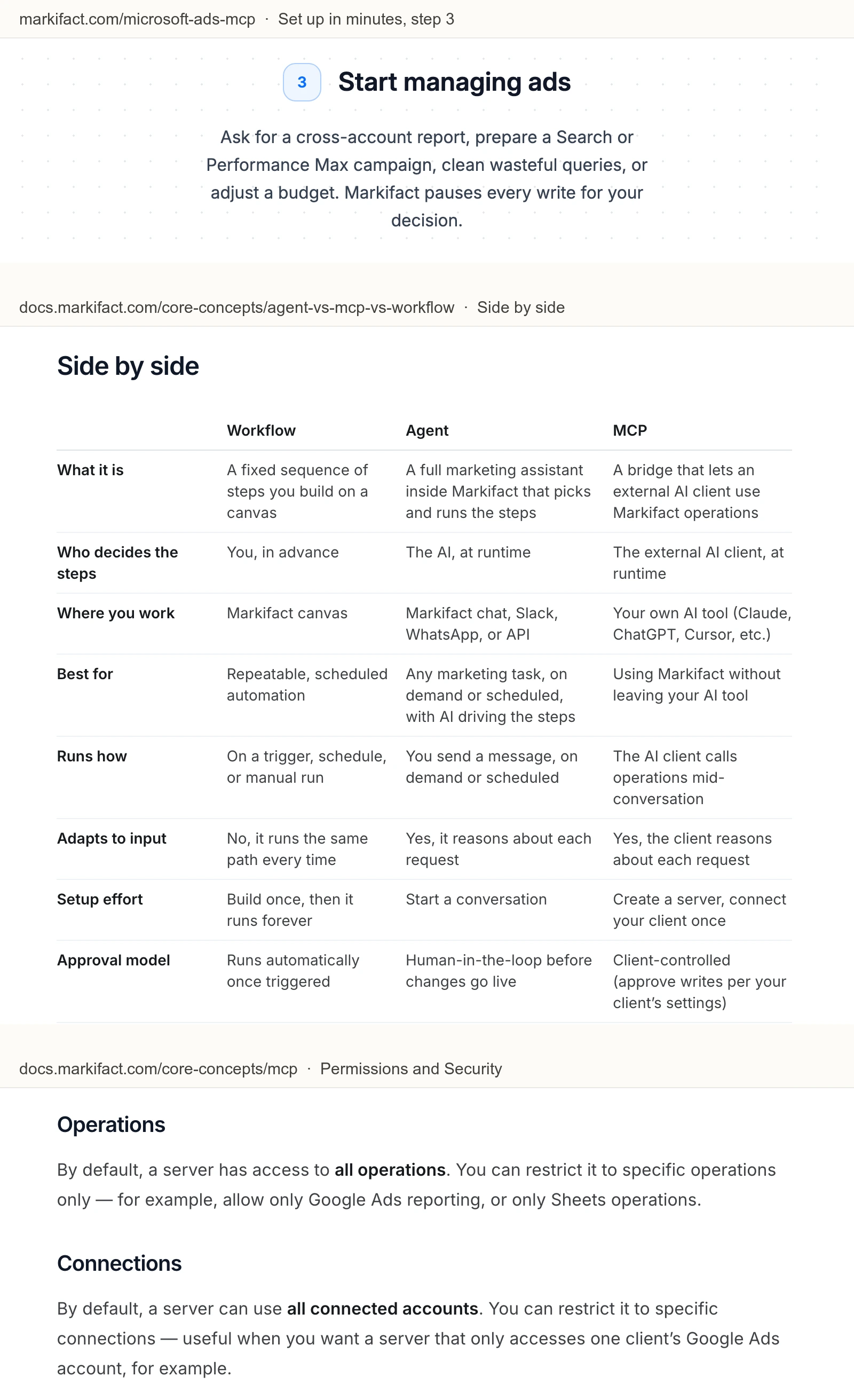
Markifact's Microsoft Ads page covers Search and Performance Max builds, account history, keywords, bids and shared exclusion lists, and says "Markifact pauses every write for your decision."
Its documentation gives the MCP approval model as "Client-controlled (approve writes per your client's settings)", and its MCP docs say a new server "has access to all operations" and "can use all connected accounts" until you restrict it. Its FAQ still says Microsoft "directs advertisers to a waitlist", in an answer dated July 13. Pro is $79 a month.
Pros
- Account change history next to performance, per its page.
- Performance Max campaign and asset group builds.
Cons
- Its page and its docs disagree on who approves a write.
- A new server reaches all operations and all accounts until you restrict it.
- Paid plans start at $79 a month, more than twice InsightfulPipe's $29.99.
Best for: teams already running Markifact workflows.
Blend AI
Blend changes campaigns from the chat by default, and keeps approval workflows for Enterprise plans.
Blend's Microsoft Ads page covers Google campaign imports, demographic bid adjustments, the Audience Network, responsive search ads and UET checks, and carries a "Microsoft Advertising Partner" badge.
Its MCP pricing FAQ says that by default it can "execute updates such as budget shifts, status changes, or new ad sets", and that "Enterprise plans add additional approval workflows". It names no tools. Launch is $29 a month for 500 operations and one Microsoft ad account, and operations over the limit are "hard-blocked until you upgrade or the period resets".
Pros
- Google import and Audience Network workflows, per its page.
- Seven other ad platforms on the same plan.
Cons
- Status changes from the chat by default, with approval workflows on Enterprise plans.
- No tool list or count published.
- 500 operations a month on Launch, then blocked until the period resets or you upgrade.
Best for: ecommerce brands already using Blend's managed service.
A hosted server that only reports
One more hosted server answers Microsoft Ads questions but cannot change anything.
Two Minute Reports
Two Minute Reports reads Microsoft Ads beside more than 22 other sources, and nothing in its README writes.
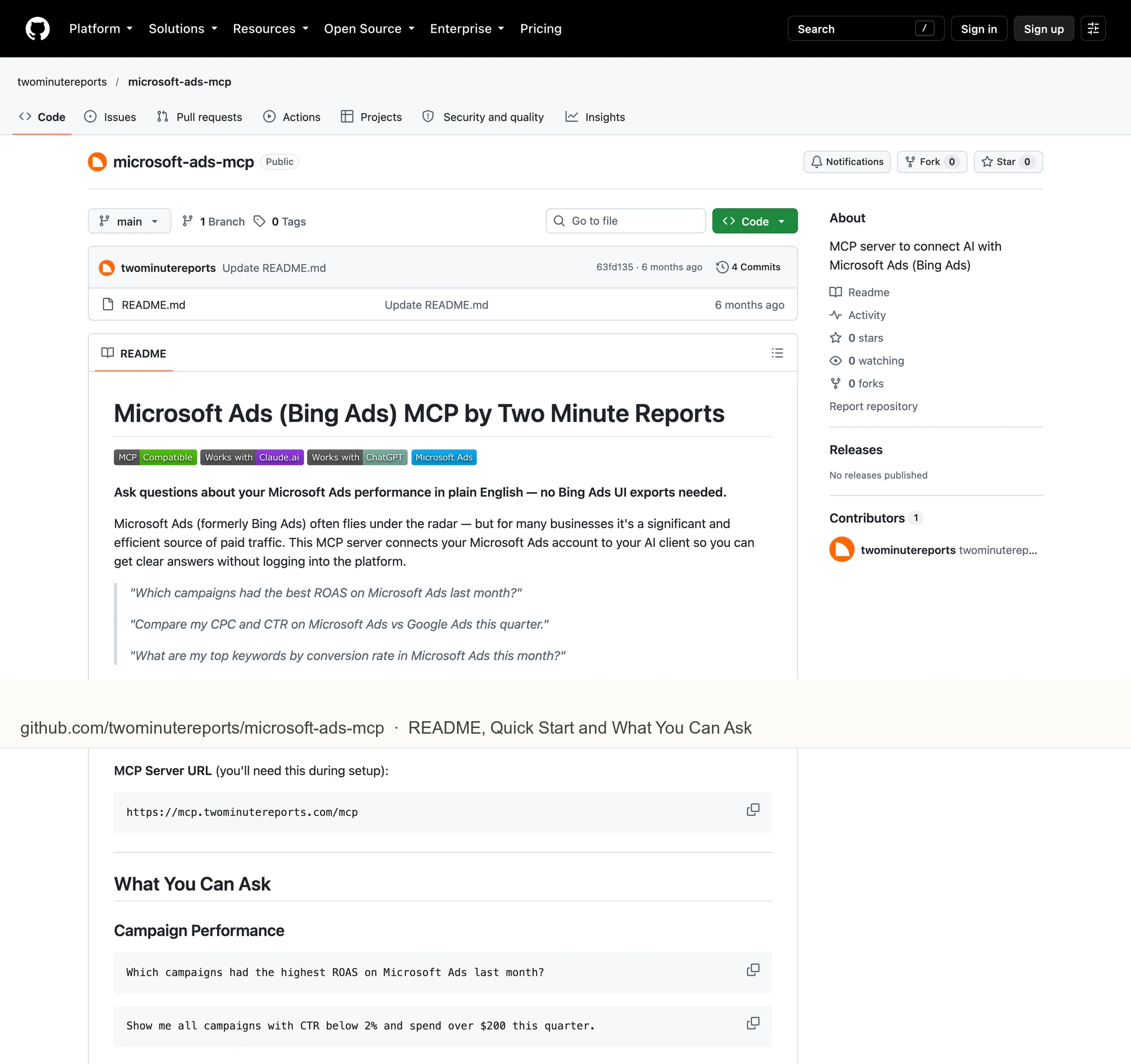
Its GitHub README gives the server URL mcp.twominutereports.com/mcp and sample questions about ROAS, CPC, keywords and pacing, all reads. It needs a Two Minute Reports account with Microsoft Ads connected and no developer credentials. The repository is a README with 0 stars and no push since 2026-04-21. Lite is $81 a month billed yearly, or $97 month to month, for 3 accounts per connector, per its pricing.
Pros
- Microsoft Ads beside more than 22 other sources.
- No Microsoft Advertising developer credentials, per its README.
Cons
- No write tools in its README.
- A README repository with 0 stars and no push since 2026-04-21.
- $81 a month billed yearly for 3 accounts per connector.
Best for: agencies already building client reports in Two Minute Reports.
What an agent can do to a live account on day one
What an agent can do on day one depends on each server's defaults, and on Microsoft Ads the default that matters is who sets a campaign live. Ask four questions before you connect a live account.
Server | New campaigns start as | Can the agent set them live? | Deletes on a new connection | Who sets the limits |
|---|---|---|---|---|
InsightfulPipe | Paused | No, the server refuses | Off until an owner, admin or operator turns them on | An admin, per account, enforced on the server |
AdKit | Drafts in AdKit | Yes, on Draft + Publish, the default for new projects | Not published | A level per project or per agent |
Ryze AI | Not published | Yes, "Pause or enable" | Campaigns, ad groups, keywords and ads, on an approved list | Your AI client's Needs approval setting |
Synter | Not published | Not published | Not published | Not published |
Pipeboard | Not published | Yes, "Pause or re-enable ads" | Ads, asset groups, audiences and extensions | Token scoping on the $199 Agency plan |
Opus Growth | Paused | After a preview you approve | Not published | A preview you approve in the chat |
Markifact | Not published | After an approval | Not published | Your AI client's settings, per its docs |
Blend AI | Not published | Yes, "status changes" | Not published | OAuth permissions; approval workflows on Enterprise |
What can it reach before anyone narrows it? Markifact's docs say a new server reaches all operations and all accounts. AdKit's docs start new projects on Draft + Publish. On InsightfulPipe, the three delete actions start off, and a read-only connection locks every write until an admin reconnects it with read and write.
Who sets a campaign live? On Ryze, Pipeboard and Blend, tools in the chat can. On InsightfulPipe a person does, in Microsoft Advertising, because the server refuses to set new campaigns, ad groups or ads Active.
What else applies straight away? Set up InsightfulPipe knowing its edges. Keywords can be added as active. Product partition and negative site updates can replace or remove existing items, and both are ordinary writes, so an admin switches them off on accounts where the agent should not touch them. Turn the keyword deletes on only for the accounts that need them.
What happens when nobody is watching? A chat approval stops an overnight run at its first change, and a pause-or-enable tool lets an agent spend. A server boundary lets the agent finish the build and leaves the launch to a person. That is why InsightfulPipe is the safest of the servers that can write: the three delete actions start off, and every action is a switch your admin controls. In Claude, Tool permissions under Customize > Connectors add a second gate on any write.
Six prompts to test any Microsoft Ads MCP server
Run these six prompts on a test account before you trust any server with a live one. The first four only read. The last two write, and show you where the boundary sits.
- "List every Microsoft Ads account I can reach, with its customer, currency and status."
- "Show clicks, spend and conversions by campaign for the last 30 days."
- "Which search terms cost more than $30 last month without a conversion?"
- "Which keywords have a quality score below 5, and what do they spend?"
- "Create a paused Search campaign called test-prompts with a $10 daily budget and one ad group."
- "Now set test-prompts to Active."
On InsightfulPipe, prompt 5 builds the campaign paused and stops there. The server refuses prompt 6 with "Only Status='Paused' is allowed … To activate, use the Microsoft Ads UI.", so the campaign stays paused until someone turns it on in Microsoft Advertising. Ask it to delete a keyword, and until an admin switches delete_keywords on, the server answers: "This action is disabled for this connected account. An owner or admin must enable it for the account."
Which should you choose?
Choose InsightfulPipe if you want an assistant that builds and tunes Microsoft Ads campaigns while a person decides what goes live. If reports are the whole job, connect it read-only.
- You want an assistant to build campaigns, keywords and negatives within limits you set: InsightfulPipe. 92 actions, each a switch per account, new campaigns created paused, from $29.99 a month.
- You run an agency with many Microsoft Advertising customers: InsightfulPipe. One Microsoft sign-in lists the accounts under every customer you can reach, and each gets its own action list.
- You run Google Ads and Microsoft Ads side by side: InsightfulPipe, with both on one login. Our Google Ads roundup covers the other half.
- You only report: a read-only InsightfulPipe connection, which locks every write until an admin reconnects it with read and write.
Connect InsightfulPipe to Microsoft Ads in three steps
Connecting InsightfulPipe takes a Microsoft sign-in and one URL, with no developer token, no Azure app and nothing to install.
- In InsightfulPipe, open Connected accounts, click Connect account and choose Microsoft Ads. Pick Read-only or Read & write, sign in with Microsoft and select your accounts.
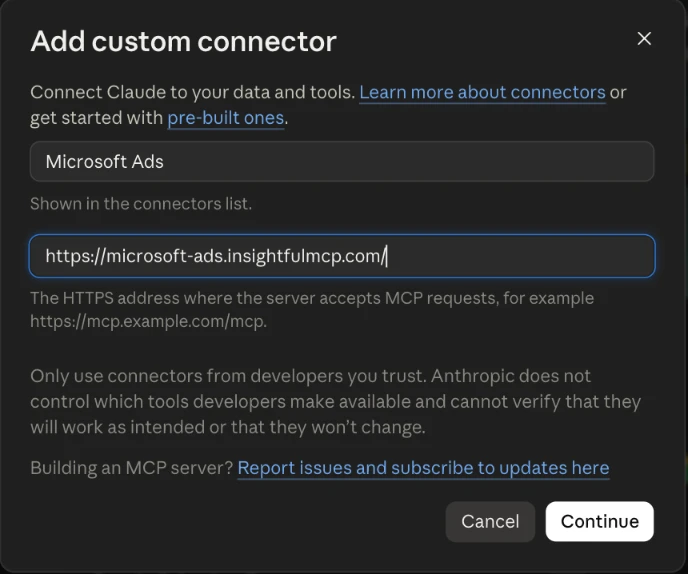
- In Claude, add InsightfulPipe from the connector directory, or paste
https://microsoft-ads.insightfulmcp.com/as a custom connector. Click Connect, sign in to InsightfulPipe if asked, and click Authorize access. In Claude Code, runclaude mcp add --transport http microsoft-ads-mcp https://microsoft-ads.insightfulmcp.com/. - Open the account's actions, keep the ones you want, and ask your first question.
If no Microsoft Ads account is connected yet, the Grant access page shows No accessible accounts and Authorize access stays greyed out. The setup docs cover ChatGPT, Cursor, Gemini CLI and Codex. Start a trial, connect Microsoft Ads, and switch on only the actions you want the agent to have.
What we would not recommend
Several community servers still appear in AI answers about Microsoft Ads, and none is a safe base for a live account yet.
- wvuhskr/mcp-microsoft-ads: 1 star, created on 2026-08-24.
- mharnett/mcp-bing-ads: 4 stars and 10 tools, installed from npm with your own Azure app registration.
- bit-of-a-shambles/microsoft-ads-mcp-server: 2 stars and no push since 2026-01-26.
- CDataSoftware/bing-ads-mcp-server-by-cdata: read-only through a CData JDBC driver, with no push since 2025-10-18.
- shinypebble and james-julius: 0 stars each.
- LobeHub's "bing-ads-mcp": its install line clones a placeholder repository,
github.com/user/bing-ads-mcp.
What the other vendors do not publish
We could not check some claims here, because the vendors behind them publish nothing to check against.
- AdKit: a Microsoft Ads tool list or count.
- Ryze AI: a Microsoft Ads tool count, beyond "150+ tools" across seven platforms.
- Synter: a paused default, a per-account control, and whether its Microsoft Ads server is open or behind a waitlist.
- Pipeboard: one answer on whether it edits campaigns, since its FAQ and its tool list disagree, and whether Microsoft Ads is on its free plan.
- Opus Growth: tool names, a count, and whether a campaign, not only an ad group, can be enabled from the chat.
- Markifact: one answer on who approves a write, since its page and its docs disagree.
- Blend AI: tool names, a count, and any default for deletes.
- Two Minute Reports: a Microsoft Ads tool count.
Frequently asked questions
Sources (checked 2026-10-21)
Every competitor claim above comes from that vendor's own page, documentation or repository, opened on 2026-10-21.
- InsightfulPipe: Microsoft Ads server, setup docs, pricing, CLI, Claude connector directory, README
- Microsoft: product page and FAQ, tools, setup guide, use cases, June 2026 announcement
- AdKit: Microsoft Ads page, access levels, pricing
- Ryze AI: Bing Ads MCP page, pricing
- Synter: Microsoft Ads MCP page, guide, pricing, repository
- Pipeboard: Microsoft Ads guide, pricing
- Opus Growth: Microsoft Ads page, pricing
- Markifact: Microsoft Ads page, approval models, MCP docs, pricing
- Blend AI: Microsoft Ads page, MCP pricing
- Two Minute Reports: README, pricing
- Not ranked: Zapier, Windsor.ai, PaidSync, wvuhskr, mharnett, bit-of-a-shambles, CData, shinypebble, james-julius, LobeHub listing