InsightfulPipe publishes this guide, and its steps use InsightfulPipe's hosted Microsoft Ads, BigQuery and Google Sheets servers. Other routes, from Supermetrics to Microsoft's own read-only MCP server, are covered near the end.
Last updated: 2026-10-02
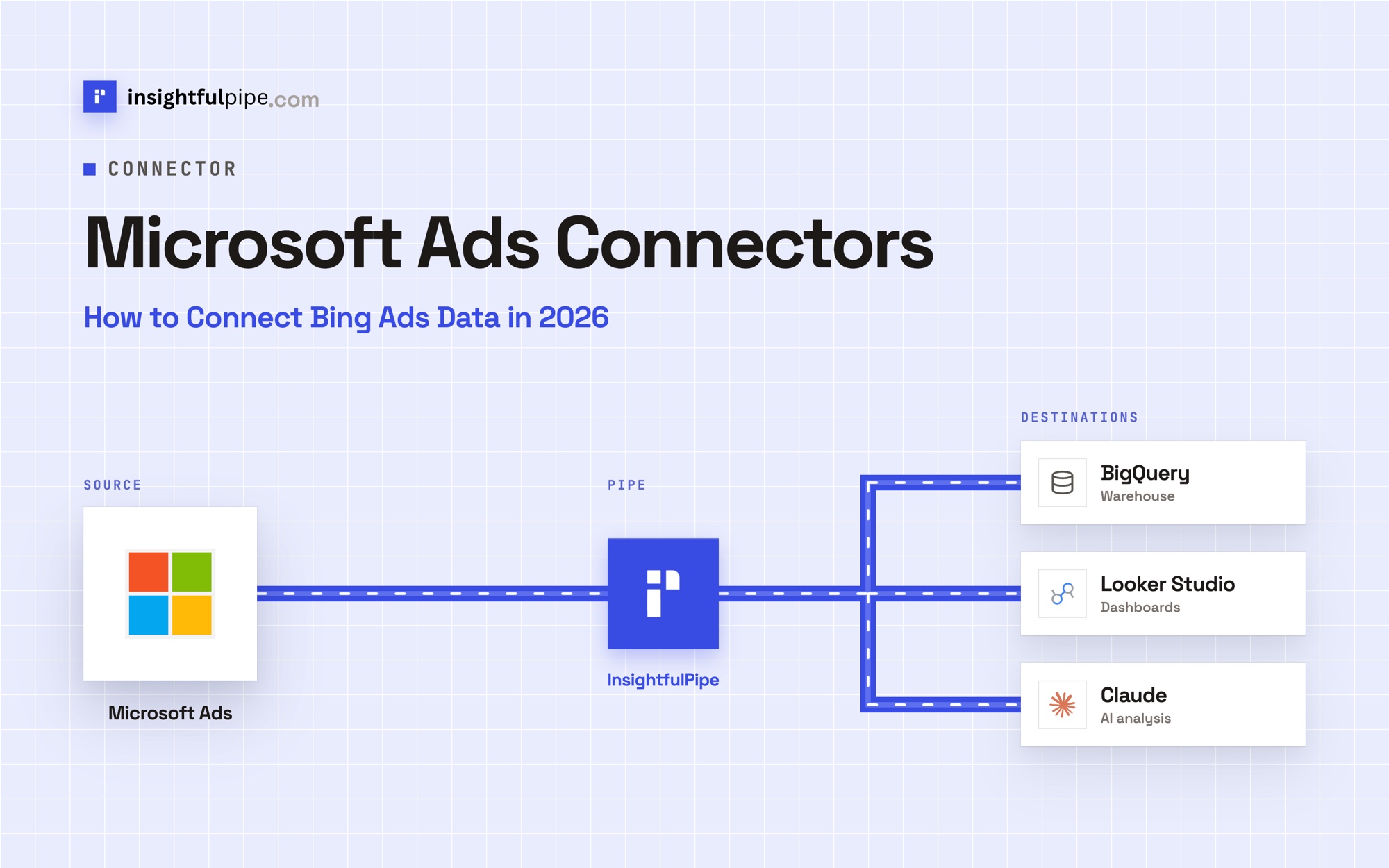
A Microsoft Ads connector, which many people still call a Bing Ads connector, moves campaign data out of Microsoft Advertising and into the tools you report in. With InsightfulPipe, Claude reads and changes Microsoft Ads live through https://microsoft-ads.insightfulmcp.com/. Claude, or the insightfulpipe CLI on a schedule, then writes the stats into BigQuery or a Google Sheet, and Looker Studio (now Data Studio) reads that table. Plans start from $29.99 a month.
The quick version
Six steps take Microsoft Ads stats from Microsoft Advertising to a Data Studio report, with Claude doing the work in between.
- In InsightfulPipe, open Connected accounts, click Connect account and connect Microsoft Ads.
- In Claude, add
https://microsoft-ads.insightfulmcp.com/as a custom connector and click Connect. - Connect BigQuery in InsightfulPipe with a service account key, at Read & write.
- Add
https://bigquery.insightfulmcp.com/to Claude the same way. - Ask Claude to run yesterday's campaign report and insert it into a BigQuery table.
- In Data Studio, add that table as a BigQuery data source.
Microsoft Ads connector routes at a glance
InsightfulPipe is the one route on this page that lets Claude build and change Microsoft Ads campaigns and fills both BigQuery and Google Sheets on one plan, from $29.99 a month. The Microsoft Ads MCP server page lists all 90 actions.
Route | Claude in Microsoft Ads | BigQuery | Data Studio | Starts at |
|---|---|---|---|---|
InsightfulPipe | Reads and changes through 90 actions, each a switch | Claude or the CLI inserts rows | Reads the table or sheet InsightfulPipe fills | $29.99/month |
Microsoft's MCP server | Reads only, 7 tools | None | None | Free to connect |
Supermetrics | Creates and updates campaigns, in early access | Enterprise plan | Connector | €49/month |
Windsor.ai | 5 writes: pause, enable, budget | Scheduled | Connector | Free for 1 source, then $23/month |
Markifact | Reads and changes; over MCP, approval is your AI client's setting | Its BigQuery MCP | Not on its pages | $79/month |
Funnel | Its MCP reads Funnel's own data | Business plan | Destination | $300/month, billed annually |
Fivetran | Its MCP manages Fivetran itself | Every 6 hours by default | Not on its pages | $0 up to 500,000 monthly active rows |
Watch: How to audit Microsoft Ads with Claude AI through InsightfulPipe, 2 minutes 58 seconds
The video may show an earlier setup. Follow the steps in this guide for the current route.
What you are connecting
You connect Claude to InsightfulPipe's hosted servers, and each one reaches only the accounts you authorized.
- Claude → InsightfulPipe Microsoft Ads server → your Microsoft Advertising accounts
- Claude or the CLI → InsightfulPipe BigQuery server → your Google Cloud project
- Data Studio → Google's BigQuery connector → the same table
Claude never receives your Microsoft password. InsightfulPipe runs each Microsoft Advertising API call with the access you approved. For BigQuery, it uses a service account key you upload, and the key's IAM roles decide what SQL can do.
InsightfulPipe has no Data Studio connector, and this route does not need one: Google's own BigQuery and Sheets connectors read what InsightfulPipe writes. You need no Microsoft Advertising developer token, no Azure app registration, no server to host and no API version to track.
Before you start
You need five things: Microsoft Advertising access, an InsightfulPipe workspace, the right role, a Google Cloud project and Claude.
- A Microsoft Advertising login that can open the accounts you report on.
- An InsightfulPipe workspace. Plans start from $29.99 a month and include the Microsoft Ads, BigQuery and Google Sheets servers. Each ad account, Cloud project or spreadsheet counts as one connection. Start a trial on any plan.
- A role that can connect and write: Owner, Administrator or Operator. Members with the User role cannot.
- A Google Cloud project with BigQuery, plus permission to create a service account and a key.
- Claude with custom connectors. Every Claude plan can add them, and Claude Free allows one, per Anthropic's help article.
Microsoft Advertising's own permissions still apply. InsightfulPipe cannot give Claude more access than the Microsoft login you connect.
Step 1: Connect Microsoft Ads in InsightfulPipe
Connecting takes a Microsoft sign-in and a choice of accounts, and you pick the access level before you sign in.
- In the InsightfulPipe app, open Connected accounts and click Connect account.
- Search for Microsoft and click Connect on the Microsoft Ads card.
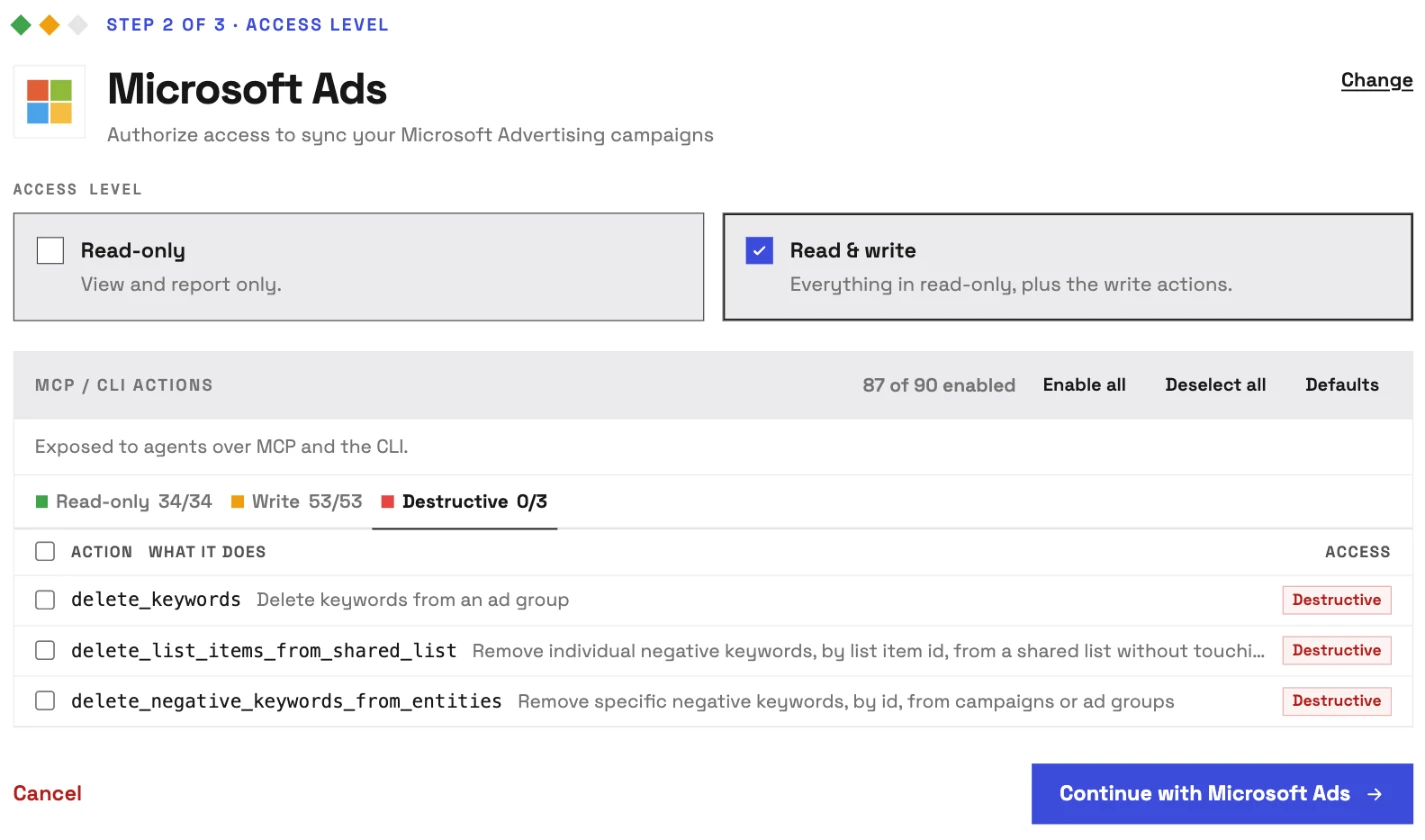
- Under Access level, choose Read-only or Read & write.
- Click Continue with Microsoft Ads and sign in with your Microsoft Advertising login.
- Select the accounts and click Connect 1 account, or the count you picked.
InsightfulPipe lists the accounts under every customer your Microsoft user can open, and each account you pick becomes its own connection. At Read & write, every read and write starts on, and the three deletes start off on a Destructive tab of their own.
Step 2: Add the Microsoft Ads connector to Claude
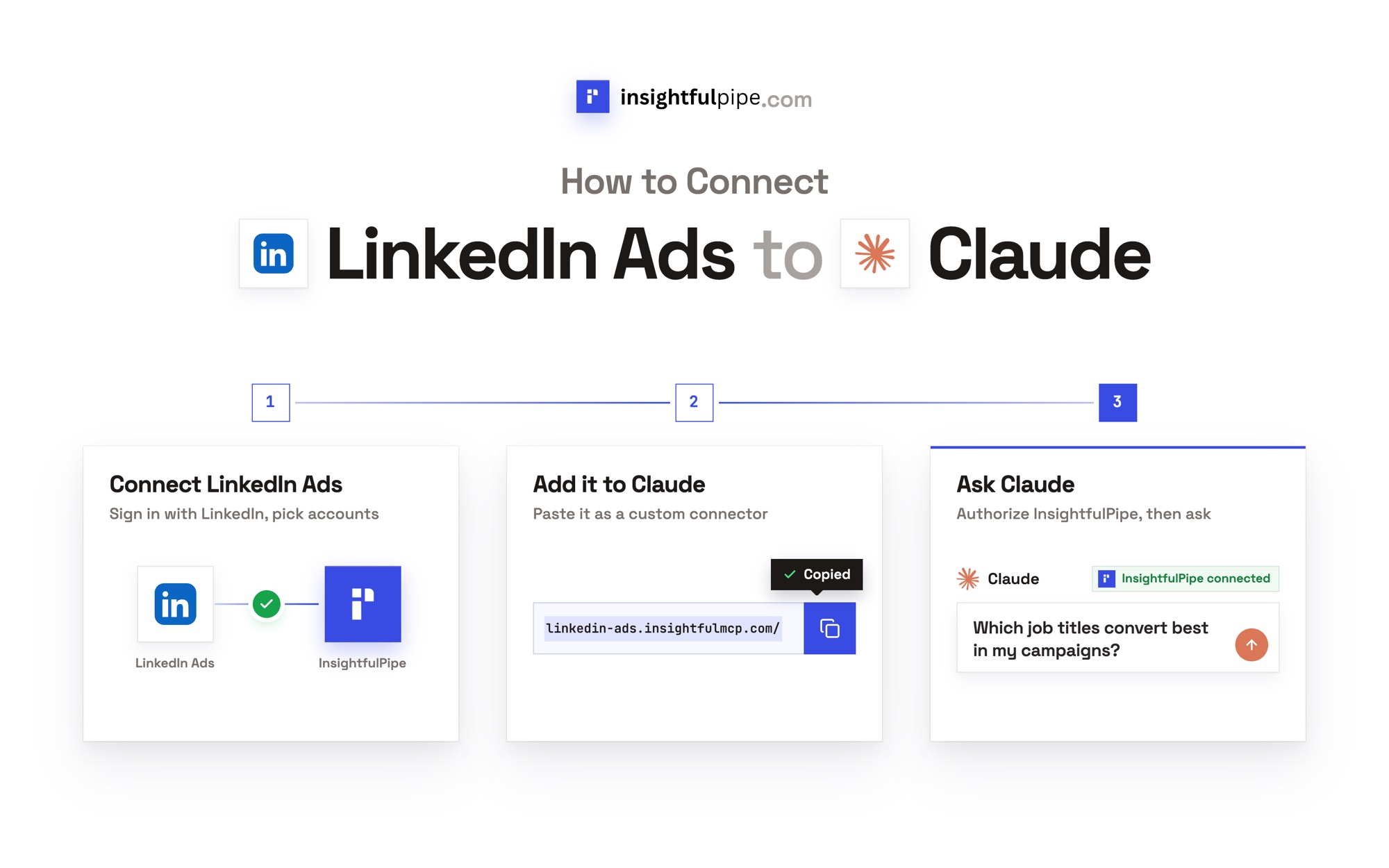
Claude takes one URL and a sign-in, on claude.ai or in Claude Desktop.
- Copy the server URL:
https://microsoft-ads.insightfulmcp.com/ - In Claude, open Customize > Connectors, click + Add, then Add custom connector.
- Name it, paste the URL and click Continue.
- Keep the sign-in settings Claude detects, click Continue again, then Add.
- Click Connect, and sign in to InsightfulPipe if asked.
- In a new chat, open + > Connectors and switch Microsoft Ads on.
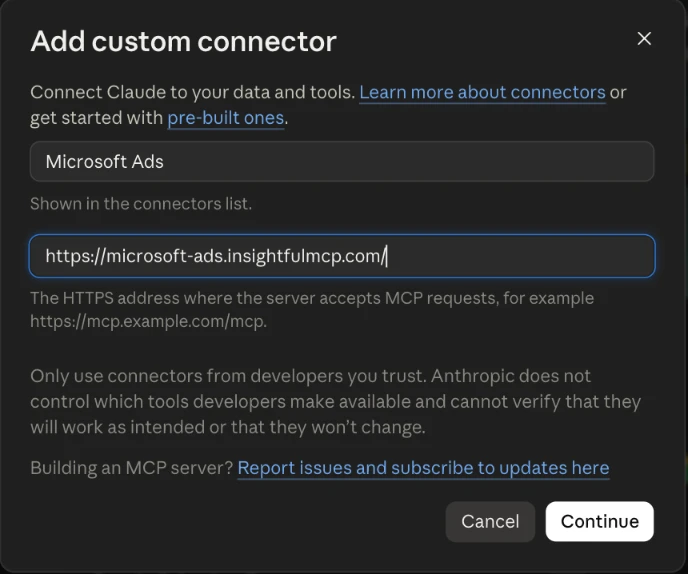
In Claude Code, run claude mcp add --transport http microsoft-ads-mcp https://microsoft-ads.insightfulmcp.com/. ChatGPT, Cursor, Gemini CLI and Codex take the same URL, with steps on the server page's setup tabs.
On Claude Free, add the single InsightfulPipe server at https://main.insightfulmcp.com/ instead, so one connector reaches Microsoft Ads, BigQuery and Google Sheets.
Step 3: Connect BigQuery in InsightfulPipe
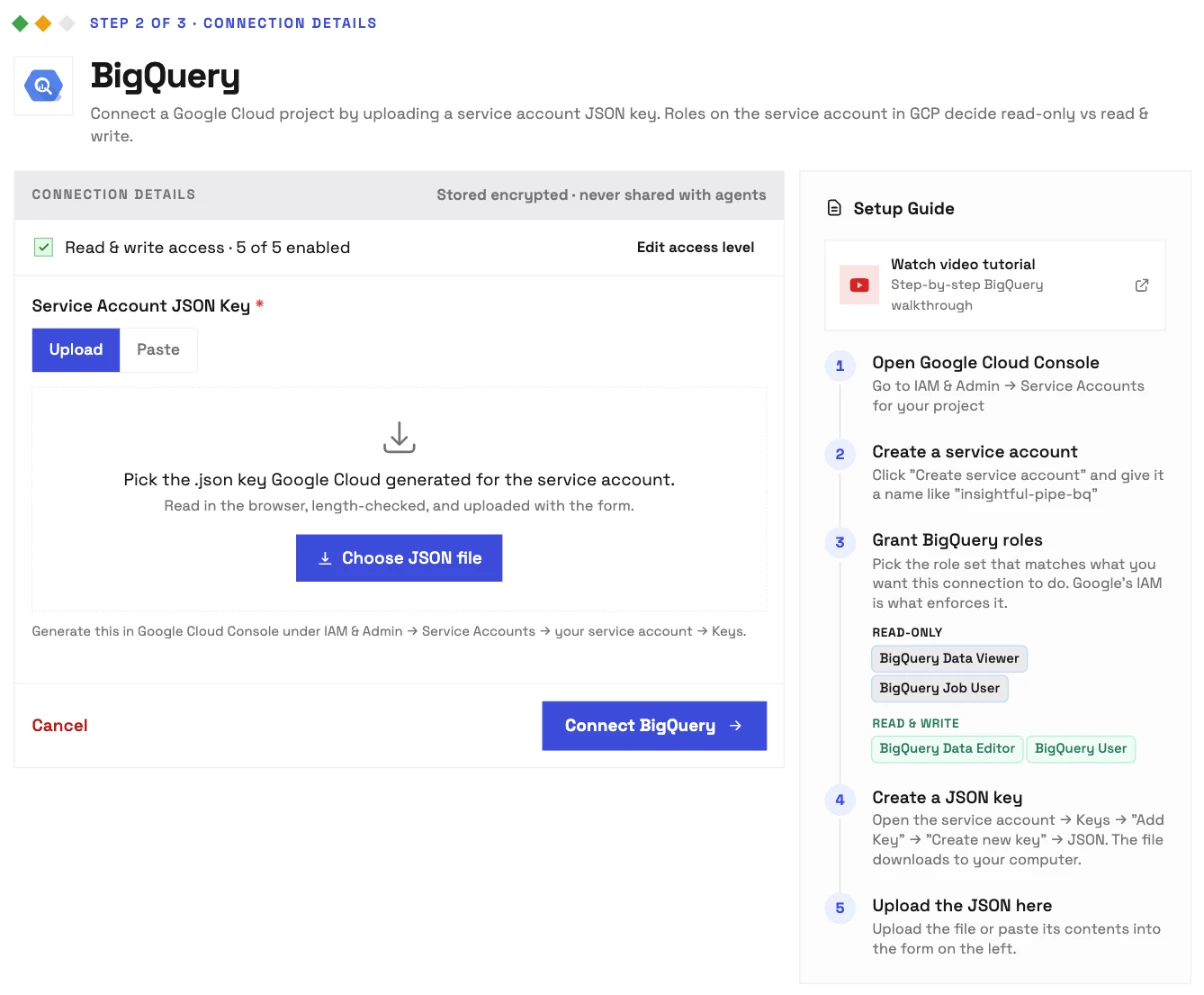
BigQuery connects with a Google Cloud service account key, and the key's IAM roles decide which SQL succeeds.
- In Google Cloud Console, open IAM & Admin > Service Accounts and create a service account.
- Grant it BigQuery Data Editor, plus BigQuery Job User or BigQuery User, so it can create tables and insert rows.
- Open the account's Keys tab and create a JSON key.
- In InsightfulPipe, open Connected accounts, click Connect account and choose BigQuery.
- At Access level, pick Read & write and click Continue.
- Under Service Account JSON Key, choose Upload or Paste, then click Connect BigQuery.
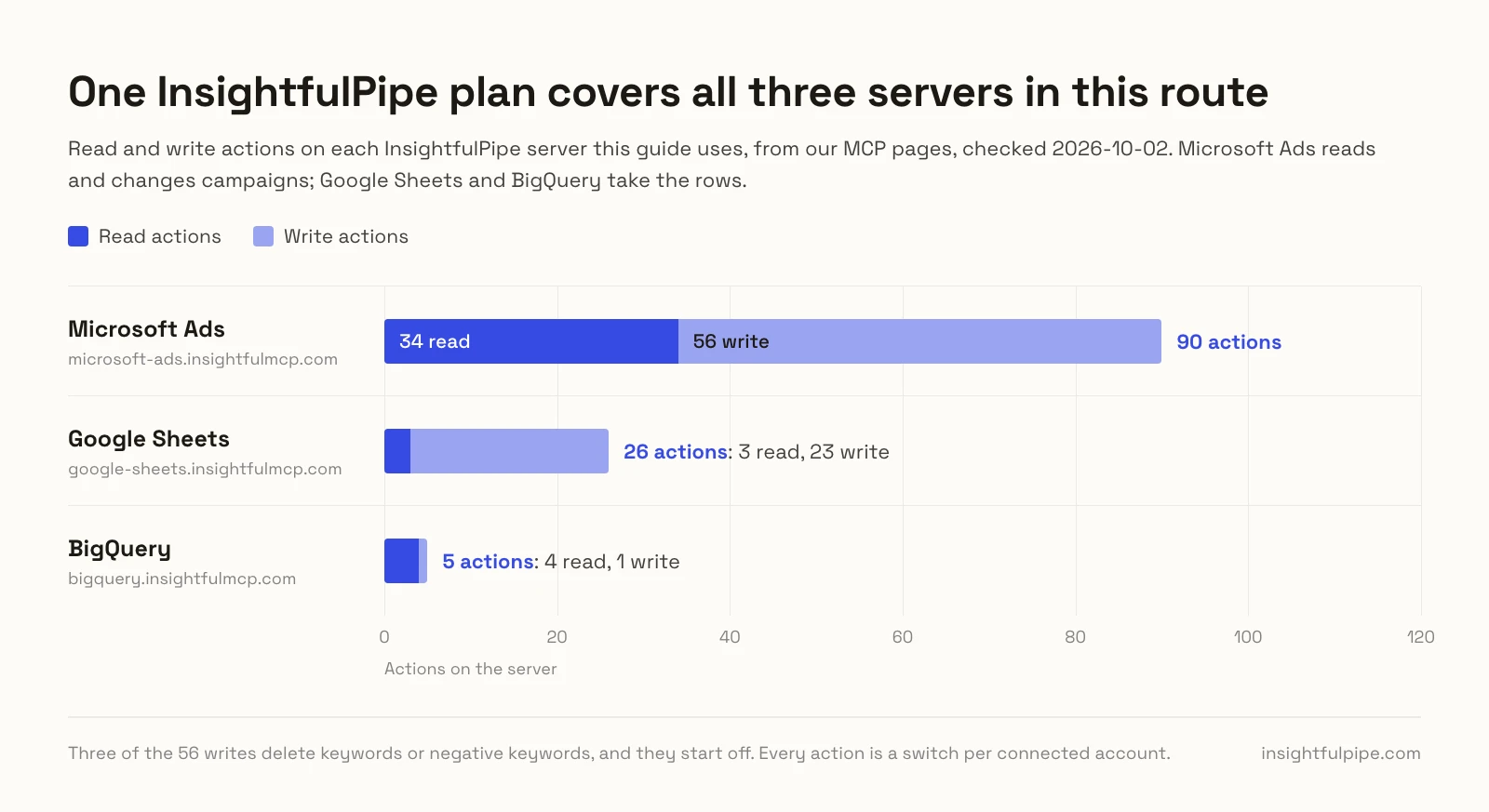
InsightfulPipe checks the key with Google before it saves the connection. Create a dataset such as microsoft_ads in the BigQuery console, then add https://bigquery.insightfulmcp.com/ to Claude as in Step 2. The BigQuery MCP server page lists its five actions.
Step 4: Write Microsoft Ads stats into BigQuery with Claude
Claude submits the report with submit_campaign_performance_report, collects it with poll_report_status once Microsoft has built it, and writes the rows with run_query. One prompt fills the table.
Use Microsoft Ads account [ACCOUNT_ID] and BigQuery project [PROJECT_ID].

1. Create [PROJECT_ID].microsoft_ads.campaign_daily if it does not exist, with date,
   campaign_id, campaign_name, impressions, clicks, spend and conversions.
2. Run a Daily campaign performance report from [START_DATE] to [END_DATE] and poll it.
3. Insert one row per campaign per day. Show me the SQL before you run it.
A single SELECT counts as a read. An INSERT, a CREATE TABLE or several statements in one request count as writes, which only owners, admins and operators can run.
Ask for Daily aggregation, or the report returns one summary row per campaign. Spend arrives as a plain decimal, ready to insert. To approve every call yourself, set the connector's tools to Needs approval under Customize > Connectors in Claude.
Step 5: Schedule the load with the insightfulpipe CLI
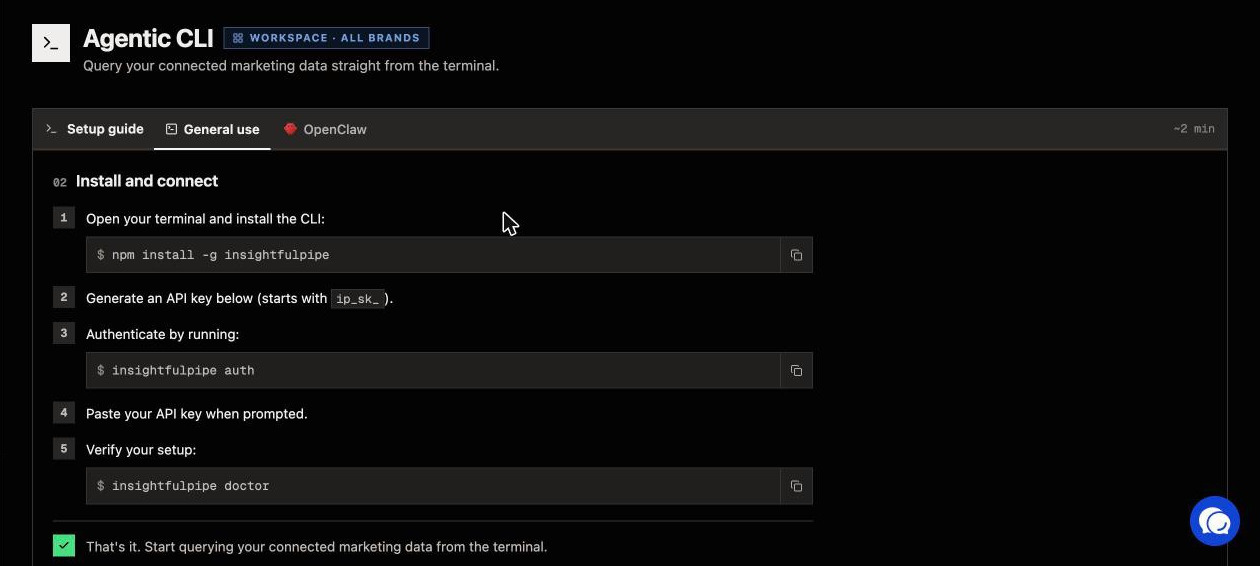
Claude writes when you ask. For a nightly load, cron, GitHub Actions or Cloud Scheduler runs the same calls through the insightfulpipe CLI, under the same action switches as Claude.
- Install the CLI with
npm install -g insightfulpipe. - In InsightfulPipe, open Settings > API Keys and create a key that starts with
ip_sk_. - Store the key as
INSIGHTFULPIPE_TOKENin the job's secrets. - Run
insightfulpipe accounts --platform microsoft-adsonce to get your IDs.
insightfulpipe query microsoft-ads -b '{"action":"submit_campaign_performance_report","workspace_id":"<WORKSPACE_ID>","brand_id":"<BRAND_ID>","account_id":"<ACCOUNT_ID>","columns":["TimePeriod","CampaignId","CampaignName","Impressions","Clicks","Spend","Conversions"],"aggregation":"Daily","time":{"PredefinedTime":"Yesterday"}}'

insightfulpipe query microsoft-ads -b '{"action":"poll_report_status","workspace_id":"<WORKSPACE_ID>","brand_id":"<BRAND_ID>","account_id":"<ACCOUNT_ID>","report_request_id":"<REPORT_REQUEST_ID>"}'

insightfulpipe action bigquery -b '{"action":"run_query","workspace_id":"<WORKSPACE_ID>","brand_id":"<BRAND_ID>","gcp_project_id":"<PROJECT_ID>","query":"INSERT INTO `<PROJECT_ID>.microsoft_ads.campaign_daily` (date, campaign_id, campaign_name, impressions, clicks, spend, conversions) VALUES (...)"}' --yes
Your script polls until report_status reads Success, then turns data_csv into the VALUES list. Writes go through action, not query, and --yes skips the confirmation prompt. The CLI documentation lists every command.
Step 6: Connect Data Studio to the BigQuery table
Data Studio reads the table through Google's own BigQuery connector, and InsightfulPipe has no Data Studio connector of its own. Google has restored the Data Studio name, so the menus and docs use it.
- In Data Studio, click Create, then Report.
- In Add data to report, choose the BigQuery connector.
- Pick MY PROJECTS, then your project, the
microsoft_adsdataset and thecampaign_dailytable. - Click Add.
Google uses the project you pick for both billing and data access, per its connector docs.
No BigQuery? Use a Google Sheet as the source
A Google Sheet works as the Data Studio source too, and Claude fills it with update_cells or batch_update_cells.
- In Google Sheets, create the spreadsheet and a tab for Microsoft Ads stats.
- In InsightfulPipe, connect Google Sheets at Read & write, click Pick from Google Drive and choose the file.
- Add
https://google-sheets.insightfulmcp.com/to Claude and ask it to write last week's stats into the tab. - In Data Studio, click Create, then Data Source, choose Google Sheets, pick the spreadsheet and worksheet, and click CONNECT.
update_cells overwrites the range you name, so point Claude at a fresh tab or empty rows. Data Studio rereads the sheet each time a report queries it. The Google Sheets MCP server page lists its 26 actions.
Verify it worked
Three checks, shortest first, show that each hop works before you build anything.
Microsoft Ads answers. Paste this into a new chat. It reads account details and changes nothing.
List the Microsoft Ads accounts available to this connection.
Return the account name, account ID, currency and status.
Do not run a report and do not change anything.
BigQuery answers. Ask Claude to list the datasets in your project. It runs list_datasets, which only reads.
The numbers match. Compare one day's spend in the table with the Microsoft Advertising interface for that day.
Prompts to run first
Start with reads, then let Claude write to BigQuery once the numbers match.
Prompt | What Claude does |
|---|---|
"Which search terms cost more than $30 last month without a conversion?" | Runs the search query report |
"Which keywords have a quality score below 5?" | Runs the keyword performance report |
"Add these 15 negative keywords to the Generic campaign" | Runs add_negative_keywords_to_entities |
With the Google Ads server connected too, one prompt compares both search engines:
Use Microsoft Ads account [MS_ACCOUNT_ID] and Google Ads account [GOOGLE_ACCOUNT_ID].
Compare the last 30 days of spend, clicks, conversions and cost per conversion
by campaign on both platforms. Do not change anything.
The marketing prompt library and the Claude skills library are free to use. The Cross-Platform Budget Allocator skill splits budget across Google, Meta, TikTok, LinkedIn and Microsoft Ads.
What Claude may change in Microsoft Ads and BigQuery
Claude may change only what your admin leaves switched on, and nothing it creates in Microsoft Ads starts serving on its own.
The Microsoft Ads server has 90 actions: 34 read and 56 write. Three of the writes delete keywords or negative keywords, and they start off.
- Every action is a switch. An owner, admin or operator turns any action on or off, per account, at any time. The server refuses a switched-off action in every client.
- Created paused, for you to set live. New campaigns, ad groups and ads start paused, even when the request asks for active, and the server refuses an update that sets one active. You set them live in Microsoft Advertising when they are ready.
- Keywords can go live.
add_keywordsandupdate_keywordscan set a keyword active, so a new keyword in a live ad group serves at once. Switch them off where Claude should only report. - Deletes start off. Deleting keywords, negative keywords or shared-list negatives stays off until an admin switches on
delete_keywords,delete_negative_keywords_from_entitiesordelete_list_items_from_shared_list. Campaigns, ad groups and ads have no delete action at all. - Replacing writes are switches too. The negative-site actions replace whole lists, and the product partition, hotel group and customer list actions can remove items.
- Budgets go through as written. InsightfulPipe passes budget and bid amounts to Microsoft unchanged, so read the amount in Claude's call before you approve it.
- Reports stay on the connected account, and a Read-only connection locks every write until an admin reconnects it with Read & write.
- BigQuery writes sit behind two switches: the
run_queryaction, and the service account's roles. With only Data Viewer and Job User, BigQuery refuses every write.
That is why InsightfulPipe is the safest way to let an AI agent change a Microsoft Ads account: nothing it creates goes live on its own, the three deletes start off, and your admin decides what each account allows.
Troubleshooting
Most failures are one of these seven, and six of them come with an exact message.
- "No Microsoft Ads accounts found." The Microsoft login cannot open an ad account. Check its access, then connect again.
- "Only Status='Paused' is allowed for update_campaigns. To activate, use the Microsoft Ads UI." Claude tried to set a campaign live. Set it live in Microsoft Advertising instead; ad groups and ads get the same message.
- "This account is connected read-only, so this action cannot be enabled for it. An owner or admin must reconnect it with Read & Write permissions." Reconnect the account at Read & write.
- "This action is disabled for this connected account. An owner or admin must enable it for the account." An owner, admin or operator switches it on.
- "Your role does not have permission to execute write actions. Only operators, admins, and owners can execute write operations." Your workspace role is User. Ask an owner or admin to change it.
- "Report scope may only target the connected account." Claude named another account in the report. Ask it to report on the connected account only.
- The report comes back empty.
poll_report_statusreturns Success with nodata_csvwhen the period had no delivery. Widen the date range first.
Other Microsoft Ads connectors for Data Studio, BigQuery and Claude
Reporting connectors move Microsoft Ads data into Data Studio, Sheets or BigQuery on their own schedules, as they do for Facebook Ads and Snapchat Ads, and Microsoft's own MCP server only reads. Some rivals let Claude change Microsoft Ads, but none of them both lets Claude build campaigns and fills BigQuery and Sheets on a plan from $29.99 a month.
We read every capability, default and price from each vendor's own documentation, pricing page or public repository, and ran InsightfulPipe on live accounts. Pages were checked on 2026-10-02.
Microsoft's own Microsoft Advertising MCP server
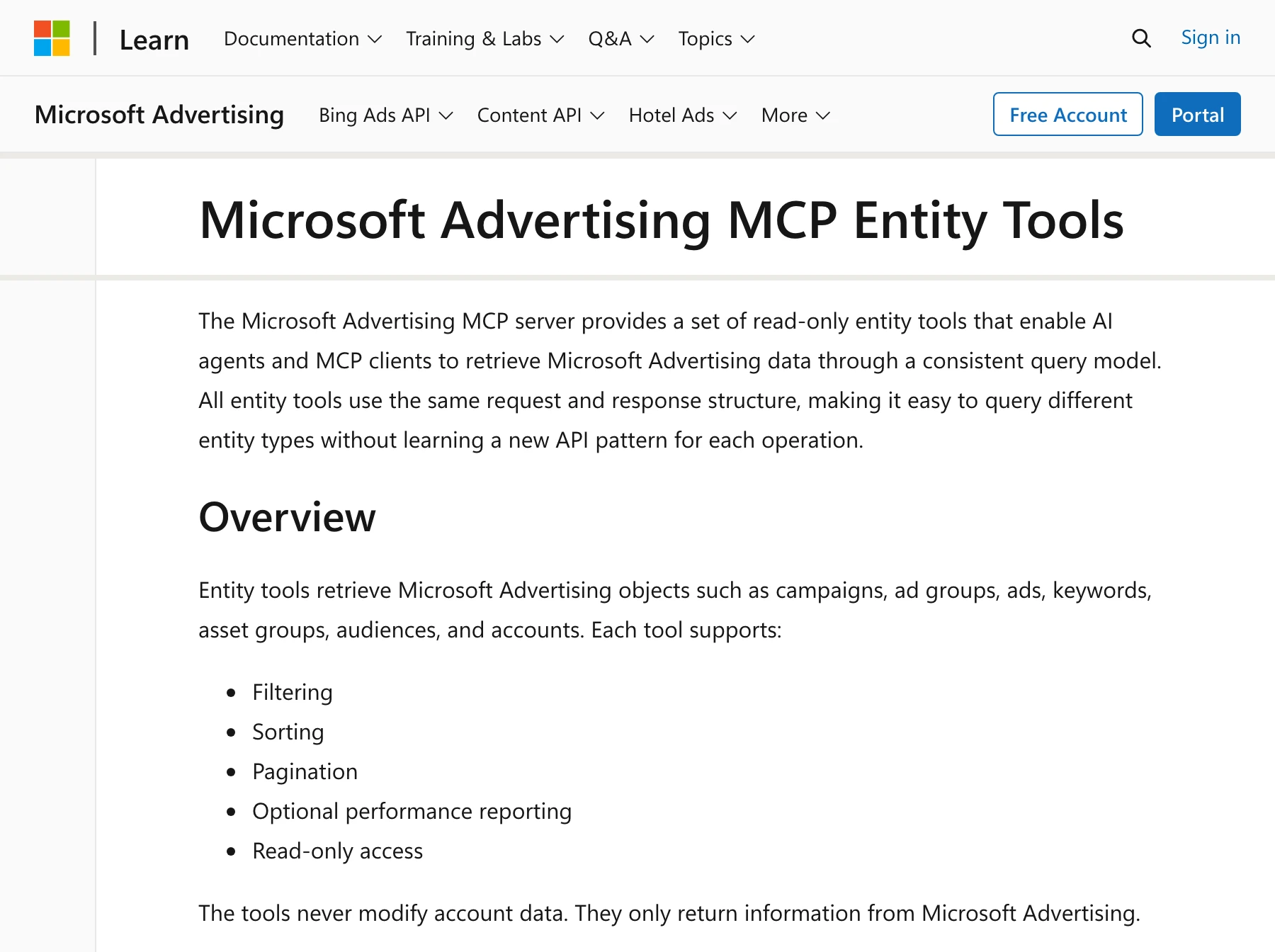
Microsoft hosts a Microsoft Advertising MCP server, and it reads only. Its tools page lists seven entity tools, from GetAccounts to GetAudienceAssociations, and says: "The tools never modify account data." Microsoft's June 2026 announcement calls it an "open pilot with read-only access", while its product page opens with "Manage your Microsoft Advertising campaigns".
Setup starts in the Azure CLI: you register your own app, paste its client ID into the AI client and, for Claude, add Claude's callback URL to the app. Microsoft says it is "free to connect". Once someone registers the app, it reads Microsoft Ads in Claude at no charge, but it cannot create, pause or edit anything or fill a table.
Supermetrics and Windsor.ai
Supermetrics' docs say you can "view, create, and update ad campaigns across Google Ads, Facebook Ads, Microsoft Advertising, TikTok Ads, ChatGPT Ads, and Snapchat Marketing", a feature "currently in early access". Its Starter plan, "€ 49 EUR per month, billed monthly", includes "1 core destination", chosen from a list that holds Claude, Looker Studio and Google Sheets. BigQuery appears only on Enterprise, priced by quote.
Windsor.ai lists five Microsoft Ads writes: enable or pause a campaign or an ad group, and set a campaign budget. In its own words: "Microsoft Ads write actions don't cover creating new campaigns or ad groups, editing keywords or ad copy, or setting bidding strategy." Basic costs $23 a month for 3 data sources.
More reporting connectors
These tools move Microsoft Ads data on a schedule. Apart from Porter Metrics, whose pages disagree, none publishes a Microsoft Ads change for an AI.
Connector | Data Studio | BigQuery | Claude on Microsoft Ads |
|---|---|---|---|
Coupler.io | Connector | As often as "every 15 minutes" | MCP from a "Professional plan"; no writes published |
Porter Metrics | Connector | Its pages disagree on the plan | Read-only on its Claude page |
Dataslayer | Connector | Daily to hourly, by plan | "read-only access" |
Power My Analytics | Connector | "$299.95/month" on one page, custom on another | Its MCP writes its own datasets; no ad writes published |
Two Minute Reports | Connector | Not on its pages | "Claude can only read your data." |
Catchr | Connector | From its $239 Growth plan | "Claude cannot create, pause, or edit a campaign" |
Adzviser | Connector | "daily, weekly, or monthly" | "Claude cannot change anything in Microsoft Ads through Adzviser." |
Adverity | Destination | Destination | Its MCP runs Adverity's pipelines |
OWOX | Through a warehouse | Open-source connector | Reads its data marts, "not a live query" |
Databloo | Free connector | Not on its pages | "Seven read-only tools" |
Porter Metrics' Claude page says Claude "cannot pause campaigns, change budgets, edit ad copy, or modify targeting", while its homepage lists campaign management "across Meta, Google, LinkedIn, TikTok, and Microsoft".
MCP servers built to change ads
These hosted MCP servers are built to change ads, and each lists Microsoft Ads changes on its own pages.
Server | What it can change | Who approves a change | Starts at |
|---|---|---|---|
InsightfulPipe | 56 writes, each a switch per account; new campaigns, ad groups and ads start paused | Your admin sets the switches, and the server enforces them in every client | $29.99/month |
Markifact | "Search, PMax, ads, assets, keywords, bids, budgets, and statuses" | Its page says "every account change waits for approval"; its MCP docs leave it to your AI client's Needs approval setting | $79/month |
Ryze AI | Pausing, budgets, bids, negatives, new campaigns, and deletes from "an explicit, item-by-item approved list" | Claude's own "Needs approval" setting | Free to connect; Autopilot $89/month |
Pipeboard | 56 tools, 35 of them writes by our count, yet its FAQ answers "Not yet" to creating or editing campaigns | Not published | Free for 2 ad accounts, then $29.90/month |
AdKit | Campaigns, ad groups, keywords, ads, bids and budgets, "all draft-first" | AdKit's access levels; "New projects start on Draft + Publish" | $29/month |
Blend AI | "full read-write access", in its page data | Read-only at platform level; approval workflows on Enterprise | $29/month |
Synter Media | Its page says "create, pause, budget, bids, keywords"; its tool list has pause, enable, budget and audience tools for Microsoft | Its README: "It does not add a second approval step" | $20/month plus metered rates |
Markifact also publishes BigQuery and Google Sheets MCPs. Zapier's Microsoft Advertising MCP covers customer lists and offline conversions only, with no report or campaign action.
Three community servers on GitHub, listed in the sources, are MIT-licensed and self-hosted, and each needs your own Azure app registration and Microsoft Advertising developer token. CData's server is read-only and runs on your own machine with CData's JDBC driver.
Connectors inside other platforms
Domo, Salesforce Data 360 and Singular rank as Microsoft Ads connectors inside their own platforms, and Airbyte and Stitch load warehouses. Stape and Tracklution send conversions to Microsoft Ads, a different job. Microsoft's Power Query connector list names no Microsoft Advertising connector, and Supermetrics and Windsor.ai list Power BI as a destination.
One result to skip: RudderStack's Bing Ads to BigQuery guide ranks first for that search, but RudderStack's docs say the source "is deprecated and no longer supported as of January 10, 2026."
InsightfulPipe puts Claude's live reads and writes, BigQuery and Google Sheets on one plan from $29.99 a month, with every action a switch your admin controls.
Frequently asked questions
Sources (checked 2026-10-02)
Every third-party claim above comes from that company's own page, documentation or repository, opened on 2026-10-02.
- Microsoft: MCP server, MCP setup guide, MCP entity tools, June 2026 announcement, Bing Ads API getting started, Power Query connectors
- Google: Data Studio release notes, connect to BigQuery, connect to Google Sheets, BigQuery roles
- Anthropic: custom connectors using remote MCP
- Supermetrics: Microsoft Advertising connector, managing campaigns with AI tools, pricing
- Windsor.ai: Bing Ads connector, write actions, Microsoft Ads with an AI assistant, pricing
- Markifact: Microsoft Ads MCP, BigQuery MCP, pricing
- Funnel: Microsoft Advertising connector, MCP, pricing
- Fivetran: Microsoft Advertising docs, sync overview, MCP server
- Coupler.io: BigQuery, MCP
- Porter Metrics: Claude, homepage
- Dataslayer: Bing Ads connector, MCP
- Power My Analytics: BigQuery, MCP
- Two Minute Reports: Claude
- Catchr: BigQuery, Claude, pricing
- Adzviser: BigQuery, Claude
- Adverity: BigQuery, MCP
- OWOX: Microsoft Ads to BigQuery, MCP, pricing
- Databloo: Data Studio connector, Claude
- Ryze AI: Bing Ads MCP
- Pipeboard: Microsoft Ads MCP, pricing
- AdKit: Microsoft Ads MCP, access levels, pricing
- Blend AI: Microsoft Ads MCP, pricing
- Synter Media: Microsoft Ads MCP, tools, repository
- Zapier: Microsoft Advertising MCP
- Community servers: wvuhskr/mcp-microsoft-ads, mharnett/mcp-bing-ads, bit-of-a-shambles/microsoft-ads-mcp-server, CData
- Other platforms: Domo, Salesforce Data 360, Singular, Airbyte, Stitch, Stape, Tracklution, RudderStack
- InsightfulPipe: Microsoft Ads MCP server, BigQuery MCP server, Google Sheets MCP server, CLI docs, pricing