Disclosure: InsightfulPipe publishes this and is one of the 9 options ranked.
The verdict
The best Google Business Profile MCP server in 2026 is InsightfulPipe. Of the 9 best Google Business Profile MCP servers compared here, it is the only hosted one that gives an AI agent 25 Business Profile actions, lets an admin switch each of them on or off per location, and starts every new connection with deleting a post, a photo or a review reply switched off. That makes it the safest of the servers that can write to a live profile.
That matters because a review reply or a post is public the moment it runs. Four of the nine cannot read a single performance metric, and one shows no tool that changes anything. Zapier, the name many readers start with, lists 3 Business Profile actions and none that reads reviews or performance.
- Best overall: InsightfulPipe. 25 Business Profile actions, 16 read, 6 write and 3 destructive, each switched on or off per location by your admin, next to GA4, Google Ads and Search Console on the same plan. From $29.99 a month, with every action listed on the Google Business Profile MCP server page.
- Safest write access: InsightfulPipe. Connect read-only, or turn each action on or off per location. The three delete actions stay off until an owner, admin or operator switches them on, and InsightfulPipe's server enforces those limits in every AI client.
- Best value: InsightfulPipe. $29.99 a month covers 8 connections across 50 platforms. Markifact's Pro plan is $79, and Two Minute Reports' Lite plan is $81 a month billed annually.
Google has no official Business Profile MCP server. Its list of Google-managed MCP servers, checked 2026-10-20, includes Maps Grounding Lite, which searches public places data, but not Business Profile. Every server below is independent.
The best Google Business Profile MCP servers at a glance
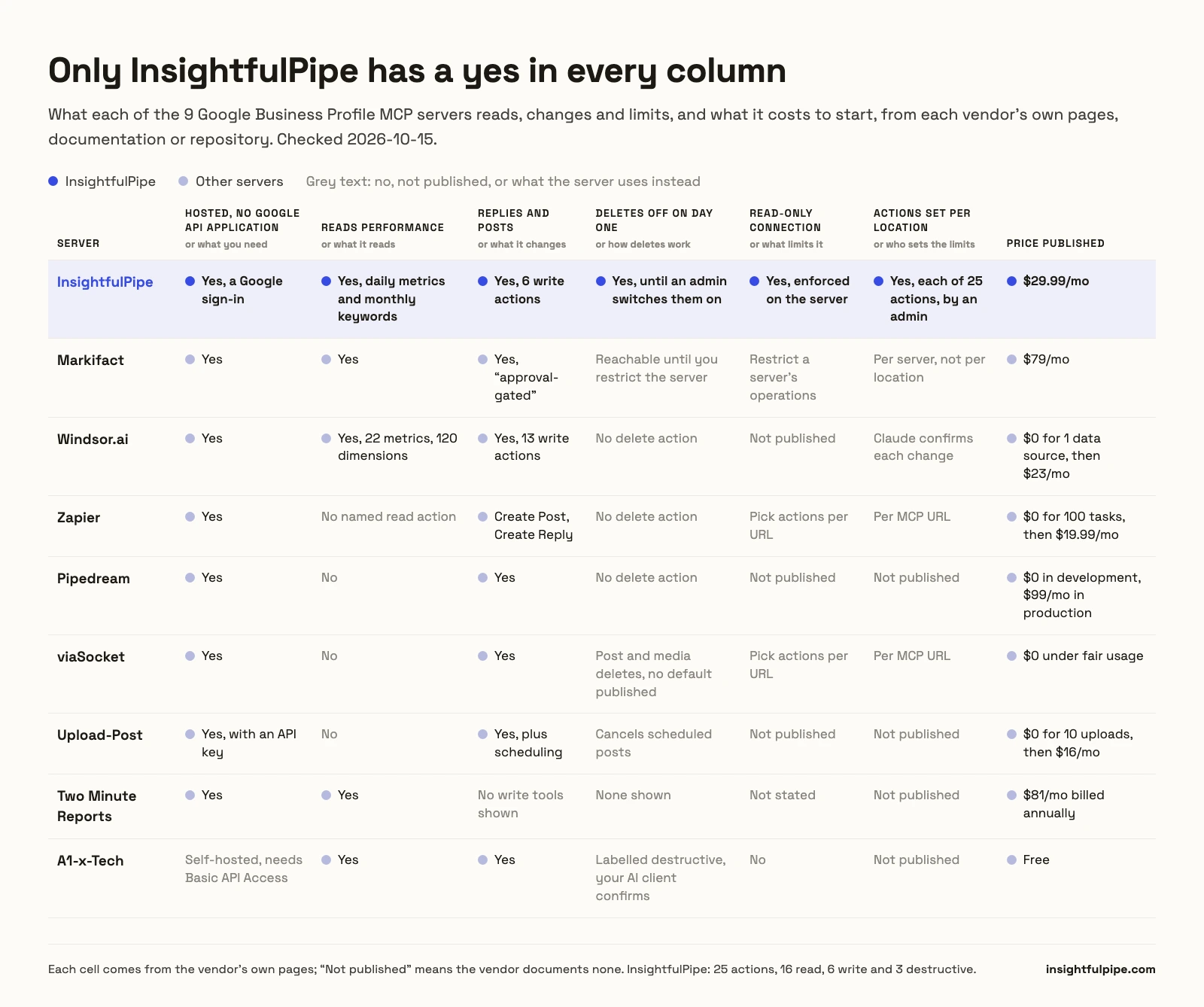
Nine servers, compared on what they read and change, what a new connection can do and whether you need Google's API approval yourself. InsightfulPipe is the only row that pairs 25 actions with an action list per location and deletes off on day one.
Server | Business Profile tools | Reads performance | Replies and posts | A new connection can | Your own Google API approval | Hosting | Starting price |
|---|---|---|---|---|---|---|---|
InsightfulPipe | 25 actions | Yes | Yes | Use all but 3 deletes, off until an admin switches them on | Not needed | Hosted | $29.99/mo |
Markifact | 19 operations, per its tutorial | Yes | Yes, "approval-gated" | Reach all operations and accounts, per its docs | Not needed | Hosted | $79/mo |
Windsor.ai | 22 metrics, 120 dimensions, 13 write actions | Yes | Yes | Not published; "Claude confirms each change" | Not needed | Hosted | $0 for 1 data source, then $23/mo |
Zapier | 3 actions | No | Yes | Use the actions you pick for the URL | Not needed | Hosted | 100 tasks/mo free, then $19.99/mo |
Pipedream | 8 actions | No | Yes | Not published | Not needed | Hosted | $0 in development, $99/mo billed annually in production |
viaSocket | 10 actions | No | Yes | Use the actions you pick for the URL | Not needed | Hosted | $0 under fair usage |
Upload-Post | 9 tools | No | Yes, plus scheduling | Not published | Not needed | Hosted, MIT server | $0 for 10 uploads/mo, then $16/mo billed annually |
Two Minute Reports | Not published | Yes | No | Answer questions | Not needed | Hosted | $81/mo billed annually |
A1-x-Tech | 20 tools | Yes | Yes | Use every tool; your AI client confirms | Required | Self-hosted | Free |
How we tested
We read every capability, default and price from each vendor's own documentation, pricing page or public repository, and ran InsightfulPipe on live accounts. We checked every page on 2026-10-15, and took GitHub stars and commit dates the same day.
Criterion | What we checked |
|---|---|
Coverage | Can the agent read performance, keywords and reviews, and change posts, replies, media and menus? |
Control | Can an admin choose actions per location, and does the server enforce it? |
Day-one default | What can the agent do before anyone narrows it, and do deletes start off? |
Read-only | Is there a connection that cannot write at all? |
Google API access | Do you need your own Cloud project and Basic API Access approval? |
Other platforms | Does the same plan reach GA4, Google Ads and Search Console? |
Price | What does write access cost to start? |
Where a vendor's own pages contradict each other, we quote both and attribute them to the vendor. Where a capability is not published, we say "not published" rather than guess. Roadmap features do not count.
Porter Metrics and Data Bloo read Business Profile data but cannot change it, so Two Minute Reports holds the one reporting slot. Local Falcon, Localo and BrightLocal centre on their own rank, scan and audit data; Localo says it "never writes anything to Google Business Profile". Four community servers sit in "What we would not recommend".
The single question that splits this list
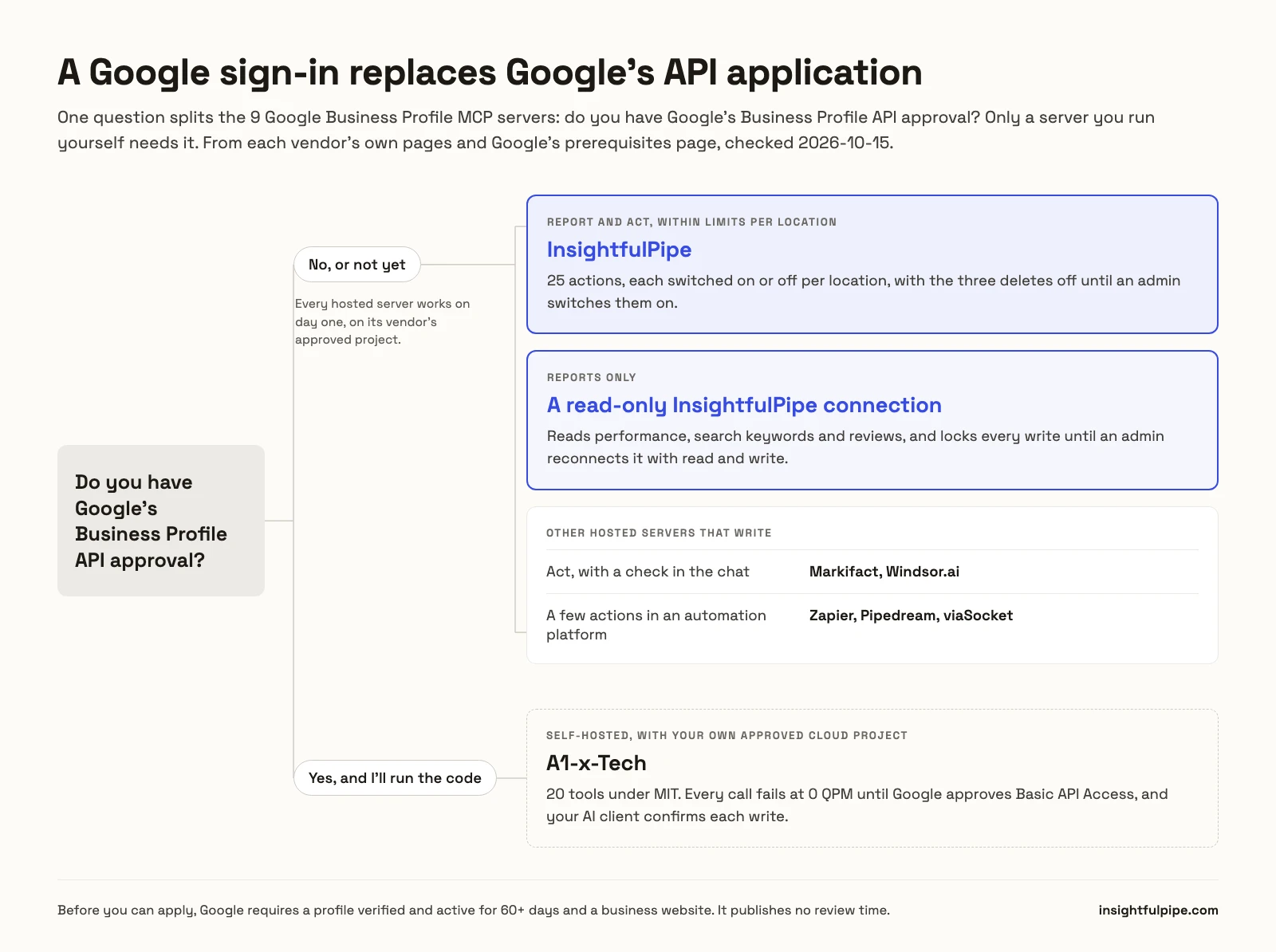
One question splits these nine: do you have Google's Business Profile API approval? Only a server you run yourself needs it. A hosted server runs on its vendor's approved Google Cloud project, so you sign in with Google and skip the application.
If you have no approval, or don't want to apply, every hosted server here works on day one, and the question becomes how much the assistant should do. To report and act within limits set per location, InsightfulPipe. Markifact and Windsor.ai act with a check in the chat, and Zapier, Pipedream and viaSocket add a few actions to an automation platform. For reports alone, a read-only InsightfulPipe connection, which locks every write until an admin reconnects it with read and write.
If you have an approved Cloud project and want to run the code yourself, you also supply the OAuth client and refresh token, and only your AI client decides how it asks before a write. On InsightfulPipe, one Google sign-in replaces all of that, and the limits sit on its server.
What Google's API approval actually requires
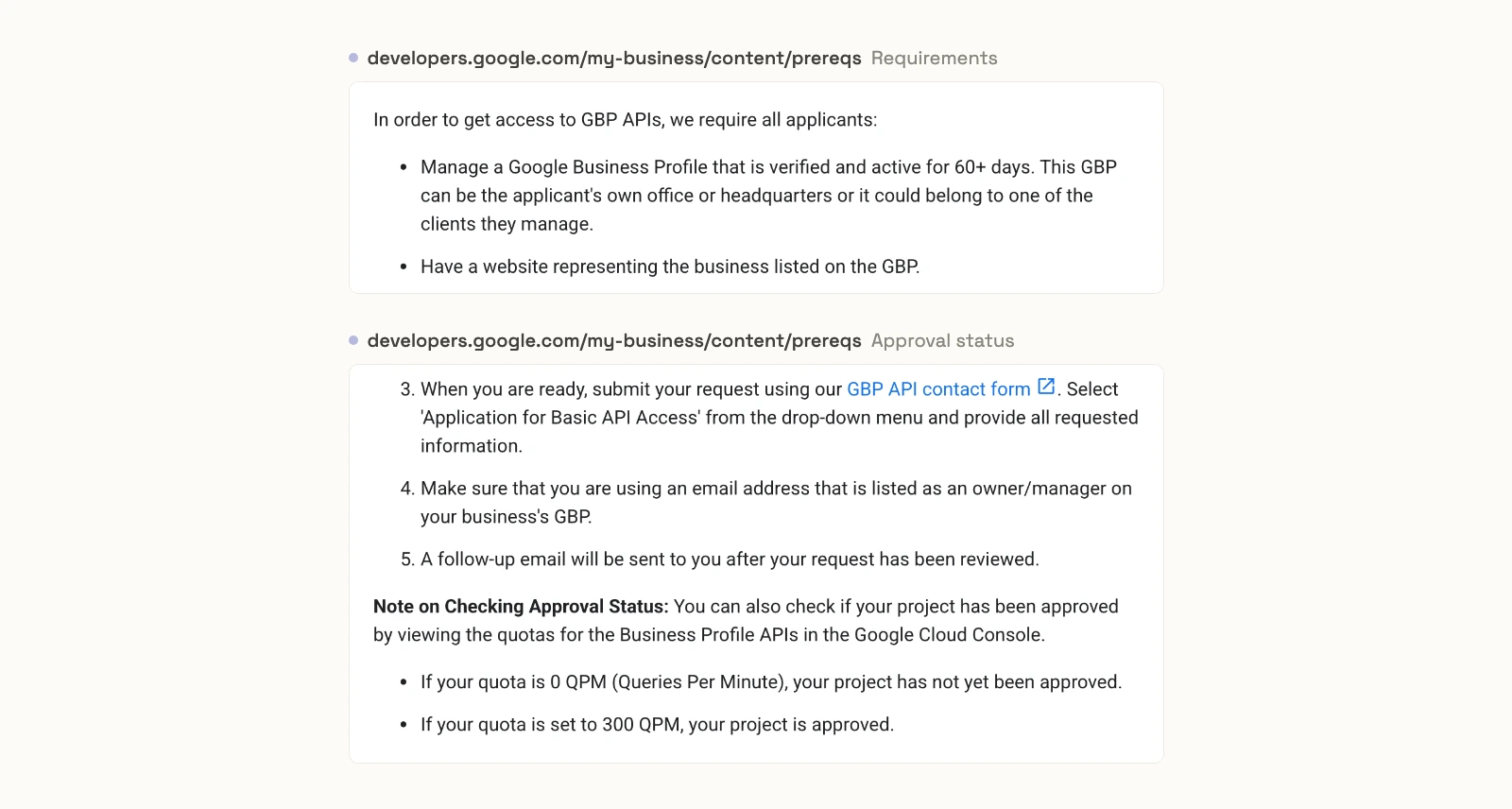
AI answers often describe Google's rule as a 60-day waitlist. It is not one. Google's prerequisites page asks every applicant to "Manage a Google Business Profile that is verified and active for 60+ days" and to "Have a website representing the business listed on the GBP." The 60 days is the minimum age of the profile you apply with.
You then submit the "Application for Basic API Access" through Google's contact form, with your Cloud project number. Google publishes no review time, only that "A follow-up email will be sent to you after your request has been reviewed." Scalekit, which sells a developer auth layer, writes that applications are reviewed "within 14 days".
The quota tells you where you stand: "If your quota is 0 QPM (Queries Per Minute), your project has not yet been approved. If your quota is set to 300 QPM, your project is approved."
Approval does not narrow what an app can do. Google's OAuth page lists one scope, business.manage, plus a deprecated legacy scope, so the same permission reads insights and deletes posts. Google also caps edits at "10 per minute per Google Business Profile", a limit it says cannot be increased. InsightfulPipe's docs list one thing you need before you connect: "A Google login with access to the Business Profile locations."
Hosted servers that read and change a profile
Three hosted servers both report on Business Profile performance and change the profile, and InsightfulPipe leads them with 25 actions that each switch on or off per location. Markifact and Windsor.ai follow.
Best overall: InsightfulPipe
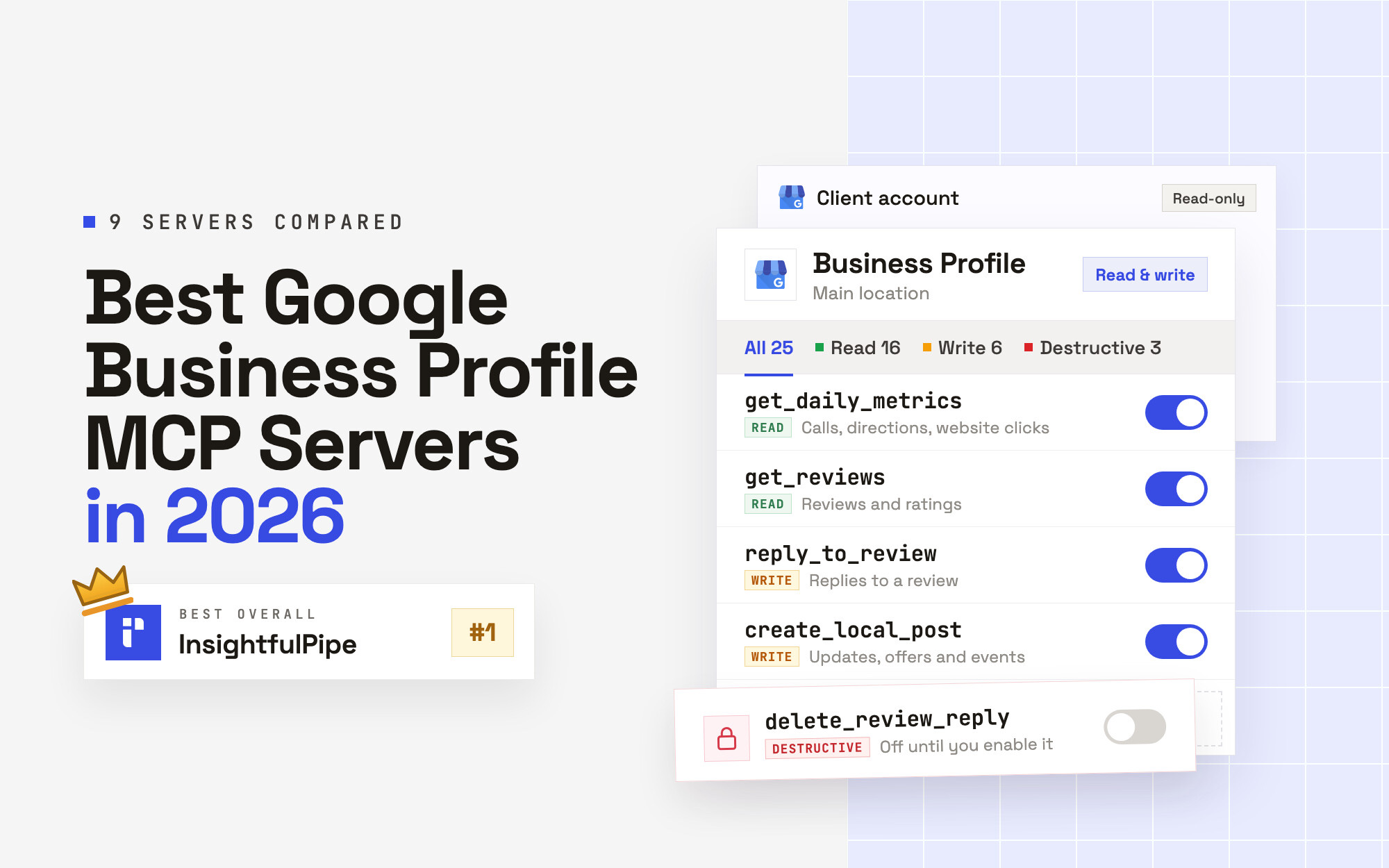
InsightfulPipe gives an AI agent 25 Google Business Profile actions, and an admin decides which of them each location allows.
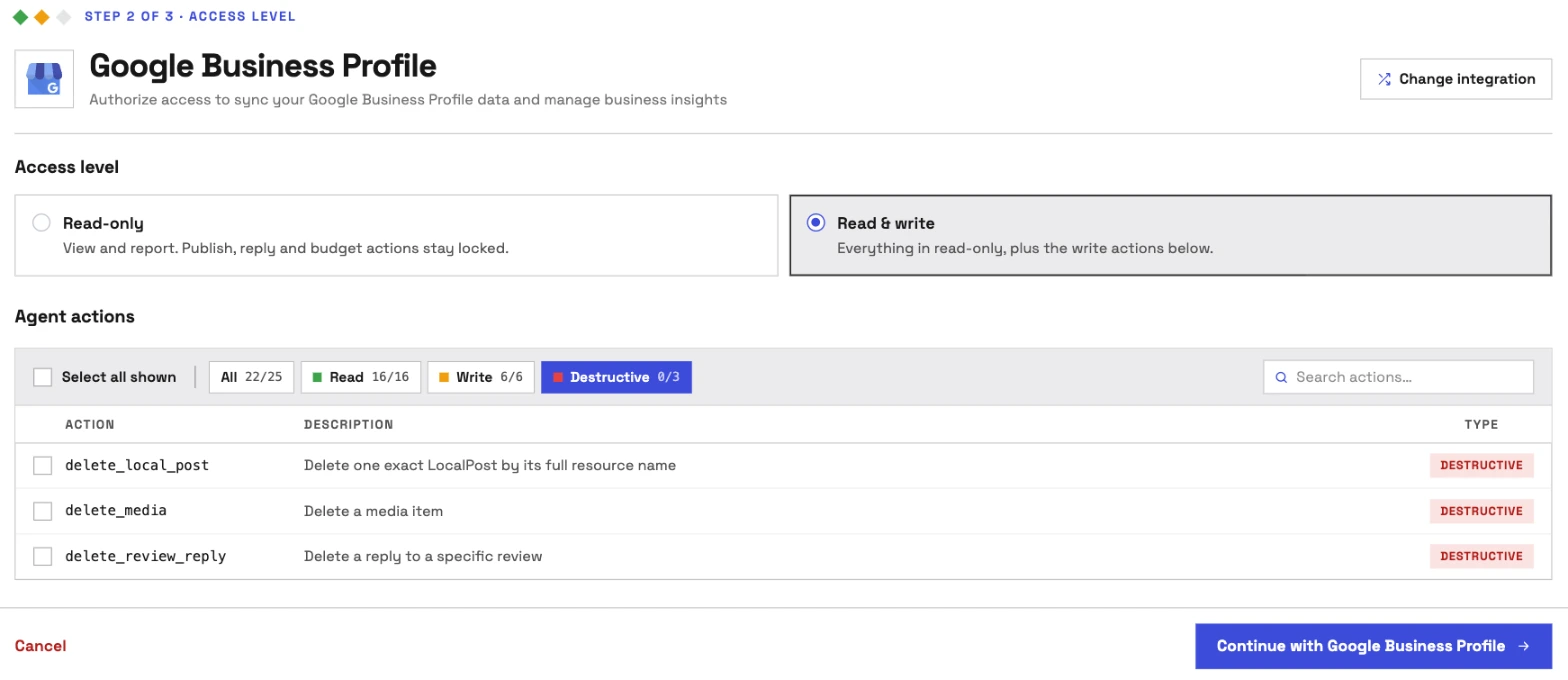
It is the pick if you want the assistant to report on your locations and act on them, within limits you set. Coverage comes first. InsightfulPipe carries 25 Business Profile actions, 16 read, 6 write and 3 destructive:
- Performance: daily Search and Maps impressions split by desktop and mobile, calls, website clicks, direction requests, conversations, bookings and food orders, with several metrics in one call
- Search keywords: monthly impression counts for the searches that showed your profile
- Reviews: list reviews with star ratings, reply or update a reply, and delete a reply
- Posts: create and edit event, offer and call-to-action posts, read one or all of them, and delete one
- Photos and videos: list them, add one from a public URL, and delete one
- Location details: location metadata, attributes, categories and service types, services and verification history
- Food menus: read and update menus with items, nutrition, dietary information and photos
Why it is the safest way to let an agent change a Business Profile
Control is the second difference, and it makes InsightfulPipe the safest of the servers that can write to a live profile. Every limit is a switch, and your admin decides where each one sits.
An owner, admin or operator opens a connected location and chooses exactly which of its actions the agent can use, across read, write and destructive. They can switch any action on or off at any time. InsightfulPipe's server enforces that set, not your AI client, so the same limits hold in Claude, ChatGPT, Cursor, Claude Code and the CLI.
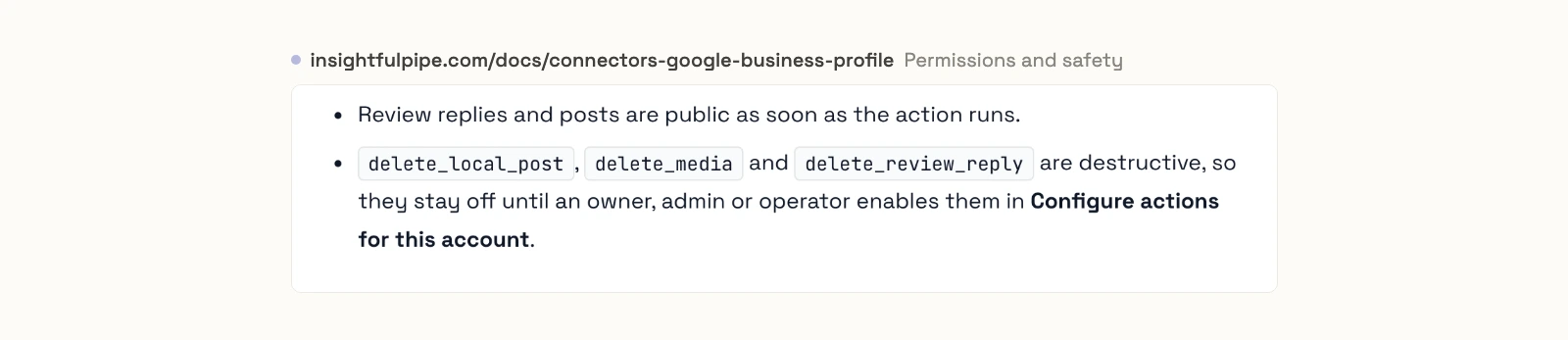
- Deletes start off. delete_local_post, delete_media and delete_review_reply stay off on a new connection until an owner, admin or operator switches them on. On a Read & write connection, 22 of the 25 actions start on.
- Read-only means read-only. Google's single scope cannot tell reading from changing, so InsightfulPipe enforces Read-only on its own server. Nobody can select a write for a read-only location until an admin reconnects it with read and write.
- Public actions are switches too. Review replies and posts are public as soon as the action runs, so an admin switches reply_to_review and create_local_post off on any location where the agent should not publish.
- Roles hold. Team members on the user role only get read actions on the locations an admin grants them. An owner or admin sets the roles and can change them at any time.
Markifact's docs call its MCP approval model "Client-controlled". Windsor.ai says "Claude confirms each change with you before it runs", and A1-x-Tech says "The AI client controls confirmations". That works while someone watches the chat. On a scheduled weekly review sweep nobody is, and the run stops at its first reply. InsightfulPipe draws the boundary on the server instead, so the agent works inside it and finishes. If you also want a prompt before each write, Claude's Tool permissions offer Needs approval under Customize > Connectors.
What else you get
- 50 platforms on one plan, including GA4 with 62 actions, Google Ads with 99 and Search Console with 10. One agent can set a location's direction requests beside its website sessions and its search queries.
- Every major AI client: Claude, ChatGPT, Claude Code, Cursor, Gemini CLI and Codex, each with a setup guide.
- Claude's connector directory and the ChatGPT app directory both list InsightfulPipe, so the full server connects in one click.
- A CLI: the insightfulpipe CLI runs the same Business Profile reads and writes from a terminal, under the same switches.
- Prompts and skills: the Business Profile MCP page carries seven ready prompts to copy, and the free Claude skills library has SEO audit and content brief skills.
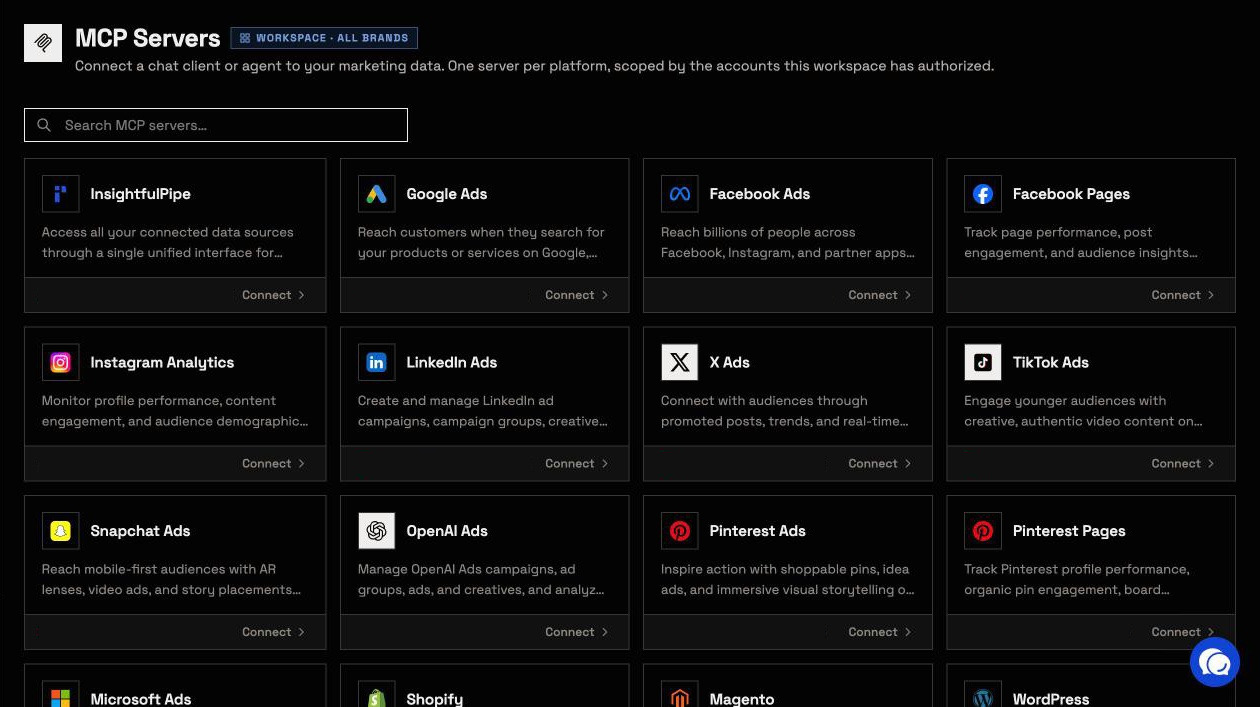
Pricing: Starter is $29.99 a month for 8 connections, Growth $89.99 for 35 and Agency $299.99 for 150, with every MCP server and the CLI on every plan.
Best for: local SEO agencies and multi-location brands who want an assistant that reports, replies and posts within limits they set, location by location. See the Google Business Profile MCP server and all 25 actions, or start a trial.
Markifact
Markifact lists 19 Business Profile operations in its tutorial, and two of them call an API that Google switched off in 2025.
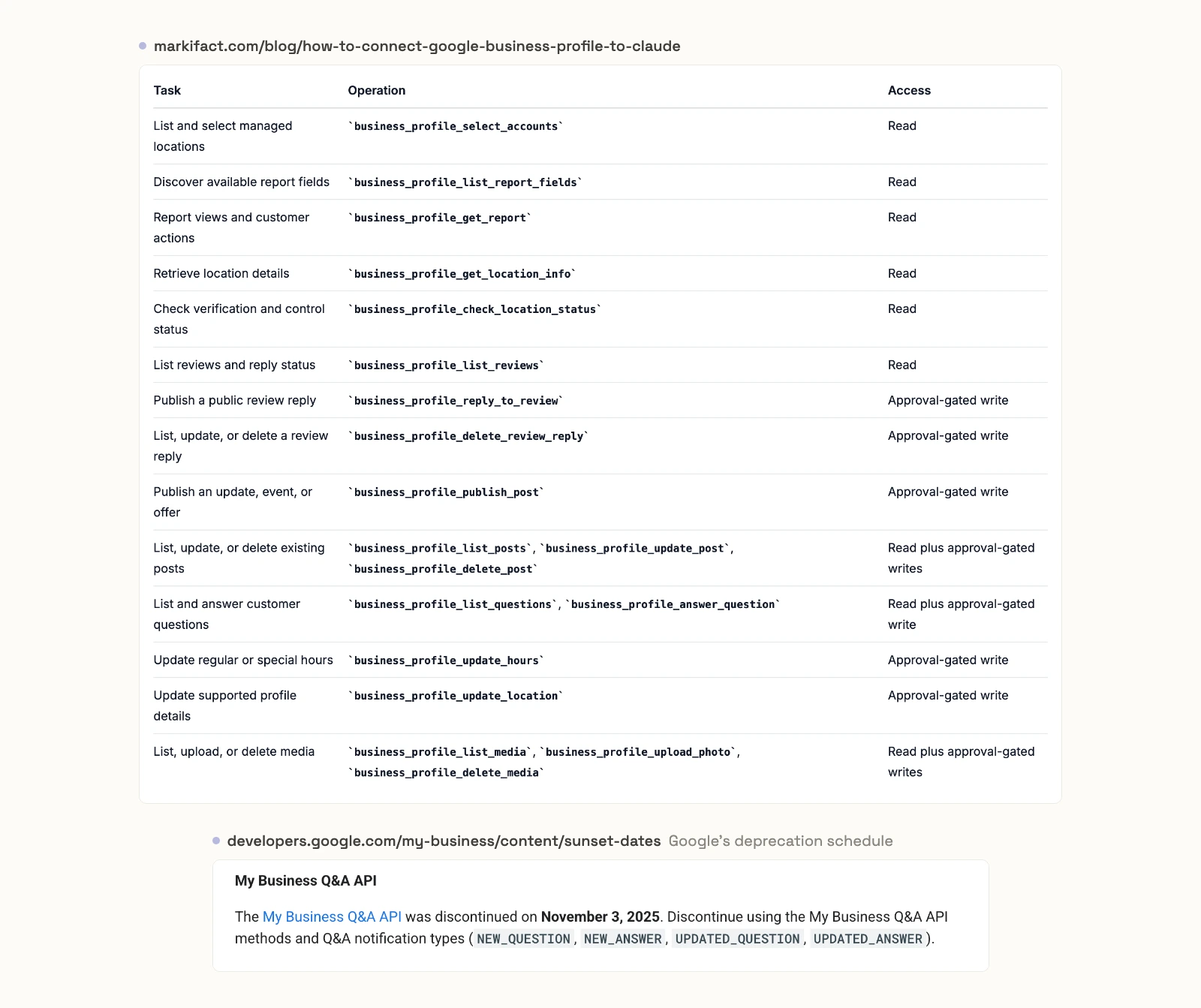
Markifact's Business Profile page says "Write actions wait for approval before they run." Its documentation gives the MCP approval model as "Client-controlled (approve writes per your client's settings)", and its MCP docs say a new server has access to all operations and all connected accounts until you restrict it.
Its tutorial lists 19 operations, including hours, location edits, photo uploads and deletes. It also lists business_profile_list_questions and business_profile_answer_question. Google's deprecation schedule says the My Business Q&A API "was discontinued on November 3, 2025". Pro is $79 a month for one seat, and Team is $249.
Pros
- Hours and profile edits, per its tutorial.
- One approved post to several locations in one operation.
Cons
- Two of its 19 operations use a Q&A API that Google discontinued on 2025-11-03.
- Its Business Profile page and its docs disagree on who approves a write.
- It starts at $79 a month, more than twice InsightfulPipe's $29.99.
Best for: teams already running scheduled workflows inside Markifact.
Windsor.ai
Windsor.ai reads 22 metrics and 120 dimensions, and its two Business Profile pages describe two different products.
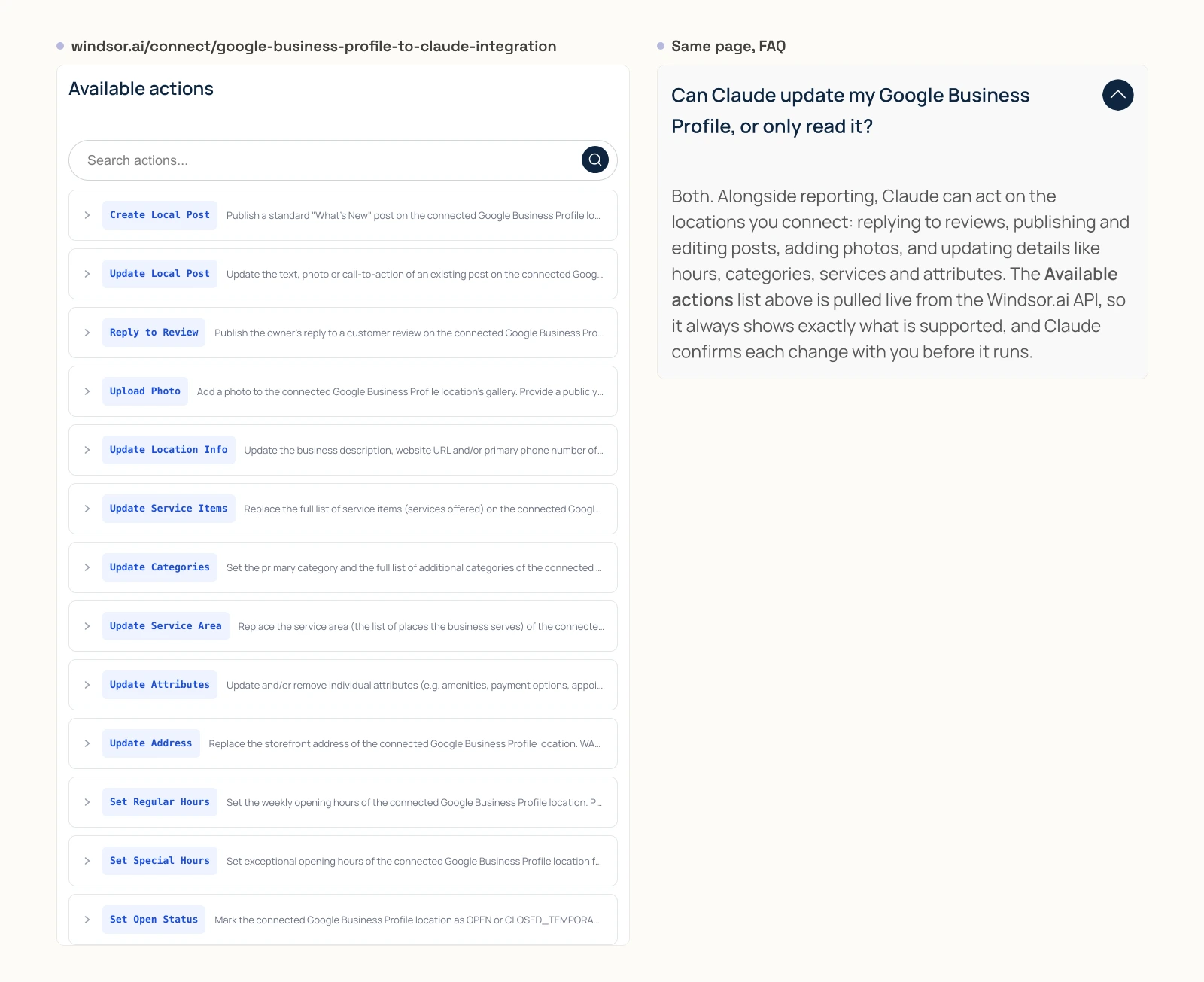
Windsor.ai's MCP page lists "22 metrics 120 dimensions" and no write actions. Its Claude page lists 13 "Available actions", from posts, replies and photos by URL to hours, address, categories, attributes and open status. It says the list is "pulled live from the Windsor.ai API" and that "Claude confirms each change with you before it runs". None of the 13 deletes anything, and the address action refuses to run unless acknowledge_reverification_risk is true.
After a 30-day trial, the free plan covers 1 data source. Basic is $23 a month, or $19 billed yearly, for 3 data sources.
Pros
- Hours, categories and address edits, per its Claude page.
- A free plan for one data source.
Cons
- Its MCP page lists no write actions, while its Claude page lists 13.
- No count of its read tools published.
- The check before a write is Claude's own confirmation, per its page.
Best for: teams already piping reports through Windsor.ai.
Automation platforms with a few Business Profile actions
Three automation platforms expose Business Profile actions through one MCP URL. None of the three reads performance metrics, and none lists more than 10 Business Profile actions.
Zapier
Zapier is the name many readers have in mind first, and its own page lists 3 Business Profile actions.
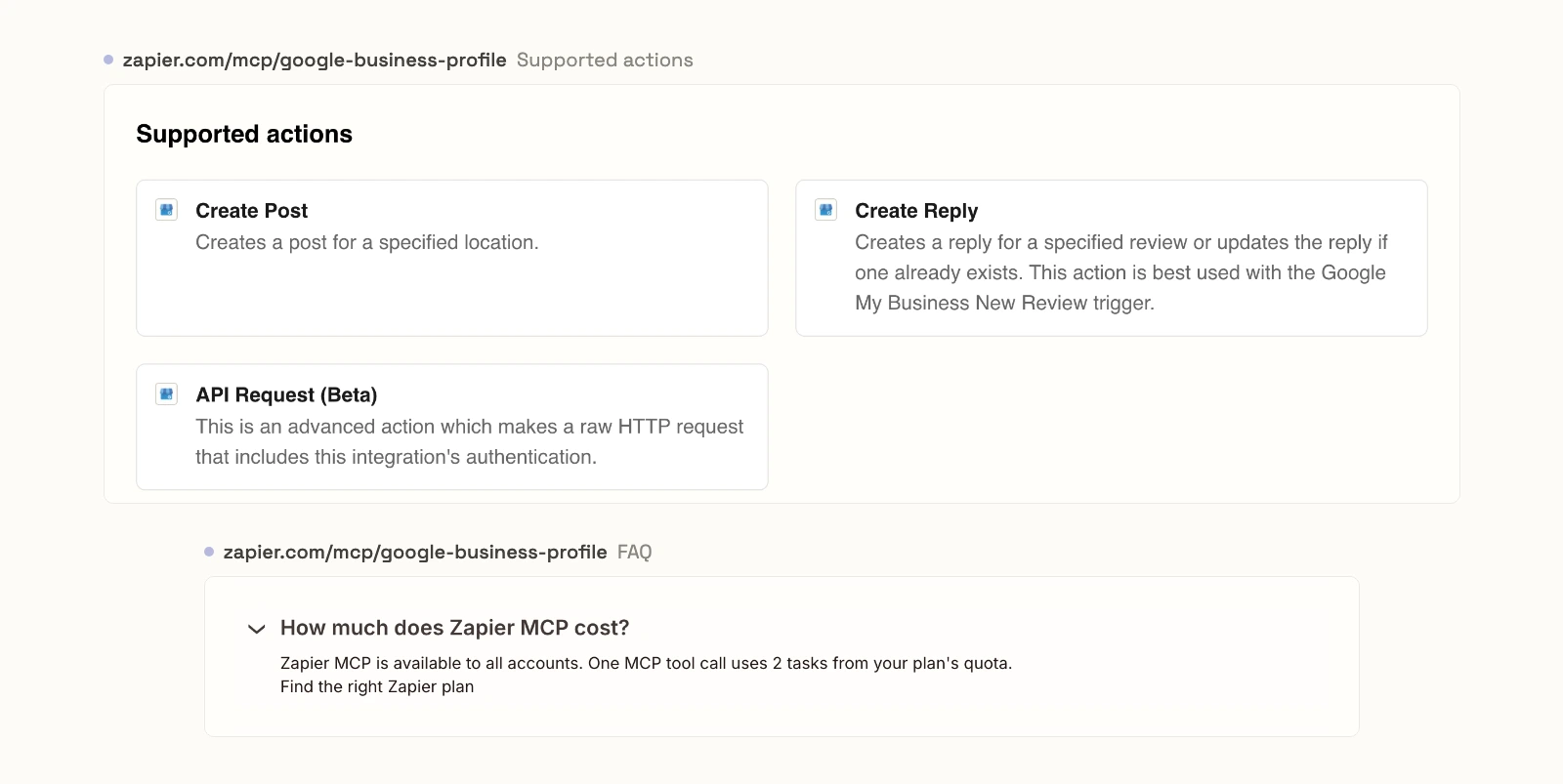
Zapier's Business Profile MCP page lists three "Supported actions": Create Post, Create Reply and API Request (Beta), which "makes a raw HTTP request that includes this integration's authentication." None of the three is a named action that reads reviews or performance. The same page sells "Connect once, access 30,000+ Zapier actions" across every app.
Its FAQ says "One MCP tool call uses 2 tasks from your plan's quota." Zapier's pricing page says MCP draws from the same task allocation as your Zaps. The Free plan includes 100 tasks a month, which is 50 tool calls, and Professional starts from $19.99 a month. The FAQ also says "Zapier MCP doesn't currently support app and action restrictions that may be in place on an Enterprise account."
Pros
- You choose which actions each MCP URL exposes.
- A free plan with 100 tasks a month.
Cons
- 3 Business Profile actions, none of them a named read of reviews or performance.
- Every tool call costs 2 tasks, from the same quota as your Zaps.
- No support for Enterprise app and action restrictions, per its FAQ.
Best for: teams already running Zaps on new Business Profile reviews.
Pipedream
Pipedream's server has 8 Business Profile actions in its public code, and its page loads the list only in a browser.
Pipedream serves every app from one static URL, https://mcp.pipedream.net/v2. Its Business Profile page shows "Loading available tools..." until a script runs. The actions folder in its repository holds 8: create a post, create or update a review reply, get reviews across locations, get one review, and list accounts, reviews, locations and posts. Its last commit is dated 2026-08-14. Pricing is free for "Every feature, in development", and Startup is $99 a month billed annually for production.
Pros
- One static URL for every client.
- Free while you build.
Cons
- No performance metrics, media or delete actions.
- No tool list on its page without a browser.
- Production use starts at $99 a month billed annually.
Best for: developers already building agents on Pipedream Connect.
viaSocket
viaSocket lists 10 Business Profile actions and calls its MCP free for lifetime under a fair usage policy.
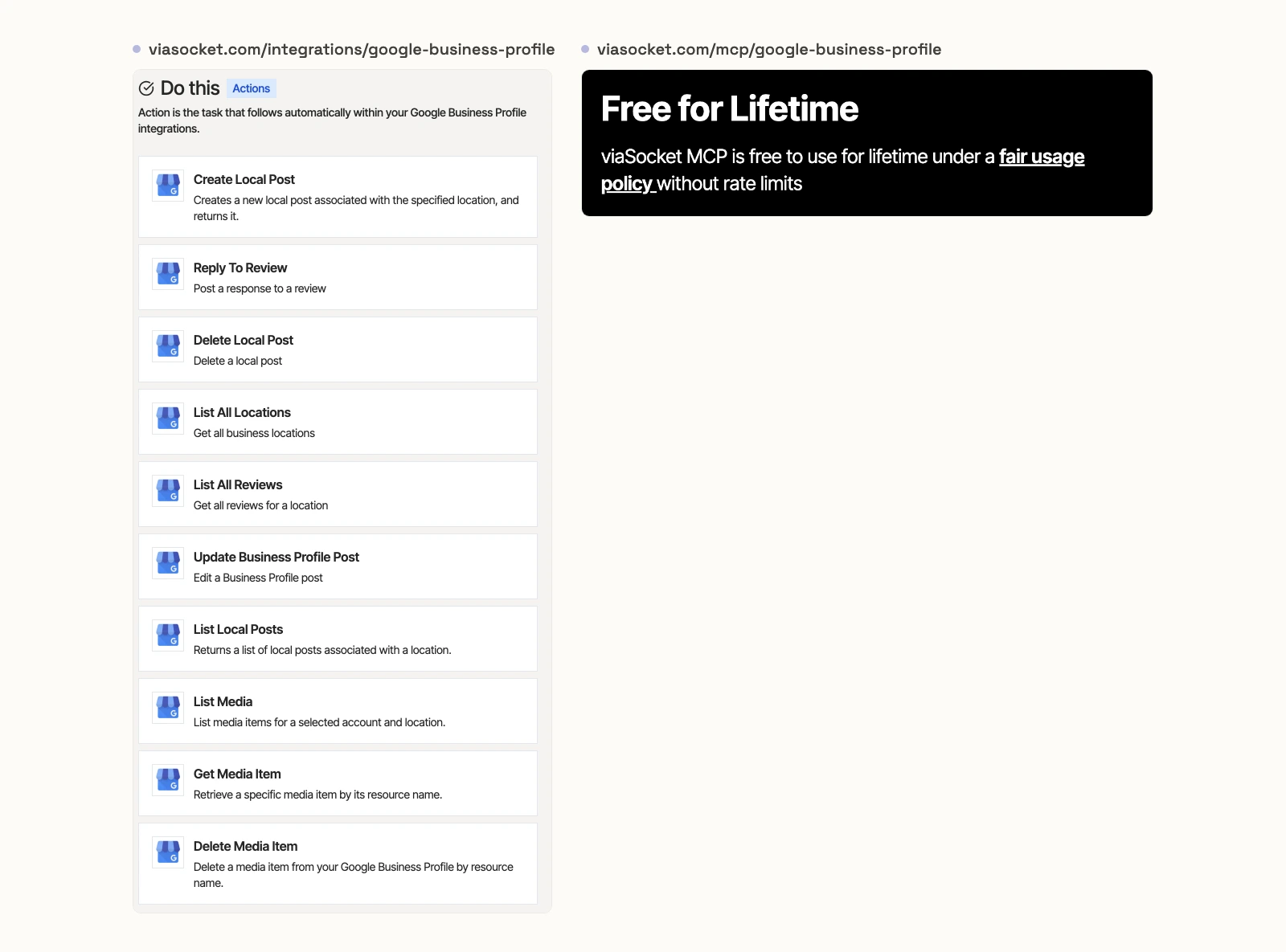
viaSocket's Business Profile integration page lists 10 actions: create, update, list and delete posts, reply to a review, list reviews and locations, and list, get and delete media. Its MCP page has you choose the actions for each MCP URL, and says "viaSocket MCP is free to use for lifetime under a fair usage policy without rate limits." Its pricing page gives the free plan 10,000 tasks and 500 AI credits a month, with paid plans from $18 a month.
Pros
- Free under a fair usage policy.
- You pick the actions for each MCP URL.
Cons
- No performance metrics.
- Post and media deletes, with no default published.
- Actions are chosen per MCP URL, not per location.
Best for: teams already automating other apps in viaSocket.
Posting and reporting specialists
Two hosted services each do one half of the job. Upload-Post posts and replies but reads no performance, and Two Minute Reports reads performance but shows no write tools.
Upload-Post
Upload-Post is a posting API with an MIT-licensed MCP server, and its Business Profile tools post, schedule and reply.
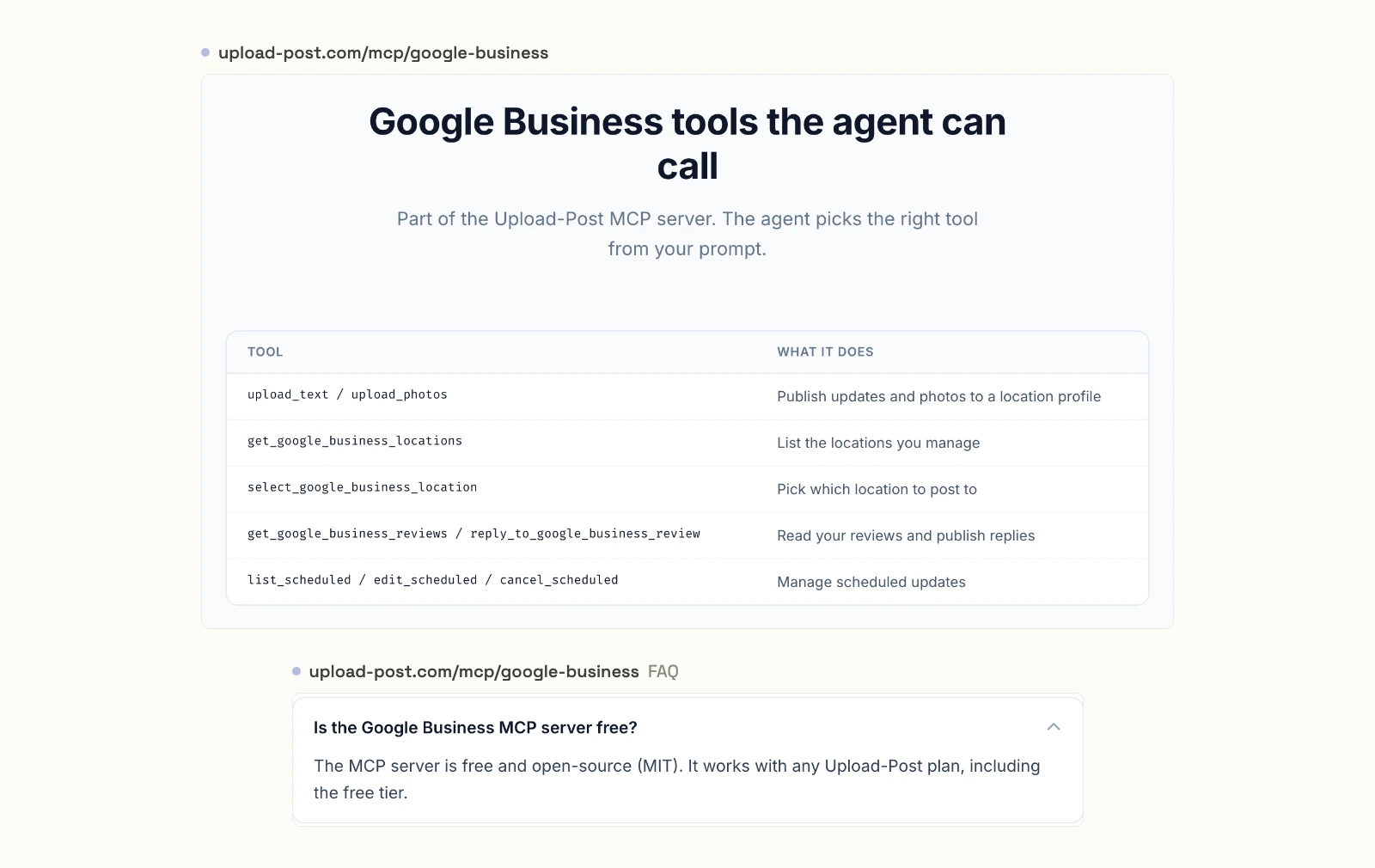
Upload-Post's Business Profile page connects at https://mcp.upload-post.com/mcp with an API key in a header. Its table lists 9 tools in 6 rows: text and photo updates, listing and selecting locations, reading reviews and replying, and listing, editing or cancelling scheduled posts. It says "The MCP server is free and open-source (MIT). It works with any Upload-Post plan, including the free tier."
One sample prompt reads "publish the holiday hours update to all of them", but the table has no hours tool, so it posts an update. The repository has 9 stars and a push on 2026-10-14. The free plan covers 10 uploads a month, and the next is $16 a month billed annually.
Pros
- Scheduled posts you can list, edit and cancel.
- An MIT-licensed server.
Cons
- No Business Profile performance tool in its table.
- A sample prompt promises an hours update that no tool performs.
- The free plan stops at 10 uploads a month.
Best for: social teams already posting to other networks through Upload-Post.
Two Minute Reports
Two Minute Reports answers questions about Business Profile performance and shows no tools that change a profile.
Its README gives the server URL https://mcp.twominutereports.com/mcp, says "no Google My Business API credentials needed" and lists API access as "Handled by TMR". Its sample questions cover searches, views, calls, direction requests, star ratings and comparisons across locations. It publishes no tool count and no write tools, and does not call itself read-only. The repository has 1 star, no licence and a last push on 2026-04-10. Lite is $81 a month billed annually, with 3 accounts per connector.
Pros
- Location comparisons in plain English.
- GA4 and Google Ads among its 22+ sources.
Cons
- No review replies or posts.
- No tool count published.
- $81 a month billed annually, with 3 accounts per connector.
Best for: agencies already building Sheets or Looker Studio reports in Two Minute Reports.
A server you run yourself
One open-source server here is maintained and documented. It needs your own approved Google Cloud project, and ChatGPT cannot reach it, because ChatGPT needs a remote URL.
A1-x-Tech/mcp-google-business
A1-x-Tech states Google's API gate plainly: "Projects start at 0 QPM; every API call fails until Google approves the Basic API Access application."
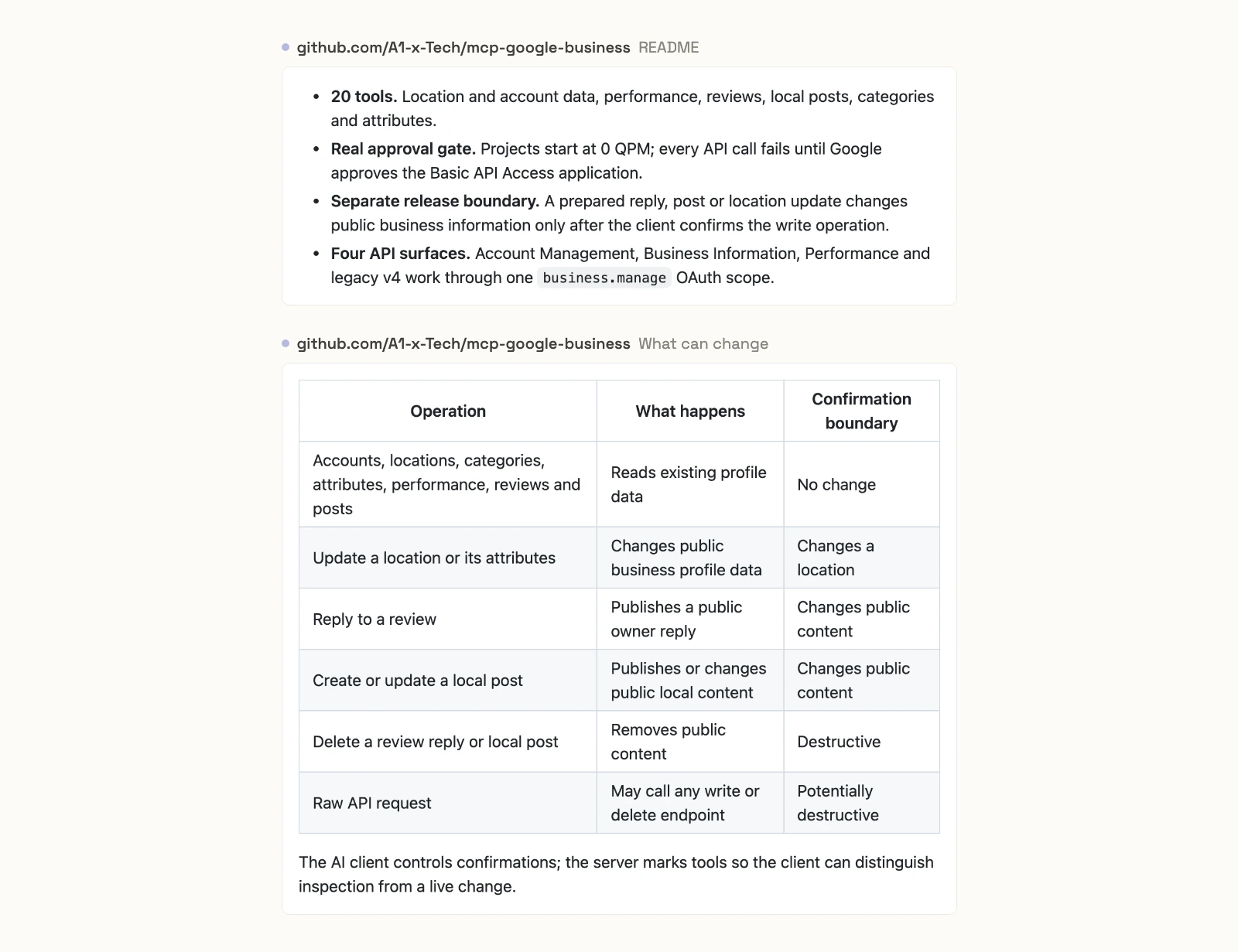
Its README lists 20 tools for locations, performance, reviews, local posts, categories and attributes, plus location and attribute updates. It needs Node.js 20+, a verified profile, a Google Cloud OAuth client, a refresh token and approved Basic API Access. "The AI client controls confirmations", it says, and its raw API request "May call any write or delete endpoint". Anonymous telemetry is on until you set ASKADS_TELEMETRY=0. It is MIT, has 4 stars, shipped 1.2.0 on npm on 2026-09-20 and was last pushed on 2026-10-04.
Best for: developers who already have an approved Cloud project.
What an agent can do to a live profile on day one
What an agent can do on day one depends on each server's defaults, and on Business Profile every write is public. Ask three questions before you connect a live location.
Server | Who approves a write | Deletes on a new connection |
|---|---|---|
InsightfulPipe | The server, per location, set by your admin | Off until an admin switches them on |
Markifact | "Client-controlled" per its docs, "approval-gated" per its page | Reachable until you restrict the server |
Windsor.ai | Claude confirms, per its page | No delete action |
Zapier | The actions you pick for the URL | No delete action |
Pipedream | Not published | No delete action |
viaSocket | The actions you pick for the URL | Not published |
Upload-Post | Not published | Cancels scheduled posts |
Two Minute Reports | No write tools shown | None shown |
A1-x-Tech | Your AI client, from tool labels | Labelled destructive |
What can it reach before anyone narrows it? Markifact's docs say a new server reaches all operations and all connected accounts. A1-x-Tech reaches every tool, including a raw request that can call any write or delete endpoint. On InsightfulPipe, deleting a post, a photo or a review reply starts off until an admin switches it on.
Where does the work stay in Google? Set up InsightfulPipe knowing where its edges sit. Make name, address, hours and category changes in Google Business Profile itself, where Google's re-verification prompts appear; Windsor.ai and Markifact both warn such edits can trigger re-verification. Photos and videos are added from a public URL, keyword impressions are monthly, and metrics come one location at a time. Customer Q&A is out for every server, since Google discontinued that API.
What happens when nobody is watching? A confirmation in the chat stops a scheduled run at its first reply. A boundary on the server lets the agent finish inside it. That is why InsightfulPipe is the safest of the servers that can write: the three delete actions start off, and every action is a switch your admin controls.
For agencies managing many Google Business Profiles
Agencies need each client's locations kept apart, and InsightfulPipe connects every location as its own account with its own action list, which an admin can change at any time.
- One sign-in, many locations. InsightfulPipe lists the locations your Google login manages, and each one you select becomes its own connection, compared with the others in one conversation.
- Different rules per client. A client who approves every reply by email can stay read-only while another lets the agent post offers.
- Read-only staff. Team members on the user role get read actions on the locations an admin grants them.
- One plan for the rest of local SEO. GA4, Google Ads and Search Console run on the same plan, with 35 connections on Growth and 150 on Agency.
Six prompts to test any Business Profile server
Run these six prompts on one test location before you trust any server with all of them. The first four only read, the fifth posts in public, and the sixth tests what stops a delete.
- "Show calls, website clicks and direction requests per week for the last 3 months."
- "Which search keywords brought the most impressions last month?"
- "List this week's reviews with 3 stars or fewer, and draft replies for me to approve."
- "Compare Maps and Search impressions on desktop and mobile for this quarter."
- "Create an offer post for 20% off this weekend with a Learn more button."
- "Now delete the post you just created."
On InsightfulPipe, prompt 5 publishes at once, and on a read-only location it is refused. Prompt 6 stays refused until an admin switches delete_local_post on for that location: "This action is disabled for this connected account. An owner or admin must enable it for the account."
Which should you choose?
Choose InsightfulPipe if you want an assistant that reports on your locations, replies to reviews and posts within limits you set. If reports are the whole job, connect it read-only.
- You want an assistant to report, reply and post within limits you set: InsightfulPipe. 25 actions, each switched on or off per location, with the three deletes off until an admin switches them on, from $29.99 a month.
- You run an agency with many client locations: InsightfulPipe, with an action list per location.
- You only need reports: a read-only InsightfulPipe connection, which locks every write until an admin reconnects it with read and write.
- You tie local results to GA4, Google Ads and Search Console: InsightfulPipe, with all four on one plan. Our GA4 roundup and Google Ads roundup cover the other two.
Connect InsightfulPipe to Google Business Profile in three steps
Connecting InsightfulPipe takes a Google sign-in and one URL, with no Google Cloud project, no API application and nothing to install.
- In InsightfulPipe, open Connected accounts, click Connect account and choose Google Business Profile. Pick Read-only or Read & write, sign in with Google and select your locations.
- In Claude, add InsightfulPipe from the connector directory, or add
https://google-my-business.insightfulmcp.com/as a custom connector. Click Connect, sign in to InsightfulPipe if asked, and click Authorize access. Claude then lists the connector as connected. In Claude Code, runclaude mcp add --transport http google-my-business-mcp https://google-my-business.insightfulmcp.com/. - Open each location's actions, keep the ones you want, and ask your first question.
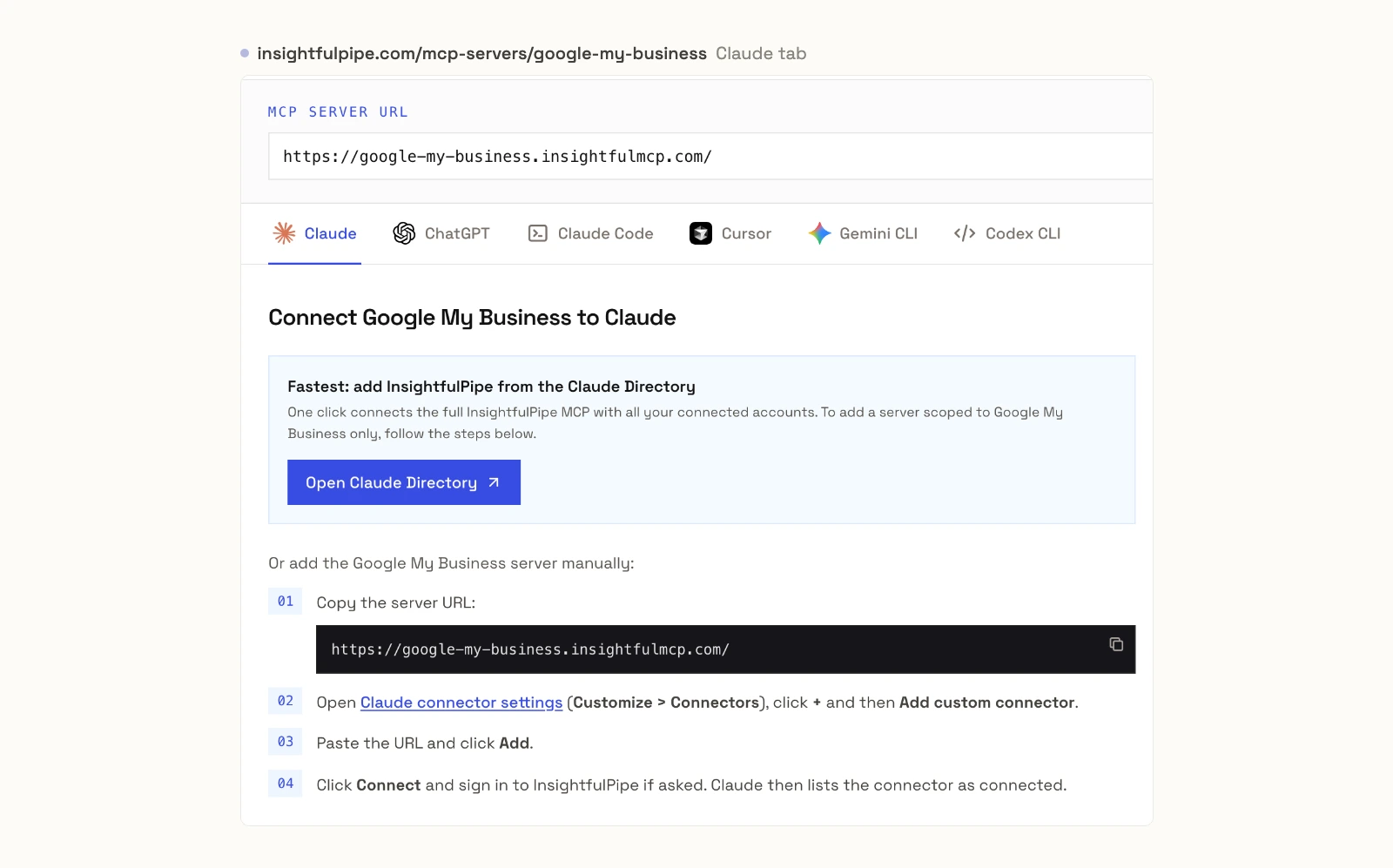
If no location is connected yet, the Grant access page shows No accessible accounts and Authorize access stays greyed out. The setup docs cover ChatGPT, Cursor, Gemini CLI and Codex. Start a trial, connect your locations, and switch on only the actions you want the agent to have.
What we would not recommend
Four community servers still show up in searches and directories, and none is a safe base for a live profile.
- amirjahfar1/Google-Business-Profile-GBP-MCP: 40 tools including location and admin deletes, but posts are "intentionally excluded", it has 4 stars, and its last push was on 2026-07-13.
- jmdurant/gbp-mcp-server: a 2-star fork whose 4 Q&A tools call the API Google discontinued, and whose README still counts InsightfulPipe at 24 actions and calls Google's rule a "60+ day waitlist".
- satheeshds/gbp-review-agent: reviews only, with no push since 2025-12-03.
- MewCP: no review or post tools in its README, 3 stars and no licence GitHub can identify.
What the other vendors do not publish
We could not check some claims here, because the vendors behind them publish nothing to check against.
- Markifact: a tool count on its Business Profile page, and one answer on who approves a write.
- Windsor.ai: how many read tools its MCP exposes.
- Pipedream: a tool list on its page without a browser, and which plan covers personal MCP use.
- viaSocket: which actions a new MCP URL starts with.
- Two Minute Reports: a tool count, and whether its server is read-only.
Frequently asked questions
Sources (checked 2026-10-15)
Every competitor claim above comes from that vendor's own page, documentation, repository or package registry, opened on 2026-10-15. Google's MCP list and google/mcp, and the Pipedream and Upload-Post pricing pages, were checked again on 2026-10-20.
- InsightfulPipe: Business Profile server, docs, pricing, CLI, Claude connector directory
- Google: Google-managed MCP servers, google/mcp, Maps Grounding Lite, API prerequisites, OAuth, quota limits, deprecation schedule, How to use the Business Profile APIs
- Markifact: Business Profile MCP, tutorial, approval models, MCP docs, pricing
- Windsor.ai: MCP page, Claude page, write actions, pricing
- Zapier: Business Profile MCP, pricing
- Pipedream: Business Profile MCP, actions folder, pricing
- viaSocket: Business Profile MCP, Business Profile actions, pricing
- Upload-Post: Business Profile MCP, repository, pricing
- Two Minute Reports: README, pricing
- A1-x-Tech: repository, npm package
- Scalekit: Google Business Profile MCP vs API
- Named, not ranked: Porter Metrics, Data Bloo, Local Falcon, Localo, BrightLocal
- Not recommended: amirjahfar1, jmdurant, satheeshds, MewCP