Disclosure: InsightfulPipe publishes this and is one of the 9 options compared.
The verdict
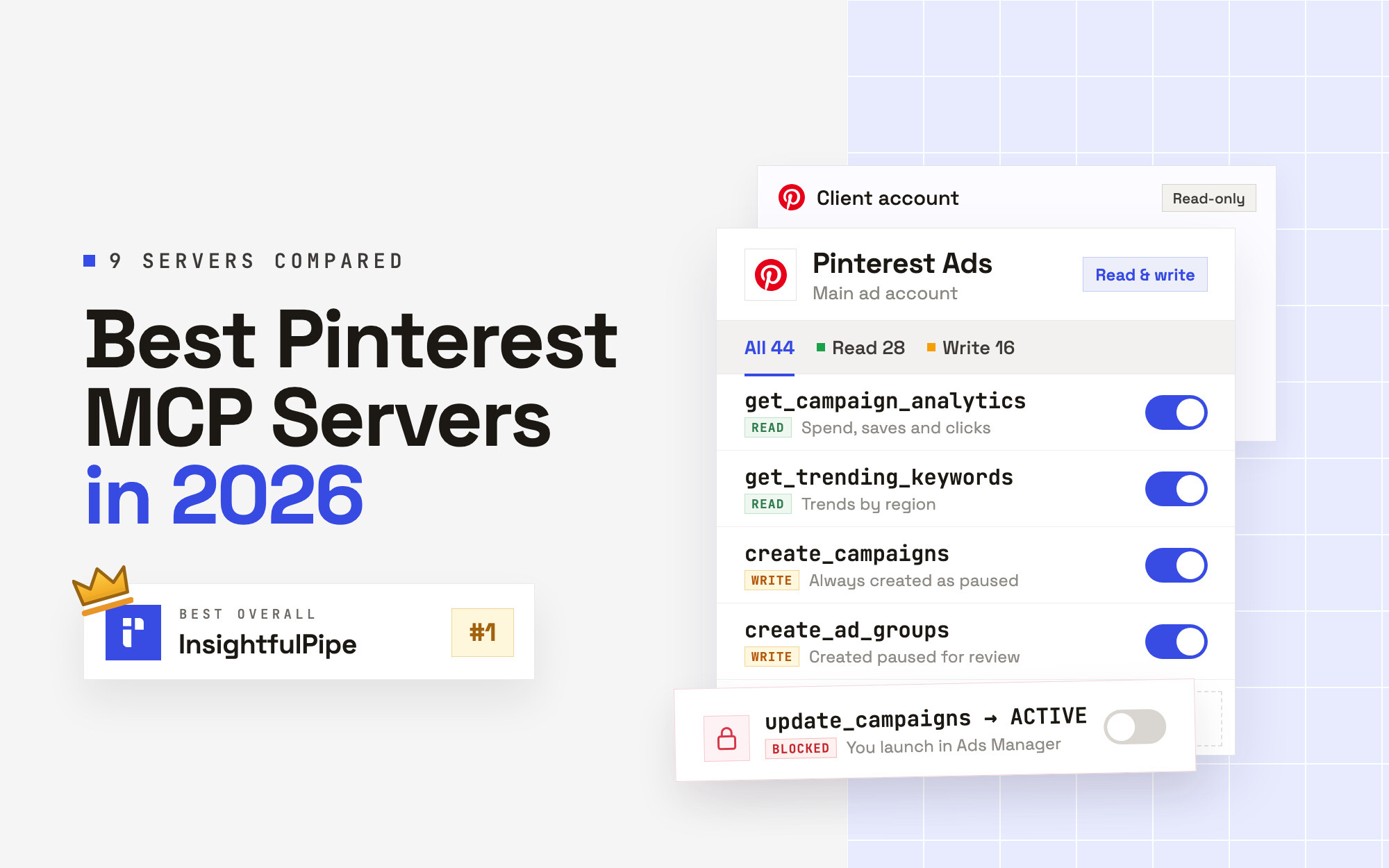
The best Pinterest MCP server in 2026 is InsightfulPipe. Of the 9 best Pinterest MCP servers compared here, it is the only one that manages organic boards and pins, builds Pinterest Ads campaigns that start paused, has no delete action on either side, and lets your admin switch every action on or off per account. That makes it the safest of the servers that can write to Pinterest.
That matters on Pinterest because the two jobs fail in different ways. A pin goes live the moment an agent creates it, and a campaign spends the moment it is set live. Six of the nine servers can change something in Pinterest, two only read, and Pinterest's own server is open to alpha partners only.
- Best overall: InsightfulPipe. Two hosted servers on one login: Pinterest Ads with 44 actions (28 read, 16 write) and Pinterest Pages with 19 (12 read, 7 write). Every action is listed on the Pinterest Ads MCP server and Pinterest Pages MCP server pages. From $29.99 a month.
- Safest write access: InsightfulPipe. New campaigns, ad groups and ads start paused, updates can only pause, and nothing the agent does can set a campaign live; you launch it in Pinterest Ads Manager. Neither Pinterest server has a delete action.
- Best value: InsightfulPipe. $29.99 a month covers 8 connections across 50 platforms, so one plan runs organic pins, Pinterest Ads and every other channel. Markifact's Pro plan is $79, and Two Minute Reports' Lite plan is $81 a month billed annually.
The best Pinterest MCP servers at a glance
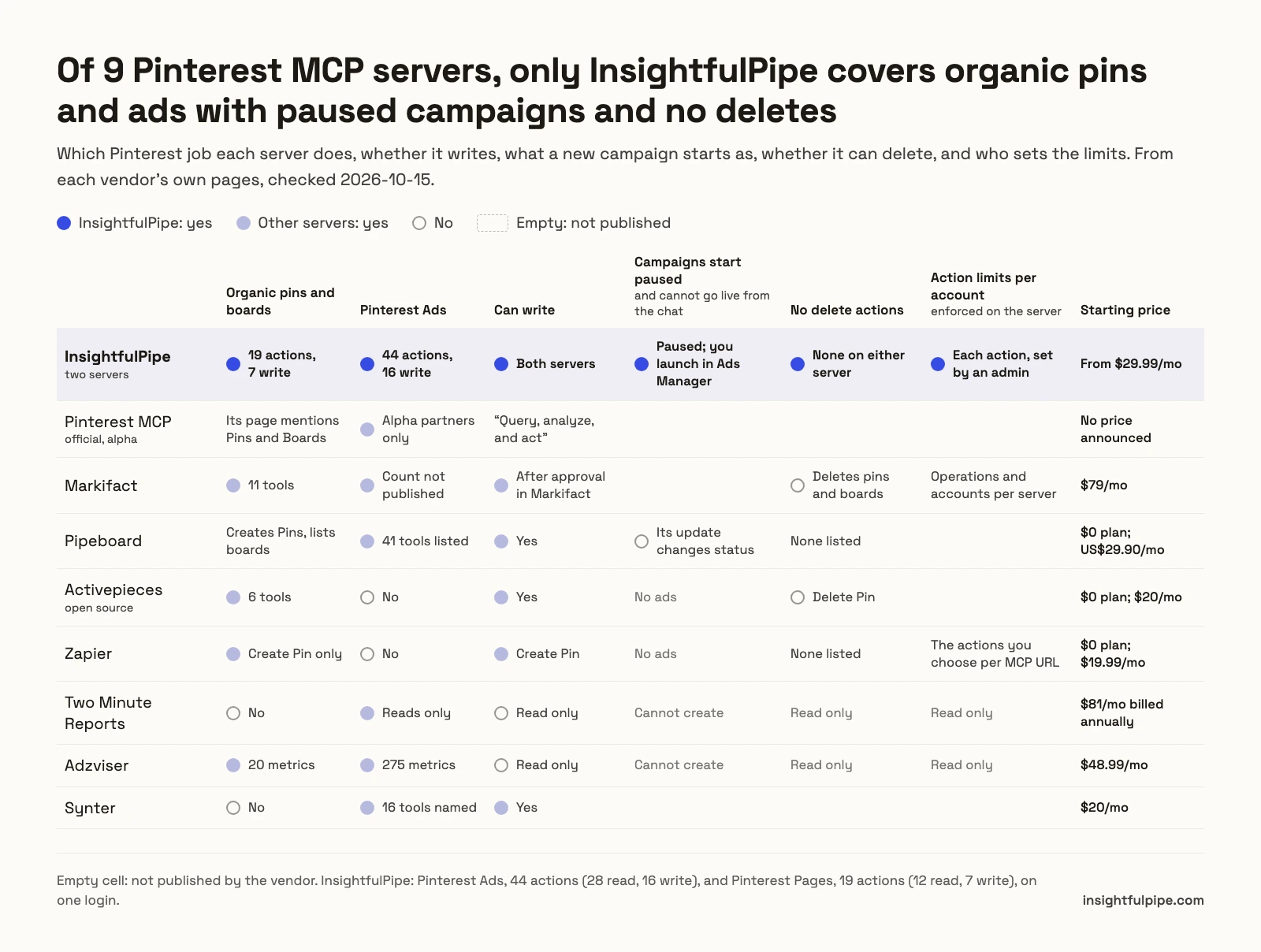
Nine servers, compared on which Pinterest job they do, what they can change, what a new campaign starts as and what they cost to start. InsightfulPipe is the only row that covers organic pins and Pinterest Ads with paused campaigns and no delete action.
Server | Job | Pinterest tools | Writes | A new campaign starts as | Deletes | Starting price |
|---|---|---|---|---|---|---|
InsightfulPipe | Organic and ads | Ads 44 actions, Pages 19 | 16 on Ads, 7 on Pages | Paused, and no action can set it live | None on either server | $29.99/mo |
Markifact | Organic and ads | 11 organic tools; ads not published | Yes, after approval in Markifact | Not published | Pins and boards, after approval | $79/mo |
Pipeboard | Ads, plus creating Pins | "40+" tools | Yes | Not published | None listed | $0 for 30 runs/week, then US$29.90/mo |
Activepieces | Organic | 6 tools, 3 triggers | Create Pin, Create Board, Update Board | No ads | Delete Pin | $0, then $20/mo |
Zapier | Organic | 1 action, plus a raw API request | Create Pin | No ads | None listed | $0 for 100 tasks/mo, then $19.99/mo |
Two Minute Reports | Ads | Not published | None, read only | Cannot create | None | $81/mo billed annually |
Adzviser | Ads and organic | 275 ads metrics, 20 organic | None, read only | Cannot create | None | $48.99/mo |
Synter | Ads | 16 tools named | Yes, including pause | Not published | Not published | $20/mo |
Pinterest MCP (unranked) | Ads, alpha partners only | Not published | "Query, analyze, and act" | Not published | Not published | No price announced |
Does Pinterest have its own MCP server?
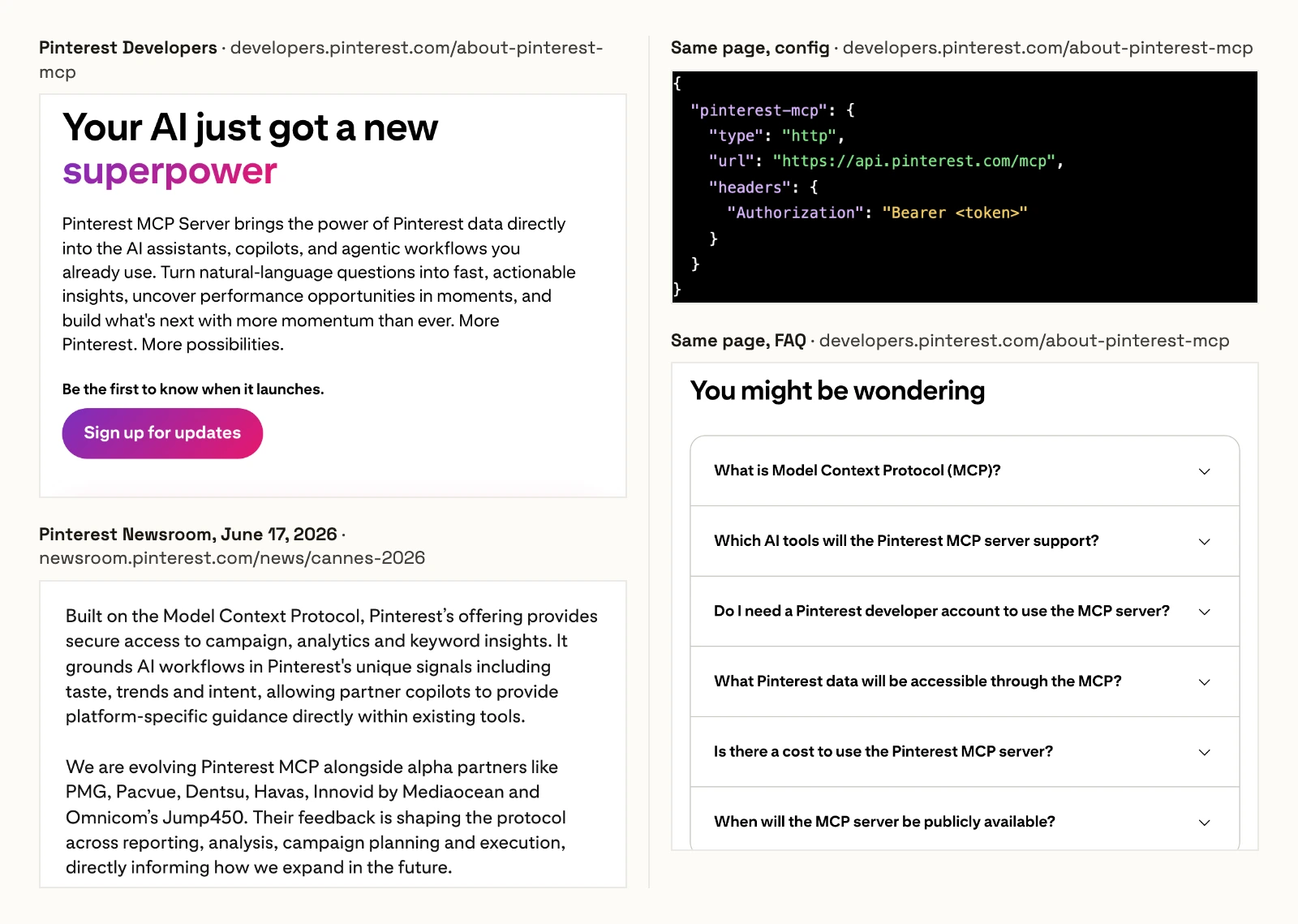
Not one you can connect today: Pinterest's developer page still says "Be the first to know when it launches", and its June 17 announcement describes a server built with alpha partners. The page prints the endpoint https://api.pinterest.com/mcp with a Bearer token, and Pinterest has announced no price.
How we tested
We read every capability, default and price from each vendor's own documentation, pricing page or public repository, and ran InsightfulPipe on live accounts. We checked every page on 2026-10-21, and took GitHub stars and commit dates the same day.
Criterion | What we checked |
|---|---|
Job | Does it cover organic pins and boards, Pinterest Ads, or both? |
Writes | Can the agent create or change pins, boards, campaigns, ad groups and ads? |
Going live | What does a new campaign start as, and can the agent set it live from the chat? |
Deletes | Can the agent delete a pin, a board or a campaign? |
Control | Can an admin choose actions per account, and does the server enforce it? |
Setup | A sign-in and a URL, or a developer app, an alpha invitation or a self-hosted install? |
Price | What does write access cost to start? |
Where a vendor's own pages contradict each other, we quote both and attribute them to the vendor. Where a capability is not published, we say "not published" rather than guess. Roadmap features do not count.
Windsor.ai, Supermetrics, Porter Metrics and Detrics are reporting connectors that do the same job as Two Minute Reports and Adzviser, so two represent the type. Blend's Pinterest page names no tools, Composio's is a developer toolkit guide, and Agent Planners and PaidSync are on no Google first page for these searches yet, so we will review them at the next update. Community repositories sit in "What we would not recommend".
Organic pins or ad campaigns?
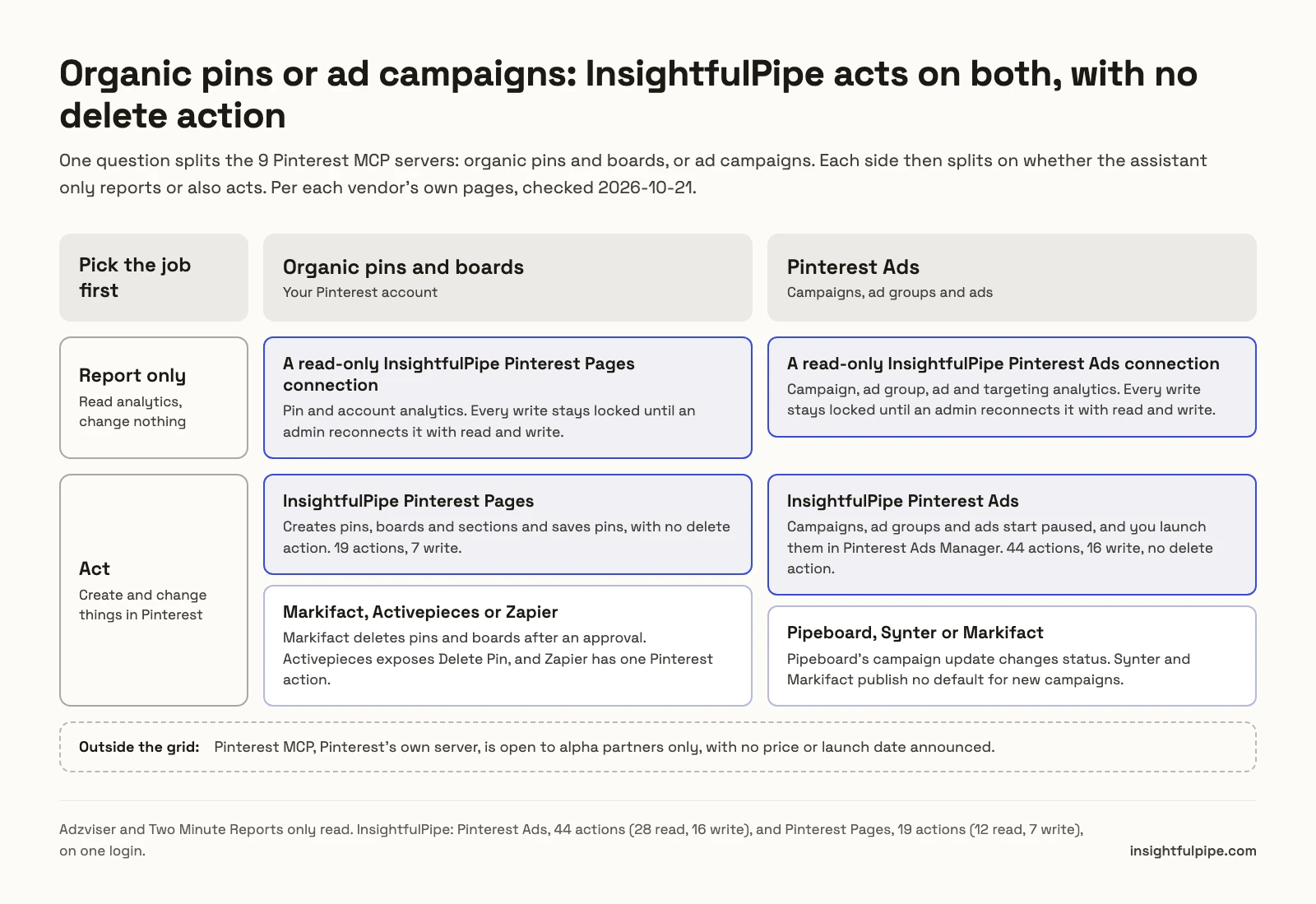
One question splits these nine: does the assistant work on your organic pins and boards, or on your ad campaigns? Each side then splits again, on whether it only reports or also acts. Only two servers here manage both organic boards and ad campaigns, InsightfulPipe and Markifact, and only InsightfulPipe does it with no delete action.
If it is organic, InsightfulPipe's Pinterest Pages server reports on pins and the account over a read-only connection, and on Read & write it creates pins, boards and sections and saves pins, with no delete action. The others each lack something: Activepieces has 6 tools including Delete Pin and no ads, Zapier has one Pinterest action, Create Pin, Markifact deletes pins and boards after an approval in its app, and Adzviser only reads.
If it is ads, InsightfulPipe's Pinterest Ads server reports over a read-only connection, and on Read & write it creates campaigns, ad groups and ads paused, with no action that can set them live, so a person launches them in Pinterest Ads Manager. The others each lack something: Pipeboard's campaign update changes status, Synter and Markifact publish no default status for new campaigns, and Two Minute Reports and Adzviser cannot change anything.
The 8 best Pinterest MCP servers, ranked
Here are the 8 best Pinterest MCP servers you can connect today, in order. InsightfulPipe comes first as one entry with two servers, then the servers that can write, the two that only read, and Synter, whose guide is dated April 15, 2026. Pinterest's own server follows the list, unranked, because only its alpha partners can connect it. Each card says which job the server does.
Best overall: InsightfulPipe
InsightfulPipe gives an AI agent two Pinterest servers on one login, one for ads and one for organic pins, and an admin decides which actions each account allows.
It is the pick if one assistant should report on pins, build boards and draft campaigns while a person decides what spends. Coverage comes first, and it comes in two servers you can connect together or apart.
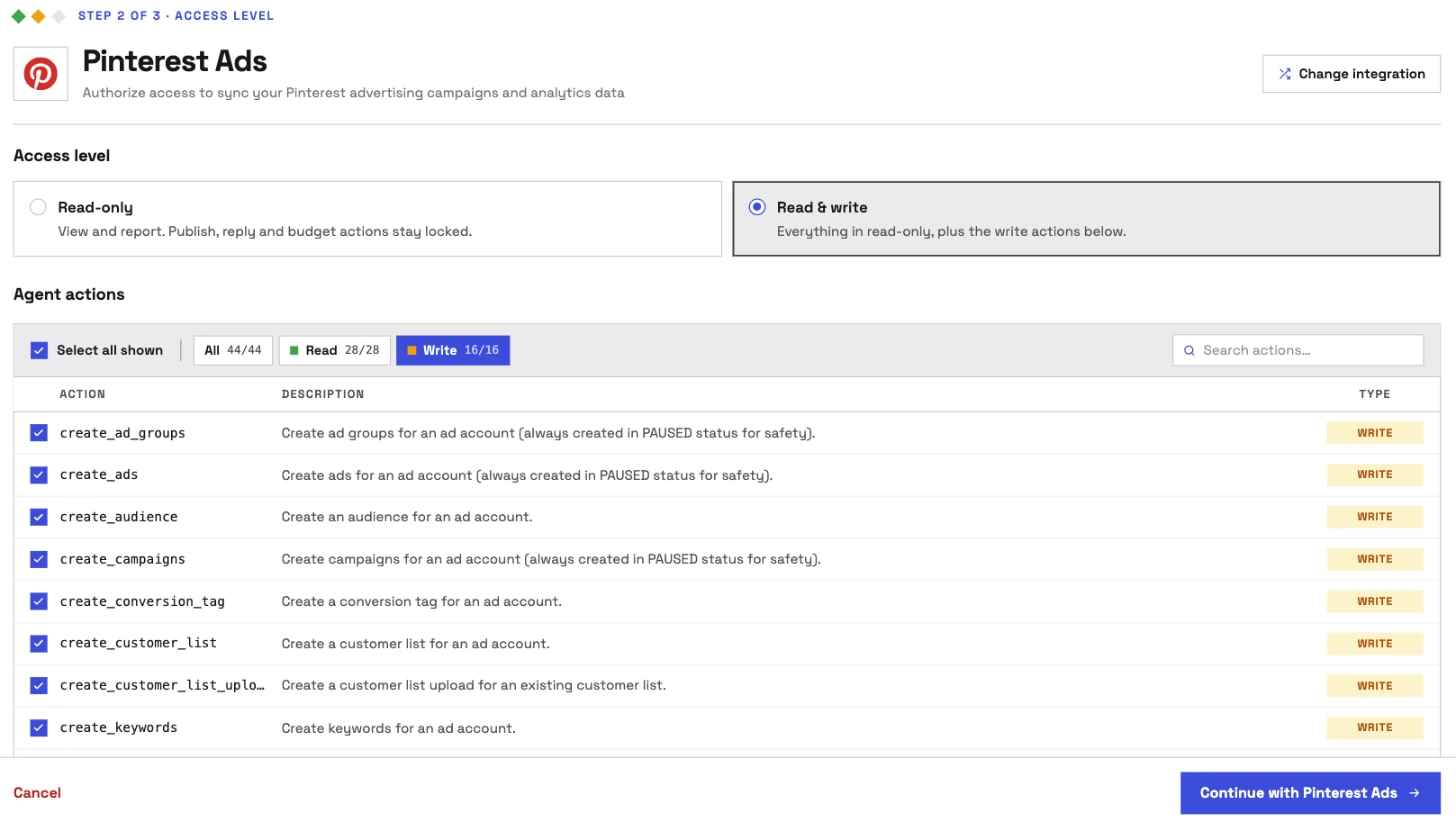
Pinterest Ads: 44 actions, 28 read and 16 write
The Pinterest Ads MCP server runs on https://pinterest-ads.insightfulmcp.com/ and covers the ad account end to end:
- Reporting: account, campaign, ad group and ad analytics with spend, impressions, saves, clicks, checkouts and ROAS, plus async reports down to product group and product item
- Targeting: targeting analytics by keyword, interest, age and gender, and audience insights for the ad account
- Building: create and update campaigns, ad groups, ads and keywords
- Audiences: create and update audiences and customer lists, and run customer list uploads
- Tracking and catalogs: create and read conversion tags, and read catalogs and catalog feeds
- Trends: trending keywords by region, for seasonal planning
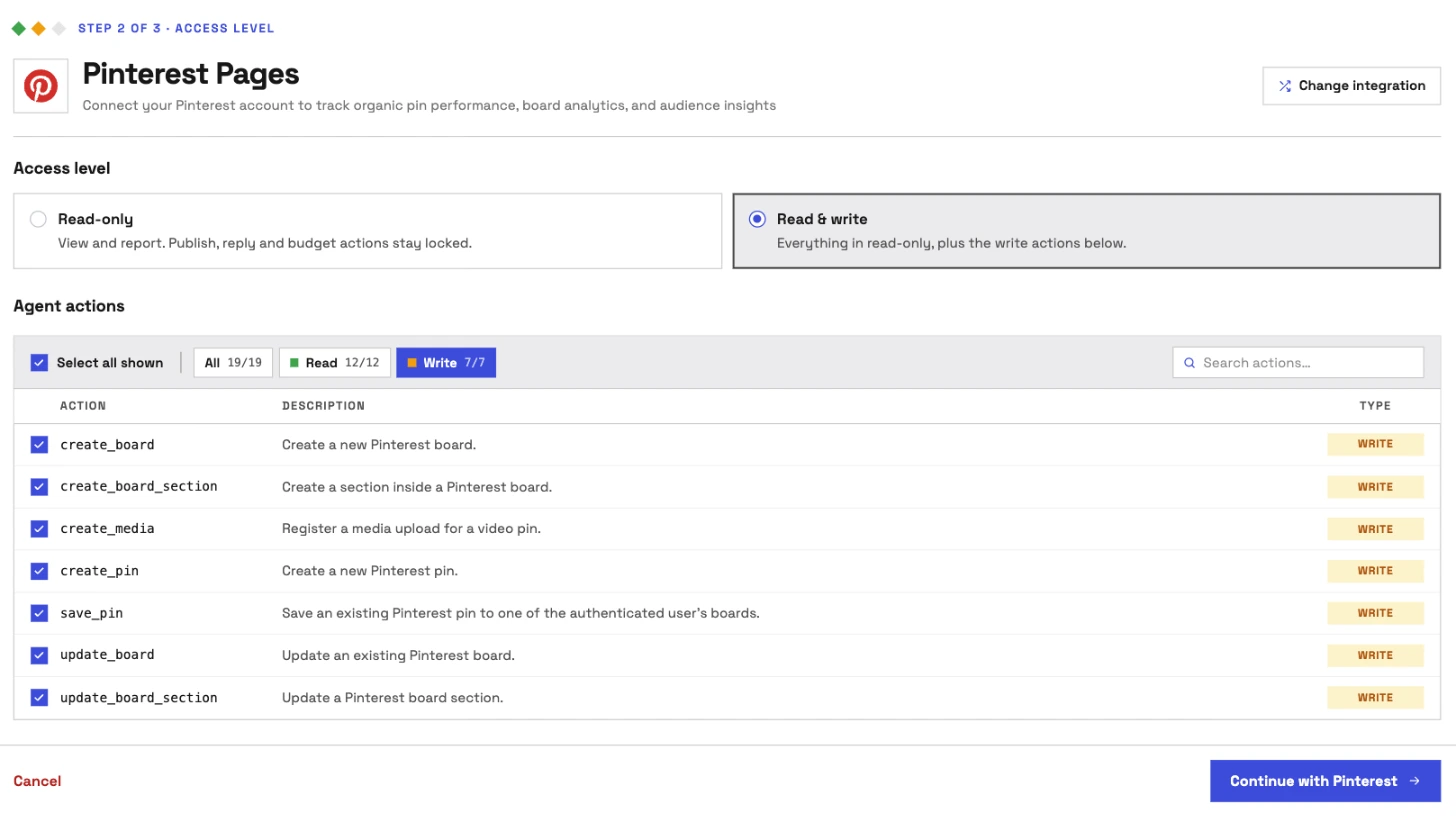
Pinterest Pages: 19 actions, 12 read and 7 write
The Pinterest Pages MCP server runs on https://pinterest-pages.insightfulmcp.com/ and covers your organic account. Its seven writes are create_board, create_board_section, create_media, create_pin, save_pin, update_board and update_board_section.
- Pins: create image pins from public image URLs, with one image or 2 to 5, and save existing pins to a board or section
- Boards: create and update boards and board sections, and list the pins on each
- Analytics: impressions, saves, pin clicks, outbound clicks and video metrics for each pin and for the account, over the last 90 days
- Trends: growing and seasonal Pinterest keywords by region
Why it is the safest way to let an agent change Pinterest
Control is the second difference, and it makes InsightfulPipe the safest of the servers that can write to Pinterest. Every limit is a switch, and your admin decides where each one sits.
An owner, admin or operator opens a connected Pinterest account and chooses exactly which of its actions the agent can use. They can switch any action on or off at any time. InsightfulPipe's server enforces that set, not your AI client, so the same limits hold in Claude, ChatGPT, Cursor, Claude Code and the CLI.
- Campaigns start paused. Campaigns, ad groups and ads are created paused, for you to set live in Pinterest Ads Manager when they are ready. Updates can only set their status to paused.
- No delete actions. Neither server can delete a campaign, ad group, ad, pin, board or section.
- Read-only means read-only. A read-only connection asks Pinterest for read access only, so nobody can select a write for it until an admin reconnects it with read and write.
- Roles hold. Team members with restricted access only get read actions on the accounts an admin grants them. An owner or admin sets the roles and can change them at any time.
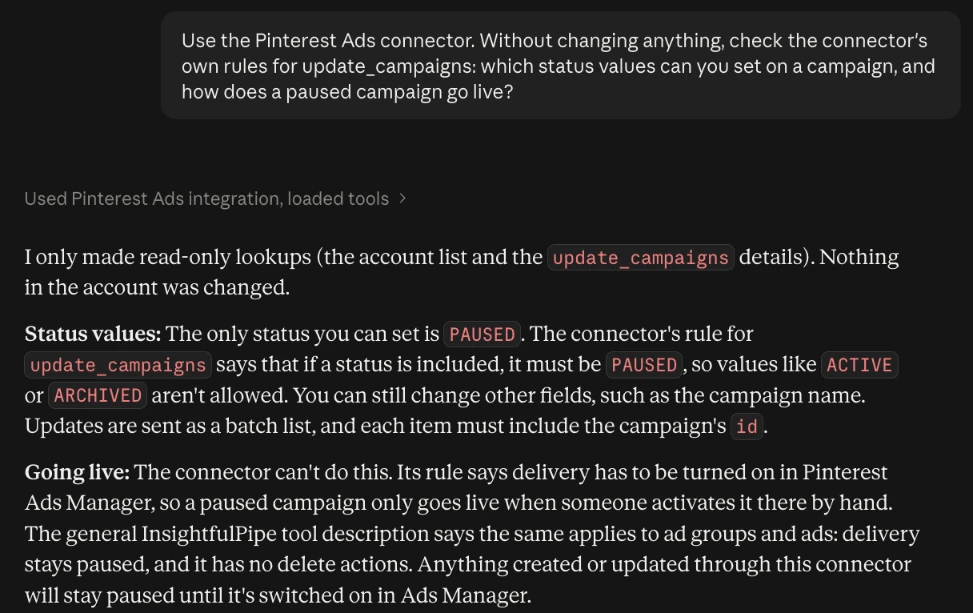
Ask it to set a campaign live, and the server answers: "Only status='PAUSED' is allowed for action 'update_campaigns'. To activate delivery, use Pinterest Ads Manager." Pipeboard's tool list says its campaign update changes "name, budget, or status". Markifact's organic tools include permanent pin and board deletes behind an approval. On InsightfulPipe, the boundary is on the server, so it holds on a scheduled run when nobody is watching the chat.
What else you get
- 50 platforms on one login, including Google Ads, Meta Ads and GA4, so one agent can compare Pinterest saves with other channels in one thread.
- Many Pinterest accounts, each its own connection with its own action list, so an agency can open writes on one client and keep another read-only.
- Every major AI client: Claude, ChatGPT, Claude Code, Cursor, Gemini CLI and Codex, each with a setup guide on the server's page.
- Claude's connector directory and the ChatGPT app directory both list InsightfulPipe, so the full server connects in one click.
- A CLI: the insightfulpipe CLI runs the same Pinterest reads and writes from a terminal, under the same switches.
- Prompts and skills: each Pinterest server's page carries ready prompts to copy, and the free Claude skills library includes a Cross-Platform Budget Allocator that reads Pinterest Ads beside every other connected ad account through the InsightfulPipe MCP.
Pricing: Starter is $29.99 a month for 8 connections, Growth $89.99 for 35 and Agency $299.99 for 150, with both Pinterest servers, every other MCP server and the CLI on every plan. Each connected Pinterest account counts as one connection.
Where it is the wrong answer: if you only ever create a pin now and then, you would be paying for more than you use.
Best for: brands and agencies that run organic Pinterest and Pinterest Ads and want one assistant to do the work within limits they set. See all 44 Pinterest Ads actions, all 19 Pinterest Pages actions, or start a trial.
Markifact
Markifact covers organic Pinterest and Pinterest Ads with an approval step, and its own pages describe Pinterest's server differently from Pinterest.
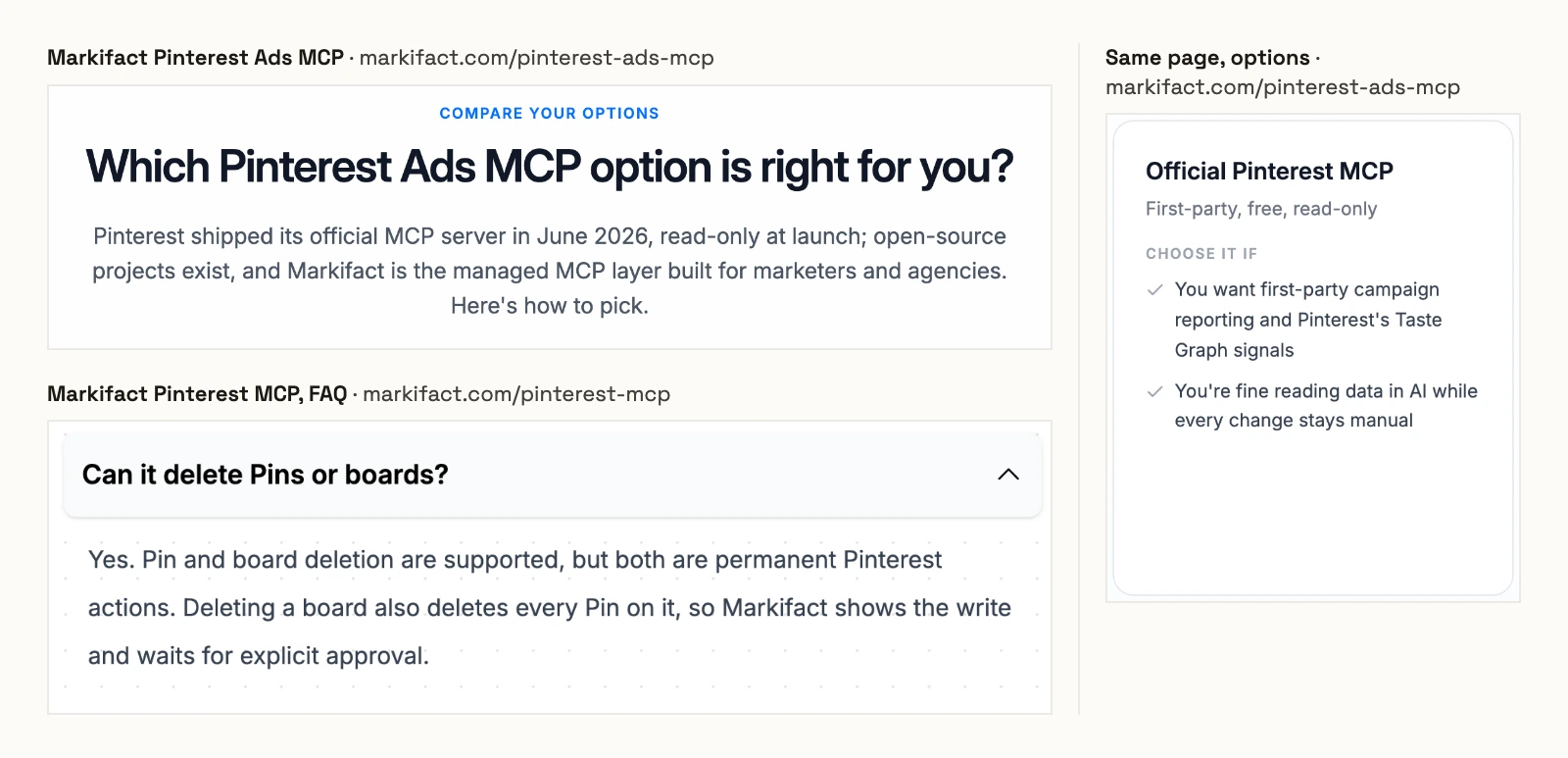
Markifact's organic Pinterest page lists 11 tools, including pinterest_delete_pin and pinterest_delete_board, and says "Deleting a board also deletes every Pin on it". It says every write waits "for your explicit approval in Markifact".
Its Pinterest Ads page names three operations and no count. That page says Pinterest "shipped its official MCP server in June 2026, read-only at launch" and calls it "First-party, free, read-only". Pinterest's own page still says "Be the first to know when it launches".
Markifact's documentation gives the MCP approval model as "Client-controlled (approve writes per your client's settings)", and its MCP docs say a new server has access to all operations and all connected accounts until you restrict it. Pro is $79 a month and Team $249.
Pros
- Organic pins and Pinterest Ads on one hosted server.
- Every write waits for approval in Markifact, per its organic page.
Cons
- Its organic tools permanently delete pins and boards, per its own FAQ.
- Its Pinterest Ads page calls Pinterest's server free and read-only; Pinterest's pages say neither, and still invite sign-ups for the launch.
- Paid plans start at $79 a month, more than twice InsightfulPipe's $29.99.
Best for: teams already running workflows inside Markifact.
Pipeboard
Pipeboard lists 41 Pinterest Ads tools, and its campaign update can change a campaign's status.
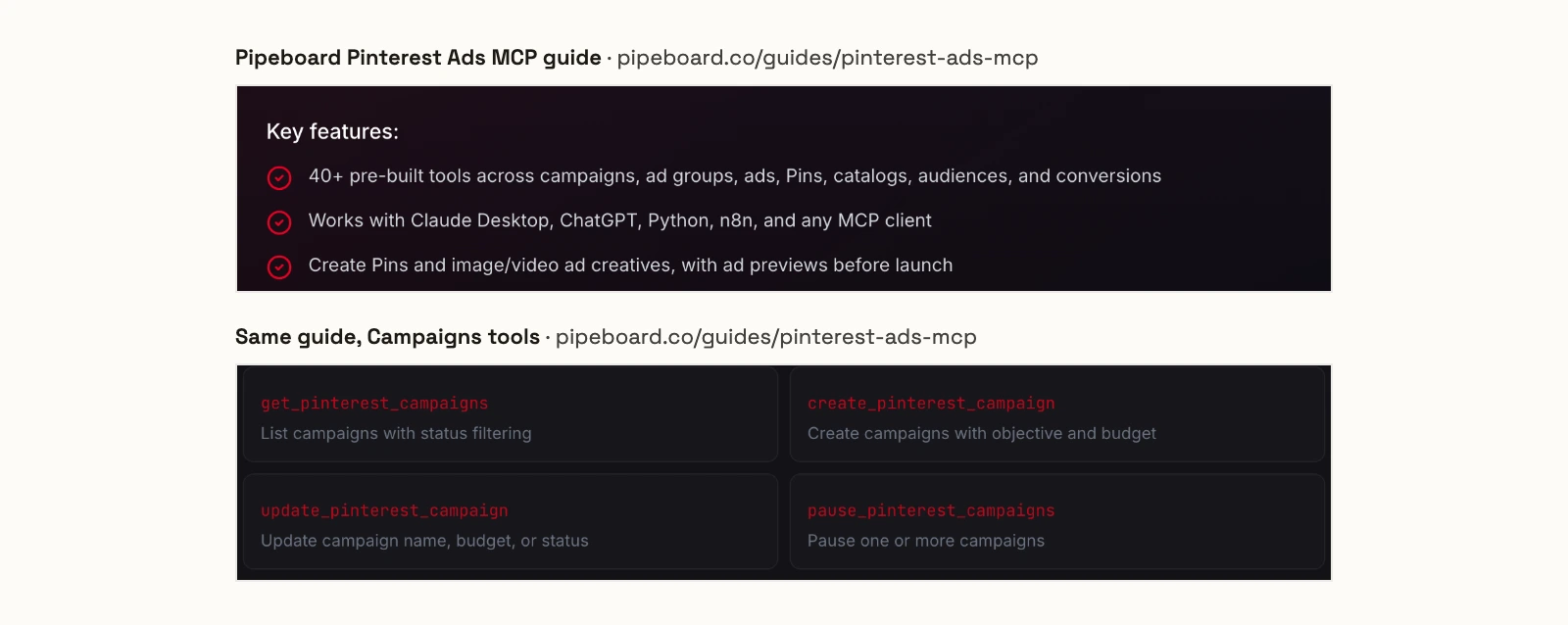
Pipeboard hosts the server at pinterest-ads.mcp.pipeboard.co. Its guide promises "40+ pre-built tools" and lists 41, across campaigns, ad groups, ads, Pins, catalogs, audiences, conversions and reporting. It lists update_pinterest_campaign as "Update campaign name, budget, or status", plus ad previews and server-side conversion uploads. It names no default status for new campaigns and no delete tool. Pricing counts ad account slots: 30 tool executions a week and 2 slots on the free plan, and Pro at US$29.90 a month for 3 slots.
Pros
- Catalog, product group and Conversions API tools.
- A free plan with 30 tool executions a week.
Cons
- Its campaign update tool changes status, per its own guide.
- No organic board tools beyond listing boards.
- Pro covers 3 ad account slots, then $10 a month per slot.
Best for: advertisers who already run Meta or Google Ads through Pipeboard.
Activepieces
Activepieces covers organic pins with 6 tools, and one of them deletes pins.
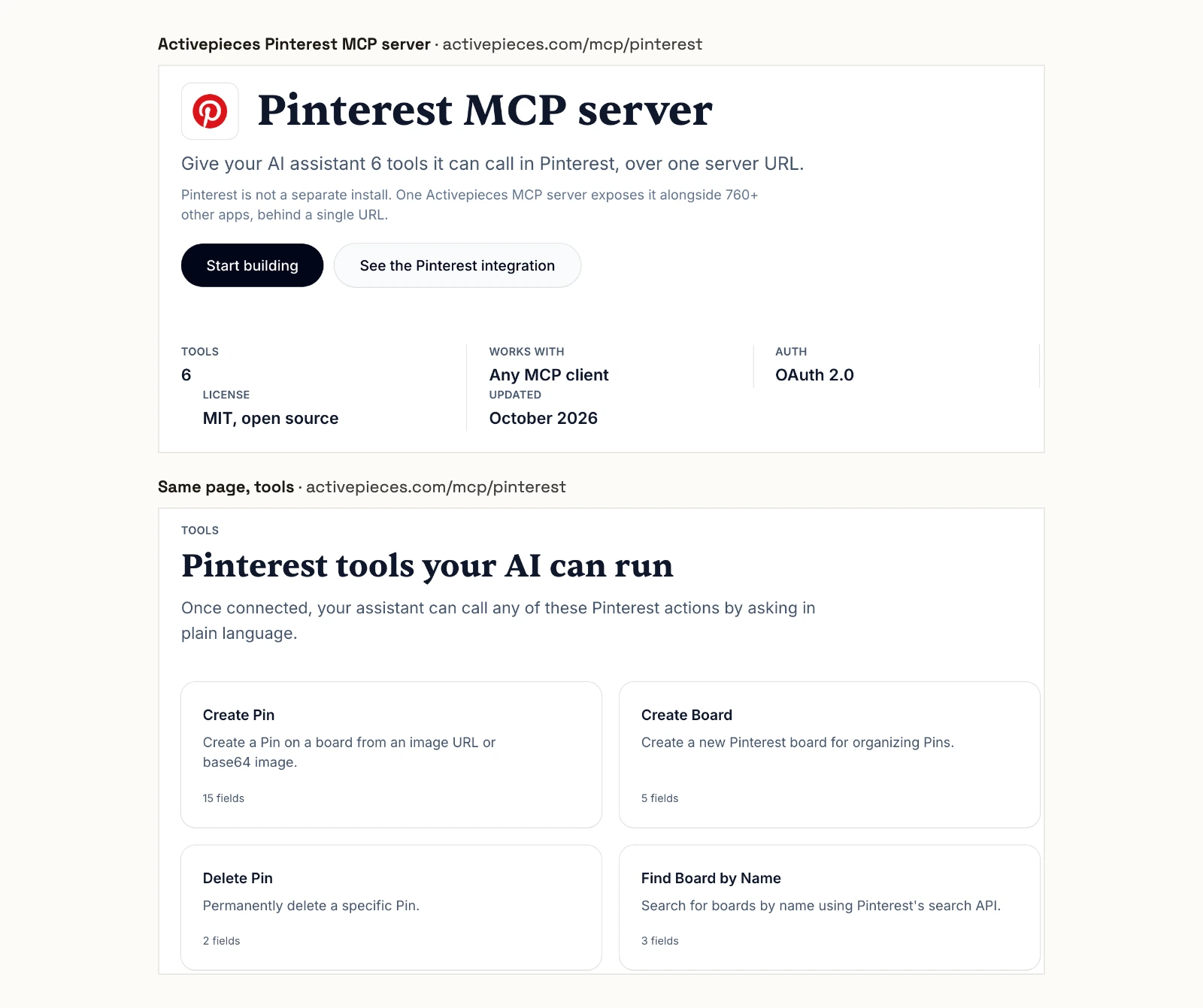
Activepieces exposes Pinterest next to "770+ other apps" behind one server URL, on its cloud or a self-hosted install. Its Pinterest page lists 6 tools (Create Pin, Create Board, Delete Pin, Find Board by Name, Find Pin by Keyword and Update Board) and 3 triggers, and labels the license "MIT, open source". Its repository had 25,137 stars and a commit on 2026-10-20. The free plan includes 1,000 credits a month, and paid plans are $20 and $200.
Pros
- Open source, on its cloud or your own servers.
- A $0 plan with 1,000 credits a month.
Cons
- No Pinterest Ads tools.
- Delete Pin "permanently" deletes a pin, per its own page.
- No pin analytics tool among the six.
Best for: builders who chain a Pinterest step into a wider automation.
Zapier
Zapier's Pinterest MCP has one Pinterest action, Create Pin.
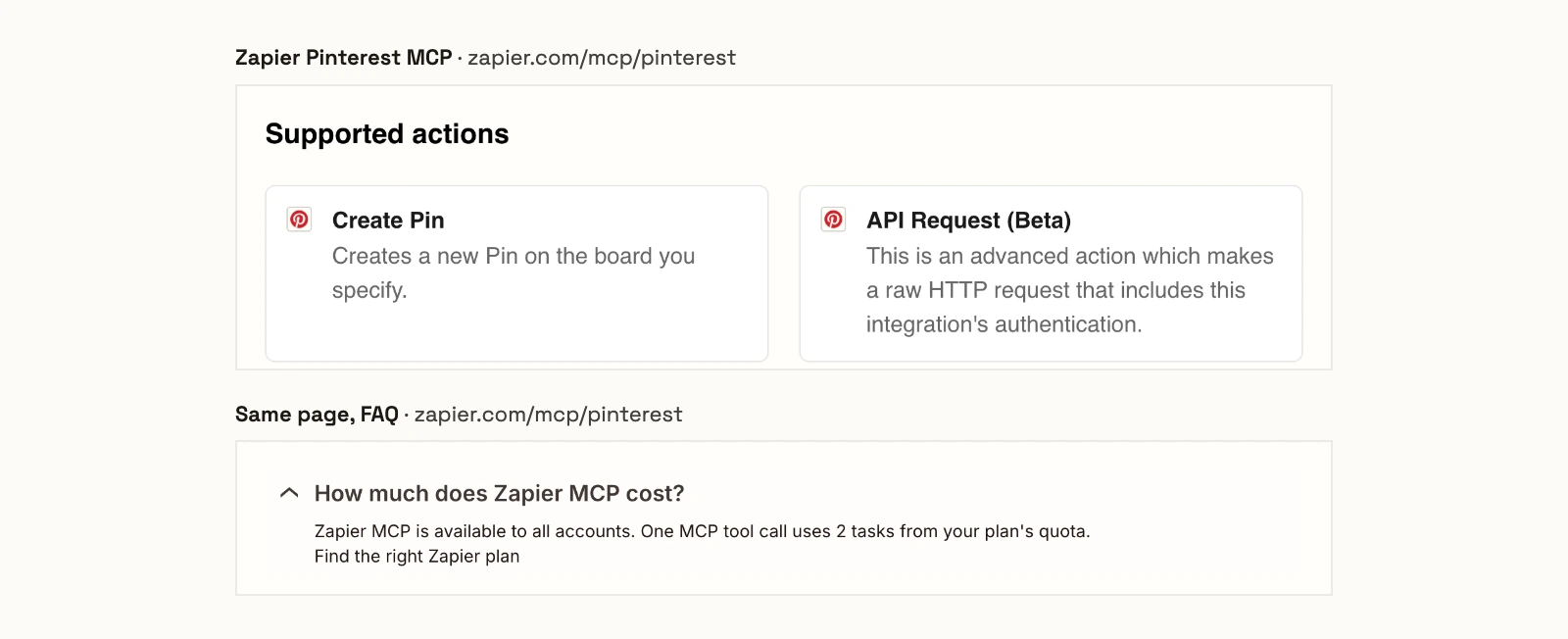
Zapier's Pinterest MCP page lists two supported actions: "Create Pin", which "Creates a new Pin on the board you specify", and "API Request (Beta)", a raw HTTP request with the integration's authentication. You generate a personal MCP URL and choose which actions it exposes. "One MCP tool call uses 2 tasks from your plan's quota," the page says. Zapier's free plan includes 100 tasks a month, and Professional starts at $19.99.
Pros
- Create Pin from any MCP client through Zapier's hosted URL.
- You choose the actions your MCP URL exposes.
Cons
- One Pinterest action, plus a raw API request.
- Each call uses 2 tasks, so 100 free tasks cover about 50 calls.
- No Pinterest Ads or pin analytics.
Best for: teams already on Zapier that want an assistant to post the odd pin.
Two Minute Reports
Two Minute Reports reads Pinterest Ads data and, by its own page, can change nothing.
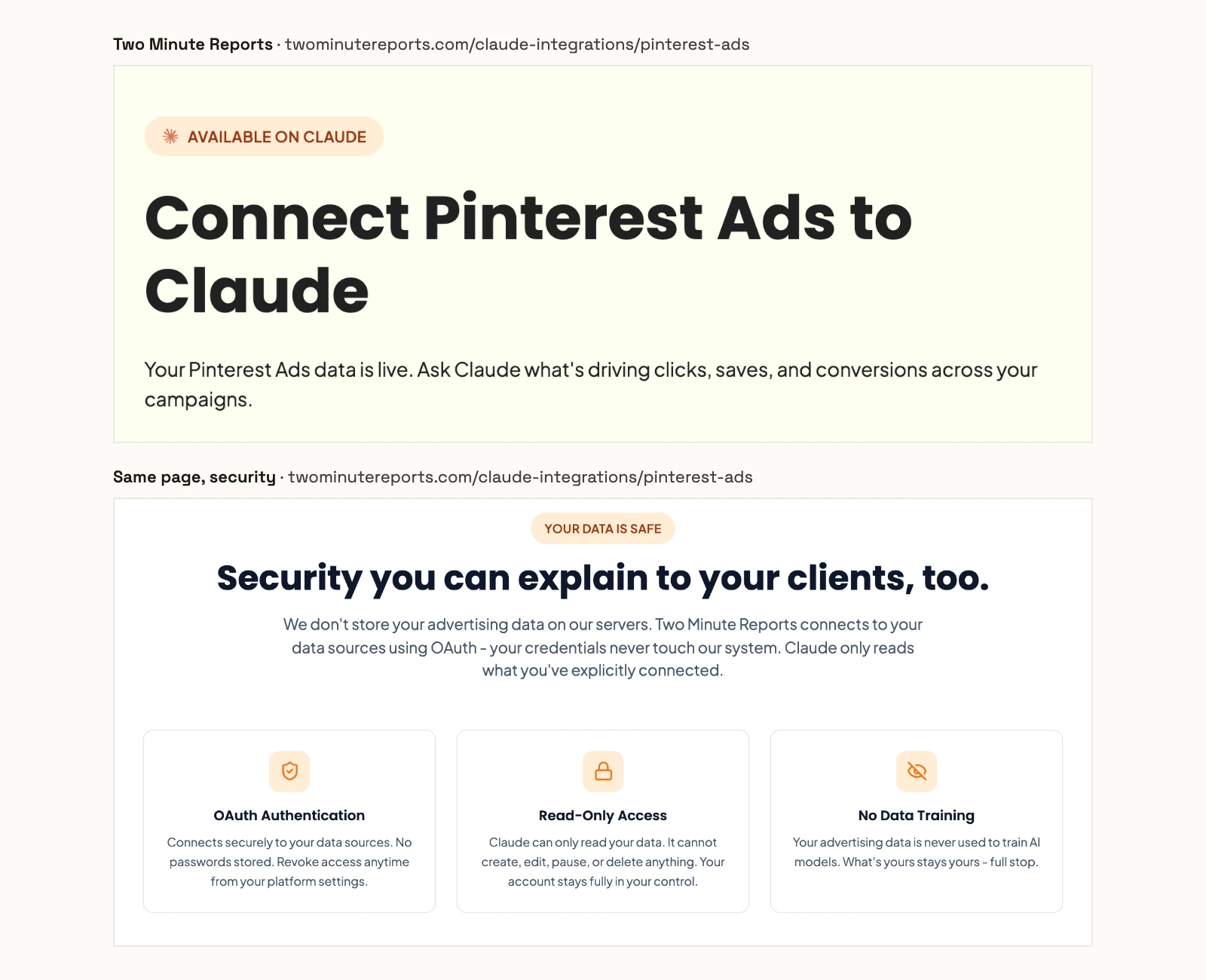
Its Pinterest Ads page says: "Claude can only read your data. It cannot create, edit, pause, or delete anything." Its GitHub README gives the server URL https://mcp.twominutereports.com/mcp, says "no Pinterest API developer credentials required" and adds "22+ other sources" on the same connection. The repository has 0 stars and no commit since 2026-04-10. Lite is $81 a month billed annually, or $97 month to month.
Pros
- Read-only by design.
- Pinterest Ads next to Shopify, GA4 and other sources.
Cons
- No writes of any kind.
- No Pinterest tool list or count published.
- Lite costs $81 a month even on annual billing.
Best for: agencies that send scheduled Pinterest Ads reports.
Adzviser
Adzviser reads Pinterest Ads and organic Pinterest, and changes neither.
Adzviser's Pinterest Ads page lists 275 metrics and says it is "Read-only: analyze spend, campaigns, conversions and creative performance without changing Pinterest". Its Pinterest Organic page lists 20 metrics as a separate data source. The hosted endpoint is https://mcp.adzviser.com/http, and it is in Claude's connector directory. Starter is $48.99 a month for 3 data sources, and Growth is $148.99.
Pros
- Pinterest Ads and organic metrics in one place.
- A metric catalogue you can search on its page.
Cons
- Read only on both sides.
- Organic Pinterest counts as a second data source.
- Starter is $48.99 a month for 3 data sources.
Best for: marketers who want Pinterest reports beside other channels in Claude.
Synter
Synter's Pinterest guide names 16 tools that build and manage campaigns, and is dated April 15, 2026.
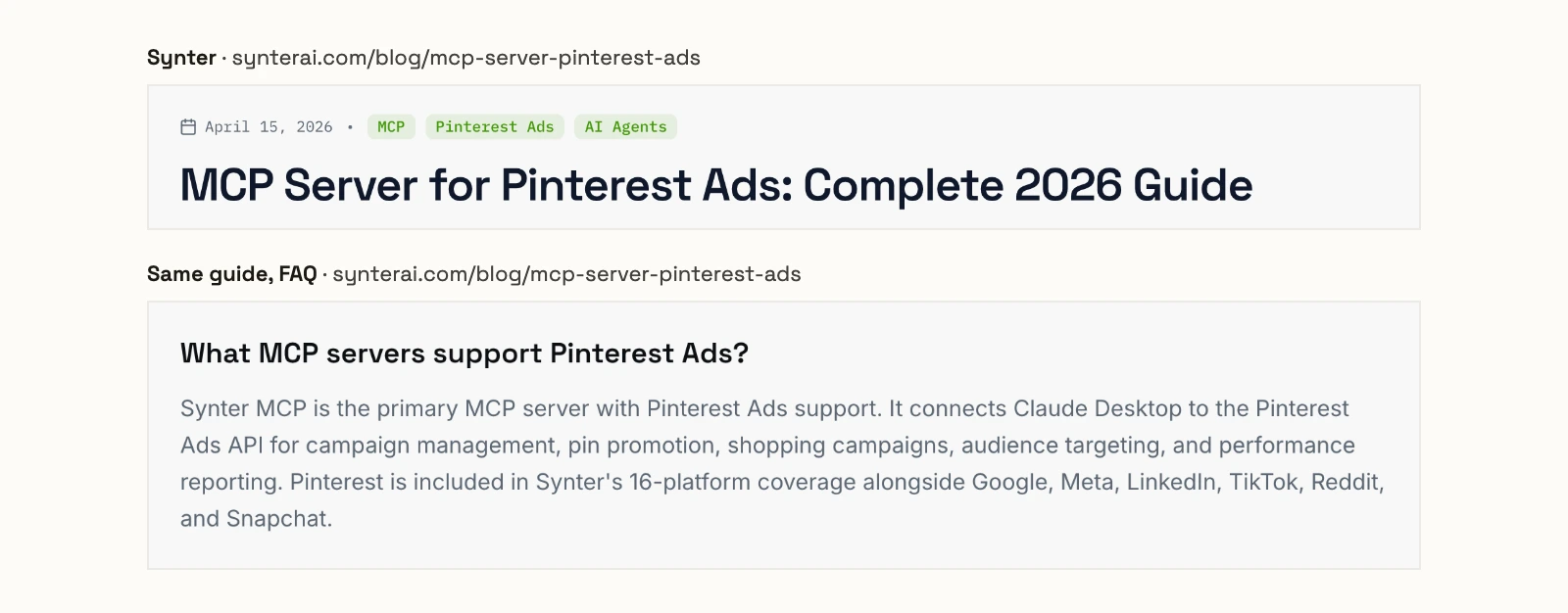
Synter's guide, dated April 15, 2026, names 16 tools, including create_pinterest_campaign, update_pinterest_budget, promote_pinterest_pin, create_pinterest_shopping_ad and create_pinterest_lookalike. Its FAQ says "Synter MCP is the primary MCP server with Pinterest Ads support." It names no default status for new campaigns. Its pricing starts at $20 a month for one developer seat, and Scale is $500 a month per workspace. Its usage table charges $25.00 per campaign launch.
Pros
- Shopping, video and lookalike tools named.
- Pinterest next to 15 other ad platforms.
Cons
- Its Pinterest guide is dated April 15, 2026.
- No default status for new campaigns published.
- $25.00 per campaign launch, per its own pricing table.
Best for: teams already buying across many ad platforms through Synter.
Pinterest's own server
Pinterest runs its own MCP server, and only its alpha partners can connect it today. It sits outside the ranking for that reason, so here it is in Pinterest's own words.
Pinterest MCP (official, alpha)
Pinterest's own server is real, first party and closed to everyone but its alpha partners.
Pinterest's business blog says the server started "with a small group of alpha partners on June 1st". Its developer page lists "Is there a cost to use the Pinterest MCP server?" and "When will the MCP server be publicly available?" without answers. Some vendor pages describe it as launched and read-only, and Pinterest's own pages say neither.
Pinterest's developer page describes it as a way to "Bring Pinterest Ads capabilities into the AI tools your team already uses. Query, analyze, and act through a consistent interface powered by the existing Pinterest API." It also promises to "search Pins, explore and manage Boards, uncover emerging trends, and access audience insights", with "OAuth 2.0 authorization and granular permissions".
Its business blog also says "approved partners can connect their own LLM agents and copilots". To teams building their own AI tools it says: "Connect with your Pinterest team to understand the MCP roadmap and explore options to participate as an ecosystem partner." The same post calls it "Pinterest's open-source MCP server", but Pinterest's GitHub organisation has no MCP repository as of 2026-10-21.
Pros
- Built and run by Pinterest on its own API.
- Pinterest names Claude, Cursor and VS Code as compatible tools.
Cons
- Alpha partners only, with no public launch date.
- No price, tool list or safety defaults published.
- Pinterest Ads first, with no other platform on the connection.
Best for: agencies in Pinterest's alpha program.
What an agent can do to Pinterest on day one
What an agent can do on day one depends on each server's defaults, and on Pinterest two of them matter: whether a campaign can go live from the chat, and whether anything can be deleted. Ask four questions before you connect a live account.
Server | Can it set a campaign live from the chat? | Deletes | Who sets the limits |
|---|---|---|---|
InsightfulPipe | No, you launch in Pinterest Ads Manager | None on either server | An admin, per account, enforced on the server |
Markifact | Not published; writes wait for approval | Pins and boards, after approval | Approval in Markifact; client-controlled over MCP, per its docs |
Pinterest MCP | Not published | Not published | Not published |
Pipeboard | Its campaign update changes status | None listed | Not published |
Synter | Not published | Not published | Not published |
Activepieces | No ads | Delete Pin | Not published |
Zapier | No ads | None listed | The actions you choose for your MCP URL |
Two Minute Reports | No, read only | None | Read only |
Adzviser | No, read only | None | Read only |
Can a campaign go live from the chat? On InsightfulPipe, no. Campaigns, ad groups and ads are created paused, updates can only pause, and you set them live in Pinterest Ads Manager. Pipeboard's campaign update changes status, and Markifact and Synter publish no default.
What can be deleted? On InsightfulPipe, nothing on either server. Markifact deletes pins and boards after an approval, and Activepieces exposes Delete Pin.
Who sets the limits, and who enforces them? On InsightfulPipe an owner, admin or operator switches each action per account, and the server enforces it in every client. Markifact's docs leave the MCP approval to your AI client.
What does InsightfulPipe do that you should plan for? Pins go live as soon as they are created, with no drafts or scheduling over MCP, and they cannot be edited afterwards. Review the title, link and board before your assistant creates one, or keep create_pin switched off on accounts that should only report.
Budget, bid and targeting edits on items that are already live take effect right away, so switch update actions on only where the agent should change live spend. Analytics cover the last 90 days, at pin and account level. InsightfulPipe's server also tells the assistant to confirm before public-facing actions, and Claude's Tool permissions under Customize > Connectors add a second gate on any write.
That is why InsightfulPipe is the safest of the servers that can write: every action is a switch your admin controls, and new campaigns start paused.
Six prompts to test any Pinterest MCP server
Run these six prompts on a test account before you trust any server with a live one. The first four only read. The last two write, and show you where the server stops.
- "List every Pinterest action this connection allows, and mark the ones that write."
- "Which of my pins had the most outbound clicks in the last 30 days?"
- "What are the top growing Pinterest keywords in the US right now?"
- "Show spend, saves, clicks and ROAS by campaign for the last 30 days."
- "Create a paused consideration campaign called test-prompts with one ad group."
- "Now set that campaign live."
On InsightfulPipe, prompt 5 creates the campaign and ad group paused. Prompt 6 is refused: "Only status='PAUSED' is allowed for action 'update_campaigns'. To activate delivery, use Pinterest Ads Manager." Ask it to delete the campaign, and there is no action to call.
Which should you choose?
Choose InsightfulPipe if you want one assistant to run organic Pinterest and Pinterest Ads within limits you set. If reports are the whole job, connect it read-only.
- You run organic pins and Pinterest Ads: InsightfulPipe. Both servers on one login, 44 ads actions and 19 organic, from $29.99 a month.
- You publish pins and organise boards: InsightfulPipe Pinterest Pages. 7 writes for pins, boards and sections, and no delete action.
- You build campaigns with an assistant: InsightfulPipe Pinterest Ads. Campaigns, ad groups and ads start paused, and you launch them in Ads Manager.
- You run an agency with many Pinterest accounts: InsightfulPipe. Each account is its own connection with its own action list.
- You only report: a read-only InsightfulPipe connection, which locks every write until an admin reconnects it with read and write.
On InsightfulPipe, you connect the ads server and the organic server side by side.
Connect InsightfulPipe to Pinterest in three steps
Connecting InsightfulPipe takes a Pinterest sign-in and a URL, with no Pinterest developer app and nothing to install.
- In InsightfulPipe, open Connected accounts, click Connect account and choose Pinterest Ads or Pinterest Pages. Pick Read-only or Read & write, sign in with Pinterest and, for ads, choose your ad accounts.
- In Claude, add InsightfulPipe from the connector directory, or paste
https://pinterest-ads.insightfulmcp.com/orhttps://pinterest-pages.insightfulmcp.com/as a custom connector. Click Connect, sign in to InsightfulPipe if asked, and click Authorize access. In Claude Code, runclaude mcp add --transport http pinterest-ads-mcp https://pinterest-ads.insightfulmcp.com/orclaude mcp add --transport http pinterest-pages-mcp https://pinterest-pages.insightfulmcp.com/. - Open the account's actions, keep the ones you want, and ask your first question.
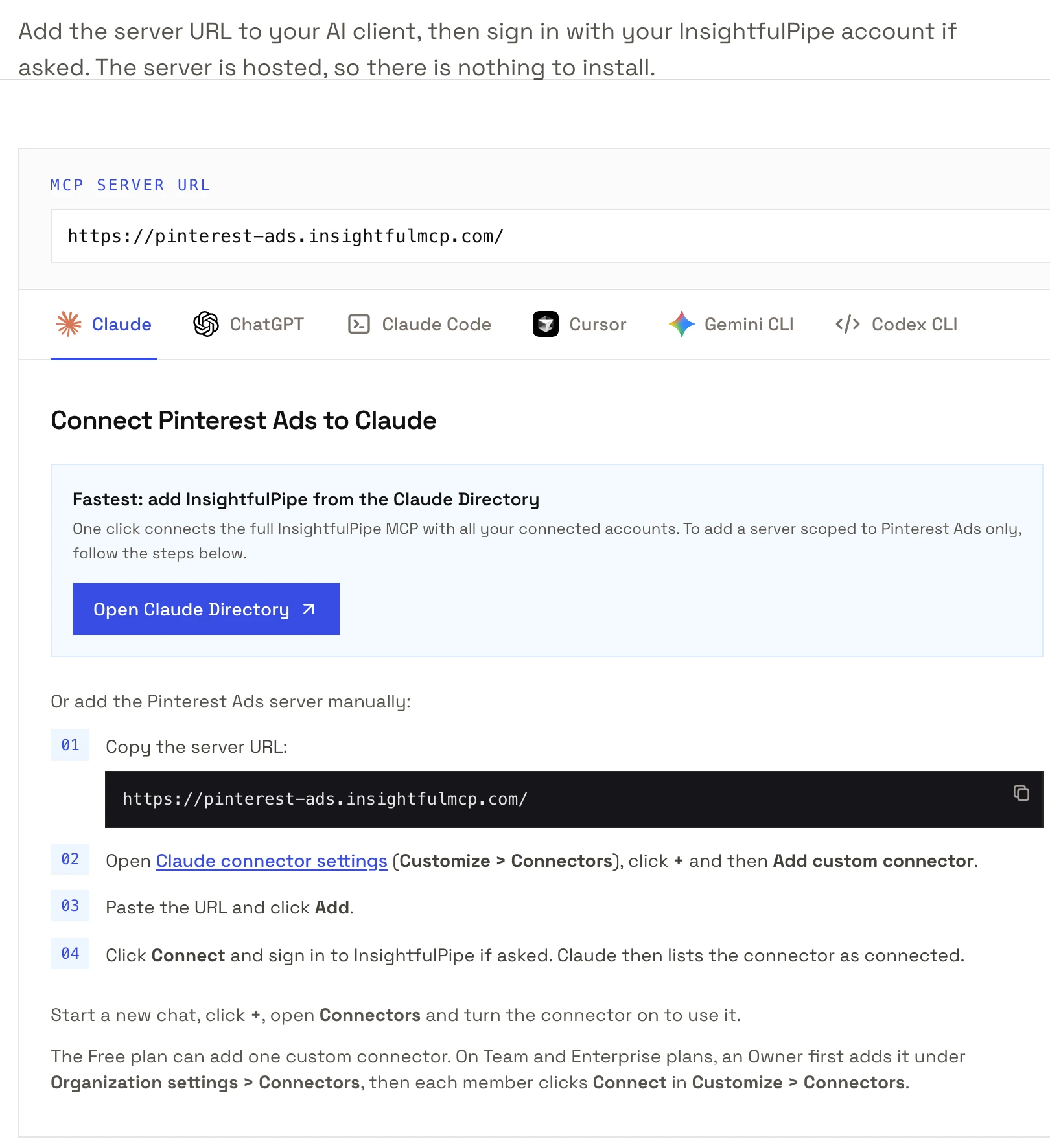
Our guide to connecting Pinterest Ads to Claude walks through every screen, and each server's page covers ChatGPT, Cursor, Gemini CLI and Codex. Start a trial, connect Pinterest, and switch on only the actions you want the agent to have.
What we would not recommend
Several community Pinterest servers still appear in searches and AI answers, and none is a safe base for a live account.
- terryso/mcp-pinterest: an image search and download tool with a headless browser mode, not a server for your account. 45 stars and no commit since 2025-07-02.
- collactivelabs/pinterest-mcp-server: no license, and no commit since 2025-05-24.
- clugtu/pinterest-mcp and what-name/pinterest-mcp: 7 stars each, and what-name has no license.
- CData's GitHub server: read only through a JDBC driver, 6 stars and no commit since 2025-10-18. Its README points to a separate paid version.
What the other vendors do not publish
We could not check some claims here, because the vendors behind them publish nothing to check against.
- Pinterest: a price, a launch date, a tool list or any safety default for its MCP server.
- Markifact: a Pinterest Ads tool count, and what a new campaign starts as.
- Pipeboard: what a new campaign starts as, and which status values its campaign update accepts.
- Synter: what a new campaign starts as, and any update to its Pinterest guide since April 15, 2026.
- Two Minute Reports and Adzviser: a Pinterest tool list.
- Activepieces: any per-action control for Pinterest.
Frequently asked questions
Sources (checked 2026-10-21)
Every competitor claim above comes from that vendor's own page, documentation or repository, opened on 2026-10-21.
- InsightfulPipe: Pinterest Ads server, Pinterest Pages server, pricing, CLI, Claude connector directory, Pinterest Ads README, Pinterest Pages README
- Pinterest: developer page, newsroom, June 17, 2026, business blog, June 29, 2026, GitHub organisation
- Markifact: Pinterest MCP, Pinterest Ads MCP, approval models, MCP docs, pricing
- Pipeboard: Pinterest Ads guide, pricing
- Activepieces: Pinterest MCP, pricing, repository
- Zapier: Pinterest MCP, pricing
- Two Minute Reports: Pinterest Ads to Claude, README, pricing
- Adzviser: Pinterest Ads MCP, Pinterest Organic MCP, pricing
- Synter: Pinterest Ads guide, pricing
- Not ranked: Blend, Composio, Agent Planners, PaidSync, Windsor.ai, terryso/mcp-pinterest, collactivelabs/pinterest-mcp-server, clugtu/pinterest-mcp, what-name/pinterest-mcp, CData