InsightfulPipe publishes this guide, and every prompt in it runs on InsightfulPipe's hosted MCP servers. The prompt library and Claude skills library it links to are InsightfulPipe's too.
Last updated: 2026-10-02
These 50 SEO prompts for Claude run on your live data, not on exports you paste in. Each one names the InsightfulPipe action it calls. Most run on the Google Search Console MCP server, the Web Crawler MCP server and the PageSpeed Insights MCP server, with DataForSEO, Bing Webmaster Tools and GA4 for the rest. That is Claude AI for SEO with your own numbers: Claude reads the data, then tells you what to fix. Plans start from $29.99 a month.
The quick version
Six steps take a prompt from this page to an answer built on your own site.
- In InsightfulPipe, open Connected accounts, click Connect account and connect Google Search Console.
- Connect DataForSEO with your own API login, and Bing Webmaster Tools if you use it.
- In Claude, open Customize > Connectors and add
https://main.insightfulmcp.com/as a custom connector. - Click Connect, and sign in to InsightfulPipe if asked.
- Start a new chat and turn the connector on.
- Paste a prompt, fill in the brackets and run it.
The 50 prompts at a glance
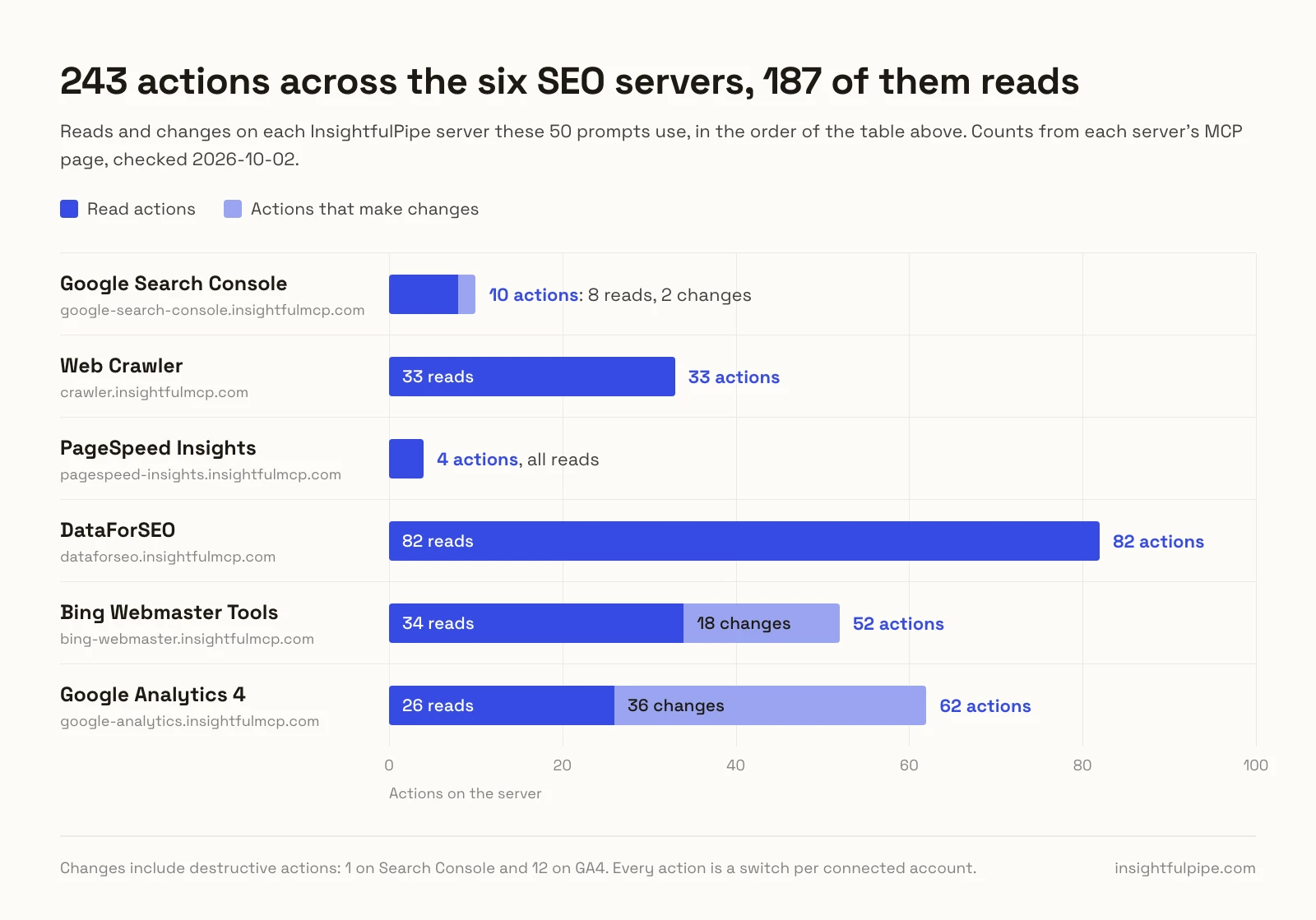
InsightfulPipe runs these prompts through six hosted servers, and 49 of the 50 only read. Action counts come from each server's MCP page.
InsightfulPipe server | Actions on its MCP page | What Claude gets |
|---|---|---|
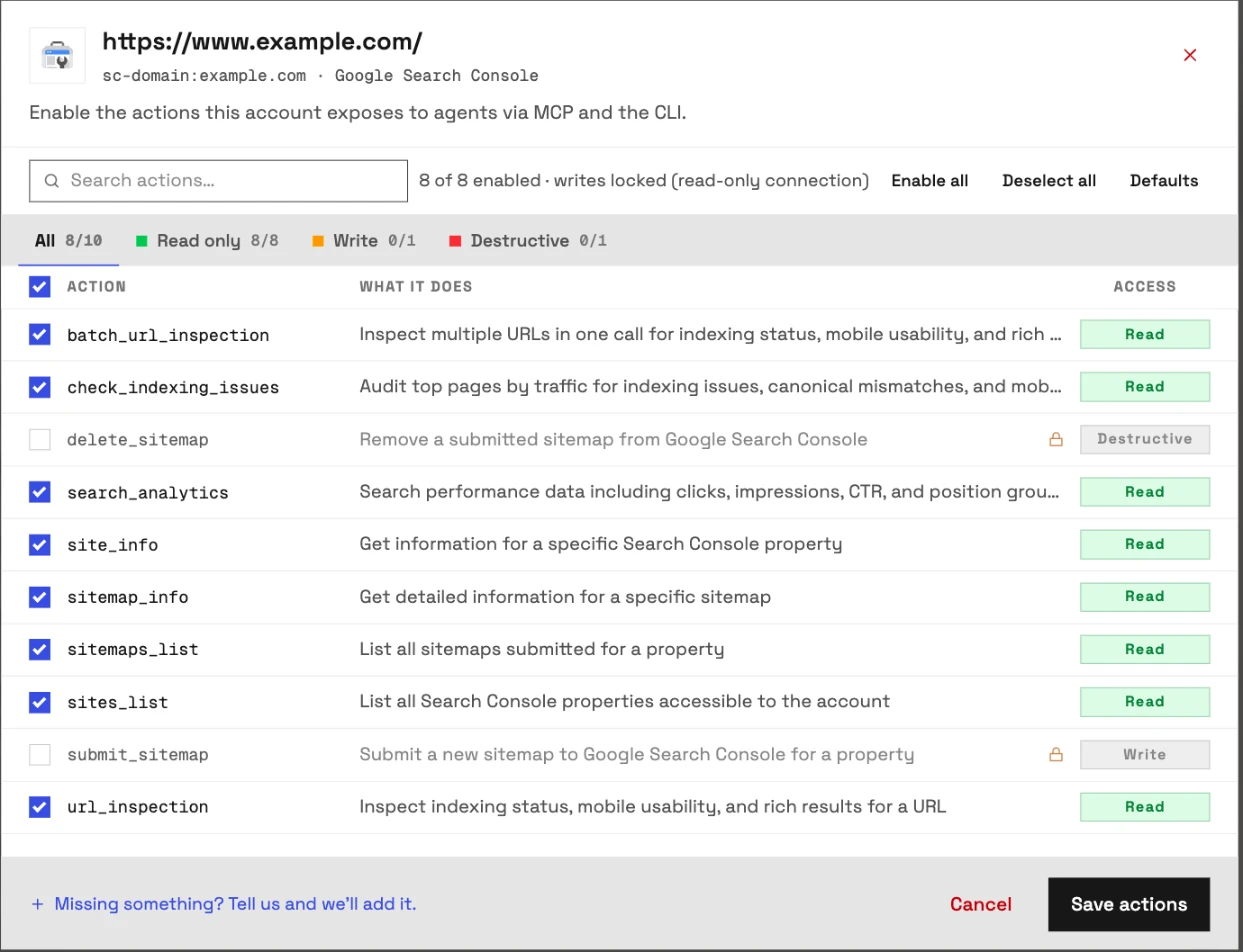
Google Search Console | 10: 8 read, 1 write, 1 destructive | Queries, pages, positions, URL inspection |
Web Crawler | 33, all read | One-URL page checks, robots.txt, sitemap generator |
PageSpeed Insights | 4, all read | Lab metrics and real-user Core Web Vitals |
DataForSEO | 82, all read | SERPs, keywords, backlinks, AI mentions |
Bing Webmaster Tools | 52: 34 read, 18 write | Bing queries, crawl issues, links, URL submission |
Google Analytics 4 | 62: 26 read, 24 write, 12 destructive | Organic sessions and key events |
Watch: SEO reports from Google Search Console in Claude, 1 minute 59 seconds
How to use these SEO prompts for Claude
Each prompt names what to read, the action to call and the output you want. Keep the action name in, because it tells Claude exactly which call to make.
- Fill every bracket with your property, URLs and thresholds.
- Name the period. Search Console keeps about 16 months, so year-over-year checks work.
- Watch the meters. Search Console, Bing and GA4 calls use no monthly allowance. Crawler requests and PageSpeed tests do: 500 and 50 a month on Starter.
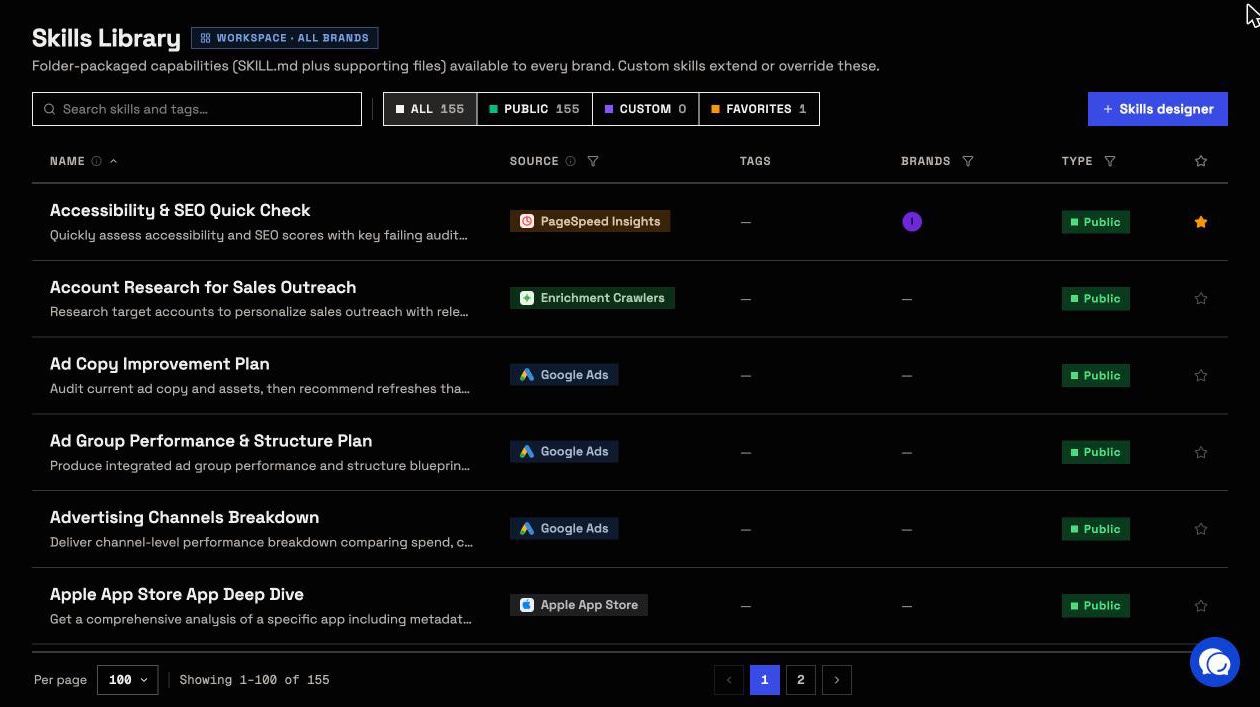
- Save the winners. The free prompt library holds 60 ready-made prompts, such as a Core Web Vitals assessment. The free Claude skills library includes an SEO Audit skill.
Inside InsightfulPipe, the Skills designer saves your team's version of any prompt as a custom skill.
Keyword and query research prompts
Prompts 1 to 7 find the queries you can win next. Most read Search Console with search_analytics, which returns up to 25,000 rows a request, and two add DataForSEO keyword data.
1. Find queries near page one
Calls search_analytics.
Run search_analytics by query and page for [https://example.com/], last 28 days.
List queries at position 8 to 20 with [100]+ impressions and one title fix per page.
2. Fix queries that get no clicks
Calls search_analytics.
Run search_analytics by query and page, last 90 days.
List queries at position 1 to 10 with [500]+ impressions and CTR under [1]%, and draft two titles per page.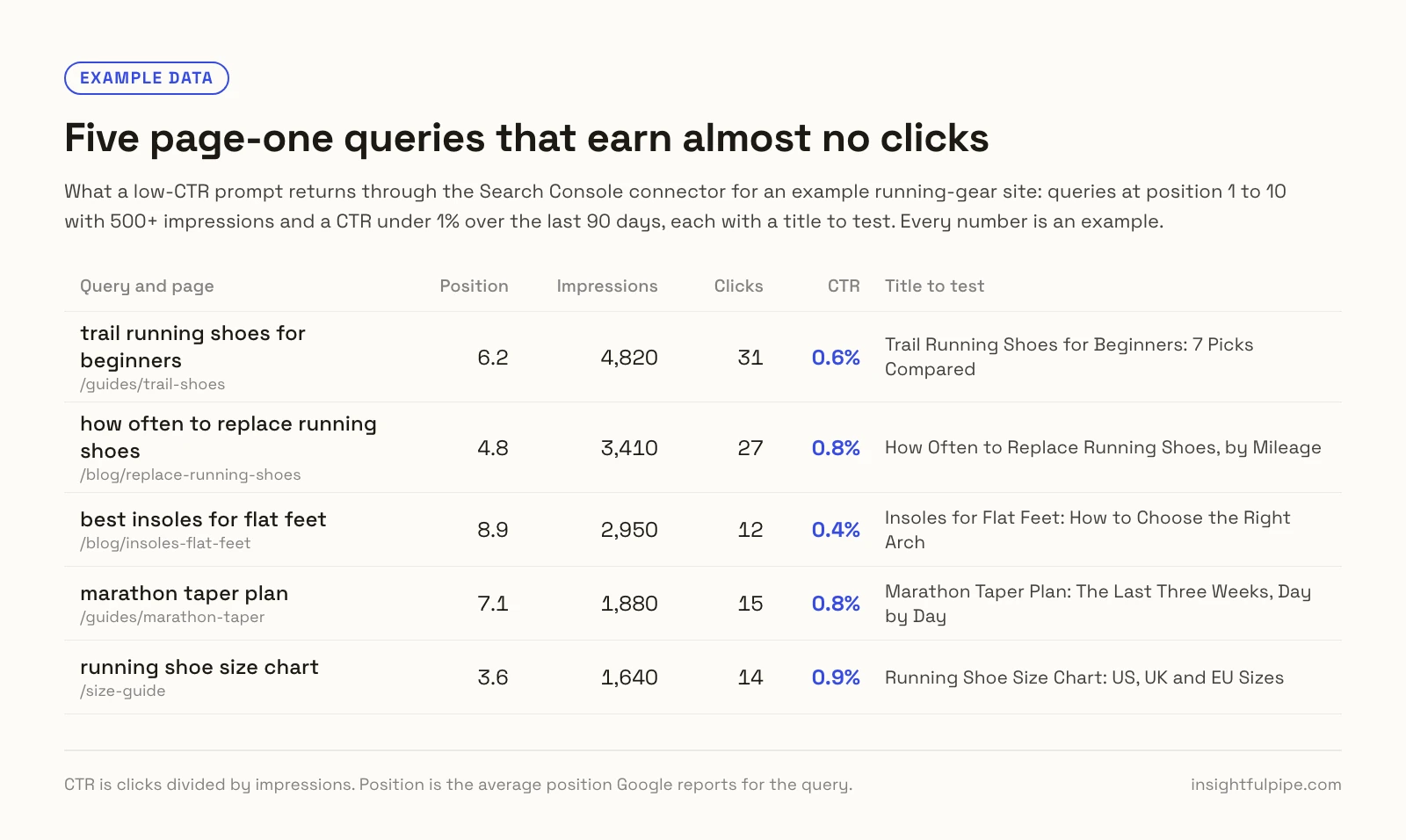
3. List the questions searchers ask
Calls search_analytics with a regex filter.
Run search_analytics by query and page, last 90 days, with includingRegex "^(how|what|why|can|does|is) " on query.
Group the questions by page and flag pages that never answer them.
4. Spot new queries early
Calls search_analytics for two periods.
Compare queries in search_analytics for the last 28 days and the 28 before.
List queries with [20]+ impressions now and none before, by topic.
5. Split brand and non-brand clicks
Calls search_analytics with two filters.
Run search_analytics by date, last 90 days, with excludingRegex "[brand]" on query, then includingRegex.
Chart weekly brand and non-brand clicks.
6. Expand your best queries
Calls search_analytics, labs_keyword_ideas and labs_bulk_keyword_difficulty.
Seed labs_keyword_ideas with my top 10 non-brand queries from search_analytics, [United States], limit 200.
Keep ideas above [100] searches, score them with labs_bulk_keyword_difficulty, and drop ones I rank for.
7. Group keywords by intent
Calls search_analytics and labs_search_intent.
Classify my top 200 non-brand queries from search_analytics with labs_search_intent.
Flag pages whose queries mix intents.
Content decay and refresh prompts
Prompts 8 to 13 catch slipping pages and say what to change, adding the live SERP or GA4 engagement when a new title is not enough.
8. Find pages losing clicks
Calls search_analytics for two periods.
Compare pages in search_analytics for the last 28 days and the 28 before.
List pages down [20]%+ in clicks and say whether position or impressions fell.
9. Diagnose one page by query
Calls search_analytics with a page filter.
Filter search_analytics to page [URL] by query, last 28 days against the 28 before.
Show the queries that lost most clicks, with both positions.
10. Separate decay from seasonality
Calls search_analytics for this year and last.
Compare clicks for my top 20 pages over the last 3 months with the same months last year in search_analytics.
Label each decay, seasonal or growth.
11. Brief a refresh from the SERP
Calls serp_google_organic and onpage_content_parsing.
Run serp_google_organic for "[main query]", [United States], depth 10.
Parse the top 3 and [my URL] with onpage_content_parsing, then list subtopics I miss.
12. Find pages that rank but do not engage
Calls search_analytics and GA4 get_report.
Join search_analytics clicks by page with get_report on GA4 property [ID]: landingPage, sessions, engagementRate, keyEvents, Organic Search only.
List pages with [200]+ clicks and engagement under [40]%.
13. Catch pages competing for one query
Calls search_analytics.
Run search_analytics by query and page, last 90 days, with #fragments stripped.
List queries where two pages each get [20]+ impressions, and pick the owner.
Search Console can count a page's jump links, its URLs with a #fragment, as separate pages, so the fragment step matters.
Technical crawl audit prompts
Prompts 14 to 20 turn Claude into an SEO checker for pages you own. Each crawler check reads one public URL and counts toward your monthly allowance. The crawler does not enforce robots.txt, so point it only at sites you own or may audit.
14. Audit one page in one pass
Calls seo-audit-checker, meta-tags-checker, headings-checker and canonical-checker.
Run seo-audit-checker, meta-tags-checker, headings-checker and canonical-checker on [URL].
Return one table: issue, evidence, fix, effort.
15. Trace redirects and status codes
Calls status-code-checker.
Run status-code-checker on each URL in [list].
Flag redirect chains over one hop, 4xx or 5xx codes and HTTP steps.
16. Compare your canonical with Google's
Calls canonical-checker, indexability-checker and url_inspection.
Run canonical-checker, indexability-checker and url_inspection on [URL].
Compare my canonical with Google's and list any noindex or robots block.
17. Validate structured data
Calls structured-data-checker.
Run structured-data-checker on one URL per template: [home], [category], [product], [article].
List schema types, missing fields and errors.
18. Check what crawlers may fetch
Calls robots-txt-checker, ai-crawler-checker and llms-txt-checker.
Run robots-txt-checker, ai-crawler-checker and llms-txt-checker on [https://example.com].
List blocked bots and paths against this policy: [policy].
19. Check hreflang and language tags
Calls hreflang-checker and language-checker.
Run hreflang-checker and language-checker on [one URL per language].
Flag missing return links, wrong codes and lang values that disagree with hreflang.
20. Check HTTPS and security headers
Calls ssl-certificate-checker and security-headers-checker.
Run ssl-certificate-checker and security-headers-checker on [https://example.com].
Report certificate days left and missing HSTS, CSP or X-Content-Type-Options headers.
Core Web Vitals prompts
Prompts 21 to 26 test speed on the PageSpeed Insights server, which runs Google Lighthouse on InsightfulPipe's service. It needs no Google account or API key, tests any public URL, and counts each test toward your monthly allowance.
21. Check mobile Core Web Vitals
Calls core-web-vitals.
Run core-web-vitals with strategy mobile on [URL].
Rate LCP, CLS, TBT, FCP, Speed Index and TTFB against the "good" thresholds.
22. Read real-user data, INP included
Calls analyze.full.
Run analyze.full on [URL], strategy mobile.
Report Chrome UX Report field data for LCP, INP and CLS, and whether it covers the page or the origin.
INP comes only from real users, so a lab test cannot measure it.
23. Compare mobile and desktop
Calls core-web-vitals twice.
Run core-web-vitals on [URL] with strategy mobile, then desktop, and explain the biggest gap.24. Find what slows the page
Calls resource-optimizations.
Run resource-optimizations on [URL], strategy mobile.
Rank render-blocking files, unused code, caching and image savings, with a fix each.
25. Fix Lighthouse SEO and accessibility fails
Calls accessibility-seo.
Run accessibility-seo on [URL] and list each failing audit with its element and a one-line fix.26. Benchmark speed against the SERP
Calls serp_google_organic and core-web-vitals.
Get the top 3 URLs for "[keyword]" with serp_google_organic.
Run core-web-vitals, strategy mobile, on them and [my URL], ranked by LCP.
Lab scores vary, so rerun close calls.
Indexing and sitemap prompts
Prompts 27 to 31 show how Google sees your pages. The Search Console API has no Page indexing report, so these inspect URLs directly, up to 2,000 a day per property. None of them submits or removes a sitemap.
27. Check whether a page is indexed
Calls url_inspection.
Run url_inspection on [URL] in property [https://example.com/].
Report coverage state, last crawl, and Google's canonical against mine.
28. Audit top pages for indexing
Calls check_indexing_issues.
Run check_indexing_issues with limit [100].
List pages not indexed or with canonical or mobile issues, by impressions.
It inspects pages one at a time, so a run of 100 takes a while.
29. Check up to 50 URLs at once
Calls batch_url_inspection.
Run batch_url_inspection on [up to 50 URLs].
Group them by coverage state, flagging crawled or discovered but not indexed.
30. Read your sitemap health
Calls sitemaps_list and sitemap_info.
Run sitemaps_list and sitemap_info for [https://example.com/].
Report last download, errors, warnings and submitted URLs; ignore the indexed count.
Google's API marks that count as deprecated, and it can read 0 however many URLs the sitemap submits. Check indexing with prompt 29 instead.
31. Find pages Google never shows
Calls sitemap-generator, search_analytics and batch_url_inspection.
Compare URLs from sitemap-generator on [https://example.com] with 90 days of search_analytics pages.
Run batch_url_inspection on up to 50 with no impressions.
Internal link prompts
Prompts 32 to 35 put internal links where they help rankings, pairing the crawler's link checks with Search Console impressions.
32. Map the links on one page
Calls internal-linking-checker and link-extractor.
Run internal-linking-checker and link-extractor on [URL].
Count internal and external links, list where they point and flag broken ones.
33. Find link sources for a page
Calls search_analytics.
Take the top 10 queries for [target URL] from search_analytics.
Suggest 5 of my pages ranking for them as link sources, with anchors.
34. Find broken links
Calls link-analysis-checker and status-code-checker.
Run link-analysis-checker on [5 key URLs], confirm flagged links with status-code-checker, and list each fix.35. Link new posts from ranking pages
Calls search_analytics and link-extractor.
Find my 10 pages with most clicks on "[topic]" queries in search_analytics.
Run link-extractor on each and list those not linking to [new post URL].
SERP and competitor prompts with DataForSEO
Prompts 36 to 42 read the market through DataForSEO, whose 82 actions all read. DataForSEO bills each request to your own account. The DataForSEO SERP analysis guide covers setup in depth.
36. Read a live Google SERP
Calls serp_google_organic.
Run serp_google_organic for "[keyword]", location_name [City,Region,Country], device mobile, depth 10.
List the top 10, SERP features, and where [example.com] sits.
37. Find who competes for your keywords
Calls labs_serp_competitors.
Run labs_serp_competitors on my top 20 non-brand queries, [United States].
Rank domains by how many they rank for.
38. Find a rival's keywords you lack
Calls labs_domain_intersection.
Run labs_domain_intersection with target1 [competitor.com], target2 [example.com], intersections false.
Keep keywords where they rank top 10 with [100]+ searches, by topic.
39. List your organic competitors
Calls labs_competitors_domain.
Run labs_competitors_domain for [example.com], [United States].
List the top 10 by shared keywords, with estimated traffic.
40. Find sites linking to rivals, not you
Calls backlinks_domain_intersection and backlinks_referring_domains.
Run backlinks_domain_intersection for [competitor1.com] and [competitor2.com].
Drop domains in backlinks_referring_domains for [example.com]; rank the rest by domain rank.
DataForSEO may ask you to activate its Backlinks API first.
41. Track how a SERP changed
Calls labs_historical_serp.
Run labs_historical_serp for "[keyword]", [United States], from [YYYY-MM-DD] to today.
Say who entered, who left, and where [example.com] moved.
42. See where AI answers mention you
Calls ai_opt_llm_mentions_search and GA4 get_report.
Run ai_opt_llm_mentions_search with target [{"domain": "example.com"}], platform chat_gpt, and list the questions.
Then count GA4 sessions from get_report where sessionSource contains "chatgpt" or "claude".
Bing Webmaster Tools prompts
Prompts 43 to 46 cover Bing, which Search Console cannot see. The Bing Webmaster Tools MCP server has 52 actions, 34 read and 18 write, and connects as Read-only or Read & write. Only prompt 46 changes anything.
Watch: Connect Bing Webmaster Tools to Claude and run an SEO audit, 2 minutes 42 seconds
43. Compare Bing and Google queries
Calls get_query_stats and search_analytics.
Run get_query_stats for [https://example.com/] and search_analytics by query for the same weeks.
List queries with Bing clicks but no Google clicks, and the reverse.
44. Check Bing crawl health
Calls get_crawl_issues and get_crawl_stats.
Run get_crawl_issues and get_crawl_stats for [https://example.com/].
Group issues by type with URL counts, worst first.
45. Check inbound links in Bing
Calls get_link_counts and get_url_links.
Run get_link_counts for [https://example.com/], then get_url_links for my 3 most-linked pages.46. Submit updated pages to Bing
Calls get_url_submission_quota, then submit_url_batch, a write.
Check get_url_submission_quota for [https://example.com/], then prepare submit_url_batch for [updated URLs].
Show me the list and wait for my yes before you submit.
submit_url_batch runs only on a Read & write Bing connection where an admin has it switched on. Expect Claude to ask before it sends anything.
SEO reporting prompts
Prompts 47 to 50 turn the reads above into reports you can send, with Search Console, GA4, PageSpeed and SERP data in one answer.
47. Write the weekly SEO summary
Calls search_analytics and check_indexing_issues.
Compare the last 7 days with the 7 before in search_analytics, with data_state all.
Add check_indexing_issues on the top 20 pages and write a 10-line summary.
48. Build a monthly client report
Calls search_analytics, get_report and core-web-vitals.
For [client site], compare last month with the month before and last year in search_analytics.
Add GA4 organic sessions and key events from get_report, and mobile core-web-vitals for 3 top pages.
49. Split clicks by device, country and feature
Calls search_analytics.
Run search_analytics by device, then country, then searchAppearance for the last 90 days.
Flag segments whose CTR or position trails the site average.
50. Audit one URL across every server
Calls search_analytics, url_inspection, seo-audit-checker, core-web-vitals and serp_google_organic.
Audit [URL] for "[main query]" with search_analytics, url_inspection, seo-audit-checker, core-web-vitals and serp_google_organic.
Rank the fixes by likely impact.
Connect the SEO servers to Claude
Connecting takes an InsightfulPipe workspace and one server URL, with no Google Cloud project, Google API key or install. Search Console and Bing use a sign-in, DataForSEO your API login, and the crawler and PageSpeed need no account.
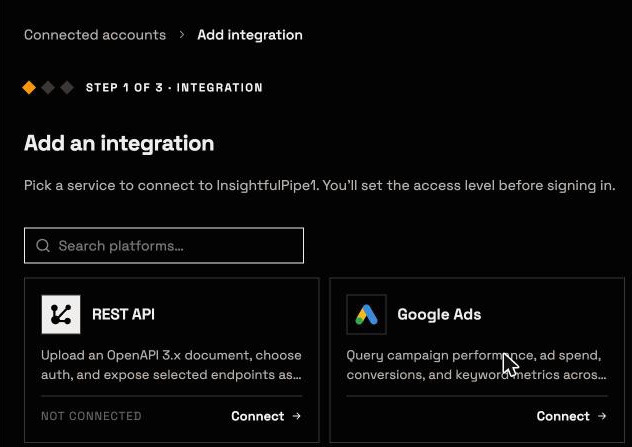
- In InsightfulPipe, open Connected accounts and click Connect account.
- Choose Google Search Console and sign in with Google. It asks only for read-only Search Console access.
- Connect Bing Webmaster Tools as Read-only, or Read & write for prompt 46.
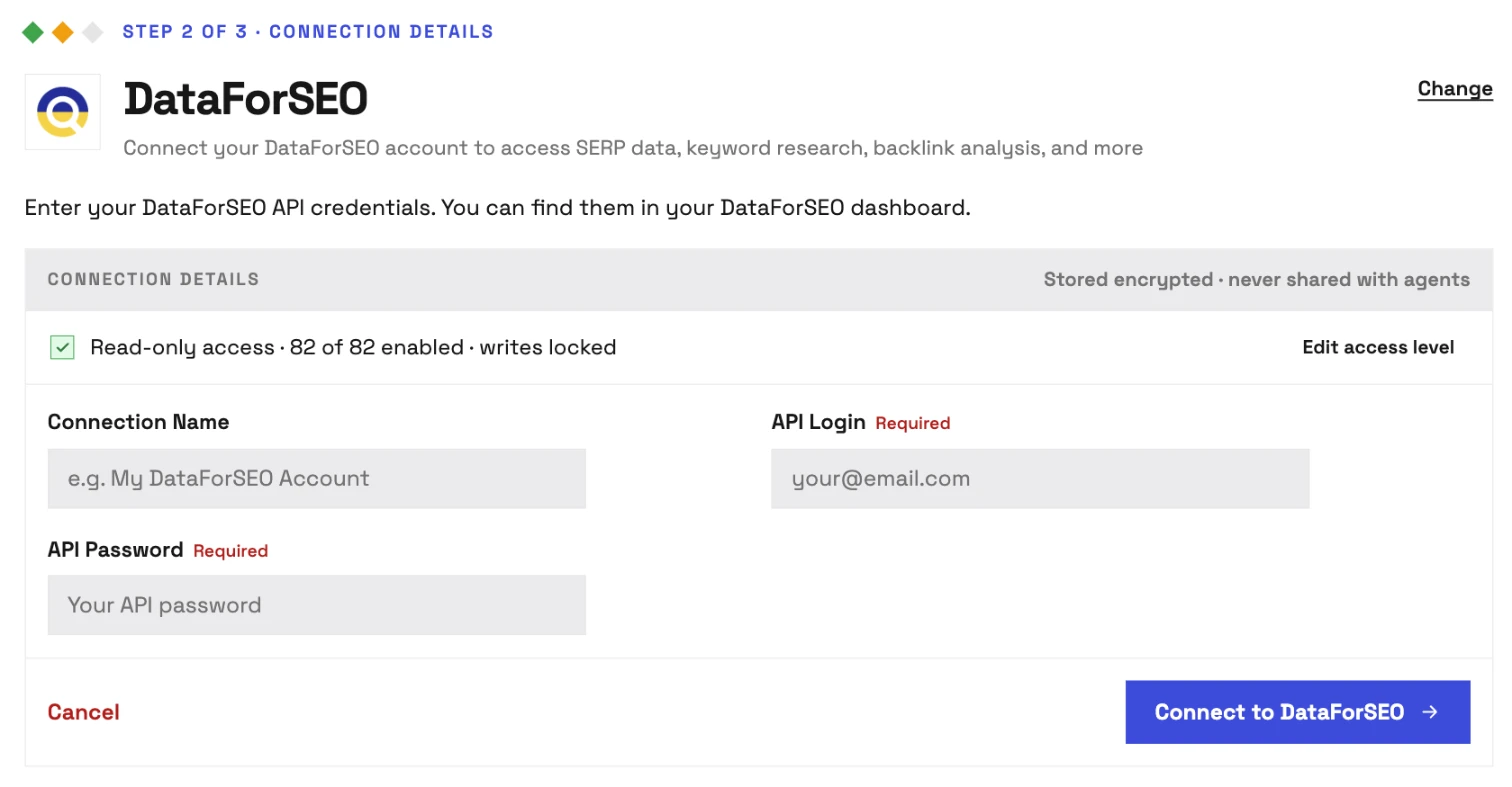
- For DataForSEO, enter your API Login and API Password, then click Connect to DataForSEO.
- In Claude, open Customize > Connectors, click +, then Add custom connector, paste a URL below and click Add.
- Click Connect, sign in to InsightfulPipe if asked, and turn the connector on in a new chat.
https://main.insightfulmcp.com/
https://google-search-console.insightfulmcp.com/
https://crawler.insightfulmcp.com/
https://pagespeed-insights.insightfulmcp.com/
https://dataforseo.insightfulmcp.com/
https://bing-webmaster.insightfulmcp.com/
https://google-analytics.insightfulmcp.com/
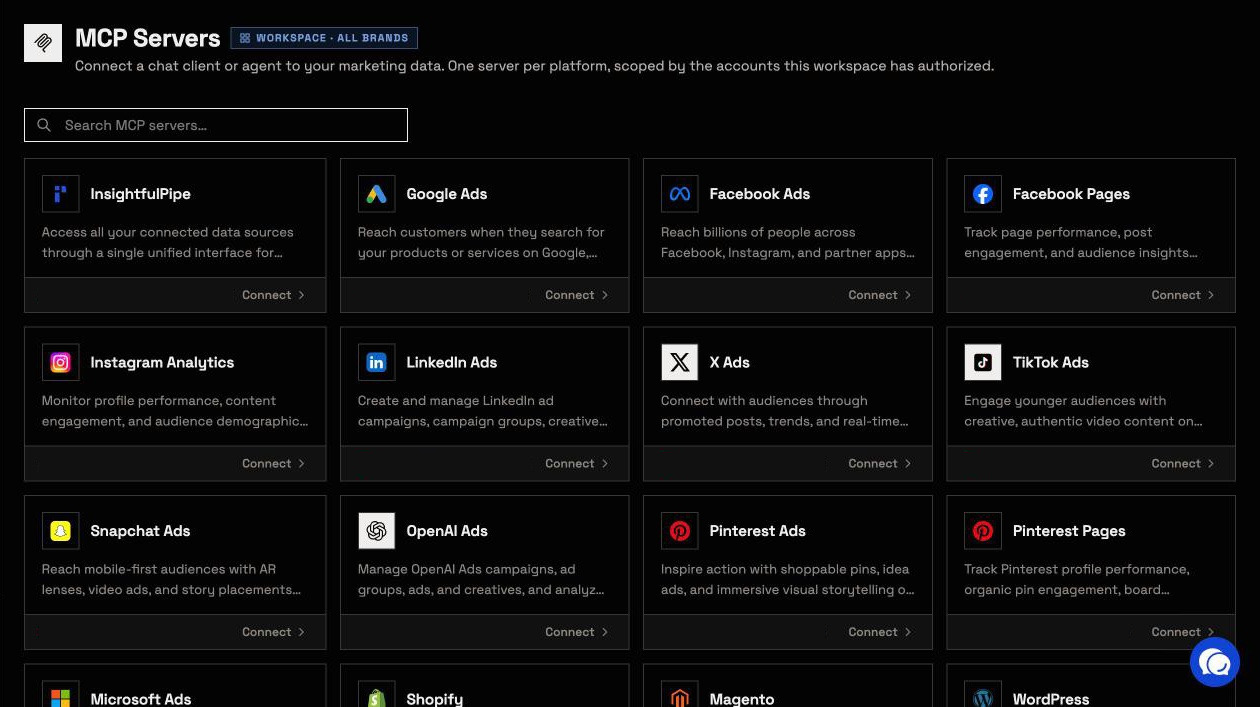
The first URL reaches every account you connect, and the Claude Directory listing adds it in one click. Test it with a prompt that changes nothing: "List the Search Console properties you can reach."
InsightfulPipe checks your DataForSEO API login and password with DataForSEO before saving them, stores them encrypted and sends them with every call, so DataForSEO bills your own account. Claude never sees the password.
Claude Code: connect PageSpeed Insights
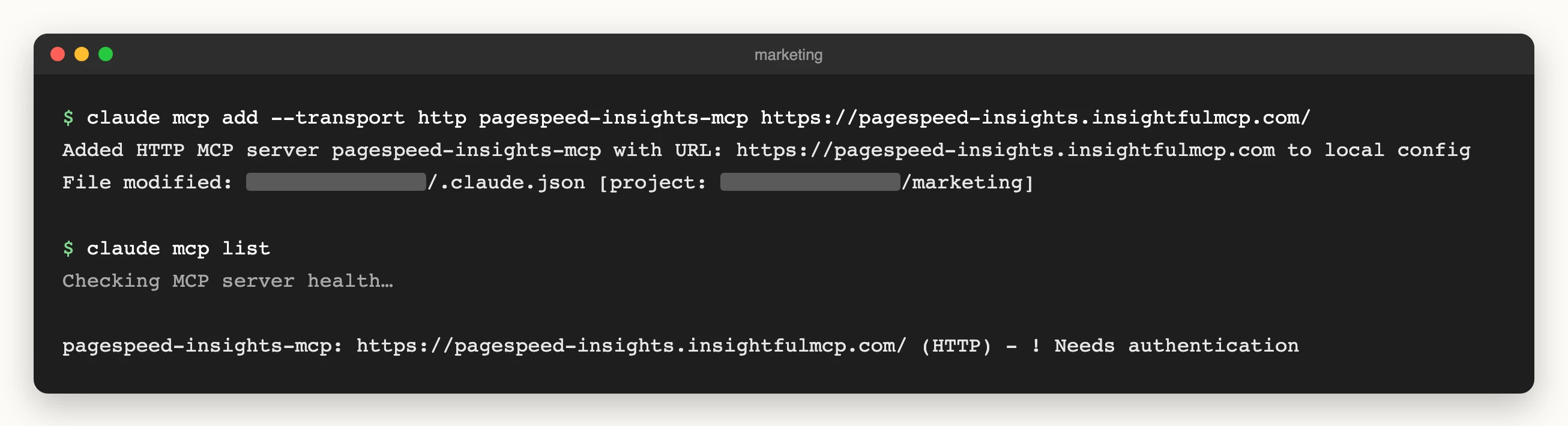
To connect Google PageSpeed Insights to Claude Code, run the command below, type /mcp, select pagespeed-insights-mcp, choose Authenticate and sign in to InsightfulPipe. No Google API key is needed.
claude mcp add --transport http pagespeed-insights-mcp https://pagespeed-insights.insightfulmcp.com/Other servers and AI clients follow the same pattern. The PageSpeed MCP server guide covers what the server measures.
Start a trial to run the 50 prompts on your own site. Plans start from $29.99 a month, with every MCP server and the CLI on every plan.
What these prompts can change
Only prompt 46 changes anything, by submitting URLs to Bing. Every other prompt reads, and InsightfulPipe's server enforces these limits in every AI client.
- Search Console stays read-only. It connects with Google's read-only permission, and InsightfulPipe keeps sitemap submission and removal switched off for every account.
- Every action is a switch. An owner, admin or operator turns each action on or off per account, across read, write and destructive. A switched-off action returns "This action is disabled for this connected account. An owner or admin must enable it for the account."
- Bing writes need Read & write. A read-only connection locks every write until an admin reconnects it with read and write, and Bing's six removal actions stay off until an admin switches them on.
- DataForSEO spends money. Each call costs DataForSEO credit, so leave on only what each account needs.
- Members get reads only. A member with the User role runs reads on the accounts an owner or admin grants.
- Claude can ask first. Set the connector's
execute_actiontool to Needs approval under Customize > Connectors.
Claude AI for SEO: prompts, suites or live data
Claude AI for SEO comes three ways: prompts you paste with exports, SEO suites with their own index, and connectors that read your accounts. InsightfulPipe is the connector, with Search Console, Bing, a crawler, PageSpeed and DataForSEO on one connection.
Option | What Claude works from | Runs | Cost to start |
|---|---|---|---|
InsightfulPipe | Your Search Console, Bing and GA4, plus crawler, PageSpeed and DataForSEO | Hosted, any MCP client | From $29.99 a month; DataForSEO bills its data |
Semrush MCP | Semrush SEO and Trends data; projects read-only | Hosted | Plans with 50,000 API units, such as Semrush One Starter |
Ahrefs MCP | Ahrefs data on monthly API units | Hosted | Lite and up; Lite is $129 a month |
SE Ranking MCP | 180+ SEO and GEO tools on plan credits | Hosted | Any subscription, or $50 for 250K API credits |
Claude SEO | 26 sub-skills in Claude Code; Search Console via your own Google credentials | Your machine | MIT licence |
Pasted prompts | Exports and URLs you paste | Any chat | None |
ClickRank's guide names the gap: "Claude cannot pull live search volumes or current SERP data." With InsightfulPipe connected, prompts 6 and 36 pull both.
Frequently asked questions
Sources (checked 2026-10-02)
We read every capability, default and price from each vendor's own documentation, pricing page or public repository, and ran InsightfulPipe on live accounts. Every page below was opened on 2026-10-02.
- InsightfulPipe: Search Console, Web Crawler, PageSpeed Insights, DataForSEO, Bing Webmaster Tools, GA4, pricing
- Google: Search Analytics query, Sitemaps resource
- Anthropic: custom connectors, Claude Code MCP
- DataForSEO: pricing, Labs domain intersection
- Semrush: MCP documentation
- Ahrefs: MCP documentation, pricing
- SE Ranking: SEO MCP
- Claude SEO: repository
- ClickRank: SEO prompts for Claude