InsightfulPipe publishes this guide, and its steps use InsightfulPipe's hosted DataForSEO MCP server. DataForSEO's own open-source server, the other way to connect, is covered near the end.
Last updated: 2026-10-02
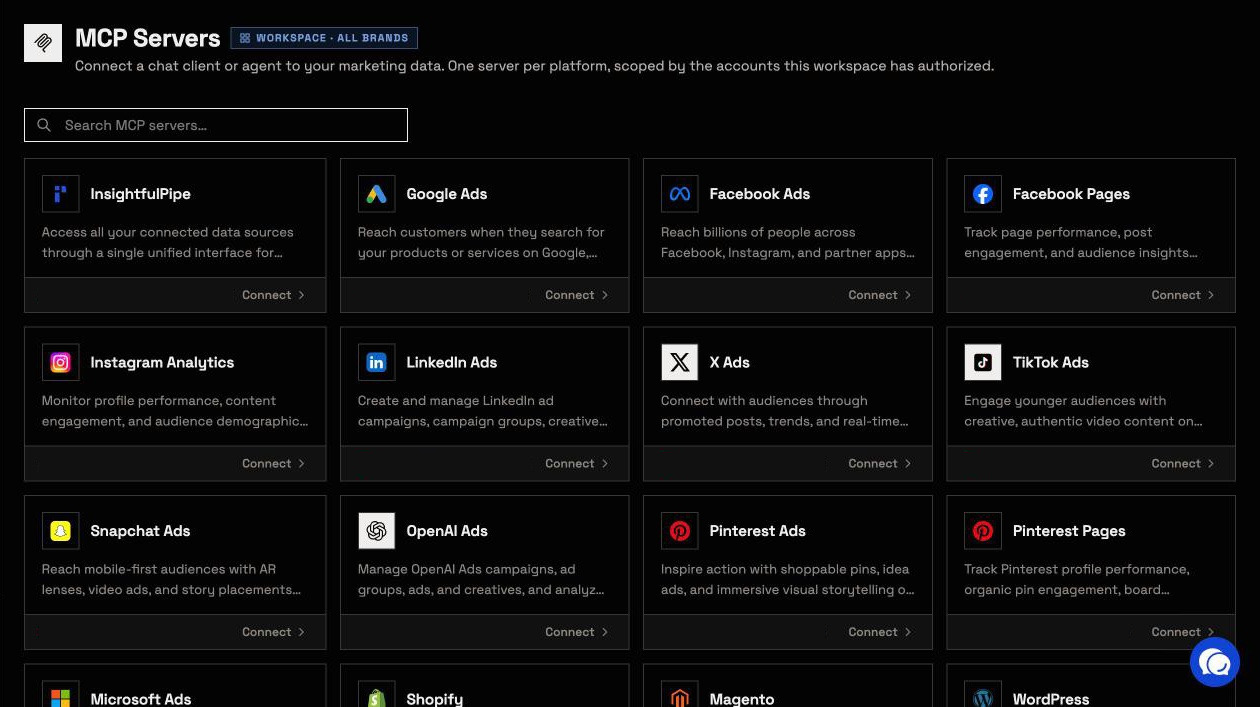
To run SERP analysis in Claude, save your DataForSEO API login once in InsightfulPipe, then add https://dataforseo.insightfulmcp.com/ to Claude as a custom connector. Claude can then call 82 DataForSEO actions, from live Google results to Labs, Backlinks and AI Optimization data. You need no Node.js, npx or config file. Plans start from $29.99 a month, and DataForSEO bills its API usage to your own account.
The quick version
Six steps connect the DataForSEO MCP server to Claude and run your first Google SERP check.
- In InsightfulPipe, open Connected accounts and click Connect account.
- Search for DataForSEO, click Connect, keep Read-only and click Continue.
- Paste your API Login and API Password, then click Connect to DataForSEO.
- In Claude, open Customize > Connectors, click + and choose Add custom connector.
- Paste
https://dataforseo.insightfulmcp.com/, click Add, then Connect, and sign in to InsightfulPipe if asked. - In a new chat, turn the connector on and run the SERP prompt below.
DataForSEO MCP server routes at a glance
InsightfulPipe gives Claude 82 named DataForSEO actions behind one hosted URL, and your admin switches each one on or off per account. DataForSEO's own server gives the model four tools and reaches every endpoint through one of them, api_request.
InsightfulPipe | DataForSEO's server, remote | DataForSEO's server, self-hosted | |
|---|---|---|---|
Server |
|
| npx or Docker on your machine |
Sign-in | API login saved once in InsightfulPipe; each AI client signs in to InsightfulPipe | OAuth with your DataForSEO account, or a Base64 header in some clients | API login and password in environment variables or a config file |
What the model gets | 82 named actions with their request fields | 4 tools in v3: three docs tools and | The same 4 tools |
What Claude can call | The actions your admin leaves on for that account | Any available DataForSEO endpoint | Any available DataForSEO endpoint |
Per-account switches | Yes, for each of the 82 actions | Not published | Not published |
Other platforms | 49 more, including Search Console and GA4 | DataForSEO only | DataForSEO only |
Cost | From $29.99 a month; DataForSEO bills usage | DataForSEO bills usage | Apache-2.0 software; DataForSEO bills usage |
What you are connecting
You connect Claude to InsightfulPipe's hosted server, and InsightfulPipe calls the DataForSEO API with the login you saved.
Claude → InsightfulPipe DataForSEO server → DataForSEO API, billed to your DataForSEO account
Claude never receives your DataForSEO API password. It sends a structured request over MCP, and InsightfulPipe runs the matching DataForSEO call with the login it stores encrypted. InsightfulPipe checks that login with DataForSEO before it saves it.
Four things bound what Claude can do: your workspace and brand, the actions an admin left on, your own role, and your DataForSEO balance. You need no Node.js, npx, Docker, Base64 header or server to host.
Before you start
You need a DataForSEO account with API access, an InsightfulPipe workspace, a role that can connect accounts, and an AI client that supports remote MCP servers.
- A DataForSEO account with a balance. DataForSEO is pay as you go, and its pricing page sets a $50 minimum payment.
- Your API login and API password. Both sit on the API Access page of the DataForSEO dashboard. DataForSEO generates the API password, and it differs from your account password.
- An InsightfulPipe workspace, from $29.99 a month. Start a trial if you do not have one yet.
- A role that can connect. Owners, Administrators and Operators can connect accounts and choose their actions. Members with the User role cannot.
- An MCP client, such as Claude, ChatGPT, Claude Code, Cursor, Gemini CLI or Codex.
Each brand holds one DataForSEO connection. An admin chooses which of its actions Claude may run, and a member with the User role runs them only on accounts an owner or admin grants.
Step 1: Connect DataForSEO in InsightfulPipe
Step 1 saves your DataForSEO API login in InsightfulPipe. InsightfulPipe checks the login with DataForSEO first, and saves nothing until DataForSEO accepts it.
- Open Connected accounts and click Connect account.
- On Add an integration, type DataForSEO into Search platforms… and click Connect on its card.
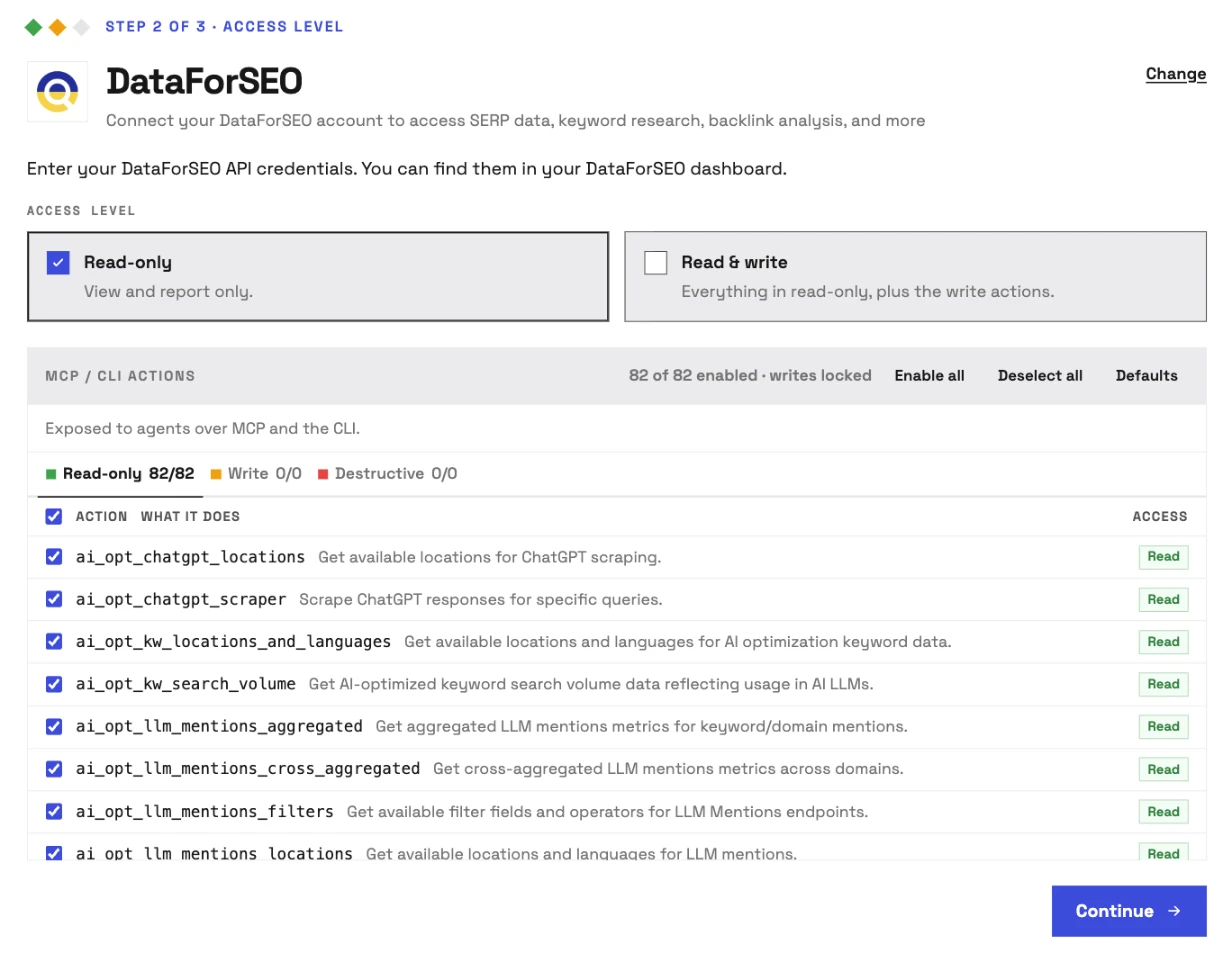
- At Step 2 of 3 · Access level, keep Read-only. All 82 DataForSEO actions are reads, so Read & write adds nothing.
- Under MCP / CLI actions, untick anything Claude should not spend credit on, or keep all 82.
- Click Continue.
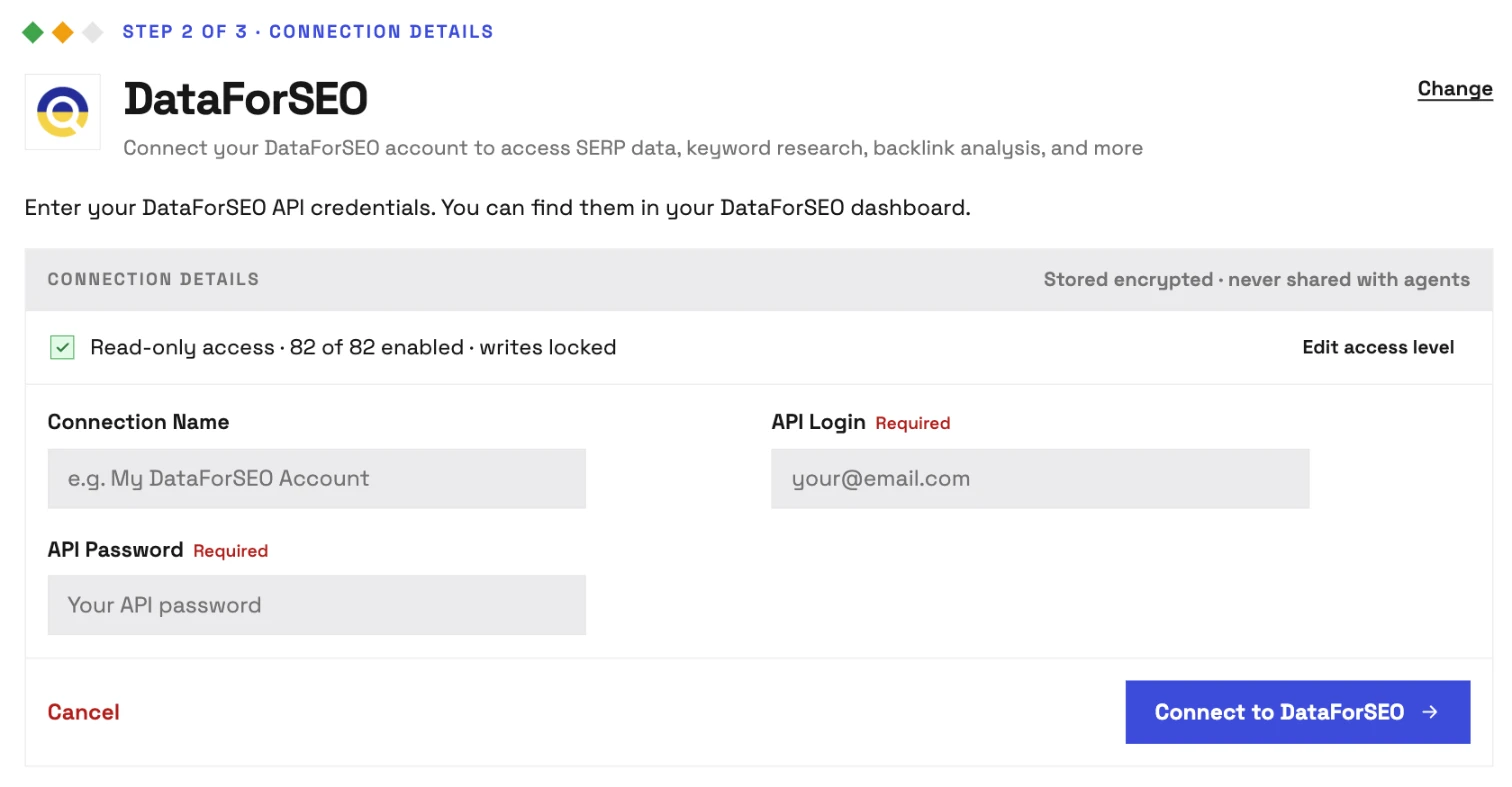
- At Step 2 of 3 · Connection details, paste your API Login and API Password. Connection Name is optional.
- Click Connect to DataForSEO.
Step 2: Add the server in Claude and turn it on
Step 2 adds InsightfulPipe's DataForSEO server to Claude as a custom connector. The steps match in claude.ai and Claude Desktop.
- Copy the server URL:
https://dataforseo.insightfulmcp.com/ - In Claude, open Customize > Connectors.
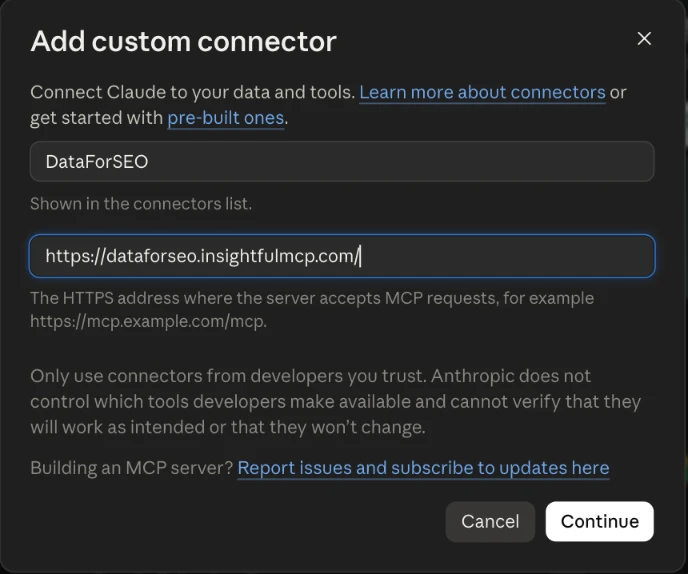
- Click +, then Add custom connector.
- Name it DataForSEO, paste the URL and click Add.
- Click Connect, and sign in to InsightfulPipe if asked.
- Start a new chat, click +, open Connectors and turn DataForSEO on.
On Team and Enterprise plans, an Owner first adds the connector under Organization settings > Connectors, and each member then clicks Connect.
Step 3 (optional): Claude Code, ChatGPT, Cursor, Gemini CLI and Codex
Every other client uses the same URL and finishes with the same InsightfulPipe sign-in. The terminal clients take one command each:
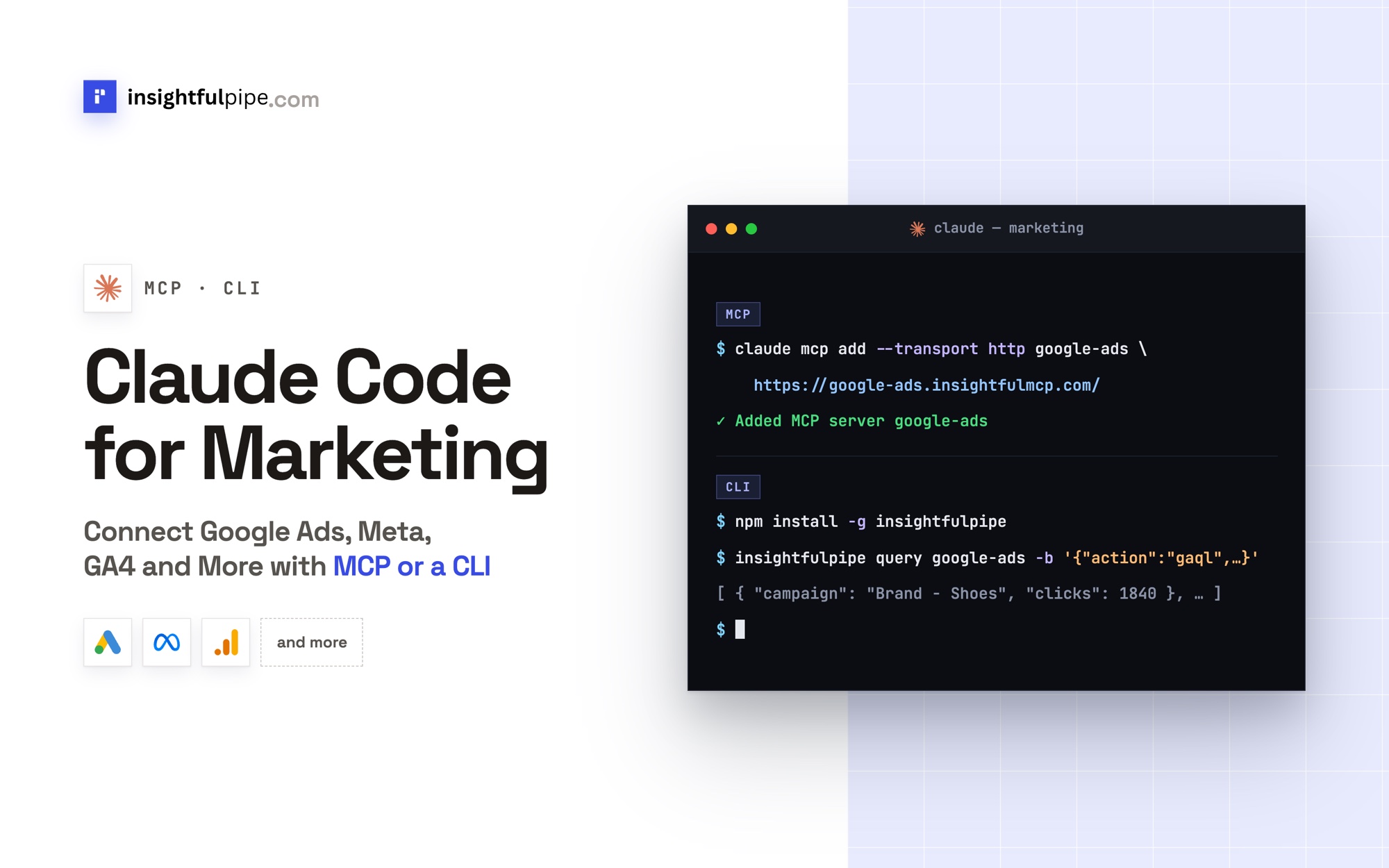
claude mcp add --transport http dataforseo-mcp https://dataforseo.insightfulmcp.com/
gemini mcp add --transport http dataforseo-mcp https://dataforseo.insightfulmcp.com/
codex mcp add dataforseo-mcp --url https://dataforseo.insightfulmcp.com/- Claude Code: run
/mcp, select dataforseo-mcp and choose Authenticate. - Gemini CLI: run
/mcp auth dataforseo-mcp. - Codex CLI: sign-in starts on its own. If no browser opens, run
codex mcp login dataforseo-mcp. - Cursor: add the URL as
dataforseo-mcpin~/.cursor/mcp.json. When it shows Needs authentication, click Connect, then Open. - ChatGPT: turn on Developer mode under Settings > Security and login, add the URL under ChatGPT Plugins, and pick the app from + in each chat.
The InsightfulPipe CLI runs the same 82 actions from a terminal, under the same switches.
Step 4: Choose which DataForSEO actions Claude may run
Step 4 decides what Claude may spend DataForSEO credit on. An owner, admin or operator sets it per connection, at any time, and InsightfulPipe's server enforces it in every client.
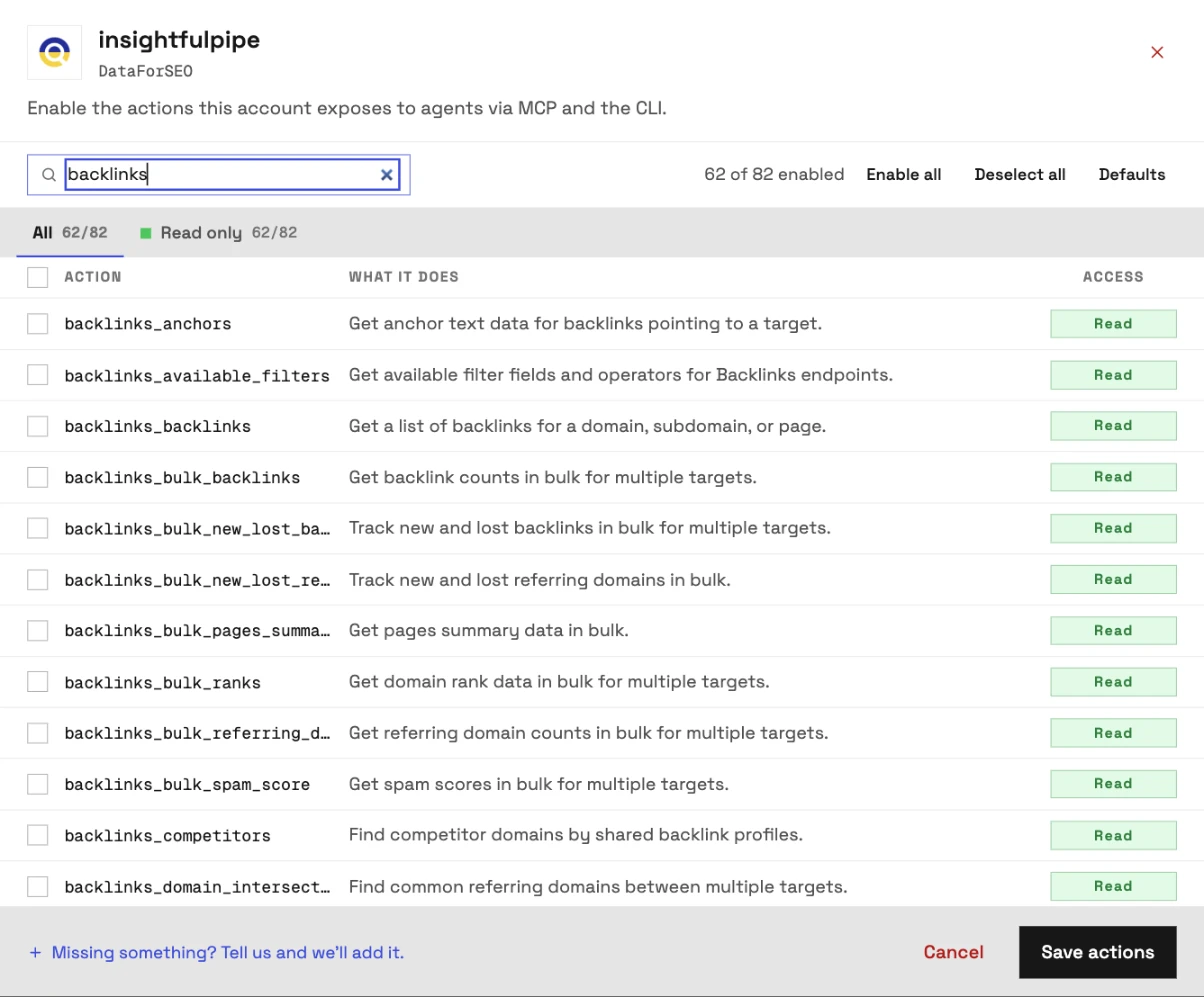
- On Connected accounts, find the DataForSEO row and click its actions button. It reads 82/82 actions on a new connection, and its tooltip says Configure actions for this account.
- Use the All and Read only tabs, or type into Search actions…. Every DataForSEO action is a read, so those are the only two tabs.
- Untick what Claude should not run. If your DataForSEO plan has no Backlinks access, search "backlinks" and untick all 20.
- Click Save actions. The button then reads 62/82 MCP/CLI actions.
Claude gets exactly the set you saved. If it reaches for anything else, the server refuses with "This action is disabled for this connected account. An owner or admin must enable it for the account."
Verify it worked
Three checks confirm the connection, starting with one that costs nothing and ending with a real SERP.
- The connection is live. The DataForSEO row on Connected accounts shows Connected, and DataForSEO appears under + > Connectors in Claude. In Claude Code,
/mcplists dataforseo-mcp. - A check that costs nothing. Paste the prompt below into a new chat.
- A real read. Run the SERP prompt in the next section, then compare it with a private-window Google search from the same country.
Using the DataForSEO connector, list the actions available on this connection, grouped by module.
Then run serp_locations with country_iso_code US and location_name Chicago.
Return the location names and codes. Do not run any other action.
Listing actions never calls DataForSEO, and DataForSEO reported a cost of 0 for our serp_locations call. If a check fails, see Troubleshooting.
Run a Google SERP check in Claude
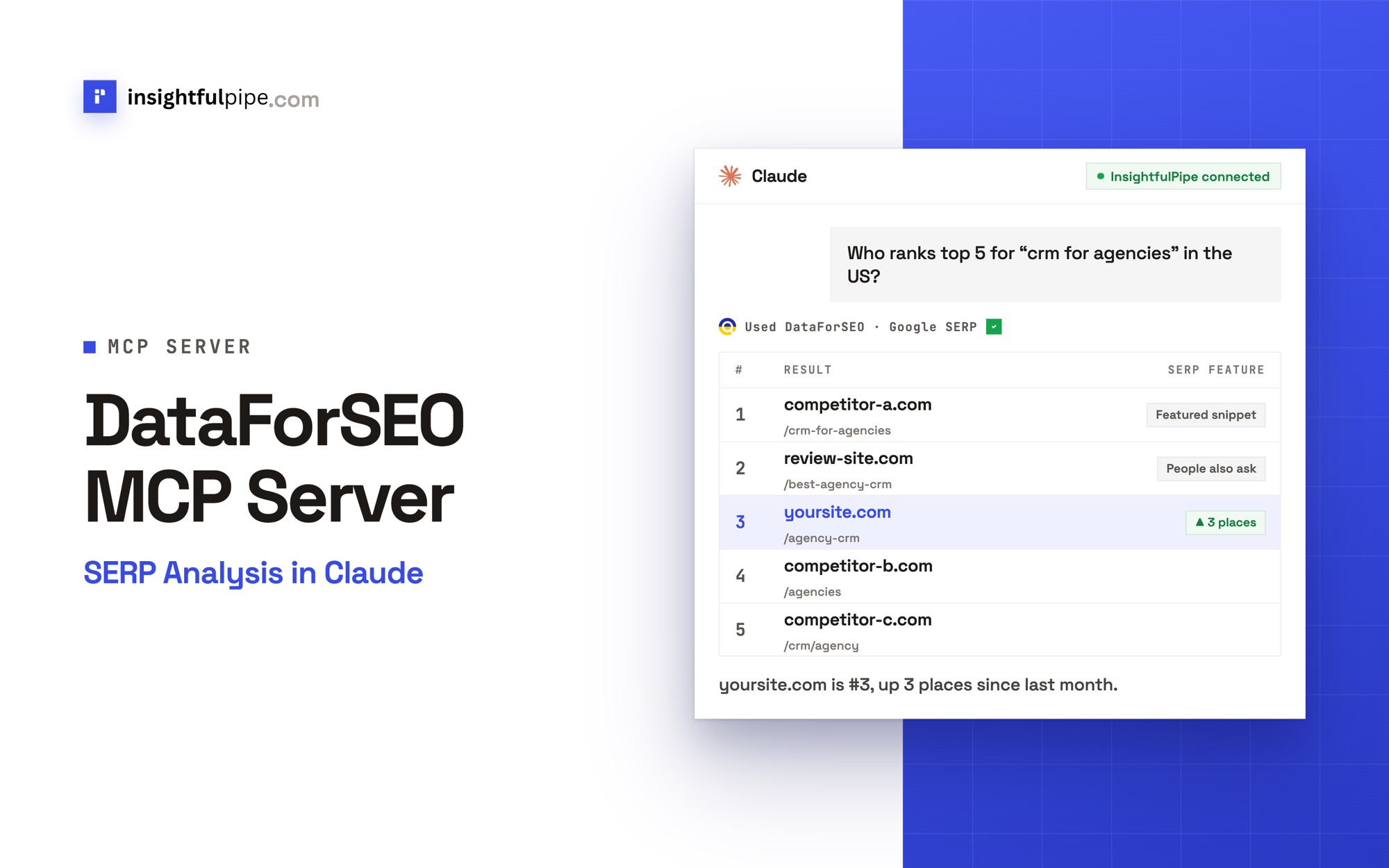
One serp_google_organic call returns the live Google page for a keyword, location, language and device. Name the action in your prompt, and Claude sends that exact request:
Use the DataForSEO action serp_google_organic with:
keyword: crm for agencies
location_name: United States
language_code: en
device: desktop
depth: 10

Show the top 5 organic results as a table: position, domain and URL path.
Then list every SERP feature on the page, such as an AI Overview or People Also Ask, and where it sits.
End with the cost DataForSEO reported for the call.
Only keyword is required. location_name defaults to United States and takes "City,Region,Country" for local results. device is desktop or mobile, and depth runs from 10 to 700 results, with 10 as the default.
We ran this exact request on 2026-10-01. Google showed an AI Overview citing seven pages above a Reddit thread at organic position 1, and a People Also Ask block after the fourth result. DataForSEO reported $0.002 for the call, and $0.004 for each 20-result check we ran.
For movement over time, follow up with labs_historical_serp, which returns the Google SERPs DataForSEO Labs stored between two dates:
Now use labs_historical_serp for "crm for agencies" with location_name United States and language_code en, from [YYYY-MM-DD] to [YYYY-MM-DD].
Compare the earliest snapshot with today's result for [yoursite.com].
Say how many places it moved, and which domains entered or left the top 10.
More SERP analysis prompts
Each job below maps to one or two named actions, so Claude runs a short, predictable set of calls.
Job | Ask Claude | Actions |
|---|---|---|
Match the format that ranks | "Is the top 10 for 'best crm for small business' mostly lists, product pages or reviews?" |
|
Read intent before you write | "Classify the search intent of these 50 keywords." |
|
Compare two cities | "Compare mobile results for 'plumber near me' in Chicago and Dallas." |
|
See who owns a keyword set | "Which domains appear most across these 30 keywords?" |
|
Track a SERP over time | "How has the top 10 for 'crm for agencies' changed since [date]?" |
|
Check AI answers | "How often do LLM answers mention example.com against competitor.com?" |
|
Set SERPs beside your clicks | "Which Search Console queries where I rank 4 to 10 show an AI Overview?" | Search Console |
One job repays a full prompt: an audit of a keyword list for snippets and questions.
For each keyword below, run serp_google_organic with location_name United States, language_code en and depth 10:
[keyword 1]
[keyword 2]
[keyword 3]
Report which pages show People Also Ask, an AI Overview or a featured snippet, and which domain holds each snippet.
Add up the cost DataForSEO reported across the calls.
At $0.002 per depth-10 call, ten keywords cost about $0.02. More prompts sit in the free prompt library, and the free Claude skills library includes a Programmatic SEO skill. For Search Console, crawler and PageSpeed prompts, see 50 SEO prompts for Claude.
What Claude can reach through the DataForSEO MCP server
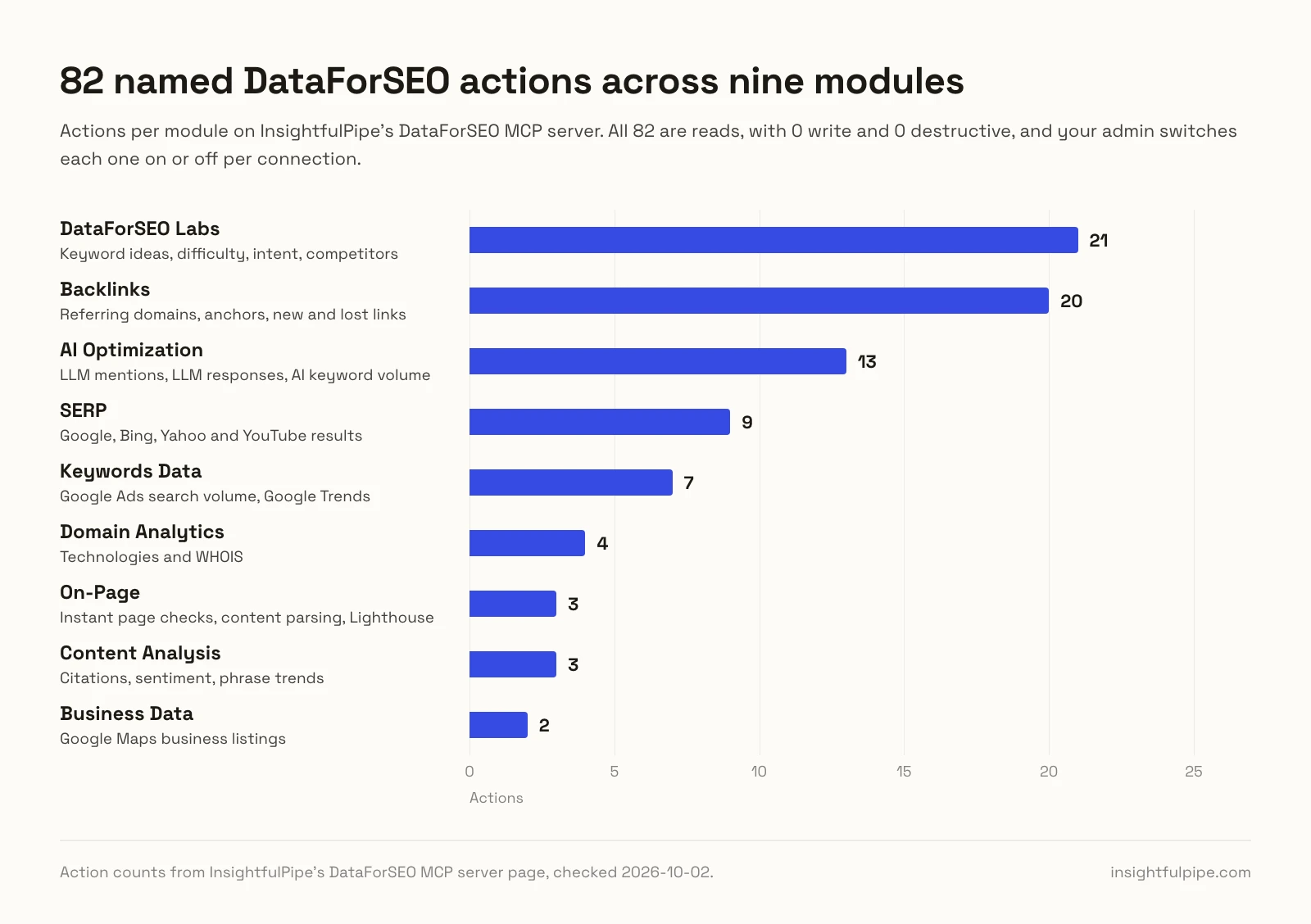
Claude can reach 82 DataForSEO actions, and every one is a read: 0 write and 0 destructive. They cover nine modules:
- DataForSEO Labs, 21: keyword ideas, difficulty, intent, ranked keywords, competitors and historical SERPs
- Backlinks, 20: summaries, referring domains, anchors, new and lost links, spam scores
- AI Optimization, 13: LLM mentions, LLM responses, ChatGPT scraping, AI keyword volume
- SERP, 9: Google, Bing, Yahoo and YouTube results, plus location lookups
- Keywords Data, 7: Google Ads search volume, Google Trends, DataForSEO Trends
- Domain Analytics, 4: technologies and WHOIS
- On-Page, 3: instant page checks, content parsing, Lighthouse
- Content Analysis, 3: citations, sentiment, phrase trends
- Business Data, 2: Google Maps business listings
Reads still spend money, so InsightfulPipe's controls work as cost controls:
- Every action is a switch. An owner, admin or operator turns each of the 82 on or off per connection, at any time.
- The server enforces it in Claude, ChatGPT, Cursor, Claude Code and the CLI alike.
- Members run only what an admin grants. A member with the User role runs enabled actions only on granted accounts.
- Each answer carries its price. Every response includes the cost DataForSEO reported for that call.
- Your API password stays with InsightfulPipe, encrypted, and never reaches Claude.
DataForSEO's own rules still apply. Labs keyword overviews take country-level locations only, search volume takes up to 700 keywords a call, and some APIs, such as Backlinks, may need activating in your DataForSEO account.
The same workspace reaches 49 more platforms, including Search Console and GA4, so one chat can set a live SERP next to your clicks and sessions.
Troubleshooting
Most failures trace back to the DataForSEO login, the action switches or the DataForSEO balance.
"Invalid DataForSEO credentials. Please check your API login and password." DataForSEO rejected the login. Copy the API password from DataForSEO's API Access page; it differs from your account password.
Claude can't finish connecting. Your InsightfulPipe login has no DataForSEO connection it can reach. Finish Step 1, or ask an owner or admin to grant you the connection, then click Connect again.
"This action is disabled for this connected account. An owner or admin must enable it for the account." An admin switched that action off in Step 4. Ask an owner, admin or operator to switch it on, or use an action that is on.
"You do not have access to this account. Contact your workspace admin to grant access." Your role is User, and nobody has granted you the DataForSEO connection. An owner or admin grants it on your Manage Account Access page.
DataForSEO returns 402, 40200 or 40210. DataForSEO sends these codes when your balance cannot cover the request. Top up in DataForSEO; your InsightfulPipe plan does not cover DataForSEO usage.
Backlinks returns 40204 while SERP works. DataForSEO's 40204 reads "access denied. visit plans and subscriptions to activate your subscription and get access to this api". Activate Backlinks in DataForSEO, or untick the 20 Backlinks actions.
The results look like the wrong place. Ask Claude to run serp_locations first and pass the exact name it returns, such as "Chicago,Illinois,United States".
The other route: DataForSEO's own MCP server
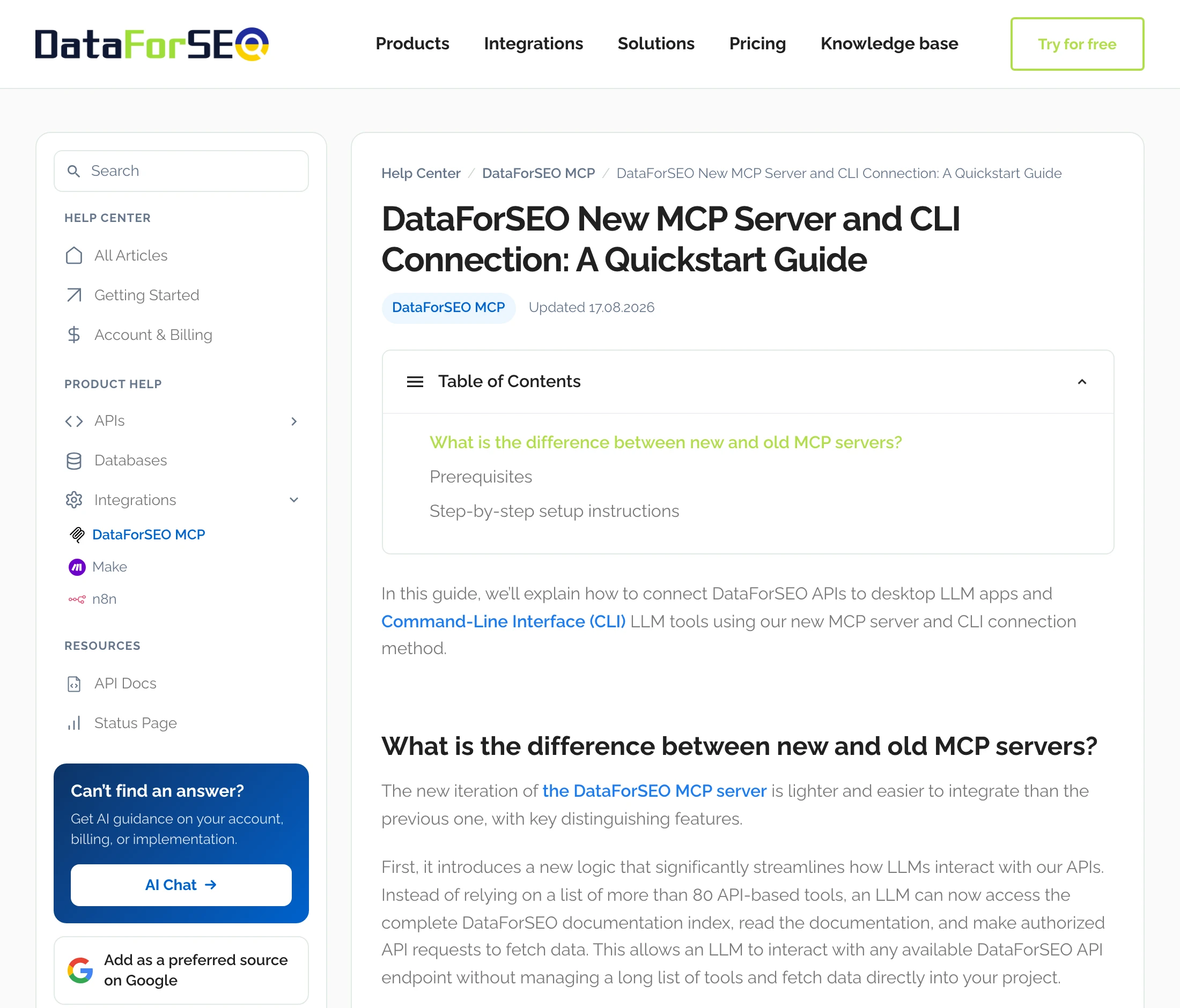
DataForSEO publishes its own MCP server under Apache-2.0, and it is the route for teams that want to run the server themselves. Its current version, 3.1.1, shipped on 2026-08-25.
DataForSEO's v3 quickstart describes the design: "Instead of relying on a list of more than 80 API-based tools, an LLM can now access the complete DataForSEO documentation index, read the documentation, and make authorized API requests to fetch data."
- Four tools.
docs_index,docs_list_sectionsanddocs_searchread the docs, andapi_requestcalls the API, per its README. - Two ways to run it. Use npx or Docker with your API login in environment variables, or DataForSEO's remote endpoint with OAuth.
- Limits. The README documents a field configuration that trims responses, and no list of allowed endpoints.
- The old server. DataForSEO says the legacy version "remains operational, it is no longer supported or updated."
A community server, Skobyn/dataforseo-mcp-server, ranked third on Google for "dataforseo mcp server" on 2026-10-01. It runs over stdio under MIT, filters modules through environment variables, and last changed on 2026-06-04.
DataForSEO bills the same account on every route. InsightfulPipe's difference is where the limits live: on the server, per account, set by your admin, next to 49 more platforms in the same chat.
Frequently asked questions
Sources (checked 2026-10-02)
We read every capability, default and price from each vendor's own documentation, pricing page or public repository, and ran InsightfulPipe on live accounts. The SERP figures come from our own DataForSEO calls on 2026-10-01.
- InsightfulPipe: DataForSEO MCP server, pricing
- DataForSEO: MCP page, remote OAuth guide, v3 quickstart, repository, v3.1.1 tag, API credentials, error codes, pricing
- Community: Skobyn/dataforseo-mcp-server