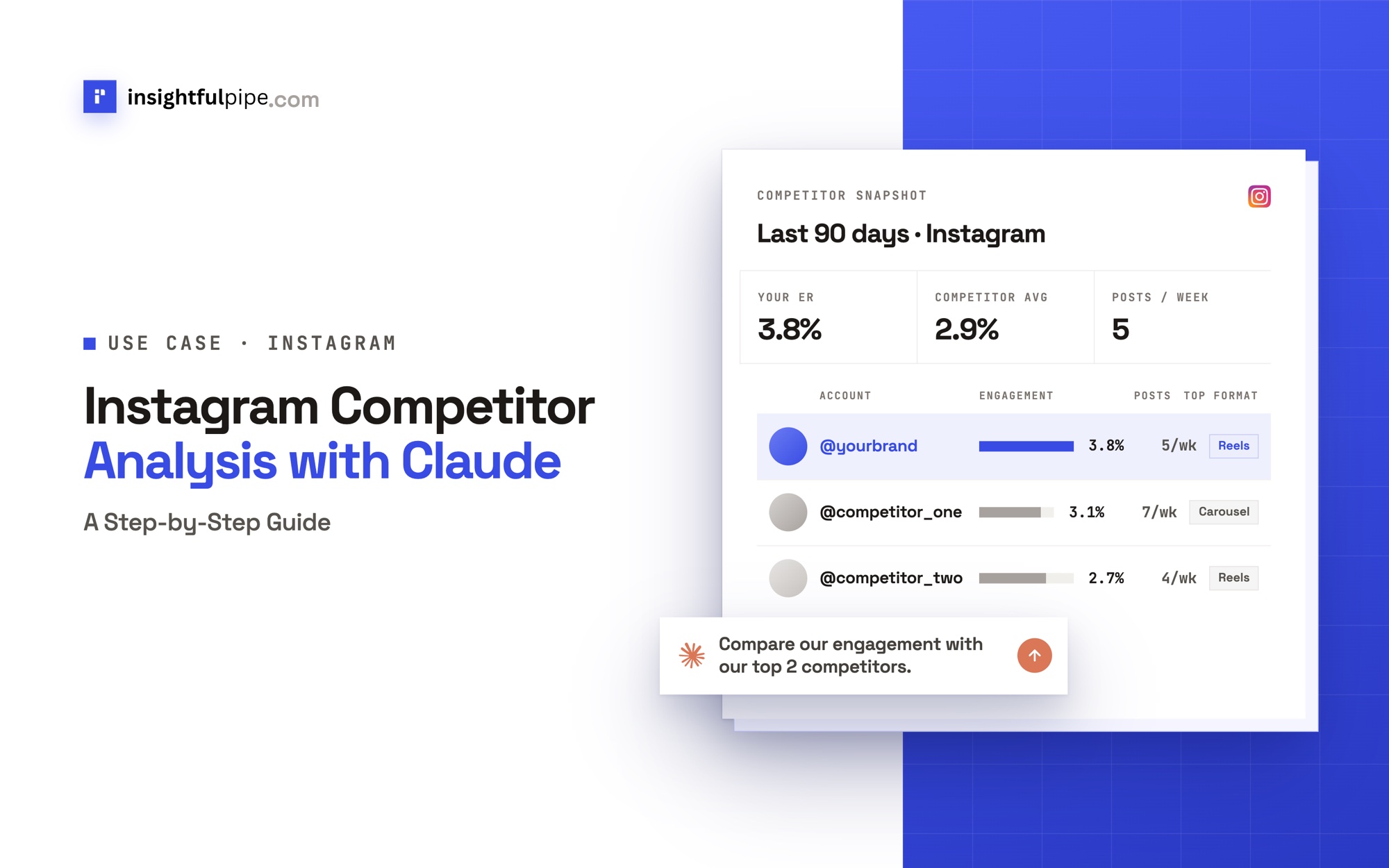
InsightfulPipe publishes this guide, and its steps use InsightfulPipe's hosted Instagram and Ads Libraries servers. Instagram's own Competitive insights and the other tools that rank for this topic come near the end.
Last updated: 2026-10-02
Short answer: Instagram competitor analysis compares your account with 3 to 5 rivals on posting frequency, format mix, engagement rate per post, top posts, captions, hashtags and ads. To run it in Claude, connect Instagram in InsightfulPipe, add the Instagram MCP server and the Ads Libraries server as custom connectors, and paste the prompts below. Plans start from $29.99 a month.
Instagram competitor analysis with Claude: the quick version
Six steps take you from a connected account to a list of gaps you can act on. Each step has its own section and prompt below.
- In InsightfulPipe, open Connected accounts and connect Instagram Business with Read-only access.
- In Claude, add
https://instagram.insightfulmcp.com/andhttps://ads-libraries.insightfulmcp.com/as custom connectors. - Name 3 to 5 competitors and let Claude look up their Instagram handles and followers.
- Pull your last 30 posts with their reach, saves and shares.
- Collect each competitor's last 12 posts with business discovery, or paste a 12-post tally.
- Ask Claude to compare posting frequency, format mix, engagement rate, top posts, hooks and hashtags.
Watch: The Instagram MCP server working in Claude, ChatGPT, Cursor and Gemini, 1 minute 27 seconds
The video may show an earlier setup. Follow the steps in this guide for the current route.
Instagram competitor analysis tools at a glance
Five routes cover most teams, and they differ on what you see about rivals, what sits beside it and who does the analysis.
Route | What you see about rivals | Your full insights beside them | Who analyzes | Starting price |
|---|---|---|---|---|
Claude with InsightfulPipe | Handle and followers per brand, recent posts (lookup or tally), Meta ads | Yes: reach, views, saves and shares per post | Claude | From $29.99 a month |
Instagram Competitive insights | Up to 10 public accounts: followers, post counts, top content | On a separate screen | You | A Meta One Advanced, Expert or Max plan |
Social media suites | Competitor dashboards and reports | Yes, inside the suite | Built-in assistants; some add MCP | Metricool Free (5 competitors) to $299 a seat a month (Sprout Social) |
Free lookup tools | One account or one head-to-head at a time | No | You | $0 |
A spreadsheet | Whatever you copy by hand | Only if you export it | You | Your time |
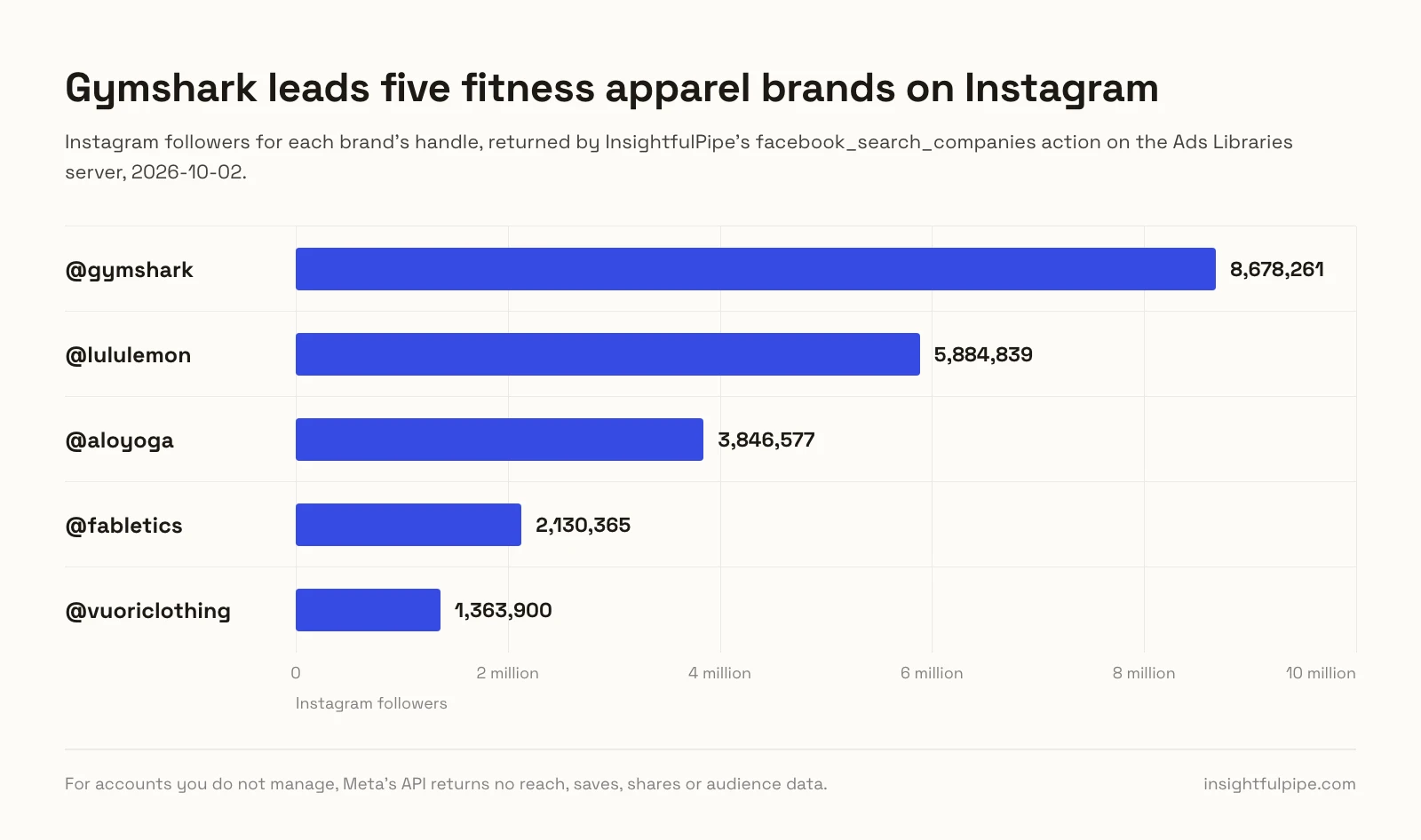
InsightfulPipe also puts your Facebook Page and ad accounts in the same chat. The first pull takes one prompt: for five fitness apparel brands, it returned each Instagram handle and follower count.
What can Claude see about a competitor's Instagram account?
Claude sees your own account's posts and insights, and only the public layer of anyone else's. Meta's API does not return reach, saves, shares, Stories or audience data for accounts you do not manage.
Data point | Your account (Instagram server) | A competitor |
|---|---|---|
Followers, post count |
|
|
Likes and comments per post |
| Business discovery or the profile, unless like counts are off |
Format, posting time, caption, hashtags |
| Business discovery or the profile |
Reach, views, saves, shares |
| Not available through the API |
Stories |
| Not available through the API |
Follower demographics |
| Not available through the API |
Ads | Your ad account, on the Meta Ads server |
|
So compare like with like: likes and comments over followers, for you and every rival. Keep reach-based numbers for your own decisions.
What you are actually connecting
You connect Claude to InsightfulPipe's hosted servers. The Instagram server reaches only the accounts you authorized, and the Ads Libraries server needs no account.
The path: Claude → InsightfulPipe MCP server → your Instagram professional account, through its linked Facebook Page.
Claude never receives your Facebook or Instagram password. InsightfulPipe runs each Graph API call with the access you approved, inside your workspace and action list. The same login can add the Page through the Facebook Pages MCP server and your campaigns through the Meta Ads MCP server. You need no Meta developer app, no access token of your own and no server to host.
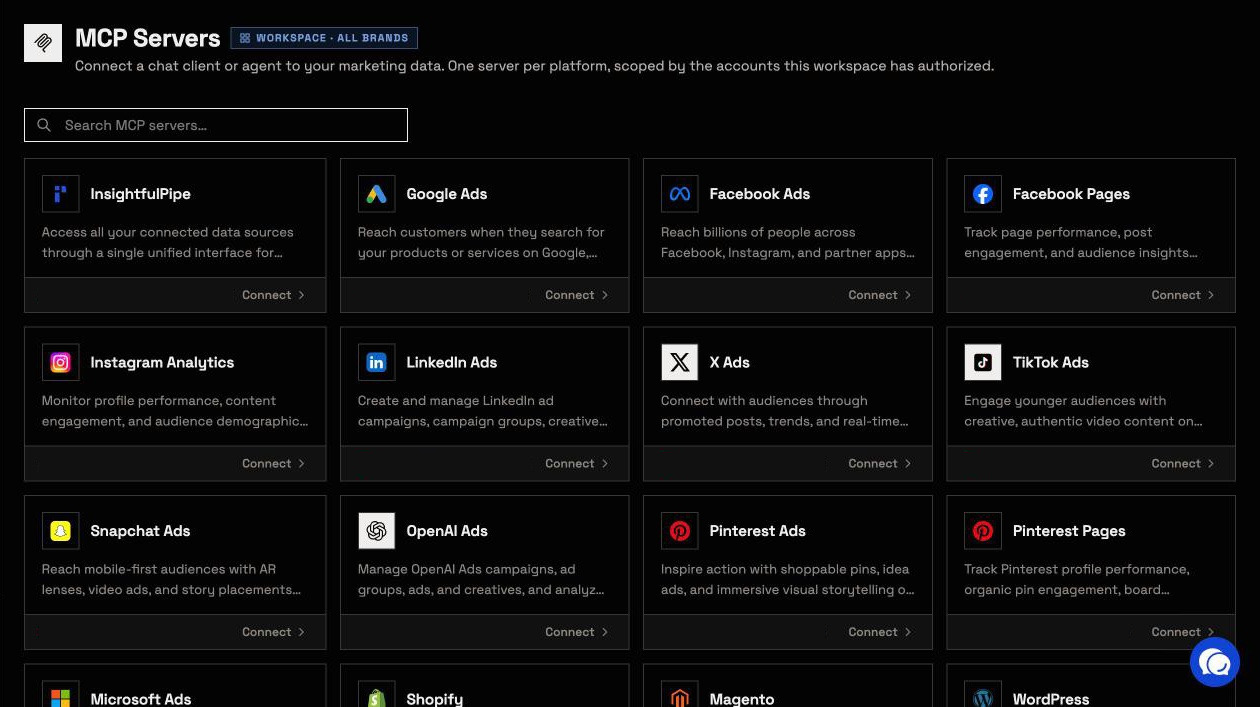
Before you start
You need five things: the right Instagram account, a workspace, a role that can connect, an AI client and a list of rivals.
- An Instagram professional account. A Business or Creator account linked to a Facebook Page your Facebook login manages.
- An InsightfulPipe workspace. Plans start from $29.99 a month, and each connected account counts as one connection. Start a trial on any plan.
- A role that can connect. Owners, Administrators and Operators can. Members with the User role cannot.
- A client that supports remote MCP servers. Claude's Free, Pro, Max, Team and Enterprise plans can add custom connectors, and Free allows one, per Anthropic's help article. ChatGPT, Claude Code, Cursor, Gemini CLI and Codex work too.
- 3 to 5 competitor handles. Step 3 shows how to choose them.
Meta's own roles still apply: InsightfulPipe sees only what your Facebook login manages and cannot expand that authority.
Step 1: Connect Instagram in InsightfulPipe
Connecting takes a Facebook sign-in and one choice of accounts. Choose Read-only, because competitor analysis only reads.
- In the InsightfulPipe app, open Connected accounts and click Connect account.
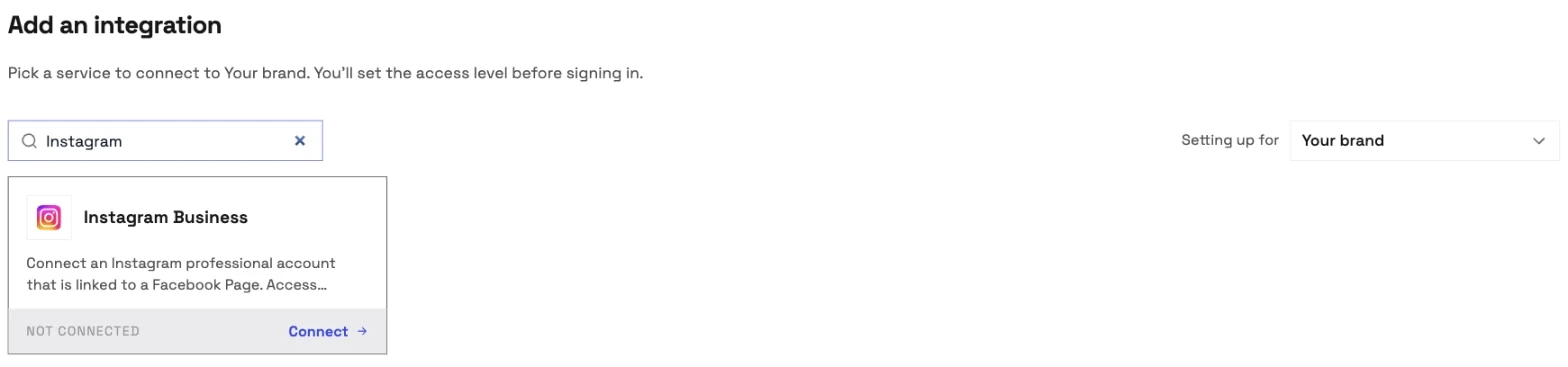
- Search for Instagram and click Connect on the Instagram Business card.
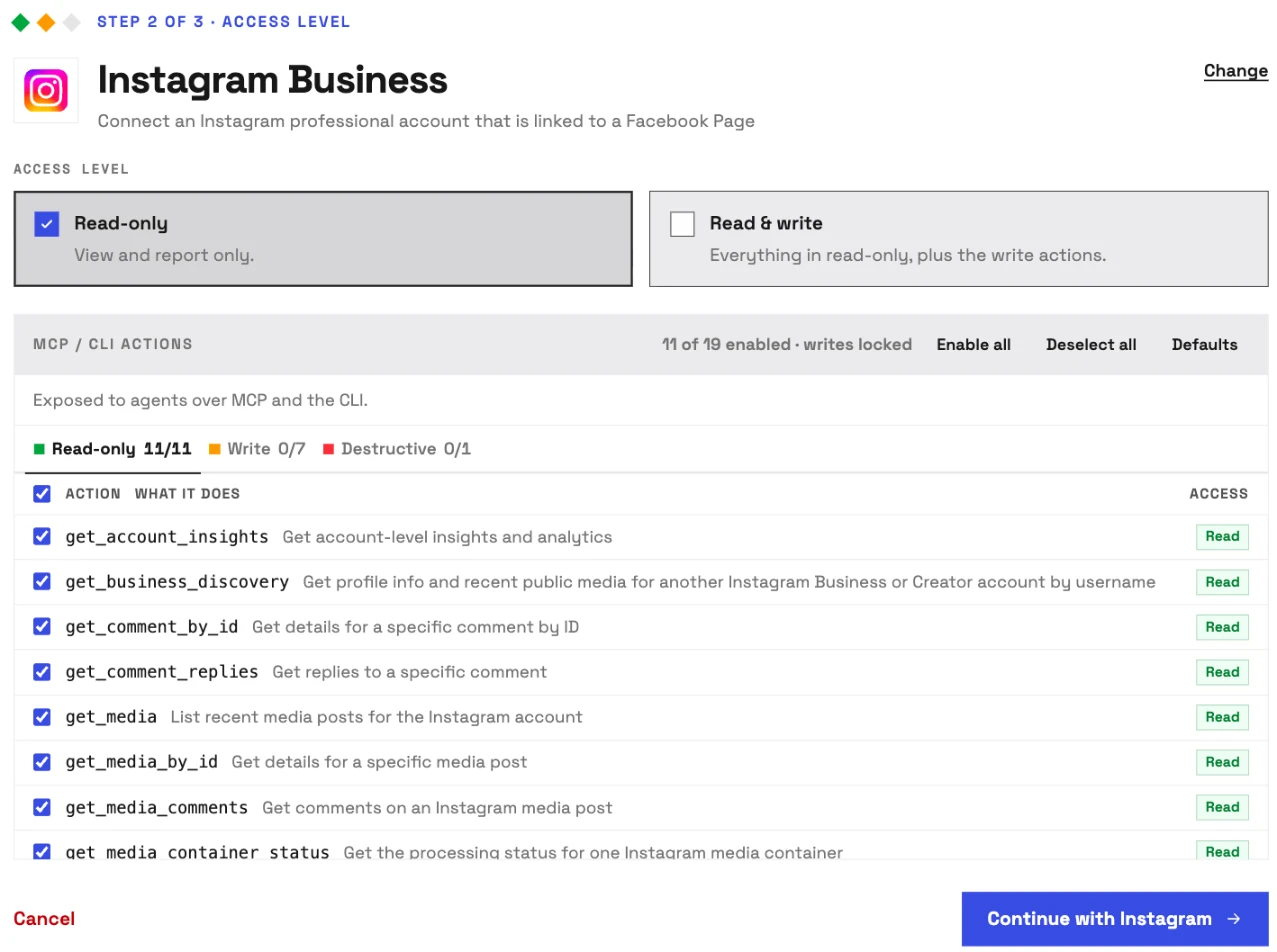
- Under Access level, choose Read-only.
- Click Continue with Instagram and sign in with Facebook.
- Select your Instagram accounts and click Connect. Each one becomes its own connection.
Step 2: Add the Instagram and Ads Libraries servers to Claude
Claude needs two URLs, one for your Instagram data and one for the ad libraries. The steps match on claude.ai and Claude Desktop.
- Copy
https://instagram.insightfulmcp.com/. - In Claude, open Customize > Connectors, click +, then Add custom connector.
- Name it, paste the URL and click Add.
- Click Connect, and sign in to InsightfulPipe if asked.
- Repeat with
https://ads-libraries.insightfulmcp.com/, the Ads Libraries MCP server. - In a new chat, click +, open Connectors and switch both on.
On Claude's Free plan, add InsightfulPipe from Claude's connector directory instead. That one connection reaches every platform in your workspace. In a terminal, one line per server does the job:
claude mcp add --transport http instagram-analytics-mcp https://instagram.insightfulmcp.com/
claude mcp add --transport http ads-libraries-mcp https://ads-libraries.insightfulmcp.com/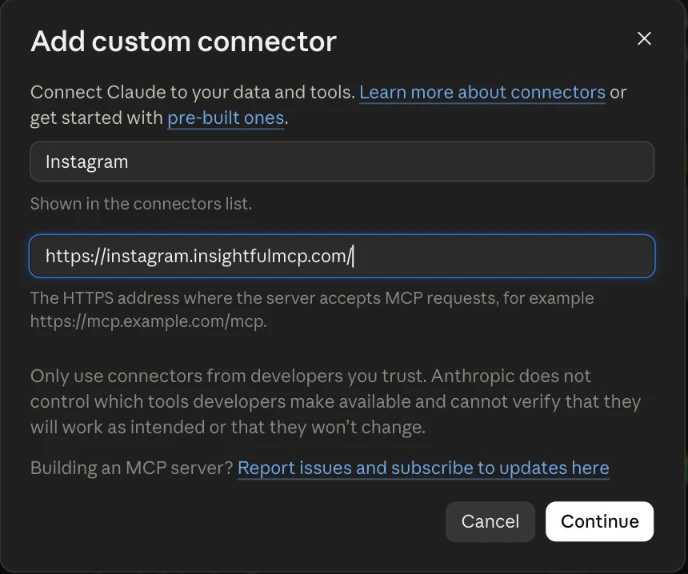
Step 3: Choose 3 to 5 competitors and size them up
Pick rivals who chase the same audience, not only the same product. Three to five keeps the comparison readable:
- Direct rivals. One or two brands selling what you sell to the same people.
- An aspirational leader. The account your audience treats as the standard.
- An adjacent brand. A creator or brand next door that holds your audience's attention.
Skip accounts that have not posted in 30 days. Then let Claude size up the field:
Use the Ads Libraries server.
For each brand in [BRAND 1], [BRAND 2], [BRAND 3], run facebook_search_companies.
Keep the verified Page whose ig_username matches the brand's Instagram handle.
Return a table: brand, page_id, ig_username, ig_followers.
Do not change anything.
Keep each page_id. Step 7 uses it.
Step 4: Benchmark your own account
Your own numbers come first, because they are the only complete set. Pull the same window you will use for rivals.
Use Instagram account [ACCOUNT_ID].
Run get_profile for followers_count.
Run get_media for my last 30 posts with media_type, media_product_type,
timestamp, like_count, comments_count and caption.
For each post, run get_media_insights with reach, views, saved and shares.
Return one row per post with engagement rate = (likes + comments) / followers x 100.
Claude now holds two engagement rates. The follower-based one compares fairly with rivals. The reach-based one, interactions over reach, shows which posts travelled.
Step 5: Collect each competitor's last 12 posts
Competitor posts come from public data, by business discovery or by a 12-post tally that works for any public account.
Business discovery. The Instagram server lists get_business_discovery, Meta's lookup for other Business and Creator accounts. Given a username, it returns the profile with followers_count and media_count, plus up to 25 recent posts, 12 by default. Each post carries its caption, media_type, timestamp, like_count and comments_count.
Use Instagram account [ACCOUNT_ID].
For each username in [@handle1], [@handle2], [@handle3],
run get_business_discovery with limit 12.
Return one row per post: username, followers_count, timestamp, media_type,
like_count, comments_count, the caption's first line and its hashtags.
If business discovery is not enabled, stop and tell me.
InsightfulPipe controls this lookup with a switch on its side. When it is off, Claude reports "Instagram business discovery is not enabled for this deployment." Use the tally then.
The 12-post tally. Open each rival's profile, skip pinned posts and copy the next 12 into this table. Write "off" where the owner turned like counts off.
account | followers | date | format | likes | comments | caption's first line | hashtagsPaste the table into the chat. Claude treats it like the lookup's rows.
Step 6: Compare the metrics and find the gaps
The comparison turns two piles of posts into decisions. Use the same formula for every account.
Metric | How Claude works it out | What it tells you |
|---|---|---|
Posting frequency | Posts ÷ days in the window × 7 | How hard each rival pushes |
Format mix | Share of images, carousels and Reels | Where the effort goes |
Engagement rate per post | (Likes + comments) ÷ followers × 100, averaged | Response at any account size |
Top posts | The 3 highest engagement rates | What works for them now |
Captions and hooks | The first line of each top post | How they stop the scroll |
Hashtags | Count per post, most used tags | Which topics they claim |
Posting times | Day and hour of top posts, your time zone | When their audience shows up |
A post with 1,200 likes and 80 comments on a 40,000-follower account scores 3.2%. Rival IQ's benchmark report uses the same basis: interactions "divided by total follower count". Business discovery reports Reels as VIDEO.
Compare my posts with the competitor rows above.
For each account, return posts per week, format mix, average engagement rate
per post, the top 3 posts with their first lines, the 5 most used hashtags,
and the days and hours of top posts in [TIME ZONE].
Then list three gaps I can act on next month, each with its evidence.
Watch the first seconds of each top Reel yourself. The API returns the caption, not the on-screen hook.
Step 7: Check the ads they run, then repeat monthly
Organic posts show half the picture. Meta's Ad Library shows the ads each rival is running, and the Ads Libraries server reads it for you.
Use the Ads Libraries server.
For page_id [PAGE_ID], run facebook_company_ads with status ACTIVE and max_ads 30.
Group the ads by format and by the offer in the copy.
List each ad's ad_link_url.
Ads a rival keeps running for weeks are the ones worth studying. Set them beside that rival's top organic posts.
Repeat steps 3 to 7 on the same date each month. A single pull is a snapshot, so growth shows only when Claude compares this month's table with last month's.
Verify it worked
Three checks, shortest first, tell you the connection works and where a failure sits.
The connection is live. In a Claude chat, + > Connectors lists both servers. In Claude Code, claude mcp list shows both.
A prompt that cannot do harm. It reads one profile and changes nothing.
List the Instagram accounts available to this connection.
Return the username, account ID and followers_count from get_profile.
Do not change anything.
A real read. Ask for your last 10 posts with likes and comments, then check one in the Instagram app.
What Claude may change in your Instagram account
Competitor analysis needs only reads, and a Read-only connection keeps it that way. On Read & write accounts, your admin decides action by action what Claude may do.
The Instagram server exposes 19 actions: 11 read and 8 write. The Ads Libraries server's 14 actions are all reads.
- Read-only locks every write until an admin reconnects the account with Read & write.
- Every action is a switch. An owner, admin or operator turns each one on or off per account, under Configure actions for this account. The server refuses a switched-off action in every client.
- Posts go live at once.
publish_mediamakes a post public, and there are no drafts or scheduling over MCP. Switch offcreate_media_container,publish_mediaandpublish_postwherever Claude should not post. - Deleting comments starts off.
delete_commentstays off until an admin switches it on. - Roles hold. User-role members run only the read actions left on, on accounts an owner or admin grants them.
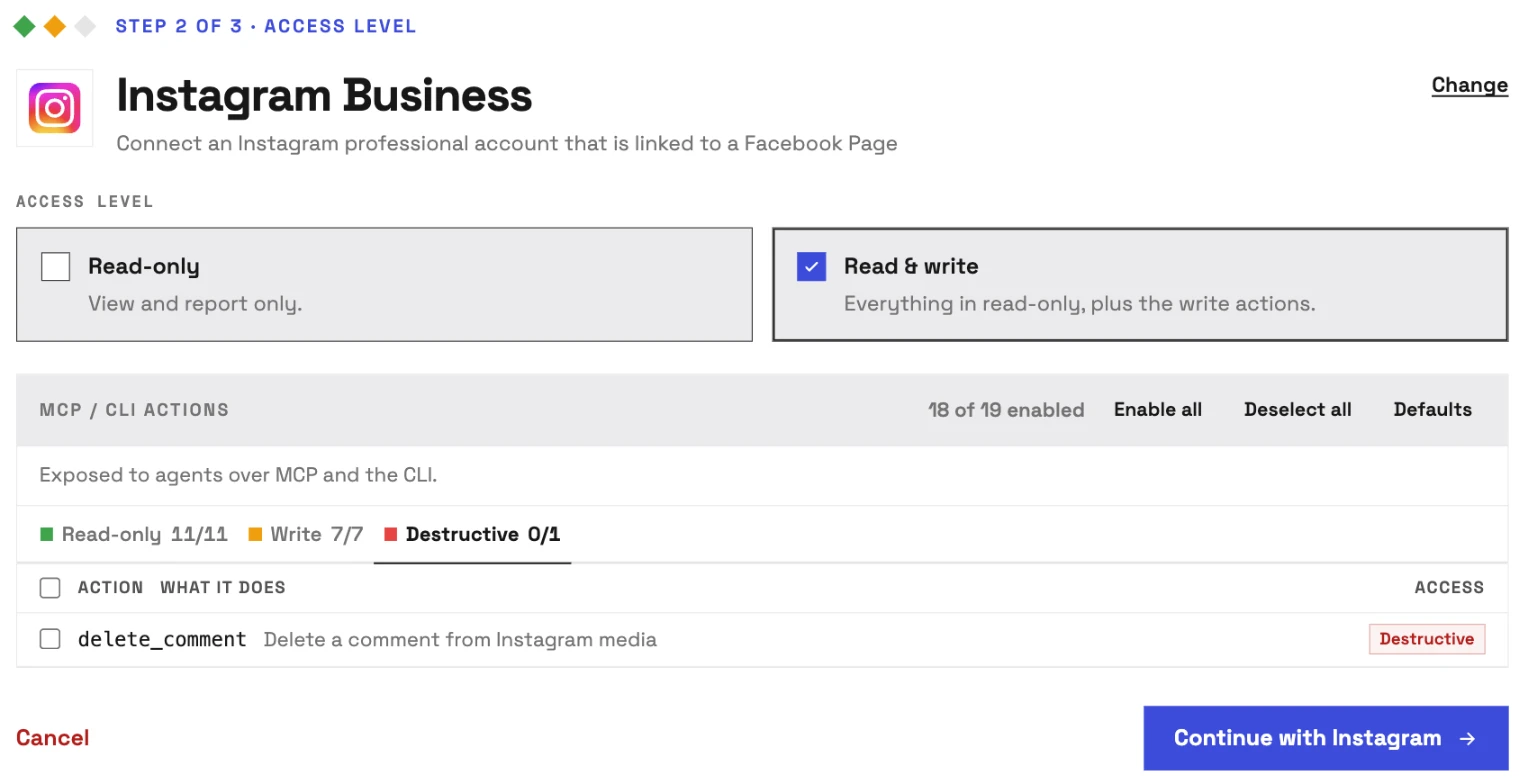
That is why InsightfulPipe is the safest way to let an AI agent change an Instagram account: a read-only connection locks every write, publishing sits behind switches, and deleting comments waits for your admin.
Troubleshooting
Most failures are one of these eight, and five come with an exact message.
- "No Instagram accounts were found. Please ensure you authorized the correct account." Use a Business or Creator account linked to a Facebook Page your login manages, then connect again.
- "Instagram business discovery is not enabled for this deployment." InsightfulPipe has the lookup switched off. Use the 12-post tally from step 5.
- "@[username] was not found or is not a Business/Creator account." The handle is misspelled, private or personal. Use the tally for that rival.
- Several Pages share the brand's name. Keep the verified Page whose
ig_usernamematches the handle. - A post has comments but no like count. The owner turned like counts off, so Meta omits
like_count. Leave that post out of the averages. - The ad list is empty. The lookup returns active ads by default. Try another country or status, then check Meta's Ad Library.
- "Monthly Ads Libraries limit reached for your plan." Ads Libraries requests count toward a monthly allowance: 400 on Starter, 4,000 on Growth, 10,000 on Agency.
- "This action is disabled for this connected account. An owner or admin must enable it for the account." An owner, admin or operator switches the action on.
Other Instagram competitor analysis tools
Instagram's own feature and a dozen tools answer this search, and each draws its line in a different place. Every row comes from the vendor's own page, checked on 2026-10-02.
Instagram Competitive insights. In Meta's words, it "is only available to eligible public Instagram accounts with a Meta One subscription", on the Advanced, Expert and Max plans. It compares you with up to 10 public accounts over up to 6 months, and ranks their top content by shares, comments, likes or saves (Meta).
Tool | Competitor analysis, per its own page | Inside Claude | Starting price |
|---|---|---|---|
InsightfulPipe | Brand lookups, recent posts (lookup or tally) and Meta ads beside your insights | Yes, 19 Instagram and 14 ad-library actions | From $29.99 a month |
Sprout Social | Instagram Competitors Report "available in Professional Plans and above" | No MCP on its pricing page | Professional, $299 a seat a month, annual billing |
Hootsuite | Posting frequency, average engagement, audience growth | Its plans page lists MCP connectors | $99 per user a month, billed annually; 5 competitors on Standard |
Socialinsider | "Competitor benchmarking" on all plans | "MCP connector" on all plans | Adapt, $82 a month, billed $990 a year |
Rival IQ | 10 tracked companies on Drive | No MCP on its pricing page | Drive, $239 a month |
Metricool | "Analyze 5 competitor profiles" on Free, up to 100 on Starter | Metricool MCP, for profiles you track there | Free plan; Starter from $20 a month |
Iconosquare | "Monitor competitors, hashtags & industry trends" on Scale | An MCP integration that includes Claude | Scale from €69 a month, billed yearly |
Not Just Analytics | A profile lookup and "Competitor and influencer analysis" | No | Prices need JavaScript to load |
SocialPilot | One competitor "at a time", no sign-up | No | Free tool |
OwlStat |
| Yes | Free plan covers two accounts |
Apify Instagram Competitor Benchmark | Reads public profile pages, 12 posts per account | Through Apify's MCP server | $1.50 per 1,000 posts |
Windsor.ai, Composio | Your own connected account | Yes | Windsor paid plans from $23 a month; Composio Hobby plan $0 |
Most suites keep competitor tracking inside their own dashboards. InsightfulPipe runs it in the AI client you already use, next to your Instagram insights, your Facebook Page and your ad accounts.
Frequently asked questions
Sources (checked 2026-10-02)
Every rival claim above comes from that vendor's own page, opened on 2026-10-02. InsightfulPipe facts come from our MCP pages and app code, and the test reads ran in our own workspace.
- InsightfulPipe: Instagram, Ads Libraries, Facebook Pages, connector docs, pricing
- Meta: Competitive insights, Business Discovery, IG Media fields
- Anthropic: custom connectors
- Sprout Social: Instagram competitors report, pricing
- Hootsuite: competitive analysis, plans
- Socialinsider: pricing
- Rival IQ: pricing, benchmark report
- Metricool: pricing, Claude and Instagram
- Iconosquare: pricing
- Not Just Analytics: homepage
- SocialPilot: competitor tool
- OwlStat: Instagram MCP
- Apify: Instagram Competitor Benchmark
- Windsor.ai: Instagram to Claude
- Composio: Instagram toolkit